odoo sage my name is dennis and i will be your host for tonight so i've been working at hudu for four years as a developer it's been three years since since i started working on a usage since the start and the topics that we will address tonight are what is the usage what needs does it fulfill and what why you should use it of course and there will also be a slight demo that that will show some of its features if you have any questions during this presentation feel free to just type them directly into
the chat and we'll schedule some time after this talk to answer the the questions that we deem uh interesting all right so let's get into it firstly what is the usage audio sage is a continuous integration hosting platform so this means that not only does it host standard uru like or do online but it also allows you to have your custom developments hosted on the same database so you can have your own developers that work on making some customizations for your database but you can also have community modules like standard apps like apps from the
app store or or apps that you purchase from elsewhere next it comes with a lot of tools to facilitate testing deployments and debugging so this means that when typically when you uh when you deploy your own server you have to pull the code and update your database and everything like this this is can be a bit tedious and audio sh handles all of these aspects for you next it's it's pre-configured and optimized for aldo so this means that the server it's already uninstalled a version of linux you don't have to worry about installing requirements and
everything all the packages that might be necessary to run smoothly it's also optimized for do so every configuration is made so that uru runs smoothly next there are a lot of services that we provide like a domain name service so a mail server if you should not have your own we have our standard ones and the backup system is already set up for you so they are made periodically and ensure that you have never any data that can be lost and there are of course a lot of a bit hidden features like uh it has
top-notch security there's a high availability you have access really access to the shell to the containers that are running your own server and coming soon we'll be monitoring we'll come back to that later on so uh to do a sage our motto is really to put the developers first so everything from the user interface to the architecture behind it is made for the developers this needs this means that the project managers will need to have some knowledge of how developers work so first and foremost you have to configure usage you have to purchase a subscription
on adobo.com and you have to configure how many workers how many how many gigabytes and station environments you want so what are workers on a dosage you can imagine them as a sort of a representation of the processing power that your server will have so typically we recommend that you get to one worker per slice of 25 users so these are backend users that will use the apps like the crm the sales app or invoicing inventory everything like that or if you have a website you can have one worker for about 5 000 daily visitors
of course these are approximative numbers it all depends on the customizations that you have had on your server for the backend or on the website and for the front end if you have a heavier website it will of course be a bit lower than that over if you have a light website it can be a lot more next is the storage the storage is so is the size that your data will take on our servers it has changed since last year because last year we were actually using only as a reference only the size of
your production database but this had a little a few issues because when you have a staging environment we will come to that later where you have actually a copy of your production database this also takes some space on our servers and this was not accounted for in our previous model so we had some clients that had a lot of testing databases and they typically we we had a provisional server space for them and uh we were actually at a loss for some of our clients so this is why we changed our pricing last last year
and um and now it's for actually the whole data that you use of course this is a bit abstract we understand so typically for uh your database you can if you start a new if you start fresh you can have you can foresee about two gigabytes per user that will use your database if you of course already have a database elsewhere you can already estimate how much size it will take and then next you can have the hosting type the hosting type is either shared which is a default or dedicated there is no difference in
the features that it holds it's mainly for legal purposes like if you have a client that absolutely needs to be hosted in a certain region in certain country you can ask us to if we have a server that's available inside a specific region inside a specific country so that we can host these clients there but there are absolutely no different features compared to a shared server then you have you have staging environments staging environments allow you to test new features with your production data but we will come to that later a bit later so once
you have configured these determines what you need you will actually create a project on the dosage when you log into audio stage you need to have a github account because a lot of the operations that you will make on adosh will be linked to operations that modify the source code and so for this we there is an equivalence between an sh user and a github user when you create a project you will need to create a github repository this repository will be the code base of your whole project so once you have chosen the repository
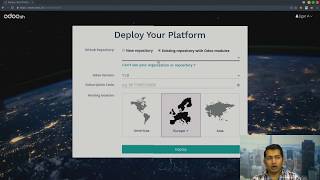
to use you will also have to choose which odo version and enter your subscription code then you can choose your hosting location there are three options america europe and uh asia for each of them currently it's uh i believe it's in iowa uh in belgium for europe and uh in asia it's in singapore and then once you've uh deployed your project you started your project you will arrive at this page on this page you uh you can see that there are a few a few different um it's it's there are a lot there's a lot
of information on the left side you can see the there are different stages uh production stage staging stage and development stage these are stages that your branches will be in so let's take a step back you have to understand to use the research you have to understand what a branch is so typically on a github repository which is the code base of your whole projects you will work in different branches so a branch is typically one feature that is being developed and or it can be the production branch where typically you will have the stable
releases of your of your code base here's a little diagram that will uh that shows you typically how developers use gits and github to uh to develop so you have the master branch all the way up there that uh typically all the developments get merged inside that branch and periodically it's released uh it's free every now and then it's it gets frozen and there's a release that's made and this does not change over time the release is stable and you can use this for production on the bottom side you can see the development branches here
is where the developer actually work in branches at a certain time in spa in in time they they choose to uh to fork the branch which is mean clone the production branch and they work on certain features that they would like to add in the inside inside the software they work on it and they test it they make different commits these are commits are version changes of the code they once they are ready and they have tested their developments they are merged inside release branches that you can see in the middle in purple these branches
are used for projects administer project managers and final clients also to test the features that have been developed to see that it's indeed satisfies what their demands were and once it's been approved then it's merged inside the production branch and there the final client can use it then let's see in the next range um so once you start using a dosage this is more or less what it would look like so you have a master branch which is in production then you have a couple of staging branches which are invalidation before being merged and then
you have a couple of development branches in which developers are working so what's the difference between development branches and staging branches well the main differences are that in development branches you have demonstration data while in staging branches you have the production data so it's more representative to do tests final tests in staging branches because it will be as it will be inside the production then you have two different kind of access rights on dosage you have either admin access rights or user access files if you are an admin that means you can change the settings
of a project you can you can you have access to all the data the production data of the project of the production database while as a user typically that's where the limit is you do not have access and restricted access to the production data so there are a few features that allow you to impersonate people that on the databases that are that are that are built by the platform so for example you can impersonate you can log into the database as a certain person and this works for development branches users can use this feature but
for staging branches for example users cannot use this feature because this would actually allow them to access production data that they do not have access to so the difference is really between production data for users they will not have access to this now there are also differences for a garbage collection so every code change every commit inside development branches will trigger a new build these builds will allow the developers to test their features but they will be garbage collected after three days while in staging as typically they need to be tested by the clients and
there's some some back and forth of configuration maybe that they will always remain the latest build of a staging branch will remain alive indefinitely it will be valid for three months after that typically normally you have to have a and do another subscription to activate it but normally three months should be enough to have to validate the developments next you have a few features like importing the database that are typically possible in staging branches importing a database from elsewhere i mean with that and that's not possible in development branches and then finally the tests the
odoo has a whole test suit that you can run and when you're making your custom developments it's important not to break these tests because they define how odoo is supposed to work and so you can choose to enable some certain tests or all the tests are disabled the tests that's up to you but typically having more tests will make it so that the builds take longer but when you disable them they will go a lot faster but in staging as you are have as you are using production data you will not be able to run
the tests because some tests sadly depend on demonstration data all right so um now let's go into the demo so let's take a project typically this is what it would get you would get you have the production database as i said you can uh connect to it as certain as a certain user here it's an empty database so there is only the administrator when i connect to it as you see i have i'm directly logged in as the administrator i can go into the apps and choose to install for example the crm next there are
a little a number of tabs here you can see this is for example the online editor this will allow you to use to actually code within your lewis age so here you have a terminal you can open for example files like audio files for example here's the license one the license file this file as you can see it's here you can change it you can edit it by adding uh as you as however you wish we will come back to this a bit later so you can also consult the logs of the database this is
mostly interesting for debugging purposes then you have access to the backups as you can see i've created this project two days ago so it means that there are two automatic backups that have been made and that uh there are a couple of uh and i have made a manual backup this can be done by clicking the create backup button here you can um you can also import a database here it's not possible currently because it's being backed up but you get the idea you can also of course restore backups and download them if you want
to work locally then you have the settings of the branch which typically um shows you the the version of odoo that you are running on usage you can choose to pin the latest the version of the of the branch that you are using so this is version 13 but odoo is continuously making security fixes and bug fixes inside this version these versions so by default you follow the latest you you get the latest updates every monday but you can also choose to work on uh to to use the code base of a previous revision because
you could also always have certain developments that depend on certain ways that work before certain bug fix and so it could potentially break the way you a buck clicks could potentially break some customizations you've made and this is why you can revert to a previous previous version should there be a problem with that and this would allow you to have some time to fix it before going back to the latest version as you can see we have a new notification this means that our backup is ready we can go to the backup and we see
here for example we have just created a new backup here that we can of course download everything so next is uh the custom domains you can add custom domains on your database for example uh i can add a dxp.udo.com and this will mean that my database will now be accessible adobe xp uldu.com and like you can see we just installed crm here it is it's installed and uh here we are then on staging branches you have a few other tabs like uh you have the mail step so males is in the staging environments you typically
do not want to have your actions to have real repercussions on the client's data so for example if i open if i connect as an as the administrator on this database and i send an email it will actually be caught by a mail catcher and it will be displayed here we can we can try um yeah we will have to install a module we'll come back to this later on um and then on the settings you can uh you have different options to what should or do what should audisage do when you push changes to
the code you can either choose to have do nothing happen you can either choose to have a new build this means that you will again again duplicate the production database run some neutralization scripts so that it does not interfere with a real production database and then it will update it with a new code that you have or you can choose to update the previous database that was existing inside this branch and just updates that one by default this is the behavior and then you also have custom domain names that you can add and you can
choose to pin the revision of odoo as well so let's go back to the mails just wanted to show if i send a message here and i said hello to my administrator normally it will be caught here inside the sandbox should arrive here of course i need i need to install mail first but yeah whatever [Music] so you also have this this builds view which is actually the same as the branches view but on the this is just one difference is that for every branch you have um for every bench you have the commits in
uh in order of appearance and you can actually see for example this on this development branch i have made a few couple of builds and i can connect to the older ones as well next you have the status page the status page gives the status of all the servers that are that are serving your database there are a bunch of servers and this is the status page collects all the data from our monitoring tools so it takes some time sometimes it takes a bit of time to load let's uh uh here we are okay so
as you can see uh the average uptime to the last day was 100 was no there were no problems uh during past months you can see the different servers that are here for example so fast master is a what do we say websites and the interface that we are using right now upp 25 is the production server on which our database is running so we can see it has a percent uptime which is what interests us here or what insists our clients here and then we have our development server which is which has its name
and we can see it had a core sometimes somewhere in this month it had a little bit of downtime not much and then you have backup servers and our mail server so then we go to our settings here we can define the name of our production database of our audiosh product projects which will also provide the name of our production database so we can see for example that we are using the domain name i call him tests i'll do xp 2020 we can just rename it to audio xp 2020 [Music] and this will change the
domain name for the database then we can also add different collaborators okay the i can for example choose to add other github users for example i can add my colleague thomas to this and he will then gain user rights to these projects and he will be able to to see what's happening i can also make him an admin or then the next option is the to allow public access to the builds page so the builds page was this one this can be interesting if you want to give access to your clients for example you can
see some you can give him tell him we are working on this branch for example and he can then connect to the to the latest builds of that branch and test some some of these features that are supposed to come to be merged so this is this option then for the module installation for your development branches you will actually need to define which modules you want to install in them by default it installs only the modules that you have inside your custom code and all of their dependencies of course but you can also choose to
have a full installation of urdu of all the modules that exist or install a list of them which you define here with command-separated names of the modules then the custom domains we saw are in this branch settings now sub modules this section is a bit more technical maybe so the code base of your git audiosh project is inside one github repository but suppose you already have made some developments for another client that you want to reuse for this client you can actually use that other repository as a submodule for your current repository and so suppose
this other repository is private you need then to add a deploy key here that will allow usage the platform to fetch this sub-module this other repository and fetch its code when it deploys it then there's a section about the production database size so this is typically linked to the configuration of the number of gigabytes that you were that we were talking before about before so you can see that it's a small database because it's an empty database i've got nothing in it it's a couple of megabytes i can see the details so that's i can
see there's a production database there are three backups made in three different data centers then uh there are a couple of test staging builds that are taking some space and other bills typically development bills that we do not charge so in total i have 131 megabytes which is less than one gigabyte so it's uh not very expensive for now then i have the section about the number of workers you can change here if you want uh more or less you can change it here and it applies live so that's always interesting should you somehow so
should your server be overloaded you can change this here then you have uh the number of staging branches that that you can use you can choose to have more should you need more you can increase this limit here and then the last part is a where your subscription code is shown um if you want to if you start for example projects with your partnership code which allows you to have a trial of usage then it will be activated as trial and will reset after 30 days but if you want to continue using the same project
that you already created you can do so by entering the subscription code that you purchased right here and this will automatically change everything back all right so this there's last step is about the documentation this contains uh typically all the features that are on audio sh and that you can use so let's have a little example now let's make a little example this will be a bit more technical because it's mainly it's some development that we'll make so let's we will skip the development part because it's a small change and we will uh we don't
have time to go through developments so we will create the duplicates of this branch and create it uh for example birthday because we will add a field on the partner view we'll add the date of birth of our partners supposing this is something we want so we create a new staging branch as you can see there's a build queued this will now it will create the it will create it'll copy the production database and run it with the code that is here for now it's the same code once it is ready we will uh we
will be able to that's already ready it's an empty database so it's pretty fast so we can open the online editor so this is a jupiter lab for those that know it we can open the terminal and here you can see the files that exist inside you can also open as you saw before the files that are inside their different repositories so we will in src user you have your own custom modules this is an empty repository so there's just a readme file i can maybe zoom in a bit then to create an empty an
empty module but with the structure of a module we can use auto-beam scaffolds and we will name our app birthday so we can see now that we have a birthday folder with a certain structure we can maybe show it's easier this way so it has a controllers folder with controls in its demo for demonstration data in its manifest file and then models and this is what we will actually modify so we can open the models the pi file here we will just uncover some basic things like we will inherit from rest partner and we don't
need this we just need a birthday field that is a date time and we will call it date of birth and all the rest isn't necessary right so we'll also not name our class birthday but partner so we save this then this extra field that we added we will also we would also want to see it inside the form view of the partner so i will just uh go back inside the views folder and here i have a couple of a couple of commented views that are examples i don't need any of those so i
will just sorry i will just copy paste something i have prepared so this inherits the uh the rest partner form view and this will just add after the mobile number it will add the birthday field okay so we save this we go back to the manifest file which we will need to modify a bit so the app name is birthday which is very well the summary will be adds a birthday field on partner we don't really need a longer description we can change the author the website it's version 0.1 it depends only on base which
is good because it's there that partners are defined it's defined and we have our views all right i saved this file now we have made some changes and we would like to push these changes on our remote branch so i can see so this is a git repository as you can see there is a dot get file so i can do its status i can see this there's this uh untracked folder so i can add it once it's added i can commit it i will i already typed my message which is at birthday module okay
and now i would like to push it to my remote repository the problem for this is that i'm inside on a dsh container so i do not have any access rights to push on the on the remotes that are listed here i can push choosing https which will then prompt me to log in and use my login and password of github but as i use two-factor identification it does not work as i need to confirm it with an sms so i will just add i will just generate an ssh key and i will add it
to my repository so i prepared a little command which just generates an ssh key of type rsa and 4098 bytes with my email as example so it will i will store it in the default folder no passphrase and here here it is now i can find oops i can find this i can copy paste the contents of this key to add it inside my repository so now this i have my repository here i can go inside the settings and then i can go to the deploy keys and here i can add a new deploy key
let's do sage yeah push push key it's very nice all right then oops i did not copy paste it right this is my key i will allow it to make right changes to push changes i need to confirm my password alright so i have added a new deploy key this means that i can now i can now use the push command on origin which is the the this repository right here and i will push my head to the branch that we are on which is birthday all right yes i trust github.com and now we should
see [Music] we can see that we have a new build that is queued because we just pushed the changes and this will actually kill this uh this editor as well once the update has been done we will be able to log inside the database and to install this module and see that it has indeed applied these changes it shouldn't be very long here we go so now we simply connect as administrator we activate the developer mode oops sorry we go inside the apps you have to be in developer mode to update the apps list and
now i can find my birthday model module oops with typo it's right here so um we just open to contact right here we see the administrator and ta-da i have my field date of birth that was added underneath the mobile and so we can see that it works fine this is what we wanted we might have to go through some code review or client review and we don't need the editor anymore if we want to merge this inside our production branch we can simply drag and drop this the birthday branch inside production branch there's a
little confirmation you can choose if you want to merge or just for rebase and merge if you choose vibration merge you have a clean linear history so this is typically the option that you would want and then you can do repeat the same process we did inside the staging branch in the production branch and you can see that it will apply the same changes all right let's get back to our presentation so uh over time we've had a lot of new projects that were created on luis age as you can see these are the number
of projects since the start of the ush on the bottom axis you can see that there are about 35 months so it means that it's been created three months three years ago and we can see that we now have over 3500 projects so this means that we of course have had a lot of work to do on the backend side and that's that's taking some sort of time there i can talk to you what's new since the last uh since last year for example we've had a lot of work done to support larger databases when
we released a platform we didn't support any database that was larger than four gigabytes and now we have some that are in hundred in the hundreds um we so there are the database imports has been changed to work asynchronously the dumps as well there have been other structure changes we now support elliptic curve keys for ssh so you can connect to your bills through ssh there are test tags for development builds you can draw now choose to have them or not have them or only a couple of them by using tags there are a lot
of small ui improvements like you can connect as a certain when you connect as a certain user you can now use a search bar if there are a lot of users you can now leave a project if you no longer have anything to do in that project there so it gives up status there are notifications and there are also there has been a lot of work of maintenance the platform itself the usage website runs with odoo and with migrated to v13 there are a lot of browser changes ubuntu 20 is coming a game sorry and
we will migrate to the in the next couple of months and we have had to handle a lot of big databases that have a few issues as well and uh making sure that they only affect their own database and not other databases there have been a lot of working inside that also in other other stuff and then the last item is resource accounting it's something that we've been working on lately and it should be released soon this will allow you to see what your actual database is using as resources how many requests is getting how
many uh what what status these requests gets answered gets answered from the get us answers from the server and uh and all that kind of things and uh what's to come what are we working on currently so besides monitoring we are still working on supporting well bigger infrastructure changes and like uh ubuntu 20 that's coming and uh yeah that's about it for now so thank you this is the end of our presentation and um if you have any questions it's uh now this is the time i will i will answer them all right here we
are so i'm joined here with uh fabian megazi who is the team leader of the usage team hello he will be asking the questions that we have had during the talk yeah and i will continue to check the question during the answers of denis so let's go for the first first question uh first question is what is audio sh everyone know what ish your presentation was really cool because i i guess it will help a lot of developers to start on the usage so now for the real first question uh it's from karim radhi how
many staging branches do you recommend i answered shortly but i think you have something more to add about this yes so stitching branches can be used for mainly two reasons one to have like a sandbox a playground in which you have the same database as your production database on which you can try new configurations and try new new things and then another the other main feature of saving branches is to test your custom developments and to make your clients test it with production data and this how many you should have you should minimum have one
because you want to have the sandbox the playground in which you can should there be problems you can reproduce them in there and for the rest it depends on the amount of features that you want to develop and have your client tests at the same time note that you can start with one and you can add more staging branches on the go you can just go to your branch setting to your project settings and increase the amount you of branches that you need there okay would you advise to have no staging branch at all well
when if you have no stake investors at all you will not be able to test anything that you that you put into production so it wouldn't i would not recommend that at least one yes yes okay perfect the second question is from p.m audu i must say that i did not understood the question properly so i will just repeat it as is um how much time database will be there in notification so i suppose he's talking about a notification system that we added to do a sage for now the notification system is only used when
you're making backups of your database or or when you're downloading dumps but we plan to add more notifications typically notifications about maybe performance issues that your database could have or simply things that need to be addressed within within a certain project and so for now there aren't many notifications but we will add more of them uh as we continue going okay and from the same person another question uh is there any limitation for changing your number of times you can do that i'm not sure so if it's if it means about changing the domain name
the the name of your project or adding custom domain names to your database no there are no limits to this the sky's the limit okay so the next question is from talal kamal uh actually two questions the first one is do you recommend using audrey sage on firefox or google chrome i think it's not really relevant no it's not very relevant adwords h is a hosting platform so it is served to any browser but the second question is uh interesting um why doesn't odoo keep a backup of the staging branch so see the staging branches
yes seeing the the databases of the sega branches i have the same size as the daisy basis of the production branch keeping a backup of all of those would increase would considerably increase the storage space that we would need for a specific project and seeing that you can have an unlimited amount of uh staging branches keeping their backups would really multiply the the storage space enormously so to to avoid doing this we we only keep the production the backups of the production database normally it's also meant for testing purposes so if you lose stating branches
staging databases it shouldn't really matter that that much you can always make a backup yourself of a custom of a staging branch you can make a manual backup and you can also download a dump of the database but the platform will not make them automatically for you okay so you could periodically if you want take a backup of a staging branch just to be sure yes that's a load it's not a problem it's not a problem i also want to say that staging branches are kept the last build of staging branches are kept alive indefinitely
so it will it's it's not necessary to make a backup of it as long as you do not rebuild the branch you will not have a you will not lose your production uh yours are your staging branch your staging build staging database okay uh next question from pmodu yet can we upload or can we update modules from the shell so yes it is possible you can start a odoo bin from the shell but typically if you do this while the database is up and running you could have some conflicts with like scheduled actions that are
running or uh or maybe requests of people uh were actually working on the database so what we recommend is always uh when you push changes on the the on your branch that you're working on is to update the module version of the module that you are update updating and then the platform will actually perform the updates automatically while it puts the database in maintenance so this way you are sure there will not be any conflicts with other actions that are happening at the same time and also it will be done in a safe way meaning
that if there are errors during the updates it will actually roll back the updates and will not apply the changes it will remain on the previous version okay next question actually i selected two questions which are somewhat similar from jelly borrows and patel juan so is it easy to change configuration like can you add more workers later on yes and also if when we increase the workers in auto sh what system what the system is exactly doing is it increasing the amount of cpu cpu and and memory so it's very easy to change a configuration
you can add more workers on the fly as well in the settings page of the project you can choose the number of workers that you want the number of workers like i said increases the maximum concurrency that you can have in on your database of the number of requests towards your database and when you increase it it's those it's allowed increases this limit but as you are on shared servers typically it allows it increases the limits for your database it does not increase the number of ecpus and ram but it's it's of course it increases
the amount that your database is entitled to on the server okay so you will have more ram for for your additional worker you are yes okay very good um so next question from michelle granson can we increase the timeout limits on sh if we have important chrome tasks and so on so the default timeout limit is a 15 minutes uh you can always normally we don't change this but on certain instances we have changed this it's uh mainly it can be done you just have to contact the support and tell the reasons why you want
to change it and if if we don't see a problem with that we will do it okay next question from darmaj jalap what is the difference between forking branch from the left panel and from using the ready made command on the top top right corner there is no difference it's just that when you fork a branch in the left panel i believe you can choose if you put it in development or in staging but if you use the the ready-made command you you it's all it always appears in the in the development section okay another
question from eve goldberg what is the logic to destroy dev instances so the developing build the development build is there a minimum time it stays active so the logic is very simple after three days since its creation we garbage collects all the builds so that means that uh well the developments instances are meant for testing your development when you make it they're not meant to uh to have clients test things on them that's that's what staging branches are for because that will be in an environment that they know because they have the production data on
it so development branch development builds are really just for the developer to test his features and we don't think there's more more need than two days for uh for this okay um so next question an important one uh from someone who i'm sorry have a name too hard for me to pronounce i will say jesus could can i use an ssh to name to connect to the postgres database so technically yes you can connect once you set up your your ssh connection to your towards your database uh you can also uh uh do a forward
part of uh of the the postgresql part towards your local instance but you have to know that ssh connections are automatically garbage collected after a while to be specific it's uh well this is a subjective change but currently it's after 15 minutes of inactivity it will be cut off and after an hour it will also be cut off because we do not want long lasting we do not support long-lasting connections over ssh so you can use it but typically we want to only you we only want you to use it for debugging purposes not to
allow other custom integrations that could potentially add a lot of loads towards postgres database typically okay indeed it's something you should be aware of we have some limits we have to put some limits on the on the shared server because autosh is all about being able to host all those database without uh hurting themselves in terms of performance so those limits will prevent ssh connection we we will have to to to leave it some processes but if you have a dedicated server we do not put those limitations so this might be an option if you
really have to do this kind of connection so we have still some time for a question very similar from maxim can the system be available through vpn so can you actually connect in the in the sh container as a vpn i don't believe so this is something we do not allow you know you for the same reason that that we explained for ssh we we do not allow this kind of of of process so you cannot connect you can connect through ssh as we explained in some cases but for the vpn it's not available so
um i have a question myself can you tell uh tell us more about the monitoring features that will be available uh in a q4 yeah so um typically we will we will uh start uh the accounting and the resource monitoring of uh the production databases of uh that are hosted under sage and we will render it public so that people from the project can see what they are actually using and consuming and it will be for those that know about graphinite will be used it will use that interface and it will actually show a bit
more detail than the current status page which only talks about your servers this will really be specific towards your database typically the number of requests that are incoming the number of step the a few categories of status codes and the the ram the cpu time that's uh that your database is using these we will have some some dashboard that will be available for uh for your database that you will be able to consult and it will be cool because you will be able to to to check if you might have a performance issue in your
code something that you do not expect you will be able to to deduce more information should i use should i add a new worker or is the problem in my code you will have more information but that's thanks to this system so the next question is from sumitkana can we give the permission to read write access in osage to files and folder so you have read write access to do a sage to the files and folders in lewis age there are a couple of folders that are mounted only read-only which means that you cannot write
them these are typically the odoo source code files these you cannot change but all the other folders and files you can freely change or write modify them as you wish i know it on the the source the standard source code you cannot the so the standard audio code you cannot modify them in production but you can modify them in development and staging branches should you add you want to add debugging logs or stuff like that uh if you have problems with the standard code that you you don't understand you can modify them in developmental staging
but not in production okay before asking the next question just to say that there's still three minutes remaining so if we're important question do not hesitate to post them the next question is from hector adolfo can we use postgres extensions like puzzles so no an accent i see the the question was also about an accident it's already installed by default and so it's already pre-configured and the databases are using it because this on the other hand on the other hand you you have no it's a it's a shared cluster among all the databases so you
do not have access to adding extension and creating extensions for your own database you can on the other hand requests that we add them and if we feel that it could benefit the whole the whole community audrey's age whole client based on the usage and we might we may consider adding them and when we consider adding them we have to do a lot of researches uh will it work properly can we handle all the limits that we want this is why we haven't installed it so far it has been requested many times but currently we
cannot add it but maybe in the future we will be able to do it a question from eve goldberg is the build screen the only place to launch and rebuild an instance to yeah to launch a rebuild it's uh currently yes we we have been thinking of adding maybe a link towards that in the in the branches page to be able to do it from from there as well without having to change screens but currently yes it's the only place where you can rebuild a build of a branch you can also do it on specific
cases if there are no builds and you want to have a backup to import a database then you can do it from other places as well where it suggests you do it but currently the standard case is only there okay we have 30 seconds and i just wanted to add if you have problems sorry if you have problems with the ui interface there is a feedback feedback form that you can use to send feedback we have 10 seconds so i will just make a question from myself is oddwaysh cool yes oh cool but and you
can also come to the discussions in the community section there is a chat with the developers of the ush in the in the rooms yeah so we are always there thank you


![[Warm January Jazz] ☕ Cozy Coffee Music & Delicate Bossa Nova Piano for Good Moods](https://img.youtube.com/vi/kre8SQ98KNU/mqdefault.jpg)