hi in this lesson we'll take a look at how to call a void method let's get started at this point in the course we've learned about classes and objects and how we can create a new object by calling its constructor when we call the constructor we are often also initializing the state of the object and storing data about the object but what can we do with this data in the case of our rectangle class we probably want to be able to find the area or perimeter of our rectangles so that we can use the rectangles
for something productive we can change the behavior and actions that an object can make by creating methods methods are procedures that allow us to control and define the behavior of an object if we want an object to perform a particular action all we have to do is create a method to make that happen in the previous lesson we showed what the actual implementation of the rectangle class looked like we focused specifically on the top half of the class which includes the class name the instance variables and the constructor the rest of this rectangle class implementation
contains all of the methods that are associated with the class let's take a closer look at how to write a method the first part of writing a method is to write its signature similar to constructors methods have signatures that provide information about how it will function in order to write a method we need to include an access specifier you may remember seeing this in the rectangle class constructor this determines who has access to use the method when writing classes and objects we will get into this in more detail further in the course but for now
just know that you must include the access specifier at the beginning of the method signature and that for now your methods will be public the second part of the method declaration is the return type this indicates what type value is being returned from the method avoid return type means that the method is not returning any value to the program we will talk about this in more detail in the next lesson the next part of the declaration is the method name methods should be named the same rules we use when naming variables method names should clearly
identify the method's purpose and be written in lower camel case as we learned lower camelcase requires methods to start with a lowercase letter and any subsequent word should be capitalized the final component to a method declaration is the parameter list just as constructors have a parameter list methods can also take parameter values and use them to manipulate objects and data in this case the empty parameter list means that there are no parameters needed for this function now that we have the method signature we can start adding some code to define this method we put all
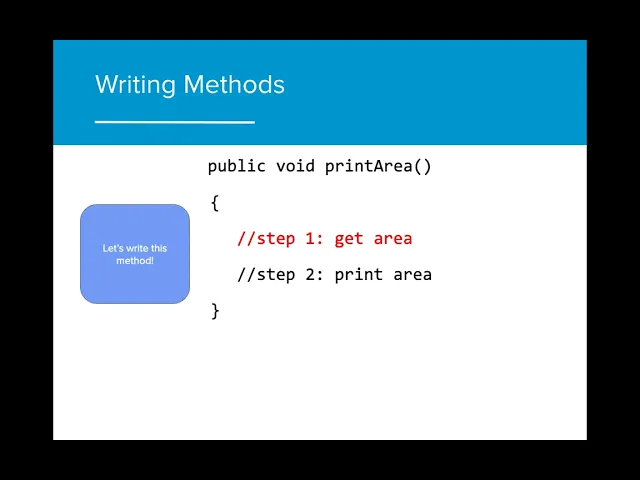
of the code that we want executed by the method between two curly brackets so let's write this method the purpose of this method is to print out the area of the rectangle to the console so that we know what the area of the object is the first step here is to get the area of the object we know that the area of a rectangle is the width times the height so we can write that in the method you may be wondering if there are no parameters in this method where did width and height come from
the height and width that we use in the print area function are the same height and width that are declared in the rectangle class and initialized in the constructor once the object is instantiated the instance variables can be used across the different methods we create now that we have the first step done we need to print the area of the rectangle object onto the console can you figure out what to add here to finish this method we just need to add the print statement that allows us to print the total area to the console because
this method is just printing the value of the area and not returning the value to the program this constitutes a void method so how do we use a method in order to use a public non-static method we must use the object name followed by a period and the name of the method a non-static method is a method that does not include the keyword static we will learn more about this in later lessons using the method name after the object will call the method and execute the code specified in the method so let's see what this
looks like in order to call the rectangle class methods we need to create a rectangle class object when rect 1 is instantiated the actual parameters 3 and 7 are passed into the constructor in the constructor the values of the formal parameters wrecked with and rectite are then used in the execution of the constructors in this case when passed into the constructor the values of rect width and rectite are assigned to the values width and height width and height are instance variables of the rectangle class and now have an assigned value once the rectangle rect1 has
been instantiated they can now be used in any rectangle methods when we write the method on the next line of code the method interrupts the sequential execution of statements causing the program to first execute the statements in the method or constructor before continuing once the last statement in the method or constructor has executed or a return statement is executed flow of control is returned to the point immediately following where the method or constructor was called if we want to call the print area method we can now use the rect1 object to do so the values
3 and 7 that were passed in the actual parameters now are being held by width and height and are called in the print area method area now holds the value 21 which is 3 times 7 and the total value is printed in the console now that the final statement has been executed by the method the program can continue to operate in sequential order if we do not instantiate the objects that we declare we cannot use the methods that rely on instance variables initialized by the constructor this will call a null pointer exception as the rect
object is null or doesn't hold any values yet we've actually already used methods when we've used the scanner class in that class the methods next line and next int allow us to get user input from the scanner object input even though we don't know the code that is being used to write next line we are able to use it to create user input in our programs being able to use code that we don't fully understand is called procedural abstraction we only need to know how to use something the right way not necessarily how it works
you may notice that the scanner method can actually be assigned to a variable in this case the string test is being assigned to the value of input.nextline this does not work for the method print area that we created because print area has a void return type there is no value that is being created as a result of the method as a result this will throw an error as a void method cannot be assigned to a variable of any other type now that you've learned how to call a void method let's get some practice in the
code hs editor