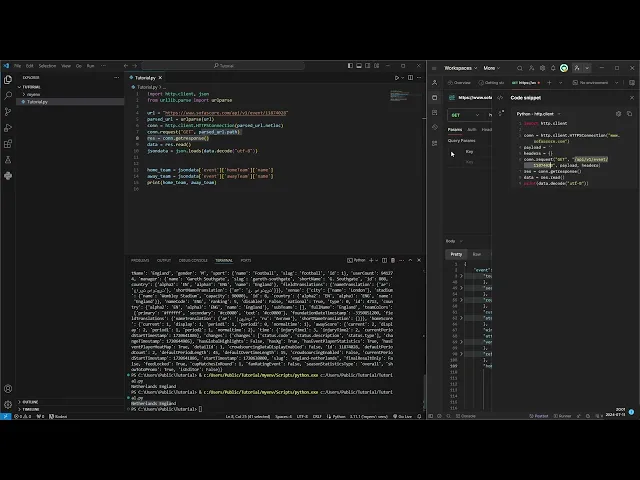
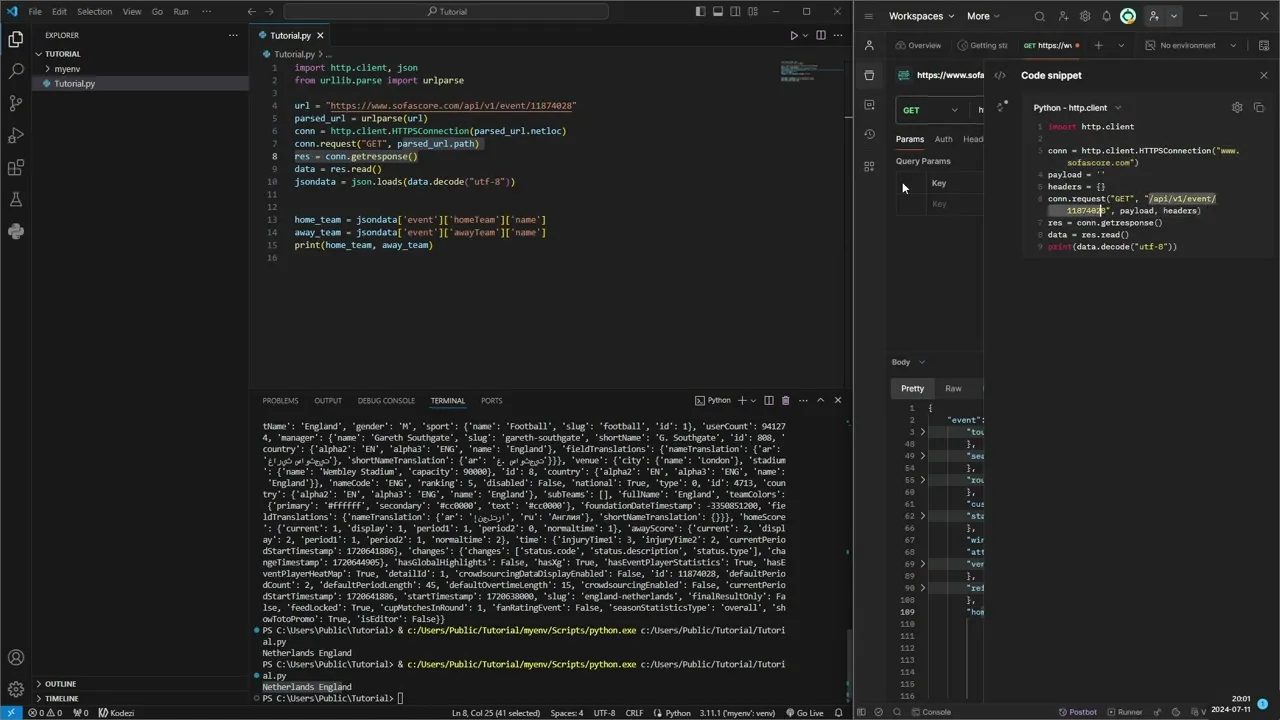
hello um today I'm going to show you how to scrape football stats using the sofa score API together with python so to start off we can go to the sofas score website and we can enter this specific game Netherlands England and the Euros uh we go to the inspect page and choosing the network Tab and the fetch uh tab if we refresh the page you'll see uh all the requests sent to the API uh and we can take for example the lineups one and uh yeah we can't see it now unfortunately but uh we can right click on it and copy it and copy the URL and go into this is Postman uh I'm using uh to test the API uh you can use I can link it in the description if you want to use it uh or just I'm showing you so uh this uh particular URL uh gets us the lineups for the game uh between Netherlands and England uh and it shows us all the players uh and the stats of the players but to do this in Python uh you'll need to import the request Library uh and if you don't have it installed you will just write pip install request but as you see I already have it installed so uh install requests and then you might want to install uh Jason uh so uh we will start by uh making a variable called uh URL and we'll assign it to this one actually we just take the event this time I'll show you how that looks later and to get the call the API we'll uh establish a response which will equals to requests do request so we will request and we will make a get request to our URL which is this one and uh we want to make our response uh it's I can show you if we print response. text we will get all the correct information use it's uh it's basically the same but to uh grab uh some information from this we will need to make it a Json object and to do that we will uh call it the Json data and we'll equal this to json. loads and then we will uh load this as a Json object so if we print Json data you will see no difference but uh you'll understand later why why this is uh uh important I can actually show you now so we'll go to the same one on Postman here uh it's uh it's the same result it's just uh better structure here so so you see uh we maybe want to get uh the and we can uh collapse this uh and you see the only key uh or the first key is the event key and all information is in the event key so we will have to go through the event key to get our uh information and then you'll see maybe uh the home team and the away team uh it's maybe what we want to get so if we want to home team we make a variable called home team which equals to Json data and now we have to filter out which uh which uh data we want so firstly we have to go through the event as all info was uh was in the event key and uh we do that by open these squared brackets and type event event which is the key and the next key we want to go into is the home team which is the home team name so home team remember to capitalize the T and then we want the name so we next key name this is the home team and we can do the same for the uh away away team uh but just to change the home to away away so if we print the home team and the way team we should get Netherlands and England and we do it so this is basically how you uh get the information and that's why it's important to uh Jon jsonify the object um and the thing with these sofas score API is that all games are structured on the in the same way so if you take another U match ID uh it will say home team exactly like it does uh on this one so uh that's why you can make um make a script with it to together uh football stats from from many games at at the same time so this is um the first way how to get it but um there is a problem with the request uh library and I'm not quite sure myself uh what a problem is but sometimes you get the wrong results um at least for me and um to come around that problem uh I use uh HTTP do client instead of uh the request library and I will show you it works uh ex it's just a bit different here but it will uh eventually use uh Json data again so uh import uh HTTP client and Json and also from uh URL li.
pars we want to import the URL uh parts and I will uh show why later so uh firstly we want to get the pared uh URL in a variable and we will par uh URL parse the URL so now we need to establish the connection which will be the HTTP do client. https connection to the pars url. netlock which is this part of the URL sofascore.
com and then we want to get a send a request so request connection. request uh same uh as on the request one it's a get request and this time we want to get the pars url. path which is uh this one uh and then we want to establish a response uh with con.
getet response uh then we want Dot which equals to response.