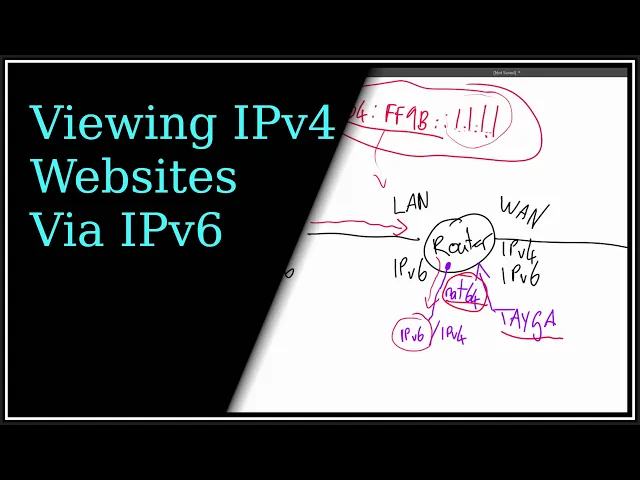
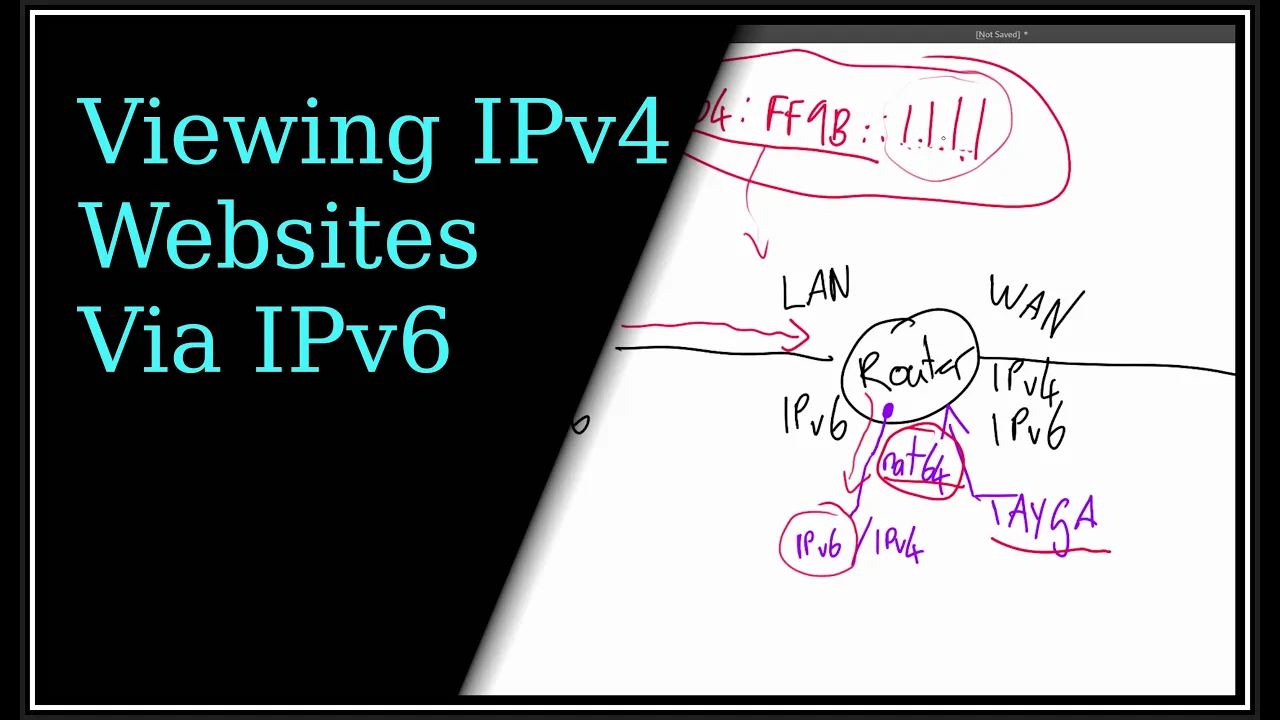
hey everyone now as I've mentioned before I run IPv6 at home here on my network and when I say I run IPv6 I mean I've actually turned off ipv4 on this VLAN so we're all one most of my stuff around the house is there's no ipv4 at all so given that some net some websites out there don't support IPv6 or a lot of them actually I still want to be able to get to those things even though I've only got an IPv6 here so what I've done is I've set up something called nat64 which translates my IPv6 into ipv4 at the router to go out and get the ipv4 site and bring it back and serve it on IPv6 so I'll go through a lot of stuff on the computer and maybe some diagrams and that because the program that I set up is called Tega and it's pretty old but the instructions are a bit rough so I think it's better if I just sort of explain conceptually how it fits together I'll do that better on the on the screen okay so to start with I'll show you my network nice and simple no ip4 address other than the loopback but that's irrelevant the um I have a global address and a link local and that's it there's no ipv4 address for this adapter which is a bridge adapter but that's inconsequential so if I I'm going to use Google and Twitter as the example sites for this good Google has version 6. so if I pin Google I can ping it but um Twitter doesn't so I'll show you what's going on so I'll just do a lookout for Google and I'll do an a record which is ipv4 and I'll just keep it short so there's the a record for the AAA record of IPv6 you can see it resolve that as well but if I do an a record for Twitter the a record will work you can see it's got some response there but if I go for AAA record I get nothing back so Twitter doesn't serve on now IPv6 okay so that's the situation so to draw the setup here I've got my um My Lan host right which is IPv6 and that goes to my router so router and obviously I have IPv6 over here and on my Wan side so that's my LAN that's my Wan okay over here I have well I have a both ipv4 and IPv6 from the ISP and out here somewhere you've got you know Google and Twitter and everyone else so that's um IPv6 and ipv4 so as you saw when the client tries to connect to Twitter it first asks the DNS which of course is in here I have a DNS server in here which gets it from an upstream server but my DNS server here couldn't reply with an IPv6 address for Twitter because there wasn't one so that is the situation so what I do is I installed this program called Tega in there okay and that's basically a tunnel between ipv4 and IPv6 and when I say tunnel I'll tell you what I mean there's an interface in here right there's an interface called nat64 and it's controlled by Taylor but the interface you can set up yourself just set up an interface in there and it has both an IP V6 address and an ipv4 address and what that does on the IPv6 side of it it listens for packets with a particular prefix now that prefix is six four FF 9B and then you know the rest so that prefix is what this listens for so when some traffic comes from this host destined for something starting off with that right the router will have a route that says okay for that destination send it down to this interface this this nat64 interface and what that does because of Taylor controlling it now the end of this address will be a mapping of the um the ipv4 address so let's say you want to Ping I don't know 1. 1.
1. 1 this will look like all that and then 1. 1.
1. 1 which is just a number mind you so that's like encapsulating the ipv4 address into the IPv6 address so when that comes in here it comes to the router I set up a route that says okay if it starts with this your destination is the net 64 device and Tegan knows what to do with it it says okay I'll just pull the end off here and send that out as ipv4 so then it will go on its merry way and of course the reverse will happen when the traffic comes back so that's conceptually what's happening here it's a tunnel between IPv6 and ipv4 if you like so that's what the devices do doing in the router okay so with the router I've got a whole bunch of interfaces you know so they are all sorts of vlans and wireguard and that and I'm going to add another one okay so in ETC there's the config file so first of all there's the device that it's going to use which will be nat64 when I make that and that that device has to have an ipv4 address and an IPv6 address so the reason it's got an ipv4 address is internal to it it's so that it can have a source IP address before it goes out to the WAN so if I go back to the little diagram here this this Nat device will have a pool of IP addresses because when it makes this connection from the ipv4 side out to the world it has to have a source address now obviously my Wan will masquerade that so the server will see my um you know my public IP address here but internally it has to have an originating IP address which would normally be your your host's ipv V4 address but you know don't have ipv4 on there so that has to be in here and it's just a pool mapping to an ip6 host on the network so every host IPv6 host on the network will have a corresponding ipv4 address within within tiger so it can use as a source address for this going out here so that's what that Dynamic pool is about so I've just made a um a 24-bit mask for it so I can have you know 253 clients because it has to use one of them for its own IP address that's just for icmp messages and stuff you don't really see that address in the real world and same on the IPv6 side it has to have some sort of address you know so if it has to send back an error in ice icmp version 6 it'll have to Source it from that adapter and there's the address now this prefix is the prefix I just told you about so when things come into it with that prefix it knows that it's got to strip the the last bit off as ipv4 and send it through and then as a directory for um where the mappings go and I'll show you that in a bit so that's that's the config so what I've got to do is make that interface so take a bank done created some device okay so IP Link now we'll have a tunnel device but there's nothing set up there's nothing running it's just a device that's there you can see it's down so what I'll do a sudo bash we'll go IP Link set net 64 up okay now it's up and what I'll do is I'll add that address to it so IP address add121 say. 254.
254 as I showed you to match the config really so the config doesn't set it up you're still going to do it manually config just tells it to use it and the IPv6 stress so IP address add um now this address I just generated from a private IPv6 generator uh you can do I could use my own but I just want to keep it sort of separate so it came up with fd7b at b85b e432 that's that and there's the address for it that's an address range that isn't out there on the net so that's for your home stuff the sort of equivalent if you like to the 192. 168 stuff for ipv4 that's all and now I've got to add some routes to it so iprout ad on the um on the version 4 side anything with 102. 168.
245. 0 24 which is that pool of source addresses where the traffic will be coming back send that to devnet64 because it knows what to do with it and for the IPv6 side um I'd be route add remember anything starting with that prefix six four ff9b slash 96 send that to nat64 as well so that builds that up so that just makes sure that any traffic from these hosts with that destination prefix when it hits the router the router says oh you've got to go to the next six four device and same when it gets back from the server and gets decapsulated it sends it back in there and take it just translates between the two protocols that's it so now I'm going to run tager so now I can run taga and it'll be running there okay so that's pretty much that and if you go um let's have a look more log syslog grip tiger oh a whole bunch of crap you'll see some stuff came in here so it's just sort of confirming that stuff now these Dynamic mappings I'll show you them so um okay so these are just some land hosts here and it Maps them to an ipv4 Source address that's what that Dynamic pool was so this happens automatically you don't have to make this you do if you want to go private to a private address because it won't do that apparently according to some RFC rules it said you can't do that so anyway that's that okay so if I come back here to this host I can now do ping um six four ff96 that's the start and then after that I'll just put a V4 address like one one one one and what you can see is I'm getting a reply so what you'll notice is the last the last four bytes here are equivalent to this in ipv4 so zero one zero one zero one zero one that's one byte one byte one byte one byte there's your 32 bits um ipv4 address within this and as I said the router when this hits the router it'll see this prefix and go route to that tunnel device and then it'll say ah this is an ipv4 thing rips that out gets the one one sends it out the other side and goes to the server and back so that's roughly how it works let's have a look at some packet couches okay so what I've got here is a packet capture happening on that nat64 device within the router and what I'll do is I'll just ping that address again so when I ping that what you can see I'll just stop all this well you can see is from my source address on this network my destination was the six four with zero one zero one which translates to this as you can see here six four one one and you can see it here as well and then the router obviously saw that destination said ah that send that to the tunnel device that net 64 device and on tiger did its thing and on the other side of that Nat device on the ipv4 side it had a source address from that IP pool for this for this host and then sent it out as ipv4 to the server out in the world reply came back did the same thing in Reverse so that's roughly how that works now if I ping a normal IPv6 address like um does Google this won't see this because this is native IPv6 and it has no need to route that to to the tunnel device it only routes things that start with this to that take a device now that's all good and well but I still can't um ping Twitter so Network unreachable so as I showed before if I do a look up on twitter. com sorry the a record uh just short that one you'll see they're the IP addresses now what I can do is Ping 64 ff9b blah blah blah and just say one of those like 104.
2442. 65 I can do it that way but that's no good if you have to do that all the time so what what I really need is DNS to resolve that for me now luckily cloudflare has a service for this so does Google but I don't like Google so I just use cloud sales one so cloudflare offer a dns-64 server for you so you can set this as a DNS server and if it's an IPv6 address you'll just get the IPv6 address but if it's an ipv4 only host cloudflare will give you the constructed IP address for it so I can use that through net64. so in pie hole which is my DNS server for my network I can just set that up so in settings for the DNS resolver at the moment I just had a standard one to show you but I could put a custom one in here and what I'll do is I'll just put that put these two servers in here so that one there for one of them and that one there for another one of them oops there there click all that save it okay so back on here now as before if I ping something IPv6 you won't see anything in the NAT device but now if I ping Twitter you'll see I can ping it by name and you'll see that I got the um the destination address as 64 ff9b so if I show you that in dig so dig twitter.
com if I just show the a record you see what I got there but now remember I didn't get AAA before but I do now because cloudflare's DNS server is providing it for me and you can pretty much see this like four one would be 65 okay because you know this is hex so base 16 so 416 64 plus one is five for the 65. you know that's that one there and well that's an easy one that's just one you can see where they map to them so now I can get to everything like I could before and what you can see over here is when it's using it or not so if I just ping um on lookout. au they probably don't respond yeah they don't respond that was a bad example but they're only ipv4 and you can tell because the address starts with this so what else is there ping uh facebook.
com that's IPv6 you know the ones because they they put Facebook in their Mac address oh sorry in their IP address so that wouldn't have gone through here okay so what I'll do now is I'll just set up a packet capture on UDP Port 53 we'll get the interface which is DNS and start that and then I'll just go to something like Twitter I go clown Down Under and I'll just uh get that off the screen because I don't care about it so you can see it did a whole lot of DNS stuff but that's just DNS between this host and pie hole which is resolving it if you want to have a look at the details have to have a closer look so all this stuff here I just want to make this a bit easier to view so I'll set this up a bit neater so what I want to see is I want to see uh just responses okay so go down here when there's a flag that if it's a response right click applies filters so I'm just looking at DNS responses and I just want to see the actual address so what was the query query was Twitter apparently so I'll just apply that as a column to keep it visible um that's over here at the start so you can see the name of it there and the response for the AAA address I'll just put that in another column as well so you can see that so what I'll do now is just tidy this screen up a little bit here what you can see is the name that it resolved and the IP address that it resolved to right so I'll start the capture again and you'll see if I do something like Google we'll see what happens over here it was already in memory uh try something different uh what's a big one Facebook try that okay you can see what it's resolving and what you can see clearly is which of them were Native IPv6 addresses and which were ipv4 so this thing here is um starts with this so you know as an ipv4 address but it just makes it invisible to this client device which just gets an IPv6 address and does it now there are some sites that have a problem with their style sheets that aren't completely IPv6 and what I should do is I'll show you that now I've just taken that dns64 resolver off and gone back to a normal DNS resolver because I want to show you something so now I'm back to just IPv6 nothing else and if I go to www. rebelnews. com watch how this displays it's half there but it's not really there see how that's kind of all the layout's kind of all over the place that's because what they've done is they've put their core stuff in IPv6 but they're referencing style sheets and stuff in ipv4 so the site's broken so just keep that in mind and I'll go back to the functioning dns64 so I'll just put the custom ones back in and save that right so I started the capture again and if I just refresh that what you'll see is Rebel news cascading style sheets ipv4 so you can see what happened half the site was IPv6 and half of it was ipv4 so at least you get to see it here if you do a pack of capture and you see it laid out and you really get to see what this theme is doing but either way I can um I can resolve anything now and and just use the net as normal so also DuckDuckGo isn't even IPv6 it's ipv4 only see you can see straight away but one thing you can see yes I just did that DuckDuckGo only went to DuckDuckGo so I like that so anyway that's all functioning nicely now anyway by setting that that DNS resolver on pie hole I still get to block ads so if there was an ad it would come back with um just zeros for the addresses so back on my router in rc.