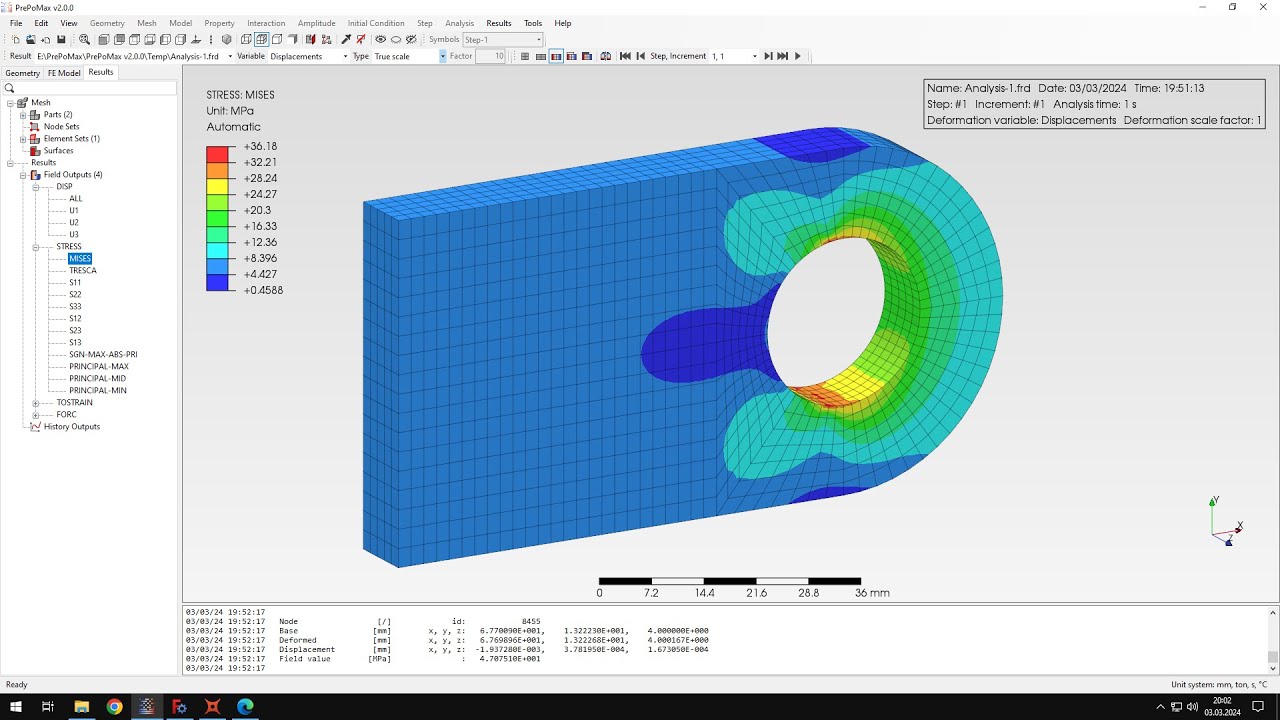
hello and welcome to my next tutorial prepomics this time i will show you how to solve a stress concentration problem using sub modeling let's create a new model first to define the unit system emitters and i will import the geometry and i will choose this first part because today we'll use two step files i will explain this later on um and that's the model that we want to analyze as you can see it's a plate or thin strip with a hole in the middle and to utilize symmetry here so we only analyze quarter of the
display that's the the whole structure that we want to analyze subjected to tension on both sides and to analyze just this piece right here and you can see that what we want to get from this analysis is stress concentration in this area okay so now i can tell you what some modeling actually is it's a very useful technique that allows you to focus on the region of larger model basically you start with a model of the whole structure with rather coarse mesh and then you create a separate analysis with a small part of the structure
and refined mesh special boundary conditions uh transfer the results from the global model to the sub model and there are two types of sub modeling the first one is surface based where stresses are transferred and the second one is node based where displacements are transferred in this case we'll use the node-based subundo link since that's the one available in prepa-max okay so let's get to the nlc setup we'll set the global model first so i can define meshing parameters this will be 3.5 millimeters for maximum element size and i will create the mesh as you
can see the mesh is very coarse but that's the point here we want to refine this later on using some modeling so let's define a material i will use standard properties for steel and you may know them from previous videos so that's the young's modulus and poisson's ratio and i will create a new section solid section applied to the whole part and i have to define a step as well this will be static step with default settings and now i have to apply boundary conditions let's start from symmetry so basically this surface right here will
be constrained in x direction uh now this surface here will be constrained in y direction uh and now i just have to fix one vertex here and this will be fixed in z direction to avoid rigid body motions and that's it for boundary conditions now i can define load this plate will be loaded with surface traction i will apply this to this edge this surface and you can see that we use only have a part of this plate so we can't use full load which is 10 000 newtons because we only have half of this
edge or surface in the 3d and so basically we have to define 5000 newtons of this tensile force okay that's it for the setup of this analysis and one more thing that i will do before submitting this simulation i will name the analysis here i would name this concentration global and we will use this later in sub model analysis let's confirm this and run the analysis it won't take long as you can see it's already available the results are already there and and we can examine the stresses as you can see we'll query this the
stresses around here are not very accurate i'll show you the analytical solution here's the analytical solution as you can see the stresses are a bit off from the value that we want to get so that's why we will use the modeling of course we could also refine the mesh only in this region and do this in one analysis but that's not the point i want to show you the submarine technique which can be used in various cases not just simple ones like this but this example i think that it's a good way to show you
how this technique actually works and that's where we use it here instead of simple mesh refinement okay let's save this i will name this concentration global and save and now i'll create a new model again the same unit system and i will import the geometry this time this will be the part right here sub model geometry as you can see it's the same model but divided into two regions this region here is the sub model and that's the rest used just for the visualization we'll later import it to the results but we won't use this
part of the model in the analysis itself okay so let's create a mesh i will match this part using one millimeter for maximum element size and i will create a mesh now and as you can see only this part was taken to the next step this unmeshed part wasn't so we don't have to worry about it anymore now let's define the sub model analysis the first thing that i have to do is edit the model properties and specify the type of analysis to sub model and this will take the results from concentration global file frd
that's the extension and let's confirm this and now i will define the material first the same as in the previous analysis so i will use exactly the same properties and i will also define a section apply this to the part and i have to define step the same one and i have to redefine in the boundary condition that was applied to this region and because in sub-modeling you have to redefine the loads and boundary conditions and the initial conditions that were applied to the region of interest the the one between analyzes a sub-model and the
rest is not of our interest because it will be transferred in form of those model boundary conditions that i will define in a moment so let's just redefine this symmetry boundary condition it was in x direction i can confirm this and now i have to define some metal boundary condition that's a special type here and to define this on the on the surfaces that are connected to the global model basically that's how we use it and we'll choose the three directions here because solid elements have only translation degrees of freedom so we are not interested
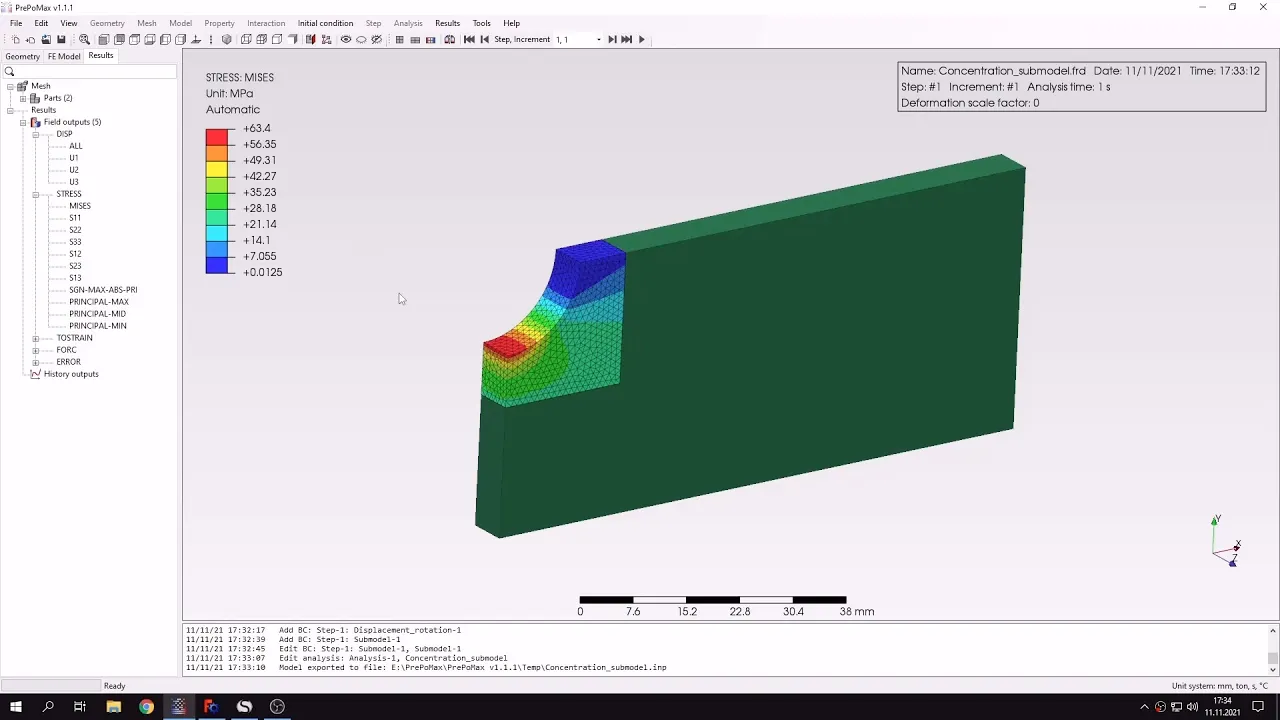
in rotations but we have to import the translations let's convert this maybe i will also change the color to distinguish this boundary condition from regular displacement bc here so we can see that we applied boundary conditions some other boundary conditions to the two phases here and that's it for this for the setup uh i will also rename this analysis to a concentration concentration sub model and i can submit this analysis it will take the results from the previous simulation global model and as you can see it's the results are already available it took the results
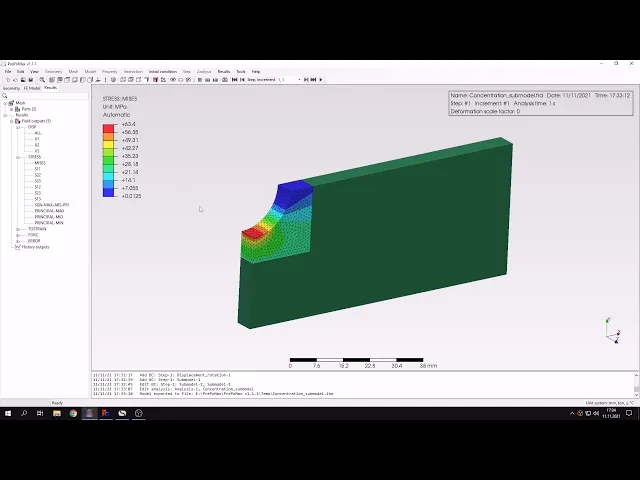
from the in global analysis and here are the stresses now we can use the query tool again and check the stresses in the region of interest uh and you can already notice that they are very close to the analytical solution uh i will remind you that the solution that we are looking for here is that the analytical value uh obtains for peterson's stress concentration factors um and that's very similar to what we got in this analysis you can query this here and you can notice that the results are very close to what we're looking for
one more thing that i can do is add this global part of the global model to results copy this and here you can see that the results are sort of overlaid and you can notice that we have not only the results here but also the remaining geometry uh in this case the geometry is simple but with more complex cases this could be useful uh what's more you can also use exploded vo2 to separate those two parts and see how they are connected for the purpose of of defining the sub model boundary conditions that's also quite
useful so um thank you very much for your attention that's it for this prepayments tutorial as always feel free to ask any questions and suggest topics for future tutorials in the comments have a nice day and see you in the next video