hello doers my name is Jose ignasio today we're going to talk about big Berkeley's baked goods now this local bakery has quickly made a name for itself with its wide selection of unique pastries pies cakes and pretty much everything else in between so with daily lines around the block and household Hobbies being more popular than ever it only makes sense for big Berkeley's baked goods to answer the demand for those customers and offer online courses to teach people how to create Sweet Treats of their very own big Berkeley begins the process with one of their
actual pastry chefs being assigned a topic based on customer interest The Bakers then create an engaging e-learning course full of original content or OC for my acronym lovers which ends up teaching the customer everything they need to know about that specific recipe or topic then they publish the course on their website and like all things with capitalism proceed to sell it on their online shop and finally the sales team processes the payment and the customer enrolls in the course and the rest is delicious history but enough chitchat though let's see it all in action now
and learn how ODU works with big Berkeley's baked goods now just as I mentioned the process begins when a baker is tasked with creating an online course about a particular recipe or a topic the baker uses the e-learning application to accomplish this and the first step for them is basically create a course this can be done in the back end of the app or on the front end of their own website now for this example I'm going to quickly build an e-learning course directly from the website's front end end don't worry I'm going to focus
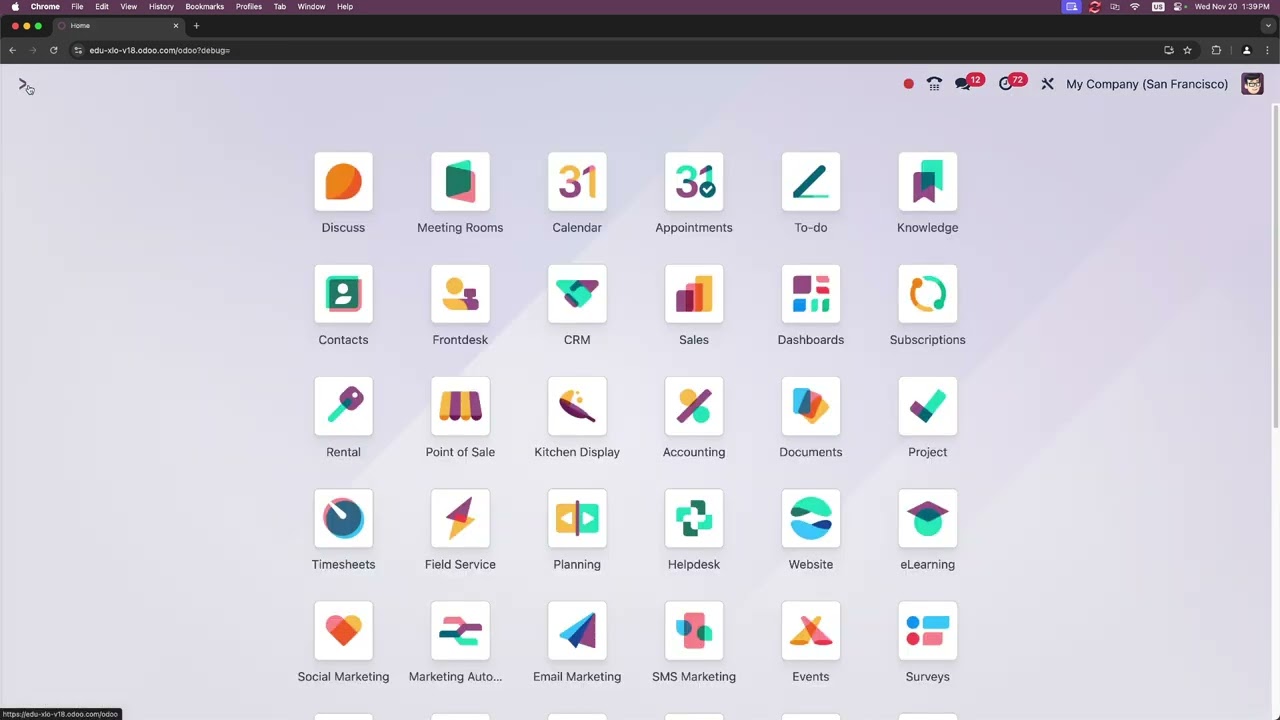
on the back end briefly as well so let's jump into our website application perfect looks beautiful everything looks good there and now on the top right corner we're going to select that gray new button and then we're going to select course we're making a course right here okay so we need a title mine is going to be basics of baking beautiful and then we're going to need a tag and from this drop down I'm going to select basic because it's basic that already makes it easy now up next we want to choose a layout the
one on the left over here happens to be our training layouts and that's already our default option so that's the one that we want to stick with moving forward with that what do every course need description of course I'm going to select an informative production to the introduction to the wonderful world of baking small little dupsy right there with my illiteracy but now that we're moving on from that I'd like to talk about this allow rating option right there if it's toggled basically means that students can review the course and I'm sure if you do
a good job it'll be a very good review then I'm also going to keep our enroll policy over here set to open because we need people to enroll and finally once we're done with that just hit save and in seconds like nanocs ODU takes me to the new course template page on the front end of my website this is where I'm going to be building my course so here I can edit all sorts of things for my e-learning course as well I could add section contents over here and I can also add little sections right
there if I wanted to and I can add them from those buttons right there and that makes it really easy so if I hit the edit button though in the top right corner there's something even cooler that I could add and I could show now we see all of odu's dynamic website building blocks and features that allow me to design the look and layout of my website any way that I want and in our case our course any way that we want but right now I'm actually going to exit edit mode via the save button
right there so for now let's just focus on content so let's click add a section right here what are we going to name this one going to call this one intro and then we're going to save right there perfect it's empty right now so after that what does a section need it needs content so we're going to select add contents and from here it gives you the option of uploading six different types in my case the very first one that I'm going to be doing is a PDF so with that in mind I'm going to
select documents and now we have something else over here we have a full option of where we want to upload either from our device from Google Drive I'm going to choose a file from my own desktop and it's going to be baking related just a PDF on the baking 101 so you notice something cool happen the title would automatically populate and I'm going to select in my case for our section the introduction section right there and lastly we're going to modify the duration just because I want people to be very I guess prepared it's not
going to be 10 minutes it's a quick one it's a nice little read it's five and then once we're done with that get save in public publish so let's save and publish and well I'm not going to lie to you OD is it's still a little bit bare so let's add more content by clicking on ADD content right there this time let's select in our case we're going to pick article this time around okay and we're going to title this one well actually first let's pick a section so you understand it we're going to select
the intro section and I'm going to title this one common baking mistakes got to have two wrongs to make a right and then for this one it's going to be 15 minutes for that and once again save and publish then ODU automatically takes me to a blank lesson web page that I can design just like any other page and we can customize it any way we want using the edit sidebar that opens up over here on the right side so to start I think we're going to need a banner that I'm going to drag over
here and then I think I also want to add let's put a picture maybe any of these ones that look kind of nice I think I'm just going to have a normal image one so we have a banner and then let's pick a picture one that has columns as well there we go and then once we're done with that look at that we're actually making a pretty sick looking website right there I don't know what I want to put in it yet but we're going to come back and modify the blocks later on but I
just wanted to show how easy it was to move stuff around and look at that it looks beautiful already and then once I'm done with that we just hit save and we're ready to move on and now now that I'm done over here I think it's time for us to go back to our basics of baking course page via in our case the title link up at the top I'll make it really quick for you to do stuff and here I think it's time for us to add another section what are we going to name
this one I'm thinking basing it on the basics of baking so baking Basics and then we're going to hit save I like how it just kind of like Stacks them so if you're moving forward it makes it really easy to know where you're going so once again adding content this time around and very quickly since I'm realizing that I need something a quick link for this one I'm going to uh copy my link over here because it's a video that we're going to be adding and I want to show something cool with that so when
I put that in there ah There It Is Everything autop populated and I'm going to keep our autop populated title and once again faking Basics now this time for our section and as you can see there's an even cooler part the estimated completion time automatically changed on its own lucky seven very sweet like those cookies so save and publish now I think it's time for us to add another section by selecting add a section I'm moving fast with these this time around test your knowledge pop quiz time o doers okay now we're going to add
content for this one and this time around we're going to select the quiz I want to make sure to get through everything and this time we're going to test our viewers we're going to title this one basics of baking quiz okay perfect or BBQ for my acronym lovers H that was an accident but it happened so we're going to set it in the test your knowledge section because it's a quiz right there and then I'm going to put 10 minutes on this I don't want to bore people and I don't want them to think it's
anything crazy and we're going to select save and publish great okay we've now been moved to a blank quiz form over here so you guessed it we're going to fill it out let's write the first question it's a very important our kitchen utensils required for baking I really hope you get this one right outd doers I'm going to create the answers yes no very last one is I don't no okay yes so doers obviously Mark yes kitchen utensils are quite required okay and then once that we're done with all of this we can move on
I'm actually going to hover our cursor over to the left you see that little cancel button right there now there's a save button right there that was pretty cool okay don't worry we're all done with this and I'm going to come back to this and add more questions later but for now let's scroll back up to the top and once again basics of baking back over here all right thanks for hanging in there with me I know we just went over a lot but we have one last piece of content to add once again we're
going to select add content over here and this time around we're going to select the word certification I want to cover some of these for you but first I I want to make a quick note and it should be noted that you're going to need the surveys app installed on your database in order to configure certifications which you just saw me do if you don't have the application please go to the apps application and install it if you need help drop me a comment I will help you now thinking ahead I actually made a certificate
for this course so we can just select it right here rookie Baker certification so we created this for other intro courses as well and certifications are just as easy to make as quizzes we're going to put this one once again inside of our test your knowledge section over there and I'm gonna actually put a tag here it's going to be certification but oh wait we don't have one so I'm just going to create that as a new tag then once that we're done with that well you guess it OD doers we have our nice completion
time and I'm going to just leave that at blank and save and publish great like many things certifications like these are made or edited in the back end of ODU to access them we actually need to hop over to the e-learning application so let's actually go do that real quick Road doers so we're going to go back so to get there we're going to open up the e-learning application from our main dashboard select courses in the top left and certifications then you select new once you're inside of here similar to a quiz it's a blank
form that we can edit to our heart's desire then once that you're done doing all your little edits and everything you'll come back back over to the courses page and inside of here on the front end you can link the certification as you saw me do earlier when the course has started ODU takes the participant to the beginning of the course which in this case will end in a quiz and certification keep in mind a certification is basically just a quiz but with more concrete rewards in other words you become certified upon showcasing your retain
knowledge from the course so let's get out of here we're going to go back home and then we're going to select the website application once again and now that we have our site let's open up the site menu over here and we're going to select the word courses right there now we're back to our basics of baking page so all of this it looks pretty good but I'm going to make some changes just because I need to make it a bit more nicer I'm going to do that over in the back end of the e-learning
application which I can quickly access by clicking on our small course button up in the very top right corner boom there we are so this is my course template page in the back end of the e-learning application even though it says that we are still inside of the website application we see the course backend view because all of Odo apps are integrated and that makes it really really easy to work with so we can also access this view from the e-learning app as well show you that I'm actually going to go over to main dashboard
once again we're going to click on e-learning and then we're going to select our course and boom there we are again so here you can actually see my content as well as has the description options and Karma tabs first we actually need to add an image to my course I just realized it looks pretty barent so I'm going to hover over here and we'll notice a pencil appears now we just need to put something very nice and fancy there we go I've uploaded my logo right now and this is now my course photo after that's
done going to hop on over to our Karma tab over here so from here I can control how many points I want to reward my participants for viewing and or sorry for reviewing or completing the course as well all of that is done here in our reward section and we can change it however we'd like inside of our access right section though there's something important I can actually determine how many points a participant must have before they can add a review comment or vote on the course we don't want to get a ton of bad
reviews for no reason if I wanted every participant to review comment or vote I'd actually change everything that we have over here to zeros so moving on we're going to go over here to our options Tab and we have quite a bit of options I'm actually just Main here because I need to change the enroll policy under access rights and we have that over here I only want people who paid for this course to be able to enroll in it I forgot but if you recall I'm going to sell this course online because there's been
a lot of demand for it and my hardwork and Bakers deserve some monetary compensation for sharing their expertise with this world so I'm going to select on payments perfect so when I do that you notice something else happens so we're going to hit save real quick so once that I did that a sales smart has appeared at the top of the template form what does that mean well inside of here I can actually control a few different things such as who bought my course and how many of them have been sold and it'll always update
right there right now we haven't sold anything so it hasn't updated but also when on payment was selected you'll notice we had a nice little product Feld beneath it remember your course needs to be a product in your product catalog in order to sell it online that makes sense right you can create your course as a product on the products page itself located in the Sales inventory or website application or even easier you can type in the title of your course as a product here as well in my case I'm going to type in the
basics of baking course I'm doing this now just to show you how easy it is because I realized I forgot to do this so we're going to create and edit this right there so that opened up a popup product template form where you can further configure your courses as any types of different products as you'd like so I'm going to make sure the title matches check I'm also going to make sure in my case right here that my product and the checkbox over here next to sales is selected and then I'm going to keep the
product type set in my case as service all looks good for me right now so next I need to set the sales price in my case not a dollar $30 we're going to make that actually $35 and then finally finally I'll add the same image here for the course just so that I have a nice parallel View and it's all done great that's it now I have to do a save and close and just like that we just did that in like 30 seconds so another thing that you're going to want to remember is your
course as a product must be published in order for your customers to see and purchase it now this is all done automatically once that I hit save and close as I did earlier on that and I also did the manual save but back over here to our options tab if I click on our internal link Arrow right there look at that I'm back over here and as indicated by the green go to website smart button it's actually published so when I click that as you can see there's now a price to enroll inside of this
course and customers can add it to their carts with one simple click but enough practice over here and enough Theory I think it's time for us to really showcase so before we can actually dive into a very quick Showcase of our actual course I wanted to talk about how we publish it first because it needs to be published then people need to be able to see it so we actually just select up here at the top once that we're on our course we select the publish right there and once that's done we're ready to go
now it's time to show you what a customer sees so let's pretend that I'm a customer who's recently heard about the basics of baking course and I wanted to enroll in it so let's actually select our course now from the courses page over here on our actual big Berkeley website so I want wanted to make a quick note as well that in addition to finding this course on our e-commerce shop up at the top you could reach it in our case from our courses and then people can select multiple from here if they wanted to
and directly added to cart which I'm going to show you now by selecting it so let's head on over to our carts and we're going to check out right now okay so I'm going to need an email and a few other things here so I'm going to automatically fill this out real quick just so that no one steals my money and YouTube knows that this is fake information as you can tell from this ODU has the ability to utilize a number of payment methods and payment acquires now a customer can start enjoying the course that
I just built from scratch if you'd prefer an alternative to this is to process the payments through our sales app with an invoice directly adding the product over to the product lines so after I finished paying into everything I'm back over here on the website if I head on over to the courses page and then I select our basics of baking course you can see everything went great because I am now enrolled and I could view stuff now if I wanted to wow marvelous I'm utterly speechless for further information let's pretend that I was mid-
baking and forgot what I was working on maybe there is some section that I can't find anymore if I need to I can actually just go back over out of here back to our course and here on the first page I could see our additional resources I could check stuff such as which Which documents do I want to check out or video I can click any of them here and select items that I might have forgotten about there you have it I was able to create and sell an online course in just a few minutes
with ODU e-learning but what made all of this possible well first in addition to having the e-learning e-commerce website sales and even the survey and email marketing modules installed you're going to want to have every setting in the e-learning app found under configuration and settings activated for the most optimal e-learning experience don't worry there's only four to choose from I'm actually just going to show you real quick how to get there so let's get out of here we're going to select e-learning once again configuration and settings okay don't care about that all right there you
go make sure these are all selected and just the heads up if you choose to enable in my case the mailing option right there you will need to install the email marketing module and if you choose to activate certifications as well up there the surveys application will need to be installed so if you're looking to recreate a similar flow to the one that I just showed showcase simply follow the steps that we went over and feel free to make any changes just make it your own it's truly easy to customize these as you saw and
you can have them tailored specifically to your Market audience and that's it that's how you build publish and sell engaging informative and completely customizable e-learning courses from a toz with ODU now that everyone's hungry after talking about all these delicious baked goods be sure to support your local bakery I think you deserve a treat after this lesson anyways I know I do it's all for now our doers but stay tuned for more of these business cases I'm coming after you big business Bros