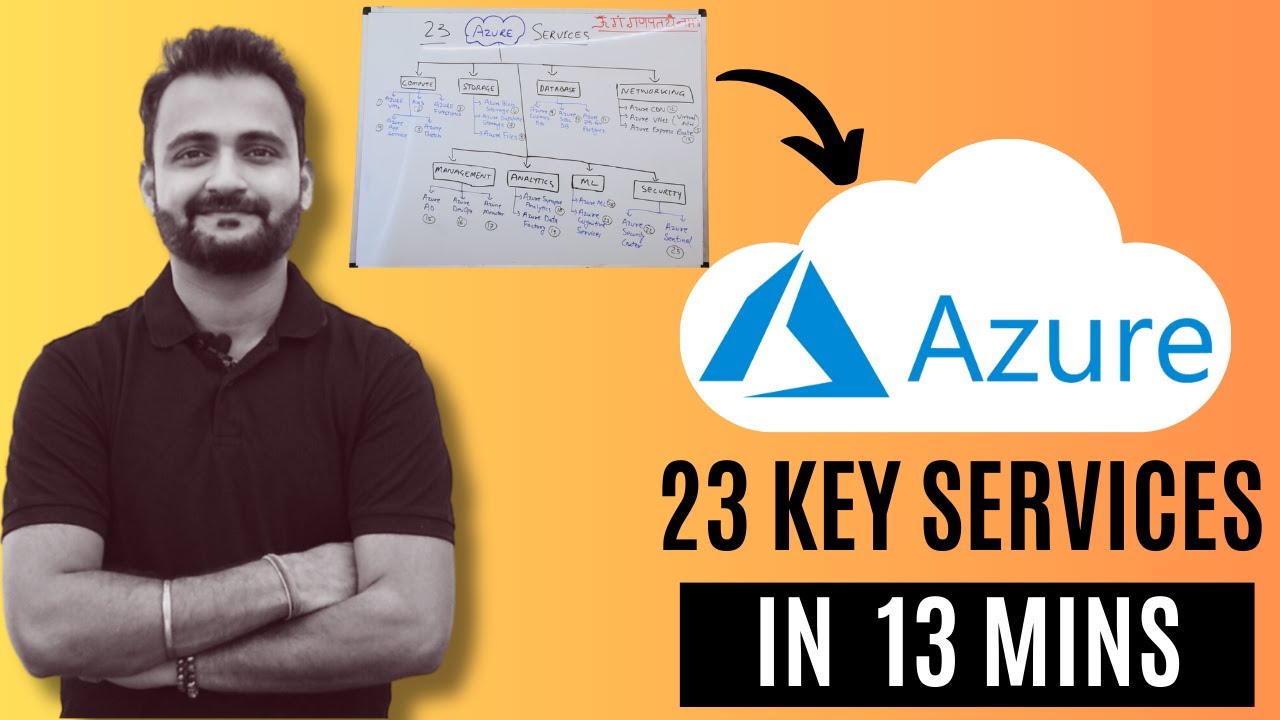
hey my name is happy and here I am going to explain the main Services of azure with the help of an example if you are new to Azure then this video will help you in understanding the Azure Services here are the list of services which I'm going to explain so without wasting time let's start we will take the example of Facebook for understanding the AO Services you have to assume that you are building Facebook from scratch first we have to understand how we will set up an environment in a private network with Azure if that
is clear to you then 80% things are already in place for you first thing every application will have are users and so will Facebook have then we have to locate the web server where the application is hosted now the application can be developed in PHP aspnet Java nodejs or in any other language This Server will be accessed by the IP address initially then we will put a relational database where all the application data is stored this database can be SQL Server Oracle or MySQL all this will be inside a private Network or you can say
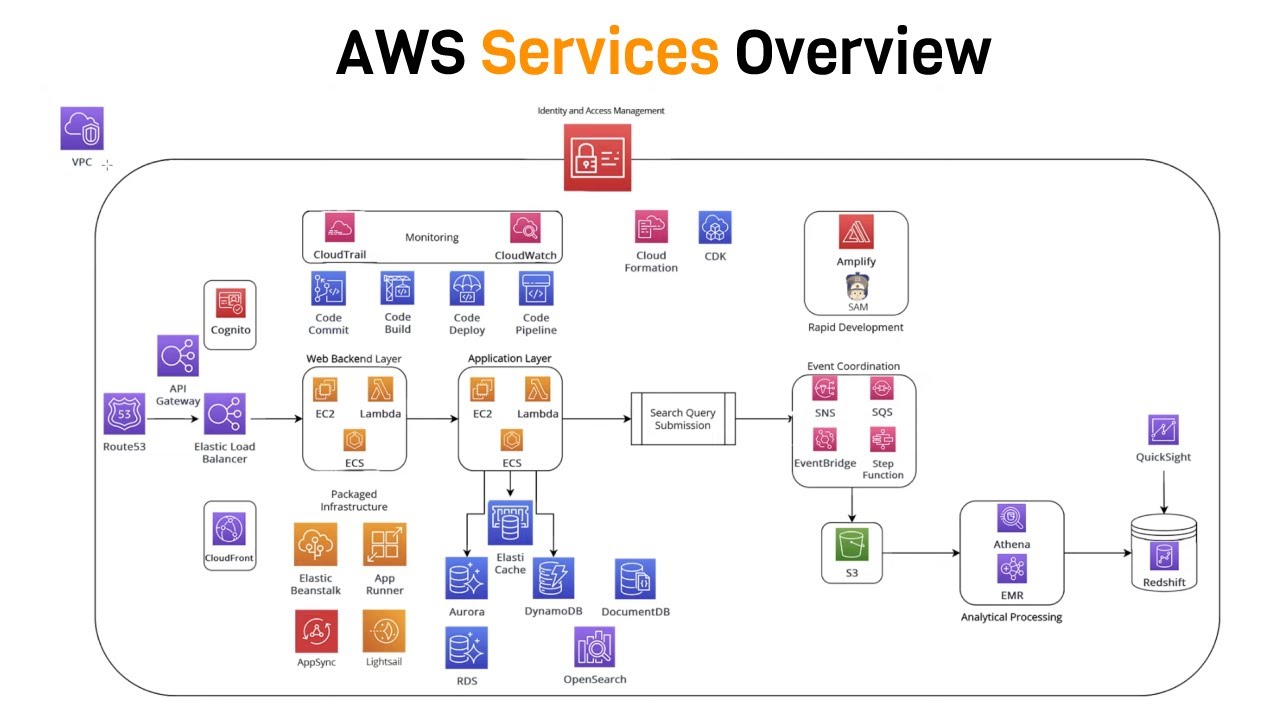
on premise Network to make it secure this is all you want for a very simple web application right now tomorrow with increase in website traffic you will decide to separate your UI and business logic layers on different servers for that you will create two different servers one is web server which will contain HTML CSS angular react or any static code another one is app server which will contain business logic layer that can be web API or something else this is all what we call a three tier architecture we don't need this direct connection now so
remove it from here now you heard the concept of cache so in order to improve performance of the application we will put cache at each level cache will serve the frequently accessed data immediately for servers it is called disk and for database it is called DB cache after some time due to further increase in traffic to your website you will do either vertical SC scaling or horizontal scaling in vertical scaling you will increase the CPU memory or storage capacity of this part particular server but in horizontal scaling you will add new servers for your application
so here you will add new servers to decide what traffic will go to which server we will locate a load balancer here to divide the website traffic properly load balancer will balance the traffic between these servers second thing is the users will not access the site by IP address they will use some domain name in this case it is fb.com or facebook.com for that you will use DNS right here for a normal application and normal traffic these settings are enough but to build for high traffic complex application you need more things next thing is you
know there are lot of images and videos circulated and uploaded in Facebook regularly and it's not a good idea to keep all these files in the same server therefore we will set up an external storage which will keep all these images and videos now sometimes this images and videos contains objectionable things like nude photo photos which you want to filter out before saving them to external storage for this we will set up a Content filter here which will work in automated way to identify and remove objectionable things before storing them in external storage other things
which are in huge amount in Facebook are messages likes and comments this data is so big that your relational DB is unable to handle them then you need a nosql DB like DB which is quite popular nowadays to store data like this nosql DB are very much faster as comparison to relational database in next step we will include some analytics part for our application Facebook you might know that your every click or activity on Facebook website is captured and then it is used for showing ads based on your activities and clicks to you this for
this we will call click stream analysis this is called click stream analysis it is used to capture your actions in Facebook all these clicks and actions will be saved in some storage like this and then with the help of some big data analytics platform like Hadoop analysis will be done on regular basis to take one step forward all this data is stored in the data warehouse and with the help of business intelligence some business decisions will be taken by the Facebook for example after doing the user analysis Facebook can launch a new product for users
and it will also help in creating graphs and Maps so that they can do a business analysis properly so that is all set now let's try to improve the application performance more sometimes images and videos shared on Facebook can be shared in other websites also right for this the direct access of images and videos will be provided to the browser so that server traffic can be reduced where only the images and videos are requested then the images and videos can be accessed by mobile application and mobile browsers also for that we will put a different
external storage for mobile specifically why separate storage because images rendered or displayed in Mobile are different in size from laptop so first these images will be compressed and resized and then it will be stored in a different external storage why we are doing so much things for images and videos because we know they are big in size and take time to download load as comparison to normal data so one last thing we will do for images and videos is to apply content delivery Network in different locations around the world for example one user sitting in
India has requested an image from a server located in USA now this image will be served to the user first time and will be saved in content delivery location of India then and next time some other user from India will access the same image then it will be served from the content delivery location of India not from the main server in USA it will make images and videos faster to download then there are some additional service which we can add in our architecture to make it fast first is messaging cues and notification like you heard
of msmq Series this will help in delivering messages and notifications fast and efficiently which will help in managing and delivering thousands of notification [Music] smoothly then the last thing is a monitoring dashboard which will present a dashboard which will keep checking the health of all the resources like servers database storage in a single dashboard if there is any problem in any one of them then it will raise the alarm this is all about the architecture of an application which is mostly similar in all other big applications if you understand this then it is very easy
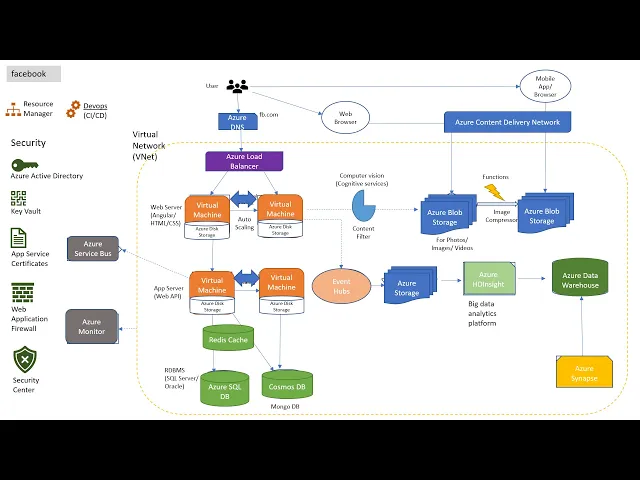
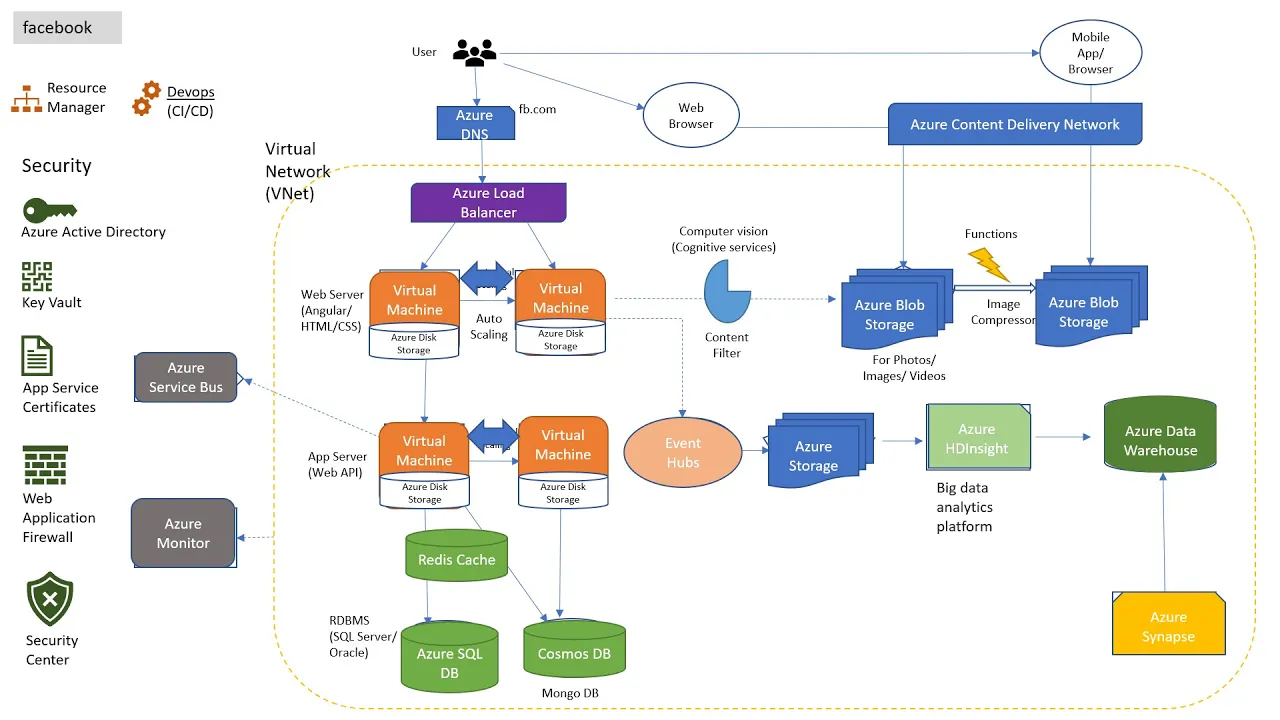
to understand as your services so let's start replacing all the on premise services with Azure services in Azure the private network will be replaced by virtual Network which we also call vnet then the servers will be replaced by virtual machines which are assigned by the Azure Cloud then the disk storage is replaced by Azure disk storage for caching and processing frequently requested data these have have a limited size now in Azure you have a feature called Auto scaling which will automatically increase and decrease the number of VMS based on website traffic this is a very
very important feature as in normal scenarios you have to add the servers manually Whenever there is a increase in traffic but here due to Auto scaling it is automatic and saves a lot of work then we will replace this database with Azor SQL database which is the most popular relational database in Azure it is same as SQL Server one can also use the database here like Oracle or my SQL the DB cache will be replaced by radis cache which is again used for fast processing of frequently accessed data from the database for no SQL AO
recommends Cosmos TB but the other DBS like mongod DB can also be used here now load balancer equivalent in Azure cloud is azure load balancer which will manage and divide the website traffic between the different servers then the DNS equivalent service is as your DNS which will manage the domain names like fb.com and do the mapping with the IP addresses of the servers if you have observed carefully here that the naming conventions of aure services are quite similar to the generic naming conventions of the services which make it very easy to remember and learn then
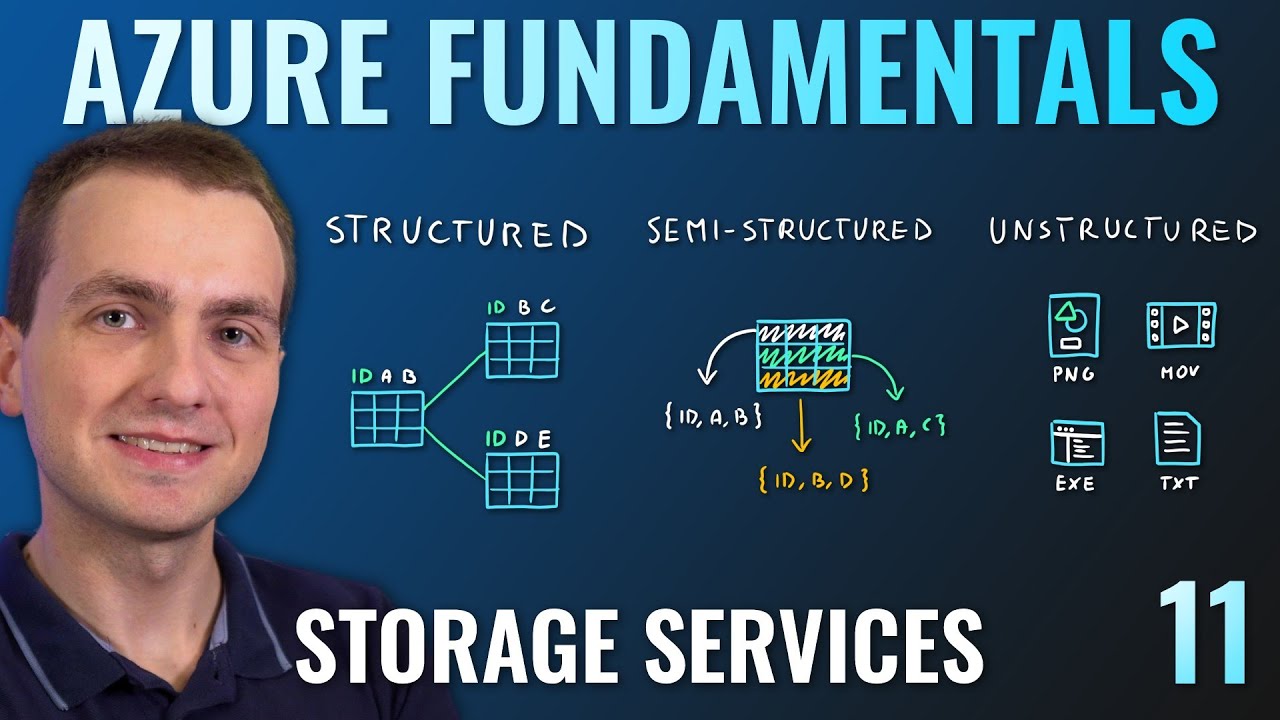
moving forward in the next step we will replace the click stream analysis with event hubs which will basically record all the user activities or Clicks in the Facebook website next we will place the storage which will simply call Azure storage in Azure now the storage can be of different types like blob storage file storage table storage don't worry if you don't know them I will cover this storages in upcoming videos then to replace aoop we have Azure HD Insight a big data analytics platform in Azure which will do the computation on the stored data remember
the computation can also be done for Cosmos and Azure SQL DB finally we will save this data in Azure data warehouse then with the help of business intelligence which is called as your syapse here business can get the details in the form of graphs and then they can take decisions like launching a new product so good so far so far so good I think it's clear till here if you are a developer then you might be thinking why we should understand the Azure analytics services uh like even subs and AZ your s apps but it
is important to understand the bigger picture to have a clear understanding of how the system works then it will be easier for you to develop the small modules which can be easily integrated with as your Cloud okay now the next thing we have in the external storage for images and videos this storage will rep will be replaced by Azure blob storage which is specifically used for storing images and videos in Azure we can take help of computer vision or you can say cognitive Services which are popular for AI and can be used for filtering the
content of images and videos on fly next thing is to convert laptop specific images in into Mobile sized images which can be done by the functions in AZ functions are serverless Computing they do not need any outside involvement you can use complex algorithms to compress and resize the images here with the help of these function Again by the by going with the same naming convention the content delivery network will be replaced by Azure Del Azure content delivery Network which will help in setup in the different locations in the world and the images and videos can
be accessed without latency then these messages and notifications Services which are right here can be replaced by Azure bus service which will make these notifications fast then the monitoring dashboard will be replaced by Azure monitor which will basically help in tracking the help of all the components in the Azure Cloud up to here we have covered the services which are doing the actual work now we will cover some Services which will make these virtual Network secure the first of them is azure active directory it is a Microsoft cloud-based identity and management access management service which
helps you your developers admins to sign in and access all these resources what resource is available to which developer can be ased by this service in short it does authentication and authorization next in security we have Azure keyal which is a cloud service for securely storing and accessing Secrets all the information here will be saved in encrypted form for example you can save the database connection string in this key vault now we want our application to be accessed by https or St uh not HTTP as it is as https is more secure for that we
will be having app Services certificate service where we can register all the certificates every network has a firewall which will monitor and restrict the incoming and outgoing traffic right similarly we have web application firewall here which we also call wav which will do the same job of a firewall the last component of the security is security Center which is nothing but to make sure that all the resources in your virtual Network are virus free and software compliant how to manage all these resources for example to add a new load balancer we can do it via
resource manager and you might have heard of cicd which is basically for deploying the application in one go without deploying each and every component separately it can be done by devops if you want to learn it in detail then don't worry I will cover this in the next videos so that's it if you have come so far then you have learned all the basic and important services in Azure there are lot many other services in Azure but we can't cover all in a single video you can like And subscribe the video and I will bring
new videos for you to understand the complex things in Azure andet with Simplicity thank you