I'm Ranga Karnam. I'm 10X certified in AWS, Azure and Google Cloud as well. Our courses are helping thousands of learners do their cloud certifications in AWS, Azure, and Google Cloud.
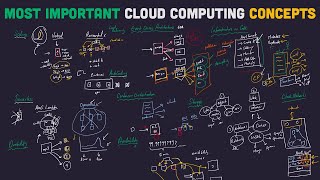
In this video, let's focus on Azure. Let's learn more than 50 services in Azure using a simple example. We did a similar exercise for AWS earlier and it was really really successful and now we are extending that to Azure.
We will use an example of a simple fullstack application and learn the most important 50 concepts that are related to Azure. We will be discussing a number of services which are related to compute, storage, databases, networking and a lot of stuff. Let's get started.
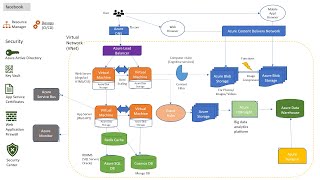
What you're looking at is an example of a full stack application. This is a simple one, right? So you have a user accessing the front-end application.
This might be Angular or React. And this is a REST API. This is a backend REST API which can be built let's say in Node or Python or Java or any language of your choice.
And this is talking to a database. And we also have a business intelligence workflow. Let's not really worry about the business intelligence workflow for enough.
Let's get started with talking about the full stack application workflow. The front end talking to a REST API talking to a database. And within this I want to start with this specific thing REST API.
How do you deploy this REST API to Azure? That's where you would need compute services. So if I would want to deploy an application to Azure, what I would need to do is first I would probably need to create a VM, a virtual machine inst inside that let's say it's a Python application.
I would probably need Linux OS and then I would probably need Python runtime on it, Python 3 and then I would deploy the application and do whatever configuration is needed for that specific application. Right? So that's the traditional way.
If I'm running it in the data center, I would provision a version virtual machine. I would choose the right OS, then choose the right runtime that is needed and install the application on it. Right?
Uh is it sufficient typically if I just have one instance of an application? Right? What if this goes down?
If this goes down, the entire application is unavailable. And you don't want that, right? Typically, whenever you build applications, you would want them to be available.
And to be a able to build availability, what we will do is we will actually have multiple instances. Instead of having just one VM, we will create multiple VMs. So maybe we'll create four VMs or five VMs where this application is deployed.
Now as soon as we start to actually deploy multiple copies when I have four uh VMs where the application is deployed to what happens we would need something called a load balancer. So I would need something like a load balancer which is present in here and the load balancer is responsible for distributing the load. So it would receive the request and it would distribute the request among these VMs.
So you can see that this kind of complex setup is typically needed whenever we would want to deploy an application. Now in Azure how do you create virtual machines in Azure the service which you can make use of to create virtual machines is called Azure VMs Azure virtual machines. In other services, in other clouds, this has little complex names like in Google cloud we call it Google compute engine.
In AWS, we call it AWS EC2, elastic compute cloud or elastic cloud compute. However, in Azure, the name is simple. It's Azure VMs.
Now, I would want to create a group of VMs, right? So over here we we are creating a group of VMs. How do you create group of VMs?
That's where you can go for autoscaling. So Azure autoscaling is what you can do is to create a auto to create a group of VMs not just one but you can create multiple VMs that you'd want actually to autoscale. You can use scale sets.
So Azure scale sets can be used to create a group of VMs which can automatically scale based on the load which is coming in and the feature is called Azure autoscaling. So Azure scale sets with this you can create four VMs and I would want to create a load balancer as well that's where I can go for Azure load balancer over here we are responsible for operations right so we are responsible for installing the OS installing the software which is needed installing the application which is present in here you are also responsible for availability right so if one of the applications goes down You'd want to be able to configure the load balancer to replace it, right? So you'd want to configure a health check on the load balancer and do things like that.
And we are also taking care of scalability of the application, right? We are scaling the application by distributing it to multiple places in and if you want really really high availability for your virtual machines, what you need to make use of in Azure is a feature in Azure called Azure regions and zones. Now, why are reasons and zones important?
Let's say I just have one VM. Is the application highly available? Nope.
If it goes down, the entire application goes down. Let's say I'm creating multiple VMs. But what I'm doing is I'm actually creating all of these in a single data center.
So, let's say all of these are in a single data center. What if the entire data center goes down? Everything is down.
Again, this is a problem. So what can I do to avoid that? I can probably create multiple data centers.
Let's say I've created multiple data centers like this and I've deployed my application also multiple instances on the other data center as well. Let's say this specific thing is in London. Let's say there like god forbid hopefully nothing bad happens but just just as an example, right?
So let's say there is an earthquake in London before because of which there is some other natural calamity or a flood or something of that kind because of which the entire London region is not available. Your applications are again not available. That's the reason why you'd want to distribute your application across multiple geographies.
So you don't want to just deploy your application in London but probably you'd want to actually put it in New York. probably you'd want to also put it in Sydney and maybe other parts of the world, right? Imagine a startup or something of that kind which wants to set up infrastructure like this.
It's very very difficult. All right, you want to distribute your VMs in multiple places and it's very very tough and that's what regions and zones enable you to do. With regions and zones, you can geographically distribute your application with very very high availability.
Azure has 60 plus regions around the world. London for example is one of the regions. New York, Sydney, Mumbai.
So there are tons of regions that are provided by Azure. And you can deploy your VMs to these different regions. So if I'm creating multiple VMs, if I really want high availability and I would want to provide low latency for my users, I would distribute it across different regions and within each region also there are multiple zones.
So we looked at the fact that London region over here we wanted two data centers right even if one data center goes down we would want it to be high highly available we would want to be able to serve the users from the other data center this concept is represented in Azure by zones right so you have number of zones even in the same region and you can distribute your VMs across zones and across regions and thereby you can get very very high availability Now we talked about a number of features related to virtual machines, load balancing, scale sets to autoscale and things like that. Over here if you're manually setting up the virtual machines, if you're manually setting up the scale sets, if you're setting up the load balancer, you are responsible for all the things operations, availability and scalability. This is exactly how we used to do things when we were running things in our data center.
However, in the cloud, there are alternative approaches. Instead of doing everything by yourself, you can make use of managed services which are provided by the cloud platform. There are number of managed services which are provided by each of the cloud platforms AWS, Azure and Google Cloud to make things easy for you.
Instead of deploying application, instead of maintaining availability, scalability, taking responsibility completely on yourself, what you can do is you can use the mainet services and you can provide them the code and the configuration. You can say this is the code we want to run and you can say this is the availability that we would want. These are the regions where I would want to run my application and this is the kind of scalability I need and the cloud provider can make that happen for you.
Instead of doing all these setup for example you can go for a service called Azure app service. Azure app service all that you need to do is to provide the code for your Java application or a Python application or a NodeJS application and it can automatically provide high availability and high scalability for you. Azure auto Azure app services also provides autoscaling as a feature.
You can look at a metric let's say the number of requests which are coming in and automatically increase and decrease the number of instances of your application based on the load which is coming in. So the first manage service which we are talking about related to compute. So whenever we want to run a specific web application or a rest API we need compute services the first compute service which we are talking about in here is Azure app service.
Typically whenever we are deploying applications to VMs there are a lot of things that you need to take care of OS your runtime which is needed to run the application the application configuration and finally the application code right so if somebody from the operations team needs to deploy an application they need to do all these things and these things need to be done every time an application is deployed whether it's in a dev QA stage in each of the environments there might be mult multiple instances and each of the places you need to keep doing this. How can you avoid that? That's where you go for a docker image.
So you can create a docker image with the OS with the application runtime with your code and the configuration all of them present inside and you can give this image to the operations team. Once the operations team have this image, they can deploy the same way in any of the environments. And the great thing is if you create docker images, it does not matter whether it's a python application.
It does not matter whether it's a Java application or a node application. The way they run it is the same. If let's say they are doing the VM approach, then if they are deploying a Python application, they would need to install Python.
If they are running a Java application then they would need to run install Java. So there are a lot of differences in how you would run uh software on VMs. However, when it comes to Docker image operations are simplified.
They don't care what's inside. It is run the same way and that's the reason why containers are becoming really really popular. What you can do is you can take the rest API that you have created.
You can create a container image very very easily. There are a lot of tools that are available to help you create container images in a very easy way. You can create the container images and you can then deploy them to Azure container instance.
So Azure container instance is one of the options you have in Azure to deploy a container. Actually Azure app service can also deploy container but Azure container instance is the recommended service. And let's imagine a scenario where you have multiple microservices which are talking to each other.
In a typical microservices architecture, you might have hundreds or thousands of microservices. And the features which are provided by Azure app service and Azure container instance are okay for a simple rest API, simple web application, maybe one or two applications, you can manage them using this. But if you have thousands of microservices or hundreds of microservices or lots of microservices in those kind of situations, you don't want to handle all that manually.
That's where you would go for an automated solution called container orchestration solutions. So container orchestration solutions in the cloud help you to implement things like microservices architectures. When you go for container orchestration, what you have is a cluster.
So you create a cluster and inside this cluster you have a number of nodes. So you have number of similar to VMs right. So you need a place to run your applications.
The applications finally run on the node and you can pass what you would want to run in here. So I would I can say I would want 10 instances of microser one, 100 instances of microser 2 maybe for microser 3 five instances. you can pass it as an input and the cluster management the container orchestration software can deploy it to the cluster.
So this container orchestration solution the most popular one today is Kubernetes and Azure also provides a service for Kubernetes Azure Kubernetes service. So that's another option to run your REST API. If you have a lot of REST APIs, if you don't just have one REST API but a lot of REST API applications which are making use of the microservices architecture, you can go for container orchestration with Kubernetes and you can make use of the service AKS or Azure Kubernetes service in Azure.
Another approach which is really becoming popular is serverless. Earlier we talked about okay I would want to install a server create VMs create load balancers install software install runtime a lot of things take care of availability take care of like scalability and all that how about leaving all that to the cloud and just providing a piece of code so can I give a piece of code to the cloud platform and not worry about where it runs not worry about scalability not worry about availability if there are 10,000 than calls to this service, let the cloud provider take care of it. If there are 10 calls, let the cloud provider take take care of it.
And I would pay only for the calls. If there are 10,000 calls, I'll pay for 10,000 calls. If there are 100 calls, I'll play for 100 calls.
I don't want to worry about infrastructure at all. So don't worry about servers. That's what is the serverless philosophy.
Another important philosophy actually another important part of this philosophy is pay per invocation or pay for use. So if there are 10,000 requests which are coming in I would pay for 10,000 requests only. I don't want to worry about anything else.
I'll give you a piece of code maybe it might be in Python language, it might be C#, it might be Java. Whichever language I would give you a piece of code and run it for me. And that approach in Azure is provided by Azure functions.
In AWS AWS Lambda in Google Cloud, it's Google Cloud Functions. In Azure, it's Azure functions. So with Azure functions, you can actually just say, okay, this is a piece of code.
This is the amount of memory I would want to make use of and I don't want to worry about anything. Run it whenever there is an invocation. Run this particular piece of code and send the results back.
So that approach also can be used to build your REST API. This is the serverless approach where you're building a REST API as a function and you're giving it to Azure and you're giving to Azure function and you don't worry about availability, scalability or anything of that kind. So what we are looking at until now are the different options that you have to run your REST API.
You can either take the manual oper option of creating a VM, installing everything, creating a scale set, creating a load balancer and doing things with it or you can you can take an easier approach. You can say I'll go for Azure app services or you can say I would want to create a container and I'll go for Azure container instance or you can say oh this regi is not on its own. there are this part of a complex microservices architecture.
That's where you can go for Azure Kubernetes service or you can say okay I don't want to worry about anything related to servers at all. I don't want to care about it at all. I'll just pay for how many requests which are coming in.
I don't want to create a server or a VM or instance or anything of that kind. I just want to take the serverless approach completely. That's where you would go for Azure functions.
So these are some of the compute options which are present in Azure. So we now looked at this one which is compute. Let's now go towards database.
Databases are some of the interesting things right as a developer. Typically the things which we focus are on the compute and the databases. And the specific application which we have in here is a rest API application.
Typically transactional applications, right? A banking application, a financial application, maybe a shopping application. These keep making a lot of small transactions right you would affect five or 10 rows in a table typically right those are transactional applications and let's start discussing about transactional databases typically whenever the old way of actually doing transactional applications is to use a SQL database now there are no SQL databases as well so in SQL databases or these are also called relational databases what you have is set of tables so you have tables which have relationships with each other.
This might be an order table which has a foreign key to customer table. This is an order table which has a foreign key to a product table. So they have very very strict relationships.
There are predefined columns which should all have values and these are providing strong transactions. So you can say these three operations together form a transaction and either all of them are successful at the same time or none of them are successful and they also provide strong consistency. Once you store a piece of information you can be sure that when you retrieve it back it will be the same.
there will not be any change because typically SQL databases provide you with strong transactions and strong consistency and typically uh these use SQL that's why I called SQL databases right so relational databases use SQL to query so you write complex queries to query this database and if you want to create a SQL database in Azure there are two very very important options so there are Azure database ASE for so there are number of databases which are using this naming clure Azure database for MySQL, Azure database for Postgress SQL, Azure database for Mariab. The other one is Azure SQL database. Why am I separating Azure SQL database from all the other databases?
The reason is because all these re databases are regional databases and these provide you with 99. 99% availability and they can scale up to only 64 terabytes. However, there are no such limits with Azure SQL database.
Azure SQL database can scale to unlimited amounts and it provides you with 99. 999% availability and it's a global database. So if you want if you're looking for a transactional application for a specific region then or if you're actually making use of things like MySQL and you want to migrate that database to the cloud in those kind of situations you can go for Azure database for MySQL or Azure database for Postgress SQL or Azure database for Mariab things like that.
However, if you really want very very high availability and if you want a global database that's when you would go for Azure SQL database. This distributes the data across multiple regions. Therefore, it's a global database and it provides you with worldclass availability.
99. 999% 99. 39% is a very very high availability for a database.
So these are the SQL options which are present in Azure. You' go to SQL if you need strong transactions and strong consistency. Lot of times you need high flexibility.
You don't want to worry about how you store data. Certain rows might have certain columns, certain rows might not have certain columns. In those kind of situations, you can store data as JSON like these are typically called document database.
And certain times transactions are not as important as scalability, right? So there are use cases where you need millions of transactions per second, right? So you want very very very high scalability.
for example, Facebook, Twitter, LinkedIn, right? So, you have thousands or millions of posts coming in every second and you'd want to be able to show these to the users. Scalability is much more important.
Coming back with data quickly is much more important than consistency. If I'm making a post now and my friends are able to only see it, let's say 10 seconds down the line, it's not such a big thing. Consistency is not such an important thing when it comes to some of the modern use cases.
However, performance is very very important. Even even though I'm making this many transactions per second, I might be storing pabytes of data. I would want response within a millisecond, right?
So, I would want all the responses to come back within a millisecond. So, that's the use cases for NoSQL databases. NoSQ SQL databases are typically used when you need high scalability, very very high performance, very very high scalability and you are able to sacrifice a little bit in terms of the uh data you store as well as in terms of the consistency details.
That's when you go for NoSQL. If you go to Azure, the most popular NoSQL database in Azure is Azure Cosmos DB. So, Azure Cosmos DB provides you with a number of options.
Azure Cosmos DB provides you a MongoDB API. If you want to store a document data kind of thing, you can do use that. It provides a table API.
This is a key value store. It provides Gremlin, which is actually a graph database, I think. And it provides other options as well.
So, Azure uh Cosmos DB provides you with a lot of NoSQL options in Azure. So, for your database, you need to make that choice. If it's a transactional application, a banking application, a financial application, in those kind of situations, you would want to go for strong consistency.
You'd go with SQL. You'd want strong transactions as well. However, if you are creating a social media application, if you are pro storing the customer profile details, you might not want to worry about strong transactions there.
In that kind of situation, you would go for a NoSQL database. So depending on the use case, you would choose the appropriate database for you. So until now we are talking about rest API talking to a database.
We're talking about compute options and we talked about transactional database options. There are also databases which are called analytical databases. You might have reporting applications.
You might have business intelligence applications. These applications act on pabytes of data. you have huge volumes of data and you would want to be able to report based on that.
The analytical databases are different from transactional databases in the sense that in the case of transactional databases you would have huge volumes of transactions right lots of transactions but each of the transaction might be affecting very few rows maybe 10 rows 15 rows 20 rows in a table but in the case of analytical databases what you would do is you would load all the data at one time. So you might be loading millions of rows at the same time typically right not all the times typically you'd be loading millions of data rows at the same time and you'll be querying on all of them right so you'll be querying pabytes of data so the use case here is little different this use case is also called the data warehousing use case so if you look at typical like earlier few years back terra data is one of the things which are which is really really popular and if you'd want to do huge processing over huge volumes of data. One of the things which is really really popular in the last few years is Hadoop.
So these are the kinds of places where you are doing analytical workloads or business intelligence workloads and in these kind of scenarios in Azure you can go for Azure S signapse analytics. So Azure Signaps Analytics is the data warehouse in Azure. If you have pre-existing workloads like let's say if you are using Hadoop on premise or if you're using Spark on premise you can also move it to the corresponding service in Azure for uh data for data bricks which is spark related thing and also Azure also provides something called HD insight which is the place where you can run your Hadoop workloads.
So if you have analytical databases typically if you want to make use of the Azure manage service the recommended one is Azure Signaps Analytics. However, if you have Hadoop or existing Spark workloads, you can also use Azure HD Insight or data bricks to run them as well. So that's analytics.
Now, business intelligence, Azure offers a very very powerful business intelligence service. So you have data in here, you want to query it, you can make use of Azure PowerBI. PowerBI is very very popular service to get intelligence from data to create analytic to create visualizations around your data and a lot of things like that.
So we talked about the rest API compute we talked about the analytical database actually there's the transactional database in here and we also talked about the analytical databases. Let's now shift to the front end right front end might be a react application or a a angular application or a Vue. js application and you'd want to be able to serve users using that specific application.
You can also use the typical approach, right? You can actually create a VM. You can probably create a HTTP server there and deploy the static content there and serve the users using that.
However, in the cloud in most of the cloud platforms, there are better approaches. If you want to run just static applications in the cloud, there are other approaches which are present. Let's look at them right now.
Like before we talk about the front end, let's talk a little bit about storage and then come over to the object storage which is used to run you a front end. Let's probably talk about the VM. Every VM you create, you attach a hard disk to it, right?
So typically whenever we create a virtual machine, we have a hard disk attached with this. Right? So in Azure, we use Azure VMs to create the virtual machine.
Now how can you attach a hard disk with it? The thing is whenever you create a virtual machine, Azure automatically attaches something called Azure disk. So there is something called Azure disk service which creates a disk and attaches with your VM.
You can attach as many Azure discs as you would want with a specific VM. So Azure disk is something like a hard disk kind of a service. Whatever you create with Azure disck can only be attached typically with a single VM.
However, there are sometimes you need a file share. So you have multiple VMs or multiple laptops or computers between which you want to share a lot of data. You'd want to have a file share and you'd want to let people access that.
This is what is called file storage and in Azure the service is Azure files. So Azure files is to store to create and attach disks. Something like a hard disk can only be attached to one computer at a particular point in time.
Azure files is to create a share a file share and in the case of both of these the file share is physically connected to your VM. So if your application is running on your VM your file share or your disk is directly attached with the VM. Now, there are other storage requirements as well, right?
So, probably you'd want to be able to have your users upload files like maybe video files or audio files or text files or archive files. So, there are different kinds of files and maybe you'd want to let your users upload and download them, right? In those kind of situations, you don't want to make use of Azure disk or Azure files.
In those kind of situations, there is a different kind of storage which is provided by Azure which is called object storage. And in Azure, this service is Azure blob storage. And Azure blob storage is the best place to deploy your front end in Azure.
So you can put your front- end files in Azure blob storage. So your HTML, CSS, JavaScript, images, everything you can put in aure blob storage and you can expose it as a website. So you can easily say okay these are the files which are present in this specific Azure block storage bucket and I would want to estab I would want to expose them as a website and there is also another service called Azure DNS which can be used to assign a website name.
So let's say I would want to expose this front end at www. in28 minutes. com DNS I can go to DNS and configure this in.
So whenever user types in ww. in8minut. com they'll be served content from our front-end application and Azure also has a Azure CDN content delivery network.
Whenever we deploy applications we would want to provide low latency to our end users. The users might be spread across the world and I would want to be able to distribute the application to multiple parts of the world. this front end which is present in here.
I don't want it to be just place present one place. These are static files. I can get high performance by distributing them around the world and serving the users from the nearest location.
That's the capability that Azure CDN provides you with. Until now we looked at a number of services which are related to Azure. We looked at compute storage databases.
We also looked at transactional and analytical databases. However, there is one very very important concept that we would need to learn whenever we go to the cloud. That concept is called networking.
Usually developers don't worry about networking because inside the data center all the traffic is controlled. Nobody from outside can come inside a specific data center. However, things are different in the cloud.
In the cloud, what we are talking about is shared infrastructure. the infrastructure is shared with a lot of other people and that's why networking becomes really really important in the cloud and AWS and Azure are no different. So let's create a simple app and let's say it's talking to a database.
Let's say this is running inside a data center, right? So will anybody from outside be able to see this traffic going in and going out? go traffic from application to the database.
The answer is no. Typically inside a data center everything is really really restricted. Now how can I do the same thing in a cloud?
How can I do the same concept in a cloud? I don't want communication between certain resources to be available outside and I would want to control both the incoming and the outgoing traffic. I want to say only this kind of traffic is all is only this kind of traffic is allowed.
HTTP or HTTPS only this kind of traffic is allowed outside. I want to be able to control all that. That's where you can create a VPC in the cloud.
What you can do is you can create your resources and you can have them created in something called a VPC or in Azure a VPC concept is called virtual network. So if you create a virtual network then nobody outside the network will be able to see what communication is going on between the resources which is happening in the network. So only resources which are inside the VPC can see what communication is going on.
So you can control what is coming in and what is going out. And there are two types of resources typically which are deployed inside a virtual network. I can classify them as public and private.
What are public resources? Things which needs to be accessed from internet. Let's say I'm deploying a web application.
I need to be able to connect to this over the internet. A user should be able to connect. The end user might be connecting to it over internet.
For example, the database. I don't want to allow connections to it from internet. I don't want to allow users outside the network to talk to it.
I only want to allow users or resources inside the network to talk to the database. So these two kinds of things can be separated by creating separate subnets. So what I can do is the public resources I can create in a separate subnet and the private resources all the things which should not be communicating with the internet.
All those things I can create in a separate subnet. So this concept of a subnet is also very very important in the cloud. So you can create a subnet.
You can create rules around the subnet saying this set of resources inside this subnet are not allowed to talk to internet. This one is allowed to talk to internet. You can also control whether they can send traffic to internet or they can receive.
Certain times you only want to allow requests to come from internet but the application should not be able to talk to internet. Certain times you might want to allow uh the applications to talk to internet but you don't want to uh allow internet requests coming in. For example, if let's say I have a VM and I would want to update a security patch, you might want to download the security patch from the internet.
Right? So in those kind of situations, you can go for a NAT gateway. So a net gateway allows devices inside your VPN to talk to internet and download security patches.
Typically this allows only oneway communication outside communication. It will not allow the inbound communication. So the concepts of subnet and virtual networks are really really important and more another important thing is establishing the connection between your data center and also your virtual network.
Right? You have your data center where your applications might be deployed. Some of these applications might want to talk to probably something inside your VPC.
How do they do that? How do you establish connection between them? That's where you can connect over the internet.
So you can actually connect over the internet. Establish a connection. This is called a VPN connection.
So you can have AzureVPN as something that is established to let your data center or resources in the data center to communicate with resources in the cloud. However, as I said, this is over internet and you are really worried about security when we are talking about internet. That's why everything is encrypted using IP sec protocol.
However, sometimes you don't want to do that and that's where you'd go for a dedicated connection. You'd want to establish a dedicated connection. You don't want to share it with any other enterprises.
And this is where you can go for Azure Express route. So, Azure Express route is a dedicated connection from your data center to your Azure virtual network. Right?
So this would help you to uh allow your resources in your data center to talk to the resources in the cloud. So those are some of the important networking concepts that you need to think about. Subnets you need to remember the virtual network concept.
You need to remember the VPN AzureVPN and the express route. So these are some of the important concepts which are related to networking in Azure. So from compute we move to storage, databases, networking and let's move to the last one that we'll be talking about.
You want to guess it's DevOps. So there are a lot of services which are part of DevOps in Azure. Let's talk about them right now.
Whenever we talk about Azure DevOps, we talk about continuous integration, continuous deployment. If you're not sure about continuous integration, con deployment, infrastructure as code, observability, we'll not be talking about these in depth right now. You can look up a video called DevOps for beginners on in 28 minutes.
So you just need to Google for or actually you just need to YouTube for DevOps for beginners in 28 minutes and you'd land up on a video which would explain this for more than an hour. So for now let's restrict it to looking at what are the things at high level. Right?
Right? So conius integration, conious deployment. Whenever you have a piece of code committed in, you'll want to be able to do static analysis.
You'd want to be able to run unit tests. You'd want to be able to check whether the deployable unit is bu is buildable. And you'd want to be able to probably deploy it and run your unit test and things like that.
All those things can be done as part of your CI/CD, convenience integration, const delivery, convenience deployment. Right? So what is the most popular tool in Azure to do CI/CD?
Yep. There is just one Azure DevOps. In Azure DevOps, you can create pipelines and the great thing about Azure DevOps pipelines is they can integrate with other cloud platforms as well.
So they can integrate with AWS, Azure, Google Cloud. You can also integrate with your data center. So Azure DevOps is really really flexible.
Pipelines help you to integrate different resources, deploy code to a number of places. You can also like take code like pick up code build a deployable unit push it to your container registries or things like that and you can also deploy it anywhere you would want to deploy them to as well. So Azure DevOps is actually my favorite DevOps tool.
So CI/CD the best place to go in Azure is Azure DevOps. If you're doing infrastructure as code the most popular open source tool is Terraform. If you are if you want to go for something which is specific to Azure, you can go for Azure templates.
Um infrastructure as code is basically creating your resources. Right? Earlier we talked about creating a VP, a virtual network, a subnet, another subnet and maybe a couple of resources in here, maybe a database in here.
Right? So all these things you don't want to do it manually. You want to create multiple environments, dev, QA, stage and production.
and you want to repeatedly create multiple environments and therefore it's better to automate the creation that's the concept of IAS terapform is one of the ways you can actually automate the provision of your infrastructure in cloud terapform is cloud neutral AWS Azure Google cloud whichever cloud you want to make use of you can make use of terraform templates is something which is specific to Azure but I think ARM templates is very very verbose the templates are difficult to understand difficult to write and that's where Azure came up with a new concept called bicep. Bicep is also another approach which you can use to create your to define your resources that you need in terms of a template. So you can use bicep to define your templates and provision infrastructure based on it.
So you can create a dev QA stage environments using bicep. So these scripts help you to create all this and you can run these scripts as part of your pipelines. Now the last part that we'd want to talk about is observability.
Whenever we talk about applications the observability is very very important. We talk about metrics maybe the CPU utilization or some application specific metric. The other thing which we care about is logs.
If you want to debug a problem logs is very very important. Trace is the other thing right? So you might have a microservices architecture where request is flowing into multiple microservices.
You want to be able to trace a request across multiple microservices. That's where tracing comes into picture. And Azure monitor service provides all these features.
So there is Azure monitor service which provides Azure monitors for metrics, Azure monitor for logs and also there is something called application insights which can be used for tracing. So this is at a high level some of the important DevOps related services in Azure. The goal of this specific video was to kind of talk about the top 50 services in Azure and I thought structuring them in this specific way where we have a sample application to structure around and have a discussion around it would be a great way.
When I started with the cloud I faced a lot of difficulties initially to understand the big picture and the goal of this was to prevent you from having that problem to prevent you from having to re like go through tons of resources to understand this. I thought it would be useful to give you a take an example identify all the possible alternative services from Azure to do this. We are actually doing this same uh thing on AWS, Azure and Google cloud as well.
So go ahead and look out those resources as well. We are also creating a similar video on DevOps on entirety right so over here in this video we just touched upon DevOps at a high level but we wanted to actually go deeper into DevOps and we would create a separate video for that as well. So if you like this specific video, if you if a lot of content here made sense for you, I think you can also try and go for a cloud certification.
Azure certifications are very very easy to do. A900 Azure fundamentals is something you can do in a weekend. The course that we have is titled Azure fundamentals in a weekend.
Or if you are interested in other clouds, AWS Azure, we also have beginner cloud certifications there. If you're going for AWS, you can go for AWS cloud practitioner. If you're going for Google cloud, you can go for Google cloud digital leader.
These are all the certifications which you can complete within two to four weeks I think. So the idea was to give you a high level big picture around all the services in the cloud and also help you to get started right once you watch this you get interested in the cloud and hopefully you would start your cloud journey. I'm sure you had a great time and I'll see you again.
I'm sure you had a great time watching this video. Do not keep it to yourself. Tell your friends and tell YouTube as well.
How do you do that? Like, share, and subscribe. If you're looking to get cloud certified, check out our cloud certification courses in AWS, Azure, and Google Cloud.
And do not forget to check out the other videos in this series of videos on cloud fundamentals. If there is a cloud topic that you are feeling it very very difficult to understand, do post it in the comments and we will make it simple for you. I'm sure you had a great time watching this video and I'll see you again very very soon.
Until then, here's bye from Ranga at In 28 Minutes. See you soon.

![AZ-900 Azure Fundamentals Full Course (2025) | Azure Complete Tutorial for Beginners [2.5 Hours]](https://img.youtube.com/vi/-pX5PjIYTJs/mqdefault.jpg)