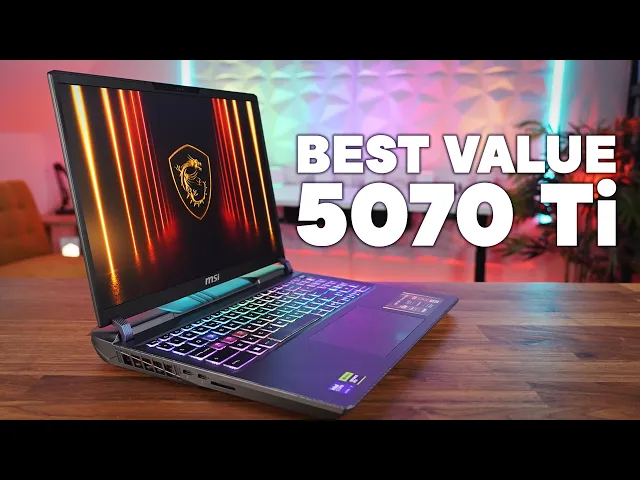
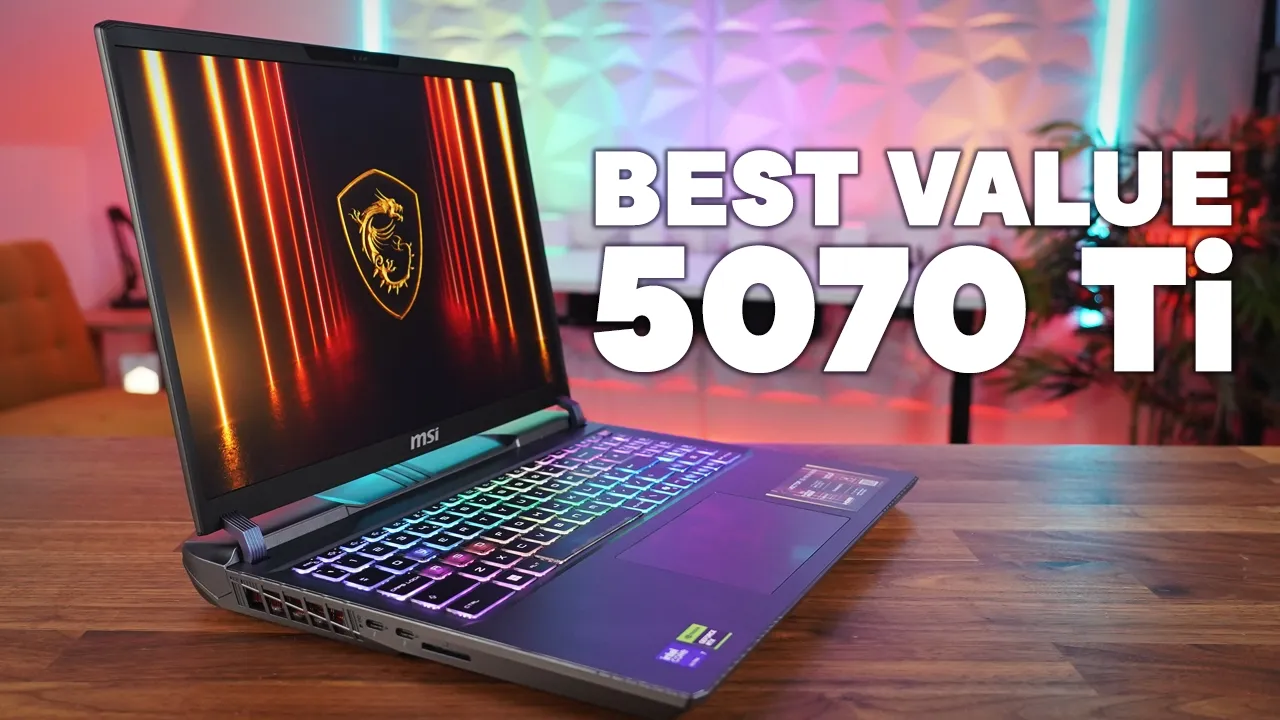
This could be the best value gaming laptop of 2025. Yes, it's not the slimmest and lightest, and yes, it looks like it was designed by a 5-year-old, but with an amazing price of just £1,699 in the UK, you're going to be getting the latest RTX 5070Ti graphics card, the latest generation Intel Core Ultra 7 processor, and a decent 16-in 240 Hz 2560x600 panel. They've even added some features normally reserved for the premium gaming laptop models.
So, grab some popcorn and let's take a look at what makes this the gaming laptop gem in 2025's rough. Hi, this is David at Mashite and today is my first 507Ti laptop on the channel and for 2025's prices, this one is actually very reasonable. So, let's take a look at the MSI Vector 16.
Now, my review unit comes with the new Intel Core Ultra 7255HX, an Nvidia RTX 507Ti graphics card, the 16inch 2560 x600 240 Hz IPS panel, 16 GB of DDR5 RAM, and a 512 GB SSD. And get this, it's actually got Thunderbolt 5, all for £1,699 in the United Kingdom. Now, the Legion that we've just reviewed cost twice as much, and that didn't even have the Thunderbolt 5.
Now, you can also choose this model with the higher version with Core Ultra 9 and 5080, but you'll be paying about £1,000 more for the privilege, but for me, this 1,699 price range is about the most I would want to pay for a sort of mid-range budget laptop. So, let's take a look around the laptop itself. So, as mentioned, this has a very gamey look.
I'm not sure who designs these laptops, but if there's anyone out there that actually likes the look of this laptop, let me know in the comment section down below because I'd love to know what you guys think of the look of this laptop itself. Pretty much the whole body is made out of plastic apart from the sort of metallic aluminum lids, but it's very solid. It's not creaky and bendy, but it does just look a little bit janky with the sort of raised hinge section, these strange colored different feet that really stick up all over the place on the bottom, and just the very overall look of the laptop.
Certainly not cheap like plastic laptops of old. So, let's see how much this actual laptop weighs cuz obviously this is a bit of a chunky boy. So, this model comes in about 2.
6 6 kg and with the 330 W power brick, we're now talking 3. 43 kg. So, there is a bit of weight to it, especially with that power brick added.
Now, size-wise, as you can see, this isn't the thinnest laptop. We also have the vents on the back, which do make it slightly longer than say something like a Razer Blade 16, but for this sort of this price range, this size is actually pretty reasonable, and it does mean having those vents is a lot better for the thermals of the laptop. Now, with regards to the ports on the left side, we have two Thunderbolt 5 ports.
Now, that is really impressive. As I mentioned earlier on, this is normally reserved for the really expensive gaming laptops out there, and even the Legion 7 that we just reviewed didn't have that. We also get a full-size memory card slot, which is quite unusual.
Uh, I actually really like that. So, if you are using this for content creation as well as gaming and content consumption, that's handy to have. Now on the right hand side we get two USBA ports and a headset jack.
And then on the rear we get a 2. 5 GB FNET port, an HDMI 2. 1 and a power jack.
So overall not a bad range of ports. Right. So opening the laptop you are greeted by the gamer keyboard.
Now once you've seen this keyboard you can't unsee it. Now functionally it's a decent keyboard. Typing was great on it, but who designed this WD keys and these cursor keys?
I think they look pretty awful. Still, the keyboard is nicely backlit with 24 color zones and five brightness settings. But on a 6-in laptop, I don't know why they've crammed these number pad on this backside.
I would have much preferred a better spaced keyboard. The trackpad down below is plastic, but it's a good size and works well and exactly what I would expect in this price range. We've also got two x two watt downward firing speakers and they sound like this.
Audio test of the MSI Vector 16 starting at 50% speaker [Music] volume. And now [Applause] [Music] 80%. And lastly, [Applause] 100%.
So there we are. That's the speaker test of the MSI Vector. Overall, they're okay.
Not the loudest speakers in the world. Not the fullest speakers in the world, but you know, for this sort of price range, I don't think they're bad at all. Also, one thing with this laptop on idle, you can always hear fan noise.
These fans never turn off. It's a constant low hum. Now, although this laptop is never silent, at least you don't get periodic bursts of fan noise where the fans suddenly ramp up when you're just say surfing the internet.
You just get that low hum all the time. Just whether you like that or not. Moving up to the screen, and I'm surprised here because on a more budget friendly laptop, they often sacrifice screen quality.
And although this is an IPS panel, it's bright. It feels incredibly responsive at 240 Hz. And that 1600p resolution is great for both gaming and productivity.
Then moving above the screen, we get a 1080p webcam, which looks and sounds like this. And this is the test of the webcam and the microphones on the MSI Vector 16 gaming laptop. Let me know in the comment section down below what you think of this webcam.
And surprisingly, it also includes Windows Hello facial recognition, something else that the much more expensive Legion did not have that we have here. So, with the tour of the laptop over, let's take a look at the performance. And this is an area that MSI absolutely excels at.
Now, they've saved some money choosing the Core Ultra 7255HX CPU, which makes perfect sense here and is a fantastic gaming processor. It has the same amount of performance cores as the more expensive Core Ultra 275HX, but sacrifices just a few of the efficiency cores, which would have no effect on gaming anyway. Now, the CPU really impresses with both single core and multi-core performance, but at the expense of power.
This CPU can consume 170 W when maxed out on the extreme performance profile. And wow, your ears will know it. When we were running the Cinebench R24 multi-core test, this laptop hit 57 dibb running the CPU alone.
Now, this is pretty uncomfortable for people around you, but fortunately, switching it down to the balance profile drops that wattage on the CPU to 80 W and gives it a much more pleasant 45 dibels. There is also a silent mode in the profile section, which the CPU is capped at only 15 W, which in my opinion is way too aggressive, as we'll see in the gaming test results later on. Now, we also get 16 GB of 5,600 DDR5 RAM, which is still enough in this day and age, but these are upgradeable RAM sticks, so you may want to change it to 32 GB or more later on.
And this laptop can also accept the newer 6,400 MHz RAM, so I will put a link to those chips down below. The 512 GB SSD is a slow Gen 4 drive. This is another area that we sacrificed a little bit of money, but it's very easy to swap that out yourself later.
And it can accept a Gen 5 drive in the primary bay. Plus, you can put a secondary Gen 4 drive in a secondary bay. The 5070Ti comes with 12 GB of GDR7 and has a power budget of 140 W.
And in the benchmarks, it gave some impressive scores. In Time Spy, we were only 5% away from the score of 175W 4080, which used to cost an awful lot more when that was released. I honestly think this could be the Goldilocks card this year for more costconscious buyers as it gives incredible 1600p gaming performance whilst costing much less than the more powerful 5080.
Whilst we're on the subject of gaming, this laptop gamed like a beast. Temps were kept in check and there was no throttling with our long-term gaming sessions. The 5070Ti managed to maintain its 140 W in the extreme mode, giving great frame rates in all of our games.
Now, if you want to use that extreme performance mode, get your noise cancelling headphones out as this laptop does hit 59 dibb whilst gaming. Now, fortunately, the balance mode came at a much more pleasant 47 dibels whilst only dropping 20 W on that GPU. I hardly noticed any drop in frame rate whilst gaming on the balance mode.
So, this was my favorite profile to actually game in. I did try gaming on the silent profile, but with that 15 watt cap on the CPU, the frame rates absolutely tanked as the GPU just couldn't be fed fast enough by that 15 W of the CPU. Now, lastly, with regards to external temperatures, this laptop never got hot on the keyboard or the palm rest.
So, this led to an incredibly comfortable gaming experience on my time with this laptop. Now, all of the profiles are controlled by the MSI Center, and I have to be honest, it's not my favorite. It's a bit slow to load and not very intuitive.
But fortunately, once you've set everything up how you like it, you probably won't bother with this software except every now and again to change the profiles. Also worth noting is in the extreme performance profile, you can actually adjust the fan curves to your own liking. And if you enjoy your hearing, it's worth spending a couple of minutes just tweaking in here.
There is also an AI profile, but I found it worked almost exactly the same as the balance profile, so I just didn't really bother with it. So, with the gaming out of the way, I want to talk about battery life. And as usual, this is Intel's Achilles heel.
Now, we set this laptop to the silent profile, Windows to power saver. The screen automatically switches to 60 Hz on battery, but with our usual battery test of watching YouTube with the screen at 200 nits of brightness over Wi-Fi, we depleted this 90Wh battery in just 5 hours and 21 minutes. Now, with an IPS screen and a large battery, I was really hoping for a lot more.
Now, performance on battery is very good in the balanced mode, but pretty sluggish when you put it into that silent mode. I also did test some gaming whilst on battery, and the performance was very good if you actually change it up to best performance in Windows, but expect just over an hour of 3D gaming. And lastly, I was surprised to see power delivery enabled on this laptop.
Very often on the more budget ranges, they don't implement it. But to MSI's credit, we've actually got PD available on this laptop. So, when plugging into my 100 watt PD monitor, I got great performance.
So, you can get by on the go without that massive 330 watt power brick. And I love having a one cable solution when I'm at home in the office. Okay, then.
So, on to the conclusion. We all know pricing of gaming laptops is getting out of hand. And £1,699 is still a lot of money for a gaming laptop.
But I have to be honest, if you can get over the looks of this laptop, it's a really solid gaming machine with incredible performance. We also get features that are not even found in laptops costing twice the price, such as Thunderbolt 5 and the Windows Hello facial recognition. There are a couple of gripes, though.
The silent profile is so handicapped, it's almost pointless. But this is something they may adjust in a future BIOS update. The battery life is the usual shameful Intel affair and the extreme performance mode out of the box is loud.
Fortunately, you can adjust the fans yourself in the extreme mode and I suggest you do so for your own sanity and the people around you. But if you feel that the premium brands are way too expensive, then this is certainly a model to consider and I've really enjoyed spending my time with it. As always, I'd love to know what you guys think of this laptop.
Let me know in the comment section down below and I will get back to you. And lastly, thank you for watching.