Hey everyone, in this playlist again here on this channel, and in this playlist, we're going to talk about something very interesting that will give your career a boost right now when we need it so much, which is to talk about artificial intelligence, that is, how to integrate artificial intelligence into our program. And to start this playlist, I'm going to start with LangChain and LangGraph here. I'll be using both with Python for now, okay? And then depending on how the playlist flows here, I'll also introduce Javascript, Typescript and we'll do this in Javascript and Typescript as
well, okay? But as I was telling you, I need to know how this playlist will flow. So I need a lot, and I mean a lot, of your engagement. Every playlist I tell you this and it always ends up being the same thing. The playlist dies because no one engages with the video and no one watches the video when things start to get interesting. So when I'm going to talk about something that's more advanced, the whole crowd disappears. So I really need you to engage with this video, like, like it, leave a comment, share it
with someone, watch the whole video so that this playlist doesn't die, so that the YouTube algorithm doesn't stop delivering this video and if it stops delivering this video, I'll have to stop making these videos and then the playlist dies and we'll talk about something else, okay? So go ahead and do all those things, like, comment, share, leave the video playing in the background, do whatever it takes to keep this playlist from dying, okay? Because I really want to talk about this with you, but if there are no views, there's no way we can talk about
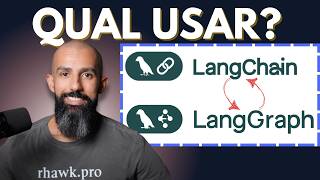
these things, okay? That said, what am I going to do? We're going to talk about integrating artificial intelligence using LangChain and LangGraph. So initially let's just see what the difference is between these two things, okay? We'll end up using both, there's no need to use both, but the two tools go very well together, so since these two tools go very well together and we're going to use both, there's nothing better than seeing the difference between the two, okay? Both, LangChain and LangGraph, are from the same company and both do basically the same thing, which is
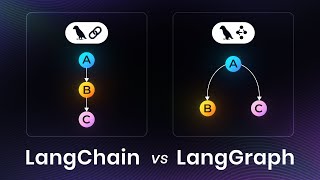
to communicate with the LLM in different ways. LangChain, it's focused on chains, that is, on chaining calls. So basically you start with step A, go to step B, go to step C, D and so on until you finish, okay? So you have basically a chain of things there that will happen at a certain moment always in that same way, okay? When you want something more complicated, for example, suppose I want something that goes from step A to step B, from step B back to step A, from step A it jumps to step C, from step
C it goes to step D and enters a loop. In these specific cases I'm not talking about chaining anymore, of calling A, B, C, D. I'm talking about something that goes back and forth at certain times. So this here, instead of being a chain, being a chain of things, we're talking about a graph, from graph theory itself. So from graph A, from node A I go to node B, from node B I go to node D, I skip a node and then I go back to node C, I can do these things using LangGraph, okay?
So LangChain, fixed steps, usually things that won't change, you won't be able to go back, in this case, you'll always move forward. In LangGraph you'll be able to do something more like this, a messy nest of things that goes from one node to another, returns to a node, goes to another node and specific things like that, okay? This allows, for example, LangGraph allows us to do things like React Agents, which are basically agents that have the format of reasoning and acting, right? It takes some steps that can, for example, have tools involved, anyway. We'll talk
about these more theoretical things a little later, so just for us to stay on the surface here for now, let's just understand this here like this. LangChain is a framework that would allow you to do something similar to what you do with LangGraph, but LangGraph was made specifically for you to do that, okay? So if you want to use the tools that come with LangChain along with LangGraph, you have the best of both worlds, the specific tools of LangChain and the Graph format that LangGraph has. And so we have these two things together here, okay?
Basically that's it, okay? I wrote a lot of things here for you to read, if you want to stop and read this later, I'll leave the repository there for you, okay? In fact, I'll tell you how I'm organizing this repository here on GitHub. So on GitHub I'll leave the link to this repository there for you and in the docs folder I'm not putting documentation, okay? I'm putting the texts that I'm talking about here for you. So, for example, what I said is here in the docs folder and I put this 001 and then 002, 003
and so on to keep it in order. So you'll follow this here in order by the number there, you can even see the text here that I'm talking about here, but the order will be maintained by the numbers there. So, for example, now we're going to start doing our first configuration and our first contact with LangChain, which is more simple to use, okay? And this is in the docs folder too. Also, this is a bit more complex, so it requires a playlist. I could make just one video, but either I'd make a very superficial video,
which I don't like to do, you know that, or I'd make a very long video, which a lot of people don't like either because I've already surveyed the channel's subscribers and the vast majority of people prefer one video at a time. That's why a playlist becomes a kind of course here, in this case, okay? So what am I going to do? Here I'm going to create a folder called src and inside that src I'm going to create a folder called examples. This examples folder, we can even do this together here, which is the following, mkdir
src examples and inside the examples folder we'll at some point deal with a specific topic. So in this specific topic I'll leave these things, in this examples folder for you to have the code for this specific example. And then when we're going to do something final, then yes I'll create something related inside src, for example, with the React Agent, or whatever name we want to give it. So when we're going to make a bigger product that will integrate several things, we'll use the src folder with the appropriate name for that thing. When it's a specific
example of something, from some class, I'll use these examples here. So now, for example, I'm creating the examples folder and I'm already creating the ex01 folder, which is what we're going to use in this first one, and I'm going to create ex02 here, which I'm going to create in this second one. I'm also going to create the following, I'm going to create src in this examples folder, 01 there, and I'm going to create a main.py for us to put something there later, and in examples02 I also now have a main.py file. So here is the
structure of my project here on my machine, right? So docs, as I showed you before, the pyproject.toml, I'll show you the README.md, it has nothing yet, at some point I'll write it, and then the examples folder, ex01, main, ex02, main, uv, lock, which should also have nothing, right? I just gave a, let me see here, yeah, there's nothing in the uv.lock, I just did a uv sync here. Since I don't have any dependencies yet, there's nothing here yet. Let's take a look at our pyproject.toml, just so you can see what it's like here, okay? This
here comes from our Python 2025 environment, okay? It's just go to Google, type otavio, miranda, python environment 2025. And then you should find a million, see? Part 4 here already, this video has four parts here. You follow parts 1, 2, 3 and 4, if you haven't used uv yet, okay? Because in most cases I'm going to use uv here for us to do our code, okay? In fact, I'm only going to use uv here to do our codes. Okay, that said, our pyproject.toml has the name here of react-agent, it was a generic name that I
wanted to put here, and that's it, nothing more here. My name, Python version 3 .13, my website here, which there would be no need to have this here, but I'm going to keep it, the Ruff configuration, but in the Ruff configuration I changed this part here from our environment there, see. What did I do? I did the opposite. There in our Python environment, I configured the rules that I wanted here and disabled some rules here. Here I'm doing the opposite, here I'm enabling all the rules, or rather, I'm working in the strictest mode so I
can loosen up, as I want, I'll loosen up some rules. For example, here I've already disabled a bunch of rules here, which are things that I'm not going to need to keep here, because I need these things. To show you, for example, I need to keep the print in the code so you can see what I'm talking about. I need, in this case here, I don't need to create __init__.py, I don't know why this exists, in this case, because you can create a namespace package in Python without __init__.py. Here I'm not going to force myself
to have to create docstrings in all functions, so I disabled the entire rule. And I also disabled the n annotation, this will be important also for Pyright, because the typing here can slow you down a lot, I'll show you here in a bit. And I also disabled the rule that scolds me if I leave commented code, because sometimes I need to leave a commented code for you to see this code. So, I disabled these rules and I'll probably disable more throughout the classes. Coming back here, talking about Pyright, the only other thing I changed was
the following, I'm keeping, every time I'm working with LangChain and LangGraph, I'm keeping the type checking of Pyright as standard here. Why? And sometimes even basic. Why? Because I was noticing that I'm spending much more time with typing than necessary. And then I spend more time doing typing than doing code and it slows me down a lot. So, so I don't focus on typing here, I'll leave it either in standard, at some point I might even go down a bit to basic, instead of keeping it in strict, as we have done in several classes on
this channel. So, that's basically what I changed here. The rest is all the same as what's in our Python 2025 environment, follow it there, I explained all this here nicely there in those classes there. Okay, that said, when I have this ready here, I can do uv sync here and that's it. And then I already do the build here of my project and that's it. And then my virtual environment has also been created here, it's all set up nicely. Now, another thing is the following, I left the .env file created there, let me delete it
here. I deleted the .env, okay. So, this is what we're going to need now, the .env. Why? When we're going to work with LLM, at some point you'll have to call some LLM, okay? Whether it's from Google, from OpenAI, from Anthropic, any of these, you'll have to call them. And they require an API, okay? What I managed to do here for us? And this sounded like an ad, it's not an ad at all, I've never done an ad on this channel, you know that. But coming back here, it's the following, I have Ollama here, which
I've already made a video about on the channel, you can take a look, I left the link here for you for this video too. And on Ollama you can run LLM locally, okay? And then you can choose the model of your preference there, take a look at this video here. But I know that not everyone will be able to run Ollama locally on their machine. And also that we know that these open source LLMs have a very small context window, they are not usually as good as the LLMs that you pay for, right? For example,
Gemini, I don't know, it has even changed this, now there are smaller and better LLMs coming out, but still you'll want to use some other LLM at some point or you won't be able to use Ollama. If you can use Ollama, I highly recommend it, just stick with it, because after you do all your tests, you'll just have to change the model you're using to a paid model when you need to, you won't need to touch the code. Although the output of some models is a bit different, but usually with LangChain and LangGraph you have
something more similar for all of them, okay? So if you can use Ollama, use Ollama. If you can't use Ollama, the only free API I could find here was Google AI Studio. Why? You can even use things from OpenAI or Anthropic, I even saw somewhere saying that there's some free tier there, but I couldn't use anything free there. So when you create an API on Anthropic or OpenAI, you'll have to put at least 5 dollars, at least 5 dollars of credit on the API for you to be able to make requests, otherwise it will deny
the requests here, I tested this before. Now, this one is the only free one that works, so this is it, I'm going to create this here with you. For example, I left the link there for you, the repository you already saw where it is, it's obvious, but you go to this link here, in this case, aistudio.google.com, and then go to Get API Key, down here, it took me a while to find, and then on Get API Key it will be this link, if you want to try to go directly, API Key here at the end.
And then here, you'll have Create API Key, and then you create your API key, you can see here that I'm on a dummy account, there's nothing here, so I don't have a project, I don't have anything from Google Cloud here. So, in theory, you see that here I had already created an API, I deleted it, but if you don't have one, there will be a button here in this case, saying that you want to create something without a project, something like that, you can go there and create it. So, for example, here I'm going to
choose any of these here, because it was already there, but you'll have the button to create without a project too. So, I'm going to choose this, I'm going to create my API Key, I'm showing you, don't use my API Key, it's like saying, use my API Key, look at it here here, I'm going to delete this API Key after I record this class here, just so you know, but I'm creating it here, you should never show this to anyone, I'm showing you that I'm going to delete it after I finish recording this class. You're going
to copy the API Key, and then you're going to do the following, you're going to create a small file in the root of your project, which will be a .env. This .env, you'll create the names that I left there for us already. So, let me close this, this here too we can close, and here below, I talked about what I talked about with you here, about the free APIs and the paid APIs, if you want to use them, but here below, I left this here, the names of the environment variables. It's obvious that we're not
going to use all of them, I, for example, I'm going to use more of the local Ollama, and at some moments, just to test, if everything is matching with Ollama, I'm going to test Google here. So, I'm going to put only the Google value here, you put only the value of the one you need here. I just lost the value of my API Key, and I don't feel like looking in the regs, I don't think I even have it here, because I copied it externally, but let's go, I'll copy it here again, okay, now I'm
going to paste this here and that's it. And so, I'm leaving this here like this, just for us to see this here at the end, but as I told you, I'm not going to use all of them, so I'm going to just leave it here, this is the Anthropic API Key, you can delete this, right? And here below, I'm going to copy this, I'm going to paste it and I'm going to change it to OpenAI Key, there. So here, why am I doing this with you? Because you'll need to load these environment variables, if you're
going to use one of these here, so just for you to see what this would look like, okay? So there in our, I think I already created these files, right? Yeah, I already created them there, there in our first example, let's get that X01 there, so it's X001, I'm going to open this main, and here I'm going to try to load my environment variables, okay? How could you load your environment variables? You could install a package called python-dotenv and use this package, but that's not how I'm going to use it, I've already talked about this
package here on the channel, I don't remember in which video it was, but I've already talked a lot about it here, I talked for half an hour about this package here, but this here loads that .env file into the environment variables of your system, okay? But uv has a way for you to run here, which is uv run, and then you run it like this, pass minus minus env-file equals the path to your .env file, and then you run there, for example, the file you want. In this case here, I'm trying to run the main.py,
in which file I haven't done anything yet, right? So there in our code, I left an example here below, of how you run this here, loading the .env already, and here how to see if it's working properly. So here, let me paste it there in our code, import this here, why is this file without highlighting? Huh, strangely the file became... Oh okay, I left nil, came and I'm going to enter again here, okay. So here, I'm going to do the following, if everything went right, I'll either see the value of the API key, or I'll
see not configured. If I see not configured, it's because it didn't work. If I see the value of the API key, it's because it all worked out. So coming back here, let me run it again there. Running, let me clear the terminal here, okay, clear. And so, look there, running, you can see here that the values came here at the very end. So that means, uv is already loading the environment variables, I'm already able to read them inside the project. So wonderful. What do I need this for? Nothing. If the environment variables already have this
name, are already loaded, the LangChain itself will do the work of loading this here for us. Okay? So what can we do here now? We can start by understanding what we're going to need to use for this here, okay? When I'm working with LangChain and LangGraph, here I'm talking specifically about LangChain, I'm not focusing on anything from LangGraph, just for us to have a hello world here from the LLM. When I'm working with LangChain, what can I do? I need to first, actually, I think we haven't done this yet, right? We need to first install
the packages, I ended up skipping here, okay? I was going to write the code, but I forgot to say this here, okay? And this here is a very important part of the version here of LangChain, because what happens? At this current moment, we have this huge message here in the documentation of LangChain and LangGraph as well, which is saying, look, these documents will be obsolete and will no longer be maintained with the release of LangChain version 1.0. And then it says here at the end, click here to see the 1.0 alpha. And the alpha will
have a huge message saying this, the LangChain v1 is under active development and is not recommended for production. So, I chose to talk about the newest documentation, especially since it will be released in October 2025. So, I'm going to focus on this alpha here. And so, for us to install an alpha package, it changes a little bit the way we install things there, okay? And that's what I want to show you here. So, for us to install what we're going to use throughout these classes, you'll have to know which provider you're going to use, that's
why we talked about getting the API Key before doing this here. Why? I got the API Key from Google, so I'm going to need the google-genai package. There are other packages related to Google, which release models from Google Cloud, in that case, from Gemini, but this one will already release the Gemini for us, so google-genai. And I'm also going to use Ollama, so I need these two packages here, okay? Just by installing one of these here, you'll already see everything you need here for you to use LangChain. So, let me show you with Ollama here
for you to see, just so you know how you can check this here too. So, I'm going to paste it there, and then notice this here, this "-u", it will upgrade the package if I already have it installed. And this "--pre", is what will bring the pre-release version here, which is the version 1 alpha that we're wanting here. So, when the alpha version is already the official version, that is, you already have LangChain in version 1, you don't need to put this "-pre" anymore, here at the end, okay? Otherwise, you'll be downloading even higher versions
than are not yet released. So, okay, now we need the "-pre", because we don't have the official version 1 yet of LangChain, nor of LangGraph, so we're going to need these things for us to learn the newest documentation. Okay, that said, I was telling you that now, after you install, you'll have everything you need. You just have to check there in your uv.lock, you'll see that there will be a bunch of packages from your uv.lock there, and at some point you'll see something related to LangGraph, or the package, here look, LangChain. So here look, this
here look, LangChain is already installed, and so along with LangChain we got here at this moment of installation version 1.0.0 alpha 6, wonderful, if it's higher it's not a problem, if it's not alpha either your version is even better. Okay, but it has to be version 1. Okay, we also got LangChain_core, which we need these things, LangChain_text_splitters, we also need these things, LangGraph already came, and Pydantic also came. In addition, we also got the langchain-ollama package, which will allow us to start ollama models locally here on the machine. So, that's what I wanted to show
you, just by installing one of these here, you already have all of them there. Now, I'm going to install more of them here, but I could do this all together too, if I wanted, okay? For example, if I wanted to install ollama and google-genai here, to have access to Gemini, I could do it like this, this command here, instead of just ollama, I separate by comma and put google-genai. And then comes the ollama package, plus the Google Generative AI package in that case, which is the Google SDK for us to use these Gemini models there,
plus some other models as well. Okay, and if you wanted to run everything at once, I even left the command here for you, for you to have Anthropic, OpenAI and so on, okay? I'm not going to, as I told you, I'm not going to use Anthropic or OpenAI, because I don't want to keep paying for this here either, right? Because the classes are free and so on, but you can use any model you want. Okay, and so, after we did that, our dependencies there from pyproject.toml, in my case, ended up like this. I have LangChain
and then I have google-genai, in the version there that I showed you, greater than or equal to 1.0.0 alpha 6. Just this here for now, okay? At some point I'm going to put rich here, I'm going to put more things here, but for now it will be enough for us. Now it's the following, I told you, right? That I'm going to keep the examples from the classes in this format here, right? In the src folder slash examples and then it's x class number, 01, 02 and so on. The one we're going to do now will
be 01, I'm also going to do a 02 with you here, okay? But as I commented here too, I hope not to go past example 999, but if I do, I'll be very happy with the engagement of this playlist here, okay? But I hope not to go past example 999 here with you. That's why 001, 002 and so on, okay? And so here I even left a link for you to go to the file as soon as we create it, you can already go to this link and click, you'll land on the correct file there
inside GitHub. Okay, and then also I'll show you some interesting messages here for us to use, okay? But that said here, let's go test our project here. So I can close this here, this example 01 is what I'm going to use, I can close this here, the example 01 is this one. So let's go, what are we going to need to do here initially? When we work with our LLM here, usually you'll need to instantiate the class of the Provider itself. For example, if I'm using GPT, I have to instantiate a class called chat.openai, something
like that, and then pass its configurations here. If I'm with Google, it will be chat.gener... let me see here that I don't remember. So here I would have to import like this, import from LangChain .chat, I'm going the wrong way here, from langchain.google.genai, import and then chat this here. And then this here I would have to put here like this, for example, my LLM is chat.google.something, like this, and then I would configure it here, okay? But the LangChain, the beauty that I find in these LangChain things, is that it already thinks of some things that
really make life easier. Sometimes they think of things that make life so much easier that I think it's bad, for example, I'm not going to follow this tutorial that's here in this quickstart documentation of theirs, because there's a lot of magic happening here, okay see? This here, create agent, will already obfuscate a whole lot of things that we're going to do here manually, so I don't want to use this here now, okay? That's why I'm telling you that sometimes they do things that make life so much easier that it makes things obscure, it becomes magic.
So I don't want to use this here now. But what do I want to use? I want to instantiate an LLM without depending on the provider itself, I'm going to depend only on the name that I chose here. How do I do that? I can do it like this, LLM equals, and then, where I was importing this here before, it was like this, from LangChain .chatmodels import init_chat_model. And so this init_chat_model, init_chat_model, it allows me to do something very ingenious, because now I can put, I could, if I want, I'm not going to do this
now, but I could put the name of my chatmodel in my own .env and configure it from there without touching the code. So this here is basically an adapter that will choose, they say infer, okay? So it will infer which provider you're going to use based on the name you use here. For example, if I want to use an OpenAI model, I'll type openai, colon, the model name. If I'm going to use Anthropic, it will be anthropic, colon, the model name. If I'm going to type, use, for example, Gemini, it will be google-genai, and then,
Gemini, I don't know, 2.5-flash. And so this is already the model, it will already instantiate, let me show you this here. If I print the LLM and type LLM, let's see if we can see, I haven't tested this here before, we'll see this in real time together. So here let's run the main.py file. So running it here, we have the following, this warning is appearing here and I had already noticed that this part of Google is showing this warning. I'm not going to worry about it, because this here is a warning from the C libraries
there from Google itself, C++, for example. But here, look, it already loaded the model models/Gemini, 2.5 flash, etc., look at which class is being used here, LangChain, google-genai, dot chat models, the one I showed you before. Did you notice that it already adapts, look, if I come here now and put, for example, ollama 2.gpt-os 2.20b or 120b, whatever, if I run this model and run this here, look there what was the class used, LangChain, ollama, chat models, you see that it already imported, already instantiated, already did everything for us. So I think it's much better
to use this init -chat-model, then we can go to those create agent magics there that are in the documentation, but I think it's much better to start with this init-chat-model here now, because this here will make your code less coupled to the model you're using. I don't need to choose a specific model. Now let's go say a hello world to our LLM. So, in this specific case, I'm going to say the following, I want a response, so response, and then I'm going to say, I can use several methods that we're going to look at throughout
the classes, I can do stream, I can do stream of events, I can load sync async, the best way for us to use this here at this moment is a synchronous code, so invoke, is here that I'm going to call, so invoke, actually, I have to call here the LLM, LLM.invoke, and then here what am I going to do? Pass the message that I want to send to the LLM, hi, hello, how are you? Let's see what we get back, so print response, let's run it again, and I loaded a model of 120 billion parameters,
which has, I don't know, 65 gigs in size, the time it took to respond here, but, look there, we have here a content, hello, how are you? All good, and you? And so, how can I help you today? And so we already have our hello world here from our LLM. You see that this message here is very difficult for us to debug this here, okay? There's a thing called LangSmith, there's another thing called LangStudio, that you can use, that will make your life easier at some point, I'll show you these things here. But at this
moment I want roots, I want us to see this here. So we're going to do the v, a of who? rich, rich will give me a print, so from rich import print, and then Ruff will complain and we'll disable the rule A001 there in pyproject.toml, because there in this case, I don't remember what this rule was here, but I think it's A001 or 4, A004, because I'm going to need this here, right? What was the problem? Import print shadowing. So let's put shadowing python built in, just that, shadowing python built in. So now, in theory,
I hope that rich doesn't complain anymore with me. Did I save it there? I did. Yeah, it didn't do anything, so let's reload the file here, okay. So there, now we can see our output in a way that is visually easier to read. So here, look at what we got as a response. AIMessage, content, hello, how are you. What is this here? It's the response from our LLM. So, that one, that one, the Ollama, chat of 120 billion parameters there, responded this here, this is the AIMessage, here came the content, hello, how are you, thank
you for asking, how can I help you today? Okay, and then came the data from the model that I used, the date, and then comes various metadata here that you can use, including the number of tokens that you are using, in this case, for this message. This will be much better in LangGraph. Here, in this case, I'm going to do most things manually just so you understand how this here works. Okay, what else can I do? Because I just sent a message, the LLM answered me and that's it, conversation over? No, and so it was
here that LangGraph would come in, but just so we don't talk about too many things in one class, I'm going to do things manually here with you. So I'm going to copy this code and go there to our example 002. 002, here is our main, I'm going to paste this code here just for us to have it, and here is our example 002. Before commenting everything, I'm going to comment these things that I did here for you to have all this commented nicely in the repository. I'm going to close these things here, this here too.
So here, what I can do? Look how interesting, you see that I started my chatmodel with Ollama, and then I told you that I could change to google-genai and change this here to GEMINI 2.5-FLASH, and then do the same thing, and I expect to receive the same response. Look there, the same response... No, in this case I'm running the other file here, let me change to 02. Look, that little warning there, but look there, here you see that I have a relatively different response. These things are important because, if you're depending on several things in
this output, you might break your code, understand? Because each model will have its own specific thing. Although it's very similar, having the content here is more important to me. But look, here I called the model that it didn't tell me what the model is here, you see? Here yes, model name GEMINI 2.5 -FLASH, here's the reason, something about safety, that you can configure this in GEMINI, anyway, there are some things here related to the model. You see that I only changed the model name, my code continues to work perfectly. But that's what I wanted to
show you before, but the problem I'm having here now, that I haven't told you yet, is that my chat has no context of the messages I have. And notice one thing here, notice that this message, AIMessage, here, it's important for us because of the following, if I come here and check what this invoke method of the LLM receives, look at what it receives in the INPUT, which is the first parameter that we're passing, LanguageModelInput. If I follow the LanguageModelInput, you see that this is a Union that can be a PromptValue, it can be a STRING,
which is what we were passing, or a Sequence of MessageLikeRepresentation. What is MessageLikeRepresentation? If I go here, I have a MessageLikeRepresentation, which is a Union, that can be a BaseMessage, a list of STRING, a tuple with STRING STR, a STR, a dict STR N, or a MessageV1. What is MessageV1? If I go here, I have, now I found where the AIMessage is, it's the MessageV1 there. But if you go to the AIMessage, you'll see that it's a class, no, I thought it inherited from BaseMessage, but it doesn't. So, coming back here to our AIMessage, we
have AIMessage, AIMessageChunk, this is for STREAMING, we'll see it later, and HumanMessage, this is your message, SystemMessage, this is the message that the system sends to the AI, and ToolMessage, which is a message that the tool you create will send into the AI, for it to read the result of that tool. So let's go back there, for us to create our own structure. So I have the SystemMessage, this SystemMessage, we're going to import it from there, from langchain_core.messages, and then this is a class that I'm going to pass into it the system message, like, you
are an assistant, let me get a PROMPT that I already made here, which will be faster for us. Look, a huge text here, but for you to see what this here does, in this case. This SystemMessage is a message that we want to send to the AI as a PROMPT for it to behave differently, okay? So I want the AI to behave like, I don't know, a stuffed animal. I'm going to say that in the SYSTEM PROMPT. I want the AI to be this case here, which I just took as an example for you to
understand, okay? I want this AI to be this here, you are a study guide that helps students learn new topics. Your job is to guide the student's ideas so that they can understand the chosen topic without receiving ready-made answers from you. Avoid talking about subjects unrelated to the chosen topic. If the student does not provide a topic initially, your first job will be to request a topic until the student informs you. You can be friendly, cool and treat the student like a teenager. We want to avoid the fatigue of a rigid study and keep them
engaged in what they are studying. The next messages will be from the student. So, this here, how do I inject this into my LLM so that it behaves this way? I come here and create a MESSAGES, okay? This, I'm doing these things manually, okay? There in LangGraph, many of these things are done for you automatically, okay? So, this here is just for us to see how these things work. So, here in this System Message, this list here, I create a MESSAGES, which is a list of messages. Remember we saw this here? Here in the typing,
that's why I like so much to go to the thing itself that I'm importing here and see how this typing is. Because this is what we're putting there, look. Sequence MessageLikeRepresentation. And notice that this here is a Sequence. We saw there in our playlist, you guys let this playlist die, my God. Our Type Hints playlist, we talked about Sequence. Sequence IS READ ONLY, so we don't want to change these messages here. So, coming back there, we're creating here a list, a Sequence, actually, of MESSAGE LIKE. And so, inside these messages, we could put our own
message here. Hello, how are you? But this here is very strange to me, because what happens? I'm going to take this out of here, I'm going to put MESSAGES, there. This here, to me, is very strange, because, look, I have a System class Message here. What will this generate? Depending on the model, it will generate a role, so that this message gets there to the LLM as being SYSTEM or developer or something, it depends on the model. But this here will get there to the LLM and it will know that this message is not from
the user, it's from the system. And this message is for it to behave this way. It doesn't always work perfectly, but, even so, we still use this here, okay? But a SystemMessage will arrive, but now I want all messages to arrive in this format here, because, pay attention to the LLM's response, it doesn't come as AIMessage, I'm not sending here to the LLM SystemMessage, I want to send my message as a STRING, it's going to be very weird this here. So, here I'm going to have a HumanMessage, and this HumanMessage here will be your message,
that is, the message that the person sends to the LLM. So, hello, how are you? Let's see how Gemini will behave now, when I send this message here, because, theoretically, it would have to follow this here, agree? Let's see, I don't know because I was testing with Ollama before. So, here, HumanMessage sent, and here we are passing MESSAGE, and below we get the response again from the LLM. Then we embed this response from the LLM in the MESSAGES, and then we can continue doing this forever for us to have a conversation history. So, coming back
here, running, let's see what it will say. What's up, how's it going? Everything's cool over here? Awesome that you came for us to unravel some mysteries of knowledge. What's the deal today? What topic is keeping you up at night? Or making you super curious? And we're going to unravel it together. Let's do it! You see how it changed its behavior completely based on what I sent it? So, this here is super powerful for us here, okay? Now, if I want to continue talking to the LLM, there's no way I can do this here, okay? So,
let me get. I made a loop here infinite, okay? Manually, handcrafted, because LangGraph already has these things for us to use, but just for you to have a dopamine rush there, in this case, and make your own LLM, I made a code here. I'm going to paste it here for you to see, okay? Just so we don't have to type this here, because it's not very important. So, look here, everyone. What did I do here? I copied the entire code, it ended up coming with a different model here. Let me change it back here, look.
google-genai, Gemini 2 .5 Flash. Okay, we changed the model. Here I left the comments, okay? Because I had left this as a cheat sheet for me to follow here in the classes, as you know, right? I have the cheat sheet here. I'm not doing this from my head, because otherwise it gets very messy. So, here is the same prompt. Here I left the comment about the HumanMessage, in that case. Here I already sent the first message. Here I did the same thing I had done before. First, SystemMessage, then HumanMessage. Then I got the response from
the LLM and printed a bunch of lines, 80 lines, with AI in the middle. Just that, basically. And here I got the response, but I already got the content here from the response, okay? For me to see only the text. I didn't want to see any metadata there. So, in response content, we will have an AIMessage in this context, because this changes depending on the method you use here. In invoke, in ainvoke, the stream, a stream and so on. We'll see that later. So, here we can also do an infinite loop and simulate these things
here artificially, okay? Because it's not necessary to do this, because LangGraph does what I'm doing. Message.append and putting the response from the LLM here, LangGraph does this in the state of the node that we're going to use, okay? But just for us, since we haven't touched LangGraph yet, just for us to have a conversation history, here I'm putting the response from the LLM back into the message and I'm doing an infinite loop. In this infinite loop, I get from the user's message again through an input. So, in the first loop, it already stops at the
input waiting for me to type the message. When I type the message, I create a new human message with the user's input. Once this is created, the first thing I do is check if the user typed exit, quit, bye or q, because then I get out of the loop, otherwise it will stay here eternally, okay? So these are the words to end the loop or to exit. Then, I add the user's message to the messages and then I call the LLM passing the entire conversation history that we've had so far. This will include the system
message up there, the first human message up there, the response from the LLM that I embedded here and then this new user message that I embedded here, so I'm putting all this in the list, now I send everything to the LLM and then I do that print of that header with AI and a bunch of dashes and the response from the LLM. And then I embed the response again from the LLM in the messages and then we go back to the beginning of the loop and do this whole part again. So I'll always be increasing
the context eternally. It may be that if you have a very long conversation here, you'll always send the context again, the entire conversation history again to the LLM. If you're paying for an API here, be very careful with this. That's why I like to use Ollama or something free here so I don't have this problem, because at most with a free Gemini API here, I'll hit the API limit there and that's it. But let's test this here. Let me run it now and so I'm seeing this annoying warning here, but look there. And so, remember
I sent an initial message to it here? Saying this here. Hello, my name is Luiz Otávio. This was the first message after the system message here. So, hello, my name is Luiz Otávio. And then it answered me here, which is what you saw, and here I embedded the LLM's message here in this message. And then I entered the loop and landed on this input here now. So at this moment I'm on this input. Coming back here, what is it saying? What's up, Luiz Otávio, how's it going? Awesome to meet you so we can get started.
How about... What's the vibe... My God, the Gemini turned into a bro here. What's the vibe that you want to learn today? Send me the topic and we'll figure it out together. I would really like to learn about white holes. Could you tell me? Tell me something about it? Is it the opposite of a black hole? There, and now we're already entering a mega scientific mode here. Nice, Luiz Otávio, white holes is a super cool topic. I love this stuff. And so... Ah, I'm not going to keep talking to it here, but this question you're
asking is the key. Is it the opposite of a black hole? That's a very good insight to start thinking. So tell me, what do you already know or imagine about the black hole and so on, the white hole and so on? You saw how the Gemini behaved, right? It changed its behavior completely here, right? Now I'm going to... Let me change the model just for you to see. Oh, okay. Another thing that I had done here and forgot to say, okay? I left, I gave a q there and look what I put here for us.
For you to look at this here, see the history of conversation that I put here? History, and then there's the system, and then it says that message that I passed, then comes the human here, then the AI, and then comes the whole conversation history. I wanted to put this here for you, because in LangGraph, we have more or less this here as a state there, when we configure the LangGraph, okay? So this would be basically our history there. This history I put here at the very end, okay? How did I get it? I did a
list comprehension here in messages, and so in this messages, I got the type of the message, this type, it will be this here, for example, or human, or AI, or system, or tool, whatever you put. I got this here at the beginning and I got the content. And then I displayed it there, putting at the top there that history. Wonderful, but let's, as I told you, let's change... What is this, guys? Oops, what did I do here? There, now it's right. I was in tmux mode here, copying and pasting, from the buffer. But coming back
here, let's change so you can see that any LLM that you put, it will behave. Of course, each LLM is one, but any LLM that we put here... I'm going to put now the GPT -OS, GPT-OS of 20b, just to be smaller, it loads a little faster here. But, look, I'm going to put the GPT-OS and I'm going to run the same query. And then let's see what its first response will be here. Look, hi Luiz Otávio, how are you? What subject do you want to learn today? It can be anything, math, history and so
on, music, what interests you. Then I'm going to tell it the same thing. I would really like to learn about white holes. Are they the opposite of black holes? Let's see what it will say. It's typing a lot of things, because you see that it's taking a while? Later we can put a loading there, or do a streaming of each token that it's typing, but that's much later, in this case. It typed a lot of things here, look. If we look here, look at the size of the response. I'm not going to read all this,
okay? But look there, hey Luiz Otávio, cool that you want to dive into the hole of white universes. It's a topic that... This here is what I find strange, I don't know why this happens, I don't know if it's my terminal or if it's it that's responding. But sometimes it types some things... It's my terminal, it seems. Apparently it was my terminal's problem, you saw that it was strange? But look there, look, it gave a huge response, then it, as I asked in the prompt for it to make the person think, notice that it doesn't
give the answer. It says, to assemble a study plan, I need to understand in practice. Do you already know, and so on? General relativity, math, quick task, answer the questions and so on. Question 2, and so on. See that this here is also Markdown? We can display this here nicely with rich Markdown here inside, or even with textual, or with something else you want in the terminal itself too, okay? We'll see that later too, if you engage with these videos, okay? But I'm going to do the following, I'm going to end this class here like
this, and I'm going to leave you with this chat for you to play with it. Always remembering, I'm going to commit this here now, to show you how it will look in the repository. There, I committed these classes. So, in our repository, how should it be here? We should already have the src folder. Look, we have the src folder, for now it has only examples, because we haven't done anything big yet. But here we have example01, I already put comments in the example01 file, with everything we did, everything we talked about, okay? I also put
it in example02, here for you. So, all these things that I'm showing you, will be available there in this repository for you. And if that wasn't enough, I also have docs, and in the docs I put a link to these files. So, if you are, for example, in this doc here, the second one, where we are talking about doing this configuration, it has everything you saw before, and below, I'll finish, but I won't put code, I'll link you the file for you to come to this file. If you want the other file, it's here below,
where we talked about these messages, here for you to understand this here, okay? And then, always remembering for the members of the channel, this is very important to me, okay? For you who are a member of the channel, a quick chat here with you. Go ahead and leave what you thought of this type of class. Do you want it like this? Do you want it faster? More superficial? More in-depth? Anyway, just leave it for me to regulate the thermometer of how I do the classes. Okay? So, I'm counting a lot on your help too, you
who are a member, for us to make the best course possible, because you can already watch these classes in real time, and already tell me so I can adapt in the next class, okay? So, that said, in the next class we'll continue, maybe we'll already be talking about LangGraph right away, right?