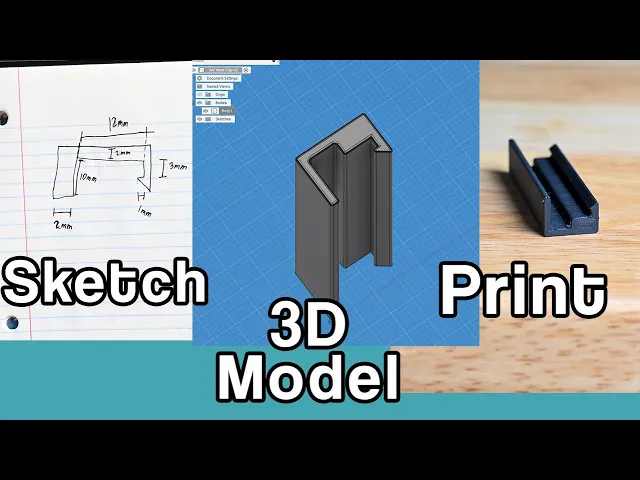
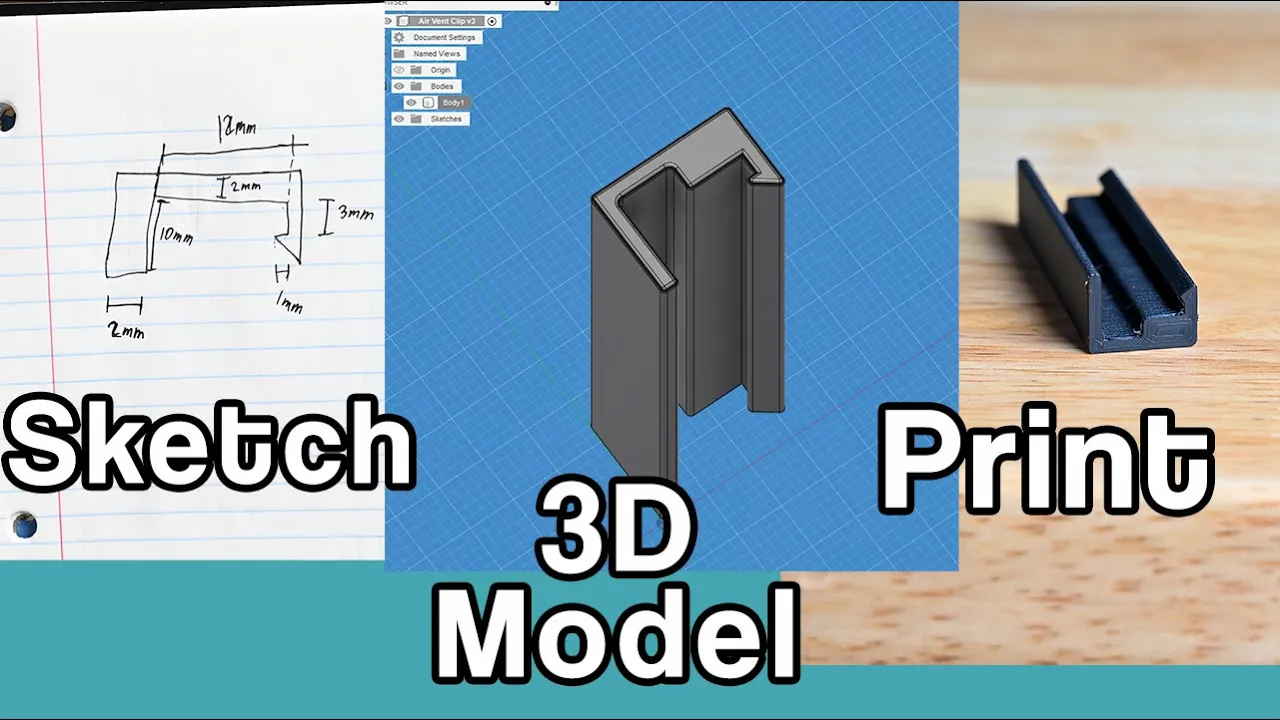
what's up everybody jj here and today i'm going to be taking you through all the steps of taking your printer from a fun toy into a useful tool we're going to be creating your first functional prints i know when i first got my 3d printer i just kept creating things that other people designed the internet is full of great designs out there for a lot of specific use cases or for example if you have a pegboard like this one and you need pegboard mounts type in pegboard mount 3d print model and you'll find so many amazing prints made from amazing designers but there's a certain point when you want to go beyond what other people have created and make something special and unique for you and today i'm going to be taking you through all the steps from deciding what you want to build designing it sketching it out 3d modeling it then printing it and probably revising it a couple times we'll see how many times it takes but don't be discouraged if your first print isn't perfect we're going to start with something simple and i'm still going to revise it several times along the way so let's get right into it there's two simple designs we're going to create today the first one this is for the air vents that are on the floor of our house they were here when we got the house and i don't know the exact model i can't look up things for it but our recent puppy named aydah she has some great pyrenees in her and loves to lay on these air vents when they're blowing cold air but one issue is it's really easy for her to bump this switch and then it closes it and no air comes out so i want to create a simple clip that will clip on here and hold this switch over keep the air open keep it blowing on her the other design is also dog related our dishwasher we can't leave the door open there to keep the steam and all that moist hot air out of there because she likes to step on the door and i think as she's growing she could break the door with her weight so i wanted to create a simple clip on the top that will hold the door slightly open to let some of that moist air out so both of these are fairly simple designs and makes them perfect examples for functional prints so for tools you are going to need some sort of measuring device a ruler will work it's really nice to have a ruler with millimeters on here millimeters are going to be a bit more accurate for small pieces like this or a digital caliper these can be purchased pretty cheap online it's not an amazing precision one but it's fine enough for my work the next thing i would recommend is something to sketch on i use a notebook and a pen super simple to draw it out you could use a post-it note the back of a piece of paper this is going to be a fairly simple sketch so looking at the kind of shape i want i'm going to create a two-dimensional slice of what i want so let me just give it a rough sketch and you don't need to be a great artist to do this we're going really rough here i'm thinking two millimeters thick on all the walls and then you pull out your calipers and you can measure how long you want it and some of your distances i can't get this down in there to measure it exactly so i can kind of guess what i want and then dial it in here hold them up next to each other and thinking will this size work there and draw out the rest of your dimensions some of these dimensions i really don't know some of these the hook on here that will latch onto the piece of metal i'm not sure exactly what will work i'm going to start with one millimeter if you need to up it in the future it's really easy to print another one this piece is going to be so small i bet it'll take 10 minutes per print that's super easy to revise i'm not going to beat myself up over these tiny numbers here's our example sketch of some of our dimensions that's just to show you that it really doesn't matter how accurate is or how good it looks just so you can look at it and know exactly what you want to model later and where these dimensions line up then that's exactly what you need i might use a ruler and some graph paper for that but for this i think a rough sketch on notebook paper should be fine and now it's time to take this two dimensional sketch and 3d model it on a computer as we head to the computer i'm going to get the measurements for the dishwasher hook and that's the same method here but on a different device so we don't need to see that so we're going to be doing the modeling in fusion 360. there's several other softwares you can use but i think for simple functional prints fusion 360 is great especially for this one we're doing right now and since fusion 360 has a free version we're going to be using it today so as soon as you open it up it should look like this you can change the color down here under environment settings i leave it on gray room because i like it a little bit darker but not too dark i think dark sky a little too dark so we'll leave it on gray room so now that we have these sketches ready these are gonna be so important we just need to get these into the computer so you'll start off by creating a sketch up in the top left corner create the select the plane you want to build it on so we're going to build it on the x y flat plane open it up here we're going to do line to start drawing out what we want for something like this let's just start at the origin so start and kind of just start drawing out the rough shape and the size really doesn't matter the angles can help if you start doing it in right angles right now but you can easily you can go through and define things as the next step so now that we have the rough shape drawn out let's go through and start defining things use this sketch dimensions to start constraining sizes of things between here and here this will be three millimeters i haven't defined this let's make it one i want the size of all these walls to be two millimeters so to find that here this one and this point let's try two or you can kind of change it around to see what looks good this dimension doesn't change the functionality of it it's more what size looks decent from here to here we want this thickness to be two from here to here we also want as two and then from here to here we want that to be 10. now whenever you're done sketching out your dimensions go ahead and hit finish now we can go and extrude this the middle mouse button is how you kind of track move around and shift middle mouse button lets you track ball kind of three dimensional move and so you can either drag it up or type in how far you want let's try 10 millimeters hit enter then go through and put a fillet on everything as i'm looking at this it's way too long that's a dimension i forgot to put in and if you forget to put a dimension in you can easily go back down here at the bottom is your history go back down to that first sketch you made double click on it it thinks we're still working on affiliate so cancel your current operation double click on the sketch this re-enters your sketch mode so now we can add it define this to here up here yeah that was way too big it was a dimension i just forgot to put in hit 12 and that takes it to where you want then hit finish sketch and it carries it forward it carries those changes you made forward into future changes so for example this extrude now works with those new numbers to extrude a new shape which this is a really powerful part of fusion 360.
if you're 15 20 steps down the line and you go back and change your dimension it carries through all those operations so for big projects that can be really useful now a big part of making this look really nice is adding a fillet or chamfer fill it is kind of a rounded edge chamfer is a sharp edge but for something this small i think a fillet will work good so go through and select the angles you want this fillet to be applied to there we'll do here here and the last angle this is a small print so let's try half that looks pretty good so now let's fill up the entire top and bottom angles that edge the entire bottom edge let's try if we can do one no see we got an error that one would mess with some of these angles up here let's do a half that also had some errors point three maybe there we go that's a good looking first shape now we can take this to 3d print go to the file and 3d print it opens this window to select your parameters you have to select the body you want to 3d print you can select 3mf or an stl file i'll do 3mf keep it on millimeters refinement i just keep hi and click ok and you can name it down here this is our air vent clip we'll name this v1 just expect you're going to revision it a couple times especially with something as small as this i'm just going to try it out i don't perfectly know if this will work but it'll take 10 minutes and barely any filament to print so we'll try it out see if it works and come back now you can open your slicing software i use cura open that file let's move it to the middle of the plate slice it up it'll be ready in five minutes now let's go see that print so now i'm back with the first print done and it works decently well but there's definitely some things i'd like to change for version two so i didn't notice until i put this on here that the tab sticks out a little higher than the face plate here so when i clip this on it rocks back and forth because it's not on a flat surface so i think i can build up one of those surfaces to make everything lay flat the other difficulty here is that it slides up and down so i think if i made it as long as this track here it wouldn't wiggle in that direction i also think increasing the edge of this little hook on the tip so we're gonna do all three of those things with our version two so let's go back into fusion and i want to edit this first sketch so when you go through and delete some of these parameters you can right click click delete to delete those delete delete so we really want this whole side to be 10 millimeters this size i'm gonna bump up to two millimeters these two let's make some three but i want to add a section so let's go back to the line tool somewhere in the middle here go down three millimeters over here but here we've got too many lines here so you can hit this trim tool to trim out that section of that line and that section of that line remove some of the constraints but we can work with this sketch dimensions uh this to this we want three millimeters like that this to this we want that to be five and when we hit finish sketch carry forward we see these new angles weren't added to the fillet like before so we can go back and edit this one this one this one and this one all to have that same 0. 5 that's another good looking part oh also i wanted to up this extrusion it's always nice i like to keep my calipers here at the desk where i'm working we're going to extrude it up to 59 millimeters and there that's a good looking part we'll do the same thing as before file 3d print select your body hit ok export it as v2 now let's get that one printed off and ready to work with and here we are with our version two here that's working really well it clips on holds it pretty well it doesn't slide up and down it doesn't slide forward to back it's still removable but still lays fairly flush i think that's a good working part it's nice with a functional print if you wanted to go on to improve it you could but i think this works for now so i'm going to try it out and use it and if in a couple of months i find i want to change or improve something on it i can easily go back here and make those changes because i'll keep these files here on the computer now on to design number two so to open a new design simply go up to the top file new design and you're given a brand new blank slate to work from we'll start with another 2d sketch this time also on the xy plane and you're really just transferring your paper sketches onto a computer draw that rough design again go through and start constraining things 10 millimeters there to there will be 30 here to here 10 here to here that will also be 30 and we'll make this one 200. with this one looking at it i think an angle on one side would be really nice so again let's get the line tool start here over and up trim tool trim out that section go back to sketch dimensions let's do eight maybe go through and define this one as eight as well and that's a fine looking sketch click finish sketch extrude extrude up let's do 30 millimeters this time we want it pretty strong because it is holding the door of the dishwasher looking pretty good now now we can go around and fill it same as before grab all these angles since this is a larger print let's do one one could work or we could probably go back go up even higher double-click to edit it two millimeters yeah that's looking a lot better do a separate fill it on the top and bottom angles do the same two millimeters create another 3mf file of this one hit select select your body it's the same parameters as before hit ok let's open it in cura so this one's a bit larger but it will work at an angle so let's rotate it 45 degrees put it in the middle of the build plate now this is a great opportunity to print at a prototype quality level we're going to print really fast and really thin so it's not going to be very structural but we're really just seeing if these dimensions that i sketched out are going to work in the real world so for example walls let's just do a one single wall on the outside that won't use up too much plastic a five percent infill it's just a little bit of infill so it'll give some rigidity to it and for speed let's bump this up to 150 initial layer let's go up to 50 for that one so this i can get printed in 59 minutes it says whereas let me show you the original settings it would take an extra hour and so much extra filament just to print it get it off the printer put it on and it might totally not work and then i'll have a worthless bar of plastic here so i would highly recommend prototyping your designs first but let's send that first file to the printer and get it printed so this is our version one and it just isn't long enough to fully grab onto the dishwasher so now that we know what we want to change from our version one to version two let's just go back to our original sketch up these dimensions i think 50 should work well and upping these to 10 and 10.
well this one doesn't have to let's leave that at 8. a little bit more of an angle to it that seems good the extrusion width seemed fine and all these fillets are still working here let's send it to 3d print select your body hit ok same thing just label this one as a version 2.