All right the recording his own right now first of all what who who are we like you know I probably know most of you probably heard me this that you know I did my introduction many times jobs cachet org started with the reason I myself okay I'm an immigrant I came from Pakistan in 2003 and you know I started with just like you know busboy job so as a busboy of I was pretty young at that time and I was like okay you know what This is something that I don't have to do this for
life now I'm not saying busboy is a bad job or anything like that but I felt like I could do much better than that right so this is where I kind of like started studying on my own and finding information on my own but the problem was that I was too new to us and the conference though was extremely when I was going for this career there's so much gap inside the learning even if you Go to the college is if you take courses from like you know certification focus type of courses there's too much
gap in it you get the certification you get the paper but nobody teaches you real well stuff and when you go to the interview then you expect that they're gonna ask me something about what is Ram what is wrong or what is a computer what is operating system then they'll tow something like ticketing system on you Active Directory on your office 365 on Your imaging on your deployment during you none of that stuff back in the days well nobody was teaching that stuff now they're kind of like putting little by little because they see that
there are people that are kind of pissed off from this type of learning and in me myself when I went to college and I was like what did I learn in this course they all this instructor did and nothing bad about instructor they did gave me a lot of information But what was it like it was a slides going through and once we were done with the slides we went for the exam and we just did some kind of like you know a cheat sheet you know look at the user name sorry you look at
the questions and password and all that kind of stuff basically we passed the exam right and most of you are in this case to where a lot of people come to jobs cash out org and say hey I got MCSA I got Network+ I got this certification I got these huge Certification but again really land a job and I have no clue how to use these certification so long story short this actual directory is a piece of training that we do in a live training and I think ma Judaism is our current member who took
our live training yesterday he finished it phase 1 so you are actually taking out of that phase one you're taking one skill and I'm teaching this for free on the YouTube and this is me But it will be put on youtube and you guys are a part of this so jobs could share stories started like that it started from an issue a problem which I wanted to fix and of course it's not just me there's so many other people now like Heidi Wally he's a security expert AWS certified and he went through the same stuff
in his site and you know that's how he kind of like also felt like I want to be a part of this platform and there's so many who are Like you know in this platform they're they're helping us with with with you know combining all these gaps between certification learning between college learning and the railway skills learning so the most important thing for me from this training is that how much of real-world training can I give you in this short training but of course it's not going to be complete it's a it's a pretty short
training right so if we look at it where does it where does it Like how do each when we train where do we put that on the resume so when we train the live training you guys are actually training about this right now so if you guys have any question just open up your mic and ask me okay about some things that I'm just straight up showing you like a resume and like okay I don't get it so you see that the training that I'm teaching you guys is basically covering this Active Directory user management
and where is it going to Help you it's gonna help you when you open up a descriptions in decom and you look for information like you know help this entry level help desk IT support so in that usually they will have this session section in there says you guys need to know about Active Directory you guys need to know about creating users password stuff like that and when you go to interview that's where this is going to help you this is what we are covering today so in our life training when we Start we start
with a pretty big training but we are we basically set up a domain controller and then we work on accurate directory so you guys are in this session right where we set up a domain controller and then we also look into some unday - we basically teach about tools to manage Active Directory and a whole training on Active Directory now sometimes in our live training we miss some of these things and then we basically send videos To our members so in this training will be kind of like doing very quick type of you know domain
setup the new guys will be setting up accounts then we'll be practicing some password resets then we'll be getting some scripts and stuff like that so of course this training will go a little bit more than one hour so if you feel like you want to stay you can stay if you feel like you don't want to stay you can leave and then we will send you the video and it will be on YouTube - ok so before we start we need to understand Active Directory as a whole so when I say Active Directory what
does that mean can someone give me an answer like when I say domain environment am I talking about no that's perfect because a domain is very important and then the reason I started with Active Directory life training because without a cure directory you will not be able to do your job 80 percent of the time you will not be able to do your job why because you always when you get a job you're in a domain connected environment people don't hire you if they have five computers right what would they hire help this and pay
forty forty to fifty thousand dollars for for managing five computers when they can manage them themselves right you they would hire you because they are in the business environment and you know it's we are Training you for more corporate level type of businesses there are 300 people 400 people or you become you work with a company who is working with a smaller office is then even though if you are managing five people then but you're not managing only five you're managing let's say 15 companies with five people right so you gotta know Active Directory in
domain and what's the difference between a workgroup what's the difference between a domain connected so if I ask You question in your home you have a laptop and you're connected from a mobile devices is that a domain environment or is that a workgroup environment can somebody give me an answer so what Google button yes it's a workgroup environment so if you have a phone or you have a laptop at home you see only you can login or you can add somebody else to that computer let's say your brother your sister whoever and they can Login
then right whoever bought it first you got the admin account then you add account to that computer the same computer and then they your your home members can login to that computer but if your home remember another member let's say brother or sister they bought a laptop can you login to that laptop without knowing the password no right you can't you really need to hack into it then then that's not legally right that's not morally right right that's Not right that's not how we're doing things right here so so basically that's a workgroup environment and
what are the challenges behind this then because you cannot manage that machine so what if let's say everybody goes on a vacation and they need something on those computers right this is something that you guys are doing for whatever reason and they need something on their computers everybody needs to send you their username and password and think About it it'll become a pretty messy job if you're working in a company that has three hundred computers now and they want a file or something to be done to those computers are you gonna go to each and
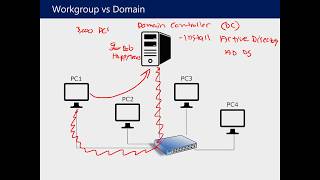
every computer tournament agem of course not right you need something managed for that management you need a domain controller and domain controller is a normal server operating system it could be 2012 2016 2018 sorry 2019 there's no 2018-2019 so You put Active Directory on top of that server and that's where it becomes a domain controller did you guys do you guys get this and of course we're gonna do this lab right now so you will get it even more so move the domain controller basically domaine yeah the domain controller manages all your computers or your
users or your groups everything is being managed in that one machine and that's where you can say then okay I wanna I Want to let you know Katie login to the other machine so you can just add Katie to Active Directory and Katie can then go to other machine in that work environment and she can just log in if you allow her right so you see that you see how you're managing it from just one place makes it super easy for you to manage 10,000 computers if you want to 10,000 users if you want right
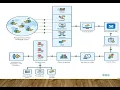
okay so if you look at this image right now in front of you this says work group you See how work group is connected to just one network it could be a switch it could be a router whatever it is but it's connected to one network and it's not being managed there's no management in between everybody's they got the internet that's great they can log in themselves we already explained that so a domain you know and network looks something like this as you can see right now on your screen you guys there's a directory Server
that's also like a domain server people will ask you in the interview can you tell me about domain domain connected environment or do too you can you tell me about Active Directory or they may say do you know either my client server network you see how they are naming it trying server network that is what it means basically you have your in a managed network right so you have computers like this and then what is Active Directory now this is a text base You guys should learn this I will just type it down or maybe
next time we are watching this video you should be able to say something more like this it's a directory service available with Windows Server platform remember we're talking about Windows here we're not talking about Linux Windows Server platform it stores information in a central database and allow users to have single account called the domain user account so you see if I say you know Jean are you when I put you in Active Directory is that a workgroup account or is that a domain user account that is a domain user account right of that network so
here we have an example of office where you can see there on the left side this is an executive office there's a key administration office office one office - this could be marketing sales whatever whatever and there's a lobby and on the right side there's a support guys right there and then there's a Networking room right so this is how a normal environment looks like now this is one floor you can make it bigger if you want to but they will have multiple floors for people right you're still managing it from one place so that's
how you do kind of your IT like a real-world corporate environment looks like this it can just go grow more that's it you will be working with different different companies or different service providers if it's too huge and of course you're Gonna have layers of layers of IT people working with you and that is something that we discuss in our first first day of training about roles and everything that that's not something that I want to cover here today but just to give you a clear idea that you know workgroup sorry in a corporate level
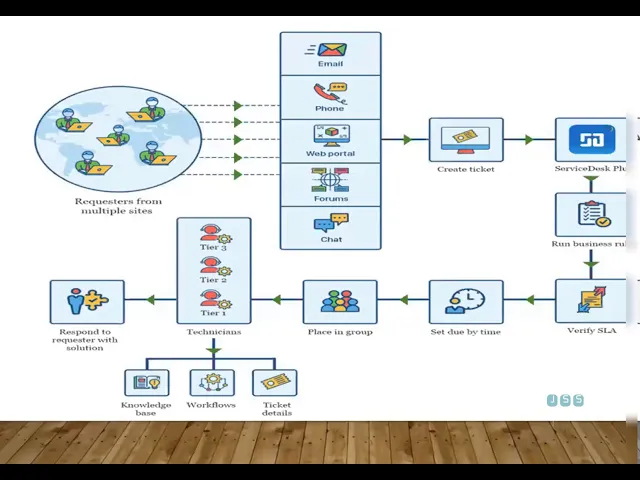
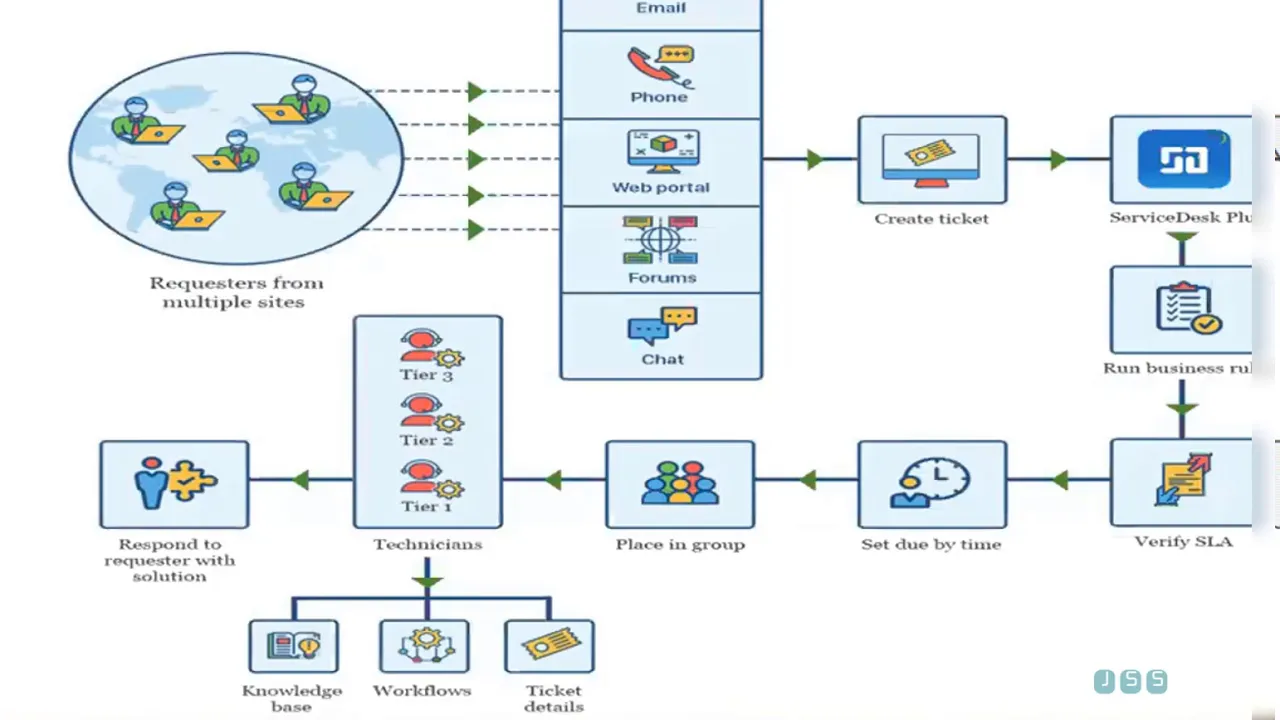
environment you're working an office like this where you have your office and you manages computers from one place okay so now we're going to talk about we're gonna Move into so basically this is I'm actually using a live training slide so I'm gonna move you guys to Active Directory I'm gonna skip through the helpdesk ticketing system part but I wanted to show this image before I move on to the Active Directory session so you see if you look at it how do you get like if you start working in the company tomorrow and they will
give you a computer and the computer will be already connected to the domain Controller it will be or things will be already done for you so then for you when you're so new to the technology you feel like there's too much behind this like that happened how did this person create my machine there's too much they have configured for you so today you're you're learning to be like I helped us who can configure your own machine so when you go to work tomorrow you're not stressed that how did this whole thing happen at least you
have some practical Idea of how things are happening and you can also use the tools and things like that to make your job easy usually in a cup what happens is something like this you you get you have a users user will have issue they will call they will email they will use web portal it will use chat and then they will do what they will send an issue right then what do you do you use the ticketing system which is in our day one we use ticketing System for live streams just like what I'm
doing live training today for Active Directory we do ticketing system training and in that you basically open up a ticket and then let's say if it's the issue about user being locked out then what do you do you assign that to yourself and then you resolve that issue in Active Directory you come back to the ticketing system you close it as a help this person as an IT person or an entry level whatever you want to call yourself Eighty percent of your performance is based on how you close tickets how you open tickets how you
close to get how you assign tickets that's eight percent of your job think about them so because without you phone companies cannot function right you're the mean person assigning things you're you're the you're the real important person for the complete so that's why they are way picky yeah there are a lot of jobs there but they're way too picky on picking People and that's why people struggle if they cannot answer about ticketing system if they cannot answer about Active Directory they cannot answer about office 365 deployments basic troubleshooting they're not gonna give you a job
especially these days nowadays things are very hybrid it's not just a normal it comptia a+ kind of think and you're good to go so that's where things really like that's the background of it so now I'm Gonna fast forward and just kind of move into Active Directory session right here all right so if you guys are looking at my screen right now because I teach reality and I just straight go to jobs and that's how I create the trainings that's how all of our trainings are based on we we look at the description in current
market and we change your training agile type of training so we change your content it's this changes all the time so you look at this if you If you search about active directory in the Indicom why people want to learn about this this is the reason look at the titles on the left side it says help desk technician have this technician IT support IT field technician anything IT support you need to know about Active Directory and this specifically put it in the description right there it says create new user accounts manage those accounts in Active
Directory and of course they can put exchange whatever They want to add but most of the people will have something like Active Directory in there ok and they will either put something like domain or but most of people will use Active Directory specifically so when you go to the interview and you say that hey you know I have done a training on Active Directory user management and everything that's - that's very different than you going there I have a plus because a plus does not cover Active Directory like This so when they start asking a
question after this training you should be very comfortable so so far any question about this whole lecture that I'm doing any anything that is coming to you all right now quick question uh-huh so I currently work in a cyber security office in which we have a Systems Administrator he's the one who manages the Active Directory as well you know using the ticketing system as a as a systems administrator the same as an IT Help Desk technician yeah so it depends on the company how like for example an active dirty job normally is a helpless job
right like because you you're adding a user resetting your password I'm having issue with my password lock out but some companies may may kind of lock it down a little bit more they don't want people to be login into Active Directory because there's too much can happen with it if you have access but it depends on how the company Structure is because the system administrator can then really define that's this Active Directory level like I just want you guys to only access certain groups nature that's it you cannot access anything else and that's how the
real in the company is that's how things are done as a system and that for example my clients or they tell me to build an extra directory for them then I'll say okay how many groups do you have do you have System administrator of security make sure you have network engineer you have helpdesk and then I will make a goo'bye group access so you see you still get access to Active Directory but only at the level of users right ok so it's like a your your access is managed based upon where you are the company
is for a structure exactly the structure and then like I said it doesn't have to be always like this it's up to the companies once sometimes maybe some some people say That no we just don't want any Active Directory stuff it helped this they can do the ticketing no problem right get it all right so here's a real ticket because I like when I like to when I train I basically take this a real ticket out and then I stray like this basically so it says Kimberley more first day is on April Monday 30th please
send her computer outlook our offices three to one is it okay if I schedule time or orientation blah blah blah okay So even though you if you started a job right now and I asked you look at this this ticket right now and you me like what does it help doesn't have to do with Active Directory right that would be you having no experience right because if you look at this clearly they need Kimberley more first day is thirty so what they didn't even define Active Directory they don't know about anything but yeah users user
will not be saying Active Directory right they're just Gonna say we have a new user but you as a technician should look at it and say okay we got Kimberley more starting on April 30th right so what do you do you need to do you need to go to that charity you need to create an account right now you may ask me how would I know how do I need name this and that this kind of stuff right that's something you have to talk to your manager they will tell you that we're going to be
using this naming convention And inactivity so you're going to be using key more that is going to be the you account Kimberley first name last name and then the date and then also it says office 321 now in Active Directory you also need to define of his numbers in there because that's how other application then look at Active Directory and grab that information from there right so even though it doesn't look like there's nothing about Active Directory but it is There's two things about Active Directory right there and a computer - so there's three things
that it got assigned to you automatically you look at it okay that's my job right there account computer and then adding information in that account so that's a ticket right there and you need to resolve it so if you're brand new you look at it and you're sitting there they're like and you say that I have some experience and you just put Something on your resume which I have people tell people don't do that but if you put like five years of resume and you go there they don't expect to come and teach you then
right because you put five years of experience in your resume so if you if you know if you say that I am an entry-level I just did some training then they're more open to you okay you know what I think let me teach you a little bit about actual directory here and they will teach you this stuff On the job too but if you know it and that's great right basically the key word you're looking for hi I'm Holly I work with Daanish been for twelve years so basically what the key word you're looking for
is called documenting right so if you know how to document things you can also look at it in a way like okay this person knows how to document things so like going back to the ticketing system it's all about documenting how you really document Because the next person was gonna see the ticket we're also gonna be following up on what you did previously so if you have a good skills and documenting and writing logs you're like okay this is a good thing and you can also mention that look my documentation skills included this is this
and so and so forth can trust me in the long way you'll appreciate it yourself because sometimes a ticket after like maybe a couple days will come back to you and you won't know What happened which engineer worked on it so I always tell my my friends my co-workers they hate whatever you do even if you click somewhere on this screen just document it on the ticket or somewhere where I can see what you did so I can backtrack it in follow up on it so what that basically mean that you're gonna document each step
that you take to say you know you log on to the computer well yeah so a lot of times what happened is like for me I'm I used To be system engineer and I have log that will always pop up in the beginning of my logging screen and will pop up for everyone and if they updated something they clicked on something like for example if this is really sensitive server and they clicked on something to open up a file and close it those things okay not really need to be documented but if you clicked on
something that had an action to it yeah make sure you Document it the hey I clicked on this a pop-up and this is a result and things like that now you don't have to click a document every single move they can't move my mouse to the left or the right now you just need to document like if you clicked on something that had an impact or you made a little modification or you change its font size whatever it just helps the next engine and then example I can give you in terms of vector directory you
may come across an Issue by adding a person to likes a domain controller right actual directory and you may come across an issue and you find a solution on internet now another technician comes in and they do the same process and they they're having issues so they have some type of document that they can look into right but of course most of the time it's a simple process that people know about it right and if they have to tell you something different then that's going to be the Documentation that we're talking about is the naming
like they'll put a different name out there right they say you need to use K more or you need to use the three letters of your first name and three letters of your last name right and the data part so that's that's the company's policy structural policy to use naming convention right so you need to know that stuff ahead of the time so you will basically ask the managers over there that hey I'm gonna Add this person what is the naming policy what is a naming convention policy in this country right or you can go
to the actor directory and find out yourself by looking at accounts right so of course then we can go on and on with this this is our life training in and we basically kind of like you know train like this and we've put more available examples and this example is a template ticket so that was just an email this is this is a ticket coming from directly From a web portal a ticketing system so that converts into an email and then you see is on the bottom they just want to update the title of a
director so actually directory can create so many calls for you you can be just hired for Active Directory stuff if it's a big company let's see if this company have ten thousand people they're gonna get a lot of calls right and maybe you just got hired to do this type of job where you Need to change a title for our director you need to add a person reset the password people that locked out there's so much you can do in Active Directory right and if it's a big company then you're working on that specifically if
it's a small companies then yeah you move on to other things like troubleshooting remote troubleshooting and all that good stuff alright so so of course we got more tickets here again so let's talk about I let me let me let if You came in ok so you see the Active Directory the main part for you guys to learn about Active Directory is what are you going to manage an activity like you say gene that that's something system and shredder was working on that company now they may be working on the higher level meaning they may
be doing policies they may be creating groups they may be creating oh use a lot of different things they can create or in Active Directory and also they may be working With a bigger environments where active directories are replicating that's more system admin job when a when Active Directory winds down another one is up and now this needs to finish to configure make sure that what happened here because he doesn't want the other activity go down or his whole company will go down right so that is more a sysadmin level job right there at the
back end there checking the logs they are creating domain controllers all that Kind of stuff and I'm going to show you that in a second what's this admin do and then how it turns over to you guys ok so mainly you guys are in Active Directory managers user groups and computers so if you go to the interview and somebody asked you what level of information do you know what Active Directory after this training then you can say yeah we manage users in there we mention computers in there and We manage groups in there and anything
related that it could be a user changing password name whatever right groups changing adding a groups adding people to group groups added to another groups computers changing computers deleting the viewers blocking computers all that kind of stuff needs to be done in Active Directory ok so this is how the Active Directory looks like I'm sure most of you guys already know that extra directory is Like this so if I ask you any one of you tell me what is a domain name of this Active Directory environment if you look at this screen can somebody tell
me just assure that org is a domain name right there that's correct so when you join a company you're gonna first open up Active Directory and look at that name so now not all not all the time it's gonna be like a website that name they may use like headquarter God jobs to share that also nobody else knows about It right see see whatever they want to name it they will name it over there okay so our lecture part is over now we're gonna jump into the lab before that does anybody have a question anything
to do with the lecture I won't ask you something about Active Directory it's supposed to be as a backbone of the system okay so suppose these actions is limited to the system administration because I can no one can play it or do Something wrong about it provided in be born or create account like this because I work I understand now it's same like you can control all the system almost the company yes and that's why you need extra dirty you can control everything in Active Directory like you know specifically at the user level of computer
level but then after that there's another piece to it too once you have at your directory up and running it opens up in other features in your Server like group policy that for example if you say that I don't want people to be changing their wallpapers now Active Directory is not doing that but through Active Directory X's there's another feature called group policy that that gets deep inside the computer land then you use that feature which is not a part of this training but I'll show it to you guys then this is why you use
Active Directory but then you have this other feature in the server that uses at Your directory kind of like that axis and it goes really really like tiny money type of things I don't want people to right-click here I don't want people to change this I don't want people to change the wallpaper I want people to lock out after seven tries when they the password seven times I want to show you that because that's important for Active Directory and you see that these are the things so it opens up more to you once you are
in the domain and those Things are usually defined by your organization yeah company in policy so you won't be doing anything policy related you were just following the rules and regulations of your company okay kind of help out on that the so the sysadmin would create the groups as a helpdesk person you would just assign those groups to the computer let's hit again sorry I didn't understand so the sysadmin would create the groups but as a helpdesk person you would just Assign those groups to the computers and the users yeah so um if I'm if
I'm understanding correctly so basically a sysadmin will let's say create the whole directory environment right he's gonna create a server put Active Directory on and then he's gonna say that this is a help this administrator group right then you get hired and they will add you to that group so that group will have specific permissions to do certain type of management like resetting a password For users adding new computers so yeah you will have ability to add more machines and everything but you won't have ability to delete Active Directory your specific things that they don't
want you to touch right so that's kind of like control control access that sysadmin can do before they even let you get into that directory make sense I just wanted to confirm so job skill shared org is the domain overall and then underneath the in the job down menu Those are going to be the groups assigned within the domain yeah that's this yeah so if jobs get shared out organs a company right now physically let's say this is a company right and I have physical computers and servers everything will be shown in here and that
in front of them mean that you guys are see it's kind of showing under the computer users are going to show under user so let's say hobbies my employees and show under users right if you are The employee yoga I shouldn't you're going to be shown in the user but that's just a generic folder you can create more if you want to and then you can put you can apply policies on top of these groups then that I want certain people to be accessing certain things and that's where you get really more defining more for
our organization's get it so if everybody's looking at my screen can you guys confirm that you guys have direct Access to your lab like this yep yeah yeah all right so now there's two things right here that I want you guys to understand help this is you I gave you this machine so then you will become a part of my company now on the bottom you guys see the remote company ABC comm right everybody see that DC 300 staff 300 staff you're gonna be system administrator oh yeah I said okay so now on the bottom
this is the company that We're talking about I am the system administrator for example and let's say we have some conversation going on between me and CEO and I'm like hey man I'm too tired doing all the stuff you need to hire help this all right this is how actually it happens in the companies right that's what helped us like you know the the the job gets created like that or if it's a too big company of course they have a better way to do it but smaller companies medium community They get help this like
a system administrator I get frustrated I can't do the servers and security and everything on my own then you need to hire another person right usually people leave or they the CEO say okay I will hire another person so let's suppose in ABC comm I'm a system and insurer and I was assigned the task to create my work group environment into what you guys need to give me these names now domain controller because interview that is What people want to hear okay domain controller Active Directory so right now this ABC com is not a company
that has any domain stuff this just names right we're gonna create so I want you guys to when I do things I want you to make sure you guys follow me now you won't be able to do anything in the ABC calm because that's kind of like control right there right then I will let you control things so then you just like what we talked about then it becomes more of like a Practical thing to learn that okay that's how I get access in the real companies right we're gonna go to the domain controller machine
and somebody asked me yesterday really good question they say that in interview somebody opened up a computer like this in front of them and it and then ask them is this a workgroup computer or is this a domain connected computer can you tell me so this could be a technical question right now in the interview tell me guys if you Guys look at this screen right now is this workgroup or domain it looks like work group to me cuz there's no option to you know sign in as a different user yet perfect that is what
cousin now you do when I add a second user you may get that option in there but that still doesn't do that / - meaning right it's gonna just show the computer it's not gonna give you any other option another option another question that I Got from life ringing yesterday a user told me and it was pretty cool what I would say people will ask you okay how would you login if I put this computer on domain how would you login locally to this computer anybody knows domain backslash user name a what is a domain
when you say domain backslash what are you gonna put in there so it would be like your job Skillshare backslash username that is in the directory already in the Confederate Domain that's your login in as a domain user if I say locally log into this computer then instead of domain what are you gonna put dot backslash yeah okay that may work but sometimes then also doesn't work what do you need to put exactly is the computer name computer name DC whatever that is right computer name slash local user and password right then it will let
you login to that local why would you need that if your domain is stop working if a user is complaining That they have some really high sensitive data if domain is stopped working they cannot login to that computer right you need to somehow login to that computer right so you do need to have your own local account which a company will have one standard account and then we use some automation tools it goes out there and changes password which is not best but if you work for a smaller company they'll just have one password on
there Just save it somewhere okay okay so we're gonna log in first and we're gonna create a domain controller right now now as have you guys seen this before reading a domain controller environment or is this a first time I've seen it before are you saying before okay so we will kind of do the same process here but we'll do it in a lab method we're not gonna expend so much time just to create a real domain domain like you know we're Not gonna sit down and do like a full documentation usually that's how people
will make domain controllers when they sit down they'll create a whole structure infrastructure backups all that kind of stuff we're not gonna do that we're just gonna stick to the lab information here so the first thing as a CEO assigned to me is a system and it's rare that say hey gene is gonna be joining the company tail is gonna be so you know to see you Assign me a like a so they assign they assign this like you know this task to me that gene Dale these people we are hiring and they're going to
be supporting other people so go ahead and create domains so the first thing I'm doing right now is I'm creating a domain controller by go to manage I'm gonna click on add roles and then I'm gonna click Next now every time you make a domain controller even in your lab environment you know you need to make Sure that you have a real name like DC 300 don't use generic names that just when you install a computer that weighs little easier and in real environments you're gonna have a static IP address in lab and warm and
we don't care about that so we're just gonna click Next here so if you guys tell me if I want to install a domain controller as anybody know which optionally I need to pick over here what's that again sorry so here check this out you're gonna use Active Directory domain services so before you join a company this is what happens right they add this domain controller so here on the right so you see I click directory services a DDS store information about objects on the network and make this information available to users and network administrator
a DDS uses domain controller to give users access permitted resources anywhere on the neck right so that is what we're doing as Soon as we click on that then server said oh you need to have more features in there so it will automatically pick those features and when I click Next click Next and here we're just gonna install it so right now we're installing a domain controller on VC 300 and it will take a second and while this is doing you guys can ask me questions so it's uh except Dale and gene and anybody else
there like there are you guys watching this yeah okay so make sure you Guys are not sleeping out there and skins me so yeah if you guys have any other questions while these travels like installations are going on just feel free to ask me how does a so with the active directory on how does it work with the D in this so basically with the active directory the DNS part is like if you work in a real company you have your own DNS server that comes with Active Directory a lot of people back in the
days used to Have their own DNS servers but then they find out that computers are very powerful these days you know virtualization tuo'er and you can give like you know CPUs on-the-fly ram on the fly so they will use two domain controllers and usually the naming convention but that would be C 1 and C 2 so that also serves your DHCP DNS and Active Directory from same computers so if one is in a big environment in a very well-established company you're gonna Have well maybe five or six domain controllers spread out throughout the nation not
just for working reason but also for disaster recovery alright so a lot of times you know one domain controller is not enough obviously it's not a best practice but if one goes down they work transfers over to the next one if that one goes down and you know so and so forth so and with that what you said being a server that's a bit advanced along with the DHCP stuff but You as a technician won't have to deal with most of it you may have to troubleshoot like let's say ping of web server things like
that but that would be for a network engineer level people so yeah like if there's an issue with the DHCP not assigning an IP address that wouldn't be your call you're just straight of us I'm send that to your sis ID min that you know oh you know I'm getting a message that no IP available or that machine is not even getting an IP address so you tested it from different machines now that's more like troubleshooting skills that we teach but you would go to open up different computers open a Wi-Fi if you have me
and then no but nobody's getting anything he really knows that this is a overall spread of issue so this could be one of your domain controller or having memory issues because one of my examples I can give you let's say DC two was out of memory some something happened to it So whoever at that point was connected to DC two and that all of these people were having issues now how did how to fix that issue is that because virtualization like I said made our job really easy now I went to the you know the
dc2 and I saw the alert and I okay there's a memory clearly a memory issue is hung all I did is that just you know shut down the domain controller dc2 and cheese the memory to let's say 16gb right and then When I turn it on again everything was good to go people need to restart the machine but that still fix the issue after that so yeah there's a lot of issues that can happen if if one goes down then the other should take over but if somebody's already connected to it they need to restart
the machines basically so now this is insulation installation is done we need to promote this to make controller right now this is like the Step that you need to do to make sure that this becomes a domain controller so we need to click on this little icon here and then after that if we are creating a first time domain controller we're going to create a new forced so that's the first to mean main primary domain controller you're creating in a companies this will be the first one then later on you can add the other domain
controllers to it so let's say you have a more office the remote office Will be using the other ones like you know add a new domain to an existing forest and you can even use the other one too like controllers so controllers will be just doing a smaller job so that's how you can spread out your domain controllers to automation that's something you're doing and that's where it says admin skills will come in okay now here's remember you guys saw that domain name in that picture this is where it gets defined so that's why I
Like to show this lab because then you know where it's coming from so in your lab we're going to use js9 because i already assign a lot of jss numbers to other members so I'm going to use GS 9 and we're going to do job skill share we're gonna click Next here so once we do this after that it will ask you for this recovery password you guys don't need to worry about this stuff this is something like I said missus admin will Be working on if they do if your domain controller was down and
something happens to it then you need you have a recovery from this step thing and here's a DNS question domain controller cannot work with other DNS extra dirty cannot work we don't do this so you would need that first TNS if you're using that first time installation then later on you can change things but you need that eNOS for this installation right so it will automatically install it without This you cannot even install the Active Directory on this machine now net virus is very important for helpless people and that's why I like this screen because
every time you go and help users out think about this you're gonna get a call I need to install this software and when you when they double click on the software they get a prompt right you cannot install it because you don't have permissions right so they usually have this box in there in that box then you Need to use something like this jss 9 / whoever is the admin or the user that we have added to Active Directory and then the password a lot of people a lot of people forget this option and then
they think about what do I need to put in this whole i if they would help this that the past or sometimes it works if they have done correctly in this stuff it doesn't it doesn't work then they will have trouble so you will need to type DSS 9 / of this what if your Company have different type of domain it's working and somebody is remotely coming into your office and now you need to log in with a different account so you're going to use Jace's 10 slash helpdesk password right understand this and I will
do our practice on this too so we're going to next here and after that we are just going to click next and next and after that we're done is just going to throw some errors which is fine this is normal In Active Directory is the yellow icons and we are going to install our domain controller and after that you guys will login to your machines and you will perform some actions so you see that waiting for DNS installation so right there it's telling you that we need to have a DNS so while that's happening and
it's gonna get restarted and everything let s queue the same question can anybody tell me is this on domain controller if I do send or can't or Delete is this on a domain is this a connected to domain controller like it's a domain connected machine or not yes yes yes that's how you figure out because that's an interview question for you guys right there technical interview question if you cannot just say that this is so simple then that's what people would know you don't know too much about the domain connected environments and that's gonna be
hard for you to then move on okay so then we Will log into this domain controller now and this is where the things starts actually this is where you get to come into the company now the first time when you are getting into the company somebody has to set you up right you can't just automatically go there and turn on the machine and bam you're on somebody actually let you access the Active Directory and you have more access rights permission rights than other people right and that's where I'm Going to define that right now I'm
gonna do it at the very high level but of course people can really really go into it little deep so if you guys if I open this server right now and I want to just make sure that you guys know about Active Directory which a lot of people should and they even though you don't have server knowledge but they still expect you to know where the actual directory is coming from where would I click to get to the Active Directory Stuff so there's the roles on city with other roles on patiently yeah tools you guys
you guys will click on tools right here and then you see the Active Directory users and computers option just got enabled before have this option right yeah so before we didn't have this option so now if I click on Active Directory users and computers you see our Active Directory will open up now you see the domain right there that we just created on the left side so This is our domain that we have created but look what happened by default it created a few folders now another question people can ask you can you by looking
at this screen can you tell me what is the difference between a folders right there there are some difference in that folder look at it very closely didn't somebody point that out to me one has a access control so yeah it's kind of like right but it's a it's a Difference between folders of the phone that if you look at it there's a dot on one folder that's its domain controller right so if I create a folder this is basically organizational unit so if I want to create something here I'm going to right click and
I'm gonna basically go ahead and click on new and then I'm going to create organizational unit so if I create this organization you know I'm going to call it staff right and you can call it whatever you want but look Every time I create something it's gonna have that dot on it but there are other ones that don't have that on it these are containers okay that comes automatically from Active Directory the problem with that folder right there is you cannot apply group policy on it now who policies a different feature without you which I
will explain that you can really really tied people down so cannot be in that container group and then apply those type of policy and you have To create a different group put users in there and then apply all these policies on it okay does that make sense to people yeah okay so now if you look at it we need to add you first the first thing I want to do is I want to create and help this account for you guys now now you let you all are on a workgroup computers right now you don't
have access to none of this stuff but once I add you after that you will be able to start connecting those machines to your Domain controller to do that I need to create one account and I'm going to call it help this how do you create account in Active Directory there are multiple ways you can right click on the user and you can click on new and you get click on user you can right click in the white space click on new and then you can click on users you can click on this little dot
right here this little icon and you can create a user so if I create a user right now I'm just gonna call it Help this and I'm gonna call I'm gonna name this is a count name so you guys have to remember this that everybody yes excuse me as a example be easier Hardy we'll use Hadi as a helped us right now so we're gonna create him a normal way of so now here's here's the information all right so he has to join let litter I'm sorry I come if new people come in they have
to join in later because this is where two farther I know so so basically if you see something like this This is where you hope this things will start like if you're trying to add it count this is what people will tell you that okay in our company we're going to use a temporary password and you must check this first option because I don't want you to give people a template faster without them changing it right if if people have a temporary password and you don't do this then that's a security risk right some people
will not change it trust me a lot of people are like That they're just like okay I don't wanna change my password okay it's easy I'm gonna I'm gonna keep you like that right so you use a temporary password then change the temporary password gets changed all the time because you don't want to keep one pass for them right but in this example since we were doing lab we're just gonna uncheck it later on you guys will will add more so we're gonna click Next here and we're going to click On finish sorry actually we
didn't add a password it mean we're just finishing it okay guys so the password that I'm gonna use over here everybody note this down to yourself because this is gonna be important for you guys to join your computer to domain so okay can you all see my notepad okay so let's go to the fonts and I'm gonna make it bigger so all of you can see it so guys use this password so dollar and and so I'm gonna Use that copy that I'm gonna put it right here now you guys are not doing anything right
now you're just watching it that I just created a user and you guys will need it when you try to join this machine to your domain because now this help this is you right Hoddy person is you right now right and actually I need to change this name to Hadi because it's going to confuse us so the account name Is javi and account login is had now if you guys looking this process that I did did I make a domain admin or domain user domain user user right to make some to give somebody more rights
what do you need to do you have to add it to the admin group admin group good answer so where are the admin groups look at the users these are the admin groups right here these are the super users right here that you have right here like domain admin enterprise Admin and that's where like I said an admin can come here create more groups and refined access based on the boss he's a little bit advanced stuff but that's where they can create a totally new group help this and put you guys in there and then
you will have certain limit access level of rights and that should answer one of your first questions and how does this work right so this is how it works so if I want to make you guys an Administrator of this domain what do I need to do I need to go to properties and I need to click off member off right and then you see where he says that it's a domain user so if somebody call you tomorrow that hey I want to find out if this person's admin or not how would you find out
you know typical properties you're going to go to the group and then you will find out if this person is a domain or not or you can straight go to that group and find who are the users of That right so now if I type domain admins then we just created hadi a domain admin so we just gave him a super powers now any machine in that network gain using that Hadi name now can take and join and join their machines to that domain right now before doing that let me quickly show you that what
I was talking about the group you can double click on the group and you can see the members and look where Hadi is now isn't it that's an easy way for you to find Out if the person right so this is what I want you guys to do first because this is a lab environment because this is lab environment we need to find we need to make sure we we connect we need to we need to make sure that we connect your machine from DNS level to this domain controller in our lab and warm and
we don't give DNS is out like you know 1 2 3 4 5 6 like that you basically point your machine to this DNS like forcefully how do you do that the first thing if I Want to find that IP for a for a machine what do I use do you guys know ipconfig /all you can do ipconfig/all orgeous ipconfig right hmm you can do CMD now guys if you guys don't know this now this is a little bit out of the training if you don't know this command I can guarantee you if somebody asks
you in the interview you're 90% not getting the job it's just too basic okay IP configures like the core of commands that you guys need to Know so if you don't know this then there's something really big missing right so ipconfig what is our domain IP address can somebody tell me the IP address it's one night two ones it's a bit 10 Dokdo 6 if I ask you what is 192 168 not 10 what is that he said 192 168 is a Class C I see and that's a network address right yes a network what
is 2 or 6 tor 6 is like the horse the horse perfect good answers so That is what people are going to test you on basically and help this level interview job right so so now we have the IP at this 206 what are you gonna do now you guys will go to your machine and I'm gonna pick one machine and help somebody out here who do I want to take over some maybe maybe 308 is that fine with you ok so 300 hey guys watch my machine now you guys are doing this part now
you will right-click on your machine or just go To the machine directly and then go to the desktop now if all is having issue you can simply click on it and go to the desktop on the top and then connect to the machine you should be already connected what I want you guys to do is to change your IP address force it to that domain controller by right-clicking on the network look at my screen right click here ok go to open network and Internet settings and once you go open the network settings go to click
on Ethernet now there are multiple ways of doing this but I'm just kind of taking you guys with different routes change adapter option are you all on this this section right now I want to make sure that all of you are on this right now anybody's anybody is behind or anybody can't see this I'm gonna mute few people here just to make sure that we have the cleaner so if you guys want to unmute and meet yourself but everybody is on network in adapter so I'm just gonna Wait for 30 seconds and then I'll move
on ok so while you guys are doing that let me check on you connect so be is ok see I'm not sure if I sign that one C is not there and some people are ahead that's great F ok so let's go back to 300 and move on so if you're not there just let us know right click here and go to properties and Italy I'm gonna have you take over now ipv4 click on ipv4 go to properties and it Lib go ahead and type the domain IP address in there Oh who's me Lucy can
you hear me are they ok that's good 192 168 10 yeah you you're putting the wrong IP address there change 169 to 168 if you do a mistake right here then in in our lab environment you won't be able to connect your domain controller it does give you some good information though like errors and things like that which is good so here you're gonna type 168 10 and our domain IP address is what let's go back 3 its 206 206 thinking my memory is pretty bad i think i got i got pretty burned out from
my last training so I think majid already know this margin I'm kind of surprised that you're still alive yeah I'm here I'm listening you know grab best on all the information so 206 is the one that you guys need to put and in the second alternative route alternative space put 8 8 8 8 8 now we do this for just for internet reason so that's nothing like you that's nothing You guys need to learn from this right now because usually in a company this will be automatically done for you you don't have to go to
each computer and try to do this like I said in a company there will be a DNS set up for you all you do is turn on the machines and IP address it's a sign Venus gets assigned that's a sysadmin job right there and you're good to go so let's go back to 300 a and I'm going to make sure that everything is good Alright so can I take over hosting so this way we're a little bit faster here 192 168 and then ten two or six right module yes and then we're gonna put eight
eight eight and eight here and then just say okay and close it so now if you join the company and they give you a machine let's say any machine this is a client machine here you go that you say that you helped us you said that you have six months experience you said that you went To job skill share you got the training and we're gonna give you the job no problem here's a machine go ahead and put it on a domain because a system and already gave you a username and a patch what is
a username Hoddy right and the password is the one that I gave you guys and I'm gonna put it up again if you guys don't know the password let me know because we need to right now we need to do a step-by-step process okay so here This is the password and this is the username I want to make sure everybody get this so just write it down so I'm gonna move out of this machine then actually I'm gonna open another tab here okay guys now how many of you know already how to join a computer
to a domain anybody knows can you guys do it anyone anyone who wants to take a lead on joining a computer to a domain rod no yeah I can try you try all right let's go what what are you at 300 BC ABI Let's go to rod now so rod are you gotta also give us little explanations to like how are you doing this okay okay so basically I do I go to computer and [Music] capacities actually let me make it a little bigger so people can see that there you go so how did you
go again sorry one more time all right yeah I just go to to my computer this computer here and then click on properties okay and change Setting perfect yeah after the two I change perfect perfect good job what's this what's it done don't mention Jesus 9 dot org is nine dot dot you're putting a full domain in me right yeah so don't have a full domain job skill share dot org mm-hmm so here is the prom that I was talking about that you guys will see all over your hedges however many years you spend In
there so you're going to get this prompt a lot so you need to know how are you gonna put that username and password here now so to use that you're going to use what CSS nine forward slash which is a slash above your Enter key the slash above it there you go and you're gonna put Hadi that's the username remember if new regimes if you were to join this to this workgroup computer to that domain you need that person needs to be a part of that domain well you can't just Automatically nobody can just come
in just start adding things on the main right you need to be a part of that yeah so that's the access level that we're talking about you're given that axis now he's able to do that so let's go ahead and put the password that I shared with you the password this is the password that I created now right yeah I read fully welcome to the perfect man good job you just oh so here you go guys this is how You join a computer to domain and this is kind of like the job that you do
this is a ticket you got us on you just did one part of the ticket you assigned it the computer is where now this computer got taken over now right yeah got taken over by the domain that I have here if I show it to you guys but we're back now how do you find out if that computer is now part of this domain how do we find that in Active Directory where do I need to go you One computer to see if it's in the computer perfect so 300 B good job theater d good
job it probably is having other people what's going on here let let us know what is what is the issues other people can learn from you anybody's having issue right now I'm trying to add the name where do I go - what are you again e ya e alright let's go back in here so when you come here basically after I'm there right now so here you're gonna click on change Settings and change settings you're gonna click on on the bottom change bottom option change you see that Allah we click on change oh yeah see
saying alright now you're gonna click on domain okay and now here you're gonna type GS s nine dot jobs ps1 j SS 9 haha dot job Skillshare dot org dot dot dot you're forgetting the dot so you have to put the dot in there go back dot job Skillshare org there you go org and now click OK ah you got in Here guys can somebody tell me what is what is she doing wrong over there anyone the main name I think you forgot one step here like the IP address did you do that part yes
I do that class okay so let's let's figure out what why is this happening so if you come here 300 right now you're on 300 right so we're gonna come here we're gonna go to open and we're gonna go to Ethernet we are going to change adapter [Music] Properties yeah before all right so what's what's the issue over here guys on the preferred DNS it should have put a 190 200 chose a static IP yes yes so all are you are putting an IP address in the wrong place that's a stat sir that's an IP
address were so basically a DHCP works like this we have a network we automatically gives you IP address right and that first option right here what you guys are seeing if I open it again here the first option shouldn't change Because we are giving you this from our server like for my network if that right the option that you need to change is this one 192 168 and what is the IP 206 206 and then here you're gonna put a today that's the Google DNS just for internet use and we want you to round towards
that that's fine when I take okay close it and now if you go back to your active directory I'll click OK and now if you click OK what happened now you see that so here you were gonna type J SS 9 forward slash slash is right above your Enter key the other one the other one so it's right this one right here I'll do it other oops sorry now what happened here alright let's go back to that change [Music] yes so when you change the IP address is that process forward when I change IP address
hold on let me down what do you mean by like the process so meaning how does changing the IP address enable you To add a domain or like toilet domain okay so when we created the active directory on that server we also created a DNS server in it right yes automatically got created right so but if you look at in the lab environment you are connecting from a different network right so the IP addresses that are you are getting has it this is a different DNS that's giving you internet connection that's why you're getting to
this Labs right but we are forcing your Machine to go back to the domain controller we created so to force that machine to talk to our domain server lab domain server you need to put that IP address missing so every time you have some type of let's say issue going on with the computers you can actually go to that ipv4 settings and you can put static IP addresses so then it doesn't change you can force your computer to go to our one route or another wrong right so that's where if you want to talk to
This domain controller you want to be a part of this domain control you want to practice then you need to force your machine to talk to that domain controller by Venus or else in our lab environment if you just say without doing that it will it would say that okay I don't find this machine because I already have a different DNS and that doesn't have this information that eNOS don't have any information by the machine right all right so now we're Gonna put Hadi in here and all up the password that I created just go
ahead and type that basically from that from that machine try to create a folder in there like you know try to just create some folder and we want to do some sharing information here why don't you see if how can you guys now put get two shares or share some stuff with us you know and that that is also connected to your Active Directory stuff yeah so on your desktop Create a folder and just name it something in there and then I will just go over it quickly so while you guys are doing that I'm
gonna create a share on the domain controller right here so I'm gonna do it in C Drive and if you guys are watching my screen you guys can do the same thing I'm just going to ski Drive and go to folder and here I'm just gonna type share so how much do you guys know about sharing between a server and sharing inside the desktop like what is The difference between these two if I want to share a folder on the server how is that different sharing is fun on a desktop or you share it on
the server multiple users can have access to it so you can desktop one have multiple access I think the desktop with you created on the desktop that ever just be a local folder no if I let's say in the domain environment you're on a domain environment now right you share what is your machine name what is your lab name Sorry oh yeah you don't have lab sorry so let's say for example if I jump into 300 a lab and if you're watching the phone if you come here oh he's actually joining this new domain so
if I do 300 B where student B can I just take over yeah sure okay so if I come here and let's say for example I'm gonna open a new new folder area right here just just gonna go here and if I go to C Drive and if I could double click here and I click create a New folder here right mm-hmm that's much good stuff if I get up if I say she right here already out of this one oh you already have one okay let me are you okay right when I right-click on
it I'm gonna go to properties I'm gonna click on sharing and here if I click on advanced sharing if I click on advanced sharing here now to answer your question again look at the screen now and tell me how many people can log into that share up to 20 Up to 20 so Jean are you there yes earlier you see you see the difference right when you share from a desktop up to 20 people can gain like basically all them together can connect to this simultaneous connection right so if I do share here permission I
want to give permission everybody andin let's say hey why would why did I do this because you need to learn about sometimes you will get a call I want to share this information with somebody Else in Active Directory domain right so how would you find that first look at it you are a part of the domain js9 and then i can put anything any number of users or domain users in here look if I do that then it's going to ask me for username and password and if this machine have access is you can just
put the username and password and it will let you create that share right right okay so so the answer to answer your question here so let me put somebody on Mute here who is no no that was junior himself okay great okay so guys you can meet yourself so now this machine can let 20 people connect to this folder all at once right but if I do the same thing now to give you a little bit difference between these two machines if I do the same thing on my domain connected or server any server if
I right-click on it you guys watching it right rattle properties yes go to sharing if I click on advanced sharing look how much can Serve our offer now look at the number isn't that huge that's a huge number right there one six seven seven two one six but how many so that's why people are using share in a domain connected environment from the server not on the desktops so if somebody come and say hey what would be the better way to share a folder you're gonna always say yeah you're gonna put it on the server
if it's something that people need to be accessing it throughout the company Another reason you want to do it on the server is because of the space amount of space the server can have versus your local machine you don't want to overwhelm your local machine on his connections she's gonna slow you don't productivity down which you don't want and the safest place would be a server because what if you shut your machine down nobody can access that folder right so the server is a place you want to put it is centrally controlled and located Yeah
and and this is where you're gonna get a lot of calls to that I want to add this person to this share folder I want to add that goop to that share folder so this is where Active Directory will come into play big time because you need to now create groups in Active Directory you need to know about your groups in the company so if we go to the Active Directory environment right here they will have groups out there marketing sales IT whatever whatever Right so rather than you adding three hundred people in one share
one by one that's gonna take you the whole night then you just come in straight just go to that group put it in that share and everybody got access right so that's a natural call for you guys but you're gonna get a call hey I need you add this group interactive directory how do we do that okay so now what we're gonna do is I'm gonna create a normal user now and we will test that normal user and we'll Login to your machines and who will see this some kind of differences between passwords and you
know login and stuff like that how would you log in as a user and then you see things right there okay well first let's create a new user here so I'm going to create a new user in actually before doing that Alan after that and you guys need to be doing this so you you all are logged into your help this machine right now right as a as a as a Hadi machine right but what I want You guys to do is this login to your machine and I'm gonna double click and open up your
Chrome so so the thing is this that if you guys can help me out if we have a Active Directory would it be a good option to let help this login directly to the server and manage this stuff and now use our settles are set to there you go so we need to download our set to in the help this machine and then we need to connect that our set to the active Directory then from there on you need to login with your machine you have the actual directory right there in your machine and then
you basically manages everything there right right now ami as the system has made sure directly managing it but when you join a company you need to do this stuff for yourself or they would have done it for you already so so there are multiple ways you guys can get our set some machines comes built in now with that feature so You go to the program features and you get it but this is the this is kind of like a trial version and we downloaded earlier so I'm sure this will not have it how do you
download it I'm going to go to download option and we're going to download it here so if you guys have found too fast for you you will get the recording and then you would basically watch it and do it ok so if I want to find out the version of this window which may not match but let's find out You're gonna go to system and if you go to the system here a second window back are you guys having the same issue here we're gonna go for this one 8:03 if you guys are having some
type of issue that is not coming up like a system that pop-up screen then maybe restarting a machine would be a good idea but I wouldn't want to do this in the lab right now of course that's just gonna delay us so we're gonna go ahead And download a 709 first now there are other ways you can find just typing the version name and xmv and find the version but I'm using an enterprise version that is a trial based so that's not going to work for a lot of you because most of you guys are
using professional version or homewards and I think in your home most of the people don't buy enterprise but enterprise is kind of like even in companies it's expensive license and a lot of schools Or people they want to buy that if they don't want these applications like site loaders type of application even they don't want that they will go for enterprise version and in that also there's different versions and there that people use in there okay all right so think we're having issues will do is anybody else having the same problem where you are clicking
on something it's not coming up you You you you alright let's check if the other people you let me know guys if you guys all are having and I think we have some problem here [Music] yeah China's started from the Downloads folder it's just spinnin okay maybe so other thing about this stuff is that why Would this type of things happen you know in a computer because remember you guys are using a virtual environment and let's say it's a 64 GB lamp server and if a lot of people are on it and we're downloading things
the memory of that server screamingly of course in future training we can make it up it up and based on this training but that's how in a real world that's also that's what happens right you have many people working on stings and then as a system And make sure you need to up that memory to up CPUs for servers to be running pretty nicely but that's another thing you guys will be learning in your IT clear about virtualization so it's very important and that's something like magic spent five days with us and another member to
learn about those types of things - if modulus here maybe he can talk about his experience a little bit but if he's available right now I'm not sure if it's on right module Are you there yeah I can see its name but maybe it's not so so anyways guys so this is gonna basically what is it gonna do it's gonna download just like at the actual directory you guys see on the domain controller just like that it's not downloading a domain controller it's like an adult right it's like in your machine there is now a
system where you can connect Active Directory group policy DNS and as a system administrator or help this person you have your own Machine to manage Active Directory from your axis so you don't have to login to the server all the time so people will ask you in the question interview question what is our site - so the good thing for you guys will be to disco Google documentation and read something about our site to maybe go some YouTube videos watch that if you're a Premium Member we also give you practice labs and then you have
all the labs about a plus and that teacher Do all that stuff so there's a lot of ways you can learn about it and the first thing you should go to the Microsoft site and just know what is awesome right so that's where at least when somebody ask you a question how do you manage that you directly from your machine it's just like rod Nell gave me an answer that was a quick answer right there that's that's all I'm expecting to know like okay yeah this person knows hottest right so while this is happening Let's
just move on to make your Directory stuff and just quickly talk about some of the other things and then we will round it up and of course later on we may add more things into these labs and you guys will watch the videos on that too now if I ask you guys do you guys want me to give you this access for next let's say few hours and then let it on key do you guys want to work on these labs or how all you guys want to do it I'm I'm okay with that [Music]
if you if you guys want to if you guys with another question about that software we didn't know uh-huh so is it is it like a software pretty much like Citrix cause usually I use Citrix to get access to its objective yeah it's kind of like Citrix but it's more defined for a lot of management inside their actual director so let me show you quickly here but Citrix might not be the same level of you know information what our setting Right so here if you look at it this is our domain right here right all
you're doing right now is this you see guys if you guys come here this information I have Windows and Ministry of tools right here if I click on it it will open up this folder right all these these these are like different applications right inside this this Administrative Tools right there that are said that you're installing is exactly when the other machine you're Just installing this feature now in this server it already installed it for you when we did the Active Directory right yeah now in that machine they helped this machine you're installing this piece
right there so then you will basically log in by just clicking it exactly the same way administrator tools will come up and you will see Active Directory users and management just like this and you're going to open it up and then you will be Able to connect you that you make right okay so that and the reason it's more than Citrix because I'm not sure so we'll give you a group policy management like this which you open up right now from there I don't think citrus will do that I don't know too much about that
so if you open this up you can see you are in the same domain and there's a group policy and this is what we were talking about after when we like the basic stuff is like in intro turkeys daddy you you Add a user you delete a user you add their permissions and stuff so if I quickly go over this stuff before we end this meeting so you see like here like if I if Hadi's a user what else can you do with Hadi every time Hadi calls you about a lock-up password will you really
go you go to the same place right and you're gonna click on properties and here you're gonna click on account and here is a hardy account is being locked out or not locked right they call you Then my account is locked out you're gonna go to the account and unlock it that's a ticket right you just got a call you unlock them ticket roll is done your job is over right yeah if if Hadi gets married how do you say that I just married to someone and I need to change my last name now male
and female some countries do change your last name I don't know right so let's say Hadees Emil he wants to change his last name then he's gonna come over here kind of Man change his last hey we don't know man come on so so the thing is this that you're gonna come here to the first name last name and you change remember we're talking about that office information numbers and everything this is where it comes right you're gonna take the office information and that's a call for you that's a help desk all that I need
to move this person to that office now automatically things are not gonna happen You're gonna come here and change the office numbers right yeah if they're using a cue directory for this stuff they may be using inventory systems that we also teach that's a different story right there may be different using a different software right there right but again if Hardy needs to be added to a different group then what do you do you go to members off and you just add him to this group right here right if Hadi needs to change the title
Hadi Becomes a CEO of this company now and what do you do you're just gonna go and click on job title department company and who's the managers you put the manager so think about just by right-clicking and going to properties how many calls can you create for yourself as a practice like you know if you you practice how many calls can you create for yourself right now about watching this probably ten or ten more Than ten right yeah and these are regular calls forty percent of the time I'd say you were connector directory I got
locked up I changed password I want to change the password help me with the title help me with the name right so very basic stuff right here but at least this is what you do at the entry level position you don't need you don't need to a lot of people think that this is something too technical that I need to learn think about this is a process a Business process and you just have to do it too repetitive right so that's kind of it for the user side of it of course is a big feature
that you guys will always be using as a search and every time I help people and they say I cannot find a user right so I tell them just one thing just go to search and change this user folder to entire directory and when you do entire directory what happens it's search all over your actual directory so sometimes people mistaking You move users to a different Oh use right and now the search is on user and then they're stressing out that they can find person right so what you do is you change the entire directory
and boom you got the user right there and then you can move that person to the right department by right-clicking on it you can move everybody to another place right all tasks can move right here if somebody call you for resetting a pass or what do you do simply right click and Reset a password here and how do you make them log change a password next time you click on that check mark and unlock they're kind of they're locked and then that's it you're solving any question about this stuff there's a and install finish we
can actually connect our set so the directory yes run is it done on 300 B yeah it's done it's done okay so now so if the our set installation is done correctly which I kind of blindly did it on then what you Need to do you need to come here and look for Administrative Tools right here you're gonna click on that in control panel and look what happened there you are in the help this you're in the help this machine right now right and you have Active Directory users and computers in your to manage to
manage users in group use local user groups to manage user and groups use a domain login so if you click on it this this account that we are on right now is Local account I believe so if I click here and to find out you can SSI now right now to manage now we rejoin this machine to the domain but we install our set on which which account anybody local helpdesk local help this and that's not to write account to use for this stuff once you join a computer to a domain we did a mistake
by logging into a local help this account so that's still a local access writer you want to Be logging in to Hadi's right yeah and that is where you when you click on it you're gonna get that but somehow it's stuck right now hey done it huh if you install something on a local machine that global account put in that apply to the entire machine and any user logon where you say I am sorry if you install a software using a local account mm-hmm and then I domain user login mm-hmm wouldn't that software be already
on the Machine so based on what this software is about to do right so this software is on the local everybody can see it but then it uses your rights to connect to Active Directory right so that's why when this local account got on there it this local account didn't have rights to talk to the domain controller right it didn't it can it cannot apply these rights on the domain environment right so that application is still there but it's not working Please tells you right there that okay you your access is not what I'm looking
for you need to be an admin right or domain it right so sometimes we need to even create install a normal application on our local machine yes it's like Firefox now those are different that's a local type of applications and even in some applications we will tell you do you want install this for all users or do you want to solve for this one user so It depends on application next yep alright guys so 300 B is giving us some issues so what do we do here if somebody asked me right now like okay how
do i troubleshoot this stuff what would I do when you're like this is an agent this is a web-based connection how would i troubleshoot this anybody knows you gotta use the universal universal answer reboot the machine yes let me tell you I spend sometimes I spend like four hours or five hours of us on a Fixing help test environment and then at the end for after four hours the fix was just to restart a machine so you don't want to be in that in that scenario where you spent four hours and you say okay I
could have just restarted this now another thing going back to the ticketing system is that let's say you got a ticket from another technician and he didn't properly document it and then you called the user say hey my name is uh my name is Holly valium I'm calling Because I have your tickets been escalated to me what's the issue and then you know the user explains and then you make all right why don't you go ahead and reboot the machine and then user most likely will get mad at you because she or he would be
like you know what the previous technician told me to reboot five times didn't work blah blah now you'd be like okay why didn't he document that step right so I get frustrated because you know first thing A lot of IT technician say it's like hey reboot your machine and then you go from there so make sure your document whenever you troubleshooting with like users especially if they're VIP and you will know their VIP cuz your company will tell you their VIP so this issue was actually not a restart issue this was the agent that is
giving you the remote desktop connection so 300b if you're there that was the issue right there so to fix this usually we work sis Admins and even helped us guys need to know a lot of our services like all these applications that we're providing you or companies they have some services running in these systems right so this application that we're using for remote desktop is called mesh so you just basically click on it and we store that application and then after that you see your machine is up and running right so our first mistake in
that was and we're going to conclude after this and if you Guys have any questions love this I will take it so you see if I login to this machine what do I need to use I need to use a Hardee's account and can you login 300b or Nell can you log in with that password I feel like I forgot already I got it you forgot about it no I got it oh you got it go ahead [Music] so uh what why is this logging in with the hub this I thought we put Hadi in
There I will check it seems like it's a new account okay guys any question about stuff that we have covered so far down if the reason is throwing helped us because when you create an account you put my name as helpdesk ah good good job right there I don't know lady that I owe me some food alright I get I got all right guys last thing five minutes and we're done okay so here's the thing you're gonna get a call and even though you guys you guys are seeing group Policy management on in front of
your screen it's not it's not Active Directory thing but how would you know when you get a call let's say somebody call you hey my account I'm trying my like you know these two is connected right now so if somebody's trying let's say a password four letters in there ABCD ABCD let's say I want to use ABCD right and it's now working foot or let's say they're using only four characters something very complex to Like they staring whatever whatever right and it's not working for them and they're getting pissed off now they're calling you they're
like hey I'm trying my passion from past four hours or of course in again four hours but let's say four minutes and they got pissed off and they call you how would you know this how would you know this information that okay they'll keep locking themselves out they need to know some information how would you know that what am i talking Was find the user and ad I usually do a search on the domain because delicios users is too large check the properties and see if they're locked Oh so that's okay that's the lockout if
you but what I'm saying is that if a user is using four letters or five right they keep using five and they're not moving up right they they somehow feel like that five is their pass and they of course because they're locking them so far but that's not working how would you Know that information like who decide is five letters or ten letters or eight letters that you need to put in there who decide that and we would you find out so here's what happens like policies like you know how we name an account right
this is a policy right we put a name really like haughty right if I if I'm running a company I need to put a policy out there that the password has to be minimum of this much this many characters right so if somebody's Putting a lower number than that of course they're locking himself out it never will work right and if you as I hope that's don't know about it is that a good thing or a bad thing pretty bad because you should know about it if you go then you spend another forty minutes with
the user you trying to like use their five characters okay let's try this let's try this and they're keeping that you know you also not moving up then if then there's a there's something That you didn't there's a knowledge gap between your policies right so how would you find out you're gonna go to your group policies and you're gonna right click on domain policies now who policies a total different sessions but these two are connected kind of like connected because now I'm gonna prove it to you guys why you need to go to your group
policy in the company and need to find this information so you're gonna go to the Group policy computer users policies and here you're going to type windows settings keep disconnecting okay you're gonna you gonna Duke windows settings and we will open up the security policies so are you guys watching this yeah so if you look at security policies in account policies right here is the power of politics that people need to set them right so if I double click on it you see these are my numbers right there are you guys seeing my screen Yes
so if the password is less than 7 characters will that ever work no no and that is where it's so important for you as it helped us to know this information to know where to find out because you don't want to be at the position where you spend another 20 minutes with a user and then you tell them ah it used to be it has to be 7 characters like hope how are you an IT person that you didn't know this and I spend this much time you see they're gonna start that that you Know
that grey area will will be there then ok because then you need to be a person who's gonna a little bit more if you don't know do research before you do you take on a call you don't want to just straight up jump into the call right because if you're so new you need some information behind you right and that is where you're going to be having a stress-free type of troubleshooting you know environment for yourself you want to be more proactive you don't want To be just reactive all the time if you're proactive you
learn about this stuff then you go there you already have answer and you look good you're stress-free you know what the issue is you tell the person hey you're putting a five character that's not allowed you need to put seven or eight right now where do we decide that this many account time will if you type it this many times it will get locked up this is where it gets decided So if you see account lockout policy is zero here I can change this to let's say five and I'm going to come here apply and
okay and it'll change the other numbers in there too so if you can tell me somebody if I tried my password wrong for six times what will happen to me you will get locked up and how would you unlock the person how do you unlock the person you guys just learned that right click on user name go to properties yeah and then of course after that you click On account and where's the unlock it's right there it says unlock account and let me tell you something that when you start when you start a job that's
what you're gonna get probably like the I believe like after a few minutes or a day you're gonna get this and of course then you don't want to be sitting there right so so this is kind of it guys so I think we spend a lot of times getting this time but of course we're gonna be Adding more stuff to it and more tools because I didn't actually cover almost half of it about the tools that we usually use for this and of course in the future training we're gonna start add more tools into it
so you guys can always watch those videos than to to to kind of catch up on this but again our Active Directory training starts from day one so when we create a domain controller we don't just teach Active Directory in one day all right it take It takes five days for us to complete the whole training we're doing other trainings too but at the same time we're in Active Directory environment so we teach little by little little by little little by little so the whole training include the actual directory with all these other tribal trainings
right so yeah it's a pretty big thing but for you guys this is a good information to even tell somebody that I know what Active Directory this is our way and solve our Set rules this is our add people this is our reset password this is our change their titles this is our change the group information so you see right from just few one or two hour of training you can answer almost ten to fifteen questions right there related to Active Directory so so after this training we usually get questions that how do I take
a full training of course that twinning that you just saw on in this live training is just setting up a domain Controller and talking about things related to that at your directory then going down to day two where we talk about Active Directory and we only touched group policy at the end but there's more to do group policy and there are more to tools and scripting zhh and things like that of course that's just they do then we go to day three day four day five and that's where your life phase is done in a
week or if you choose weekend's that's four Days divided into two weekends so it's a lot of work to do a lot of training and you do it hands-on then we basically give you lapsim test out access which is another hands-on simulation type of training where they will you get detailed because here we prepare you for more real-world type of training you get very much a good confidence for going out there and looking for these jobs description applying and getting helped in the interview and things like that Then of course you need to learn things
now by going through the this test out phase two you get more detail about to radical more of definition learning and then also doing it so then you see active directory's cover drivers this partition volumes a lot of things that we don't teach in the live training so it is even though it is hands-on it is kind of like important phase and that's why our training is not just live training and you're done basically That's just phase one you're done because you broke all of the the barriers of like you know how to get into
IT how to start training for IT that barriers is that barriers are broken in phase one now you're in phase two and then phase 3 we talked about your resume and how you're going to apply so it is gonna take your time a lot of people ask me how much time does it take for me to to finish everything now of course Phase two is something That you will continue to learn but after phase one we start working on your resume and in a month and a month and a half you're ready to apply to
these jobs and a lot of people have got a success out of this so that is the whole complete story you can see this is a pretty lengthy process in a way that you have to be very committed so if you want to become an IT professional the commitment has to be there because not only for that commitment also the money That you're spending also the energy that is being spent on you and yourself that you're you're coming to these training and of course you we want serious people to be also you know taking all
that energy out of us it's a lot of effort into this so this is what we do in a life feeling so if you're into in this type of training then of course you would go to job skills shared org you're gonna click on instructor-led IT Training this is kind of the service that we provide an instructor-led training only now we do have other options like premium memberships and other things but those are not complete that's like labs that you have to do things on your own so yes there are free courses there are incomplete
courses you can take but it's not gonna be like live training so you can you can pick here two options you can do it full payment save some money or you can do pay back Monthly if you prefer that we have two options you can come here on weekday training or you can do two weekend training so if you're a if you're a person who is working jobs and you want to do a relaxed training then you can take this option if you want to do it finish it off you want to be in the
flow then take the weekday training and you can still see the details that how many people have took it from the examples you can see that but the example that we Showed you in this training is the perfect example this is exactly we teach in a layer live training but just more more days more hours more practice