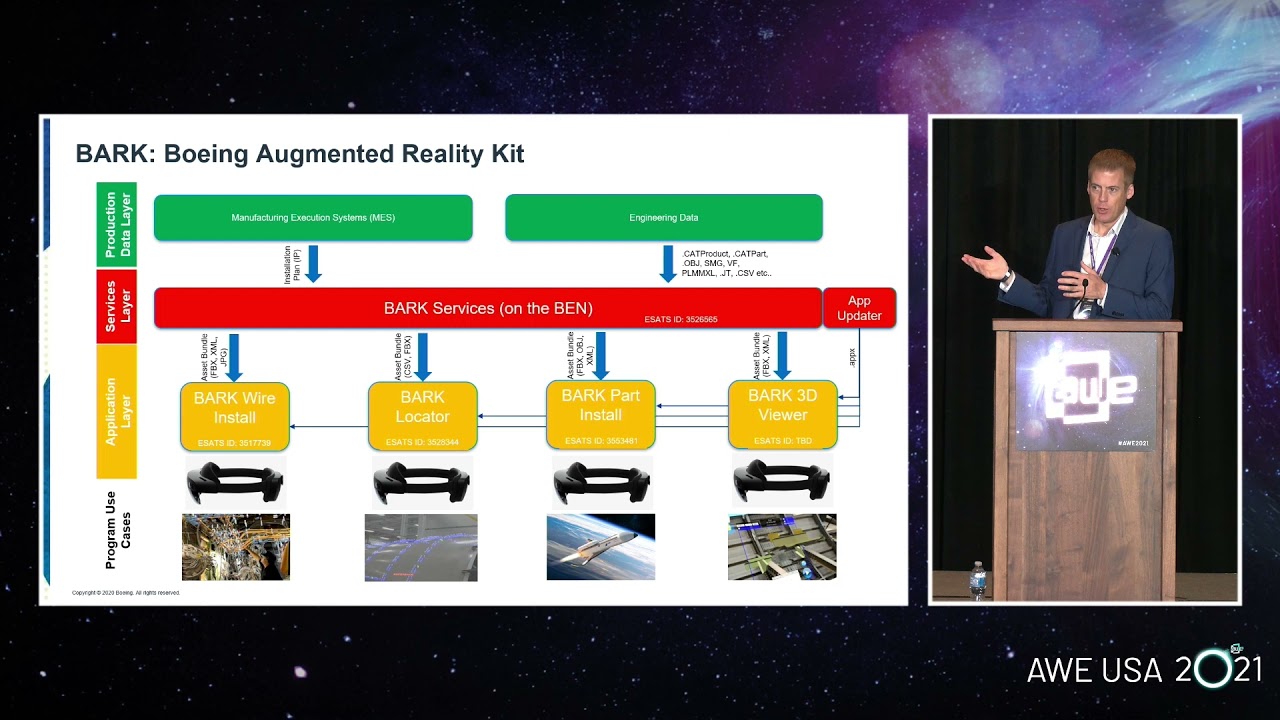
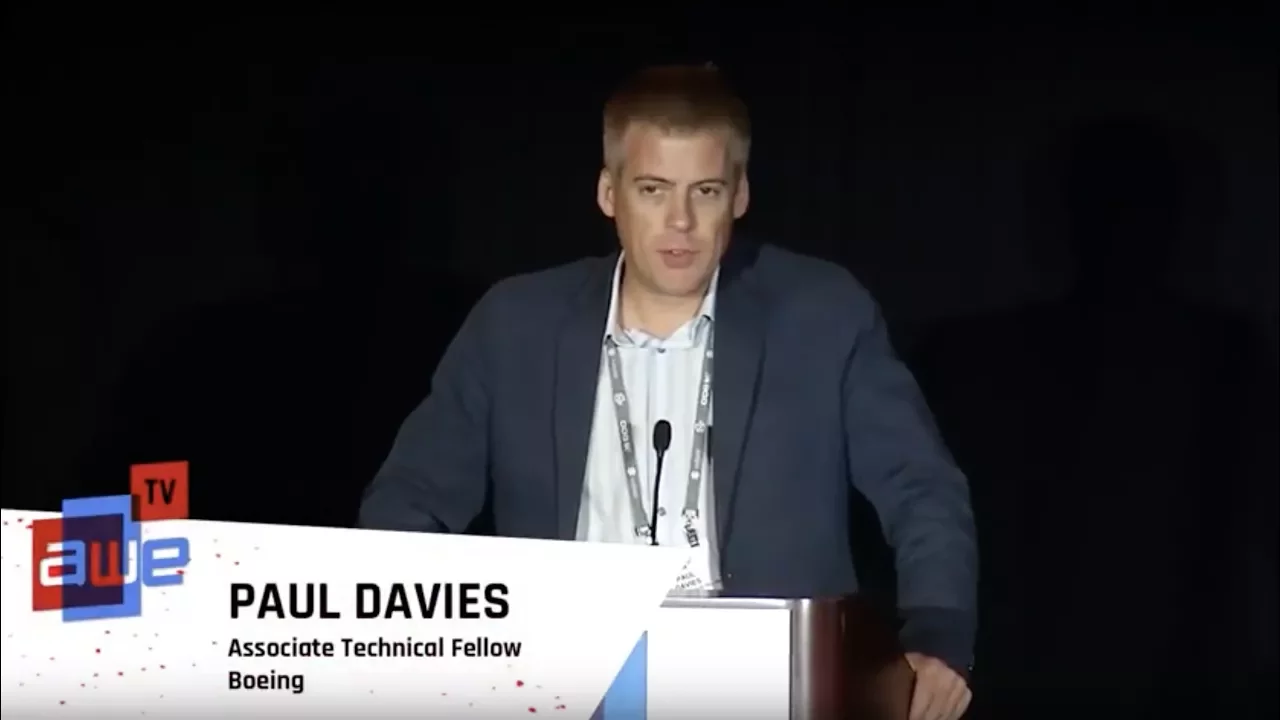
[Music] actually I'm going to say a few words about what bowing of doing what my team is doing at the bone company going to talk for the next 10 15 minutes share a little bit about how we've matured some of our open era pilots specifically manufacturing and how we are now working to standardize some of the technology we've developed and we're calling it the bark the Boeing augmented reality kit the goal is that this would be available to many or all of our production programs for them to use if they see use cases for augmented
reality so we actually have a long history in AR I've given a few talks aw before another competition I would like to show this picture it goes back to the late 1980s and this is two of our researchers Tom Caudell and David Maisel were up in the Puget Sound area up in Everett in the commercial airplane factory and this is one of their prototypes he's wearing obviously a early version ahead certainly seeing very basic 2d line instructions on how to build up a wire harness so we've been doing this kind of work for a long
time obviously this is what the technology was not ready this was way before its time but you know we would think along about these things for quite a long time now of course technology is far more mature much more available so we're doing some more continuation of what was started over 30 years ago I always like to start with a few definitions especially for at least in the Boeing community we're trying to standardize we'll come to some agreement about what different devices make sense for using on different applications different workflows and what we call different
types of technologies so we've kind of honed in at least the technical community at Boeing of homes on these for kind of baseline standardized terms and I know this doesn't agree maybe a hundred percent with everybody but at least it's what we're trying to come to a conclusion on everyone's familiar with virtual reality everything is virtually generated we call informed reality things like Google glass maybe a music display that is kind of offering your peripheral vision probably not spatially registered but is taking some content and is showing it to you on a wearable we call
that informed reality augmented reality everyone is familiar with what that means and we call mixed reality basically augmented reality the handles occlusions in real time so real objects can include virtual objects now the barque tool that we're standardizing really only deals with augmented or mixed reality we have other work lots of other work going on around the company using other types of displays informed reality and virtuality but the barque tool only deals with AR and mr so of course there are a lot of devices out there now and there's more coming seems every every other
week there's a new device available but in in my opinion only a few devices on the market can do true AR to mix reality and I've circled a few of them here are the requirements the technology requirements for doing a are actually very steep they're very difficult because the tracking is usually the one that causes most issues many devices you know put some of them up on here either don't track themselves or they're not able to display in your direct line-of-sight or they just don't lend themselves the form factor just doesn't lend itself for generating
an AR display so most of our bark AR mr work is focused on tablets cell phones the daiquiri smart helmet and the whole lens there are other devices that can do it obviously we're focusing on those four to begin with so this is the current standard that we are using for augmented reality and manufacturing today and it's only on tablet computers I know go down to the expo hall tomorrow you'll probably see a lot more wearables and you will tablet but we're still believing that wearables have a little ways to go before we can truly
implement them in production in our factories now there are some use cases where it makes sense however we're thinking the tablets are still probably got a lot of mileage in them before wearables get to where we think they need to be so tracking a tablet is difficult so you can see what typically what we'll do is our current standard is to install a tracking system around a work volume this system here is from vikon we also use other manufacturers such as a RT and so will I fit a cell like this this cell is in
el segundo just by the los angeles airport we've got eight tracking cameras there the cell is about 40 feet by 60 feet and those tracking cameras give us submillimeter accuracy anywhere throughout that work cell so we say we use tablets we've created tablet holders 3d designs and printed the hole markers for the vikon or the tracking cameras to interact with and then of course because usually people need both hands depending on the job but more than likely need both hands to do the job we'll put the tablet on an arm like that it's a zero-g
arm from equipoise and that allows them to move the tablet around position it where they want to and keep their hands-free so this is the standard we're working with now we've deployed this tool to over five locations now five different programs around the Boeing Company across four of our sites across the country across the enterprise so these have been mostly pilot work and we're trying to understand the use cases where it makes sense where we can get the most value out of it and get feedback from the mechanics and technicians who are using it so
that we can continue to develop it moving for performing foot and this is the block diagram for that system this one again only uses a tablet we're not using wearables really yet we are in the research realm and in the labs but on the shop floor we're only just getting into wearables it's divided into three blocks there you can see for tracking the bark tool has really three options it's either two motion capture vendors so we've coded interfaces for so we can stream in their tracking data or in an old-school fiducial markers sometimes the market
makes sense if you're in a cargo hold of an aircraft or an area where it's very it was difficult to track using any kind of excitation system and it's a small volume you know sometimes the market just makes sense the core functionality block is really just software we've put a lot of work into calibrations we want mechanics to be able to calibrate AR systems quickly and accurately to make sure that the content work instructions whatever they are are aligned correctly so we put a lot of work into that the digital content usually comes from the
program itself it could be CAD models the design it could be custom 3d generated work instructions or stay axons whatever the job may be content will come from the program we're developing unity applications to display that content and and register it and then every space on a tablet now going forward we have some bigger goals in mind obviously like like most other people we're currently developing a unity application that's going to be deployable to multiple platforms however we're focusing on these four and I put some of my thoughts here on the benefits the pluses and
minuses of each one they're still believe there is really no one platform that will meet all use cases in manufacturing some programs have a higher tolerance for cost so they can afford a high accuracy big tracking systems because they need to you know that they need the the best accuracy in terms of robustness you know different devices are obviously more mature more robust the technology readiness level III rate tablets and cell phones to be highest because we're just more they've been around for longer and the CRL stands for a cultural readiness level and that's really
how adoptable releasing piyo are our population going to adapt and use these things and again tablet from cell phones because they've been around longer and everyone has them I think they're more likely to be adopted quicker however of course wearables are starting to become a bigger thing now so I don't think it'll be long before they become adopted more easily and then usability in manufacturing nobody wants to hold anything so you know tablets it's not great but it's you know it's one way to do things wearables obviously are are the way to go because if
you keep both your hands-free and so I provided some rein in there but so we're developing our Bart tool so it can be deployed on these four platforms because we realize that some jobs some programs some applications are going to dictate using a tablet there may be safety things to consider by putting a wearable on a person in a factory in a hazardous environment so it may be tablets all the way to go other areas maybe tablets to start practical maybe you're in a confined space so a wearable might be the way to go so
our application will run on multiple platforms so I have a couple of examples of some of the use cases we're working on one would be as we've seen a couple of times this morning step-by-step task guidance which is pretty straightforward everyone everyone kind of begins with this one I think this video is an early version of the bark tool running it's on it's on a Windows tablet you can see here we've just animated some CAD models the design models of the part going into a tooling fixture pretty straightforward probably don't need a R to communicate
this was a done for a demonstration for some of our executives you can see some of the mechanics using the tool they in the bottom right-hand picture they're showing a lot of wiring on top of one of our assemblies they're using it to get an understanding of what the designs how it should be built how it should look like when it's built that arrow pops up on the screen there if you look away from the instruction you'll be surprised when you give somebody a tablet how many times they'll kind of look at their feet and
say it's not working we say we have to look over here so we put that arrow there to help with that another use case would be interference checks and particularly in high value low rate assembly for instance like a satellite different modules are assembled in different work cells and when we try to do the mating there can be interference issues so we've tried showing one half of mate virtually and another half will be real so in this case the radiator panel is real the colored object is virtual if you look at the bottom left hand
image you can see one wire bundle has been righted incorrectly and if you look at the cat 4 that the cat actually shows a radius for that bundle to clear that green piece of structure but it wasn't built that way so we were able to detect that ahead of time usually if we didn't have our tool they would have detected this at the time of mate which is not what you want to find these things so we were able to show them ahead of time and they fixed it before they tried to mate it so
we've seen some good value out of doing things like this a big one at the moment for us is wiring install new modern commercial airliners are insanely complicated with a lot of wiring some of the programs were working on the military platforms are working on have more wiring than we've ever put into an airplane before so writing those wires getting the harness in place meeting separation requirements things like that become a real issue so we're doing a couple things the one on the left is a pilot we did last year actually was in on a
a V onyx cabinet you can see it's showing all the wires usually we see one by one it's showing connector locations and P clamps tie-down points things like that the image on the right is more recent this is something we're working on one of our larger airframe platforms we're going to be taking production data that already exists in 3d and right now that data is viewed on paper which is unfortunate we're going to take that data and provide it to the electrician's in real time on a wearable on the airplane that's we're going to have
that by the end of the year finally the last use case we're really focusing on is training and this example is using a hololens it's in the Everett factory you can see here we've crafted a 45 step training episode around how to install this one part it's called a door seal it goes over the two sections of a fuselage goes over the joint and it's been particularly troublesome on some of our programs and we've needed to get more people up to speed on hundreds that job faster so we've crafted this tool we've been able to
cut down the amount of time it takes to train somebody by around four times using this tool that put the whole lens on they'll spend a couple of hours they'll run through these 45 steps we've modeled we've modeled tooling i'm we've modeled at tooling it shows where drills go shows where feeler gauges go and so really it's just a matter of see and copy is very straightforward to to do so that's about all I have time for kind of a brief overview of some of the things we're working on my contact information is here please
feel free to reach out to me email call anytime I'll be glad to chat a couple questions did come in on the app so let's see here a lot of questions came in okay let's do the one from Kevin what CAD software is using your conversion and what problems are experienced converting if they are so that's a big deal obviously you know CAD is all nerve services no 3d design tolerance and design collars you know a are real time rending needs tests laser services so everyone is struggling with it how do we get from engineering
models to real-time rendering in AR we've tried a couple of things we've used software from Acuna polyworks things like that more recently we're using more CATIA tessellation tools but it's still manual and everything we've done so far has been about exporting something from a CAD tool tessellating converting it usually Dinah skies downsizing it and then putting it onto our platform this is not ideal obviously especially in terms of configuration control because then your your things are displaying are not source control to the each other design the one as we move forward that I mentioned the
project we're working on right now for the wiring we're actually going to leverage a lot of work our IT group has done they have already tied into the design tools we use in this case it is CATIA we have a visualization tool called IB T is the emergency visual integrated visualization tool all of our commercial platforms are available all the 3d data is available through our IV T and we're going to leverage that work that they've done so that is configuration control and we can get it out in a tessellated format so I see you've
done a lot of heavy lifting for us there we're just going to take that data pull it over a network to a wearable device so we've got we still have a lot of work to do as everyone else is in this space but I think we're making we're making small steps so I'm actually over time I'll leave it there I'll be around during lunch you feel free to come grab me thank you [Applause] [Music]