how to get started with blot follow along and in the next 3 minutes you'll have five social media posts ready to go from the website click log in the first thing you're going to see is this screen to add a source a source is basically a high quality piece of information you want to write about you can add articles websites YouTube videos Tik Tok videos podcasts and PDFs and you can also just add any topic you want over here in perplexity and this will use perplexity AI to research the web for that topic let's say
we want to take this YouTube video talking about the no BS way to build a million dooll business grab the YouTube url paste it here click add and now you select which platforms you want to generate content for let's say Instagram LinkedIn Facebook a Tik Tok video script and threads click generate post and now blow is going to work on drafts for each of those platforms you're easily able to tweak each draft and I'll show you how that works in a minute so now we have three posts generated four fourth post coming this is your
Tik Tok video script now your final post which is threads now we have all five posts generated here's the Instagram post with hashtags at the end here's your LinkedIn post here's your Facebook post and your Tik Tok video script and threads let's say you don't like this initial draft for LinkedIn you can choose one of the prompts from your library for example for LinkedIn I often like this prompt structured bullet points click generate and this will generate a new draft LinkedIn post using that prompt from your library okay and now let's say you like this
but you don't like all of these asterisks you can just ask the AI writer on the right hand side to remove asterisks and it'll make those edits and if you don't like those edits you can click regenerate to get a new variation so here's a new draft and no asterisks and you can do all kinds of things as well insert an Alex horos quote from the YouTube video in the post now this will take the YouTube video transcript find an Alex horos quote and incorporate it into your LinkedIn post here's the quotes you can switch
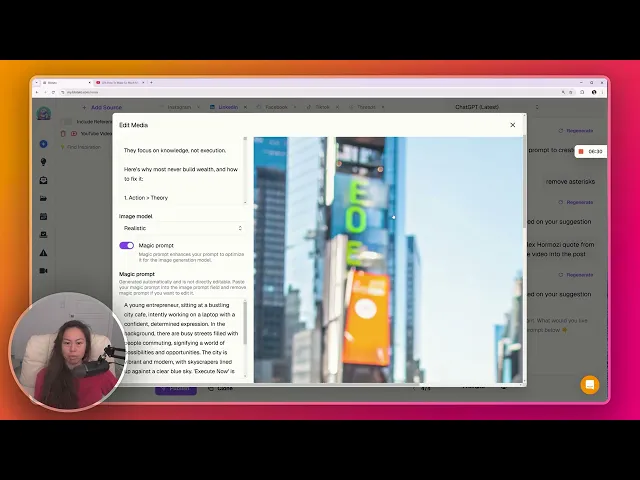
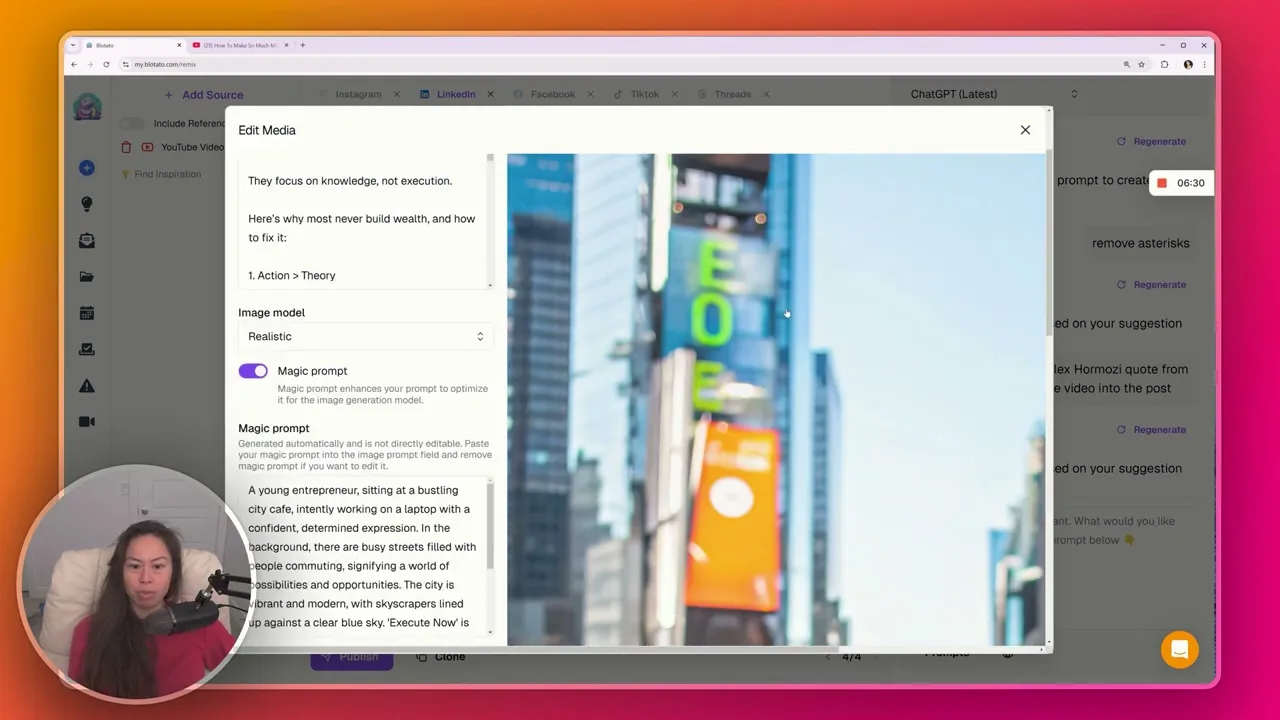
between versions here these are all the drafts we made for this LinkedIn post choose the one you like best and if you want to attach an image or video you can upload a file generate an AI video within blot generate a Creative Image generate a text quote card or generate a realistic looking image as an example let's generate a realistic looking image this will take a few moments okay and here's our realistic image if you want to make a new variation just click regenerate and you can edit the prompt itself let's say you really like
this post and you want to use this exact same post for other platforms all you have to do is clone this post so let's say we want to clone it over to Facebook and this will take the exact post the text as well as the image or video you've attached and clone it now for Facebook don't forget to add your unique point of view your experience your insights and data points to each post to make it truly yours and build your personal brand that's what I found work best not 100% AI generated contents okay once
you make those tweaks and you're happy with what you have go ahead and click publish you can either publish it now you can choose your next free slot in your calendar which I'll show you in a separate video or you can pick a custom time slot here is where you can pick the different accounts you have you can connect personal accounts as well as pages so for LinkedIn I have my personal account as well as a blot page select the account you want to publish to again choose your time and then go ahead and click
publish once you hit publish your post will disappear from the drafts page and you'll be able to see it over here in your published posts okay so you can always go back and see your published posts and don't worry about saving drafts all of these draft posts you haven't published will be saved here and it syncs across devices as well so you can start working on a Twitter thread on the phone and then switch to your laptop or iPad later and real quick for platforms like like threads Twitter and and real quick for platforms like
threads Twitter and blue sky you can make long form threads click add a new post to thread and then this is the next reply in that thread and for each platform there's a difference character limit threads is 500 Twitter is 280 characters you can attach an image or video to each part of your long form thread you can add as many steps as you want just make sure that your threads are not empty so you'll see a red error message like this if one of your your replies is empty a couple more quick things I'll
point out if you want to enable web search click this and it will use perplexity if you want to use a different model there's chat GPT 40 latest which is what I use GPT 40 03 mini for more technical content and Claude 3.5 so