Welcome, down here in the machine room. I'm Jesper Pedersen from KDAB, and in this video and the following seven videos we're going to talk about what is going on down underneath the QML level. In the next module, we're going to see the interface between those two and, then in the final video module, we're going to talk about models coming from C++.
So, from now on and throughout the rest of this video series, it's going to be C++ -- a lot of it. We'll start out talking about the object model that is built into Qt. It all comes from the special class called QObjects.
Then, we'll have three videos where we'll talk about signals and slots: how do they work on the C++ level, what is significant about those, how do you connect the signal to a slot. There's a few different ways for doing that, and we're going to talk about an unsung hero of this whole thing. It's called QVariant.
It's a very, very important class in the glue between C++ and QML. It is a very important class when we talk about model view, so super important to learn. And then in the final video of this module, we'll talk about the property system in QObject.
Yes, that was not a speaking error. The property system in QObject is what we'll map to the properties on the QML level. So we're gonna see how that even fits together, and once we're done with that.
. . man, we will know so much more.
Have you ever been in a fight with one of your friends who thinks java is better than C++? If you have, I'm sure that he told you that java is a much more modern language. well at least until C++ 11 and upwards, he was right.
Java is standing on the shoulder of C++. In C++, we have a number of of legacies carried around that keep the memory usage to a very minimum. And all of that means that, in C++, we do not store extra information.
You got an object here; Have you ever tried asking that object, "who are you? " Well, sure we got RTTI, runtime type information, in C++. But I'd like to know who you are as a string.
We've seen that in GammaRay over and over again, that I would point you to "hey we got this element here" and whatever and you could see the element names. That is no thanks to C++, because in C++ you cannot ask for that kind of information. "Hey, object.
Can you tell me what methods you have? " "I don't know. I was compiled.
My inventor, Bjarne Stroustrup, said that it was not important for me to carry that information around. So, when I was compiled, all of that information got thrown away. " We need that for numerous reasons when we program with Qt, both when we do programming with Qt on the widget level (It might be dbus, for example, inter process communication happening with dbus.
We might need it there. ), but we definitely also need it when we talk about QML because, up here on the QML level, we may say, "hey, I would like to set the text property of an object down there. " Then it doesn't help us very much that all we have around is this string with four letters saying "t-e-x-t.
" We need to be able to get to set text method of that object on the C++ level. That is what QObject adds for us. So QObject is a class that sits at the top of the class hierarchy for enormous amounts of classes in C++ with Qt.
There's a lot that it doesn't sit on top of, but there is a lot that it does and it adds quite a bit of information. It adds facilities for signal slot communication, as we'll see in the next three videos. It adds the whole property system that you've seen in many, many videos by now.
It adds event handling. So, how do we integrate with the underlying hardware and the underlying hardware tells us that the user clicked somewhere or typed something. That's also coming from our QObject, and it adds memory management.
Yes, in that fight with your good friend from java he will likely have told you that in java we at least have a garbage collector so we do not leak memory. Of course, that is where you win the discussion because you say, "in C++ we don't; that's why C++ is a better language than java. " But, let's be honest.
We have lots and lots of software out there written in C or C++ where pointers are leaked and memory, therefore, is leaked and it just builds up until the application crashes. Qt addressed that problem back in 1994. .
. . Actually, Trolltech addressed that back in 1994, when they wrote their first version of Qt, simply by saying, "QObjects, they do have this memory management model.
" Let's see what that looks like. Well, before we do that, let me just for clarity say that many of these facilities are just added facilities in C++ and some of them require that we have a meta object compiler. This is a good time for you to take your hands off your keyboard.
I am not to blame for the meta object compiler. I'm just a messenger. Actually, let's kill that conversation now.
Yes, today -- 2019 -- we can definitely do most of what the meta object compiler can do, at least without a dedicated compiler step. We have fancy template magic, but Qt was invented in 1994 and back then there was definitely not that powerful template matching for that. So, please do not go on a long rant about moc.
I'm sure you can find numerous threats on the internet with that already. So, the memory model with QObject basically goes like this: Whenever you create a new QObject, you're giving a pointer to another QObject that is a parent. And this slide here is even slightly outdated because it says QObject point, a parent equal to zero.
You should, of course, say QObject point a parent equals to no pointer because it's just a pointer that we're giving. Then, whenever the parent is killed -- let's not be so dramatic -- whenever the parent is deleted, in its d structure, it will run through its list of children that has been given to it at their construction time and it'll delete all of the children. If a child, however, is deleted, it will go to its parents and say, "Hey, you know what?
I'm out of business. Can you please take me out of your list of objects to delete whenever you die? " And the beauty of this is that it means that all you need to do is keep pointers to the top most QObjects around and then delete those whenever you do stuff again, of course, on the C++ level.
In my years of teaching Qt, I have seen many people that try to allocate a QString using new. The reason why they are trying to do that is because they're looking at Qt code and admittedly those people weren't from the widget world. So they would see that I would write new QLineEdit, new QTextBox, new Q whatever and then they would say hey that means that anything that started with Q must be allocated using new, but that's not entirely true.
It's anything that inherits from QObject that should go and be allocated using new. If you have a QString, a QStringList, a QVector or whatever, they are not sub classes of QObject and therefore they do not participate in this parent-child relationship where, when the parent is being deleted, it will delete its children. You of course might have reasons for why you want a pointer to a QString rather than a QString, just like if you were a C programmer you might have had your reasons for why you wanted a pointer to an integer rather than just a plain integer.
But the reason should not be that, "hey, it starts with Q, therefore it must be allocated using new. " Can you get that rhyme out of your head please? QString, just QString name order.
But of course things that do inherit from QObject should likely be -- well, most of the time you will want to allocate them using new, because if their parents are deleted it will call delete on the children. And it kind of is not so good when you call delete on something that's allocated on the stack. Whenever you compile your application that has QObjects in it, behind the scenes a second step will happen.
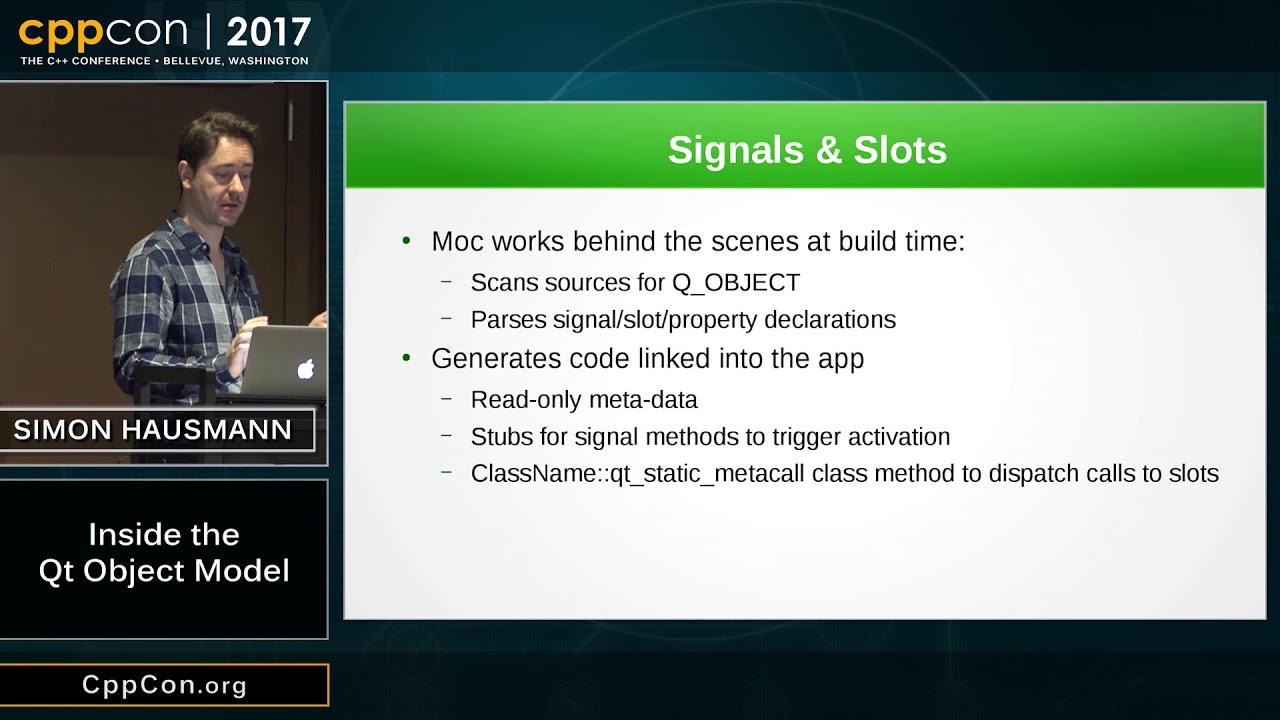
A little friend of ours that is shipped with Qt called moc will be executed. What moc does is it opens your header file and it looks through that class and I'll see, "oh we got something that is inheriting from QObjects," and then it will write additional information into its little black book. So it has a little black book saying okay and one of the things that you can go and ask the object afterwards -- what that moc has written into that little black book is that you can go and ask it for -- "hey, my little friend, what is your name?
" "oh, my name? I am foo, as in f-o-o," because it's a class Foo: public QObject. So there's a lot of information that is written into this step.
And one other thing that is written into it is, like, which slots we have, which signals we have. So I can set up an object over here that is in a completely different process that knows about this object over here, and this object over here can simulate to the user if the user from over here goes and asks, "what methods do you have? " it can say, "yes.
well, I got this and that and that and that method," because we have this additional meta object information that is written in. If you're interested about the gory details of this let me just point to a video from a good friend of mine, Volker Krause, who, in 2014 at Qt World Summit, had a video or had a presentation called Do it Yourself Meta Objects. So there's a link right down here now and in that video it's actually pretty interesting to see that you can do all of these things yourself and that's exactly what stuff like dbus or QtWebChannel, or QtRemoteObjects or QML does.
They do have all this. They do require this kind of meta information. So as I said, what's going to happen is that you're going to run moc.
It will spit out a C++ file. You'll compile your own classes here. You will compile this bit out version of moc and then you'll link it all together into your binary.
So there's gonna be an additional step in there. And how does all of this work? That's actually one thing I forgot to tell you -- namely that, when moc opens your header file, it will look for a magic marker called Q_Object or Q_Gadget.
We'll get back to the gadgets a bit later and classes that have this Q_Object in them. These are the classes that it will extract information for. And the Q_Object, by the way, also adds a number of stuff.
I'll urge you to go and just start up a class where you have Q_Object, press F2 so you go to the actual definition of Q_Object, and one of the things that you'll see is that it actually supports getting to a special class. That's a meta object, and on that meta object you can go and get to a class name open parenthesis close, which gives you a QString or a const char pointer or whatever that represents the class name of the object. I've been asked numerous times which objects should you add Q_Object to?
Should you do that for all of your QObject subclasses? Yes, please. Unless you have a very very very very very very good reason, you should certainly add Q_Objects.
And why is that? Well, if for no other reason, when you're looking at your application in GammaRay. So, one of the very last things we're going to see in this training is proxy models.
So, proxy models are models on top of models, and models and data come from down here and they show up at the top and then they filter up and they get sorted or whatever, and sometimes it doesn't work and then you go to GammaRay and you can look at the data on each of those levels in your models and it's super, super inconvenient if you can see you have a proxy model, three of those, and they are all just QAbstractItem model subclasses and you cannot see which one. It's much easier if you can see that: here's my filter proxy, here is my whatever proxy, here's my whatever proxy. So give all your objects that subclass from Q_Object.
Yes, I know it's gonna cost you 60 bytes more per class -- not per instance, but per class. So it is very well spent memory doing that. And that's the end of the meta object information.
If you want more please do go and watch Volker's presentation. It is actually pretty enlightening. Otherwise, do come back and watch the three videos that I have for you on signals and slots.
And have I said it before? Please do subscribe to our channel. We love hearing back from you.
So do subscribe to give me your comments below, and until next time have a great day.