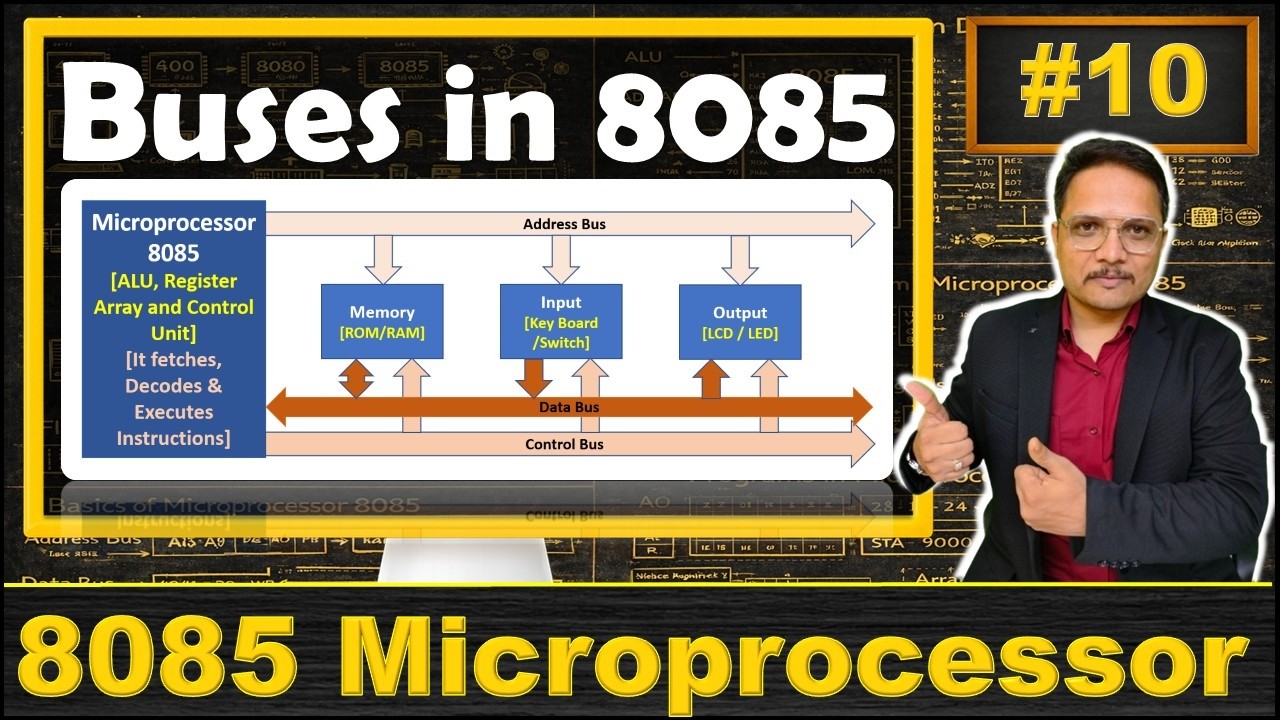
Hello friends, welcome to Gate Smashers In today's video, we are going to discuss Types of Buses in Computer Architecture And generally, on what basis do we make these busses? That what is that bus carrying? As you can see in the diagram, address bus, what is it carrying?
address! data bus for carrying the data And control bus for carrying the control and timing signals So here according to the diagram, you have. 8085 microprocessor And here we have control unit And if we talk about address bus So what is address bus carrying The Address.
Like if we talk here in memory In memory or input and output devices If I want to fetch anything To reach any particular location Then what does the CPU or microprocessor do for it? Generates an address And that address will be generated from the address bus And from any particular location we have to fetch the data That location will be in the address bus Like if we talk about 8085 microprocessor So here the address bus length is 16 bits 16 bits means Total number of slots in memory is 2 raised to power 16 Which is 65536 But if I talk about Let's take a simple example The memory we have. In that we have, this address bus The address bus length is let's say 3 bits So what does it mean that in memory we have 8 slots 0, 1, 2, 3, 4, 5, 6 and 7 So total number of slots will be here?
7! And it has 3 bits What does 3 bits mean? That to represent it we have 00001001001110010110111 Means if we say that address bus its length is 3 bits So what is it showing?
It is showing that 2 raised to power 3 Means 8 slots 8 locations in memory Which we can also call block Means 8 places where the data can be read So generally if we talk about 8085 As I said 16 bits So total number of slots in memory is 2 raised to power 16 Which is 65536 So from these many slots From where do I have to take data? Let's say my slot number is this So I have to take x and its location is 101 So what will come in address bus? 101 And let's say if we have a value of 16 bits And if we have only address 101 So what will be the MSB bits?
Will be 0000 It's simple Address bit shows us How many number of slots are there in memory? And this is unidirectional Means. processor generally generates address And that address from where we have to take it?
Let's suppose from memory we have to take some value from input device Or we have to send any value to any output So for that we use address bus here Then if we talk about data bus First of all what is data bus? Unidirectional means let's suppose if we talk here Input device. If we fetch anything from input device Let's say we typed something from keyboard So how will it go from there?
It will go first in data bus Let's say it goes in data bus And from data bus it will go to processor We have different types of registers near processor Which we discussed in the previous video Data gets stored in those registers So this is it basically How we have to travel data And if we talk like this from microprocessor Let's say I converted some input to output And I have to show that data on printer Or I have to show that data on monitor which is an output device So how will we show? From here that data will go And it will show in output device So to travel data To send data we use data bus So it can go this way and the other way So it is bidirectional And between the registers also Where all registers are stored? In microprocessor So like we have data registers Temporary registers In these registers also if we have to shift data Then for that we use data bus only And how much this journey will be?
It depends on the size of your word Means like we talked about address What address bit shows? That how many locations we have in memory And the length of data bus depends on The size of the data you are taking from this location Let's say, that in any particular location I can store 2 bytes, Means the size of word we have We discussed word in last video too we use word basically to represent memory And the size of word we have in this example That is 2 bytes Means I can store 2 bytes in this location 2 bytes here, 2 bytes here, 2 bytes there So what does it mean? 2 bytes means 16 bits So how many bits can data bus carry?
It can carry 16 bits This is how we represent with the data bus So the length of data bus depends on The data you are storing in memory Or the data you are taking from memory How much is that length? And maximum length let's say If we talk about memory Then we have 2 bytes in memory And let's say the data coming from input is 1 byte So there is no problem Now what will happen in 1 byte? That the last 8 bits You give them value And before that the MSB That will be 8 bits 0 0 0 0 It's simple If the size of data or address is less Then you give the LSB values the same And the MSB bits will be simply 0 0 0 Then we have control bus Control bus is basically used To send control signals or timing signals And for this we have dedicated hardware Which is a control unit Because for which instruction to execute There should be complete timing It should not be that if I am executing the instruction later Then it may be that there is a problem in my output So generally we have control signals Let's say if we talk about the register Then we have to load the data in the register So load is a signal Load means in that particular register To load the data I have to activate the load If I want to increment any value Then I can increment Let's say if I want to clear something To clear we generate the control signals If we talk about memory Then if I want to perform read in memory I want to read something from memory Or write something in memory For this we have control signals Which generates control unit And timing means At what time clock pulse should be activated That is what is done by the control unit And all these signals travel through control bus If we talk about input Then if I want to read something from input device And write something from data So for all these values We use control bus for all these purposes So this is simple Although it is a very simple point But if you want to understand computer architecture well Then you have to keep these small points in mind Only then you can do big concepts well Students try to cram directly Don't cram at all We will bring these small topics And as soon as we relate all these topics And make a whole series You will get much more benefit from it So thank you, all the very best.