Hello! I'm Ruben AI. I'm here today to upload my first video onto my YouTube channel.
Uh, we will be looking at different AI products that are available. Um, the first one we're going to be looking at is Google AI Studio. Uh, we're just going to be exploring the different services or tools here and what these all mean, just so you get a simple understanding of how this works.
Uh, so we're just going to start at the very top. This is "Get API Key. " You need an API key to link your different services together.
So if you want to create an API key, you just click on this button. Um, hold on. This should create an API key.
So here you go. If you copy this, see? Copy this, and then you put it into wherever it's asking for an API key if you want to link this service with the service that you're trying to use.
Uh, the next thing we're going to do is create a prompt. So this is the prompt page. AG, um, so we're just going to… so over here, you can look at the different models that are available.
Um, they each have their different pricing and what they're best for. We're just going to stick with the basic one, which is a start-off one. Oh no, this is the more version.
Oh my God, there are so many more! Alright, cool! Well, we're just going to do the preview one, the one-stop-off on Gemini 2, Flash Experimental.
So tokens are how much is generated. Uh, this is the free version, so they give you over a million tokens. If you're not using it to generate a bunch of information, you can just go with the free version.
And temperature is how creative the AI can be. So it wouldn't be super creative. You turn it all the way up if you want it to follow instructions exactly, and you lower it down.
Okay, cool! So the next thing, uh, is these settings. We're not going to touch these today, but they're just, um, if you want it to give you extra information.
So we're just going to turn on grounding, just so it shows you different, uh, things it's using. Google Search—you know, that's interesting to know. Um, okay, so the next thing is system instructions.
You don't have to use this, but this will make it so that it follows the style and tone that you're looking for from your answer. So, uh, there are a bunch of different options you can go with: professional, child-friendly, short, long, or you could say like a student or a teenager. Uh, we're going to go with, uh, I'm going to create a coach guide for kids, so we're going to go with child-friendly and short.
So first, what we're going to generate is, um, a lesson plan for a basketball kids team. It should generate a probably fun lesson plan. Oh, I forgot to press run or enter, so I need to press run.
Oh, that was quick! It created a lesson plan. If I gave it a specific age, it would probably need to create one for ages 6 to 10.
It gave us a warm-up, dribbling sets, some fun stuff, a cool down, and it kept it nice and short. So, uh, something you can do is you can edit what's inside it, you can rerun it, or you can delete it. So I'm going to delete this, and we're going to have the same prompt just to show that that can be different.
I want it to be sort of short and detail-oriented. Let's run it again. So now it's giving us more detail, um, for each of the prompts, and, um, as you can see over here, it's actually using my tokens.
The more you generate, the more tokens it will use. This is pretty simple, so it's not using that many tokens. Um, and the temperature is low, so it's following my response.
It's following my prompt pretty accurately. So we're going to create a new prompt. We're just going to show how the different temperature levels affect it.
So we're going to turn it down really low, and um, I'm not going to give it an option. I'm not going to give it a tone, but I just want to create, [Music] a… actually, we are going to give it instructions. We just want two paragraphs.
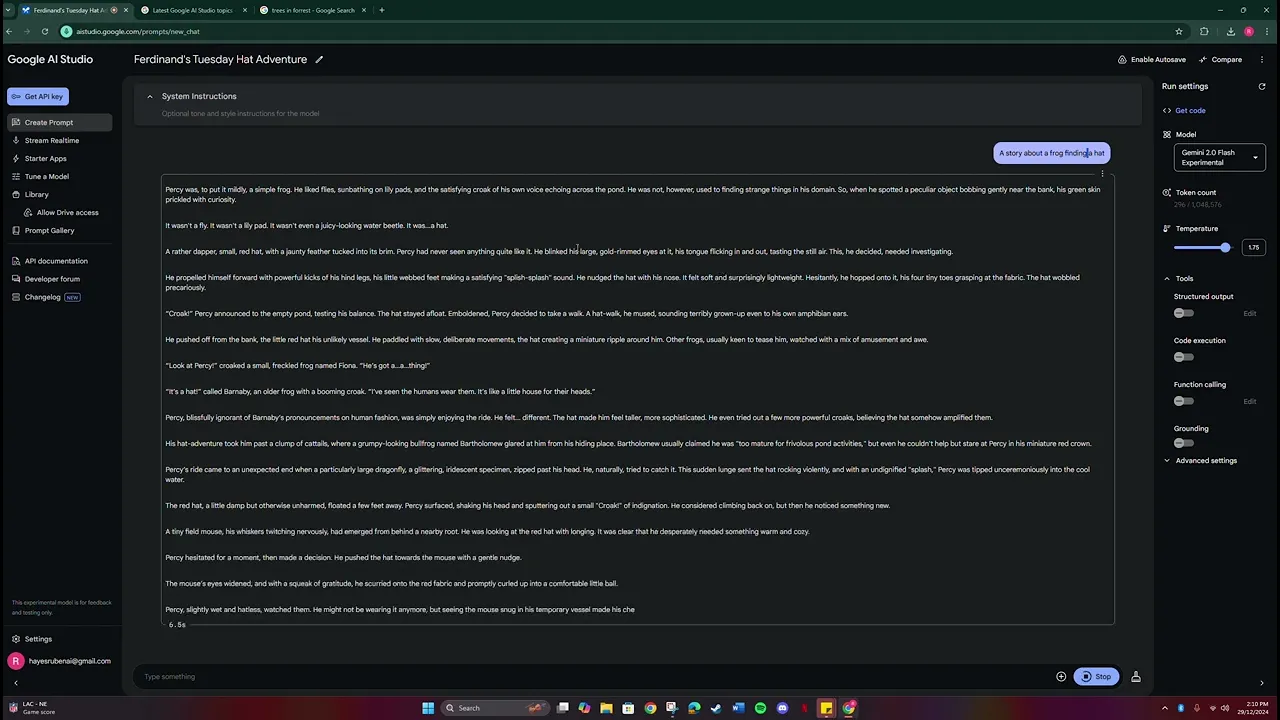
We didn’t have to put it there; we could have put it in here, but just separating it out. So we just want a story about a frog finding a hat. Let's run this.
This is fairly short. Let's give it a name: Fern. Okay, and then we're going to turn it up—the output seems to be more creative, but it's still very short.
Let's say two paragraphs. Um, I did say two paragraphs, so that's why it's so short. Let's see if I remove the two-paragraph limit and rerun it.
It's a fairly long bit; let's add a few characters. It's said Barnby, Fiona, Percy. Let's turn it down and see if it's different.
It should be different; it should be less creative. It's shorter. But that's all right.
Uh, we're going to go to the next thing. So, the next thing is stream real-time. You can talk to Gemini; you can show Gemini your webcam, which I don't have with this computer at the moment, and I can share my screen to help it help me with what I'm working on.
So, we're just going to talk to Gemini for this one. Oh, and over here, you can select different models; there's just the one model at the moment, and you can select if you just want text or if you want audio. I'm picking audio just because I want to see what it sounds like, and there are a few different voices.
We're just going to stick with the default voice. Um, okay, we're just going to press start recording, and the first time you press this button, a thing will appear up here asking for consent to use the microphone. I've already done that, so it shouldn't ask me again.
I'm going to press start recording. Hello, could you tell me what 40 + 95 equals? Sure!
40 + 95 = 135. Is there anything else I can help you with? Okay, great!
So, it just heard me and gave me a simple answer. Uh, let's see if it can tell me anything current at the moment. Hello, could you tell me how many pizza shops are in Melbourne?
I cannot provide you with the exact number of pizza shops in Melbourne; as a language model, I do not have access to a real-time updated database of business locations. Okay, well that's interesting. Uh, let's see what happens if I have it generate me a short video or a short email.
Hello, could you create an email for me to send out to customers about their new hats for sale? Sure! I can help you with that.
Here's a draft of an email you could send to your customers: Subject: Check Out Our New Hat Collection Hi [Customer Name], We are excited to announce the arrival of our latest collection of hats! You can find a wide selection of styles and colors at our store. Come visit us or shop online today to find the perfect hat!
That's excellent! Thank you very much! You're welcome!
Is there anything else I can help you with today? Sounds cool! It gave me a short example email for my hat business that I'm apparently starting to run.
Uh, the next thing is starter apps. There are a few different things: there's spatial understanding, video analyzer, and map explorer. So, spatial analyzer I messed around with before; it's actually very interesting.
You can upload pictures. I'm going to upload a picture of some trees, and you can make it find all the trees. If you want to, you can give it a label.
I will; I'll just call it trees, and it should find all the parts in the picture where trees exist. There you go; it has them all highlighted. Uh, there are so many that it's struggling to find that it struggles to separate all the trees.
But that's all right; it did select quite a few of them. You could figure out which ones are trees or not. Uh, let's give it one that they gave.
Let’s see if we can just find the cheese, uh, and let’s label it as cheese. Looks like it’s an actual cheese, oh, but it has selected the cheese bit. Let’s go to points.
Points to the cheese. Yeah, it did put the point on the cheese. Um, I wonder if I select candle if it would still select this cheese or not.
Oh, it did identify that that is a candle, not a piece of cheese. So that’s interesting. Let’s go to the starter apps, and let’s go to map explorer.
Take me somewhere. Oh, okay! So if I press C, it brought me right into a small village in Siberia.
Okay, on control. Okay, let’s see if I give it the prompt: take me to the life. See if it’ll bring me there.
It will! Like, this is just what Google Maps would do. So, let’s see if I can be more vague.
Uh, take me somewhere. Uh, take me to. .
. uh, let’s see what happens if it gives me surreal. .
. surreal sounds interesting. Landscapes of the world's largest flat line.
Oh, that would be… I've seen pictures of that; it would be very… it’s a lot bigger than I thought it would be. Okay, the next thing we’re going to look at is the Tuna model. So, this one you can create a model from existing information that you upload to it.
Um, I will not allow it access to my Google Drve just because this is a brand new Google Drve account, so there isn’t actually anything in my Google Drve to access. Uh, but if you are interested in this, I can upload some information and then train a model on some data and see what it gives out in different videos. The library, again, wants access to my Google Drve, which I have nothing in, but again, I would be willing to upload files to it to show this off.
Uh, I imagined that it would be listing my files and then I would be able to select them for AI, and it would then try to find information for me. Uh, the next thing we’re looking at is the prompt gallery. So in the prompt gallery, it gives you a bunch of different pre-made prompts for you to select from.
There are different ones. We're just going to kind of select one at random. Uh, let's go with Recipe Finder.
Oh, okay, so it gives you an example. It has an image of some noodles, some cheese, and an egg. Let's run this.
Okay, so it has identified Yag cheese and udon noodles, and it has selected and created two or three different recipes using those three ingredients, with a few different ingredients that would just be arranged in your kitchen. This one looks interesting; I might make that one later. Uh, and the last three parts are information that you can read on your own, just highlighting different parts of it.
I recommend reading this in your own time; I won't go through it. Uh, but that's it. That's everything on this at the moment.
If you find this interesting, uh, I'm happy to create some more videos, and I'll be seeing you guys later. Thank you! Bye!


![Hands-On Power BI Tutorial 📊 Beginner to Pro [Full Course] 2023 Edition⚡](https://img.youtube.com/vi/77jIzgvCIYY/maxresdefault.jpg)