I'm willing to bet that you need to be running Facebook ads if you're serious about growing your business fast in 2025. Learning to run Facebook ads profitably, being able to throw a dollar in, make 2 4 6 8 $10 back, is one of the highest leveraged skills that you could possibly have as a business owner. And if you don't have the proper skill and you don't actually understand how meta works, you don't understand the intricacies, then you're likely putting yourself at a major disadvantage versus the thousands, if not hundreds of thousands of business owners and
media buyers that actually do know how. On the other hand, if you don't know how to set up meta ads and you don't know the proper way to structure and strategize within your meta account, your business is not hitting its full potential. So, for those reasons, I'm literally going to walk you through everything that I know about Facebook ads step by step so that you could set up, structure, and ultimately scale your ads profitably today. Everything that's in this video has allowed me to run ads for over a hundred brands at the Moonletters where we
have scaled brands such as Lamb Squad, JC Dossier, Lola Dre, Nature's Plus, Amish Baskets, Kin Euphorics, Alive and Well, Kleinfeld, Opera Beds, you name it. I've spent over $500 million on ads to generate north of a billion dollars in revenue for businesses over the last 11 years in basically every single vertical across e-commerce. And today, we're going to go through literally everything. And I mean it. I created a list here of basically all the hot topics that I want to go through. We're going to start from the very beginning, the most important things that are
setting up your foundation. And these are things that you need to still be checking if you're already spending $100,000 a month in your ads. It doesn't matter. These are also things that you need to nail perfectly if you're about to spend your first dollar. And before we even get started, if you can't pay attention right now, put your phone down and save this for later. This is one of those videos that you should be listening to intently. you should be walking through with me in real time so that you could actually take action to impact
your business today. And before we get into my exact strategy, structure, everything that we're going to be walking through, I want to share a couple common mistakes that I see basically every single day for highlevel accounts. We're talking accounts that come to us spending over $100,000 a month that are still making these mistakes. Keep in mind, I'm going to go through these throughout the video. So, just keep these in the back of your head as I talk through them. This is a very, very complex, advanced video. All the topics I'm going to hit here are
going to be the full speed version of the topic. So, I want everyone to hop into their ad accounts right now. And the very first thing that we're going to be looking at is in our events manager. Now, I know you might say, "Whoa, whoa, whoa. I've set up my events manager. Everything's good. I promise. I checked it 2 months ago. It's all set." This is so commonly an issue, and I'm going to show you how to health check in like 30 seconds. Here, what we're going to be doing is going into our events manager.
And inside the events manager, we're clicking data sources. And then we're going to click on our pixel. And then what I want everyone to do here is just scroll down to the purchase event. This is the most important event. And you can check all your events with the same process that I'm going to go through. It only takes about 20 seconds per event. Once we click the purchase event, we're going to look for two things. First, visual check. We're pulling back physically. And we're looking for discrepancies between the blue line and the greenish line. You
can see pretty much throughout the entire month, the blue and the green lines line up perfectly. There's this one spot here where the browser has 25 events and the server only has eight events. But outside of that, these are generally really, really close. That's a good first pulse check. The next thing we're going to do is we're going to click view details. So clicking view details. What I'm looking for here is par between total browser events and total server events. Just to brass tax, what this means is your pixel is firing at the same rate
that your conversion API is firing. What I see here is really, really close. We're looking for about 10% discrepancies at most. And in this case, we're a little bit under 10%. So, we're more like 6% discrepancy between the conversion API and the actual pixel, which is the browser versus the server. What do we see here? We see 3,000 browser events. We see 3,200 server events. We're good. The next thing I would do to just see if there's any bigger discrepancies, right? So, let's say you hop into here and you see the browser events are 100
and the server events are 200. First, you should be able to visually see where the gaps are. For example, I showed you this little gap before where we see that big spike in browser events and lower server events. So, I would just check. Let's see what the last seven days look like. And again, this is just a quick pulse check. We can see the discrepancies are a little bit more clear. And in this case, they're actually smaller, right? So, we're tracking really, really well here. Totally happy with this. The next thing we need to do
is actually validate are any of these numbers correct. So, to do that, we're going to hop into our Shopify account. Once we're in the Shopify account, we're going to click the orders over time button. And then this is just going to give us the quick number of orders over any x period of time. So, in this case, I'm just looking at the last 7 days. Last 7 days, we have 813 orders here. And in my events manager, when I look through last 7 days, so we're checking May 3rd to May 9th, we have 783 from
the server, which is a little touch under the 813, but it's all within that 10% rule. I'm cool here. We're underounting very, very slightly, which is completely okay. We just want to make sure we're not overounting significantly or underounting significantly. 5 10% are not going to make or break our ad accounts. Now, you probably recognize how we can do this exact same thing for every single report here. So, I would start with the purchase event. Then I go to the initiate checkout. Then I go to add to cart. Then I go to the view content
and page view. Any data that you could possibly validate within the Facebook ads manager, you should. Generally speaking, we want these to be as accurate as possible. But just note the purchase is the most important one. The purchase is the one that we need to have within that 10%. Everything else could vary a little bit more because people have different ways of blocking and stopping different tracking. There's a whole lot out there that could stop that, but purchase should generally be that 10% rule. The next thing that we're going to do to set a foundation
here, and again, this applies to brands who are spending hundreds of thousands of dollars because I literally, and I'm going to show you guys this audit, I literally just audited a brand yesterday that had over $150,000 in ad spend and are not doing this correctly. You're going to go to the lefth hand side and you're going to click advertiser settings. There's two things in here that we're going to need to adjust. First is the advantage plus creative. Click on advantage plus creative and make sure all of this is off. The very short version of this
is that these are tests that Meta is running on your ad account with roughly 5% of your impressions. It says we may show fewer than 5% of your ad impressions. And then here again, we may deliver them to fewer than 5% of your ad impressions. To me, why would I even let Meta have 2% of my ad impressions on tests that are not proven? 2 3 4 5%. These are all important gains that we could be having in our ad account. Now, I'm going to take you guys on a journey. And this journey is going
to be one of how do we spot issues in our ad account and how do we analyze what's actually wrong? Because I recognize that I can give you a setup. I can give you a structure. And I'm going to you're going to get to that setup. You're going to get to that structure. But if you don't actually understand how to spot what's actually wrong within your ad account today, then you're never going to be able to iterate, learn, and actually build your ad account over time. you're always going to be stuck finding the new strategy,
finding the new hack, finding the new structure, when in reality, what you should be doing is building on what you already established. So, this is an ad account that I just audited yesterday. So, I already have some notes built out, but it's pretty fresh to me, right? This is not something we're running. Things are a little weird. Things are a little broken. You'll notice here over the last 30 days on this ad account, they've spent nearly $150,000 in spend to drive over $300,000 in revenue. Sounds great, right? This is a big account, but there's still
huge issues here. And just 3 to 5 to 10% changes are going to make thousands, if not hundreds of thousands of dollars and change over the course of the year for this business. The first thing I look at, I literally physically take a pullback and I just look at how does this account feel to me? And I know that sounds crazy to most cuz everyone wants to do this, do that. But I pull back and I look at it and I say, whoa, we have way too many campaigns that are active. Right off the rip,
we have 16 active campaigns in this ad account. I could tell you very straight up, no matter if you're running $100,000, $500,000, unless you're talking about different countries, different regions, and like your Teeu or something, you're not running 16 campaigns. This account is running to two to three primary products. There's no reason they should have 16 different campaigns. First things first, we know that there's breakage going on. We know that budgets are probably split too much. And before I even go further, the next thing we always want to fix is our column set. My column
set that I like to use is unique per business. But these are the foundational columns that I'd like for you to set. What I always like to start with is delivery, making sure we can see if the campaign is on or off, attribution setting, budget, amount spent, purchase conversion value, purchase rorowaz, purchases, cost per purchase, and then our secondary metrics. CPC, CTR, CPM, add to carts, cost per ad to cart, checkouts initiated, cost per checkout initiated, and frequency. You'll notice that these are still big important, like the most important metrics. There's a billion other metrics
that you can pull in here when you're analyzing things like creative or adsets or audiences. These are just going to build the foundation for what I'm looking for at first. We'll dig in deeper later. Now, once we have our column sets, I am basically in an audit going through column by column, and I'm starting left all the way to right. Starting at the left, we've already looked at our campaigns. We've established that there's way too much going on in this account. And if you're looking at your account, you're seeing 15 different campaigns, eight different campaigns,
10 different campaigns, it's probably time to say, "Wo, maybe I am running too much. Maybe I got lazy here and I didn't feel like setting it up properly, so I just duplicated something." Or that was that thing that worked for 2 weeks, or that was that sale that I'm still running. Oh my gosh. Right? There's so many different things that happen in an ad account. So, this is your moment to be disciplined and actually fix it up. And I'm going to give you in a few minutes the exact setup that I want, but you still
need to understand why. Next piece that we're looking at is attribution setting. In this case, I see no problems with this account. What I'm looking for is mixed attribution settings. Generally speaking, if you're running ads to the same website, you should have all of your attribution settings be the same. We see a couple multi-attribution settings here, but when I actually click into the ad account, they're fine. It's just the engaged view, which technically doesn't do much at all here. So, I don't care about that. What I'm always looking for is accounts that have one day
click and then another that's 7-day click and another that's 7-day click, one day view, and another that's incremental. That will break your ad account because it's very confusing where the conversion should actually go. And in nine out of 10 cases, we want to have uniformity across our attribution settings. So, this is good here. The next column though, complete opposite feedback. This is a huge red flag. Look at all of the using adset budgets. If you don't know, campaign budget, which is formerly known as CBO, is the ability for Facebook to spend your budget based on
where it thinks the best performance will come at the campaign level. You set the budget at the campaign level. And if you have five different adsets, the budget is split up amongst those adsets in a way that Facebook thinks it will drive the best performance. also known as adset budget, means that you define your budget at the adset level. And if you're running right now in 2025, there's no other way for me to say it than you're behind. There's no reason to run unless you have a single scaling campaign, which again, we're going to get
to that exact strategy. If you have a business that's selling products for under $250, even under $500, do not run If you have a big high ticket business, yes, could come into play a little bit better here because you actually need adequate time for your creatives to learn and Facebook might not properly allocate the spend. That's the really, really tricky part about this. For nine out of 10 of you listening, we're running CBO campaigns only. So, I really see this as a big red flag. There's way too much human oversight here. In this case, the
person managing this ad account thinks that they're smarter than the best algorithm to ever run. Just it's not going to win. We're we're foolish to think that. Next pieces that I really want to look at and the next couple things that I look at in groups together are amount spent, purchase conversion value, and then purchase rorowaz. All I really am looking at here is where is the distribution of spend. We generally want to see a couple of campaigns dominate the ad account. Now, I mentioned they have 16 campaigns. I am terrified when I see 16
campaigns and I'm still seeing thousands of dollars of spend on a bunch of these campaigns. So, we have so much split within the ad account. And the even scarier part about this whole thing is there's actually a couple of campaigns that are driving significantly better return on ad spend, but are not getting all of the budget. I don't know about you guys, but I care about one thing, and it's profit. If my business has the opportunity to get a 2.7 return on ad spend, which we can see right here, versus a 1.7 return on ad
spend, you better believe that I'm going to shift as much cash as possible from the 1.7 into the 2.7. There is a point of diminishing returns. That's a topic for another day. But as you scale, you will see a slight decline in return on ad spend because the quality of traffic is going to decline. However, we're not probably instantly going to decline from a 2.7 to a 1.7. So, just logically speaking, we need to make sure we're shifting cash to the best performing places. Now, the next thing I'm looking for is what's going on at
the adset level. So, to keep this pretty simple, I'm going into all of my active adsets and I'm sorting by spend. And what I would normally do here, and keep in mind this is a multi-hour auditing process. I'm going to go through adset by adset and look at each of the specific settings that are set up. What I'm first looking for here is what are the big possible red flags. So, first off, I see no issues in the top section here. But what I do see an issue in is the audience section. Why on earth
are we targeting multiple interests at the same time? When we hit all of these interest all grouped together, and I know you guys can't see what these interests are, we're basically creating another version of a broad audience. We never want to group interest together. Interest should generally be single interest in their own adset. The only time you're grouping interests together is if it's job titles, things that are hard lists that you know you specifically want to target. Like if you're in B2B and you want to target dental technicians. If you're using interest audiences as a
way to just guide the algorithm, we never want to give it 30 different interests because that is literally just a broad audiences. Cuz as I go through some of these, you can see here on the right side, this is an interest of 12 million people. The next is an interest of four. The next is an interest of 17 million people. Stack these up. Yeah, there's going to be overlap, but stack these up and there's going to be 100 plus million people, which is basically the entire United States. Now, as we go through a bit further,
my biggest call out before was the use of And this is a big problem. We have so many adsets in here that are basically not getting the adequate spend that they should be getting that Facebook would probably be giving them if they were in a CBO environment. I'm going to hop into that structure in a second. So, after we look through all the adsets, the next thing that I'm doing is I'm actually looking through all the ads. So, I'm taking a look over the last 30 days. You could do 90 days, you could do 14
days, whatever is adequate to your business. It honestly doesn't matter too much. Just don't look at like yesterday. Look at a decent chunk of time. And when you're doing this, sort by spend. And what you want to look for are, are there creatives that are getting too much spend that truly don't deserve to be getting any spend at all. And right away, this is just a spot test right here. I could see two creatives, actually three creatives that should be getting way more spend. First off, at the top of the account, this one creative has
33% of the total ad spend in the account. and it has one of the highest return on ad spends. That means we should scale this and we should create iterations of it. I'm going to get into what that means soon, too. The second piece of creative that stands out to me is this one. It has a $2.96 return on ad spend. It's only spent $4,600 or $4,500 in total ad spend, and it's only being given $200 a day. Why? Why aren't we spending more on this creative? It is the highest converting creative in the ad
account. It is doing the best job out of anything else in the ad account. Give it more spend. but they're restricting it. They're putting constraints on themselves. So, I've given you a pretty good idea of how I like to go through the ad account, the progression that I like to go through. Keep in mind that's going to take hours, literally hours. And if you're serious about this, it should take hours. So, I will stop here for a second to say that if you don't want to spend hours every single day auditing your ad accounts and
actually working within the ad account every single day and you want professionals to take over your ad account, go to the moonlighters.com/apply to work with us today. Worst case scenario, you take a 15-minute call, you hate us, and you never watch one of my videos again. Best case scenario, you're one of the many businesses that we've helped scale. Let's go back. Okay, so the structure and the workflow that I'm going to go through right here is the exact setup that we like to use. Now, keep in mind this structure builds upon one another and is
specifically curated to the newest way that Advantage Plus operates. So, if for some reason your ad account is still in the dark ages of forced advantage plus with one single adset versus the new way of advantage plus, then I would highly highly recommend you reach out to your Facebook rep and you get this coordinated. Now, the thing is 99% of the content around strategy and structure when it comes to Facebook ads is using the old way that Facebook was set up. This is all focused on the new Advantage Plus setup. So, keep in mind everything
I'm going to go through here is not only the new age, the new way of advantage plus, but it's also curated to be built over time. So whether you're spending $0 today, I'm going to go through that structure all the way to the most complex structure and they stack on one another. Each of these parts, no matter where you are in your journey is really, really important. Let's pop in. Now, instead of just showing you these graphs that I have here and this theory that I like to put together, the frameworks that I like to
make in my free time, I'm actually going to show you what to do in the ad account. For the foundation of any ad account, you are creating two campaigns. We are going to click create. We are creating a sales campaign. Click continue. And we are creating a prospecting campaign. This is going to be our primary prospecting campaign. It's going to be a combination of the core of our account and the testing because our goal is to reduce creative testing as much as possible. The perfect test is a test where you spend $1 and you know
your result. Now, that's not possible in basically any case, but Facebook could short route the way to actually figure out which creatives should scale, which is why we do our testing in a CBO environment. So, first off, prospecting, we are shutting off advantage plus catalog ads. And in the right corner, you're going to see the Advantage Plus campaign score is dropping. We don't care about this at all. Moving down forward, we're setting our budget to a campaign budget. And we're setting our daily budget at this first stage to basically our entire daily budget. So, if
you have a $100 dedicated to Facebook ads, put this at a 100 bucks. Really straight up. We're keeping our bid strategy at highest volume or value. We're keeping our budget scheduling and our ad scheduling completely untouched. In your audience segment reporting, as I mentioned in the very start of this video, we are having our engage and existing audiences properly set up. And then we're going to move to the ad set. In this first ad set, we are naming this pack one. Pack number one is going to be the first of many, many, many packs that
we eventually create, but it's day one for you doing this system. So we name this very simply pack one. We are generally going to include website and shop as long as you are in the US and you have a Facebook and Instagram shop. Select website and shop. If not just select website. Your performance goal should be maximized number of conversions. And then in your data set make sure you actually select your correct pixel. Your conversion event always is purchase. This is one of the most common issues that I see for people running Facebook ads. They
think they should start with add to carts or initiate checkouts. If you want purchases run to purchase. Your next piece is cost per result goal. We're not touching this. This is off. In your attribution settings, we are running standard attribution, 7-day click, one day view. We're going to analyze on a 7-day click, which I'll get to, but we generally want the most amount of signals coming to the Facebook account. We are not touching anything in budget and schedule. We are not touching anything in audience. So, you should see this advantage plus little green guy on
here. That means that we are using the advantage plus signals. It's completely fine for right now. In our placements, we're leaving this on Advantage Plus as well. We're not manually selecting placements at all. And then when it comes to our ad, in this case, there's a little too many variables for me to determine exactly what you should set up as your ad. But just note, you want to have a mix of images and videos, and you want to have somewhere in the range of four to eight creatives, max. 48 creatives is a good sweet spot
no matter the budget because it's going to give Facebook enough signals and enough different creatives that it could navigate the budget based on what's performing the best, but it's also not going to put you in a scenario where there's 50 different creatives for it to go after and it can't actually figure it out because there's not enough impressions to go around. So, if you're in this first range here where you're under $3,000 in ad spend, I don't want you to make multiple packs. That's something for the next stage. All you're going to do in this
stage is literally put all your creatives into this one single adset. The important part here is you need to create signal density within your ad account. Signal density is the very simple concept that the more signals Facebook has, the better it's going to perform to guide your creators to the right people. We want to mash everything together in this really early stage. And I know that is contrary to everything else I'm about to talk about and basically contrary to what everyone suggests, but in these early early stages under $3,000 ad spend, just smash it all
together. The second thing that we need to set up is our existing customers campaign. What we're going to be doing for this is we're going to be creating a brand new campaign. It's going to be a sales campaign and we're going to call this either existing or I like to call it retention. It's just what I've always called it. We're going to shut off advantage plus catalog ads. We are going to in our campaign budget set our daily budget based on a frequency. You have to go off feel here right off the bat. So if
you only have 50 purchases lifetime, you could literally set this to five bucks. Like don't be afraid to set this really really low. If on the flip side, you have a very large business, right? You're doing $50 $100,000 per month plus. Spend what you think right off the bat you're actually going to be able to sustain. So if you know your customer list is large, go a little bit higher here. The way that we manage this campaign is different. The way that we manage this campaign is we go all the way to the right side.
We're looking at frequency. So frequency is the amount of times your ad is shown to the same person on average. I love this metric for retention based campaigns because it just tells us we don't want to overspend on our existing customers, right? We don't want to overspend on people who already have purchased our product before. I'm looking at this and some good rules of thumb are we never want to show an ad more than one time per day to any person over any period of time. So over a 7-day period, you could show your ad
seven times max. I'd recommend half 3.5 to four. over a 30-day period, 30 times max, and I'd recommend 15. So, what do we actually do in this retention campaign? Cuz this one is set up a little bit differently. So, in this retention campaign, you're going to find one ad set to start. We're going to just call this existing customers. And you could also add a little dash here and call it existing customers all time if you want to include that. Here, website and shop. All of the exact same settings that we had from the previous
adset. And scrolling down in the audience section is where we changed something for the first time. You're going to click this button called further limit the reach of your ads here. It's going to put you on a big warning. Hey, you shouldn't do this. Switch the setup. Do it. The reason we have to do this, the reason we have to use the further limit your reach is because we actually wanted to target the audience that we're going to give it and not go beyond that audience. You're going to go down to your custom audiences section
and I want you to add purchase 180 days from the pixel. And if you haven't already created that, then create a new audience for that. Now, so you're going to grab your purchase 180 days. And then also if you've imported your data from Claio, then your Clavio purchase 365 days. So you can see I just have two audiences here. You can see my campaign score has sunk even further. Totally fine. Doesn't mean anything. And then there's this button here, use as a suggestion. Make sure that is not clicked. Again, our campaign score tanks. It's actually
like kind of like a good sign if it's tanking here. It means we're getting very narrow. I guess like a good odd thing to think about here is if you're building this retention campaign and your campaign score is like 75 80 or greater, that's a red flag. you're doing something wrong. You should go back to the beginning here and and rewatch this because you're literally setting up something wrong. You want this to be very narrow. What is this actually doing? By us selecting our custom audience, by us not allowing it to use this as a
suggestion, by us not using the recommended setup, this audience is actually targeting our purchasers over the last 180 days and our Clavio list of purchasers. This is really, really key because now we're legitimately knowing who we're targeting. Okay, so we've moved on from over $100 a day, right? You're getting to that next level. The next important campaign and structure that you need to add on to now is we're going to be expanding on our prospecting and we're going to be adding the scaling mechanism for the very first time. So, first things first, let's expand on
our prospecting. The way that we expand on our prospecting is very simple. We're keeping the same prospecting campaign. And the way that this functions is every single time we have new creatives that we want to deploy in the ad account, whether they are iterations, new concepts, new videos, new images, it doesn't matter. Every single time, and I don't care if there's two, I don't care if there's 12, we always create a new pack. And the way that we do this is really simple. We're literally just taking the existing pack. We're duplicating the existing pack into
the existing campaign like so. Now, we can see we have the second pack, which will be called a copy, and we're just renaming it. If you want to remind yourself like dates of these packs, something that I like to do sometimes is say pack two and then I'll put like today's date. I'll put like 5 10 2025 just so we could actually see when we actually launch that pack for the first time. Within these packs, we're creating as many ads as we need. Again, in that four to eight range is the sweet spot. But if
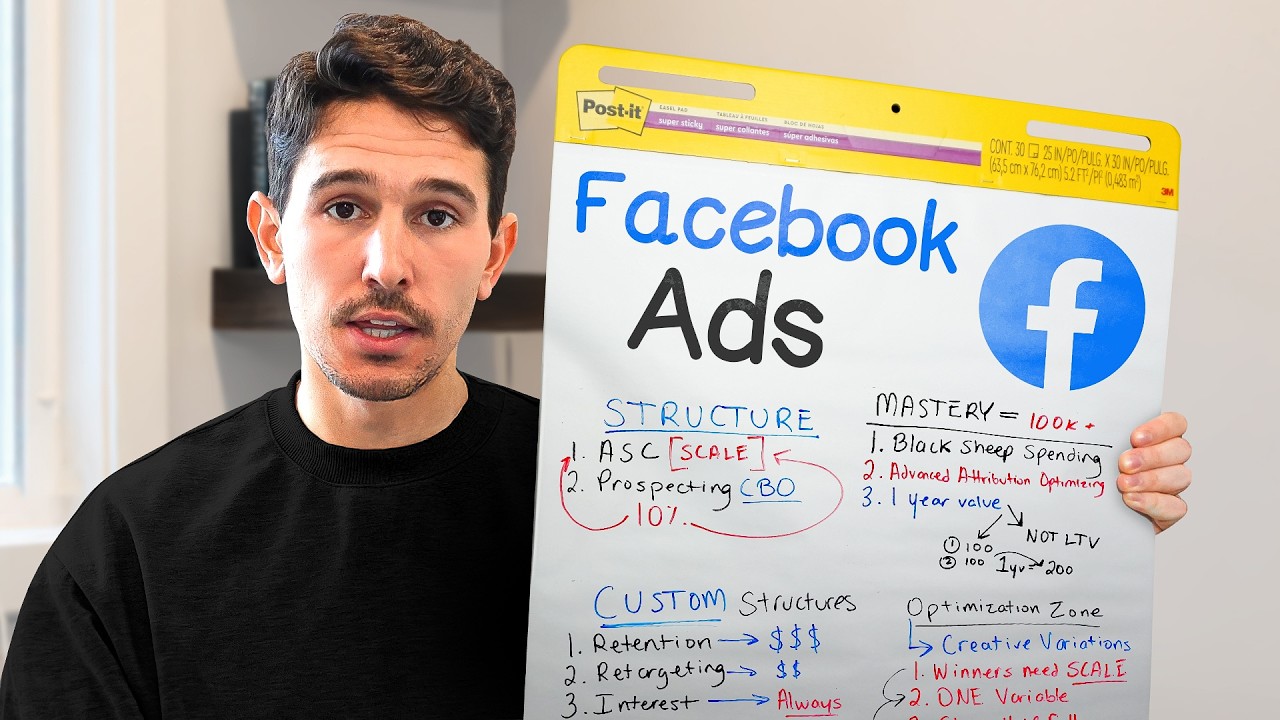
you only have two or three ads, don't worry. Put them in here. Keep them separate. And then the fun part, scaling, what everyone likes to talk about. So what we're going to be doing here is we're creating a brand new campaign. Again, we're creating a sales campaign and we're calling this our scale campaign. All of our settings are exactly the same. So, advantage plus catalogs are off. We're setting our budget up. Budget is a hot topic for this one. I want you to start this at 20% of your prospecting CBO. If your prospecting CBO is
set to $1,000 a day, you're only setting this to 200 bucks a day. Really, really simple. This is going to scale, but we're not just immediately forcing it to scale. That's a very important part everyone needs to know. You're setting your budget exactly the same and all the other settings are exactly the same. The big key difference here, this campaign and this ad set is generally only going to have one single adset in it. This is the scaling mechanism. It is not necessarily about the perfect settings here. It is about what we do to this
campaign and what creatives get graduated into this campaign, which of course I'm going to go through in about 30 seconds. Make sure all of your settings are set properly here. All should be completely broad. We want this to do all advantage plus. And I think this is the highest campaign score that we're going to have in the entire account. Okay, so we have our scaling campaign base. What creatives actually go into your scaling campaign. So this is the introduction to the graduation system. I'm going to show you a flowchart that really breaks this down super
super well. You can see here we have a prospecting and we have an ASC. I still call it an ASC. It's the scale campaign. Call it whatever you want. The core of this is we have our broad packs which we can see right here. and we're taking the best performing creative and we are graduating that creative into a winner's bucket. That winner's bucket then gets graduated into the scaling campaign. To show you what that looks like in actual ad accounts, what we would do here is we would go into the prospecting campaign and let's say
there was eight different creatives in pack number one, eight different creatives in pack number two. We would then take the best performing creatives. We would duplicate those creatives with a hard duplicate button and we would push them into the scaling campaign. Really straightforward. You might be saying, "Well, what do I decide to graduate? How do I know what's good? How do I know what to actually push into accounts?" Let's go back to that ad account that we were auditing before, and I'm going to show you exactly what you should be scaling. So, when we look
inside this ad account right here, that again, this is an audited ad account. This is not an account we manage. I want to show you probably the most realistic example of what you could actually graduate in your own account. So, once we're in this ad account, to actually decide what we're going to graduate, we're going to go to all ads. And I just have a filter in place for all campaigns that actually received an impression just so we have a very clean look here. So we have 133 ads that ran over the last 30 days
spending $147,000. What I'm looking for are top performing ads by both spend revenue and return on ad spend. I'm not worried about ads that have $30 in spend and a 15 return on ad spend. I'm going to show you the example. This is my criteria for what to actually put into the scale campaign. The very simple way to think about the scale campaign is you are forcing spend on your best performing assets. When I look in here, first off, clear clear winner. The number one ad in the ad account, which is spending the most amount
at the highest return on ad spend in the total account, we are absolutely putting this into the scale campaign. Moving down forward, just looking by return on ad spend here, there's really only two more ads that I would actually like to graduate into that scale campaign. Everything else has either lower than our KPI or is just not spending enough, right? because we could see these three ads are clearly dominant. 2.7, 2.96, 2.4, and they all have $4,000, $4,000, $45,000 in ad spend. And as we scroll down a little bit more, you're going to start to
see some flyers here, right? So, we have like this ad that spent $47 at a 7. This ad that spent $57 at a 5.4. They have not acquired enough volume, so we ignore these. All we care about is top spenders and top purchasers. We're going to grab these three creatives. And what I would do from here is I would copy using the hard duplicate button. We are not clicking copy and paste. We are duplicating these hard and then we are pushing them into the scale campaign. Just to show what that looks like, it's right here.
Again, we're taking the best performing creatives. We are pushing them into the scale campaign. Okay? So, you're past 3K, you're past 3 to 10K, you're now upwards of $10,000. And there's really only one thing different here. $10,000 plus, you're going to start to introduce interest groups into your prospecting CBO. This is a key difference maker for your ad account because it's actually going to guide your ad account to find bigger pockets and bigger opportunities. And if you don't do this, your broad audience is actually going to narrow down. It sounds really bizarre, but basically what
happens is Facebook figures out for you what your best audience is. And then even though it's broad, it tries to stay within that range, right? It tries to stay within that audience that's similar because they're not going to show if you're a beauty product, your product to men over 40 who don't use beauty products. Instead, they're going to keep you pretty tight on a specific cohort of the addressable audience. Now, what interests do is it allows your pixel and forces your pixel to actually spend on people who may have not been in your original broad
audience. What we like to do instead here is we take our prospecting campaign and within this campaign, we're going to create a brand new pack. So, this pack instead of being called pack one, pack two, pack three, what we're going to be doing here is very different. In this pack, we're going to call it interest one. and we're going to put an underscore and we're going to call it whatever interest we're targeting. So, let's say this is a beauty brand. I want to target something different. First, I'm going to go down to the audience section
and right away you have to do this right. We do not use suggestions here. We further limit the reach of our ads. We switch the setup and we go down to detailed targeting. In this detailed targeting section, we're then going to be able to type in our audience that we want to target. I'm going to type in Nike just as an example. What you want to make sure you're doing too is you find the interest. Note here this says employers, schools, job titles, interest, employers. Interest is what we're targeting. So, we're targeting people interested in
Nike Inc. footwear. And yes, this is a pretty big audience. It's actually a giant audience of 400 million people. So, maybe not the best example, but find the interest that you think is adjacent to your business. In your detail targeting, we're targeting Nike. Everything else is exactly the same. In your detail targeting, you're targeting your one single interest. We're not stacking interest here. We're taking the best ads in our ad account just like we did in our scale campaign and we're pushing those into this interest. So just like we did here, we're taking our best
performing creatives and we're moving them into our scale campaign. We're taking those same best performing creatives and we're pushing them into our interest. You'll note here I say interest number one, winners. Interest number two, winners. These are winning creatives. And the reason we use winners is because we know that the creative will not be the failing variable. We know that the audience will be the failing variable. And that's what we're testing for. Okay, we're moving quick now. We've added interest groups. That takes care of basically anyone in the 10 to 30K range. Now we get
to 30K. 30K plus. It could be 50K plus. Do what you think is best for your business. Every business is unique. 30K plus is where things start to get interesting. We're spending $1,000 a day. It's a lot of money going into the system. We need to dial it in. The difference between this is one campaign and clear exclusions. This is the first time we're heavily introducing exclusions into your ad account. You'll notice here prospecting stays exactly the same. scaling is exactly the same. Existing customers is exactly the same. Retargeting is the first time we're adding
a retargeting campaign. So the way that we add our retargeting campaign is we're creating a brand new campaign, a sales campaign. We are shutting off advantage plus catalog ads. All the same settings as before at the campaign level. At our ad set level, we're doing all the exact same settings except we are clicking further limit the reach of our ads. Switch the setup again and we're changing our custom audience to now be retargeting. The retargeting audience that I generally like people to start with are 30 to 60day site visitors and 30 to 60day add to
carts. So in this case I have a pre-built audience for visit/ add to cart 30 days. You could add these separately. You could add them together. It doesn't really matter. But this is anyone who's visited or added to cart over the last 90 days. And bang our campaign score takes a big knock because this is a very small audience. I don't care cuz we're going to click do not use as a suggestion. We want this to be really really narrow. And again, this is a red flag. If your campaign score is high, that means you're
setting things improperly. Retargeting kind of speaks for itself. People generally understand that we're targeting our existing visitors. We want people who went to our site to actually convert, come back, and purchase. The difference that we need to now establish in the ad account is we need to create what I call swim lanes in your ad account. So, if we take a look here at our flowchart, you'll notice that there's four segments. These are the four campaigns that we've created. This is the most complex structure that we want to run with. The key here is that
we need to have separation in the ad account for this top section to be all focused on new customers, the retargeting section to be all focused on engaged customers or site visitors, and the retain section to be all focused on existing customers. In our current setup, we kind of do that, but we don't have exclusions in place. So, this is the final step. This is the final boss. You're spending 50K plus. Here's what you need to do. You need to create in each and every single adset clear exclusions. The way that we do this is
really simple. Campaign by campaign. I'll show you how to do this once and then you could logically you're a smart person probably if you're listening to this. You can figure it out from there. The scale campaign. What you want to do here, you want to go down to your audience, click show more controls, click custom audience exclusion, and then put in place all your site visitors that you're targeting in your retargeting campaign, which in this case is 30 days. So we're going to add our same audiences that we're already hitting. So that's our 30-day add
to cart and visit. We're also going to exclude all of our purchasers that we're also targeting in our retention campaign. So now we have purchasers 180, the Clavio 365. So this audience can hit everyone except purchasers 180, visitors 30, add to cart 30, and our Clavio alltime list. This puts us in a scenario where we know for sure that this ad absolutely hits new audiences. So when we scale this exact ad set and this exact campaign, we know it's driving net new business. And that's ultimately how you grow a business, not with hitting your existing
customers 40 times over. You grow a business by scaling into new audiences, new customers, acquiring new customers, and then doing a good job by delivering a quality product so that they keep coming back. Okay, you have my exact structure, my exact strategy, our graduation system, our scaling mechanism. But the one thing you don't have yet is how to analyze and iterate on creatives. This happens so regularly where I see businesses just throw a bunch of crap at the wall. They try to figure out what was working, what's not working, and they tried to make what
they call iterations of creative, but they're not taking big enough swings at that creative. Instead of focusing on new concepts every day, I want you to take an iterative approach to creative. And the way that you can do this is the same way that we identified our best performing ad to graduate to our scaling campaign. We're also going to take those same ads and we're going to try to create more variations of them. So what does this look like? So if we take any top performing ad here, we're identifying by high spend and high return
on ad spend. Then what we'll do is we'll open up this creative and I'll just show you an example. Let's say this ad by the skinny confidential, which I actually know is a top performing ad because it ran for 46 days. If you generated this creative right away, you're like, "All right, cool. We have a winner. We're going to scale it. We're going to keep spending on it." But how do you create more of this? Most people, what they would do is they take this exact same piece of creative and they may switch the call
outs. They might switch the headline. Those are all fine things to do. But what you actually want to do as quickly as possible is take this piece of creative first. Start with the same person that's taking the photo. Change their top. Maybe change their hair, change their background, have them do the same thing in a different setting. Then you take the next variable which is it the person or is it just the shot? So you do the same shot with a different person. So all we're doing is we're taking the biggest element possible that we
could change and we're creating variations. So we take this ad, we want to create four to six new ads just like this but different. Then we want to upload those as a new pack. And that repeats over and over and over again. If you're not doing this, this is the hard work. If you're not doing this and you're always worried about the next hack, the next structure, if you're worried about my next video, then you're not doing the right thing. You need to focus on what's actually driving business. And when you have winning signals in
your ad account, create more. We hit basically everything that I've established that works right now in 2025 after doing this for nearly 11 years where everything seems to change every few years. If you got value out of this video and you want to dive into one of these topics, one topic I would highly recommend you dig deeper into is our exact setup. So, you can click this video right here where I go through my exact setup, strategy, and structure for Facebook ads. Now, we hit that, we previewed it, we went through it pretty well right
now, but there's even a deeper analysis that I do on the video right here. And if you got value out of this video or if you have any questions at all, please hit the comments below, shoot us a like, and I will see you all in the next