What's up y'all a a lot of faces looking at me right now it's pretty weird I was expecting to have like couple people it was like 33 people are coming everybody one from the East Coast wants to change the time so sorry about that I am NOT a teacher I am NOT an instructor I am not good at this and it's not what I do so bear with me I got a few things I want to show you a few things I'm excited about and I think I'm Just gonna start with like a bear blank
project and just kind of show you how I set it up is there anybody I guess I would ask us or anybody that doesn't know that doesn't use live great at all is there anybody that like never has no thing good good I'm like I don't want to I don't want to read the manual and I want to go through and do every small little detail I just want to kind of show how I do it and I'm positive that there's that None of us do it exactly the same but I'm really interested to learn
how you guys do it to do if there's a better way if you think I do it wrong you're wrong I do it right but so I'll share my screen which should look like that and so Jamie you let me know if anything is kind of technically going wrong here but hopefully you can see my screen and not my face turn almost good okay um I can't see the hand raises or if you want me to speed up or something So just chime in if you want me to do something different than I'm doing so
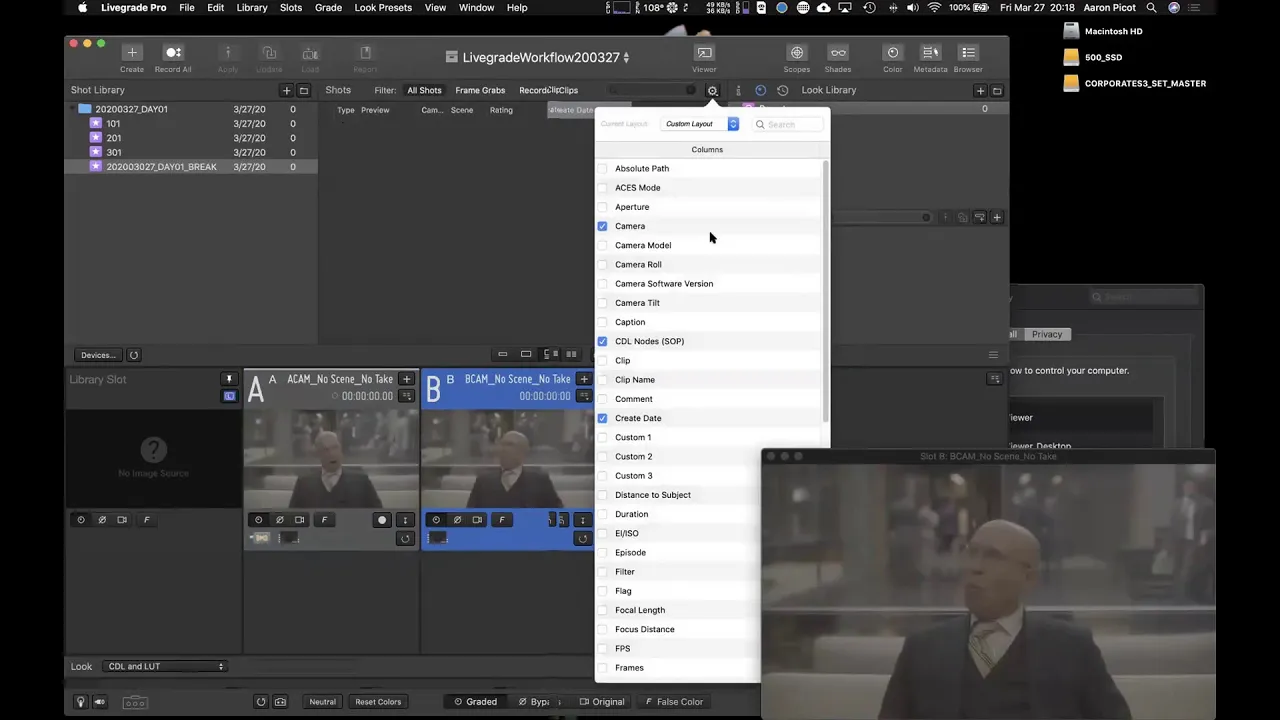
I just started this project it's nothing I have no shots no folders no devices just the kind of bare bones when you start upgrade so I would if I was starting a new project I would I don't know what this shooting date thing is I would probably just get rid of that as soon as I could start a folder called don't like how it I don't like how it starts with a folder and I'm Been like I'll make a folder in a bit but I usually date my folders so today would be the year the
month and the date and then I would say like day one if I was on episodic or anything that was going to be something where I wanted to either refer to the date or the day I just will kind of want to have that information right there and something that could there get rid of this so then inside there I would start making bins so what I'd like to do is Make a bin per scene that we shoot so for shooting scene one we're starting off on that scene and I see that there's gonna be
a bunch of scenes on the call sheet that we're gonna do but I kind of wait to make a new folder until we actually start that scene so maybe I'll make like a 201 301 just for that love it just so like now one thing I'll do is I'll create and you'll see why later but I'll make like separate folder that looks like that With the year month day day one and then because episodic usually has brakes film break and a rap break where you know obviously you're gonna send footage at or after lunch to
post who's waiting to get going on it and then again a trap so I'll do like break and then you'll see why I do that later that's for like reporting and stuff so let's add some slots and devices I have a couple of box I always hooked up and they are in dual channel mode if You're not in if you're not familiar with the Box i/o this is kind of the interface for how they how to control them over the network so I have a dual channel and channel one is on SDI one down to
a two and I have it both set up for a legal video over here but if you're gonna do Sony or something else then that's where you want to get into looking at changing it but the fact that I'm able to control the Box iOS here tells you that I'm connected to it so Then when I go here and I go to a device it should be no problem that's just top try that right it knows it sees the box I do it do I want to do channel one or channel 2 I'll do both
channels I'll create two slots we'll call it this is a I call it I named it right here a for the aka camera and then B gonna be camera after you type something in here make sure you get tagged or else it won't know record returned or something also while I'm in here I'll add my I Have a capture device a black magic HD Mini and some video kind of lined up here so I can add that and then you'll see it show up here so that's pretty much all set I do have these I
do have my box I always config too with the naval frame grab and then they can continuously refresh frame grab so let's see that now you can see an image I have a little 7q hooked up with a with like a six or seven minute video clip from from that job I did corporate and Chris Bolton has a question oh yeah I was just gonna say it's not so much a question but just one thing with the live capture is if you use mean like view transmitters and if it flips over to that sort of
720p screen saver thing it can sometimes if you use inbox iOS you can kick all your box videos off your network if I'm using a I'm just saying accusing that lot that live metadata update function and for the Froyo apps when it refreshes and you Feel refreshing with a 720p signal in there it can sometimes Bach take all your box ions off the network just a general warning for that okay I'll go ahead and roll this little 7q here so we can kind of see if I highlight my a camera slot you can see that
it is able to capture either stills or video right now of the live video that's what's rollin be camera slot you'll see here is just refreshing every four seconds because my black Magic ultra sultry whatever you want to call HD Mini is only any a camera slot and not in the B so if I go to the B camera slot this window my viewer window will reflect kind of what's going on here in the with the the box i/o only updating every four seconds later I'll show a way to kind of get that to auto
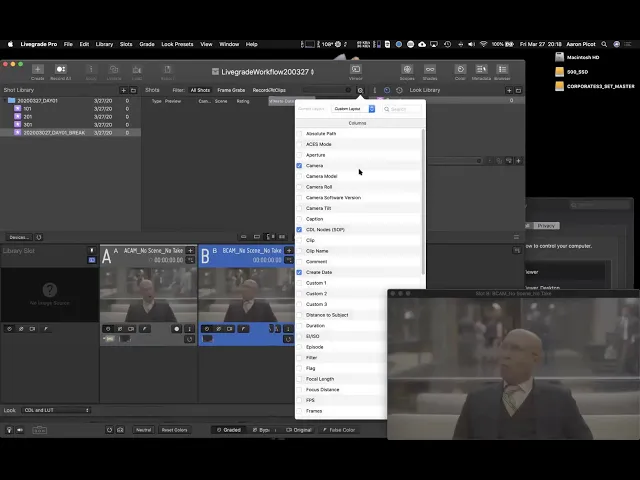
switch the device over which can be kind of interesting if you want to record different slots or whatever mmm did I see a question pop up or sorry I'm still Figuring out zoom I don't know how it works nobody standing if you got a commission article the this slot metadata here where you can pick what you want to see depends on what I'm doing alright there's not a whole lot that I really need to usually see in here I I don't really need to know what the white balance is for the scene usually because the
the on-screen display of whatever camera you're using just says it right On the screen so I don't usually keep track of real numbers clip numbers so if I hide all the entries I can get rid of that let's just go back here what I will do sometimes is lens model focal length that's if I'm gonna pay real close attention to filters that were using I mean different lens sets that we're using if I'm going to create like lens color presets and stuff like that which would I will get into in a little while but I
know that I know that some of You're gonna do this differently to me but there's not usually in this little kind of portion of the screen anything that helps me too much I would love to find out if there was some stuff that helped me but a lot of times I'll just leave that blank really um what's next so just like and hey real quick just to interject there Aaron I just discovered this the other day that with master primes and like the newest Bolt firmware framerate tilt roll white balance the lens so yeah in
fact your focal length etc all come in live over that MIDI yeah and it'll still record that metadata like when you when you create a shot or role of a or video or whatever it'll still it doesn't it'll display it up here in this little what do you wanna call this the shots library yeah if you want it to you cannot turn into all that stuff on and off I just don't really usually need to see it down Here like this little portion having information for me to look at it hasn't helped me before in
the past although I know that the live metadata will show up right there yeah Brandon he suspends a question go I'm just quick question on the general think of everybody is there anything in the that doesn't come through a pass that you guys wouldn't want to come through and or passed via hardware because there are limitations to what that's the I will pass and not Pass but is there anything important that everybody uses all the time or would like to use all the time if it was passed through various I would appreciate a real number
because I like to keep tabs and that's how I deliver with my CDLs name my name my CDLs with the real number you know that would be good like I could see the how that would be that would be handy for sure a lot of this stuff I keep track of as far as naming CDLs is Not roll number but just see number or episode number sometimes take number let's get into the Atlas get into Co see how it says a km no see no take okay well let's add a scene intake we're on 101
do the most divisive topic we have tonight so over here in the global this is the global metadata field I'm gonna add what I what kind of bits of metadata that I'm going to manually be changing all the time I'm not usually changing what season we're shooting but I will do Episode I will do what scene we're on and I sometimes will do take if I think that things are gonna change drastically between takes but a lot of times for episodic it's just the episode in the scene or what really helped me and I'll just
let's say we're doing episode 3:06 oops 306 right and then we're doing scene 101 they do have this shot slot you can do which I'm told was is meant to be okay now we're doing Apple you know now We're doing Bravo and now we're doing Charlie you know we're doing Delta I don't use it I leave shot completely out just because I don't think post understands what that means I think when they see a scene number it's one one Apple one Bravo lunch are you know I mean so Mike Romano has a question yeah we
hold all of Michael Romano's clay he's got a three month time all right go ahead go ahead come on Mike you're up I think he got mad he hung up all right Continue on all right yeah he'll have yeah I know he has a way he uses the shots lot and he's mentioned it before but I can't remember exactly why he does it but I know he has a good reason for it I'm anxious to be reminded what that is so now that I've set my global kind of metadata get going here uh this little
thing right here a kam underscore 101 underscores no take that is like a clip identifier which I hate really I I don't really understand Having clip identifier x' hopefully someone's gonna explain it to me in a way that makes sense I you know what I use it but I'll show you later how I use it and it's reluctantly so I use it as well because um I find when you get into trying to differentiate a CDLs difference between a B and C and D cameras that's the only thing that really tells you if you're borrowing
the Braavosi DL and putting it on a camera And vice versa but is it a good use for it yeah that's good use for it so then and I think that it probably you also kind of go in here and do a manual shot identifier clip identifier custom which you can use all these little bits of metadata if you have them to create your shot identifier so usually I'll do like usually I'll do like episode the scene and the camera so that it'll look like you know any any CDL that I create or any look
that I Create will just be named after the scene the episode and which camera it was of course I don't do it like that I usually I'll do it like app for episode and then I'll drop the episode token on there underscore maybe SC for scene if you have a good thing going with post maybe you don't need the EP and the SC but I find that it's kind of like takes the guesswork out of it for them later like what are these numbers and underscores what am I looking at oh That says app that's
that scene I okay yeah and then I'll do like JC Johnson has a quick question about what you're talking about hey so my question is when you're working with VFX do you put the X before the 101 or you just leave it as 101 whatever script he tells me to do I take scene numbers directly from the script supervisor so I mean not like taking C numbers directly from it but and I've had instances on set where post wants The X and sometimes they don't want the X because they putting the X there puts it
at the bottom of the bin and so if you're shooting multiple scenes a day you're or it's going to look like something is missing so you just typically do whatever is done on set yeah because I don't know maybe it's because I either call it you know starting with episode as I have right there so the episode wouldn't start with the X right you talk About the scene like sex 100 would be the scene right but it would still put it down further than 102 103 and all those I suppose the would they're saying you're
saying that in your experience post is has take takes an issue with that on some shows that I've been on I'm just curious what other people are doing because I tend to just leave it off now I'm curious what other people are doing as well I don't know I I I've never heard I've never proposed say anything like we don't like the way you're naming your CDLs because they're putting them out of order I think that they just I I think what they probably do is they just see that all my CDLs are our name
with the same kind of naming scheme like I'm setting up right now and then they can just look in the bin where it says X 100 or whatever and then they can plug it in yeah I feel the same way and I feel like if they're going off of the script notes It's going to have the X there anyway correct yeah right when I personally set this up I said a really similar to you Pico but I try to think to myself like if I like say I'd died and someone new came in and had
to take a look at all my CDLs you know and there was no document to tell them about what I did the CDO should be explicit show episode scene camera and like if you're not in the room to defend yourself your file-naming should defend yourself That's a nice right right right right and the last the last little bit that I do is is I say what camera it is but there is no camera so where is it taking that information from right here a little slot name I still always get confused by which ones the
label and which ones the day because when you add these these slots that's always going to us have a it's always gonna have a B it's always gonna have a C and then it's gonna have Whatever you named it and I'm so I named it a and B does anyone know definitively which one's the label which one's the name I think you want to use label which is when the one you've already preset and what I labeled it yeah because and my reason is like sometimes I'll get on a unit where you have like X
camera or W camera or whatever and so if you name it within live grade like you did when you determine your slots you'll name it accordingly like that I think you like It you want to use slot label because if you don't it will add a a or b and even if you have X or Z camera in there right it's not labeled that's what I mean I don't it's just the the verbage because I labeled it oh and I also named it so which I don't know it's like a to me that's a strange
kind of don't you just call it why do they just be like a camera slot right there anyway that's something I would Chandler Tucker has a question good I do and I just wanted Time in and say that um I go off of slot label because on a lot of shows da and Charlie camera are separate bodies but it's the same operator so for me I have that like you know for example if the Teradek made between bodies so I can just quickly change the slot label and write that without having to redetermination I it's
kind of one of those things I admit that I always get backwards 50% of the time but I do it exactly like you're doing it to it's Just when I'm first starting it off I'm always like okay is just that I'm typing in is that am i naming it right now or am i labeling it right now like well depends oh so right now I'll call it B camera right there and then right here right so we know it's label so there you go because it changed it here strawberryk question if he can figure out
how to unmute himself here go i unmuted you strawberry can you hear me yeah last corner Hey so I don't use some clip identifier whatsoever because it comes the same wildcards available to it that you do on export of CDLs collected a clip you know a shot whatever whatever the hell they're calling it these days in there if you selected a still image you need to export that as a save as shot or whatever to get a CDL and a still out of it and then you do custom wildcards there you can actually select camera
as the thing there but that is populated From the label field it's kind of a disaster and it is not very clear but that's what's going on there right but like as a Chandler it was like we were just talking about that III would prefer not to use it either but I think for just being able to for my eyes to look that out and see what it is I'm looking at right here I just never am sure you know for that like I do have a nine but all it tells me is scene and
shot shot I do use and I just put the letter in There right so that's you know seems to me like both ways work right yeah real quick let's hear from Brandon heesu if anyone doesn't know he works for color front and so we've talked about how color from wants the CDL naming to come into them this might be a good chance for in the chime in it's kind of either/or that I know this is a big a big thing but I think that as long as for us at least you know I think the
biggest thing is that we do we have some Semblance of the original clip name which sabi did sometimes the toughest thing that doesn't come through metadata for you guys to kind of automate because everybody's like seeing take all that information but as a dailies provider and operator the this clip that shows up as a zeros or one Caesars or one and without script notes without camera reports without any of that the scene and take information basically means nothing in the sense of Automation and speeding things up not in replacement of anybody just the idea of
like how do I make all of this faster and I don't know if any of that comes I know I over fact none of that comes through in the CDL so sometimes the the scene intake name is great but at the same time there's still the argument for clip main so it's a it's a delicate balance between the two especially for a provider from from our point are you saying you want you want the CDL is name Like a 0:32 underscore c7 yes for automation purposes yes because then I could just point to a big
folder I just blew up sorry but from from the dailies perspective of turning and burning and getting things done it does make it like oh here's my folder full of 7,000 TD ELLs I know that one's for you know a 0 1 C 0 1 2 6 or whatever it might be so but I know that's not ideal in general that's not the craziest thing ever though if That stuff is coming over the metadata because then for onset use everyone on set can refer to it as seam take information and if that metadata also available
then that can be used in the wild card export to go to dailies in the CBL man and we've been working with manufacturers specifically not just a GA has you know with partners Teradek everybody to be like this stuff needs to pass through your boxes maybe not this gen we know this gen is long past due But the general thing is at that past the cameras spit it out every camera spits it out in different ways but if it went through then you know then and that's something that on a color for manufacturing side we
can actually talk to all the manufacturers and say you're sending it right cool and then I can talk to bran and say cool your box needs and pass it AJ your boxing is a passionate you know Fuji if you're a wow entertainment your Boxing is a passive whoever it is we can we can work with to make sure that their fpga will just push it through on each bank or normal thang or whatever channel they want to pass it on so a CDL I see the question of CDL for every clip is difficult but you
know you can block it in our software I can say these next ten CDL let's go to these 15 Clips or this one CDL goes to this entire role so you know it's just you know but if she didn't Take us how everybody really wants to do it then we just can't import the CDL until after we match the metadata and then we get into the whole toilet bowl of metadata on set let's circle back that but show us choice what you exactly want and well we'll think about it I'll stop my diatribe and we'll
just continue for Brandon looking at we're looking at this if would one bit way to do this be you know say it's a one clip one you have that as a CDL and then you get no CDL until you get a one clip 22 and then tell the software to say use a one clip one CDL for everything up until the next one that it receives is that something that's totally doable yeah it's a Python script that's easy because that might be a way that I mean that's kind of how a lot of stuff ends
up getting spit out once we get to look right I say that's for the whole setup and then the next one comes at the next setup that wouldn't change our work too Much and if we had that metadata we could include that in the file names you know exactly yeah and that's a that would that be easily doable like that's not a big thing at all from the applying perspective and you lemon you're next hey Brandon so is this something that you could together a best practices for color front so if we found that we
were dealing with a post-production company that was using color front you could Give us a line-by-line setup that worked best with the software that you represent yeah hundred percent and you know just maybe maybe something that you can put on my dealt with it is kind of a best practice everything for free ball and then also within that if you have that list of equipment providers that are not passing through that metadata if you include those people maybe as a group we can put pressure on those people to put The pass through that metadata because
ultimately it's gonna help everybody save money same time and you know may post faster make the DI T's you know more useful onset and saving kind of money yeah I can tell you specifically AJ I've been dealing with with this specifically since September getting them cameras testing bodies icing metadata new firmware or making sure everything is consistent with their firmware with library with color front You know to make sure that everything is passing accordingly and I've been talking to Bram like hey on whatever is happening potentially next making sure that they're on the same page
they did everybody's patching that stuff tarot deck all the guys to be like look at this all needs to wirelessly hardwired whatever we need to find a spot in that transmission for it so are they worth or are they all every everybody's been really really I you know due to our Partnership with AJ it's really easy to step on their dick and say do it but with everybody else it's a you know it's a touch and go but everybody's been no one says like I don't really want to do that like everybody's been that's right
yes we understand next generation it's just like there's always the balance of yeah but all these people have like si team box ioz each and I don't want to burn them too hard But at the same time they know is that the next generation and there are new FPGAs and new technology that allows them to have more information across that FPGA to pass through and then there's what matters and what doesn't matter and helping them to differentiate what actually matters for people actually in the trenches it's gonna get better so give us that list of
of what matters with the color front stuff and then we Can kind of push that to making sure that our metadata and then that with a manufacturer's that's going through I definitely will I'll put it together yeah it's cool but it's great that you accept it minutes we're trying it's evolving like it's a it's a crazy everybody knows the limitations of CDLs right that's a big thing yeah it's 10 numbers doesn't really tell you anything there's no additional metadata and you get down a different Road which I'm sure Will cross later in the conversation well
you know 15 years ago yeah yeah yeah Piko the floor is yours but the that was soom interface wasn't letting me unmute a really cool really cool topics I'm glad to hear all you guys talking about that stuff I think basically what I'm trying to get through here and which I'm doing probably a little too slowly is just like a very basic kind of what I would do at the Beginning of a job just setting it up which I'll try to speed this up and shouldn't take much longer but just for those who are involved
you don't use lag rate a lot just to kind of get an idea of why things are important to set up right at the beginning so try to remember where I was next we got our devices set up we got all this stuff right here so if I have a video coming in from a camera feed there we go you should hopefully all see this you guys See this video right down here of the live video playing yeah okay so that's just a shot from something I did recently and what I always want to do
is I want to route the log signal into my nut box or and into any capture device that I have ultra studio HD Bay is what I'm using right now so that way when I I'll get rid of that little view let's bring up the color view so let's say I want to put a look on this this was some red footage so I'm gonna use the Red kind of a lot that we use the show LUT which was this roll-off three [Music] and then I want to just maybe add some contraire take away some
contrast maybe and cool it off and make them super mad green I don't know it doesn't matter so I'm adjusting these parameters right now with with the hardware actually a MIDI controller so this is what I would Be doing if I were watching the live footage and I was doing live grading I'm grading live I can change my saturation take it all the way down to black boy it's a little bit better so whatever it doesn't matter but that is my CDL and my luck that I have and there's the order that they're in CDL
before the left so then as we're shooting I like to take a lot of stills so I have my stream deck you know set up hopefully you guys all got your stream Decks in in order I have you know grab a camera we'll grab it so a lot of times I'll what I like to do is kind of grab it every time they look a certain direction or they stand up or they go into a different lighting setup or whatever I want to just kind of every take I'm always grabbing a lot of stills it
doesn't cost anything as far as storage I keep a separate drive hooked up to this computer 500 SSD is what's called and that's where all of my live Grade grabs screen recordings whatever so if I wanted to for many various reasons could be helpful I can record it because I have that HD mini hooked up so I can tap record and I get the little red line right here so now I know that it's it's recording the a camera I switch over to B camera I can't record because there's no recording device there's no capture
device assigned to that slot it's just the Box i/o and the box i/o does not record video but I can Still be grabbing things from the beat camera you see the beat camera doesn't have any LUT or any CDL or anything so it's just the log but I can switch back to a see what's going on while recording or not recording or whatever I can be turning my CDL on and off with the grade bypass happening right here that out of the way and this I'm just toggling this with with the stream deck but on
off that and then with another button I can look at my Original log and then of course false-color on log or false color with my black and white or not with black and white and everything that you're seeing in this window right here is very easily then piped back into my video router and then sent out to one of my grading monitors we talked about Gordon it is to capture video and be able to play it back into your router to capture video and play it back into the router you mean like if I want
to if I want to Display it for the for the DP if they want to see it take by a crystal again for lighting reference continuity etc yeah well that's why I usually take all the stills I'm more of us stills kind of grabber for that because I kind of maybe that just like in my head kind of subconsciously but also subconsciously I know where I'm hitting all grab I'm not just grabbing things like like this I wouldn't grab this I don't need this but I'm only grabbing the important stuff and I can go back
and find it quickly just by kind of scrolling through but the same thing if you wanted to record video sure if that's how you want to do it I'll go ahead and pause the live video coming in just so it's not confusing for a second but here you can see the type is this little rectangle that means it's a still if I go down and find there it's triangle that means that I that's a recording so I want to see The recording I got to put it in the I can either use it as a
reference which is I have a split screen here and I can scrub through that video recording right here of course I can make that basically almost full screen if I wanted to and scroll through it or alternatively I can just send it to the library bin so I have that open that up a little bit so the library bin I have this little L library button kind of highlighted you Can unhighlight it and then you can if you do that you can scroll through and nothing changes but if you highlight that then whatever you scroll
through kind of throws it into your library slot so then you can see whatever I'm highlighting up here in the shots library is being since I have the library slot activated it's showing that in my viewer window so let's go find that video clip there's be a clip then I can you know somebody wants to Essentially watch playback or go to a certain point let's see what he's laying down okay cool I can scrub right to that let's see him when he sits right back up okay I can go right to that and then this
would be something in the preferences I would want to have external video turned on and check mark there and make sure the you know all the frame rates and all that video format is how you want it and then have that video piped into your router so That you can send that to any any other destination you want so it's piped into a an input on the router I'll just show you hold on a second not male like this I use a aja 32 32 and it has a web UI here so essentially if you
were looking at the front of the router control panel that would look like this [Music] so I have the Blackmagic HD Mini in as a destination that is That is what I added right here that's basically the end the capture and so that needs to be a destination and I have it as right my a cam because I have the 7q right now hook into the a camera slot in so because the the HD Mini can capture as well as playback so then up here under under source I have this one HD Mini out so
I can say like all right on the vit one monitor or VI - bond or whatever okay boom I like that so right now I just have my I have a Little monitor hooked up right there just showing me what I'm doing so oh yeah so I'm just routing that over anytime I want I can flip over from live video over to what's coming out of the HTM any so to use that in this sense to just play back live video is it's helpful but also what I will use it for is and I'll play
video let me go back to so let's say here's my live stream coming in right and we're looking at take 3 or whatever alright let me see Right now when he's sitting up I want to see this wide shot as a reference okay cool and then obviously like I said this this viewer window can be piped back into my router so now on the 25 inch monitor I'm watching the live video coming in with my still overlaid and obviously this is perfect for being able to line up shots being able to match lighting in color
Oh before it was a little more contrasting okay what are less contrast II all right Well I can be changing my live look while looking at my my overlay there of course you can come to the right left you switch it over I want to see her or instead let's line it up to more like her okay I want to be way kind of trashed here than it was before okay great overlay can be handy too if it's if you really need to line up something that we shot earlier got this little wipe back and
forth but I use that all the time Like every shot pretty much I have a reference from either the master or the reverse or something kind of just lined up and ready to throw up there if I want I usually just use a wipe yeah yeah good sorry this is a good opportunity to talk about anticipation yeah right so we're doing a scene 101 and now we're doing oh let's say we've we did we shot scene 102 two weeks ago all right whatever we previously shot scene 102 and the thing we're doing today is seeing
101 and it Has to line up the DP is gonna want to see how it looked maybe wiped like this right next to what we're about to shoot so hey you know what side of the room was he on hey how intense was the contrast sons face when we shot scene 102 okay I got that over here in the shot library I'm gonna have a dated folder the date we shot it the scene folder I can go right to it there's my scene I want to see it from B camera oh okay you go to
the B camera Right there BAM I think the shortcut key is F if you don't already have it but loads the loads the still right in there and you're and you're referencing it and of course you can just go straight to the library to for the full screen if you want to route the full screen like to the beer B monitor screen or something like that so yeah always always anticipating what the DP may want to look at what we've already shot go ahead sorry I just wonder if you get Confused with all those stills
in there and those are all stills in and looks right so you get confused making sure you export all of those CDLs out at the end of the day here for your break a rat trap okay so what I do you had good question what I do is and I believe I got this idea from mr. Romano is I use this rating here so as we're going along and we're coloring we're live grading and we're capturing stills do our hearts delight And everything is good and then they say like all right cut moving on we're
gonna apples up you know gonna go to 101 Apple at some point I will go back through my stills take a look at them find which one I think is a good screen shot okay that one's pretty good right there and I really like the color that I did on that so whether like whether or not all these previous grabs were completely different colors and at the end they goes you know I really wanted it to be to have some color in it let's forget the black and white let's go back to the color okay
fine I can update that however that happens a lot right the DP rate after the scene and we move on hey uh make that last thing more contrast oh okay right so let's make it more kinda pasty like they said and right right do that okay cool well so I've just re you know retime the shot by looking at it in my library I can tap Update which is right here and it updates it I can go back to my slot and reapply that look right here just by hitting apply or by double-clicking it then
I if he's like I just do it for the whole scene okay I can select that camera the whole scene then I can update all those now that they're all in the right color that they want this was the one I liked right here I believe so I'll give that a five star rating that was definitely that's definitely What I think is the best still image whatever I'll also go through and find other parts of the scene that are ah that's a good it's kind of a good shot of both of them um anything that
I think is a good lineup of any point of the shot I'll give it like a three star rating and I'll tell you why I do this the five star ratings get duplicated so now you see this is the same exact thing is this and I'll drag this into my break folder so hopefully you understand what I'm doing there is by the time lunch break happens I want to have one still from each scene from each camera that played they'll all have this five star rating because I know they're the best ones so let's say
we do 20 setups there'll be 20 stills the number of setups we do match the number of stills that I grab stills shots looks whatever it's all the same exact thing but still this all contains all that information it contains the the thumbnail it Contains the CDL it contains the LUT if I want it to if I wanted to export a cue so then after I have all my shots in there for the break then when I want to be my report send it along with the drive the report is already Nate and the port
is named after the band that I had it in sorry about that little window yeah nice tiny little laptop screen here and I can save that wherever I want it and it's named this and it's got everything that I have active right here these little anything I have active checkbox for metadata so this is where it can I can report on tilt and roll and anything that comes through that's comes through with the clip I guess if it comes through the SDI or anything that I added manually will show up I'll just make a report
the desktop hell of it hey just want to interject real quick yeah hey Tyler just to add answer your question as well I I know I do things a Tiny bit different than Pico here but I usually make a CD a bin and a reference bin per day or per break like morning or afternoon CDL is just a pristine bin just for the looks right that are being made and then in the reference bin I put a screenshot in the chat window in the reference I just take tons and tons of reference images and I'll
go through that when I have time just delete the ones that I hate and then at the you know at the end of the day or at the end Of the break it's super easy to just export the only the studios and then export the reference images separately that's kind of how I go about it yeah on my jobs I've been doing like exporting stills to a desktop folder and just taking hundreds of stills and then just creating the one CD outlook per camera in the folder but I definitely see the advantages to the way
you guys do it also so one thing to remember too though is if you're doing stuff like how we Have it set up here you want to be able to search over months right and to get the search feature as it currently feat works which is not great you like in Kiko's library you'd want to click the root folder and then you can actually search by scene numbers and you'd find CDLs and/or images you know I mean so you want them to be inside your project not safe to like a desktop I do that right
the show right whatever the show name is and then I because then I can go here and then I can search scene 101 or 101 and then it's gonna show everything from within my show that's scene 101 or I could type in scene 101 a and nothing will show up because I haven't done it's camp 101 a that's what you're talking about right yeah and this is being able to use this search window yeah there's this like library needs to make this search a hell of a lot better but this is this is a work
around and I see strawberry with His hand up we should let him talk for three minutes so I just wanted to add to this oh can you guys hear me yep okay I just wanted to add to the something that's a little different than the way I do it to Pecos thing and this comes back to this big problem as to how many stills is there you know one CDL per still cuz that's really how live grade wants you to do it versus one CDL with many stills you know a lot of the DPS and
people that I work with wanna see Numerous stills if we come back to match I don't want to end up with one still to represent a set up I want to have lots of them so what I end up doing is I do the rating system but I I give five stars I mean it can basically be a checkbox you know what I mean I don't really need it to be a rating thing I get five stars to any still that I want to export and then at the end I leave them altogether I don't
separate CDLs and stills because just like Pico said They really are one the same right when you have a still stored in there you also have all of your grade data and the metadata associated it's really one thing you have a log image you have a graded image you have all the steps you took to create that graded image and all the associated metadata in that one entry and your column down in your library but when I did separately to get around this problem because I found it was confusing to spit out a pile of
CDLs When we wanted to send a pile of stills but we really only wanted one CDO per setup so what I did was I created a bash script that sits in an automated that allows me to right-click on the break from there after I spit out all these stills yells and it deletes all the extraneous ones it only takes one from each setup right it's just a logic statement that pseudo RM you know remove goodbye right so that was a really kind of Complicated workaround for that and I see Pico is really sending one CDL
per set up her camera for lens you know my question for everybody else though is is anyone how is everyone else dealing with that are they doing it the same way are they sending a CDL for everything I know Brandon's gonna say Automation why's there should be one for every clip how does everyone else handle this kind of stuff silence similar to Pico I just have in a Break so I'll set up a day and then beneath the day I'll set up three folders ones the a.m. break one is a stills or reference folder which
is basically the bin that has everything extra that I'm not sending and then a p.m. break and so I'll just similar to the rating system I'll write whatever I want to go to the break and then I'll drag over the good ones or the start five stars into the break folder and then everything else gets dumped into The day folder or the reference folder it's just a that's everything else I took for the day and then I'll just export the one break folder the PM folder and that's what goes to post it's kind of what
what I do is well I do keep those separate folders but what I end up doing after I have the folder so I'll have like like I look at Pico screen right here and he's got you know the date day one when everyone else is a shot I would have an AM and PM as well So I have break one break too you know and then within that I do a bin for each and every setup and then the bins within folders for scenes and I drop all of those into a massive directory called scenes
right and then that way all that stuff is organized in there cuz like recall especially in features and episodic stuff can get really intense needing to like pull something up and be able to very very quickly say you know yeah the look that I've got in here is Exactly what we did when we shot the turnaround I just slapped it right on top and be able to do that super quick you know so do you take so like Pico has it right now do you then take like 401 and 501 and then put them in
a overall directory that just says scene so basically what I'm gonna have is I have a I have a top-level hold on can you hear me now okay at a top level after he called scenes right and within that I would have a folder or I guess It's a folder a directory called 101 and was in that would be a bin which is with the star you know that purple with the star and that would say 101 and then it'd be one next to it called 101 Apple one Baker cetera 7 you know that way
it's all in there and that's kind of what those thing with like x-ray at the front it's like stupid you know I wish we had a prefix field which we could then decide to manga which we like and that's where I use the shot field so That everything is independently searchable in the column after setting up in a relational databases I found that you know you really kind of need that for sanity and you never know when live grades gonna fix this disaster you know so then it would be useful at that time you would
have to change the way that you do your work you know we're gonna go to a Chris Bolton real quick oh hey if you guys want the chat window open One of my the way I do things for the grabs and the scene information it's look for the bolts grab stuff PNG [Music] reference to the X and V if you want to add that as a separate sidecar to your scene information you can make custom columns in live grade yeah I've played with that before one of the problems I had was that I don't know
about the recent versions so it does not have all the same wildcards accessible in all of The places that you go to use wildcards so when you go to export sometimes in the past anyway ways I think the custom ones worked most good yeah it was it was just kind of weird how it works that is a great idea though I think I would probably start using that to do a prefix Abe satin Europe just want to mention one thing about the battle the afraid of grabbing livegrade is that it only really works properly in
709 Colorspace I've had to go back to using desktop video with my black magic hardware because I haven't done a 709 job in like two years and it it does some weird color science to that if you're working in 2020 or any other color spaces so it's especially bad in p3 so just you know word to the wise this is all really fascinating to me but none of this would work in my world at all it's not a great solution but you can Reflect rain grabs using another piece of software so you can refighting for
different color space if necessary it sucks but you could totally I mean III all this drag and dropping is interesting to me my teepees like you know why'd you become looked at the screen I don't know is that something that a Tom Ford is working on are they aware of this Dave oh there it's it's it's just it's far beyond their understanding I'm sad to say I'm kind of Like stop complaining about it because not as you think they've not as far as you think excellent where we are stepping on them with Captain Bill fight
nerd to get them to understand how important the relation is in the stills world to the color space of what you're attempting to ODT basically so don't know when but we are stepping on them pretty hard right now they are aware with it I mean with with the advent of doing you know silverstack lab and have An option for output color space flagging there they are aware nice hey Chandler you had your hand up you still have questions I know I'm just gonna chime in real quickly about this workflow and naming schemes and bins and
all that sort of stuff so real quick I actually record everything and I record each take and log and then bring it all over into silverstack I primarily work in a color only workflow where my loaders are Handling the data so I'm using silverstack just to manage everything on that end so I spring a PFOA over from live grade in the silver stack and then manage everything completely in silver stack that makes it all searchable you're able to do reports a lot easier from there if you have silver stack lab you can actually do up
to 12 stills or clips at a time that you can use this reference for your DP when they're trying to ID a scene or trying to match To other shots so I just find it's a lot easier that way and then you can pick and choose the skills that you really want from there you completely change all of your color after the fact and then export the CDLs that you actually want to export from there so that's all are you able to show us that tonight uh yeah can I would just have to what you
have to allow me to create a zoom on my Clark computer I don't have a man maybe we do Piko real quickly don't we get back to you Jason had a quick question and then we'll go back you know hey since we're talking about stills export and all that and doing multiple stills just to get us on the same baseline as their naming convention that we should be using for each additional still so Micra my workflow that I usually do just for exporting stills is I send them to a I send them to like a
Google Drive folder that I invite the DP to and I end up Inviting usually like makeup department Falls pretty much anybody but directors and actors technical technical workers that want to I want to basically keep a keep a running catalog or a reference of what will be what we've been doing they can just have it right there on their phone instantly once I once it sinks of course that's not gonna work on all shows you you know that's gonna be security issues with that and stuff like that but that's kind of where I get into
With my method of rating so if I do the 5 and the 3 I just know in my mind that I take all the fives and all the threes and I save them just just JPEGs with the look applied and I'll save it to a Google Drive folder looks like that you know the IT grabs I'll I'll save it to the episode in the scene number [Music] no one cares really what their name to be on the scene and the cam but you can see like it's gonna add a 5 or a 7 8 9
10 11 12 basically the number one up through Alvar minutes however many stills I'm exporting it once to get around that if you don't really like that then you can customize it and add like a timestamp maybe sometimes I'll do like check the timecode of the clip [Music] sometimes right here you can get a in the clip the clip identifier I will add timecode right there I think a lot of times you can I don't know why but a lot Of times it'll let you kind of state how you want the time to be saved
this could have to be coming in through SDI for that to work though you know it's like it does it would seem that it does you know when I did it before I was like time of day and I can't remember right now off the top of my head exactly how I fell current time that's what it was just because if you can do it where it has seconds there we go hours minutes seconds then it's constantly changing Which is kind of a dumb stupid workaround but you can see in the slot now the clip
identifier is changing every second so now if I take a still grab still grab still still then when I go and look at my clip identifier which is way down here because I don't look at it there that's 16 15 it's got the second for the last thing so if you don't want to if you don't want a clip to be named episode scene cam 2 3 4 whatever you can Add a little bit more meaningful netted that on there gives you the time of day time code would be great i but yeah you'd have
to be getting the time code to the SDI so to jump off of the identifying you know 1 2 3 4 5 that it depends automatically that's actually something that I brought up to palm for a few times because I don't like how with certain things in live grade when they're automated they add a space and then a number rather than give me an Option to do no space or an underscore or anything and so I have to go in and have my own scripts that I wrote to take out spaces but I was just
curious how you were doing it yeah and so when you do it that way obviously you can see with the time code it does put the the underscores between everything and it doesn't put any spaces so yeah better that way but like I said I really kind of leave that clip identifier thing way at the end that's kind of an Afterthought I the only time I'm really looking at it is right here in the in the slot just to kind of look down and go okay this is the look that's applied so yeah that's just
kind of how I do it a lot of the point when I go through the scene you know I might have a three star a three star or three star I like all those shots and then I'll just to quickly grab them up altogether I'll qualify it by rating and then I can grab it export the stills to my Google Drive Great it's done wherever the Google Sync thing is you can see it start sync and then BAM it's on a DPS phone and like five minutes five seconds 10 seconds however long it takes to
upload and I find DP is really like having that option if they can because they will much rather look at 4050 stills on their phone even if it's just captured straight off the SD I long as it's colored the way they saw it on set That's instead of sitting down and watching dailies for 2 hours they're gonna swipe through the images be really happy or come back the next day or at you through text message that night about how it doesn't look right or order they come back the next day and they said alright this
looks a little off let's go back and send post a new a new thing it seems like a really easy fast way that I can do it with with livegrade use something like Google Drive or Dropbox whatever Apple still swear everyone do have iCloud it just real quick I just because some people are hitting me up privately I just want to make sure everyone feels comfortable obviously taking grabs and whatnot but like naming CDLs naming you know naming um images or sorry frame grabs exporting and whatnot and this is like is everyone feeling good or
does anyone have questions about that right now before we kind of move on from it Just in case like just as a just as a test here with you know if I'm gonna also I eventually I'm gonna save the CDL so let's do it like I would be saving a CDL which I just hit shift command s you can check or uncheck whether you want to CDL or a JPG to accompany it and then there's where you want to name it whatever so do I really want to call it camera cam scene mmm so right
here is where I would customize it probably make it look pretty close to my clip Identifier slot whatever I'm not gonna take the time I guess what was it slot label right oh now it has camera right I can use camera thank you yeah it's camera there yeah like now it's camera like okay well why was it slot label before but anyway they're good that's exactly right so but now it's gonna be named the way I wanted to you know it's gonna stay that way under the customizable window as long as until I change it
to something else and then I can save those anywhere and that's gonna save a JPEG with it I want or I could save it as a cube whatever kind of let I want and it'll contain the look contain my the 3d lut node you would follow all of them together all of your nodes the CDL node CDL saturation node and 3d lot into one cube now if you have to put that unit right yeah which some people just some people I know will use cubes only And just so there's no confusion they can just send
that along and postal and open that that one post process it's gonna deal with no metadata on the color what do you mean name sidecar files that aren't attached to anything are useless so you could you could complain about the CDL all you want but you know every piece of hardware that you have that anybody's ever going to use rasterizes the color exactly the same way and the minute that they export an aioli or an XML that data is attached you know it's it's embedded in it and and and the color I'm gonna say the
color is ever gonna use it again but at least the least that David travels you know through the post pipe are you hidding hand somebody ten thousand tschosik you guys said no if they were in color right the right color do that with 10,000 with 10,000 lots let's just glad that that that thumbdrive what's the end up in the Trash you know don't don't don't think it isn't going to if this isn't convenient through that for the next guy bunch of guys have to work on the project it's just never gonna get looked at hey
Gav what are you talking about specifically I'm talking about the use of multiple cubes it's just silly now you don't have to like this but yeah we should we should be aware you should be aware of like what happens to what we Did what we hand into the post pipeline you know see I mean hmm if the data isn't attached to the picture file somehow then it can't be parsed later and it could skips thrown away you know so all the work that we did on set never gets seen again oh you can't force the
colorist to use what you did but if you make it so they can use it maybe least you have a fighting chance are you talking about like making your own like show lots and having multiple 3d lots I'm missing what you're saying sorry so hmm you have a thousand shots in something right and you color each one of them if you did that with one show lot and a CDL for each shot the least of the dailies process the CDL data gets attached to the rest of the right of the picture metadata and travels through
posts and can be accessed later can't do that with multiple Lots what I'm saying right so you would so you would be right you wouldn't send the Multiple cubes you would do would stick to the basically one or however many show let's you have whatever show let you want to use and then a CDL pair shot or Curtis scene or whatever we want to say that as few as you can get away with it's the way to go you know sure but on the slate or how are you guys getting the actual show LUT if
there's multiple to post as I was on show we had five show lot so I actually was doing cubes but I understand that they wouldn't pass Down the line after that point but I do wonder what you guys are doing to get the post house to or the daily these people to put the right show let on with your CB else right there as of recently information is now available as a wild-card Thank You Brandon in the CD yeah export so what happens is whatever 3d lut you had loaded in the 3d lut node inside
livegrade for that slot when it exports the CDL you can actually fix the name of that cube as part of the Wild-card that names the CDL so the rule therefore sanity's sake would be to try and make the smallest file names for those 3d lux you intend on using the show is humanly possible right and not use a lot note LUT name like I have here in the report that was something that's just you know we picked from the preset right here we went through it with red they said you know the presets in in
in live grade are pretty good they're you know we've been working with Bob Firth Or what they're what we gave them basically so use those great so use those it's got some crazy long character name I'm like whatever it's that's what it is we're not touching it the rest of the show there it is so on this particular show we'd only had the one nut node and stayed that way the whole time but when you do change it so okay so and that gets better than a or what that would not know the cube is
not embedded Into the early if they decided to include that in a custom column the name of the cube they could do that guys if the work that you do cannot be transmitted explicitly through the rest of a normal post pipeline why are you trying to do it well they have to send this this 3d lot as well right they're not gonna make a 3d left for every shot like we were talking about right so what he has to do is if he's using a preset in his pre-production Process he's gonna have to create a
totally empty CDO with no values to get this exact thing out as a cube and send it to post so that when they recreate each one of these shots with the CDL and they just use this to know what cube he's using right something like I think we're all talking the same language here yeah I think yeah you definitely said them yeah you definitely send them the show let ahead of time or on the first day or every day if you want and say This is just a little device so but it's every day yeah
sure yeah yeah yeah but that's a clear communication that you just have to have a post that your that's how we're doing it we're gonna send it every day well I'm gonna send it once or it's gonna be in this shared drive where it's it's anytime you need it there it is or the definitions of what show Lots you're using or how many show Lots you're going to use should be what usually happening Before the first shoot day I think usually with me it is yeah yeah Andrew Reynolds had a question Andrew Europe you and
your Europe but if you want to talk was he muted all right he's yielding his time to Strawberry go ahead Mike really quickly to what we were saying there about if they're using multiple different Lux first one of the things that I would advise against Pico is using the preset like directly as the Preset if for some reason your software gets updated and palm for it something up maybe using that preset and there might be something wrong with it I always if I'm gonna take the preset the DP says they want it from the preset
I'll export it and then I'll load not the preset but the exported file yeah always using the same file yeah for sure right you you decide you'd load it right here with this and you exemple wherever You had and you to load that yeah yeah that's a good point that's a good point make sure it's the same one no matter what yeah and if you're using multiple 3d lots which I try to discourage I have seen that where the second assistance or putting that on the slates it's a shitshow it's almost never right I catch
them all the time doing the wrong thing and just recently that's why we can't get the right role number of a damn slate come on I know I know to have Them have the right LUT I think it's asking a little much so the automated way that exists now Brandon put his elbow down on Palm for it worked very well I was like look we really need a way because they did not have the ability to export the cube that's used as a wild card now we've got that that I think is the very best
way to use a short file named cube and include that in the wild card so if there's any question you just look at the file name And you know that that's the lot that was used when this CDL was created and that will allow you to recreate the color management pipeline very simply from what's there in that little file name and bring them in you're up yeah I just wanted to comment on what Tyler was saying so I finished a Marvel show like a week and a half ago like everybody else did where we did
actually have multiple left us now we had a show lot to start so That was fairly easy because the lab got it no big deal whatever as we went along the DP refined a couple of looks that he wanted me to use as starting points four scenes throughout the show now what I did was Erin Pico can you run on your the lot like a the can change the tab to the one that shows the metadata please so you can sort of help illustrate what I'm talking about here go to like your hair neck up
oh you're a slot and change your view so we see that information Yeah so I added so go to the plus sign there on the a slot please so I used a think it was like like one of the comments or what does it here I might open mine up sorry custom one yeah like custom one custom to I used the naming structure of the LUT itself and put that in there and then made that a wild card on my export for my CD elves and stills so whole naming convention was like episode underscore scene
underscore camera underscore comment - We're sorry custom - custom being what in this case I think that's because I was working off of an old version like version 4 be started the series way back in like July or August of 2019 and I didn't have version 5 ready to go so that was my fix yeah it doesn't automate the lab but our jobs just to help them out right so I'm giving them CDLs that say in there ok this is a CDL and your output luck will be this guy right here happy day for Blue
house you know so that's what I did there was no issues I did always get on the radio and tell them hey guys ok we're gluing me day gloomy day right on the slate thank you and the assistants were pretty good about it I didn't see them yes at once because you got a lingo I would say it they would read me back or they would come to me and say here read this and be like yes we are that but I always told the lab say hey look just go with what I give You
regardless of what you see come up in the shot because I'm I've got the deep easier you know three feet from me so I know what he needs cool oh hey real quick and a lemon then we'll go back to Pico do you guys feel that this is all way too complicated you have hashtag your hashtags but lots upon naming conventions what about if you just hit a Save button it saved everything your true late and II know you know You know what that's that's using that wild card it just spits it out like he
was doing Braverman was doing this that way before he didn't have that availability and now it does that it's easy and you you mean like of all the work that we're doing and it's like would be better if it just all tracked it tracked by timecode or something and so then you can just hit export and everything that you did all the decisions were made just become a file That you hand post and then it all kind of unwraps on there and then lays nicely within like a true laid system sure so I won't get
into it too much but kind of what I've been doing with with with livegrade and with silverstack and I think somebody else kind of alluded to it as well is once I builds actually throughout the day really if I'm gonna be doing transcoding and stuff like that you can right-click on your bin and export of pomfrit look archive pfl a Which what they call it and that'll contain basically like pom for its own set of information I've never unwrapped the file and looked at exactly what it looks like but you can take that over to
you can take that over to silverstack lab and tell it to match looks based on neither timecode or episode scene take I guess shot metadata there's like five or six to criteria you can use to match this library of looks that you chose over Autumn it's automated basically so I can't member who is a movie this Chandler was mentioning you do that with with your recorded clips because you're just doing all color pick a member who is you sorry that was talking about that but essentially that's the same thing and so then when you you
know if you wanted to do it by real number or whatever scene number than just when you dump the stuff in in lab you can kind of just instantly match it maybe not Instantly maybe it takes five seconds but instead of lining up each CDL for each shot or making sure that this and the other it's just kind of goes and it gets you into the next software with the decisions that you have already made and so then if you want to if you want to adjust further before export or for whatever reason you can
do that to the best of silverstack labs color and capabilities which I know isn't that much compared to what people are doing On commercials but but in another session or whatever if anybody wanted I'd be happy to kind of show that workflow to Jason Johnson you're up real quick yeah hey so can we talk about how you know different lenses different cameras had different looks and in pre-pro or you know when you're prepping you would be creating different presets for different cameras and then working off of them throughout the job okay Yeah actually that was
one of the next things I was gonna do a job I worked on recently it's called corporate that corporate sorry uh deputy actually I have no idea what images are in here I haven't looked in a long time so I'm sorry anything offends anybody but so this this show presented the challenge because we had a lot of different lenses none of them matched and we had two or three cameras constantly changing the lenses changing the primes almost never Or Xena and I knew that it was gonna be tough to to ride the irises and also
make sure that all the you know all the colors matched quickly so the idea I came up with was to create this look library with these different bins so in prep I kind of went through and I lined up like a color checker chart and a gray chart and I had my you know my wave forms vectorscope and all that kind of cool stuff and I sent the light one you know To one color temperature we did some white balancing and basically got to a place where I captured a still from the feed with with
each one of the lenses put on the same camera body and label them so here's you know you can kind of see what's going on here a cam I had their set of Hank Rose became her head there so the pink rose and so I created this knodel preset for each lens so it's not just um it's basically the just a CDL for one slot and I'll show you what I mean by slot this CDL would be a slot or a note I guess you could say so if I were to click this you see
it added another CDL node although it's not doing oh it's not doing it the way I would like it to but these are all called Lenz's this the CDL node and that's how I saved these all if you go to save it as a node you can kind of like deselect which node do you want to save it as whatever you have open so whatever Corrections I made and this Lens would only be applied to this little preset I'm not saying it that right I know I'm kind of being confusing but the point is that
when B camera went to the 25 Bank row I could double click this preset and it would throw that node down here underneath my main CDL working window this is the only one I don't know if you can see these moving this is when I when I do Corrections with the panels this is the only thing that's gonna be adjusted is this CDL node and to the Saturation node all these other nodes are gonna stay put wherever they are I'm not if I drag this way over here and I go to spin it's only gonna
it's only gonna spin this top CDL node so what we had going was hopefully they're just curious CDL to whatever so - precept reached lens a node preset so that every time I can click it it would it would keep us consistent within the scene So the top CDL node was basically like salt and pepper to taste make it look the scene how you wanted to look also saturation of course and then this node down here was just any kind of slight offset if not if definitely it had some kind of a different feel it
was warmer it was cooler it was contrast here it was darker whatever I kind of brought everything back to neutral at prep just with small Corrections and just so on the day it worked pretty well I won't say it worked a hundred percent I would have liked to would like to have the numbers be much more like mathematical and and exact if something like that could be kind of perfected and given like one button keyboard maps so I can map it to a stream deck or something other than a keyboard what I would want to
do is have basically three button presses which camera which lens which filter or or combination of filters basically and that's kind of where I was Trying to get it to and I'm rambling a little bit and I'll take questions guys that one yeah ryan mcgregor want to know how you edited the look preset in the side panel just go over that again how you kind of built that out okay all right so let's get rid of just for just to make it easy we'll just get rid of this top CDL node right there so I'm
on CDL advanced that's how I'm able to add and subtract nodes I'm never gonna use a 1d lut I don't know why that's on there So we have a 3d lut node should be like the show a lot the saturation and this node that I've named lens you can name it right there so let's say I'm looking at a lens and it's too cool all right I warmed it up a bit why is it not sorry it's a bad example it's not letting me actually use my hardware panels but let's say I just need to
warm it up a bit I mean drag mid-tones just do it Manually just to show you what I'm doing it looks too saturated okay I bring saturation down so I've made a little color offset for example I can go right here to the look presets and touch this button right here that is create new nodes preset OOP now do you want this little color preset to include your let your saturation and your CDL no and I want it to include the lot at all because when I click this I don't want it to turn on
or off a lot I just wanted To do the saturation and see yeah but let's say new testaments right so then I can reset let's say I reset all these back to nothing and I add a new CDL node there we go hey Pico a her know how to question the CDLs get combined right when you have two or more layers - that's right it's just number of numeric values that get combined to make one CD oh that's not like duplicating extra values basically that's right yeah it does it does the Math for you basically
and spits out what your what you're trying to do for the CDL so now I should be able to I don't really know why it's not letting me control the top layer but with obviously Raven for a reason right now are we seeing what I don't see your screen anymore I see mr. Braverman well then I'll stop sharing it and I'll reshare it see this mind me it might be me you were seeing my screen and not his no seeing your face but not his screen Careful about okay I'll go get more food [Laughter] so
anyway now I think as long as this is named lens then if I double-click this you see how it made the adjustments right there it set it back to whatever that correction was I just made and it affected my saturation so now I have kind of like a like I'm like a bottom layer CDL right here that is my lens preset up here is how I would ever want to color the scene all of this is doing For me is keeping the scene that we're shooting the same no matter what lens we're putting on change
the lens change the lens preset these color decisions up here remain as intended as you did on the previous lenses for the most part you'll see what I mean when you do it I haven't found it to be an exact science and it's not perfect but it's the best I think that that the software itself can do so far as far as keeping things in line um actually if You wanted it to work consistently would put the lens correction ahead of your color style CDL okay transformation is very very important with this stuff and you
know you also have to find that yet you have to find the one slot that's got a little icon of the of the panel and that way you'd be controlling the thing you want to be controlling you look at the saturation node you see there's a little thing on the left side there if it's just Combining the two things together Dave can you explain that better because it was only only from painful experience I've been I've been down this road and what I found was my particular show was a bunch of a very very mixed
bag of anamorphic lenses and I found that if I put those especially when you went from like a daisy into a night scene and you wanted I found that the correction nodes that I made were wildly different and while the different results depending on The on the illumination of the scene we were shooting but when I put the lens correction ahead of the cone style things gotten much more consistent much more quickly don't it did there's no reason why that way but it did that's nice that's good to know actually I'm gonna try that next
time I would have liked to work a little more consistently with like what you're saying 1 between between differently lit Scenes between tungsten and and in daylight so you know what that 8 what that a camera 50 looks like you know it's warm all day why did they get pool at night or whatever and yeah that's that's what like them interesting it's good to know but so you know choose-your-own-adventure as far as taking this information and applying it to to whatever you're doing but I found that this very hectic shoot was simplified by doing it
this way these Lets were we actually had three show lots and we actually only ever used two of them so we basically had to show lots so these let's that I made were nodes where I would change the LUT down here to wherever the dt underscore old one or o2 that's where i would change a different LUT and then i would save a node and i would uncheck everything but the let that way when I click it it just changes the Lutton node and that's it so it that's just that's just nice Instead of having
to go to load and find it and load it you can just kind of tap your presets right there right there I think we only used one and two didn't use that much but it came in handy what else so when you when you export are you doing uh are you exporting to CDLs or is it averaging them yeah it a virgin it does the math average was concatenation now not averaging exactly right um copy that yeah it could average they Wouldn't look the way you wanted but yeah no it's just you don't have to
spit out multiple CDLs it's just if I already know but there's a gotcha there too because you know you can't you know that so p-values that they add up to one so yeah so tread lightly with the stuff and you have to test test test before you just don't both do it on Tuesday morning you know while the right rehearsal right you can see right there up in the up in the shot library how it has the two Different lines of CDLs right there you you so that's letting me know that I have the two
different nodes working together and then the sat node let know and all that stuff so all goes along in the report I think I showed that already and yeah we tried to put the LUT names on the slate but you know Romano is exactly right and Dave is exactly right like the slate is an integrated piece of Technology and doesn't really help anybody almost ever because it's always wrong so I tried trying to raid it in with with reporting and with you can thinks it's consistent and including as much information I can daily with breaks
and raps hey be good once you're done with this there's a question to kind of go back when you're setting up your box Co and just talk about legal extended oh okay going over those things again and how like sometimes you let last great Control a box sometimes you don't want it let's just go over that in a minute yeah I had nothing else to say about the the lens presets so if anybody has a question about that then we don't get to it just you know only or whatever adding a love box because I
use the Box IOT's I usually let the FSI remote utility do the range selection right here for for the or this type of code value type of stuff I know they I'm not doing this say you're an Alexa sending log C Wireless To your box how would you say right okay so I'd put it in an illegal range which is called video and this utility and I'd make sure that all my channels channel 1 and channel 2 were both set to video not accidentally set to extended so I kind of caught it earlier because I
did a Sony show for whatever reason I had one in extended so before I came in and set this up I made sure that everything was in video if I wanted to set up another of my Other box i/o and a slot at a device but in the other IP address leave is it real quick to have a Pico saying there uh if you're not running a newer version of live great and you changed what the range setting was that's in the box lighter utility there is a bug where a library will incorrectly report the
range and it can be set differently and they basically fight for control so if that happens make sure that you remove your device and riad it or just make Sure you're running the latest version library I actually recently found a bug in that too I was talking to finders about it but it's a little on belated it's like a weird I had a box I owe that would just go into extended for no reason and it was a variation of like restarting reality and pointed and livegrade pointed out changing it from video to extend it
and eventually it would fall into play and then fall out of play so I don't know if that's Related or not because you were being tested Luke mmm you know I'm great that you were using yeah I'm you know I was this was a problem I had for the first time in October and then resurfaced I don't know I just like last month but it was only happening dual channel mode so if that means anything there was an update to live grade that I just did last night and it was a signal range fix but
I didn't read all the details maybe it's that hmm I'd be interesting yeah I Mean it was weird because it would only pop up on four camera days that was the only time I ever had problems with it it's on this rail my question about legal verse fuller extended is generally if you're using an Alexa you're gonna get legal out of the STI out so wouldn't you want to set your box i/o twofold because if you said to legal you're taking away from the already legal image that you're getting in from the STI good question
no it expects legal that's what You're saying you're saying legal is headed to me so I want to expect legal so I'm going to set it to legal okay so the tricky thing is that library library scales to extend it in it when it does all the math inside the program yeah okay which is what most programs do if they're doing it correctly yeah you should extend a full or extended whatever you want to call it on the fly yeah Tyler there's a it's on the pumper Website it's a really really old knowledgebase article like
three years old they actually have a a graph shows it's like camera we below SDI when it goes ycv art to RGB so now you're inside light great and the program is working in full range okay now I'm leaving like great I gotta go to an SD I'm on so I can see what I'm looking at and I get moved from RGB ten bear twelve bit back to why CBR 42 and I'm legal again to a legal monitor all Right does that make sense for you cuz the red is another curveball so is Sony but
at least for the area side of things yeah I know I I had issues I just was curious because I didn't assume the program would I thought it was just closing down to a legal range based on whatever signal was coming in so if it was a legal coming in you know actually one full because you're actually already getting a legal signal and the other thing I've an issue with at one point Was DXL versus red and and the order of operations as far as a a lot or a CDL on board the camera is
something else you guys should all be aware of which camera to use and how it actually works will you speak to that sure I did a DSL show which is just a lot basically that covers everything and then I went to a red show which has the IPP to transform and then you can also put a 3d lut on and it's just the order of operation so the we had done it Incorrectly we thought the IPP to transform was first there's a white paper on this which I didn't find a couple weeks in and then
these the 3d lut and it was actually the other way around the 3d lot went first and then the IPP to transform so when they went and shot something in a kind of drastic three lot they created sholat it didn't show up correctly when we recreated it for the daily so just trying to figure that out and sort of how you want to Make sure each camera you're doing the correct order of operations actually especially if there's multiple steps to it with the red for example be that Chris I see your hands yeah just a
couple points um first one is just to do with the Box iOS just look quick heads-up if you're using the Box i/o with the dual inputs with the two separate camera feeds like then they call it the pro box if you have mix camera signals it's not supported on the Same box so if you have like one box that's 720 or 1080 or different frame rates it will contaminate the other input so you might have a system we were like whoa what's going on with my eight camera feeds all monkeyed up well your C camera
feed for example come into the input - it's gonna be all monkey with the alternate format so just a heads up on that and then what would be the telltale you say monkey how would you know on the day like oh this is the Problem having yeah so as you can see right now on me on the display under the D camera tab you see that those vertical lines there you'll get something kind of like that but it'll be like a garbled image combined with the vertical lines because what's happening is it the box audios
like some other devices they want the same format same frame rate to be on both inputs for the clocking is just throwing me off once before and I was like what The oh something's broken but actually it was because I had a like a sony a7s or something like that was plugged into my line and I forgot to change my decimator box to match the format of our primary cameras hey that happens too if you're if you're bolt loses signal and switches to 720p yeah you should have it set to match incoming signal or whatever
that says so when like a bolt loses signal it stays in ten 1080p24 2398 because that little garbled Image that people were showing I so get that and I talked to Flanders about all the time like I still get that garbled image and I have to refresh the frame grab yeah weiss to get rid of it yes that's still the workaround so there's actually way just three few just refresh I actually have setup on my my panel to refresh all stills and all columns every so often hit that button to refresh them all without taking
a frame grab that fixes that problem and then just a Comment to do with the DX l2 and the DSM c2 workflows is just set the cameras the legacy for the moment is and then pre 243 years yeah exactly and then just a heads up if you if you end up using the light iron lot colorist or dailies colors hate that everybody hates it it's a nice lot it's actually really great for skin tones but it does add that one extra stop push into it so just a heads up closer to 1.4 this to let
everybody know Doesn't just one straight stop it's about 1.4 stops that adds yes doesn't have ISO recalibration correction or wherever the hell it is that Reds calling it so it kind of does need that but I wouldn't write that camera at 1600 over why would you say that same sensor same same low-pass if you use a little light I don't think there's any road camera that can braid at 1600 and look great Oh see me yeah yeah just add to that the Last three jobs I've done have been red DXL combo jobs and it's funny
I'm often in the situation where DP is gonna shoot at a higher ISO because they see that that's the native ISO of the camera so then effectively we start over exposing the camera and just bringing it down the CDL I'm just wondering if anybody else is using that practice which is ass backwards but it's just sort of the easiest answer to that sort of situation depends if it's if it's night a night Scene or a day scene I mean it's a day scene I'll always be absolutely careful in a red camera to pad the highlights
yeah if it's a night scene it's Pat it doesn't any matter honestly okay yeah all right interesting yeah you have to be really careful with the highlights on those cameras and it does make sense to a great hire and you know it during a day scene I know it's counterintuitive right but a higher rating during a day scene will protect your highlights but At night you really can't underrate them you know a lot of people seem to think that they do that but then when they look at it or Kate I realize that was kind
of boosted yeah like at night the padieu night scenes will quite often rate the camera at 800 or even lower in some cases exactly like a lower ISO that way you're putting way more way more neg in there yeah I feel like a knight seems I'm always writing the camera at like 800 640 and in that day scene and I'll Crank it up a little bit for highlight retention but that's sort of where we land if anybody doesn't have anything else to add I did want to talk about bringing stills from posts back into live
grade as a verification because I feel like that's something that we all need to be better about if you will it's the the confirmation and you know trust but verify and this is something that came up in our Netflix meetings a few times That like a lot of di T's will just cross their fingers and be like yeah here's my still there's my CDLs but they don't bring stills or frame you know dailies back into their system from you know from post to verify that everything's lining up so Pico you want to talk about that
for a minute so you're saying somebody on the the dailies team will cycle back stills that they've captured after they've applied your parameters yeah send back on the Shuttle drive or some kind of a Google Drive for a Dropbox or something somehow to get you there stills yeah so that you can do a visual verification I always it's funny Curtis is saying he's has trouble with it but I always like I have to have it because I bring them back in I piped them back over SDI because you can't look at the stills on your
computer screen like mistake some people make but you piped them back over SDI and you can do a wipe and just make Sure waveform doesn't know it doesn't move and then you know that Express alias or whatever they're using is doing exactly what you want to see DL is lining up perfectly and it's that kind of confidence that a lot of people starting out don't realize they have the ability to do or the ability to ask for but it's I mean from at that point on you know you just make a habit of doing it
every day and it's just confidence you know it's a hundred percent Confidence that what you're doing is working we've had to ask specifically and just say hey the DP wants this but really I want it because I know the DP doesn't care or like you know they trust trust me to check it and so I have to tell the dailies people yeah the DP and I need this and then you know we get a sense how ever they send their every day just so that you can verify what you do is actually coming through because
you know in the beginning I felt like yeah Was a fingers crossed or I'd have to go into post and like I remember I don't know when I first started I brought my frickin cart into the dailies operation because it wasn't lining up and then it was some checkbox that wasn't checked or whatever but yeah that especially setting up the show the first few days is most important but getting it stills continuously is nice also just for the fact that they you have a reference from their side of what it is Yeah I mean hey
if you're on a high security show just shoot a color chart you know Macbeth chart and set it you know with your CDL correction sent it to them have them send it back to you you know I still burned in even video file and then you know you don't need an actor's face in it to confirm but it's it's so crucial to make sure your workflow is is round-trip working you know um also I I haven't really had pushback On this but like I get a lot of shows I get stills every day and I
bring those in and like a lot of times they have way better stills than I do because the dailies operator can be like that's the exact frame you know so I put those stills in a different bin in my live grade folder library called reference and it's amazing to pull up that information two months into a project you have high quality stills from them and from you you find that it gets weird When you pull that stuff up for like a matching reference for a turnaround and you don't like LSD on there and the sizing
is different yeah I mean you know it's just a quick little explanation that like it's clearly not the video feed that I was taking a screenshot of you know but uh it's been it's been helpful for me I'll just say that that's a good point though I mean just being being thorough and not just like you're saying just hoping you're having Hopes and wishes that what you're doing is is working but actually verifying it it's important it trust but verify yeah so I know for the I know we've been on for a couple hours you
know the East Coast guys are like yeah it's 1:00 in the morning I'm talking about stills verification on a Friday night okay by the way are the only thing I would add is I had an issue on a show where we were doing freestyle for the set up instead of CDL and LUT and in freestyle When you are set up that way you cannot export a CDL through the file menu you have to do it I discovered much later through the little gear icon there so just a heads-up to anyone if you're doing freestyle whether
it's a import export lot or anything like that you got to make sure that you use the gear icon and so the file save look icon set up was that the the workaround for you I remember you had this issue but I don't know if it ever got resolved yeah I was I was an idiot apparently and I just assumed oh it didn't save CDLs what's going on I thought it was the SPL contrast slider or the green slider but it was just I was in freestyle on two of my cameras and not on the
third one for some reason and so on two of the cameras at wood and export CDLs but if you do go to that gear icon under the SPL tab you can save CDL but it is individually instead of GroupWise no bummer Thanks to the live great gotcha what's the what's the benefit of using freestyle mode anybody know making non-compliance EDL's there isn't one it's it's that stuff shouldn't be in there yeah work out on as I was talking earlier about the DXL two versus the red if you are loading ace a 3d lot and then
doing an IP BT IPP to a lot as well you want to make sure you put them in the correct order so freestyle gives you that opportunity to Move stuff around or I was just on a pickup on a job where we had a aces lot and then they want to do a CDL and then another lot so you had to do it in freestyle and they just want to save the CDL so you have to have the CBL screen and save it through the gear icon instead could you not do CDL and LUT but
just add another LUT node CD all advanced see two events yeah freestyles a holdover from Version three when they were starting to experiment with as you Can see Pecos screen right now this extrapolated yeah and I think it's sort of gone by the wayside as the power and usability of CDL advanced this is much more improved so I don't know but you can reorder those luck those LUT nodes in that in those layers and yeah exactly that's what you could have done Tyler you don't have to be in tree every style any any gritty allows
you to do that yeah Jamie you spoke Earlier about legal versus extended with an Alexa and then also how red and Sony were totally different stories so I'm curious about would give to stay with red because I feel like moist and lucky with illegal illegal workflow with that the the last show I did that was red was over two years ago and the the colors made me ten show Lux that we used yeah all sprinkled through that was a show where we actually put that amazing we put like lot one through ten billion it Worked
it worked fine but I actually don't remember what we did because I think he made an extended luck so I actually had to set lab grade to extended and not legal in and so it's just prior to IPP to no but when I PB to came out but no one used it and you know we're like just use legacy because there's so many things that don't translate like I like we still are yeah yeah I PPT was not meant for us it was meant for wedding videographers you know I mean I like how they call
it legacy but really it's the future its current legacy yeah and everybody's still finding that all right so sorry since on weird world well there mano is the master of that world you should ask him I got a question for everybody else though because someone photo cam called me the other day apparently they know that I know apparently everything other is about Venice whatever but they stumped me on a question and I've never done an f55 show before I think we took one out one day on a series and then just throw it away you
know it's just good what no what no you guys done fifty five shows and if so is of them okay is it full it is a 0 to 1023 is it sixty four to nine forty or is it 64 to 1023 what they mean either holiday above say four to ten twenty three is what are those guys yeah see that's a real that's a Nakia number right there well no it's not the okay so it's okay so the work the solution to this is you just scale anything I use in side the camera I just
scale and lattis I like I can answer that cuz I did timeless for NBC season one here in Vancouver and it was at 55 and I replaced add it so I didn't know what the heck was going on and yeah and also box I always didn't exist back then yeah I don't think yeah I know that was like early late 2016 Yeah so um we had to get a device from Sony I was like an add-on box that came out of the SDR eyes and he took the 3G signal and made it a proper 1.5
g signal which then it does like what the Venice does now it made it a legal signal so it was like a hardware adaptation to take their version of extended and make it legal so then I was actually in legal out I know it sounds totally stupid what box Adam it's all of those well no because I couldn't get my luck boxes Even in extended in legal out to match up perfectly and I had to do is scale the lot that's exactly right that's what I said eed to scale the Lots externally the best way
to do that is in a lattice I find and then things line up nicely I know it slowly because I'm still doing a show that's 55 I do most of the shows I did one hour at 55 s okay why don't you tell us this like three years ago bro nobody asked [Laughter] So just let me just speak up just for one second if you don't mind um you know every shows got its own you know weirdnesses and proclivities I mean you know mostly I do just you know to be fully transparent mostly I do
multi cams and you know the one offs is on the one-off shows I do you know comedy music whatever the colored pipeline is what I tell is what I tell everybody it's gonna be if we don't discuss it on longer shows you know there's there's a process And and I did a couple of shows for Sony and they I was quite surprised to find that nobody saw me at the studio knew anything about this camera whatsoever but I wanted to do a log workflow for a sitcom and they sort of we have to have proxies
that match and I said I can absolutely do that and they said wow no problem and of course took me about three weeks to figure out how I was gonna don't problem that one we had lots of pre-production time and subsequently I mean I know honestly I mostly most if I do these days is in HDR and it's all in aces and and and again two people a transparent I don't use the Flanders hardware I use I use is minis and you know all these things are explicitly transform properly in in the what's that I
use that that and so all these level things are addressed you know in a way that's that's repeatable now so you know but it's it's not it's not like you kid from the thing I just expected to work I Wish we could do that but you know I don't think maybe the re cameras do that but that's about it right but it's figured out now so Dave you're saying that when you when you make those transforms you bake that in your lot or you take that transform that only makes the signal behave the way you
want it to range wise and then place it in the camera so the first job was XA PC and we had to have proxies so for that I had to make it work inside the Kirk I had to Make the the LUT baked into the proxies batch my show color and that was how I just I mean I know it's just a matter of iteration time like you'll try every control and every piece of hardware every piece of software I add until I found a solution now most the jobs I do are raw and so
that solves that problem really well and and and aces especially aces in version 5 of livegrade solves the rest of them cool well that answers that question for Anyone was wondering about the f55 it is definitely different than the Bennett yeah and by the way I had my y cameras a Venice just just for fun just for shits Abe will be calling you with all questions in regard at 55 all overtly that we'd ever close so that's this point you're the guy you're the guy hey Jason Johnson time for a subject change hey so my
next question is about workflow but it's more how you guys go about say there's a splintering unit That goes out and you want to color that footage since there is no scaling and livegrade or anything like that I've just been having the ACS playback off of the camera or grab a camera that we're not using and playback for myself you know cut the line so I'm only I'm getting it color it takes me stills and send it out because I don't I want to have the you know the data around it so that it's going
to match up directly when we go to do something else and I Know exactly what I'm looking at i send an odyssey with them on the splinter unit and then i have it captured log i'm gonna bring him back to the Cartman graded then I just created and summer stack it's a you know it's quick and easy if a loader is downloading I'll hop on the truck and just spend five minutes with it can I propose something you can also just tell the Daley's operator to match that cover your ass so Jason is your Question
about how do you help the second unit di t match color-wise work you've done from muteness no this is like d camera going off to get Beauty shots or something that we've never seen before so I either color and then you want to grade it when you get it back to match exactly those are that yeah I usually do it so first you can you can take the card in a reader plan play it out of your computer or SDI into a lot box as Well like play it out of resolve back into your system
yeah sure I do that all the time yeah you can also just have the loader give you the shuttle drive before it goes out quickly load in the Y into silver stack and grade it that way that's a good point and like and by loaded you just mean like add to library just so it adds it to like just so it registers you don't got to sit there and download it exactly yeah just wasn't even go in Great real quick on your system to get your CDL from silver stack and then hand off the shuttle
to the PA or whatever that's smart I like that anyone does anyone else use Chandler's silverstack workflow of recording the the the feed and taking those files and they're sort of sex that you mean yeah it's a good idea I'm gonna try it I haven't done it I'm happy to discuss the minutes as do you have your system set up so you can share your screen yeah It's very very interesting like I've never even heard of that kind of workflow so that's why I ask like it always just making it from lies you know what
we can do give me a second I can log into that computer yeah might as well hey one thing just to circle back on was uh that we hadn't heard agenda was anticipation I don't we touched on little bit but can't mention enough how Important that is like when you look at the call sheet for the day if you see you're on scene three but yesterday you shot seem to it's taking place in the same bedroom bring up the reference images bring up the CDLs that you have by them I just let the DP know
like hey same look is on there same Corrections from yesterday here's what we shot just want you to see it and that kind of stuff goes a really long way yeah also I bring up steam for to bring Up see you know the the previous scene and the scene proceeding I'll have the stills from that and an interesting trick that I discovered recently to allow you to have more stills that you can switch between really easily is that you can load a still into slots and then if you are unpinned on the library slot you
can then switch between your slots and you could have you know as many stills quickly accessible as you do slots That's an interesting little trick that's a recently I figured out in live grade that's nice yeah I can't tell you how many times I've had like the DP run into my tent and be like can you bring up the still four oh yeah oh great you already have it Thanks yeah that's huge huge already huge so I think what Chandler Chandler Skye probably gonna pull up is is thank you are you able to share your
screen or you Shut up your we can't hear you he's probably yeah he's he's freshening up his drink right now he's on a second we're gonna be watching a web stream of a BNC connection to a computer in his garage Adam did you have another question yeah about the HHS note I've tried using it a little bit to get some sort of minor secondary work you mostly playing with like saturation values and stuff and I Get a lot of weird colors does anybody have any suggestions or fixes to using that node properly I know obviously
if you if you stretch it like me you want green to be purple it's gonna where things that I'm talking about like oh I want to reduce warm skin tones so I'll pull the red back a bit and then it just it gets all wonky anybody tried fooling around that and had success only when X only when exporting it as a cube CD l value well I Know and but I mean like I I'm manipulating the saturation wheel node and then I'm looking on my OLED monitor and I'm getting like pixelation on like the shoulder
of an actor's sweater and it's that sort of color it's just it's like I can't leave that up there for the DP to see you like what the hell's going on and then it goes through as a cube in it and it messes that up so I don't think it's like the I see more than just a limitation of the like CDO cube kind Of thing right instead of non secondaries hey have you tried to put that HHS correction below the output that no I haven't I'll try that next time thanks for mentioning that I
always wanted killing off of a log signal not like a color corrected image you know in the yeah like what are you showing you so if you put your thinking if I change the order of operations I'll have it has more comfortable okay the HHS node once To have a linear image yeah also the the output of the cameras I mean it's 10 bit signals 42 but I mean all those outputs are like you know half precision D bear it's they're not very clean plus usually have HD transmitters in there but little sidenote HHS is
nice if you want to do a quick look at image and get rid of like a chroma chroma screen so I like green screen or blue screen if you're trying to check color levels on the face Without having that bias in there it's a good tool for that okay yeah III cuz I did bake it into a lot and then applied that as a nut on the clip once I've been downloaded and silverstack and it looked exactly like my stills did a granted I'll try what you mentioned Jamie I'll try to introduce it at the
end of the order of operations and see if it gives me a better preview so I don't think it's gonna be a world of a difference better because if all the limitations Chris said but I think you actually might it might grab on the colors better well yeah I was just trying to illustrate to the DP like a way of making a slightly more artistic basic secondaries look you know doing what library does we're doing it live without the delay of what resolve life does but it didn't work out the way I had hoped so
I had to sort of abandon it unfortunately but yeah it's gonna say scratch live hew versus huge saturation Controls and stuff like that is much better there's precise it's got a long way to go but yet the controls are nice that's the new program that we got an email about a few weeks ago I think right now you can download the beta right now that in the scratch program is that information exportable as a CDL no right okay just checking cuz I can use that on a regular basis you know well you know the shoulder
joints all the last show I Did the I actually had to make a really strong hue/saturation change I'm sorry saturation change and I actually went into freestyle mode just for this one shot and it exported a mesh file because I knew they were in color front a cue everything that I could and I said you know stills whatever and actually the myth ridi mesh file went right into color front and it worked perfectly but with that word for visual effects And everyone else I doubt it but at least they knew what we were going for
but that's also I communicated with my dailies guide to give them the heads up on that in the past I've done that kind of work flow within resolve made an actual through you let then brought that into live grade you know that would sort of be the way but then you'd have to start tracking an additional lot on a long-form show Yeah that means like a new baseline yeah I just I just did it as a one-off but somebody was asking about her Curtis was asking about live looks which is the assimilate program we just
did a conference with Massey who's like the product manager the other day totally unrelated to this but we're gonna do another one if you guys want to join and you guys can download the program and get a feel for what he's looking for feedback but we'll talk about that in Another session can we talk about regrading real quick Romano I know you wanted to talk about that and how important it is to grab stills and log and then be able to regrade later yeah and I'm sorry I often regrade the like the stills that I've
taken throughout the day a lot of times you'll start you'll be doing exterior work you'll start early in the morning and the scene you'll be shooting it all day you know you have several Talents sitting around a table outside your something like that you know and you find that it really you end up losing your way a little bit so what up or what ends up happening is the DP changes their mind and how they want it to look as we've gotten further into a large extensive either a full day or a multi-day scene or
something like that so often what I'll do the real benefit of grabbing them in log is before I do the break maybe I'll grab them as we're Going to lunch or something and be like hey you want to just look take a quick look at what we did the light changed all morning we're mashing but you had a change yet me making changes you know and it sort of makes them take an overall look at it we show them all those like five star stills that you grab you know and you could switch between them
and they get a real sense of what you've had there and how it's changed throughout the day and you'll See that over the course that day it really really swapped a lot so you can make those changes I update the stills and the CDLs it's as if you did it live and then you just send it along and it's been super useful to me personally I think that being able to grab your stills and log completely changed the way that I use library to do live grading in every single app I like is a massive
benefit if you guys aren't doing that now I Would say check check it out because it really really can make things easier when you're working with DPS I want to change their look as they go along did anyone have any questions for how that works maybe well confused about it or anything like you can show us at some point probably not tonight though right so what's what I don't have the video input but I have live grade open with a project that has stills in it yeah I was gonna show us something then you take
Over and you'll show us yours alright and Steve had a question cool yeah and he wants to go ahead while he's talking I can hold off if you prefer it doesn't take very long I could just show you guys really quickly all right yeah all right so Romano but Steve you had a question well Romano is going well it just goes back to the caps I've been using caps alot on commercials and stuff and there's no way to capture log still that I'm in because I'm not feeding it Log you know definitely true and if
you're in network what if what if you also have a image capture device applied to that to that slot so I have an image a that's the other up thing about it it seems to double let it on you can put it at the beginning of the chain but you won't be able to update it unfortunately well so that's the other question Pico for you when I add my black magic device I have the quote like a duo card in my computer I delete the Box IO capture input just to have the faster feed do
you have an issue having both of those in the slots so it was kind of a side question for Aaron if you're still everybody can you hear me sorry buddy I've uh I forgot the I haven't had to hold down the space bar all night I just kept my leg oh no I found that if you add a capture device to the slot it just defaults to that okay good to know good to know but yeah if I'm doing caps and I have my black Magic card a double any still I take is like a
double its doubles up on it but everything all the footage I bring in resolves yeah there should be you can show you should be able to turn that off set up the capture device instead of being like straight camera feet Issei that's colored or whatever yes here I'm actually looking for it right now it's been ages since I've seen it but there is a way we didn't we didn't go over Erakat we were kind of saving that Towards like the very end but for commercial workflows it's awesome because there's no real reason to like regrade
is still in commercials right yeah probably not right we graded and resolved secondaries and power windows yeah so like just being able to give them a look as they're shooting it it's great and then you you know fix it all later yeah yes this is our our endless quest for better Wi-Fi control on set so you can Control the cameras even better so really quickly though what I was talking about here I'm just gonna show you guys really fast I think Pico may have gone over this so I'm just gonna be pretty brief with it
so let's say we've got so these these stills here right and I'm using a stream deck to load these so I have a button called load SDI and it loads this image into the library slot we're down here this is just the viewer this is the slot itself right when you Have the library slot selected and it's highlighted any control changes that you make are gonna occur to that but they are not saved to your clip here in your library unless you update them right so in other words if we're looking at this shot here
right and you know we got home boy we want to say oh we want to make it really blue right you'll notice it changes here changes here it does not change there right now if I were to say update and admittedly update and apply Are very confusing because apply points up update points down the image down here is what you're affecting it's going up there everything backwards I know so all you have to remember this you just don't remember the verbage and if you're one of those people that turns only the icons on out there
change that stick with the verbage that's the important part right so now that I've updated that I would now take that and load that still as my reference now I've got it on Both sides although I looks like I have a flipped reference there we go any way that you could pick a frame it doesn't have face in it it's where we are recording this sucks well it's a little late okay okay here we go there you go all right what's this one let me see this one's good too now I'm gonna have to bring
this into iMovie and chopping block alright put a marker any time line okay so here we go We got this car right we want it to be blue right so we've made it blue but the car is not blue so now what I have to do is I have to update this and now I've updated it so now I just modified the CDL associated with that remember that at any time I can also bypass the CDL or bypass the entire image pathway all together and only look at the raw captured image right all this stuff
I have you don't see my mouse moving I'm doing it all from a stream deck right so Now let's say okay so the DP says we like this right so what I'll then do is unload that is the reference on the other side now we've got the reference and the librarian shot they're the same image but we're gonna make this other image up here we're gonna make that one match this now that we know this blue one is how we like it to look we've got this other scene where like that doesn't quite match so
now we can correct that one to match right and once we like what We see we can say update and now the way that I do a lot of stuff with the five stars this works out well I will go through and hit list because you only get a DP size for a few moments right and they say okay I like that I don't like that I like that a little bit more this doesn't great make everything look like that and then they walk away so then I would go through and bring the rest of
them up one at a time he's saying these are all different setups Right and then I would affect it change it and every other still that I have of that set up I would also update so you can select multiple ones and update all of them in one shot with the look that is stored here right what this does is when they go if you're lazy about updating them all when for some reason we want to come back and they want to find something right even if it's something stupid like which hand he was holding
a gun in you know and you Pull up a frame that doesn't match what the final color correction was supposed to be you didn't update all the stills that you have and then you're going through all your stills someone invariably usually DP is gonna go do we'd really make it look like that and you have to be like no this isn't what it looked like so religiously go in there and update your stuff to all match when you do update something update anytime they fuse that I found that to Be very very helpful but that's
basically the regrading idea and then you just spit him out and I've had things before where studio got pissy it was too dark didn't like it it was so dark deep he's like we got to regrade that are we gonna have to go in there tonight I go no and I just pull up the stills and we regrade it you know and then I just pushed the stills and the CDLs with a specific note to our dailies Colorist or operator that we want to redo that particular scene or a particular piece of material you know
and it works out really well and you can save this like here I've even got regrade like this regrade entire deposition room sequence that's Paul right so it was like redo this up no we can't leave that redo this sequence right so we redid it we do redid the whole thing and if you look we actually made a darker right but we had that log Material to work from the entire time which was a real benefit and really helped us out there so that's what I would say about being able to regrade and that's really
where the benefit of capturing log comes into play and yes a recap you're not gonna have that benefit but frankly how often are you gonna need to do the kind of things that I just talked about in a commercial environment not very often never never but right now I mean we talked about this not too long Ago at Kaslow and remember I was saying do it the same way every time right as far as like capturing stills and punching in metadata and all that stuff if you are always staying on top of how you do
it and you have a method regardless of how the particular shows thing is different you'll find that it's these things become more automated even though in a commercial world these seem like alien things one day you're gonna Have to do a series you know and you're gonna have to get hip to some way of managing these it doesn't have to be how I do it necessarily but there's gonna have to be some plan and just preparing yourself to always do it the same way super helpful because then it's just rote it's just rote memory you
know so that's what I would say to commercial guys who are like I'm never gonna need to do this well if you always do it the same way no matter what as far as like Capturing stills for every take and all that kind of stuff you know if you're on top of it then it becomes second nature and that's what I would say about that stuff so I'll pass the torch on there's it there's a good question we'll show your your router controls my router controls hey I don't know why where is that I don't
never look at it it's all just on the stream deck in an iPad it's under the live grade lab grade menu go down to go to live grade and go down to Video routing we do plan on doing like an advanced version of this if you guys would be interested in where we get deeper into cap automations router control all that kind of stuff so you guys are interested let us know I love it dude it's killed vit oh yeah killed the ideas to get everyone out of the tent I push killed the i-team every
monitor on my cart I got a button that kills every monitor on set and it's called Killem oh nice there you go there you go and if you look here - I've got both my portable system and my large systems stuff in there so I had to really skin things different for the 16 by there just isn't enough IO on that thing to really do what you want to do you know uh although honestly now that I look at it this is a disaster from the last show everything just got changed That happens every show
yeah I do have sort of a set system though that I return everything to I just haven't done it yet companion solves a lot of these problems what does no companion yeah yeah I mean I might show now I have three router frames and I control the wall for my screen deck I mean it's pretty it's Jo free science fiction some days you know what the truth is though I played with companion and I use I have used the Video hubs of black magic once and they have that iPad control and I have an iPad
matched to every video hub that I have like I have an iPad for it like dedicated to it you know and that's where I do most of my stuff I really only use this for some of the complicated macro stuff for sure but no keep in mind that like the Blackmagic routers you have button mapping and macros and you know all but yeah and and while the while the router Kubo router Frames have macros getting to them is not easy so it's a lot I found mm-hmm you know I have certain keystrokes that changed 30
or 40 cross points in three different frames is much as your so just to list out what output goes to what impetus to what output and just throw it on a key you know well that's what these are right but I didn't need too much more than that and I just built them into this because honestly I looked at like I haven't played with campaigning That much I know we're kind of being a little bit off topic but I was like I just can't handle resetting up an entire system with one additional package of software
and such things I was just so over it you know it was particularly with livegrade because none of this exports correctly I can't portable eyes this information I have a feeling companions probably a little better at that and I know you look into that I have to say it was the shock of Shocks like it was aware the framers had different IP addresses and it was and it was very happy to be able to it knew which stream was which I'd like you know that was very happy deeply and you don't have to worry about
your top level application and you can also control your key press and key release separately hmm and and a bunch of other like really cool goodies too I mean like you know also you know imagine I haven't got DP he's got a Router I had to line up the inputs on that router so that the so that everything he would ever be was on it was on 16 buttons on the top row because we know press shift yeah right I broke the router again yeah I know you did its companion to that abated eighth you
know what I'm using it for about a year and III think they said it was about it's either was but I've had zero problems alright cuz I was I was thinking we shall just chip in some money and get That developer to just focus on getting that done for us for Raja III give you 50 bucks to write the thing [Laughter] we could get this done well real quickly before I take my screen off does anyone have any questions about the idea behind capturing and log and then regrading before exporting or anything related to this
topic is live grade studio helping you do that any better than regular livegrade pro what's the advantages Studio is basically a way for me to take some money and throw it into a hole in the air you're helping your tax write-off is what you're saying it's the boat ownership of what we let me tell you something that what really what I paid for the most with this was that my stream deck buttons if you go into any one of these the first one that tells you which program it is it opens guess what live grade
slash studio is not the same as library Pro I had to Change every one of these things right I mean it was bad it was like it was like super bad but no as far as benefits go you get this is something that's important to because this is probably gonna bite people right if you don't use live grade much and then like the first time you go to use this do you guys see this if i zoom in on my screen or no no we tested that earlier than that okay well anyways you know how
you have this printer lights the SPL LGG and CDL grading modes right I think it's good yeah cool yeah so down here a little bigger not really I guess anyways these these modes so the way that live grade handles order of operations is that they say that this no hood right here not not that whole thing that he's got selected just the top CDL node right so each one of these different grading modes are only affecting the same values so you have offset power and slope no matter what they call it you are only Affecting
offset power and slope so if you guys look at this trick the waveform right here and you see this effect curve right if you were to turn the contrast slider right and you see it changes my effect curve but now if we go to CDL you look at the values offset and slope have been changed now this is a particular hot disaster because if a DP says ok I want you to you know give me a give me a little bit of slope up takes it off set down and Then later they say you know
what do it in contrast right ok so give me more contrast I don't like that reset contrast guess what just happened it just totally jacked us up these are not at the value stable or before right and that's been a big problem that I've been trying to get I was in the beta first studio when they first started introducing sillies modes and the first note I had for them I was like there's a huge bug when you reset one of these Things it with all the others and they were like no no that's how it's
supposed to work so I'm I don't know maybe you guys are good with me I just agree with you if you wanted to store CDL but it has to really it's gonna affect the SOP no matter how you interact with that exactly exactly but check this out so this is what I was hoping they would do is that because you can have say you're in CDL advanced you can have multiple CDL nodes right why Couldn't they treat each one of these is a CDL note and when you export it it just holds them all together
mathematically you know that works now but they're not doing it that way so if you were to do something like this and then go here and like do something and then go all I need to reset that it will totally jack up the other settings so that's really mr. E's 4 right I mean that's me that's why you save things and inspect pads I mean yeah I'm surprised That's actually causing you to stumble well no I understand the process of it I understand what's going on but so often we're making very fine adjustments you know
I mean everybody's work clothes may be a little different I just wanted to make sure that people were aware that these things are really all working the exact same values no matter which one you're in here so if you reset something it will change what the other values are this is most apparent when you're using An external surface and you make a change and then you push reset on that change to go ah I didn't like that well it just now affected what you did with your other you know the wheels when you just turn
to knob right so so then you go to go into history and you go back two minutes and you just double-click on it you're back where you were yes you can do that that's true now everybody knows that they are all linked Together though it's important thing to understand hey let's go to live I don't use that history thing as a disaster do you use the history thing I hate all the time because I want to I never want to look at the screen again I want to do it all on the tangent panel and
I love I mean it was a kind of a surprise when I put 5.1 in there and my panel didn't work while I was at work but you know ten minutes later it's like Oh duh nothing's mapped and now I'm just love With the whole thing but yes I use this tree quite a bit yeah I hate the history anyways I'll give the floor up if anybody else wants to see anything you know I can I guess I don't know how to stop sharing my thing here before you move on yeah how do you capture
log images and not feed them out to everybody like you may hit a color image the whole time right while you're capturing your locks tools yeah yeah it's how you route it you have to route Your you route in the log image and you route out your let box okay if you're recording video it actually there's a setting I can show you in a moment when you're setting up your recording devices okay yeah I don't I don't record video at all I can't really speak to that um that particular portion of it you know but
it's it's always capturing the log but you're never look looking at it unless you tell it you know unless you click original And say I want to see the original feed you know the original image right so it always always has that mask behind it for everybody you know only if you turn it off will it would ruin that okay and the second my second question was about what you were talking about with everything being affected is there a way in lime grade to do an a/b like a before after just by selecting your different
new different shots in the middle section right there the shot library all The all the stills that he's grabbed exactly so if you have that's another reason why you want to be grabbing stills all the time is because that's kind of a history window as well right there but with actual thumbnails so you can see what you were doing and you can pop it into the library so you can always go forward or back or whatever you want to do to to a be you can also do that you can load a one of some
one of your shots that you grabbed in your Library window and then you can and then you can load another one as a reference and kind of wipe back and forth and a be that way or you can do something you grabbed before over the live image that you're currently watching and kind of side by side of that okay which I which I know is probably just just saying that sentence I mean if you don't have like this setup in front of you I understand how that can be confusing Yeah there isn't a great way
I know exactly saying it's kind of a kind of a weird workaround but I mean I really don't think there's quite a better way and I had never really put thought into how to berate Patrick into coming up with a better world right yeah because in resolve if the DP comes in and says oh can you crush the blacks more I'll throw up another node I'll crush the blacks and I'll turn it on and off so you can see this is what what we were This is where we are where we were this is where
we are this is one of the reasons why I wanted those those grading modes separated so that you could basically maybe turn each one of them on and off as it stands though the way live green treats those vertical notes they're nodes only operate stacked on top of each other not like an resolve really like a free panel you know you could just keep creating more nodes more CDL nodes and have them separated like That although I have a feeling you might find that quickly that gets complicated but you could do it that way if
you wanted to and there is a checkbox on the left side of each node it's visible down there on the screen right now I don't know whose screen that is but it's there you can turn that checkbox on and off and that will turn that node on and off in the image pathway there you go just like that also you could also do use your look presets which I've never used But you can use that for what Scott's talking about yeah it'd be hard when you're like creating a look right there and they say turn
it on turn off you know some people really like that but the like show me one show me the other show me one know something the other show me the one from two ago then we're in Davis history box you know that's always a test when they do that man I know I know but it's a great question and it is I think maybe for what you're talking about this the multiple things but the problem is if you give them a bunch of CDL nodes and then they like that and they want to keep calling
that up you're gonna be stuck dealing with a thing that has a whole bunch of CDL nodes you'd have to export that CDL and then re-import it into only one node because the export it will fold all the CDL Nodes into one mathematically right hey hey Scott I missed the beating of question but I think you're talking about like making different versions to show to a DP real fast is that right yeah just a being a certain color change or shift or some sort I still make MIT make a new shot just double-click in the
in the library there just boot boot boot I mean that's where the proficiency comes in for sure I'm mostly working in caps so still though just yep right here Where I'm fantastic me drawing some kind of shape they wanted to change just make the change like it make a new look and if you have time rename it so you remember what it was you know yeah I mean that that's that should be able to do it right here am I missing what you're saying no no that would do it okay you know what you could
do is is duplicate a look so grab the lock of after standing in there duplicate it and Then you can have two different ones that you then you know you click on it and you say you know load it in the library slot and they say okay let me see the other one you just click on the other one load it in the library slot and that becomes very easy way to go back and forth and to save both of those looks and you can update the look as needed you know yeah if you're only
doing one camera as well you cannot you can always use dual Channel mode in the Box IO load the one look on a channel and then freely grade in the B channel and have it up under under you know like a split screen on your monitor so you can see like what they liked and then where you're deferring from and you know you mean so you can have kind of like a stored look that they liked and then the departure from that stored look on the the right side if you will I do that a
lot also to DP first let's say let's we Gotta try something different you know yes are playing around and usually wait is everyone seeing this like no no no just us they're still staying we're on box io number four dual channel you know whatever you know what I mean and then when they're happy with it usually after the tape then I'll push it out to the monitor so take do all this and have our look right that's useful for a commercial or close to yeah they just sent 709 to the village and say you Have
to look figured out and then pipe the look to village yeah it's a good way to do it right hey real quick I want to get to Chandler's workflow real quick but Chandler can I just show one quick thing that I discovered during this uh this thing let me just share my screen we were talking about like clip name uh hello second always everything up but if you're using a bolt XT with like the newer firmware on here timecode to address Tyler's question does come through along with a lot of this metadata so like the
ISO shutter angle by bounce nd filters I think we had a change there it's like in 96 this ice master prime would change but then also to Brandon's point clip name actually came through but the problem is it only changes when I make a new CD l or frame grab so I'm not sure how useful that would be Brandon if you're still there but you can see that a 182 lines up with a 182 clip eight so It's there and then also you get a camera tilt camera roll and this always coming over SDI it's
useful if it's there it's just a matter of how it gets out of live grade and into something that can be poured it into a dailies pipeline that tracks all the way along right like the CDL doesn't pass any of that so it's like what's the serial name if it had this clip name in it would that help you guys yeah but that's not part of the standard first Now to clip name like if you name the CDL the clip name yes but that doesn't get carried inside if you call this il whatever you call
it inside the CDI itself that doesn't exist my thing just crashed anyways let's go to Chandlers window alright so life cycle Michael Romano I was dealing with a lot of DPS who would change their mind halfway through a scene or we'd be losing daylight or something like that so I'd have to go back to make a lot of Changes and I really hated how I was unable to do anything with that at least in the past with why afraid they've made a lot of updates lately um so you can do a lot more inside alive
right now than you used to be able to I've kind of defaulted to this workflow and maybe do we help somebody maybe not but um so what I do is all right so I come in here of devices as I was mentioning earlier you come in a capture device what you choose your input you just choose direct Camera output so what that's gonna be doing is s actually recording a log image but it still allows the library to do everything it needs to with the actual looks and anything that you load into your library will
will actually have the looks applied to them when you pull it up but needless to say it is a long image at its base so I'm not gonna get into naming conventions and all that right now I kind of discussed all that earlier but for me I'm a basic workflow Is I create a separate bin for each setup once I'm done with a setup I and export that entire set up as at PFOA I'm recording every single take to a SSD raid on my cart and so basically I'm recording every tank saving the information I'm
then coming into silver stacks I'm gonna do this kind of quick and dirty here we can go into more details if people have questions but basically come in I find my recordings I would Those shots in much like you would load a card in I only create a new name if it's actually a new scene for this I'm just adding in an extra set up here so I'm gonna leave it as it is no point in naming that set up I'm gonna delete it later hey Chandler real quick yeah this this library that you're showing
us in in silver sack is this does this also had your camera negative in it as well as it's just your lab grade library in silver stack so in silver stack it has The negative it has the log as a mom yep as well yep that it so what I'm doing right now is I'm actually if we go into here and let's see so as you can see this is a log image I haven't done anything to it yet whether that's because you're capturing the log image in live grade right that's correct yes that that
image that you're capturing is what you're bringing in but not the file that the camera is recording correct yes but for all intensive purposes it one It's one-to-one because it's long correct because for me I'm using a loader to do my data backup for safety reasons and other reasons but yeah so this allows me to kind of have a camera negative to some degree it's not perfect but it gets the job done I'm not doing playback so as long as I get 90% of it or whatever that do you know that song so from here
out then load in PFOA he's come to my appropriate PLA open it up links up now brings all My metadata in and it supplied all my books to these shots can use let me know can you tell me real quick just when you're when you're importing the PD Fla just show show everybody that because there's like four or five six seven ways to yep I'm gonna delete this I gotta restart because it won't let me do it otherwise don't you love how they call it unregister years well it kills me if you try it if
you try to use the command delete option to delete like A CDL it will delete the folder or a bin that you are currently selected on it is a pain in the ass alright so for me my ACS have really really shitty transmitters so I do not get timecode so unfortunately I cannot import based off of time codes so I am currently set up based off of clip identifiers you see right here so I am choosing to works with palm for to get them to save the file name as how you have it set up
as your wild card inside of lab grade so That way the way I had set up in live grade right here clip identifier is how it is okay so you're saving your recordings right so is seen as a flip identify didn't fire correct yet then when I'm loading it into silverstack elos with files based on the clip identifier there with the India manage find those clips together if you like I didn't match my looks based on clip identifiers and boom now the appropriate looks are applied For it it brings over any metadata you may have
in this case I have limited made it metadata so you know if there's not a whole lot there where this comes really handy for me is that as I mentioned before you've got complete control to change anything you need to but what I really like is that I'm just going to do this real quick here whatever that's fine is that we still have you can rely on consumer and so I can actually export This out to one of my monitors and now my DP has basically kind of a storyboard mode of what we've been shooting
and we're then able to match the current shot that we're doing to what we've been doing so this allows him to look at how we've been looking around the room how we were lighting based on different angles things of that nature so my DP currently is constantly using this feature of he even learned my router just so he can pull it up when he needs To if I'm not at the car or just whatever he wants to jump back and forth or whatever so are you piping this out of SDI onto your monitor correct yes
so you've got this feature and then the other thing I found this really nice about this is that um it gives me personally an overview of everything because you know as our eyes look at the same scene over and over they're going to naturally white balance there's a lot of times that I thought something was a Good match and then I go back and you know I look at 34 a as compared to 34 II and all sudden there's a huge yellow shift and here I mean would actually see that shift and then go in
and adjust the according clips you know once you've selected the clip you can come in and you know change whatever you need to bla bla bla bla are you are you doing straight from silverstack out to the monitor or you actually like looping your silverstack feedback through live Grade and then I don't know it's going directly from silverstack out into okay and can you group a couple of clips so that your correction is applied all like say three at the same time I do not believe so I hadn't really delved into that honestly so I
can't wait you may be able to but it's not anything I've looked into so Chandler I have a question are you are you taking all six of these clips and like showing them as a quat as A split on your screen all at once correct yes I hold on one second I can show you this is gonna be really I'm not prepared for this it's because the viewer window is what the output is over SDI oh wow I had no idea that silverstack could do that if anybody it has to be silver speckle lab there's
a big difference no X T it can be okay XD can do as well they're good so if anybody will look at my actual face I'm gonna turn my camera around Real quick and so so there's my monitor nice so that's what they're seeing and you can do up to 12 images at a time unfortunately that's the max still a while so you know if you handler hit hit command ' and show them where it is in the menu setup Oh so Scott once it comes up you'll see what I'm talking about so you see
external video yep if it sees that you've got an output vise loaded that's that's you got to make sure it's there But that's what'll come out whatever is in the viewing window whether it's the one frame or lots of frames and you can playing a whole bunch of frames at the same time too and you can also a B as well just like you do in life period what's really obnoxious about this is that I've been asking Patrick for this function in library years I've been sending him what are becoming ever increasingly like threatening emails
with this function with stills you know It would be a different way of doing it but I was like dude what did they could do it in labs why can't they just do it for stills and library it does not do it library will not do that so for me when when I'm happy with everything they've done I think come into my list here and here's where I actually export my CDLs so I'll go down my list 34a I'll add my look there 34b I'm out there and I don't add another single so something has
actually changed But now I'm 34 AC cam boom I'm gonna create a new studio now if I've gone back and adjusted something like we did here this is gonna be a new look so I know I need to create a new studio here I'll come in before B do that I quickly apply it to all the 34 B shots that were being cameras apply my looks and then what I do is I just mark a shoot I mark a little flag here and that flag goes out of my report so that it's just another failsafe
for the dailies Operator to know that that CDL has been adjusted and that's when they need to start you know changing clips over to the new studio and then and then the other benefit is that once you've got all this here this handy little function right here allows you to take your still image and you know you can take your stills of the exact frames that you want instead of randomly grabbing them as you're shooting so super stack also has a nice new feature I just found out About today with the updates where we at
general here we go you can choose to color mode you can do original color and as shown in player so you can take both log stills as well as rec709 stills that way you can hand off one set to post and then you can keep your own set because for me with my raid setup I can keep like four episodes and beyond that I actually have two actually come in and I just have a separate folder within days that are Just stills so if I have to pull up old episode that's for reference or something
like that I didn't have the stills because I can't keep that much video on my hard drives so and then as we were mentioning another reason I like to do this in silverstack as opposed to live great is as we were speaking about earlier even one second hey when you get a chance chris is asking to show the CBL export process so we understand that absolutely give me just one sec that's Not enough bud stop descriptions here so for example and here I could do there we go now every single steam that's in a hospital
hallway is gonna come up so you know we may have like Central Park I may have Time Square you know whatever like that's one thing I don't have to actually go and wait and try and find the script supervisor to figure out where something was if my DP says hey I need to quickly match this to the last time we were at this location I can just Blow up every single time we've been at that location for the DP to look at and make references pretty cool dude gotta say seems a little cumbersome but I
see the value it is yeah it's not perfect and I'm working with palm floor to try and smooth some of this out it's only a work in progress for sure so let's do 34 here and it's a lot faster when I'm working on set I'm not really prepared to this so here's all our CDLs For example and so when I go to export it I just select all right click export selected looks and just like in live great exact same situation choose whatever you want choose your folder save them and the naming scheme for me
I just have it based off of the look name which is the name that I've actually named over here on the CDLs themselves what a what are you recording the the log video files I just like pros for q2 or I guess the Highest setting I think it's for 2 to HQ maybe yeah for 2 to H cube what are you using to record your video I have a black magic Declan quad 2 so that gives me 4 inputs four outputs you mind opening up your system settings and to see that your video card settings
in the system so there you go so have input a B C and D and then my four outputs and I haven't delved into it because I don't know enough about SDI toolkits but supposedly With this card you can completely map them how every waltz you could have eight inputs if you want or six inputs to outputs but whatever is best for your system I'm running off default right now I don't need more than the four inputs at this time so you understand Steve that he is he's adding that device in his devices tab in
lab grade don't under their a device at capture device I choose my input I don't have a name you Can't there's the video feed right now but you pick the appropriate video feed you choose you know what do you want it to be - maybe p23 you choose the camera type that way it'll bring up the appropriate metadata if you're actually able to get that metadata you choose your decode level and then here as I said direct camera output will actually record a log file but will still allow you to manipulate it as normal within
livegrade I know that's what we were Talking about earlier - with a recap and not getting a double edit right yeah I probably have to set the wrong box I have the duo card it has four inputs and you can make them either inputs or outputs but I'm having a weird thing sometimes I'll reboot my computer maybe three or four times it'll be a different job and what I've had set up in livegrade the input will change so I have to go I've had that issue as well with the Blackmagic quad - yeah Sometimes they
like to jump around a little bit yeah like an HD link all over again unfortunately Oh God so that was really quick and dirty if anybody has any more detailed questions I'm happy to go into it I just didn't want to waste too much time no I love it dude I mean we've been asking palm fir to kind of combine those functionalities forever because I think like what everyone's seeing is like being able to reference material over Months is super important along with the metadata because now that you have this stuff in here you can
export this to the cloud and have a lot more useful information so as you can see you know here's my episodes I've got 22 episodes worth of information blocked out by day lunched in rap and then I have a folder just for the stills yeah and I can reference any of that at any point in time as the DP or anyone else on set needs to see it what do you do you know The reason I do video as well is because um stills are really nice but a lot of times the DP we'll be
like hey I really want to see such-and-such at this exact point in the room and if I didn't grab a still gonna I can't show them that so this way I can literally just scroll to that exact frame and say hey is this what you want to see yeah perfect so what do you do when you have to go mobile how do you how does this what do you mean by you Mean even more mobile than my carts let's say you're you have to go work on a boat I do my best to get my
card on the boat that's why you make sorry make really good friends with the grips that's a lot of beer yeah hey I put my card on a helicopter hey there you go I mean technically everything is on this 16 terabyte SSD raid it's really not that big it's a a two rack you so I mean I literally could just pull that out plug it into a laptop and still have Access to everything there's a 12-volt you could you could report it all you could record a quad split in a mobile mode to like a
7q or something like that and then you wouldn't have individual but you could pipe a bag out absolutely yeah and Chandler you said exporting stills versus CDLs you don't do that at the same time you'd have to do that separate that is correct yes unfortunately um so here I'll show you That seems like that could be added to silverstack though because that would be you that would be super easy to do I think because we marry when you're looking at that those thumbnails on your right column so here's here you highlight all you could just
there should just be a box that says include right so let's say let's say this was everything in my scene when you are in the quad view if you do hit the take a snapshot it will take the frame that is Currently up from every single one of these shots so if if you want to just do one shot for each setup then that perfectly does it it takes care of all your needs if you need to go in and do more than one you know for your own reference then you've got to go in
you've got to actually manually go through and pick all the various stills but if you just want to get like one click one from every single setup all you got to do is pull it up in this Multi view and then just hit uh at that and boom now it's just pulling stills for all eight clips how did you get the multiplex stills that you have in your folders ah so that is when we just full-screen mode and then I took a screen grab on my screen Chandler yep there in lab they haven't added like
a gallery section yet how they like a still store mmm no not really yeah it's a real shame yeah independent Lab grade as well I mean yeah as i said i just keep separate bins that are just my stills you know I guess yeah it's a little it's another extra step but yeah cuz I'm what you'll just go back and like you just go back and like add to library yeah exactly I just do an add to library and create a separate bin that's just stills and I import just the stills for that day rulz
thanks for showing us that yeah the Problem anybody else got anything to add I think we actually covered our whole agenda which we didn't think we would get through so if anybody has anything they want to cover any questions there's no stupid questions feel free to ask anything there's no ridicule here yeah there's a little bit there's a little something that I thought was interesting that well we don't we didn't cover and that is the automations manager in livegrade is anybody but me using the Automations edger because I'm using it kind of minimally he's a
sorry for the distraction borscht was that was that was that Dave yes how how are you using it what are you how are you implementing um you know the like you know the my goal is to simplify everything and I and as much as I love those screamed X I'm still driving wave panel on my big cart and up until you know two weeks ago three weeks ago mmm I would usually get To in funeral attempts to make those tangent buttons work for source selectors and of course not they do so well I was driving
around with I've been using the Automator thing for and I actually don't use it very much but it would work a lot if you were capturing stills off of a Blackmagic SDI or any kind of SDI video i/o is that you can set it so that when you switch to a slot it will look like normal route yeah exactly and I think that seems to be the One real benefit I got out of that automation function that's right I was gonna kind of just illustrate that for people if they were if they're at all interested
I know what the hour is kind of late for I'd like to see it if you don't mind okay okay if that's how you do your your grabs then this is a big win because you can have a single channel of SDI input and be able to grab from numerous sources like off of a stream deck you Know and you don't have to worry about making all this manual switching right so so I'll illustrate here I have just a a in a B slot so automations manager is here this is nothing don't know about that
so the first thing I would probably do is say like when I switch to slot a a and I previously have a video routing HD Mini switch to a and HD minutes which would be so my the the source coming into my HD mini black magic HD Mini is switched From a camera to B camera so I can say when I switch to slot a my video routing configuration should switch to HD Mini that's one when I switched to slot B like a video routing configuration should be HD mini B so that's cool because you
know now when I switch from here to here it'll switch it on my router but the problem is my little my little thing is still stuck in the a slot I've switched to B but it Didn't switch over so then what I have to do in the automation manager is add when I switched a slot a video capture device move to current slot and do you have that as a plus for each like right there there should be a plus to add another event action for one thing this'll do it it's a little clunky but
you'll see that when they switch slots it'll switch my my video caption by this is like if I only have one channel of video capture I can use that One for as many slots as I want it takes an extra second second and a half for it to happen but it actually switches my router for me and switches the thing over to the other slot so if you want to keep things kind of light a little bit more mobile that's kind of a trick I use that make there's anybody that doesn't make sense I love
it it's great for portable rigs I do all my stills correctly box I oh but that was the primary function that I saw That that automation and thing was capable of that was right and if you're if you're using boxed a load like I do it's cool too but if you're like now and then I want to record something from one of the slots I don't have to go into devices and like slide the thing around I'm doing five cameras or whatever it's like okay I can just tap the slot and it just automatically switches
over for me it's nice if you don't if you don't have a whole lot of channels and input Just a side note show that little icon on the bottom corner you can disable that function sometimes you want to change slots but you don't want to do an operation op this here you can kill your automations [Music] or you can put your automation that's what you're talking about right Chris yeah anytime you you know that's mean if you if you want to kill an automation individually you can checkbox it off or If you just want to
kill all of them you got this guy right here you but anyway that's just one of those little tricks I use down there I learn midnight here in LA man New York guys must be must be here in the garbage trucks coming around thanks for showing that yeah this was great guys thanks everybody for participating if you guys want to wrap it up we can also have any votes time to Peace out yeah if I would say um you know for me personally if anybody wants to kind of do a one-on-one or something pretty much
any night after the kids are in bed basically I'm down to I'm down to do one of these sessions or whatever so hit me up yeah here and I'll take you up on that yeah thanks Aaron for all of your help sure yeah sure Scott no no one-on-one let's do it thank you thanks everybody Jimmy thanks thanks you all for joining us this was awesome thanks guys I'll post this I'll post this up soon I'll make like a date with YouTube or something yeah makes do you blow out that face I'm gonna put your name
and address underneath his face wanna market birds great yeah all right good night everybody thanks very much guys good night