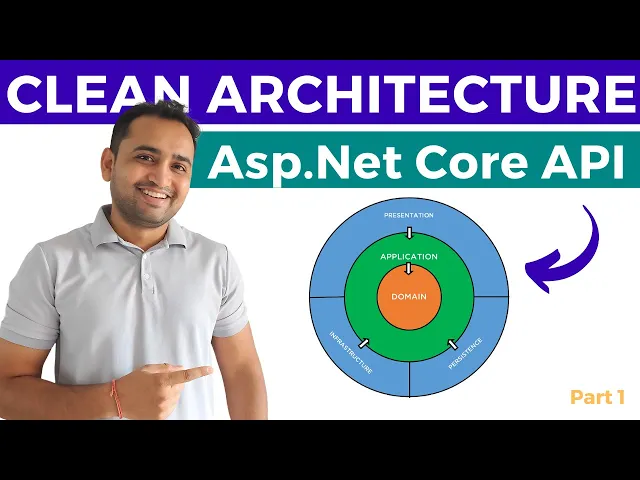
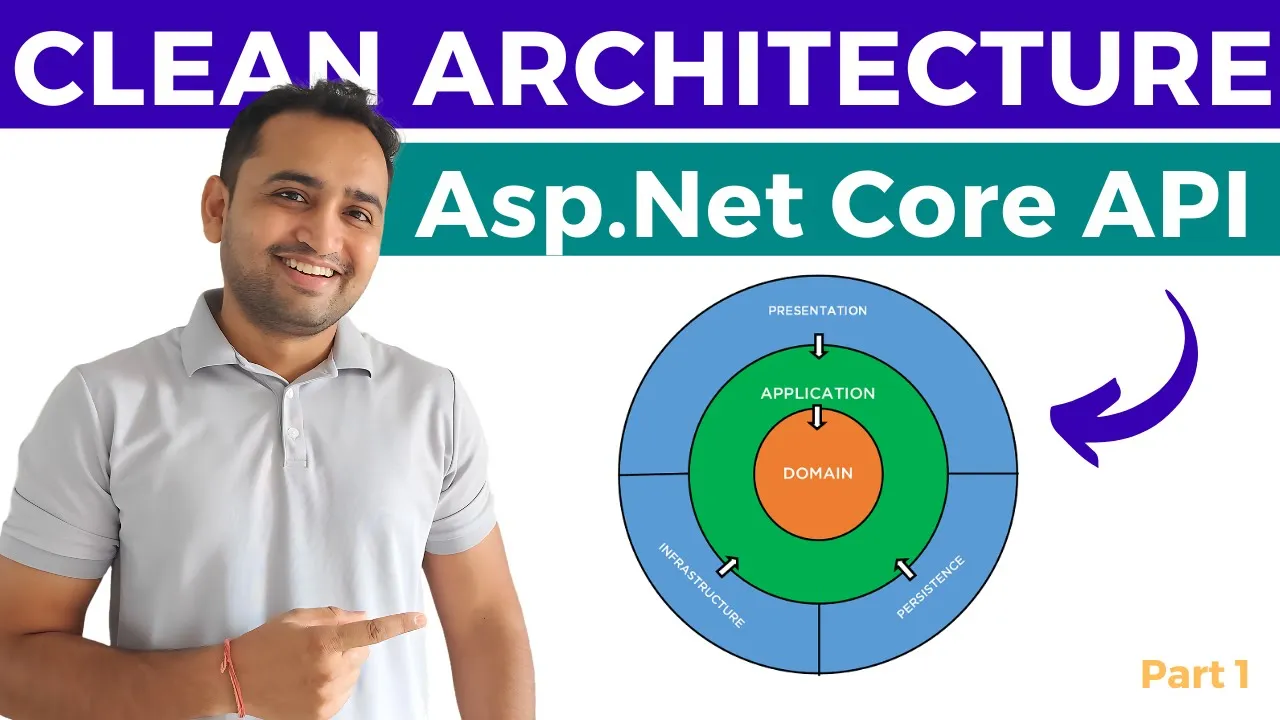
ASP ret core is one of the most popular framework to build the rest API and if you want to learn about any framework then the fundamentals of that framework is super important but only the fundamentals are not enough most of the time you will have to work on Enterprise applications and over there you will have to deal with the architecture as well so if you are having only the knowledge of fundamentals and then you will try to work on the real world application then you face some challenges so here in this video I'm going to talk about the asp. net core web API with clean architecture we will create all the separate layers and you can use this architecture in your application whether you are working on a monolithic application or you are working on microservices this entire architecture will work on both type of applications and let's start everything from this scratch so here I'm using this Visual Studio 2022 and here I will be creating a new application let's create a new application over here click on this file new project and either you can add a solution and then you can add all your projects or you can directly start with the application so here I'm using this aspet core web API let's click on this next button and let's give a meaningful name to this one the name of the application is my app. API this could be anything and let's choose a location to store this entire code base so this is the place where I will be storing this entire code in my local system and you can also get this entire code from my GitHub repository and you can find the link of that repository in the description box below let's click on this this select folder and there we go we are not making any further change click on the next button so here we are going to configure this application for the https and this is the container support which we do not want as of now and enable open API support let's use this one because this will add the Swagger to our application do not use top LEL statements use the controllers so either you can use the controllers or you can go with the minimal API the concept is going to be same here we are talking about the different layers of your application and if you want to use this latest concept which is tot aspired then you can use this one as well but as of now let's not focus on that one we are focusing only on aspet core web API click on this create button and as you can see we are having this esp.
net core MP application we will not do anything over here and we will create some more projects for our different layers so here I will be focusing on clean architecture and for that you will have to add three more layers over here so let's quickly add some more layers new project and this time I will be using class Library if someone is saying that this is a layer it means most of the time we are talking about the class Library so this class Library let's choose that click on this next button and again here I will have to give a meaningful name so let's use my app and this time let's give a name application click on this next button net 8 is the latest version that is available and I'm using that one click on this create button so we are having one layer we will talk about the uses of all these layers in just a bit but first let's let's add two more layers so next is going to be the core again the class Library project click on this next button so here again I'm using this my app do either you can write core or you can write domain over here it is up to you but let's use core and again click on this next button we have created two layers as of now let's add one more over here so I'm going to click here you can notice that I have added all the layers in my application so let's just close all the tabs and let's focus what we have so here you will notice that I'm having four applications this is my first application which is the main application it is a kind of UI as well if you using this clean architecture with some UI framework for example the Blazer then at this place you can put your Blazer application and then I have my application layer then I have my core layer and I have my infrastructure layer so let's talk about all of them one by one so first I will start from this infrastructure infrastructure is something that will have all your main implementations for example if you are interacting with a database then the repository implementations will be there in this infrastructure as well as if you're making a call from a third party then that implementation will also be there and in case you are using the Entity framework core then the DB context configuration will also be there in this infrastructure structure project there are so many other things it means if you need to implement something that will interact with maybe some external party that you can write over here talking about the core core is something that will have all your core classes core classes means it will have all the dtos the data transfer object it will have all your entities entities means the classes of your Entity framework code you can also put all your enms over here it means something that is common that you can put over here in this core talking about the application this is one of the the most important layer and here you will write all your business logic if you are using the mediar pattern then the commands and queries will be written here in this application layer and because we are talking about the separate layers so there are few more things that we can Implement over here and if you have some basic knowledge about the ESP ret C framework then there is a very important concept which is called as dependency injection and we write all the dependencies over here in this program. cs class by using this Builder do services but because we are talking about the different layer so it is always a better practice to create separate dependency file for all these layers and for that let's quickly add a new class over here so we don't need this class one let's delete this one and we can delete this from the other one as well I'm I'll be deleting it from here as [Music] well okay so let's add a new dependency in file over here so add new item and here I'm writing dependency injection so we are making it as public so what is the main concept that I want to do over here if I go over here in this program Ro CS class then you will notice the type of this Services is I service collection it means over here I can add all my services for this application so what we will do we will create an extension method on this services so the type is I service collection we will be using the same concept and we will be calling that extension method from this program. cs class so ultimately we are injecting everything in this program Ro CS class so let's see how it goes here we are in this dependency injection class and let's add a new method over here so this is going to be public static I service what is the name this is I service collection so let's use that and here I'm writing add legation di this time let's use the this keyword so this is the concept from CSR it is not a concept of esp.
net code right this is a very basic extension method so here I'm writing again this I service collection and let's just return it and because this is a collection so let's use the services over here and remember this I collection Services is not available in the library project this is the concept of ESP net code so we are using the library and it is not available over here and and to resolve this problem we will have to install the package from the newat and to get that package you can take the help from this visual studio so simply right click over here and choose this quick action here you will notice you are having this option to install this package let's click on this one find and install the latest version so what ultimately will happen ultimately this will go to the new get package manager and it will download the same package from new get to your solution to particular this class Library project so if I open the C proile of this application you will notice we are having the link of that package over here the abstraction is over here and that's the package that I'm using at this place all right now what is the benefit the benefit is that we can use this I service collection over here in this application project all right now let's do the same task in other application as well so in the core again I'm going to add a new item like this add over here as well new item dependency injection and let's copy the code of this method and this is code then do the same thing over here as well paste changes and this is infrastructure layer so let's just use that as well okay and because these are some separate class Library project so we'll have to install that package in these projects as well so right click choose this quick accents and let's use the same package we are using 801 so we are getting the suggest Su that we use this one which is fine here as well let's use that name space quick acction there we go so this package installation is done now we will have to call them from the main application and before that we will have to establish the connection in between them so we will have to add the dependency of these projects so remember the entry point is this main my app. API application this will have a dependency on the application so first first we will add the reference of this application project to this main my app. API so let's right click on this dependencies or you can simply click on the name of this project go to add and choose the project reference this one you can also click on this dependencies add project reference both of them will open this same window so here I will have to use this my app.
application let's click on this okay button and that's it now this application project will depend on this core so let's add the dependency here as well add project reference this will use this score okay and this infrastructure will use the application so let's right click over here add project reference that's the application although this infrastructure application will also use the core project but because we are adding the application and the application project is already having the reference of that core so we will automatically get the reference of that core project as well so let's add only the application over here we are done now we will have to add one more thing over here and we will have to add the reference of this infrastructure in our main API project so let's do that right click add project reference and that's it the linking of all these projects is now done now what we have to do we have to call all these dependencies from our main application so let's go back to the program. Cs class over here so again in this main application as well you can create a separate class class where you can add all your dependencies and that is something a good practice so let's do that as well so even in this main application I will be creating a new class again the name is going to be dependency injection although the name does not matter you can give any meaningful name over here and let's just copy the code this one paste it here like this there we go and remember we don't have to add the reference of that package over here in this main application because this is the aspet core web API project and this project is already having the reference of that package so let's go back to the program. Cs class and over here we will call that add app di method like this and here because this method is placed inside this my app.
API namespace so we will have to use that name space as well right like this now we can register all the dependencies of this main application over here and again from this place we can also add the dependen IES of our other applications so first we will add the dependencies of the add application TI like this and we can also add the dependency of the infrastructure over here so let's simply use this add infrastructure di like this now there is only one remaining dependency injection file which is in this core and although I don't think there will be too much code in this core dependency injection class because the ultimately main logic is going to be return in the application and in the infrastructure layer but because of some reason if you are using the dependencies in this core project as well then you can add that either in the application or you can also add that over here in this main application so we will use that whenever that will be required as of now we will focus only on these two dependence injection classes and that is all in this video in this video we have set up the basic implementation of the clean architecture by using the ESP R netore framework and now in the next video we will add the mediar pattern and we will implement the curent operations by using the SQL server and remember one more thing guys if you are having any questions about this esp.