next you'll focus on Google specific offerings in the cloud Google cloud platforms products and services can be broadly categorized as compute storage Big Data machine learning networking and operations or tools leveraging compute can include virtual machines via compute engine running docker containers in a managed platform using google kubernetes engine deploying applications in a managed platform like App Engine or running event-based server less code using cloud functions a variety of managed storage options are available as well for unstructured storage there's cloud storage for managed relational databases there's cloud sequel or cloud spanner and for no sequel
there are options like cloud datastore or cloud BigTable managed services dealing with big data and machine learning are available as well our data centers around the world are interconnected by the Google Network which by some publicly available estimates carries as much as 40% of the world's Internet traffic today this is the largest network of its kind on earth and it continues to grow it's designed to provide the highest possible throughput and the lowest possible latencies for applications the network interconnects with the public Internet at more than 90 internet exchanges and more than 100 points of
presence worldwide when an internet user sends traffic to a Google resource we respond to the users request from an edge network location that will provide the lowest delay or latency our edge caching network places content close to end-users to minimize latency applications in GCP can take advantage of this edge network to Google plow divides the world into three multi regional areas the Americas Europe and Asia Pacific next the three multi regional areas are divided into regions which are independent geographic areas on the same continent within a region this fast network connectivity generally round-trip network latency
zuv under one millisecond that is at the 95th percentile as you can see one of the regions in Europe is Europe West to London finally regions are divided into zones which are deployment areas for GCP resources within a focused geographic area you can think of a zone as a data center within a region although strictly speaking a zone isn't necessarily a single data center compute engine virtual machine instances reside within a specific zone if that zone became unavailable so would your virtual machine and the workload running on it deploying applications across multiple zones enables fault
tolerance and high availability behind the services provided by a Google cloud platform lie a huge range of GCP resources physical assets such as physical servers and hard disk drives and virtual resources such as virtual machines and containers we manage these resources within our global data centers as of mid 2019 GCP has expanded across 20 regions 61 zones and more than 200 countries and territories this expansion will continue when you take advantage of GCP services and resources you get to specify those resources geographic locations in many cases you can also specify whether you're doing so on
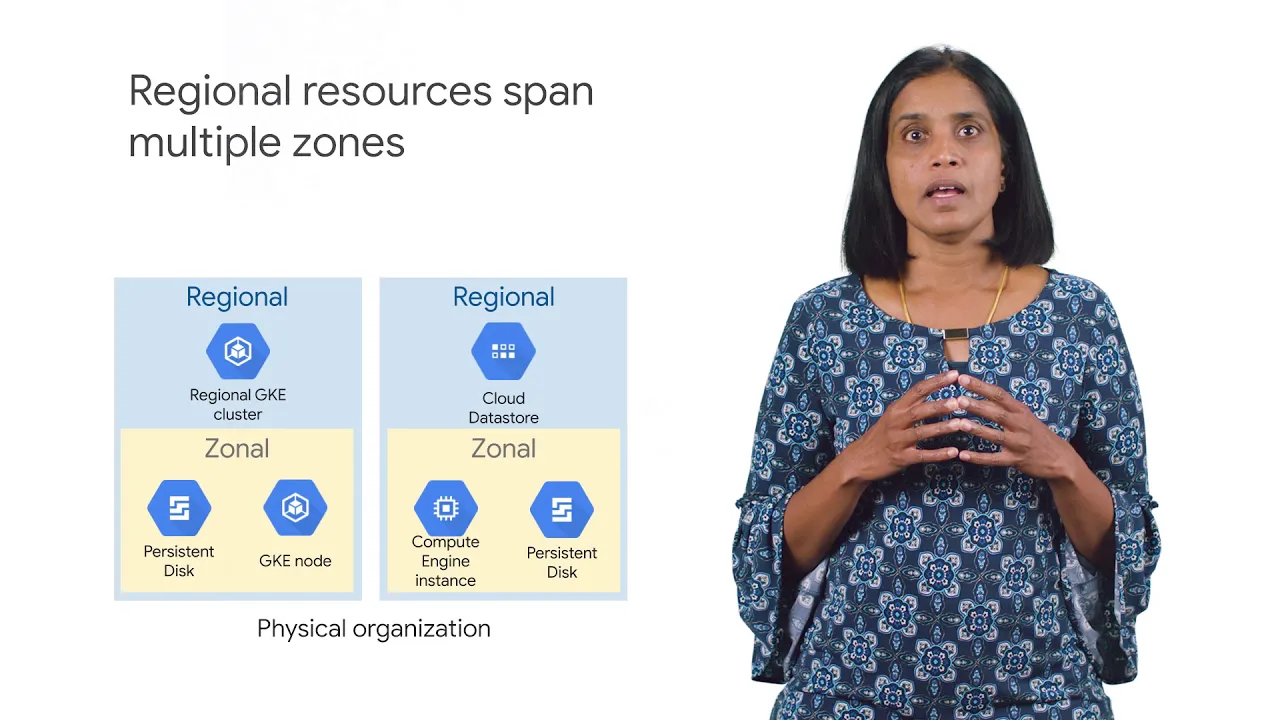
a zonal level regional level or multi regional level zonal resources operate within a single zone which means that if a zone becomes unavailable the resources won't be available either a simple example could be a compute engine virtual machine instance and it's persistent disks gke has a component called a node and these are zonal to regional resources operate across multiple zones but still within the same region an application using these resources can be redundant Li deployed to improve its availability finally global resources can be managed across multiple regions these resources can further improve the availability of
an application some examples of such resources include HTTP load balancers and virtual private cloud networks the GCP resources you use no matter where they reside must belong to a project so what's a project a project is the base level organizing entity for creating and using resources and services and managing billing api's and permissions zones and regions physically organize the GCP resources you use and projects logically organize them projects can be easily created managed deleted or even recovered from accidental deletions each project is identified by a unique project ID and project number you can name your
project and apply labels for filtering these labels are changeable but the project ID and project number remain fixed projects can belong to a folder which is another grouping mechanism you should use folders to reflect the hierarchy of your enterprise and apply policies at the right levels in your enterprise you can nest folders inside folders for example you can have a folder for each department and within each departments folder you can have subfolders for each of the teams that make it up each team's projects belong to its folder a single organization owns the folders beneath it
an organization is the root node of a GCP resource ID or key although you're not required to have an organization to use GCP organizations are very useful organizations let you set policies that apply throughout your enterprise also having an organization is required to use folders the GCP resource are our key helps you manage resources across multiple departments and multiple teams within an organization you can define an are our key that creates trust boundaries and resource isolation for example should members of your Human Resources team be able to delete running database servers and should your engineers
be able to delete the database containing employee salaries probably not in either case cloud Identity and Access Management also called iam lets you fine-tune access control to all the GCP resources you use you define iam policies that control user access to resources