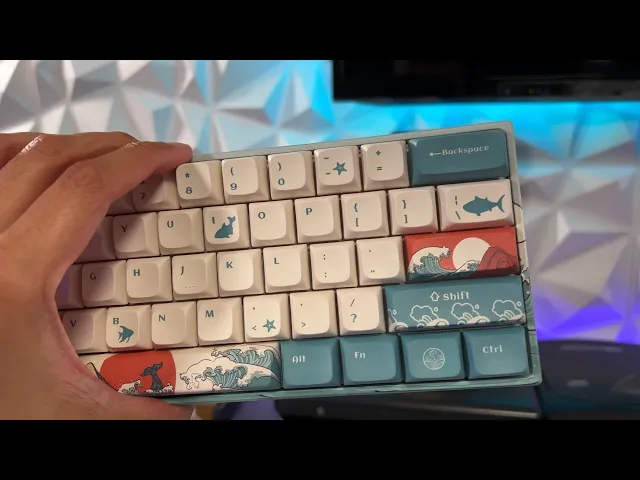
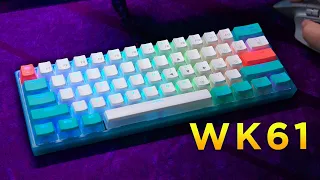
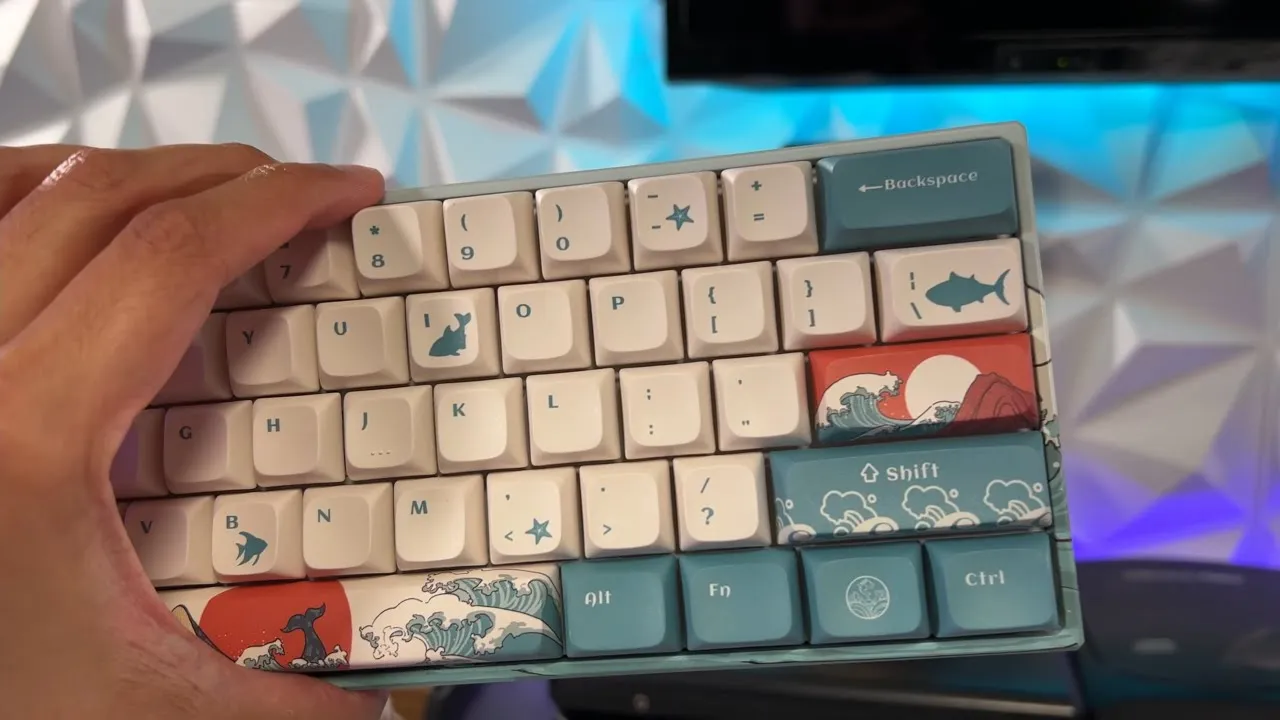
today we're going to be unboxing setting up and reviewing a 60 wired and wireless keyboard from xvx this thing is cosmetically gorgeous with custom keycaps and bass but moreover than that it has an included 2. 4 gigahertz dongle in the bottom four rubberized feet usbc 10 hours of continuous battery life and some very silky smooth gather on yellow switches that we're going to find out in this video i can't type with but it's hot sticky fire for gaming let's get it [Music] on the table today we had the xvx mark 61 60 wired and wireless keyboard this retails for 80 on amazon does come in several color ways or themes and multiple options of gatteron switches you are going to have your keyboard in a moisture wicking bag as well as an xvx branded mouse pad that does match the theme or paint job of your keyboard which is pretty sweet however this is a little bit petite for my taste as i prefer a full-size mouse pad so i most likely will not be using this but it is cool if they include one and then in the front you are gonna have your usbc cable now this cable is rubberized that is not microfiber or braided however it is relatively flexible and it does come with a cable tie back one of the nice ones that stays attached which i really like and there's more xvx branding on the tie back as well this is about a four footer so if you are using this wired as opposed to the dongle which is in the bottom of the keyboard depending on your setup and how far your tower is away from your keyboard you might need to get a usb extension if you do need one i will have it linked in the description below now pulling this beauty out of its case and i do say beauty because these keyboards especially for the price point are simply gorgeous as you can see this is fully custom the base the keycaps as well as the bottom plate which actually has a three-dimensional stamped or emblazoned logo on the bottom which i think is fantastic you do also have rubberized feet now one thing i'm not a huge fan of is they don't have flip up feet i personally like to my keyboards at a slight angle for a more comfortable and ergonomic typing position however i will caveat that by saying that the keyboard is already slightly slanted upwards so that really isn't a huge deal because it's already in an ideal typing position for me but let's just take a second to look at the cosmetics of this keyboard i think it is absolutely gorgeous i will be overlaying some b-roll as well throughout the video i absolutely love these keycaps they are a perfect shape where they are rounded to where they fit your fingertips just perfectly f and j have three very distinct dots or bumps so you can feel like you're reading braille when you're typing or more realistically you know exactly where your fingertips are when you're typing not to mention the font that they use on all these keys looks fantastic and i like the graphic on the spacebar and inter as well absolutely gorgeous now you do have a 2. 4 gigahertz dongle on the bottom here which i think is really nice that it is included in the keyboard so that way you don't have to worry about losing this thing whenever you decide to go wired with this or you're simply not using this keyboard you can just pop it right back in its holster and you don't have to worry about losing it which is really nice and getting it out is also very easy because they do have a little cut out to get your finger in there nice and easy like other than that you have an on off toggle on the bottom as well as a usb-c port on the top and that is it now you do also have an instruction pamphlet i'm not a huge fan of these pamphlets that fold out like this i prefer a little brochure you can flip the pages but this is just fine no pictures or anything however it is very informative and english is the primary language and very large font so it is very easy to read and it walks you through all the functions and features of this keyboard and it walks you through all the functions and features of this keyboard for example the rgb lighting modes yes of course this thing has rgb because we know that adds frames per second to our pc well it doesn't do that but it does look pretty sweet and if you don't want the rgb you can simply turn it off or dim it if you have a very dark room and it's a little bit blinding or disorienting for you i mean it's not going to be blinding it's not like you're throwing a flashbang and then breaching a room but it might be a little bit distracting for you when you're trying to get your kd ratio above a 0.
6 like your boy over here now i will primarily be using this keyboard wirelessly with the 2. 4 gigahertz dongle this has an 1850 milliamp hour battery which will get you at least 10 hours of continuous use with a charge time of 6 to 8 hours giving you a full charge now these switches feel insane i am going to do a typing test in this video so you can get a little bit of an idea about how much noise they make which isn't a whole heck of a lot but they are not tactile or clicky like most of the mechanical switches i have tested they are completely linear with a good resistance and the only noise you're hearing is when i bottom out on the bottom of the plastic base the only other keyboard i've tried that had switches like this were the opti mechanical switches inside of razer's one-handed keyboard but i feel like this does it just slightly better or maybe it's because it's a larger keyboard not a one-hander it's a 60 percenter it just feels really good as for the stabilizer in the space bar as well as enter and shift very even press good resistance good snapback or rebound these switches feel good and if you're wondering about the size this is a 60 percenter so you can hold down the function key in combination with any of the numbers up here and that will be your f buttons or functions up top and also in accordance with the instruction manual if you hold down the function button and a series of buttons on the keyboard you will adjust things like your rgb backlight the rgb just roared to life when i plugged her in i love the way the rgb is implemented because you cannot actually see any exposed leds or anything and the light just gently fades or bleeds through all the keycaps you'll see that better during the b-roll that i'm overlaying kevin at it right now this also does come with an included keycap puller so let's check out these switches right now as you can see this does have gateron yellow switches which do look like they're mounted and soldered properly these are not hot-swappable and these switches feel absolutely fantastic and they differ so greatly from most of the tactile clicky switches that i've used in the past these are virtually silent as you can hear the only sound you're really getting is when you bottom out but if you don't bottom out because you're light-handed or feather fingers then this is really quiet as you can see there's a ton of control over the rgb modes as you can adjust brightness speed color and 19 effects or modes we'll go through those now so this is the spectrum cycling but that's a little bit fast for my liking i feel like i'm gonna have an epileptic seizure let's turn it down there we go nice and slow just like me let's see about these modes shall we oh that's nice saucy and with a lot of these modes you can adjust the color as well so even though there's 19 modes there's also nine colors for a lot of the modes so technically there's dozens of lighting effects and then we're back around to spectrum cycling as you can see i'm over at the pc with the xvx keyboard hooked up wirelessly i've got a word document pulled up and we're going to do a little typing test bam a little bit of a learning curve here holy i am trash with this keyboard oh oh geez youtube channel oh i don't like that where my hand naturally wants to rest my palm keeps hitting this button that pulls up this little pop up here it's like almost like what you would see when you right click actually it's exactly what you see when you right click i don't like that at all two gamer heaven youtube channel can't type this is a keyboard that i am not used to using so i am freakishly slow so the keys do feel incredibly good however they are substantially different from my usual keyboard so it will take some getting used to i do like the placement of the keys and i do like the way that they feel but i have to really focus on what i'm typing so as a point of reference i generally type between 80 and 95 jeez why does it keep doing that as a point holy dude this is rough this is the hardest part of the video as a point of reference holy mother of god struggling here 80 to 93 words oh boy typing test over it uh it types enough of that so there's my final verdict of the xvx 60 wireless and wired keyboard i have more pros to say about it than i do cons i think it is a good keyboard the fact that it retails for 80 us dollars and comes with a slick set of keycaps as well as a nice painted base and that dongle that's built into the bottom is awesome the rgb looks great for gaming it works fantastic the only thing that i was having extreme difficulty with as you could see was the typing test now granted i went directly from a full-size mechanical keyboard with larger and more spaced out keycaps completely different switches razor tactile green switches to gather on yellows on a 60 keyboard where the keys are much closer together so i was having extreme difficulty typing however i will say after a couple of days of using strictly this keyboard i'm sure i will pick up the pace and it's not a bad typing keyboard however as somebody that generally types on a full size keyboard or maybe a 10 key list maybe a 75 percenter at the smallest jumping to a 60 these are great for gaming that is the application that they're best for because you do not need to have a full-size keyboard for productivity and typing emails then also a second keyboard a one-handed keyboard next to it that you only use for gaming this does it all it's proficient in typing and it's great for gaming because you have all that mouse space your keyboard is not taking up any mouse space hardly at all so you have all that room also i do like the switches they are a lot more sensitive than i initially thought where you really don't need to press them very far at all i would say about a third of the push is where it actually registers so you do have a lot of dead space in the bottom however you can cut that down or completely eliminate it by putting in some rubber shims or o-rings over the key caps and that will do a couple of things one it will make the keyboard virtually silent because these gather on yellow switches are already super quiet but you won't have that plastic on plastic bottoming out because it'll have a rubber plunger in there that stops it and also you will get rid of that dead end slop which will probably increase your typing speed and maybe even your response in gaming because you know once you've registered that key and it bottoms out you're done you can stop pressing that key because these are very sensitive and they register about a third of the push down so for me a little bit too much dead-end slop in these gataron yellows i most likely would put a couple of o-rings or shims in there but i do love how silent they are while i was typing and talking you could barely hear the keyboard clicks they're not even really clicks they're just the plastic bottoming out over my voice so that is fantastic for you streamers or maybe you're a youtuber and you do screen recordings of gameplay or maybe you're just a pc gamer and you stay calmed up with your buddies in discord they're not going to be hearing a bunch of clicking in the background because this thing's virtually silent also cool little feature if it's at standby or idle for 60 seconds it will turn off the rgb and go into a little standby or sleep mode to conserve that battery life 10 hours of continuous use however probably several more hours of standby time overall i love the cosmetics or appearance of this keyboard i think it is a good typing keyboard once i get used to it and the overall fit and finish feels very premium there's no creaks or moans and groans it doesn't feel like cheap parts been plastic or anything like that if you're interested in this keyboard it's linked in the description below and i'm gonna go learn how to type with this keyboard because that was embarrassing peace if you enjoyed the video liking it helps it to get seen by more gamers this information will reach in the system as well which in turn helps me grow this little channel which i do greatly appreciate subscribe for more content like this i cover news in the gaming community and industry tutorials helping you get set up streaming and youtubing as well as honest gaming product reviews keyboards mice headsets controllers mics chairs etc there are some hefty exclusive discount codes found only in the description of my videos and only for the audience here at gamer heaven check out into the am for some of the sickest looking and most comfortable cloth to ever grace my gaming giblets if you don't want to be scorching your corneas with harmful blue light check out gamer advantage the only blue light glasses on the market that look sexy and actually work if you're looking for a custom controller that'll blow the competition's tits back aim definitively has the best bang for buck or price to performance when it comes to xbox playstation and switch controllers nope they don't do switch but they do do gaming mice i said doo doo i have links to all my other platforms and socials in the description below if you need a quick laugh or blast of gamer adrenaline check my short form videos out at tiktok to get in touch with myself and the stallions and stallionettes of gamer heaven join the community discord and check me out at twitch.