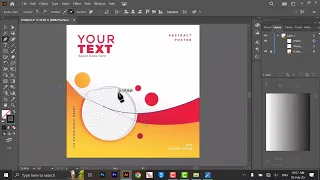
hello and welcome to my youtube channel today I am going to show you how to take multiple of piece of any object in Photoshop quickly so let's get started first of all create any shape I am making this a square invite now this is our vector shape we have to convert it into faster rise faster shape so to convert in master shape to convert this into raw specially just right-click on it and choose rasterize gear now you this is our faster shape so to make a copy of this object quickly we have although we have
a method to make a copy with add with pressing Alt key and dragging when this take more time we want to do it quickly so to make a copies quickly just press ctrl alt T and then break it wherever you want to put is Intel and then press control shift under these multiple times to take a copies you can see there we have a separate layer for a v-shape if we want two copies of this shape on the same layer then what we can do get all these shapes first we have to make a selection
of this object we'll make a selection or don't control the and click on this icon to make a selection and sorry and then press install for P and move it put it it will desire place and then press ENTER and then press control shift enter T to take a copies but you can see that now we are getting copies on the same layer press ctrl D to deselect again if I want to make copies click on this next election then plus control hundred t move weight convert this enter and then press control shift onto T
multi one time take more focus this control V to be stick now we have these all sets you can make any shape you can make copies of any shape with this method like I am choosing this odd shape or maybe any other share Mumbai okay I'm making [Music] you're making copies of this hardship draw her and changing its color the way click here which will be their color now again this is a vector shape we have converted into roster shape and kill it in the Tilikum mustard I get when I'm gonna do roster click on
the gear click on this icon to take this lection then press ENTER on 150 move into desert this is that then fiscal 250 multiple times to take 25 for peace it's controlled B and then you can repeat the process and we learned eh we did earlier event it on this yeah this icon with control key risk encounter and T downward this indentation to shape up 30 multiple times to take north of 20 and that's it not only shapes but you can also take copies if this method of text also like I'm in love the size
or PE and this is how we have depend on it we have to convert text also in to rasterize shape click here for a slice and then make another selection press ctrl alter P you know it somewhere is in the in phase control shape to 30 multiple times should take more focus this ctrl D to deselect again I am taking more I want to take more focus so kill it the hold down ctrl key and click on this here make a selection press ctrl 130 move it and place it at your desired location is inside
to deselect and then a sponsorship on 30 multiple times to take more problems this can help you to dislike and then even move it easy wherever you want so that is the tutorial how to take multiple copies of any slave on the same layer or on the separate layers quickly using Photoshop in Photoshop so if you like my tutorial please like share and subscribe see you later till then take care and bye-bye