hello and welcome to my presentation on instance containment techniques for effective incident response i'm jonathan polling a principal security consultant for threat detection and incident response here at aws if you're attending this talk odds are likely you've been involved in or exposed to a possible incident within your aws environment involving an instance or maybe many instances or maybe you haven't yet experienced such an incident but are looking to be prepared for it should one occur well either way you're in the right place now you might have seen various blog posts or presentations on how to
perform instance containment within aws but what's the most effective method are there other options that haven't been discussed is one method better than the other which one should you be leveraging for your incident response processes this presentation will provide answers to all of those questions and hopefully more by helping you better understand the variety of options available for instance containment the pros and cons of each method how to implement each of them step by step and provide you with a suggested path to start building effective containment measures within your environments today so let's get started
we'll begin our talk with what might be a very familiar scenario for some of us involving a possible instance compromise and a series of events we might expect to occur if one's not well prepared to respond we'll then cover the various types or levels of effective incident containment and how to implement them followed by an alternative to simple containment that can yield additional highly valuable data sources for investigations and we'll finish with a suggested approach for building the various capabilities within your own environments all right let's jump right into the scenario picture yourself at home
it's saturday 2 a.m you're sound asleep from a long week of cloud ops engineering you're awakened by an email notification on your phone oh that's the work email notification what could it be you see the email subject a guard duty alert for cryptocurrency and bitcoin tool uh oh quickly better get to the computer you log into the aws console and navigate to the involved ec2 instance this is not good it's a critical production web server should you shut it down wait no you remember there's an isolation security group set up by security staff with no
rules which allows no inbound and outbound traffic great this should cut off network access until we can figure this out you change the security group to the isolation sg on the instance and send out an email to the group the system has been contained oh that was close it's not over yet but it should at least buy you some time until you get back into the office on monday to investigate back to bed you go saturday 8 pm another work email notification you see the email subject this time another guard duty alert for an ec2
drop point the ec2 instance is attempting to communicate with an ip address of a remote host what this instance should be isolated you try to connect to the instance using ssh but it's blocked as it should be the isolation security group doesn't allow connections okay so this instance should be completely isolated then how is it still connected to the internet you feverishly send out emails to everyone you know begging for help what's going on here sunday 8am you've barely slept no one has responded yet the instance is still running but you've got no idea what
continues to go on with it you decide to just shut it down as a last resort but it's already been 12 hours of possible sensitive data access and this means shuttering a critical production server this won't be a good monday you know what's coming might be time to update that resume okay so the resume part is clearly facetious no one should be getting fired from this but we all know that feeling right so what went wrong here well first we didn't have a known working or tested plan for containment we didn't understand security group rules
and their expected behavior we allowed for additional unnecessary dwell time for the attacker within the environment and we very possibly shuddered a critical production server and service that will come with a substantial cost to the business ultimately we very possibly suffered sensitive data exfiltration well why not just shut down the instance well shutting down an instance does achieve containment but it comes at a cost you lose valuable volatile data from shutting down the instance for example memory which can contain active processes connections data buffers things that are extremely useful for an investigation and it's all
lost during shutdown this may significantly hinder your investigation and ability to form a root cause analysis because you can't fix or prevent what you aren't aware of now in some cases it may make sense to just shut down and delete and move on but shutdown should not be a default or go-to response in most cases it should be a purposeful decision planned well in advance and in consideration of all benefits and costs okay you get it you won't just shut it down next time what should you do then well here's how we can better prepare
for the next time first we need to understand what the options even are for containment then we need to define containment procedures that are specific to the threat type and the resource type for instance instances data etc then we need to implement containment techniques that prevent what you don't want and allow what you do that are effective at varying levels of granularity from a singular instance all the way up to a vpc and most importantly techniques that retain and derive as much useful data as possible for leveraging investigations and understanding scope so how do we
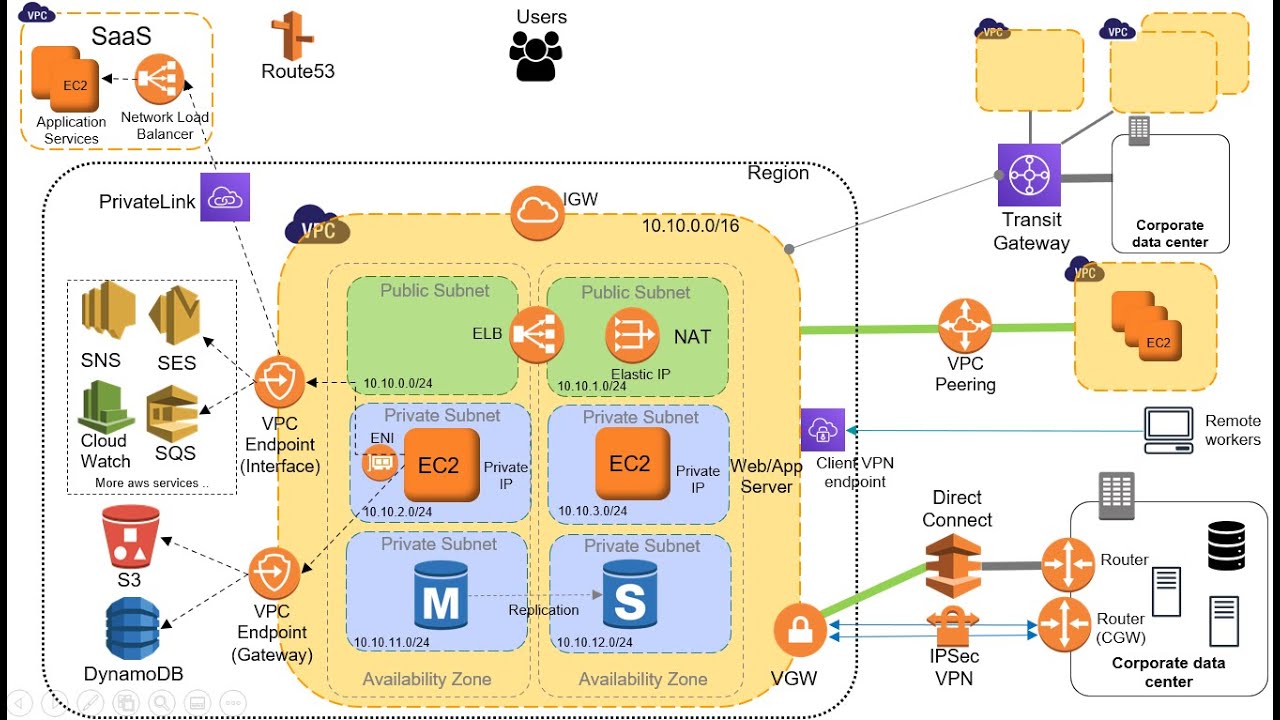
do that well i'm about to show you exactly how to do just that implement effective containment techniques working our way up from the instance to the vpc let's see how first we'll set the stage with a reference architecture to better visualize our areas of focus for containment you can see we have one instance and a security group with a network access control or knackle applied to the subnet a route table routing traffic to and from the instance and internet gateway providing internet connectivity now your environment may have a bunch of different things in front of
or behind or around each of these items but these will be the important points of focus for implementing effective containment measures with that reference architecture in mind let's get into the techniques we'll begin with security group level containment leveraging security group rules to contain a singular instance or a set of specific instances we suspect to be compromised before we get into the specific techniques let's first understand security groups and how rules work security groups rules begin as an implicit deny for all traffic when no rules are present you then create rules to allow certain traffic
responses to inbound traffic are allowed out regardless of outbound rules and vice versa this is how they implement stateful connections within security groups you can assign multiple security groups to an instance if there's more than one rule for a specific port amazon ec2 applies the most permissive rule you can add or remove rules at any time and changes are immediately applied to the instances associated with the security group but the effect of some rule changes the effect of some rule changes can depend on how the traffic is tracked now this is the extremely important part
which perhaps you already noticed with the bold orange wording this part is critical to implementing effective security group containment namely with respect to understanding the difference between tracts and untracked connections this is an area of common misunderstanding is what actually led to the instance in our initial scenario maintaining internet connectivity despite attaching a security group with no rules so if this issue wasn't readily apparent to you in the scenario you'll want to pay particularly close attention here security groups use connection tracking to track information about traffic to and from the instance this is how they
implement stateful connections but not all flows of traffic are tracked with one exception that icmp traffic is always tracked now untracked connections apply to traffic with a quad zero rule and a quad zero rule for all ports in the other direction for example an inbound quad zero and an outbound quad zero for all ports and vice versa for these flow of traffic is immediately interrupted if the rule that enables that flow is removed or modified for example if the inbound rule for an inbound connection is removed or modified and vice versa now track connections apply
to traffic with a specific ip or cider rules and you can see a couple examples there for track connections flow of traffic is not interrupted if the rule that enables the flow is removed or modified regardless of the rules in the opposite direction so can we see now where the mistake might have been made with the security groups in our scenario now i know this might be a bit complicated so let's try to visualize what we're talking about here here we can better visualize the difference between tracked and untracked connections and the effects of changes
on each i've labeled the track connections with a t and the untracked connections with a u for the inbound rules we can see there's one ssh rule for a specific ip a wide open quad zero http rule for both ipv4 and v6 traffic and a wide open quad zero icmp rule for the outbound rules we can see there's a wide open quad zero rule for all protocols and ports for both ipv4 and v6 traffic in this example if we remove the inbound ssh rule it would not terminate any existing connections but it would prevent any
future inbound connections because we're using a specific ip here to yield a tracked connection that means any active ssh connection from that 203 address would remain connected despite us removing the rule now if we remove either of the inbound http rules it would immediately terminate all existing http connections and prevent any future inbound connections for the respective protocol because we have a corollary quad zero outbound rule for all ports yielding untracked connections moving down to the outbound rules if we removed either of the outbound rules it would prevent any future outbound connections but it would
not terminate any active connections as they would not be considered untracked due to the lack of a corollary quad zero rule inbound for all ports in addition it would make all new respective inbound traffic tracked note that icmp traffic is always tracked even if we remove this rule so now we better understand how security groups work what are the pros and cons of leveraging security group rules for instance containment well it's the most granular type of containment this provides extremely effective and targeted containment of a single instance when using separate or dedicated security groups for
isolation which we'll get to in a second on the downside rules can terminate only on track connections and not tracked connections and you can't just perform a one-click application of a pre-built isolation security group with no rules to prevent traffic this requires a multi-step process to both terminate active connections and prevent future connections and if it's not done exactly as described traffic will still be possibly unknowingly allowed so how would we perform security group level containment leveraging security group rules the first way to do it is by leveraging the existing attached security group we'd identify
the security group attached to this to the instance delete all existing rules we create a single rule of quad zero all ports for all traffic and both the inbound rules and outbound rules this is what will convert all existing and new traffic to being untracked we then remove the quad zero all ports inbound and outbound rules to terminate all now untracked connections the second way to do is by leveraging separate dedicated security groups now when leveraging separate dedicated security groups you have two options the first option involves using a single security group for this option
you would create a dedicated isolation security group you then create a single rule of quad zero all ports for all traffic in both the inbound rules and outbound rules again application of these rules will convert all existing and new traffic to untracked you then remove the existing security group association from the instance and associate the isolation security group with the instance we then delete both rules with the quad zero all ports for all traffic from both the inbound rules and outbound rules of the isolation security group given that all of our connections were converted to
untracked deleting both of these rules would effectively terminate all connections and prevent any future ones the second option involves using two separate dedicated security groups for this option you create a dedicated isolation security group that we call isolation ssg step one you create a single rule quad zero for all ports for all traffic in both the inbound rules and outbound rules again this will convert all existing and new traffic to untracked you create a second dedicated isolation security group which we'll call isolation sg step 2 with no rules we then remove the existing security group
association from the instance and associate the isolation sg step one security group with the instance this will convert all existing and new traffic to untracked we then remove the step one isolation security group from from the instance and associate the isolation sg step two security group with the instance and that's it all three of these methods allow for targeted containment of a single or multiple instances leveraging security groups and rules and no one method is better than the other you can leverage whichever makes the most sense for your environments now i'll move the stack a
little bit to subnet level containment attempting to leverage an isolation subnet to perform containment can we just create an isolation subnet and move compromised instances into it sounds simple unfortunately we can't because you can't change a subnet associated with a running instance you'd have to shut the instance down before you're able to do so but is all hope lost could we still leverage a method like this nope not all hope is lost and we'll investigate in a little bit how to leverage an isolation subnet later in this presentation so sticking with subnet level containment will
now attempt to leverage network access control lists or knackles to perform containment before we get into the specific techniques let's first understand how knackles work knackles denier allow traffic solely based on an external to the subnet ip or cider so for inbound rules we would specify a source which would be an ip or cider external to the subnet for outbound rules we would specify a destination which is an ip or site or external the subnet you can't deny or allow traffic based on an internal ip or cider for example an instance ip knuckles are stateless
so it doesn't matter if it's a response to a loud traffic and each knuckle and included rules can be associated with only one subnet at a time you can have a maximum of 20 rolls per knuckle and you have a maximum of 200 knackles per vpc to better visualize how these work let's take a look at an inbound rule for a knuckle here we can see that for an inbound rule we must specify the source which will be an ip or cider external to the subnet to which the knuckle is applied now looking at an
outbound rule we must specify the destination which will be an eye piercinger external to the subnet to which the knackle is applied so as you can see while you can filter traffic on an external address there's no way to filter traffic on an ip or cider within the subnet and we'll discuss the impacts of this in a little bit now you may be wondering how are these different from security groups both are used to deny and allow traffic to instances aren't they basically the same thing well there are a few key differences between them mainly
involving at which level they operate for example security groups operate at the instance level and knuckles operate the subnet level what they support net security group support allow rules only while knackers allow support allow rules and deny rules whether they're stateful security groups are stateful knackles are not how they're evaluated and security groups evaluate all rules before deciding whether to allow traffic and knackles process rules in order starting with lotus number rule and decide whether to allow traffic or not very much like a traditional firewall and how they're applied so security groups apply to an
instance only if someone associates it with the instance now knackles applied to all instances in the subnet that it's associated with so it provides an additional layer of defense if security groups are too permissive here we can better visualize again the layers at which each operates and affects traffic you can see both security groups and knuckles are positioned to effectively limit traffic to and from instances they just do it in different ways with different impacts at different points of the network connection neither is better than the other and both can be used for effective containment
depending on the situation and goals of containment so what are the pros and cons of leveraging knuckles for containment well it takes just a single inbound and outbound knuckle roll to both terminate existing connections and prevent future connections no worrying about the the state of the connection like we did in security groups the downside they can't be used in a targeted fashion to isolate a single instance we can only block specific external ips insiders and this will isolate all instances on the associated subnet now this could be a pro if you're looking to isolate an
entire subnet so that's up to you but these may require deleting an existing knackle as well in order to fit the isolation knuckle rule if your knackle rolls are at maximum capacity so make sure to remember or record any rules you have to remove in order to place these how would you perform subnet level containment leveraging knuckles well you can do it one of two ways the first is via an existing knuckle we'd identify the subnet associated with the instance identify the knackle associated with that subnet add a deny all knackle rule to both the
inbound and outbound rules as rule number one for all traffic again if you need to delete an existing rule to make space ensure you remember what that was you can restore it in the future if needed right and this denies all traffic you can also do it via a new knuckle you can identify the vpc and associated with a vpc and subnet associated with the instance create a new knackle within the vpc where the instance resides and by default the new knackle will create a single denial rule for quad zero traffic within both the inbound
rules and outbound rules which is very convenient you then just associate the subnet of the instance with the new knuckle both of these methods are effective in immediately terminating all existing traffic and preventing any future traffic to and from the entire subnet associated with the suspected compromised instances without respect or consideration for the state of the connection as discussed previously with security groups another effective method for subnet level containment involves leveraging route tables to filter traffic to and from the instances subnet route tables define and control the routing for all of your vpc subnets and
there's two main types of route tables there's a main route table and a custom route table main route tables are created automatically when you create a vpc and these control the routing for all subnets that are not explicitly associated with another route table custom route tables are non-default route tables you create and customize and by default they're created empty with no routes each subnet of your vpc must be associated with a route table you can't associate a subnet with more than one route table and subnets that aren't explicitly associated with any route table have an
implicit association with the main route table you can also associate a route table with an internet gateway or a virtual private gateway now what are the pros and cons of leveraging route tables for containment well the first pro is there's minimal intervention to perform containment you simply associate a route table to a subnet and you can have a pre-built isolation route table that's ready to go and easily able to apply now you can't use these in a targeted fashion to isolate a single instance and again this isolates all instances on the associated subnet in addition
this still allows intra vpc or local routing for example instance to instance traffic which is something you need to consider performing subnet level containment leveraging route tables can be done in three simple steps first you can create a custom route table which will be empty with no routes by default you identify the subnet associated with the instance and simply associate the custom route table with the subnet of the instance and that's it subnet level containment using custom route tables moving up the stack to vpc level containment would it be possible to perform vpcy containment by
modifying or simply removing the internet gateway well let's find out internet gateways serve two main purposes they provide a target in your vpc route tables for internet routable traffic and they perform network address translation nat for instances that have been assigned public ipv4 addresses and this supports both ipv4 and v6 traffic so can we just attach the internet gateway from the vpc to isolate everything that would be extremely convenient but unfortunately we can't you will get dependency errors if you'd attempt to do this in an active environment for example ec2 instances with public ip addresses
will prevent you from detaching the internet gateway until those mappings are removed and by removed we mean instances are shut down and clearly shutting down every available instance in a vpc is not viable nor wanted so how would we do vpc level containment well you could remove all the internet gateway routes from all route tables and attach a custom route table with no routes to all subnets within the vpc there are various options depending on your needs in the situation but whenever possible attempt to perform the most granular level of containment achievable this is a
big hammer so you'll definitely want to use this containment measure wisely okay so we've covered a variety of ways to perform effective containment of an instance or instances by terminating and preventing all inbound and outbound traffic now what if you want to isolate the instance but you also want to maintain direct access to it or you want to allow continued av edr what have you telemetry monitoring and reporting what if you still want to acquire volatile data like memory what if you want to collect additional indicators of compromise from this instance i propose to you
all the idea of instrumented monitoring via an isolation vpc what is an isolation vpc you might ask well this is a pre-configure ideally located within a dedicated and effectively instrumented and limited forensics account that serves as an environment to facilitate three things real-time system access real-time system and network monitoring and collection of information intelligence from the compromised instances so why utilize one well the previous techniques we described involved performing complete isolation of an instance or instances by terminating all existing traffic and preventing any and all future traffic while effective at preventing propagation of an infection
there are some consequences to such full containment techniques namely the possibility of loss of valuable data to your ensuing investigation this valuable data can include source ips of the attacker command and control activity network data and payloads and other attack attacker activities and progress on the system this data can be extremely valuable in your investigations to not only help identify additional compromised systems but to build proactive detection and prevention measures to minimize the scope and impact of the attack this is where an isolation vpc with instrumented monitoring can be a highly effective and valuable alternative
to simple full containment now that we've identified a new approach to containment let's check out the pros and cons of this approach what benefits does an isolation vpc provide over the previous containment methods we've discussed well it provides effective containment while also allowing for carefully instrumented access you're allowed to continue leveraging your av and edr solutions as a force multiplier for containment and response it allows live and interactive querying and collection of data from the host and you can continue to collect additional iocs or indicators of compromise for use in proactively identifying additionally possibly compromised
instances and infrastructure now some of the downsides here are you must know the full sets of ips and ports utilized by your endpoint utilities if you wish to have them continue communicating additionally you must know the specific sources of connections from which you plan to connect to the host for interactive querying and you must be very comfortable building and implementing security groups knackles and routes to ensure the compromised instances communications are properly limited as i said while this approach can be very powerful it does take purposeful planning and there are certain requirements and considerations for
this methodology to be effective for example the instance will have to be shut down before it can move to the isolation vpc you can't move a running instance to a different vpc and you've got to create an ami from the instance and relaunch that ami in another vpc the source ips of actively connect attackers will need to be collected prior to instant shutdown as those will not be restarted or reinstated and for good purpose this can and likely should be automated through a variety of options such as memory capture system tools like netstat etc and
the efficacy of monitoring will rely on the malware and activity persisting across reboots if the malware does not have an automated for example auto start method of restarting or resuming upon boot there may be nothing to collect upon resuming it within the isolation vpc and above all else do not continue running a compromised instance if there's a possibility that it may propagate infection or facilitate additional unauthorized data access when in doubt provide a full containment of or whatever procedure is merited based on the identified and associated risks to your business with those important considerations covered
let's get to building an isolation vpc so how about how would you go about building such an isolation vpc first we need to build the isolation network we'll create a vpc again ideally within a dedicated forensics account we'll create two subnets an isolation subnet and analysis subnet we'll create an isolation security group that allows outbound connections to monitor malware command and control it allows outbound connections to av and edr endpoints for continued communications it allows outbound connections for vx land traffic to analysis security group which will be important for allowing traffic mirroring and collection and
allow inbound ssh or rdp from the analyst subnet for live querying and monitoring we'll also create an analysis security group that allows outbound connections to isolation security group to connect to the compromised instances and allow inbound connections for vxlan traffic from the isolation security group for monitoring next we'll instrument our data network data collection capabilities so for traffic mirroring if that's what we'd like to do for full pcap collection we'll set up a nitro based monitoring instance in the analysis subnet as a traffic mirror target or receiver we'll then instrument that instance with appropriate tooling
to receive and log the captured and mirrored traffic to set up vpc flow logs for flow record collection let's enable vpc flow logs for the isolation vpc we'll then instrument our analysis instances we'll launch and pre-configure the appropriate instances within analysis subnet for querying the isolated instance and performing forensic analysis and finally we'll execute the process for isolating and monitoring a suspected compromised instance so for the compromised instance we'll first collect any necessary volatile data we'll shut down the instance we'll then create an image or ami from the instance optionally we can copy that ami
to another region if needed and we'll share the ami via modify image permissions with the forensics account now within the forensics account we'll launch the ami again as a nitro based instance within the isolation subnet of the isolation vpc we'll then create a traffic mirror session with the following details the traffic mirror target will be the eni or elastic network interface of the monitoring instance in the analysis subnet the traffic mirror source will be the eni of the compromised instance in the isolation subnet and the traffic mirror filter will be inbound and outbound rules for
all tcp and udp traffic for quad zero so to collect all traffic and that's it you've now created an environment that allows you to both effectively contain a compromised instance or instances while also collecting valuable data for your investigation as we've seen with this instrument and monitoring approach you can not only leverage effective containment measures but also a variety of additional real-time data sources that can be exponentially more helpful in your investigations from identifying command and control activity to deriving and extracting encryption keys to identifying and distracting malicious binaries for use in your network ids
appliances you're not only able to contain the instance but also identify malicious processes for av and edr signatures gain additional insight into the attacker's intent and goals leverage malicious file hashing for organization-wide search and detection and drive myriad iocs as forced multipliers to reduce attack or dwell time impact impacted the business and returned operations pretty awesome huh excellent so we've discussed a variety of containment techniques and how to implement them as well as proposed a methodology for leveraging additional valuable data sources missed a possible compromise how do you get started building your containment capabilities well
here i've outlined a crawl walk run approach to implementing effective containment techniques within your environments that you can take and start using today first you'll establish a dedicated forensics account and test our sandbox environment it's a security best practice to have a dedicated forensics or security account for response second you'll understand the levels of containment security group versus subnet versus vpc which we covered here hopefully these differences along with the considerations for each are a little bit clearer from this presentation next we'll define containment procedures based on alert resource environment data etc these should be
developed closely tied to your business risks and threat models we'll define failover plans for if and when containment technique isn't effective because as we all know things don't always go exactly as planned build and test the basic containment techniques in a sandbox environment because it's important to ensure the techniques are working as expected within a sanctioned environment we'll then implement these basic techniques within production this will establish your baseline for effective incident containment within your environments we'll then build and test this isolation vpc in a sandbox environment if you choose to leverage this methodology it
will require purposeful planning and testing within a sanctioned environment should everything work out well then implement the isolation vpc within your forensics account this will allow you to achieve maximum benefits of both containment and data collection for investigations and then ultimately test your plans and expectations regularly now number nine is last but certainly not least as we know aws is always involving with additional features that can be leveraged to save time and increase efficacy of operations so make sure you're taking the time to keep your processes current as well as keeping a pulse on which
new features capabilities and services can make you even better at responding to possible incidents with your environments thank you all for joining me in this presentation i hope everyone learned a little something whether just a much needed clarification maybe even entirely new way of performing effective incident response within aws that you didn't know before stay well stay safe and keep building your incident response capabilities






![AWS re:Invent 2022 - [NEW LAUNCH!] Automate data discovery with Amazon Macie (SEC215)](https://img.youtube.com/vi/mRUVeyVF3jM/maxresdefault.jpg)