Okay so let's start on the ui maintainer training so i'll be covering through uh the attacker architecture more for let's say if you are going to maintain the software so in this case uh will be for roof and kelly to know more about the behind the scenes of tech ui but this is also relevant for any user who want to make a Fault on tech ui and want to maintain the fork after you're on their own and this is really uh something you need to open source up because you download ui path you install power
automate desktop there's a limit to how far you can customize it you know whatever range of options you can customize depends on how liberal the company is to let you customize but and we are talking about open source Software like that ui the range is in theory in finite because every single thing that that guy is built on is open source you can even go down to the you can go down to the level of what is the error message that shows up you could go to the level of what's the message that the prince
when you get a result you can control everything as long as you are willing to Make a fork of the the tool and modify the code and that itself is also a it has a cost to it because it takes time for you to maintain that piece of code and if you do a fork and that gets updated then you've got to merge the new features that come into your fork either that or you can choose to ignore some of those features that's also doable or you can Get the latest version of tech ui and
modify the changes you make directly to that new version of that ui that's also possible but primarily uh what i'll cover is more for the people maintaining it to customize it to debug or deep level troubleshooting yeah so so on github uh home page i'll just zoom into the old home page which is more Developer focus so at the end of that there's a architecture diagram so uh that ui if you look at the programming languages i think there used to be one part that shows the languages in the tool i think it's no longer
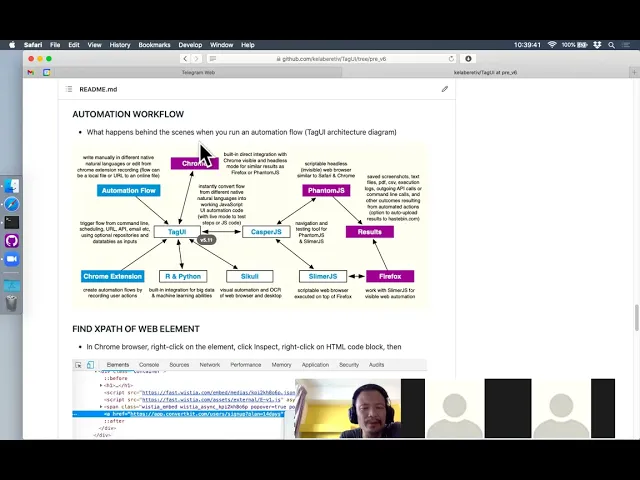
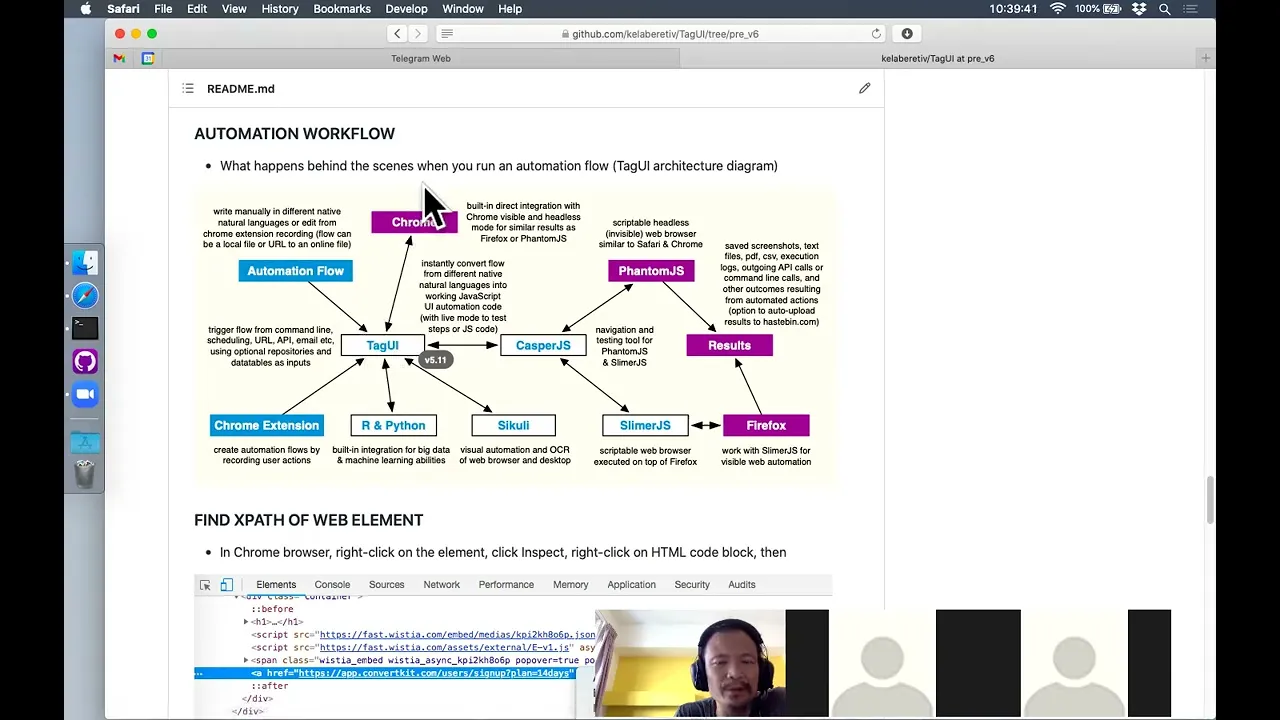
here i hear that so you look at the ui languages Right they actually source all sorts of code inside is javascript php shell python batch file and c-sharp so why how does this fit in okay so if you look at the terrain architecture this is from version 5.1 but the overall architecture is roughly still the same there isn't big architectural changes since version 5.11 that one was uh sometime back A couple of years back yeah it's 5.1 yeah okay anyway so at the core of that ui will be this tool called phantomjs is a hitler's
browser headless browser means a browser that doesn't have the web interface that you see it's just a command line tool that actually runs a web browser and 10 years ago almost days ago is it's amazing because there's nothing like it and it's very useful for people To do testing where they want to test web applications and whatever and whatever so phantomjs came into the picture but it's just a browser so it's still not that useful to do testing and automation so it comes a project called casper.js another open source project which makes it easy for
you to automate what you want to do because this excel is just a browser and browser means you have the browser Rendering engine you have the javascript engine you know you have the css html engine and so on to render the web page but it's just that it doesn't render to the screen you just render in the memory and uh but as a browser itself you can't do much with it you know you've got to write a lot of code to try to automate then you come uh casper gs where it's uh created by a
guy in france uh called nicolas yeah this one created By a guy originally from indonesia but he has a move to silicon valley for many years already so this guy was this was created by a guy in france so jasper.js helps to make automating the payless browser easy by creating various previous code to do that though so instead of writing 10 lines of javascript raw javascript code to automate uh going to a web page clicking on the button in casper.js you Can do it in one line for example so you make it very easy to
navigate the hitler's browser so these two projects are very popular in the prime in their primary of the days of their days they became less popular when chrome start to launch a headless mode i think it was a 2017 yeah that's where this project become more on the uh it's called like archive and maintainers Yeah so far it's been working but uh yeah who knows in the future there may be a certain version of windows or mac that doesn't work with this then probably the maintenance has to recompile a new version but so far for
the last few years uh it's right left this segment and i don't other than for one mac uh update right i haven't changed the binary for these two tools for the last few years yeah the mac update is very updated because uh There's some change in the open ssl but other than that that is quite stable these two components and it's important when you are building a an open source tool to use components that are relatively stable stable means like they don't have a lot of bugs they don't keep changing and improving i mean if
you're using a component that's keep improving right that means you haven't reached the stable state yet right you haven't reached the ideal Functionality it wants to be at yet so maybe that's not the right component to use you know unless you're trying to build something really cutting edge that you no choice have to use that otherwise using something that's a stable mature try and test it not changing too much is usually a better option to use as a component of what you want to build yeah so coming to the picture will be tech ui Where
uh instead of let's say 10 lines of casper gs code javascript also you know it will be one line of tag ui code let's say i say uh click locking button for example so that one like locking button will be converted to 10 lines of casper js code and converted to 10 lines of phantom js code so essentially that that one line of tech code becomes uh maybe 100 lines of Phantom gs javascript code and automate it to run and that was before chrome healers entered the picture but uh after chrome heller's entered the picture
i created the chrome automation engine to control chrome through the web socket back end so i wrote that from scratch uh because i don't want to use any intermediate library like uh whether It's a node.js library like selenium or other python library this is an important integration so i think it's important to own that integration by writing all the code needed to automate from scratch so we are not held uh hostage by any dependency whether there's a bug whether there's a need to iterate fast we can fully control the pace yeah so that was the
integration For chrome uh phantomjs is still available today so if you run with no browser today option you are actually running phantomjs it's just that you don't see the browser that's all you still can serve webpage and read data and value but chances are uh you are not going to get the expected result you want because phantomjs has quite a dated browser and the javascript Engine is not the latest so when you visit modern website uh chances are if you visit enough website you're gonna hit the new situation where a page is not rendering the
way you expected the xpath you're looking for is not available because it's rendering the page differently than it is if you are using chrome yeah so because of that i Strongly don't recommend users to run the no browser mode on the web automation you can still try it it's a memory efficient compared to running chrome but in terms of accuracy is definitely far from using a chrome browser because this is 2022r so when anyone launch a web app it will be primarily testing to work on chrome but nobody does testing on phantomjs Anymore relatively fewer
people are so because of that right whatever application that you use run a website the best source of truth for the accurate rendering and showing the result during the html dome is chrome yeah or at least chromium browser which comes in other flavors like brave browser like a microsoft edge as well so this is the chrome integration Then there's also a hidden path uh to go to firefox through the slider js but the catch is you need a version 59 for firefox which you can google and download version 59 for firefox and then the option
is still hidden within tech ui you say type ui something with a dash firefox it will automate on the firefox browser version 59. um Again not recommended because if you are using all browser chances are this has been 59 is a couple of years already chances are it might not work accurately with modern websites the latest website so usually i recommend just go straight for chrome um anyway this is for rpa automation so it's not really for Test automation you don't really need to test on all kinds of browsers on chrome or as should suffice
in microsoft internet explorer they are actually reaching end of life so they're actually encouraging different app developers to migrate to microsoft edge yeah and that will take some time but in the meantime microsoft has a compatibility mode to run the ie engine inside yeah patek ui cannot Automate the ie engine yeah it's a different uh automation architecture altogether from chromium so you cannot automate through the back end but you can still automate through the front end through computer vision and keyboard shortcuts and mouse automation but that's about it you can't get as good uh automation
control as you would with chrome yeah Then it comes into the picture to be the desktop app so you know um tell you it's gradually add new features so i think it's uh 2017 sometime in the mid 2017. i added the integration for schoolie so scrolling has been a critical component of that uh today because through this goli x engine it's actually an mit computer science uh Lab project that was a spin off and now maintained by a guy in germany so through this goliath engine you can do things like computer vision ocr desktop uh
automation and mouse automation so that's very important and it gives secure today ability to automate more broadly than just a web website yeah so this is a critical component but it is optional optional in the sense that If you are not automating a desktop app you don't actually need to use it or run it or install the open jdk that's required to run it so it's purely optional yeah then there's also direct integration to i'm python uh these are the two languages for machine learning today uh python is more popular now but r is still
being used by data scientists so in your tech ui workflow you can run Python code quite uh seamlessly yeah relatively seamlessly like there's still some overhead because you're trying to control two programming languages variables in the same file so there will still be overhead yeah but uh it's it's uh it's a pretty minimal yeah so there's also chrome extension uh it's quite dated already we haven't really updated conversation for a while Maybe down the road a good roadmap would be to create a better version of the inspector recorder that can do it without even having
a chrome extension yeah i think that's uh should be possible then you have the inputs that's coming in whether it's workflow file or you can point a url so for that ui you can just stack ui followed by a url to a Tag file you can you'll automatically download and run that file yeah uh provided there's internet access so that will be the architectural ui so uh any questions no no can i okay so next what i'll do is uh we go and trace the quota to understand what happens when we wrap up something so
let's do something very simple uh so let's do something say Just go to google home page for example so let's what happens when we do take her demo tech okay i'm using a mac but the same back-end process will also happen for windows so when you write one like just go to google home page you just load the browser go to google home page then it quits finish okay now there's no Artifacts remaining here because i didn't enable the logging so right now i will do the same thing but i uh create a logging file
at the source folder when that happens you'll see all the intermediate files for running the demo yeah this this also in the documentation under uh there's a section for Advanced topics yeah so now it's the same thing except that the remnant intermediate files will be there so there's a js file there's a log file there's a raw file and there's a text file which is a source file you have so why is that raw file it's there because say you call multiple tech ui subfloor right and what happens is tech ui will Create a new
version of the text file called raw file which contains all the code for the sub flows let's say you call mini subflow then the software is like 10 20 line in the end this one will be 15 plus 10 20 lines and then it called the translation of this human language file you see it's also one line here to javascript file you see the site is much Larger already because there's a lot of supporting functions and logic behind okay and then you have a log file which is the output of what was done just now
okay so let's look at the generator javascript file okay so there's a various configuration options real setup and inputs various default parameters various supporting functions And then you zoom up to the end you see the actual code that's uh generated from the www.google.com so when you get the www.google.com in your tech ui script that line get translated to this series of code so you go to a bank page uh then you go to set a default download location to The place where the flow file is then you set the instruction to go to that page
then you wait for one second then you get the title of the page and then you show it to say hey you're at that page already things like this are all built into tech ui why need to wait one second because if you stray away query on the page title right you will not get anything The page is still loading so you need to wait a bit of time to for the page to load then you can get the page title dot is already built in several other tech ui steps like you want to click
on something uh it will [Music] maybe the best way is to do something like that so google.com Type uh q as american talent for example okay so let's say we do something like that we wait for five seconds then we do a snapshot to okay let's say you do something like this so now um what i want to show is what's the effect of instead of one line we actually do Four instructions so what happens okay so let's trace through this uh scenario right so we we are back there so let me view the file
demo.js okay now you see here me try to move this down so you can compare okay so the left file here is the original One line where you do a google url this one you have the same thing but you notice that each line of uh your instruction gets compiled into a series of line or javascript code so in this case the the line called type queue right you will do things like you show or up on the screen uh then you will check whether the element has appeared you know you'll keep checking for up
to 10 seconds And until it appeared if you appeared within 10 seconds you was trying to send a key to this element and then said enter key as well because there was a code here to do i enter keystroke okay so do i enter key and after that you see there's a built-in error Handling within 10 seconds if you cannot find the element you throw error you say cannot find and then you take a snapshot of the air of the screen here in the same way if you try to do uh computer vision visual automation
a click on something if you cannot find right you take a snapshot but a not of the web browser but the whole desktop screen so all these are built in already so that's why You don't have to write all the here is like actually more than 10 likes of code because i combine multiple lines of code into one line so you can imagine here right all these actually your one line here gets compiled to maybe hundred lines of javascript code to send to the phantom js javascript engine i think it's based on es5 the javascript
engine it's a couple of versions Behind the latest javascript definition but it still works a lot yeah it's largely usable for the use cases uh our users have so you have things like you do a wait five seconds that will be compiled into this saw you sure wait first i guess and this way then you do a weight you know things like uh take a snapshot then you'll send an instruction to take a snapshot for Example then at the end some cleaning up and then you quit and show the result how much time you took
for the automation so this would be the example of floating maybe one question though as i run through with you thinking what's this t echo so the t echo is used when Here the primary reason why there's a t echo is because that ui can run in quiet mode so what i do is every time there's a need to print something to screen i call t echo instead of trying to print directly to the screen so in this t echo function you'll check whether you're in choir mode before you print to the screen so if
user is running in choir mode it will not print to screen so you'll be just silent it doesn't show Any output uh just now at the front yeah it will not show any single line of this it appears to be blank yeah and it's also useful with these designs because when you're running a workflow halfway uh let's say you have a part where you have a key in the user password or what so you might want to set coil mode Equals to true so that it doesn't frame all the sensitive info to the screen and
after the user and the password completes right you just set to force again then you'll show the output to screen again this is also covered in the documentation i think mode yeah here also you can use this in your flow to set it to on and off as required rather Than just run quiet entirely yeah so it's very flexible okay so now we let's go back to the behind the scenes what happens okay okay so when i type the tag ui command on the linux and mac you will trigger this type ui file this one
okay This is for linux mac from windows will trigger the tech ui command file so what you're seeing here is when you have an automation workflow you type attack a command you the entry point will be here this would be the entry point okay okay so same for windows entry point is here uh Yeah this this is quite the standalone for cli too you have to design such that if user never give any input you will show some help in for like the version number like how to use it you know the sum of the
options so these are standard so that's the first part of the logic so um i will let me see um the logic for the windows and the mac is The same except that on the mac is a linux one is the written in bash scripting language and for the windows one it's written in windows batch scripting language yeah so i think maybe for the sake of the primary use case most of our user windows so i just run through how the windows one work yeah so It does certain things like chat weather is online url
and there's other syntax to check whether there's a url given and if it is it will go and download the file and then after downloading a copy of the file you'll set that the file name as the first parameter to automate that file then you check things like whether it's uh go into live mode you know that you went live if it is right you create a Dummy file call live.tech and then run that file yeah then uh these are all happening in sequence this is still like a a programming language where you define functions
then you call each other no it's all running linearly sequence so if you trace through the code it's quite easy to understand how it's being executed Yeah but the part that's hard would be to understand the syntax for windows batch file and linux bash scripting that one need to google yeah if you need to troubleshoot something into google yeah i also learned this from scratch as i start to build it uh i can show you there you see um What i mean by i learned along the way okay so let's say i look at the
mac version so it's like 471 likes right let's look at the very initial release of tech ui okay alpha release how do i okay see the version okay so there's a very initial version of ui it's like december 2016. so you look at the structure the basic structure that Defines the initial release it's still here you know you have entry point but i developed it on magla at the start it was only uh sometime in march 2017 there at the windows version so it's only six likes you know so this six night is is the
core of uh what that ui does already uh this is just a start i call the degree pass to Convert a human language to javascript code then run run casper js on the generated javascript file that's all yeah but this six line right has now grown to 400 almost 500 likes because along the way you add more and more features and more and more edge cases more and more options so things will become more like a data table object repository all these things yeah so but this is the first Version and then the ui header
you know you have the header file is just a pretty short file that defined the header file and then the footer there will be a header and footer because the beginning part of the generated javascript code and the end part should be the same the only the middle part which is the instruction step that would Be the one that's different also for convenience you have a header you have a footer which users can customize you can customize to do things differently then you have a tire pass file where you convert the human language syntax into
javascript cola so that's the first version first working version yeah okay then um so over here This is a newly added the seven months ago eight months ago where there's a update option okay go ahead go and download the from github repo and overwrite yeah so basically check whether there's a zip file various checks like essentially and one is uh check already you want to compare the version to check whether uh the version that you have is uh the same as the latest version in the Github yeah so all these are batch file scripting syntax
which i think is an overkill if i ask you guys to learn now but based on here you can google and you can find what this all these means are but basically batch files we think is very hard much harder than normal programming languages because for example right you want to do simple thing like uh you want to check Uh for some parameter and string within the file right you gotta do some crazy stuff like a for loop syntax just to read that value out and get it into a variable yeah it's this uh it's
not the intuitive line in my view why you need a for loop just to do something so simple but uh it is what it is there's a lot of legacy constraints going on so um Usually it's like that you know when you have a workaround that work around will end up becoming the primary way of using something and there's also little incentive to improve the language to do more because uh it works already the tendency is not to add more to uh complicate things like so that's why legacy reason i think that's why till today
is still the syntax to just do something like trading basically this is just trying to read The uh the version number uh of the the tech ui file which is it's trying to read the command file here and as well as the command file downloaded from github yeah so after comparing the version you'll say are you leaving the latest if you're latest then you do take your update of course you don't want to do anything Right you're using your latest and it's pretty fast you see after i type quickly download and get a result it's
not like it take many years to sync yeah and even the downloading is very fast uh fortunately the overall file size for this repo is about 12 mag yeah so the largest uh files would without the microsoft office source files and the documentation source files The domain also includes some mp4 that's why it brought up the size yeah so um but it's so hard for me to put all this separate as a separate repola yeah but an idea would be let's say thank you become a separate project you know as a pranky hub organization then
it may make sense to Store the documents as a separate repo if you do that then you actually decouple all these maybe 10 eight to ten megabyte away and then when user do a tag ui update you just do a pool of a two mag file it's a much faster for example and then maybe uh the microsoft office uh stuff can be stored as a separate reporter now it doesn't make sense because this is a Singapore github organization it doesn't make sense for three four tech ui people to flood the the air singapore uh organization
report it's just uh it will just clutter the main organization but if tigger assists his own organization yes then it makes sense to consider breaking up the documents away breaking up the Office of plugins as a separate uh project so that it doesn't block up the web user do a tegra update yeah but anyway this is uh i would say it's a it's a low return on investment because it depends on context right now it's 2022 so for a user to [Music] download to the user's life you know Like instead of taking five seconds to
download or 10 seconds you end up taking one two seconds so the additional 10 seconds is not a lot you know of pain yeah but uh anyway it's just an idea to decouple but uh the gain from the actual user benefit is not a lot yeah anyway okay let's go back here so after you do that ui update Uh all these commands like chrome right is also packaged together with that ui the windows version for linux and mac it comes with it so there's no need to package so if you look at the tech ui
uh zip up the download under the source folder there's a unx folder that's all the linux based commands the windows version of those linux based Commands yeah so i store a copy of that so that it's easy to do some of the things that's done on the bash file on the mac [Music] you ask me i think linux and best scripting is uh much more powerful than windows pack scripting and i think a lot of people agree with that but uh Microsoft introduced powershell which is taking that tile scripting to another higher level notch still
i think a lot of people would think that the powershell is more powerful than linux scripting and i i agree with them too yeah so uh anyway so this one is the downloading and and do All the stuff other downloading you told extract out so sometimes uh everyone says wow i think i encountered this once or twice the user say hey got a error say comment file and that's because there are virtual windows somehow the tile is not in but otherwise by right from windows 7 onwards i think tie is a standard command in uh
windows Okay so after you download the zip i strike it long then you see here is like actually quite a number of lines of code extract already then you replace it they remove the the zip file blah blah blah yeah then things like self-centered check whether the flow file as these you know if not blah blah blah Then check the parameters there's a baseline option where if you run that ui with the baseline option it will store a copy of the run result to a baseline folder yeah i think it's no longer a public option
yeah yeah i like to trim away options ruthlessly because it reduces the cognitive load for the user Yeah so options like this is good for testing but the in most rpa use case may not be so useful so i trim it away again baseline option so when you run that ui uh with base light option for example i run the chrome example it will run the same thing but you create a folder called baseline and store the run result right there that means the whatever the output is it Yeah and the reason for that is
you you do a it's like you try to do a snapshot in time at present so that in the future you can compare back the two-run result yeah but if you today you use a report option you get a similar effect also you also start a copy of the log yeah so this was before the report option was uh actually introduced the baseline option will keep overwriting Okay the baseline will keep overwriting rather but report one report will keep each run for of the same file you will store as a separate file with a running
counter yeah so i think report option is more powerful and more robust than baseline option but that's why i decided to retire so and then you'll be thinking why not remove it the reason is because uh we can't just simply remove something That's added because you don't know how many users actually use this option right imagine their horror where they take your update suddenly they're created up here for suddenly don't work you know i think it's a nightmare i think it's important to respect the uh the time that your assisting users put in to build
something using your tool and The assets and resources they create and not screw them up by suddenly giving them a surprise to break their code with a new release i think that's very bad and not the right etiquette for software releases yeah so i i will not remove this uh uh because of that lah and there will be costs yes there because there may be maybe 30 more lines of this code that's Redundant but these 30 lines of code to a modern cpu right has negligible overheads in terms of storage is like maybe 300 more
bytes in terms of a memory and execution it has maybe 0.1 it will take one more millisecond to pass through this series of code so it has negligible overhead but if we remove it it might impact somebody's work and uh deliverable yeah Certainly so because of that the trade-off would be better not to remove but we still don't want to confuse user and encourage them to use an obsolete option that's like documentation in the redmi i don't have this anymore you type here comma also don't have this anymore yeah then yeah then you use the
baseline option you'll create a folder hop baseline to store everything like basically Then here you have some blocks of code to determine where casper.js is installed where phantomjs is installed so you will first check whether you install them through node.js it has an npm package for installing tech ui in the past but they're also deprecated we are not maintaining it anymore there's a oh there's a one let's say for windows And mac the dependency are actually packaged together with that guy's zip file the casper js so he's trying to check whether it's there and so
on yeah so uh let's see then there's also for mainly not useful would check let's start whether there's a symbolic link that means user install manually on their own yeah but this is not something applicable to windows so this block is not here okay Uh primarily what most users will experience would be this pathway yeah sorry this one they'll find a match on the package dependency on windows and mac and then they'll run yeah okay and here check for various options like deploy option if it's a deploy option setting to true so that you do
something special at the end you do something like uh it's very uh Mundane work because you got to run through option one to ten using this repetitive code yeah yeah but uh it's the syntax law for the batch file if the deploy option you do something like runtek ui just to generate the script and then you quit instead of running it then check whether it's a chrome option so uh starting with version six the default is Chrome previously user need to type chrome to start uh chrome engine yeah and without chrome option you will run
the phantomjs browser and why we switch to version 6 uh to be chrome is because there seems to be a default option by people already and but that's going to break barrel compatibility right that's why we jump a version from five to six usually When the there's a new release that is likely to break uh user's accessing script and bail compatibility you have to jump a major version yeah that's a that's a so-called the general uh principle yeah you write software and you gotta introduce some changes that you know for sure it's gonna break some
user's code Right it's better to market it release it as a new major release and you include it in the notes it's gonna these are the things will change yeah if you are using it now you you will have to uh uh you know if let's say a user was previously running with condom js mode without option right then here they actually need to run with no browser to get the same effect otherwise you'll Launch chrome and do something right so these are things that uh diff will be different that's why version 6 introduced but
since version 6 was introduced uh it was a couple of years back there hasn't been a need for a backward compatibility breaking change that's why now we're still at version 6 108. you know each time there's a small change i increment that the intermediate version the minor version In the future that might be to make a change that is a breaking user code then we jump to version 7 but until now don't have so there's no need to learn of course this is in terms of software engineering practice la if you're talking about marketing right
it's a different story you know some people for marketing maybe you want to bump to version seven version because it shows that there's a lot that's being done a Lot of changes happen this is that's for marketing but for in terms of compatibility perspective right version 108 is says compatible in version 6.0 yeah so uh yeah like uh for the samsung you got s10 right there for marketing reason they jump to s20. so iphone become iphone 11 right so so What wanna overtake that okay hey let's go in jump straight to s20 that's purely marketing
right it's nothing i mean how can you jump from 10 to 20 noma is just for marketing reason yeah then you check for things like whether the chrome browser slack you check for things like whether there's a for each option right there's a full option there's a shortcut Of the option which is one letter for convenience so you check both days and then and right now i haven't even halfway through the this entry point you know we haven't even talked about passing the human language part yet so it's a lot of work behind the scenes
it's just that uh it's transparent to users but it's necessary all these happen to achieve this outcome line that we want so we check whether it's microsoft edge Check whether it's headless option healers means you run chrome uh in the invisible mode you don't see chrome running you'll see a webpage i think you gave users too many options that they should you should like say there's nine arguments then if they don't want to use then they should like type something dummy but then you can just stick to like the first okay It goes down the
line but if you don't want to use it then you can just type something else like i don't know that one might be easier to control how users use it yeah but but that is not the standard practice for cli to ci tools usually uh the order of the parameters right can be intermixed one usually and If you are not using a parameter right the standard norm is to not it's okay not to include rather than having a dummy placeholder so that's true all right so because of that i try to okay the good thing
about following existing norm is that let's say you're a totally new user to get to know to use your tool there's always a gap in terms of the new knowledge you need to acquire so by Designing your app to something that users are likely to be more familiar with right you reduce that knowledge gap so the user can get productive very quickly without investing a lot of time to close that gap so for example let's say yeah we introduced a way where the parameter are always in a strict uh order and people don't want to
use the option they use a dummy you know in that case right the knowledge gap will be higher because User got to learn something new uh of course this doesn't apply if it's a totally new user i know nothing so for me to learn this way or that way it's no different but to the existing uh pool of users who are familiar with ci tools right then there'll be a reduction in gap if we do it using the the established normal Okay not not to say that as the rich storm is right a lot of
time establishment is not not ideal not efficient but because of legacy reasons is there so yeah i'm sure in our chinese traditions and various customs right there are things that doesn't make sense anymore but we Still do it because it's a it's a legacy it's tradition you know so for us to change it uh there's a cost to it yeah there's a there's a push back also to it sometimes okay it's just that some things are there because of the way things evolve organically in the past and and a lot of it's a lot of
time doesn't make sense but The the cost to change it and handle the pushback may be too much for people to try to change those norms yeah imagine all the documentation that has been in place for all these standards right this other way we do something totally new uh it will be hard harder to proliferate yeah um okay there's also a test option the test option and the debug option Okay so when uh okay just now it was a firefox option so the debug option what happens is uh this is also not published basically it
published uh details of the phantom gs log which is pretty useless because now the primary usage is automating chrome so the lock from phantom gsng is not meaningful anymore so as i remove but i still keep it there in case for better compatibility Then you have a test option where you run a tech ui workflow for test automation let me show you you may not have come across this before so i go to the chrome example there run the test option so everything is the same except the output is designed for testing after you run
you you know why okay the same same automation is running blah blah blah Okay and the only difference is the output is designed for test also make sure you have some syntax highlighting and coloring for different parts and then you have an output log file [Music] that you can fit into test automation reporting frameworks yeah you show how long the test suite run how much time taken how many parts how many fail yeah So this was the option added early on in 2017 but i remove it from the default options and the documentation because i
decided to focus more on the rpa use case rather than test automation use case there are so many established open source library for test automation that there's no point to compete with those tools yeah and i give you an example let's say robot framework robot framework is for test automation and robocop builds On robot framework so can you see that although both are trying to automate the front end of application the test automation user needs and the rpa user needs are quite different so if you try to take robocop to adapt it to use for
rpa it's gonna be quite tricky because it's hard for robocop to evolve to serve rpa users needs Yeah because if you do so right it usually and likely will come at the expense of its primary user base which is a test automation users but if you don't evolve to meet the needs of rpa users then you also have a problem if you claim that you're you're a framework for test automation robocop but you actually rpa user is second class citizen right over time you will show up In the usability and that's bad luck so right
from the get-go i i know that this uh i believe is an issue that robocop team will face all they are using a framework which in this course is designed for test automation and what they are doing is to develop a lot of modules for rpa exists outside of robocop So that's a good strategy and then i hope that works because uh to have more options in the market is definitely something good for the users in the rpa space okay so yeah rpa framework this one so uh they built a rpa framework uh based on
robot framework rpa framework yeah so they build their Own different libraries so for rpa the core is robot free modula now robocop they are the most well-funded rpa startup for open source i think 26 million usd so far so in terms of the team size and the pocket size they are the largest open boss raise about 5 million the other players like open up here i don't think ellen has raised any money ellen from denmark of course that guy we Are not going by the vc route okay so choir mode choir mode report yeah so
if you run report option you'll generate a reporting file okay scroll down scroll down speed mode you run with speed mode then you modify the certain code in the code base to run it faster sorry turbo spinball deprecator already Speedboard last time is uh between iterations you will do a three second wait uh yeah if your speedboat it doesn't wait for the three seconds [Music] right now the default for data table iteration is it will always wait three seconds by default um sometimes there's a mechanism like this that's designed in and built into the Tool
because we made decisions for the users if we we know a domain well enough and the reason is let's say you have a data table of 100 red course you want to automate data scripting from linkedin it don't don't add in the delay of three seconds between each iteration right you very quickly or exceed the rate limit of a website and then you get the user into trouble for using your tool so Uh so in a sense we are trying to protect the user for their own good luck but of course they can choose to
override by changing the how the code works that's okay yeah okay so after sorting out all the options you initialize some of the files these are important because what i did is to use all these files for the respective integration to detect Whether uh workflow requires all this integration so basically delete all these files first for r python schooling integration and then as you pass through the ui code if there's a need for those integration right you create a dummy file for this yeah and then later part of this uh batch script if you detect
those files exist it means that you need to launch those backend processes because here i already deleted my so if The as this later part of this file right it means i need the to launch those integrations okay and check for whether a user provides a data table [Music] and the data table structure is actually not the way that ui natively handles it in memory so a data table Looks like this so maybe a serial number named country okay so we have one one two three let's say you have three records uh ellen denmark betty
um the Belarus candy canada okay so let's say you have a data table like that right for tech you are in the memory right the structure is actually not stored like that this structure is not good for making the inferencing of the value the structure is actually a transposed version of that let me show you what i mean so it's actually something like this okay so The actual structural data type is like this so before that you are even run right you try to i write the code to do the transposition to convert this structure
into this structure and once you are in this structure right it's very easy to match the keyword let's say a user use uh echo name for example echo name you know as part of their workflow so in This structure it's so much easier to match this name to or alan betty or candy depending on which iteration you are versus in this structure you want to match this to here is actually very hard yeah so that's the reason there's a need to do the transpose yeah and also for objects is for data table and for object
repository right actually You realize that the structure for object operator is also like that you have a value you have some some you have a definition you have a key then you have a value you have a key you have value the structure of the uh objective also like that it's just that object repository is only uh only Two columns are the key and the value whereas data variable has more column for different iteration yeah so the structure like this uh makes it easy to deal with the data table and also reduce a redundancy in
the code compared to object repository versus where you write another set of code to process the data table in this structure Yeah so easier to transpose it and use the existing code from object repository to do this so that's done here then here is checking for data table and when you check data table there are certain lines to check and count how many lines there is in the table so that you will do a big for loop through the data table yeah you see here the big for loop so imagine you have hundred lines of
Tech ui in the data table that your records what you do is do a big follow up to pass the ui source code 100 times and run it based on the 100 set of data sorry the 100 rows of data which means let's say you have 100 runs right any of the run fail it means the other runs are not affected correct right because it exists independently yeah so you do all the processing and you call the Phantom js sorry casper executable to run so whether the earlier run fail or not doesn't matter it will
not be affected you only be affected is user control break to queue this whole uh you know all this automation otherwise it will not be affected and i chose that model because uh if you have a long running record let's say for 10 hours If you don't run this record as a fresh instance right you might grind the problem with your memory issues and garbage in the memory so it's less reliable but it's better to run slower and more reliable so that's why i queue everything and run again so [Music] this one is an api
step so If a workflow has an api step in inside right you'll run back ui with phantom js with security fossa this is to make cross domain function course what they mean is let's say you go to website a and you go to an api call to another endpoint right but i write there's block one by default by phantom gs javascript engine because it makes sense like you go to google automate something google suddenly you Do an api call to uh let's say amazon web service so that might be a security breach so if by
default it's not enabled but uh if you're using api called it doesn't need to enable that yeah uh there are integration process python integration process schooling integration process yeah so this one we can cover the detail ingredient we cover in the next section but uh basically for each Integration right i have to write the corresponding engine node in their own language to so copy the receiver so tech ui will send instructions sentences send then the receiver will receive the instruction and act and then return the response back to type ui with the result and then
you keep repeating repeating until the automation completes you know and when Tech guys send right you set the instruction with a unique running number you know instruction one instruction two instruction three introduction four and then the receiver from preset python or schooling you will check the instruction one okay let's look out for instruction two difficult resolution three then return back so there's a consistent uh chronological order which instructions Is taken executed and responded back so you will make sure that everything happens synchronously like the sequence which is important for rpa rpa let's say you have
a few steps go to a web page log in sorry go to the web page key in your username password and login by doing the steps in the wrong order right you will not work because the ui is not designed to handle You you don't click the login button before you type in the name you don't go and uh type in the name before you go to a web page it's nothing to type you know so it has to broadly speaking happen in the sequence for rpa that's for web automation yes for desktop automation the
sequence is still relatively important let's say you open a cim app right you want to search for customer record then you load and Then so it doesn't make sense to type into a customer record before it's even loaded it has nothing to type into also yeah so usually rpa processes is is linear linear in the sense is in sequential order in between there may be condition that branches off and back but largely speaking is in the sequence if you don't run rp processors asynchronously in parallel right all the time barrel it Just can't happen that
way yeah you know human because largely uh is designed for humans uh we make humans actually uh we you're a web page we use a desktop app we do all the steps in sequence but we don't randomly jump over the different steps yeah largely speaking but that situation where doing certain steps first or seven steps later it has no difference okay yeah for example your Automation to say uh i want to click the the first five check box on the page in the last five check box on the page so those are maybe uh 10
instruction so whether you do the first five instruction first or the last five introduction first it's still the same because you are not hitting the submit button before that right so in this case yes the order doesn't matter for that part because whichever we do Is flexible yeah but in other case the order you should do is quite uh important like you submit a claim obviously you can't click submit before paying in the dollar amount of the trademark or the key not the you know facebook claim whatever they please submit so in that case the
submit button right has to be always after all the steps to fill out the form yeah but for filling up the form let's Say there are 10 fields right the order which is being filled up it doesn't matter that much okay so then this part is for starting the chrome process uh don't don't be um don't be traumatized look at the code here Because what's important is to know where to find what yeah so now i'm running through the sequences thinking around what happens you know it's so that you get an understanding of when you
type a command what happened the back end but all this command if you never write batch files before linux basically before you won't know this but it's okay you just need to know where to find what and i add a lot of comments You see i very liberal with comments on yeah oh i tend to over comment like that another under comment yeah because you add an additional comment that's not little people can just ignore but uh if you never comment right even with myself i come back to look at these five years later i
won't even know what this part is trying to do right i mean i write it Five years ago um last time i used to drink and sometimes i have a few cans of beer there i could go through the night right so i don't even remember what i do right so with the comment you'll help me to remember yeah sometimes i actually can be quite productive after i go to uh some clubbing you know have some drinks and come back i kind of sleep there code through a new Section of code yeah of course next
day i'll tesla but i i sometimes wrote those code not in the perfectly uh conscious state so this part of cloud try to [Music] check whether you're running edge if you are running edge you try to do some setting to change the command to bind microsoft edge that's all do some error checking whether the Command can be found if not you give error message this part is important to emphasize when you design software it's important to create error messages that are actionable by users themselves because you do that right you cut down the support requests
that's coming in which users can troubleshoot and find solutions themselves and when you do that you reserve more time left for actually Improving the tool versus doing something which users can solve themselves quickly yeah so here i say it cannot find your browser at this location you know so say your browser is at a non-standard location please raise an issue here so in this case our user know where to solve the problem they'll raise the issue here then they'll tell us The error and they'll tell us uh where is the local the user will tell
us where's the location then we'll just add in the new location by right there's only these two locations from what we know the standard practice of default installation either at the program file or the local app data folder so it's suddenly or this one x68 so if there's literally a fourth location that Appear then we just added the code here a lot that's all yeah but so far nobody has raised it like this is for future proving that's all the whole chunk of code you remove right like 99 percent of users should have no problem
one yeah but this is future proof like one year down the road maybe chrome decide to install somewhere sorry maybe edge decide to be installed somewhere then this one will break and then they'll get this error then they'll Tell us that we just add one more block of code here then that will fix it yeah and the order which we uh checked this would be important yeah uh because you want to prioritize on the one that we think is the most commonly used one so that when it's fouled we don't check the rest already yeah
so this order will be the also important uh So with edge you know you go and queue all the processors that sounds like edge if this chrome you go and kill all the processors first and after killing them you start the chrome process with a tag ui custom user profile then over here It keeps waiting until the chrome processor has launched and ready to accept instructions for tech ui so sometimes you hear user uh once in a while your user race issue hey i run your command it just hangs there then this is usually a
place to look at because this is the part ui code during initialization where it can hang this is the infinite loop as you can see Means that it will not exit this loop you see i scan you see this is like checking whether the websocket connection for code is ready if it's not ready i go to scan web socket again so here if chrome somehow is blocked from receiving instruction for tech ui it will hang here forever okay yeah he will not progress you just hang here and peop user will either restart their computer Control
break control c or whatever then they'll tell you the problem so this is a part that uh can be a problem and why we never decide with a timer or what is because this is the most fundamental thing that you supposed to have law you know you you don't have chrome uh if you have chrome which uh in the earlier part really did the validation if you're a chrome and you cannot connect to chrome something is Wrong and most likely is the user id policy that is blocking chrome from being automated uh so you can
tell user to let's say double check the id policy you know whether something is blocking i invite them to the zoom call to dig further but most likely it's due to the it policy don't allow uh their chrome to be automated they don't allow the chrome to have an active web socket connection that that ui can connect to So your hand here error message that comes out like this when this happens there's no error message it just hangs there it's just but there should be other reasons from what i understand this is the only main
reason because the other part of the code doesn't have a infinite follow infinite loop for other errors right you either throw error break halfway go back to command Prompt or whatever else but this is a part that is silently fail yeah i don't think even say message like automation start i i don't think so i yeah so you just silently fail and just hangs there yeah so but this is a rarely happened so that's why we also don't i mean we try to design something here right you'll affect the 99.9 percent of the user that
doesn't have the problem So also not the good idea to do something here yeah so it will never end yeah so after it is available and connected great there we go and connect uh we're going to start the uh chrome browser engine to connect to that websocket connection okay and this part also going to write the code to do that that means having an engine Uh for receiving commands from tec ui yeah and now going back to what i covered earlier the languages and that's precisely the reason why there are so many languages because you
need a php to do the passing from human language to javascript you need a javascript code to actually run those functions in phantomjs js engine then you need uh the batch file to run the what i showed You law all these are batch file the windows batch file then you need the best shell file to run for mac and linux then you need the c-sharp because of roofs microsoft office plugins then you need a python code to run the python integration and the schooly x integration yeah i think uh there's also our cola but i
think it's so small it's not even listed here So so after launching chrome this is the actual command here that starts the execution of the rpa so just now we saw the generated uh okay this one only already the so we saw this generator javascript file so this is the actual command that called casper.js which is running phantomjs at the back end to Run this whole file and then t is a command that capture whatever is shown to the screen and output it to a log file that's all so we want to capture the lock
that's how you use the t command and this is checking for test mode because the parameter to launch the test mode is slightly different yeah but uh it's not a publish Option now it's a hidden option so for legacy reason that's why this part is still here okay then so now it tries to uh okay after running right it sends the finished signal to the integration so when you have to finish signal the different integration will detect and then kill themselves and exit themselves Yeah then other things like uh m process there's an m process
command to try to cure accessing process so you're running batch automation you'll detect for this signal file to uh quit the automation the batch automation otherwise right you have a let's say 100 record and you try to run and process you'll kill your 10th record but then you'll continue from 11 record words so the tiger process is still Running but by having this signal file from the end processors command creator for tech ui you you force it to end yeah then do some housekeeping like cleaning up any date uh chrome processors so not not anything
it's intentionally killing the chrome process yeah because there is a command you can send to chrome for tech ui to queue itself So that is the way to do that so the way to do is actually get the process id from a windows command and once you get the process id you queue it by force yeah and some other housekeeping like you convert the log file to windows readable file by default the log file is a linux and mac version which means if you open notepad everything is in one line in In mac and linux
the backslash n is a thing for a new line but middle is backslash r black slash n so when you open the door space file so right you open the linux in the mac base file windows right everything is in one line because there isn't the backslash r so this part here converts all the log file and the generated Files to have the backslash r yeah and how to do how do i even get that i do it through google if i watch the syntax to do it and i test it like to make sure
it works then edit either yeah yeah all these are for googling and check whether there's report option to do what's needed you know and do some cleaning up of the unnecessary log file if uh year logging Doesn't exist so by default it will delete all the intermediate log files then here clean up the because you are killing chrome for slowly right there's a need to clean up some of the chrome settings so that it will not show the eight the chrome has accidentally been killed but you know the next time it runs so in order
to overwrite that there's a need to hack Some of the chrome uh configuration so that the chrome will think that it exited cleanly and not accidentally got killed yeah but the reality we are actually killing it yeah so you know change back to the initial directory uh some more cleaning up yeah so initial directory is so let's say Just now i run tec ui from my desktop folder what it does is at the start you keep a record once it's the original folder but you'll change directory to the tag ui source folder to run everything
because all the files that's here runs here so for ease of art limiting complication due to the file missing file path issues file name with spaces file public spaces i changed to that the ui source directory before Running everything but after running everything we go back to the initial directory so user won't be confusing how come i i run the ui command here at desktop folder after running suddenly i have somebody folder it's not a standard practice like it's better to return back to the initial user folder that's why that is cleaning up here going
on okay So what we cover is the overall picture on on this so when you call command you know you pass it to do all this but what we haven't covered is the specifics of the integration and the passing itself and the the functions within the the javascript uh code that we sent to phantom.js and Kasper js so what we haven't covered is that portion there so this uh would be a good overview of what happens so what we'll cover next later at 1 30 we'll go through this part here okay so you see here
so just now we cover here this command runs the javascript file right but before running the javascript file you have to create right so where's the part that create you'll be here Take ui pass so we'll be here you actually you know in the big for loop you call the tagger pass command to pass the human language file into a javascript file then after that's done do all the other prep work then call the casper us command to run it yeah so now uh i will give a quick run through for the mac version so
that you guys is uh just a well but yeah essentially the code is like exactly the Same even the command i also keep it to be exactly the same yeah okay so on the mac version everything is the same as that is uh syntax is just for macros or for linux scripting the order of the things uh the things are being done the checking of options everything is the same yeah so it's the same order as a windows one i'm primarily a mac user so whenever i Add new codename option i always create on the
mac first then i migrate the code to windows batch file yeah so all these are the same is and you don't have to understand this or memorize this when the time comes to you can just google uh the syntax for bash scripting bash as in a b b s h so when you search how to do a if in batch scripting for example how to do if in bash script then you get answer Okay yeah i like that then you see oh if statement you can have various various options and how you can structure it
yeah and then you see all these different things you will come out already yeah no slash f means you check whether the file is z-saw yeah and when you put a exclamation mark in front you check whether the file Don't exist or not they'll do something then there's a need to do a dance statement uh then there's a need to do an and if in windows 1 don't need for that so you put on different line you'll be something like that you don't need a quotation mark the semi code right is needed semicolon is needed
if you want to combine multiple lines into one line So if you don't you'll be something like that yeah i'll like that that's fine here so i combined so that uh it's easier to see on the small screen and don't need to keep scoring left and right yeah so it's the same order And the difference will be like on windows and mac of course and linux the place you look for chrome of course the place will be different so the path are mapped accordingly for mac and linux versus uh yeah you see bank is like
that it's always standard one is this this one see so ios yeah chrome is there one it's just a standard practice is there but i do also Have error checking in case it's not there you show error message please report uh to tell us i think i say your chrome is installed at a non-standard location on mac can you raise the issue to tell us more for example here like that huh so we can so-called a close a feedback loop very quickly from an error very quickly when A user has error i don't know how
to solve it with a actionable error message if not they know where to raise the issue so they tell us quickly so we quickly can fix it and release the update yeah so we if we try to keep this iteration look tight and uh short and fast right then even if we are on the behind our competitor very fast we can overtake them because we iterate at much faster pace than them so that's a very Important so same thing there's an infinite loop here yeah while true while true means you'll never exit the loop so
you only see where you break when you found that oh there's a websocket uh being opened up by chrome so it's time to break and then connect to chrome okay yeah so this is part again where you can hang la but so so far i haven't seen users Reporting that for all mac and linux yeah usually it's a some enterprise windows user the policy block then it will happen there uh yeah the rest are same then there's some standard style like you return error code if there's error like uh you have error during passing your
error during running there you just return the error code one otherwise with the error code zero This is irrelevant for most users because they are likely to do further automation and chaining different type ui execution but for more advanced users if they try to change different things together right this error code is important so uh the bigger automation engine will know whether something has run successfully or not [Music] yeah okay yeah so i think we covered the good decent amount uh before we break for lunch uh any questions on what i covered this morning okay
the other time a dark one there was when i think there was some excel thing then we found out that there was a difference in Uh the way excel values are shown and received or something yeah then then this and i first the only time i doubt and i also just see it and i just google and fix the thing then okay yeah so i think that time you're digging that ui pass yeah yeah okay yeah i think around never price yeah i hate it yeah so Uh yeah so so far we haven't covered that
you have passed it those would be the the bulk of the logic yeah yeah this part is the part that's the entry point which is important because if you are going to do any tracing right you this here will be one of the first thing you want to check to see whether the error happens on the option level or the passing level Let's say from the error message you know for sure it's something to do with the passing then you straight away go check that pass but it's something to do with the options being interpreted
wrongly so and so on then you have to check here yeah most of the time issues don't happen here this is just the entry point the things that are checked here are pretty standard So it's unlikely to have problems uh before the problem usually happen on the passing side yeah i can't really use my beam too yeah yeah i developed my brain oh actually for you i i the initial copy i did right was on Veeam but on under my web server so it's actually more colorful wow okay so oh maybe the background is wiring
that's fine i don't know okay so for that ui right when i created it i always make any change on the my web server but it's only the last couple of years i i don't know what changed there i think I think i got quite comfortable with the code base that um all this all this coloring are not important to me anymore it's like whether got this color or not um i think it's negligible when i change things but initially when i start learning javascript php Whatever right all these are useful you can help me
catch typo very easily my other color coding let's say you have a bracket that's not closed properly right i think they'll have some height think you see uh you close probably you show whether you have a extra bracket or not yeah all these are useful but now not so useful for me so the overhead of typing the old command to go to the web server versus editing locally right it's A lesser that you know the way it's not worth it and if i and my github connection is from my desktop also so if i need
to commit code right if i do it on web server later on and you copied locally to commit to the github or soma yeah i didn't set up to commit from my web server yeah but you can set up that way also by i did yeah and later on Yeah it's just not much gain for me to do there but usually yes it's developed on theme uh on my web server then later on it's the it's also developed on vms the last few years on my macbook yeah and vim is a slightly higher learning curve
than vs code but if you master it it can be very productive because you don't have to Keep moving your right hand to touch the mouse to move to different place your two hands are on the keyboard all the time you know for your right hand to move to the mouse and back right like hundreds of times or thousands of time in the cost of a week is actually overheats yeah so if you don't do do that you can save a lot of time and write more cola in less time Even my vs code right
i installed the vim extension so my vs code the navigation is actually navigation acr so if i choose a new file okay so it's a new file [Music] right so uh all these are veeam on let's say i have uh many lines right i had the first line Right i can straight away jump to the last line you know with a shortcut you know i can still jump to the fifth uh 12th line with a shortcut you see so all this can be do in veeam then let's say i have a long line of code
right some super long line i can straight away jump to the end of the line uh Your shortcut enjoy the beginning of the line with a shortcut without moving the mouse at all without putting my hands to the mouse to click and then type that's a lot over here with vim you don't you skip all this overhead you can jump uh to the next word very easily with your shortcut go to the previous word uh very easily with your shortcut yeah what is what have you memorized Yeah but then after you use it for a
while right you actually don't need to memorize it become part of your muscle memory like you learn to swim you learn to cycle right after you get familiar you actually try to rehearse a step how to cycle how to swim it becomes part of your muscle memory but the initial overhead is there but anyway i learned to use vimeo because i gung-ho or what but Many years ago in my job i was a technical consultant i go to customer sites to install and set up their erp on linux and sun solaris so on those os
right you don't have a gui on you the only editor you have is vim so i'm forced to learn bim to do my job right so yes so fast forward from there since i know it right yeah i might as well Continue to use it i find quite productive yeah and i was paid to learn how to use vp there's no other editor i don't ever there's not actually a notepad about what or what on the linux server the only thing you have is the terminal so that's the rationale why it developed yeah yeah so
okay uh how about kelly do you Have any questions for this uh morning one no no okay all right then i'll see you guys at 1 30. yeah before we can do a good almost two hours then we uh see how far we can do then we go for the subsequent ones in the subsequent weeks all right okay see you guys later i'll Stop recording now uh at the end of the session right uh i don't have an official youtube account to post so i just post to my uh google okay but i was thinking
to post to my my own youtube blog there you can maybe uh link from documentation like for people who want to maintain their own off that ui yeah but in the field in the future It when that yeah become a foundation and let's say tech ui has his own home page right or home youtube channel then uh just move everything there yeah yeah for now uh you see my youtube i think i only have one uh video yeah my youtube has only one video the tech ui technical webinar a few months Back all the other
video uh don't have ready no not relevant so i will just maybe add two more one for technical uh no maintainer training part one maintainer training part two and then if needed part three and buffalo yeah okay thank you okay all right see you guys like the