hello everyone welcome back to my channnel my name is p and this is video number 14 in the series TK 2024 in this video we'll be looking into a very important concept which is stains and tolerations so this is important yet confusing many of times people confus with it and you know don't really understand it so we'll try to understand that from very basic and we'll try to cover uh the demo as well as some explanation concept over the board so I hope uh after this video you will not be facing any issues with 10
cent Toleration and it will be a piece of cake for you so that's what my plan is and we'll also be looking into note selectors so comments and like Target of this video is 200 comments and 200 likes in the next 24 hours I'm sure you will be able to do that and yeah let's start with the video okay so let's see how actually it works so for example I have three notes over here and let's say this one node node one or node a whatever it is it is specialized to run only AI workload
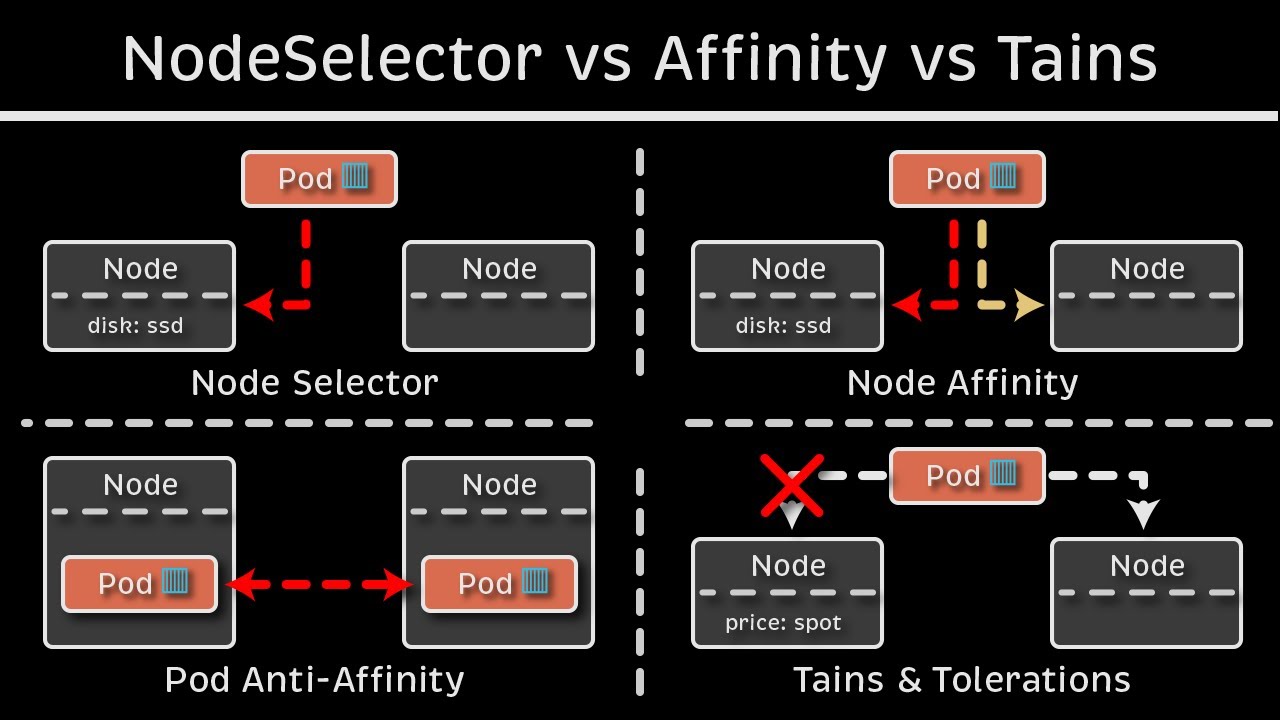
because it is running gpus as well let's say so for that what we'll do is we'll taint this node okay with the key value GPU equal to True okay so this is a taint on this node so now when we have a pod that we are trying to schedule say this is the Pod okay and this pod is something that we are trying to schedule on a particular node it will first go and check like the scheduler who's responsible for doing that it will first go and try to schedule this on this node but this
node has a tint which says only the ports that has GPU equal to True are allowed to be scheduled on this node so this won't be scheduled over here then it will be scheduled on the next available node let's say node two and we have let's say one more pod again this pod does not has this uh matching Toleration GP equal to true it will do the same it will try to uh schedule the pod on this node but it will reject the node will reject the Pod and it will go onto the next node
or maybe this node but what we have to do to make sure that the Pod that we are scheduling is scheduled successfully on the Node one so what we'll do so here is the newer pod that we have okay in this pod we'll add something called as Toleration so Toleration is something that will enable the part to be scheduled on the Node in which there is a taint right but this Toleration has to be GP equal to true I'll tell you how to create that but for now let's say uh we created the Toleration with
value GPU equal to true right now when scheduler try to schedule this part first it will go to this node and then it will see if it has the matching Toleration yes it found it so it will schedule this part on this particular node now why did it happen because it was able to tolerate the taint right so over here we are not actually scheduling the pod on a particular node right we are I mean it's the other way around we are actually instructing the node to accept only certain parts so this particular node will
only accept the part that has toleration of GPU equal to True why we do that we do that for many purpose for example in this case let's say this node is a bigger node it has gpus running it has extensive memory and uh other resources and we only want this node to be specialized for AI workload s right so that is why with the help of Toleration we are telling that this pod is an AI workload is running the AI workload that's why it has to be scheduled on this particular node which is specialized to
run AI workload and any other parts which are running non AIML workload can go on either of the other nodes available so this is what U Toleration does over here we have seen Toleration has a key value pair which suggests what type of Toleration or what type of taints to tolerate right taint we do that on node and Toleration we do that on pod so remember this point so I'll just add it over here uh this is a taint and this is a toleration which was on the Pod me add it over here as well
just to avoid any confusion I'm going to add it over here so this is the Toleration on the part now it has a few more things so we have seen the Toleration um has a key value pair and it also has something called as effect effect is the scheduling type like it could be one of Threes so it could be either no schedule okay and it could be either uh let's have a look at the taints and Toleration uh so there is no schedule and then we have no execute and I guess um there's one
more okay so there is uh no schedule then we have prefer no schedule let's move it over here and then we have no execute I'll tell you the difference between each of those No Ex and this schedule has to be a forf s and these all are nothing but effects that we have to specify with the Toleration and uh it'll be in the taint as well so how does it work um when we specify one of these effects it works differently in each of the scenarios for no schedule it will work for only the newer
Parts okay I'm just add it over here it work on the newer pods for no execute it will work on all the existing and newer parts so that means if uh if we use this effect on uh Toleration it will check if there is any existing pod as well running which is not tolerating the Tain and it will EV it but for no schedule it will work only on the newer pods so whenever we are trying to schedule any parts and it will check the Toleration if it is tolerating The Tint and prefer no schedule
it tries to uh apply that but it does not guarantee it it no guarantee of the pods scheduling for that particular T and Toleration but this is how it works now let's have a look at with the help of an example so we'll go to our uh visual code editor over here where we have our cluster running so let's see what we have already running we have a few pods running so let me delete those I'm going to do some cleanup engine X and redis and basically that's it now um let's see what nodes do
we have so we have three nodes one control plane nodes two worker nodes I'm going to add a taint on both of the nodes uh worker nodes worker one and worker two and then I'll try to schedule a pod so let's try to taint the node first so command for this is Cube CTL taint node and then the node name node name which is this and then we have key value pair so key value let's say uh GPU equal to true so that's the key that's the value and this is the ttin that we are
adding on the Node and instructing the node to only accept the part that has GP equal to True okay and for the same effect effect let's say no schedule all right um it says unsupported taint be there a spelling mistake M take but let's do a quick help on that p h and no schedule with n capital as well so yeah I made the mistake with this no schedule okay so now it says the worker node has been tinted let's apply this taint on the other worker node as well which is worker 2 okay now
quickly have a look at that Cube CTL uh describe describe node okay and the node name is this you can grab and look for paint or maybe it is capital D let's see I okay yeah it's tains with the capital T so now it is showing that GP equal to true and no schedule the taint is there on the Node okay so now uh let's try to schedule a part okay run and engine X hyphen hyphen image equal to engine X okay Enter now do a k get pod and now it says it is in
pending State why because this part does not have uh Toleration to tolerate the nod staint so that is why it is stuck on pending and now if we do a describe on this so cctl describe pod this pod and let's see the error message it says zero out of three nodes are available one node has untolerated taint which is kubernetes doio control plane so this is the taint that we already have on control plane and two other nodes had untolerated taint GPU equal to true so we have three nodes one with the taint for only
control plane workloads and two other nodes that we have tainted with GPU equal to true so this part is not able to fit in any of the available nodes and it says preemption zero of three are available preemption is not helpful for scheduling so that means we are not able to schedule any uh this particular part on any of the note unless we have the Toleration okay so what we'll do we'll create a toleration on this particular pod so or maybe let's create a new pod Cube CTL run let's use a redish redish image when
I an image equal to redish and I'm going to do a dry client uh dry run equal to client hyphen o for yaml because I have to make the changes in the yaml we cannot add Toleration from the command line okay so there is the yaml I'm going to let me move inside the day 14 folder first and then I'm going to redirect this to a new file red. EML okay we have a file over here now and to add the Toleration we go inside the spec and add the container level at this level so
after restart policy we add tolerations okay and if you want to verify the syntax of it uh you can go back to the documentation T and Toleration on the same site so basically just search over here it will be the first link that I have opened and this is the format okay Toleration key operator value effect so I'm just just going to copy this okay so let's move it two spaces to the right all right so we have the Toleration over here key and it has to be like everything has to be in double codes
key is GPU and operator that means equal because we can use equal to not equal to and in and like to select from the multiple operators we can do that so that's why operator is equal and value is true when GPU equal true and effect is no schedule right this is the Toleration now if we apply this i hyph f redish yl and let's see what it does it is in running State okay and if we do CU Seal Get PS hyphen o wide and you see this is running on worker node one uh because
it was now able to tolerate the taint right so that's why it's been scheduled but the first pod engine X Sport it's still in pending because it does not have the Toleration so let's remove the taint from node 3 and let's see if it was able to schedule uh the engine xort so to delete the tint what we'll do is Cube C taint node node name was um worker two and let's do a help on that it does not show or maybe there is a different command for that let's uh go to this and let's
search for untain or uh let's go to our cheat sheet it should have the command and let's search for [Music] taint okay this also does not have it delete the TT this oh okay it's it's pretty simple we just have to add a hyphen at the very end I forgot that so let's uh use the taint command again and and uh we have to add key value which is let's say what was the taint on cctl describe node and um this node grab STS okay so I'm going to copy this p Tain node DK cluster
3 worker 2 on the second node and that key is GPU value is true and the effect is no schedule okay and we have to add hyphen at the end so this will remove the tint it says it's untinted and if we do the describe and grab taints again it does not have any taint and if we do get BS now now this engine export is scheduled and if we we do describe or let's do get pod hyphen o white engine XP is scheduled on worker node 2 because we have removed the taint now okay
so I hope uh this taint and Toleration concept is clear now with the help of an example that we have just seen so you can try it out yourself add some taints remove some taints add toleration remove it and basically this is um why we use it so it has different purposes like when we have seen if we are using a specialized node for for running a specific uh type of workload or our control plane for example has a taint by default to prevent any custom workload to be scheduled on that node that means only
control plane components and the system components should be scheduled on the control plane node that is why it automatically added a ptint on that node right so that's what it will do and then we have a concept of selectors so the way selector work is let's say we go back okay so over here we are telling the node to only accept a particular type of part but it is is not guarantee right so let's say this particular part that we have it was scheduled on this particular node because it was able to accept it but
what if the scheduler tried to schedule this particular port on this node we did not have any taint on this node so it would have scheduled it right so this does not guarantee like T and Toleration just prevent or restrict unwanted parts to be scheduled on a particular node but it does not guarantee that only those particular ports will be scheduled on it so this port can go over here or here as well right it restrict what parts are scheduled on this node So to avoid that or to add some more functionality to it so
yes this is really important and we always use trains and Toleration in production environment and everywhere else but we add few more features of scheduling for example selectors okay so what selector will do uh instead of node make that decision of what type of PODS to accept will give the decision to the Pod to which node it has to be deployed on so we do that with the help of labels so again instead of GPU true as the taint we use GPU equal to false let's say as the label so we add this label on
the particular pod and and now we say the part to match this label with the node label so the node have this label as well so we'll add the label on the Node as well let's say we added this label on both the nodes now what it will do it will first try to check that if any node is available with this matching label so it sees that yes uh this node so it will schedule the pod on this node or if it can be scheduled on this node as well so I in either case
the Pod will be scheduled and it will not go to this node because this node does not have the matching label even if it would have gone over there without the label it would not have tolerated the taint on that note so the part will be scheduled over here with the matching label now let's see how this can be done so I'm going to go on my visual code and uh I actually had to record it twice because my mic did not work in between so I'm recording it again that's why you already see uh
few files over there so let's uh delete this or let me pause the video and do some cleanup first okay so I did some cleanup now um let's create a new pod let's use Cube CTL run enginex New iph iph Image equal to enginex and I'm going to do a dry runal to client and I will also be generating this as a yaml create a new yaml new engine x. yaml we'll be making changes in the yaml so over here new engine X go at the same level container level and add a new field which
is called node selector okay and inside that you actually specify the label so if we do GPU equal to false right it will match this label to the node where the label is applied and it will schedule this pod on part on that particular node if it has multiple nodes then it will select in one of one of those nodes if we do a save and if we do a cube CTL oops not here CU CTL apply hyphen f new engine x.l get pods says it is running and where it is running CTL describe pod
it is running on uh this worker node because it has the matching label let's see if it has the matching label TTL uh get nodes I find Ione show labels okay so work not this one and I already removed the label from it but somehow it took the label from it it does not have a label because I removed it so it should not maybe the Pod was already running oh yeah the Pod was already running so let's delete the Pod once engine X new okay let's apply again apply hyphen f new engine X okay
and now let's do a get bods now it is stuck in pending and if you do a describe on this you will see it says uh zero out of three notes are available one has untolerated ttin which is your control plane tint and two nodes did not match the pods node Affinity or selector no because this selector that we have no notes are available that has this matching label so let's try to label one of those nodes so get nodes and then I'll just copy it and to add the label on the Node is adding
the it's same as adding the label on the Pod basically the same command with a few details so Cube CTL label node node name and then label label is GPU equal to True okay sorry GPU equal to false okay so it says it's been labeled and if we do uh show labels now um here is our label GP equal to false okay and now if we do a get pod the Pod is now scheduled and it's should be scheduled on node one which we have just uh labeled so let's see umine X new and CK
cluster 3 worker which is a node one and it has scheduled on that node it match that label and it scheduled on that node so it is important to understand the difference between node selector and uh taints and Toleration so taint and toleration works as a restriction applied on the Node so node makes that decision what type of PODS to accept but with node selector PS take that decision on which node it wants to go right and there are some limitations with node selectors like we cannot use some Expressions we cannot use logical and or
we cannot add more conditions to it so that it can be scheduled on one or more nodes right so for that we use a Concept in kubernetes called node affinity and anti-affinity so that we'll be covering in the next video but I hope uh the concepts that we have discussed till now uh is clear to you and you have done enough practice as always there'll be a assignment task in the day 14 folder in our GitHub repository so try to complete that and you know where to reach out if you face any issue on Discord
and over here in the YouTube comment section and someone will help you out So yeah thank you so much for watching this video please try to complete the comments and like targets for this video as always and I will be publishing the next video next 24 hours or as soon as the target is completed and uh basically that's it and thank you so much for watching and I hope you have a good day






![Power Automate Beginner to Pro Tutorial [Full Course]](https://img.youtube.com/vi/1p5kI7SYz4Q/maxresdefault.jpg)
![Business Analyst Full Course [2024] | Business Analyst Tutorial For Beginners | Edureka](https://img.youtube.com/vi/czymrnQV2p4/maxresdefault.jpg)