the topic of today's session is conversion API Gateway versus uh service igtm what to use why and when so who's actually talking today um my name is Serge I'm an account manager here at St and I will let Dennis and Floren introduce themselves yeah uh I am CEO of stape and founder so usually I responsible for technical stuff at stap and yeah hi everyone everyone and uh thanks for having me on this webinar I'm Florian based in Hamburg Germany and um I'm thrilled to be speaking to you today as a partner manager and meta in
the signals and data field and it's a privilege for me to work alongside many exceptional Partners such as state thanks for having me great thank you guys so um regarding this session outline and what is going to be about right so of course we will talk about the conversion API Gateway what this is um how it can benefit your business we will talk about business use cases and of course top brands who use the solution and what kind of results they already got um we will go through the demonstration on how to set it up
step by step it's really easy exactly the way we advertise it so you'll be able to see it yourself and of course um overview and advantages of service at Google gole Tech manager versus conversion API Gateway benefits for agencies and a lot more what you'll get from this webinar is of course the recording um actually each and every person who register for this webinar and there were like more than 500 people will get the webinar recording via email uh in addition to that we will also um provide written guides and conversion API Gateway and server
side GTM setup and we will post a LinkedIn post l basically recapping everything that we were talking about during the webinar and answering all the questions uh that we maybe didn't answer or did answer but we'll basically compile a big LinkedIn post just so you don't miss anything so now um introduction to conversion API Gateway and here's where I pass my word to floran just so he can tell us more about the solution oh my bad uh should I stop sharing my screen yeah I think I will so Floren the screen is yours thank you
so much yeah thank you so much for having me first of all I'd like to start with why advertising is changing so let's zoom out for this a bit on one level growing privacy expectations are increasingly addressed by laws and regulations such as gdpr in the EU and CCPA in the US they really vary in their scope and implications for how businesses can use customer data more personally people are exercising their choice to opt out of any data collection and connected personal personalized experiences more and um on another level digital platforms have introduced and might
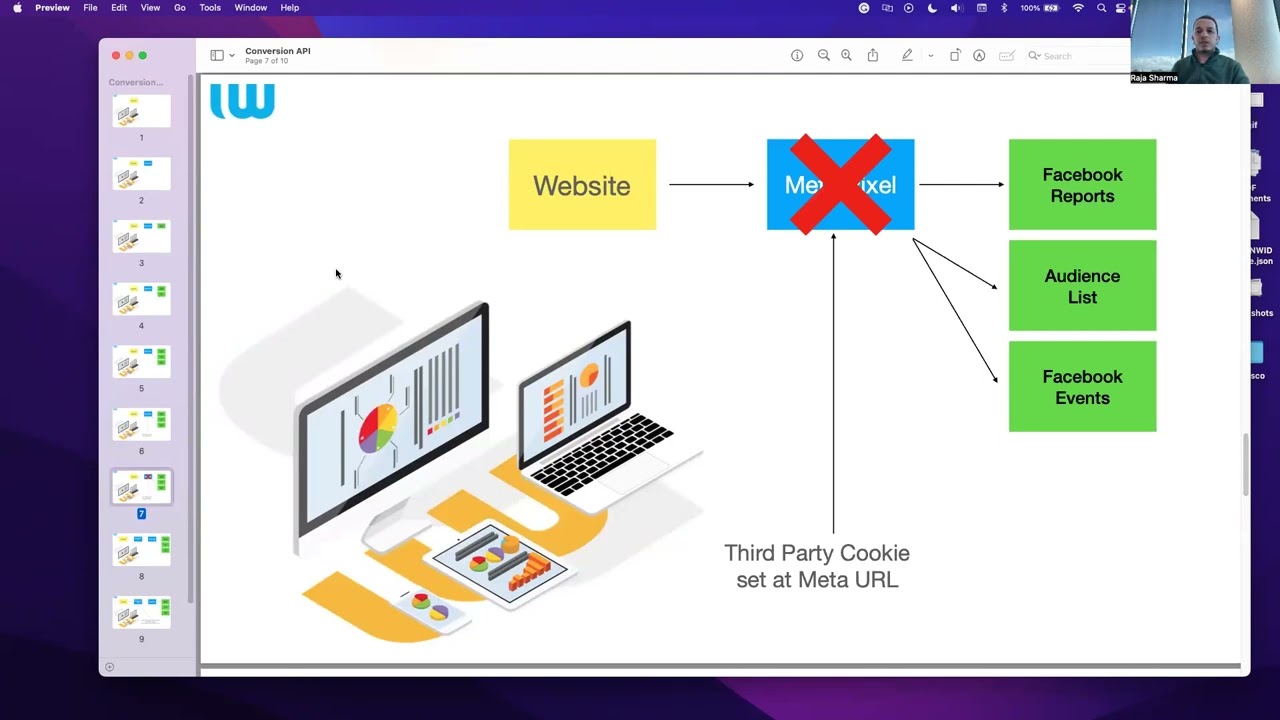
introduce more features that really limit access to people's data such as removing shared identifiers like third party cookies right so the outcome is that businesses do not longer have the complete picture of the customer Journey so your business may be trying reach a shopper who put an item in their card but did not complete the purchase so you may no longer be able to actually re-engage that potential customer so hence businesses do not have the ability to understand what drives a specific business outcome so what actually can be done right So Meta here um offers
the convergence API and let's go a bit into the differences between pixel and converence API and what the converence API actually is so when you advertise on meta platforms or meta technology traditionally this journey relied on web data that used The Meta pixel which relied on browser based technology the conversion API here creates a direct connection between your marketing data and the systems that actually help to optimize ad targeting and decrease the cost per action and measure results across meta Technologies here you can see this a bit more visualized the convergence API allows you to
share website events that the pixel may lose due to network connectivity issues or simple page loading errors so the conversion API can also be used to share actually other types of important events and data that occur offline or at a later time which the pixel cannot adopting the conversion API today is the path to successful datadriven marketing and the main benefits are on this slide first it can help you to improve your ad performance secondly it can help you to improve measurement capabilities and thirdly it will give your business a competitive Edge in today's really
uncertain ecosystem and prepares your business for the future so it's not a question of if it's rather a question of when you will need to trans transition to conversion API and the numbers actually speak for themselves advertisers with a pixel that setup conversion API saw a 133% average decrease in cost per result and larger advertisers in our study that uh in addition to the metap pixel set up the conversions API saw 19% additional attributed purchase events that were not visible before so now we have been talking a bit about the why but what about the
how on this slide I want to show you possible integration methods but also um as mentioned our great colleagues from state will also show you simple and easy path in more detail so generally you can consider direct Integrations which allow you to customize your convergence API setup completely by yourself while this method is at no cost other than obviously your internal developer cost the setup can often take multiple weeks and requires access to your server database and obviously ongoing maintenance secondly you can consider partner Solutions such as cdps or Commerce platforms which allow you to
benefit from support of meta's meta business partners so examples here are tium Shopify data hash stape and others you can actually find the whole selection of meta business partners in The Meta partner directory on our website so naturally the cost and implementation difficulty really varies by partners and then there is Convergence API Gateway and Gateway for multiple accounts so these integration path are fairly new integration methods that connect your Amazon web service instance or gcp Google Cloud platform to send your data to meta this is very coste efficient and developer resources and support is not
required so this solution can either be agency or Advertiser hosted what does that mean so the convergence API Gateway for multiple accounts is a convergence API Gateway feature that allows businesses to create a single copy Gateway instance and easily integrate and onboard multiple clients onto conversion API let's let's go through some data and success cases that we have seen so generally our data from 2023 is this I think shows that 10% increase in conversions thanks to the conversion API result in an 11% decrease in cost for acquisition let me show you some examples here so
actually suited to this great weather at least today in Hamburg which is one day of summer thanks to adopting convergence API Ray Ben reached 36% more people decreased the cost per 1,000 views by 19% and also decreased the cost per conversion by 7% which is fabulous the global retail chain heer from the Netherlands went a step further and they actually introduced the convergence API and started to measure offline conversions with a result of a 386 per higher rower 88% decrease in cost per conversion and 12% incremental inore purchases so we also have some some more
data for fintech and Banking and Banking and credit card advertisers with a metap pixel who in addition implemented conversions API for web events saw an average 50% additional conversions and also there's one interesting client some up who leverage convergence API for CRM so in a connection to the CRM systems to optimize for qualified leads instead of purely optimizing for lead volume achieved a 10% more qualified leads volume and decreased the cost per qualified lead by 15% thank you I hope I was able to show you what the conversion API is roughly how you can set
it up and actually why it helps you to grow your business and I'm happy to pass it over to the great team from stap starting with sech thank you Floren thank you so much and yeah guys so basically the hardest part of um actually presenting the solution is actually holding back from saying that it will like really drastically change everything because for some cases definitely will but as uh our great colleagues from meta we basically allowed to share some of the like modest results like 10 12 12% increase Improvement but as you can could see
on Florence cases Florence examples some of the cases and some of the um use cases are really changing the game for the company so yeah now about the copy copy Gateway demonstration and how to actually set it up um we have only like four or five steps to it so we will show you how to create an account on state obviously we will show you how to enter your account details how to sign sign into your user interface on conversion API Gateway Hub and how to add pixels so the first step is of course to
sign up for stape account and that's super easy to do obviously you just go go to state. you go to products you select ma conversion API Gateway hosting and you start click on start 7-Day free trial by the way we have a 7-Day free trial for the solution so you can basically check yourself and see how what kind of results you can expect from the solution so here you can just add your email address create a name for your copy Gateway and um of course sign up for State term of use and select your server
location for step two just log to your St account basically just create a password repeat your password and log in here I'll will pause for a little bit so we have basically two options when it comes to pricing when it comes to this solution so the first one is basically pay as you go you pay just $10 per month per one pixel and we host that pixel you can also go with the unlimited plan it's still called unlimited even though that there are like a certain limit to it right already so it's up to 100
pixels for $100 so basically it means that in case you're in an a you're an agency and you need to host like 100 pixels for 100 of your clients you will be spending just $100 per month to basically maintain the entire infrastructure so here you just select whatever plan works for your case for this specific demo we will be going with the unlimited plan just to show you that you can set up several pixels basically within minutes so we go with the unlimited plan and there's also an option to add card later so we were
trying to actually even shorten the time even more of the you know the actual installation because uh our customers report that the longest uh step of the process is actually adding your credit card information so we de so we just decided to even skip that so you just click on ADD card later and that's it all you got to do now is just to click on finish copy setup so you click on that and there is step three which is create your conversion API Gateway account so again um put your email address here create your
password and retype your password and now just log into this freshly created account and now you're in the conversion API Gateway Hub all you got to do now to host the pixel is just to click on add data source because I mean obviously your pixel will be the data source here so you click on add data source click on get started and continue with your Facebook page click on next select the right business manager and instead of business manager select the right pixel that you want to host here you can show customer information parameters to
basically control what type of data you want to share with meta and what not so in case you need to do some changes here just basically check or uncheck any of the options and click on next and that's it so you just click on done you also need to share uh the token access with the website and click on confirm and within a couple of seconds the pixel should be basically hosted and it should say something like data source has been yeah this is it data set data set has been eded successfully so we just
added one pixel if we need to add another one for the second client let's say all you need to do now is just to click on add data source here click another add another data source click on get started and basically repeat the entire process log in is your Facebook page click on next select the right business manager select the right pixel check customer information parameters and yeah it's basically the same so you can just keep doing that in case you have unlimited account you can do it for 100 pixels so we're all set with
the second pixel again share your token with the website click and confirm as you can see second data set has been added successfully if you scroll down a little bit you will see the event activity basically within some time you will see that some events were received some events were published here you can basically filter by data sources a look at several data sources simultaneously so it's a really sophisticated dashboard that we have here step five is actually an optional step and I saw a question about that uh in the Q&A section already so basically
adding a custom domain allows you to improve measurement performance even more so for that you can just click on uh data routing um setting on the left side menu click optimize write down your subdomain and domain names and please bear in mind that this step will require you to define the DNS settings for the custom domain so make sure that you can actually do that with your D DNS provider before proceeding so that's basically it for the demonstration flow of how to actually set it up that's like super easy develop it like literally requires no
developer resource that's why it's a great solution for agencies and speaking how it looks like in the network tab I mean I wish I could understand at least anything from here but I think I would just better pass the word to Dennis so he can basically elaborate more than me yeah as you can see on this uh screenshot uh FB evans. JS loaded when your Facebook uh pixel loaded on the page page this Facebook uh JS file is modified after you connected your pixel to copy Gateway second request shows that your configuration of this pixel
loaded from meta servers inside this configuration file uh there is directive to send request to your connected copy gateware in our case this St doc domain and you can see on down on the screenshot uh near number three there will go two request one request will go to your copy Gateway and another request will go to Facebook directly that's very similar to what uh you will see with uh other Solutions so one request send it directly one through server Ser through your servers and uh in this example you can see St dog but this domain
can be completely modified uh inside copy Gateway so you should put there your domain when you set when you set up copy it way that's it yeah so basically as easy as that that's that's how it works um under the hood basically right so let's move forward to the overview and advantages of the service side Google tech manager I mean probably the majority of the audience who watches us already knows this flow of how everything works right so basically the website user does something on the website that data that action is basically captured uh on
the client side and then passed to the Cloud Server so then it can be passed to various Analytics software using tags using whatever logic you want to basically attribute to your setup um for the main benefits of the service GTM we can of course mention the full control the sgtm allows you to decide exactly which parameters will be sent and in which format uh data enrichment inside of the sgtm container you can actually enrich data you can anonymize data you can do almost whatever you want with that data before sending it further right of course
it's improved website page load time so that's a really important metric that probably all the websites are trying to improve at all times so if that's something that you're interested in definitely go to server GTM and the page load time should become a lot better and of course it's one tool for everything so you can use sgtm for G4 Google ads meta and a lot more so basically this server container is not locked well locked maybe not not not the right word right so it's not just limited to sending data just to meta you can
send data to whatever you want from the container so now if we compare the two and what to use and when for optimal results uh we really need to mention that both MAA conversion API Gateway and serice side GTM can both be used for implementing conversion API and this is how you implement it through hdtm so basically everything is relatively easy right so there is client side environment there is server side environment you are passing the data from the client side to the server s side and then using G4 client and using the appro appropriate
tags you are sending that data to appropriate analytic platforms analytic software um and here is on the other hand how the conversion API Gateway integration works so it relies on the data that's um basically collected by the pixel that's implemented on the website and that then that data goes to conversion API Gateway which as Floren mentioned previously there is currently three vendors who basically provide hosting for that that's AWS stape and Google cloud and from there the data basically goes directly to metap pixel endpoint and conversion API endpoint so when do we use conversion API
Gateway instead of service GTM um as you might have noticed during the presentation um conversion API Gateway is a much more it's a far easier way to actually set up conversion API so in case you're not sending the web events using the conversion API yet definitely try conversion API Gateway if you're already using the metap pixel nothing is stopping you from trying the conversion API Gateway to see what the results will be in case you're not working with an e-commerce partner such as Shopify woocommerce and big Commerce and of course if you have it resources
but not enough developer time for other conversion API pass for integration so as you saw during the implementation uh demonstration it's super easy takes literally like five minutes of your time to set up an account from scratch and host the pixel for your client um now when it comes to benefits right some of the benefits were already of course mentioned during the presentation but here is what I was talking about right so the average cost per result Improvement is 133% even though that's really different from client to client this is basically the data that we
can officially share not to overpromise anything right um and of course there is 7% increase in number of conversions measured after the implementation of conversion API for the the obvious benefits we can just recap that it's of course speed it just brings down to a couple of minutes of your time to set it all up it's really coste efficient and it Finds Its audience everywhere basically if you're just the business owner if you own the website just go with pay as you go option pay 10 bucks per month and basically you have a lot better
results in case you're an agency goes the $100 op option like support 100 of your clients paying just $100 per month to me that also sounds like a great deal um the solution can also be used everywhere right whenever you can Implement pixel on the website it can it can be used there and of course it's low maintenance cost to be more precise it's like zero maintenance cost right because it's all maintained and supported by state and meta for you
![[Stape Webinar] Google Ads conversion tracking for Shopify: advanced server-side setup](https://img.youtube.com/vi/7ASTO--LNLE/maxresdefault.jpg)

![[Stape Webinar] Enhanced conversions tracking - step-by-step setup for GA4 and Google Ads](https://img.youtube.com/vi/J3Hr9ii6Ce4/maxresdefault.jpg)
![[2023] How To Set Up Facebook Conversion API w/ Google Tag Manager (Server-Side)](https://img.youtube.com/vi/L65roS_B4rA/maxresdefault.jpg)
![Meta (Facebook) offline conversion tracking [Step-by-step guide]](https://img.youtube.com/vi/EeQjsLh4wrI/maxresdefault.jpg)
![Google Ads offline conversion tracking setup [Step-by-step guide]](https://img.youtube.com/vi/gsFYcfHWOA8/maxresdefault.jpg)
![How to add a custom domain in the Google Tag Manager server container [Step-by-step guide]](https://img.youtube.com/vi/0TNJYHbXT8s/maxresdefault.jpg)
![How to use Stape Store [Step-by-step guide]](https://img.youtube.com/vi/BadIVCxppuM/maxresdefault.jpg)
![How to set up server-side Google Ads conversion tracking [Step-by-step guide]](https://img.youtube.com/vi/s-R6mvpiLk4/maxresdefault.jpg)

![What is server GTM Debugger? [Overview]](https://img.youtube.com/vi/VtErfslpkUg/maxresdefault.jpg)