All right, welcome to NextLft 2. 0 niche finder. This tool is your all- in-one niche finding tool.
I promise you there won't be a niche you won't catch. Um, and there's no way when you purchase this tool that you can't find a good niche that you can print with. So, first off, I'm going to just say every person has different requirements when looking for niches.
So, please keep that in mind. Um, this tool is made to find faceless niches. It could be high quality, it could be low quality.
Uh, but if you're looking to track um, like non-faces channels, this is not the tool for that. Anyway, with that being said, I want to get started and basically show you how every single one of the features in this tool works. So, starting off, um, I'll just go top to bottom.
You have keywords and channel. Now, the tool scrapes YouTube uh all of YouTube every single day. So, what you have to understand is that we don't make an entire database of all the channels on YouTube.
What we do is we filter, we prefilter for you all the channels we think have a very high chance of being an interesting niche. This could be older channels, this could be newer channels depending on a couple requirements. Um, and this keyword and channel search lets you search through our database for specific channels within our database.
Not any channel on YouTube, but within our database. So, moving on, you can also see how many channels uh have been analyzed uh in the last like uh 48 hours. Um, moreover, you can see um the recently added outlier channels.
Um, so this is really useful. Basically what outlier uh outlier means on a channel basis. Imagine you have a uh channel that has 10 to 20,000 subscribers like uh this channel is in that range.
we would calculate the median average views uh for uh that subscriber range across all the channels on YouTube and we would get a median average views for this subscriber range and then we would compare the average views of this channel or uh to that to that median and then you get this subscribe or outlier um count. So this will help you to find really interesting uh channels like for example ages and pages. Here you go.
is pretty interesting. Um, again, maybe this one, it gets updated every 24 hours. So, here you have another one.
Um, police chases actually a niche I originally started. Um, so as you can see, it gets updated every 24 hours. And, uh, this is really useful for monitoring like the top uh, outlier channels every single day.
Then this is probably one of my favorite features uh, in the next niche finder. Um, it allows you, let's say you find a channel, right? Let's say you find a channel uh like this one, Sleepless Historian, and you think like, wow, 90 videos and already half a million subscribers, like this must be a very good niche.
And then you go to next left and you see, oh, if it's in this top five here, the chance that most uh of your competition has seen it is very high. Um so we look at uh engagement, we look at um amount of views, we look at uh also monitor Twitter uh for how much uh channels are being linked. Um and basically we make uh up this list and um it allows you to see uh what channels are most being uh watched by faces competitors and this will ensure that you can always stay ahead of the competition.
Let's say you find a niche, you think, "Oh, this is a really good niche," and it's in this, it's in the top 50 of this list. Most likely than not, it's going to get pretty competitive pretty soon. Um, it doesn't mean it has to be competitive now, but we think it's going to be competitive in the coming 3 months or so.
So, keep that in mind uh that if you see it in this list, you're not the only one to know about that channel or niche. Now, moving on. Um, trending keyword is just um how much has a category or a keyword been searched in the niche finder.
Um, and you can see um what people are looking at um and what has been kind of saturated. Um so you see boring history for sleep like sleep is historian Carl Young. I think that's like a philosopher niche uh and like these 2D explainers so you know uh what not to go into but you can also see okay what are like some trending niches right now.
uh you can find them using the trending keywords. Um then more so you can quickly navigate the categories using the most popular categories and then uh there's another really cool feature that I love which is um viral videos on small channels. Now viral videos on small channels basically what it does is it finds all um channels that h are under 10,000 subscribers and have videos posted in the last 30 days with over 100,000 views.
And the cool part is you find banger niches. Like this is like such an amazing uh uh addition. It's basically like the homepage method on steroids.
Um so you will see this channel for example. It will have probably under 10,000 subscribers. 8 days ago 700,000 views.
Bro, this is a I haven't seen this niche before, but this is a banger. So, as you can see, the niche finder is amazing at finding uh these types of like channels. Uh and and really this will um make you much faster than anyone doing um uh finding niches manually.
So, you can just press man uh random and it will um reload and will find you uh more uh videos with that same metric and you can just keep pressing random like you would do on the homepage method until something interesting comes by. So that's the homepage for you. Super super useful.
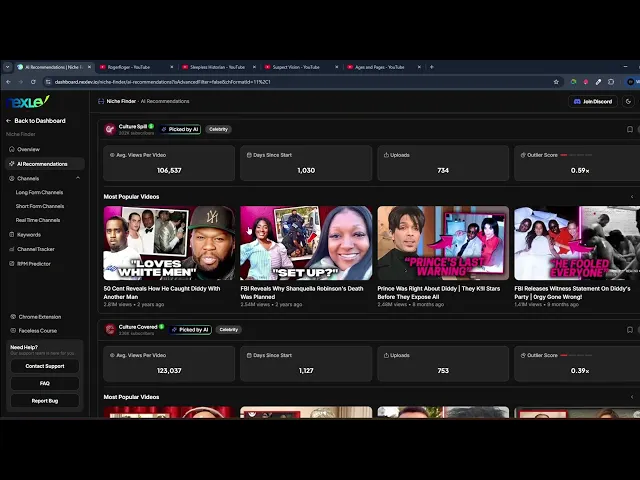
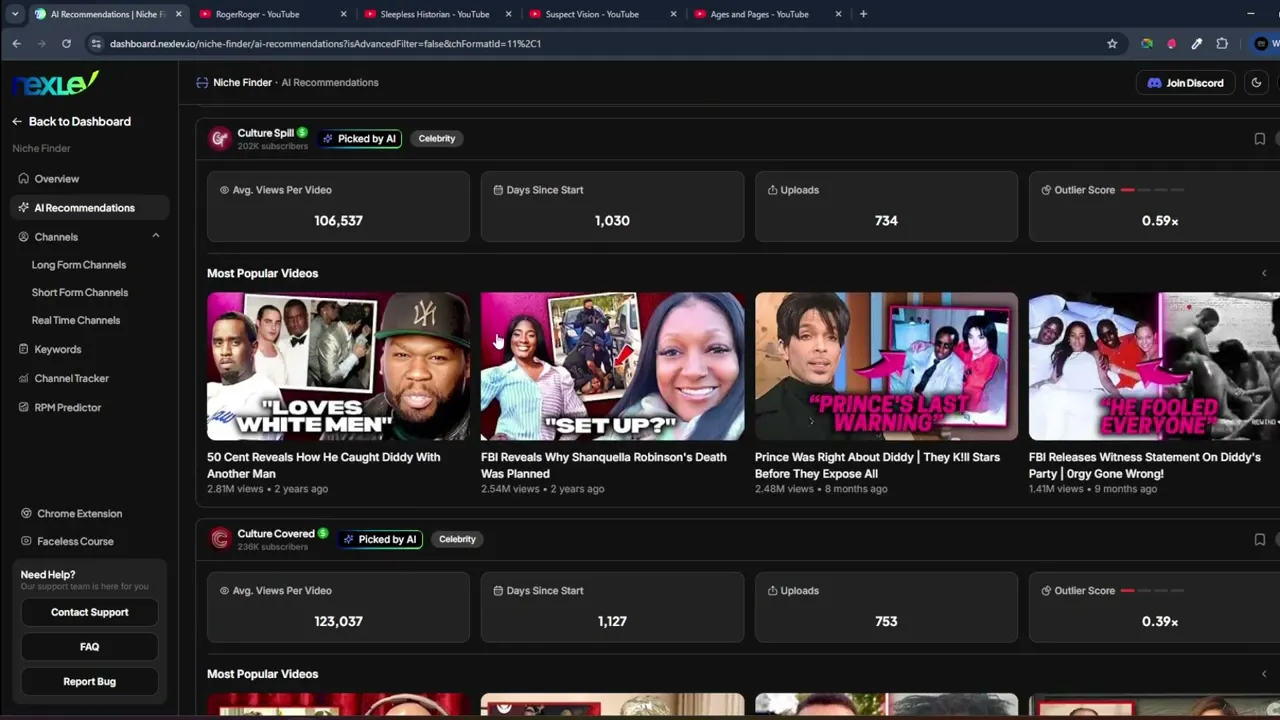
Um it yeah just a great great addition. Um then moving on you have AI recommendations. Now AI recommendations is another cool feature.
Uh basically we have a uh bi-weekly uh cycle where we feed all the channels in our database or the recently added channels in our database through a very long chat uh uh like a GPT prompt and it um it catches all the channels that we think might be interesting and yeah it basically uh it's it's a more diluted version of the um long like the total database. So uh long form short form channels that that will give you access to all the channels we have in the database and AI recommendations. It's just like some a curation of the best um of the best channels we think uh we have.
Now obviously sometimes it might miss something. So it's always useful to go over to long form or short form or real-time channels to see what else is new. So, um, yeah, very useful.
And, um, going into the more niche finder UI, and there's a bunch of settings. Like, there's endless amounts of filters. You first of all have these presets.
Uh, they're pretty self-explanatory. Basically, what these presets do is, let's say I press an outliers, I get highest um, outlier. So, it filters on high outliers.
Um, if I press high average views, low days and start, it does exactly what it what it says, like low days and start, high average views. Um, and same thing for all the other ones. Uh, the cool thing with the next level nicheinder is that you can sort on um like channel types.
So, for example, um there's a lot of different filters you can access, but um if you start over here, uh what you can do is you can go for example to format and you can say, "Oh, okay. Hey, I want like commentary videos or only documentary videos and then um or channels and it will basically then show you all the these are commentary channels as you can see like all of these are like commentary um and then these are more like documentary channels right so this is really useful if you just quickly want to filter uh by formats um and yeah super super useful and there's a bunch more um like um filters that you can go through I will quickly go over all the different filters that we have so we have monetization status on uh also meaning but both uh on non-monetized and monetized um has short. So can the channel have any shorts on it?
If you press no the channel will only be a long form channel. If all you will get both like a channel that has both long and short videos on it. If yes you will go only short channels.
um AI AI channel. Um this will basically try to recognize if there's like a made with AI tag in the description. So if you press yes, you will most likely find like more AIish content.
That's also pretty useful. Kids content does the same thing. It it it um checks if most of the videos have a made for kids uh tag.
And then a faces channel. Uh this will check if there uh if there's any presenters or this will check if there's any like uh more like skits or non-faceless content on the channel. Um moving on you you just have um metrics.
So main metrics, subscribers, average views, upload. Um so this can be 1 to 12 uploads, 12 to 12 to 55 upload, uh first day since, uh first upload date is basically when what date in what date range the channel first uploaded their video. Um and then you have category, um format, and then quality is kind of like um how polished does the channel look.
Like if you press low, you'll get more like police bully cam or like low quality like AI or tutorials. If you press high, it's like magnets, media, fern type of channels. Uh so that's what quality means.
Uh then video metrics, you have like median views, average length, uh RPM, and then a bunch of other like channel related metrics. Now, I wouldn't overdo this to be honest. like these filters are here to if you're looking for something very specific or like a very specific set of requirements, then that's what the filters are here for.
If if you want to go even more specific, you can even have like a slider and you can select your own values. Um, however, what I would recommend for everyone using the niche finder is just literally go because we already filter out so much for you that all you need to do is don't play too much with these filters. Maybe add like a minimum days since start or a minimum view count that you want, but just go like um average days since start uh and just scroll through and just just scroll cuz there's no way if you scroll like this like there's like 10 different good niches here.
Like you already found like 10 different good niches uh by this point. So really don't make it too complex. Just use these presets that u um so that's really helpful.
Well, another thing I like to do is instead of like AI recommendations, cuz these only get refreshed every two weeks. Um, what you can do is go over to uh real time channels. Absolutely amazing feature.
It shows you all the um channels that our system is currently adding in real time. Meaning like as you can see this gambling niche, I have not seen this before um has been added to our database 23 minutes ago and I think this is already a pretty pretty good niche. So, um yeah, it's pretty decent.
It's not it's not perfect, but it's it's definitely not like a horrible niche. So, um again, you can quickly find interesting stuff here. Um here you have some AI like um content uh Formula One channels.
This one is a bit older. It will add everything. Um so, here you have another one uh 110 days in start.
This one 56 days in start and like 55,000 views. So, you can find a lot of interesting stuff here as well. just by scrolling.
I wouldn't play too much with the filters really um unless you have like very specific requirements. But usually what I see beginners do is they make hyper specific um like filters. You have to imagine that if you select average views above 1 million and um you select uh so let's say average views above 1 to two million and you select like days in start less than uh 3 months ago.
So the chance that a channel started the last three months that has more than a million views on average on every video is very very small and it's also a very small chance that that will be in our database because we're looking for more recent channels, right? So um you have to be realistic with the filters. Don't make the filters too specific because you won't get a lot of results.
what it's just much better is just like sort the channels or give some very broad range in the filters and then just scroll through cuz usually the best niches I found that have made me the most money are usually the niches that kind of fall out of my uh previous assumptions. So that's why I just love um using the nicheinder every single day just logging on to it and just seeing and being very aware of what new channels are blowing up. Uh right.
This is really useful because if I'm aware of what is blowing up every single day, it gives me much more idea also ideas on what's working with thumbnails, what's working uh in other niches, uh what's what the face space is doing in general. Um so this is a really valuable way uh to go about it. Right?
So um just so you know, that's a really good piece of advice. Um now moving on um another thing that you can do is if you have uh a um ch if you have the chrome extension as well uh I assume you do because you have next left pro has access to the chrome extension as well um included. So once you press save you can really neatly uh save u your channels or any channel that you find to your next left swipe file.
Uh, and I think this only makes Nex that that much better because what you can basically do is let's say you find an interesting niche. Um, I'll just I'll just put it in here and I'll press save. What it does is it then if you go back to your dashboard and you go over to Chrome extension and you go to um your Swipe file folder where you saved it, you now have this folder and in this folder you can see the channel.
But that's not all. What you can also do now is go to settings and press public. You get a link and you can share it with your team or your partner or your business partner.
Um, super useful and you can also when you see something on YouTube, you can also save it to your Swipefire folder. Um, so everything is now integrated in the Nex ecosystem. So everything really nicely works together.
Um, then moving on. Um, I do want to say in this tutorial that if you're looking for what does a good niche look like, cuz I can guarantee you most of these niches that you're seeing here, um, like for example, in real time channels, um, I can guarantee that if you try a couple of these niches consistently, like the chance is very high that something will hit. Um, like some of these are just pretty pretty decent niches.
like this one is maybe a bit low on average views and maybe the quality is high. Actually, the average views is not that bad, but uh it's a bit of an old channel. Um there's a bunch of tutorials uh and and videos of me going out and showing like what a good niche looks like, but this tutorial is really just how to operate um uh on the niche finder.
It's not it's not about okay, what does a perfect niche look like? If you want to see that, there's channels or there's videos on the Noah Morris channel that go over, okay, what do I look for in a good niche? Uh, but what I would give it as a quick quick piece of uh like advice uh when it comes to niche finding in like mid 2025, what you want to do is like basically identify a format.
So not just don't identify just a niche but identify like a common pattern um across all of these and then once you've identified a common pattern that works like for example this format right it's a bit old this is this is quite old but I'm just using it as a format it's not perfect but like we've seen like every blah blah blah explained just transfer it to another niche I've seen that work really well or these like ex like tragedy uh niches I've seen this apply to car crashes plane crashes um hiking uh bunch of different areas like these tragedies uh or like even like um like search and rescue stories. I've seen those as well. Um I've seen a bunch of these types of channels but in different subniches because people just found a pattern across multiple channels and and extrapolated um that pattern.
So that's what the niche finder is really good for. You'll you'll quickly see these patterns arising. Now moving on, we have obviously short form channels.
Um short form channels I would recommend currently if you uh if you're watching this right after the private uh or sorry the the launch of NexF 2. 0 I would recommend um first of all um going and uh if you're looking for English channels just select the English language uh just because we're also scraping for short form channels. Um, we're also scraping uh other languages because people asked us to.
So, we're also scraping other languages. Uh, and another cool thing you can do is so we see go to recently added and what you often see is that you'll be able to find a lot of channels with like commentary. Um, that's kind of what we try to do is like add uh channels with that are kind of transformative and have a lot of commentary.
That's what the niche finder system um tries to primarily do. They have to say it's still not 100% optimized, but we will push this out in the next week or so. Like you will find like very viral Reddit stories.
Um we have quite strict days since start and view counts requirements in order for us to add it to the channel, but you'll find a bunch of like more of these um like storytelling channels like this one. It's a bit older. Um, but yeah, you'll find a bunch of interesting ones if you just scroll through or uh start filtering.
We do have some pretty nice filters on here as well. Um, you can filter by average view count, subscriber, outlier score, total views, total shorts, country, um, and category. Um, so for example, you can go like um, aviation and then um, see what you find.
So here you have some aviation um related short channel. So like this one is 93 days since it got started and you see some drone and some military. Oh, this is quite interesting like 120 days like average views like 500,000.
So yeah, you'll find some interesting stuff on here especially with the categories and such. So yeah, that's how the short form niche finder functions. Then moving on to um keywords.
basically keywords. Uh it's it's not something I use too often, but some people like it. Like you can just like look for different keywords and see what channels are related to those keywords.
Um not something I used to frequent, but uh it has similar like filters. Um you can click on like a keyword and it will find you channels kind of like similar to that keyword. Like here you see a bunch of airport uh Airbus related channels uh as you can see.
So that's what um it does. Now moving on, we have uh channel tracker. Uh very nice feature.
Uh basically, let's say you're in a niche and you are um thinking, okay, what is best performing for my competitors? You can now see their real-time views. Now, it's still in beta, so some of the views won't be 100% accurate.
Um we will be working on this in the next couple um next couple weeks. So, but what you can see is you can just accurately see the real-time views of like any channel on YouTube and it what it what this allows you to see is okay what is the best performing video for them right now like which one is the most evergreen which one um had you know how many views were they getting per 48 hours and it really helps with ideation in terms of like thinking and uh thinking about all right what was the most explosive video for them what one which video was the most uh evergreen screen for them. So, this is really really useful.
Um, and then last we have the RPM predictor. Uh, we're bringing this back soon. Um, it's because we're making a major improvement to it.
But yeah, that's the new nicheinder 2. 0. Uh, and I hope you guys uh learn a lot.
And if you have any questions, you can always go into the Discord and I'll speak to you there. Cheers. Thank you very much.