[Music] high students and a big hello to everyone watching around the philippines i am teacher mike your technology and livelihood education teacher welcome to our fourth episode and today you will gain a better understanding of the devices connected to a computer as i will discuss the connection of pc hardware and peripheral devices so bring out your pen and paper and join me as we build your knowledge towards a better future one skill at a time welcome to tl9 let us study let the study come with me all of the knowledge and all of the skills
will help you to be life ready we'll help you to be life friendly [Music] hi i phoned last time about my slow computer after removing nsr files from my hard disk drive i still find it slow maybe i need to upgrade my computer awesome thanks a lot oh another thing since i'm teaching do you sell headsets and web cameras here thank you so much i'll have a look now and see what i can find in providing good customer service it is very important to create a connection between your customers and in computer system the connection
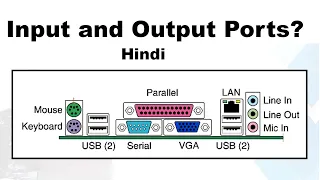
is also very important because this serves as a link between a plug or connector into a port or jack students do you still remember the definition of hardware when we say port this connects external devices to a system unit there are many peripheral devices but they fall into three general categories we have the input devices output devices and storage devices so what are the different types of input devices here are some of the commonly used input devices we have a keyboard computer mouse graphic tablet touch screen microphone webcam and joystick or game controller every time
you are in your online class and your teacher asks you to answer a specific question which peripheral device will you use so your teacher could hear you it's a microphone students do you love computer games if you do may i know what game you enjoy the most do you think it would be better to use a joystick or a game controller for a better gaming experience here are some of the common output devices that are still being used today we have the speaker headphone monitor printer and a projector imagine yourself listening or watching a movie
using a surround sound speaker i could just imagine how enjoyable it could be at present monitors are evolving fast as users are also looking for high definition monitors not just for their televisions but also for their computers just imagine yourself working gaming watching hd movies on ultra high definition screen i am sure you too will be very amazed at the beginning of the pandemic i even remember 3d printers were widely used to create personal protection equipment face shields for our front liners thank you and a big salute to the 3d printers our last output device
is something that i am sure you've seen in school it is a device that your teacher brings to the classroom if he or she has something to present like a powerpoint or a video presentation to the class do you have any idea it is a projector aside from the input and output devices there are also other devices inserted or plugged into the computer system to store data images music videos and other files these are what we call storage devices so what are some examples of external storage devices that are commonly used at present we have
optical storage flash drives and external hard disk drives so do you know which one has the largest storage capacity among the three the answer is a blu-ray disc did you know that back in 2017 kingston released the world's highest capacity usb flash drive called the kingston data traveler ultimate gt and can you guess its storage capacity it's 2 terabytes and that is so huge but of course everything comes at a price storage devices with higher capacity are more expensive as mentioned a port connects an external device to the system unit while the connector is part
of the cable that you plug into the port remember that i mentioned that most ports are now switching to a usb type of port what if i ran out of usb ports where will i plug the other peripherals you will need a usb port hub students at this time it's time to check what you have learned from our topic let's have a short review today i want you to choose the letter of the correct answer in each question or statement you will be given three seconds to answer are you ready let's begin [Music] [Music] [Music]
[Music] [Music] [Music] [Music] [Music] [Music] [Music] students how many points did you get i'm sure you all did well in this review and because of that a big congratulations to all students for this episode's assignment i want you to think outside the box when you answer this question that i will be giving you if you can create a peripheral device for a computer what would it be and how will it function let me know your thoughts just post your answers on our facebook page www.facebook.com tle with teachermike and do not forget to write your name
and the name of your school and always use the hashtag tle with teacher mike i cannot wait to see your answers because i know that some of them will be very interesting and intriguing well students that's all the time that we have for today i do hope that you'll learn a lot from our topic next time we will discuss one of the most commonly used input devices and that is a keyboard once again i'm teacher mike your grade 9 tle teacher leaving you with a code from bill gates i think it's fair to say that
personal computers have become the most empowering tool we've ever created they are tools of communication they are tools of creativity and they can be shaped by their users who knows you could be the next bill gates thank you for watching deb tv and i'll see you next time [Music] you