welcome to shelter Le skills 2024 I'm Lauren reel and I will be talking about shelter Le for Napa cart it's shelter Le is a web- based tool we use to track animals through every stage of an instent incident it's still being developed there's a big update coming in late February 2024 um that's a month away so some of the things I'm talking about right now are going to be changing in the new update there's going to be exciting new addition there's going to be a Veterinary module and a number of the changes will be with
logging in on the the new uh version of Shel is going to have a new URL and a new incident selection procedure so we'll send out some new training materials once that update goes live this video is a refresher it's an introduction do not let it supersede the specific training in the S so the stand standard operating guidelines for your area so shelter officially uses the Chrome browser unofficially I've used Firefox successfully that's our current URL for now you do need credentials to use shelter Le if you do not have any yet contact me and
I will work on getting you set up and we currently use test in instant for practice always later in the video I say we always use test instant I meant we always use test instant for practice there three main modules within shelter Le hotlines primarily used by hotline operators that's a remote role dispatch is primarily used by the shelter Le technician that's an in-person role at the command center and shelter is primarily going to be used by the intch take technician that's a person at the shelter who might be helping input um animals that were
brought in by their owners or by First Responders so here's the login screen for a shelter Le it's very common to get an error message the first time you hit log in don't worry about it just hit log in a second time and you'll usually get in then currently we select incident we always select test your login screen will be slightly simpler than mine but you can still select incident so here is the shelter Le homepage you can confirm your intest here and in the UR L above as we mentioned earlier the three main modules
are hotline dispatch and shelter you can also will also be using search generally most of you will not be using reports or admin and admin's actually I think going to be just disappearing in the new update in February so starting with the hotline module if I am a hotline operator in this scenario um I have the paper version of the hotline log next to me and some um the hotline s so next to me to help guide me this during this process but when I'm inputting into shelter Le one of the first decisions I have
to make is is this an owner calling non-owner calling or first responder for our sample we selected non-owner calling our non-owner calling is June bug 555 555 5555 June bug is calling about her neighbor's animals she's been taken care of we do have the owner's information from her so we can go to the ad owner page some uh shelter users get thrown by this use existing owner field it exists so you can scan and see if this person already has entry in shelter Le so you can enter a name there say it is is oh
it can't be Suzanne we don't have a suzan so we're going to have to just go down and start filling in her name directly without using the existing owner field if we were to be using um the existing owner field say Barney Rubble he already has an address given so you can check with the caller is this the Barney rubel at this address is this still the correct phone number to reach you but instead we are going to be entering Susan bird for hotline foric cart um we generally don't ask you to ask for driver's
license or email at this time because it is some information we can get later on when it's less time sensitive moment um here we are looking for trying to move through these fields fairly quickly if you try to fill out every field in shelter Le the call can take 10 minutes in most circumstances in early evacuation that's going to be too long so the search for contract contact address gives you the chance to fill in the address as you're given and then it matches it to a confirmed existing address so Shel shelter will not let
you enter a fictional address it says it sounds like you're looking for this address please confirm you can confirm and move forward to the next step which is animal name species animal information so this uh caller is calling about her neighbors Birds we're not going to care about color for these hens requested service for the birds is shelter in place she doesn't think that they're going to be evacuate reasonabley um they're not aggressive they don't need an animal control officer they are confined as far as we know they are not injured no animal notes or
medical notes at this time for these birds so number of copies is what we use for animals that come in herds or flocks instead of having to enter six individual entries for six Birds we can say it's a bird there's six of them but there's also at this house a dog this is a large dog it's a gray dog and they're hoping to get this dog evacuated again this dog is not aggressive does not require an animal control officer is confined is not injured only one copy of this dog last scene can be significant especially
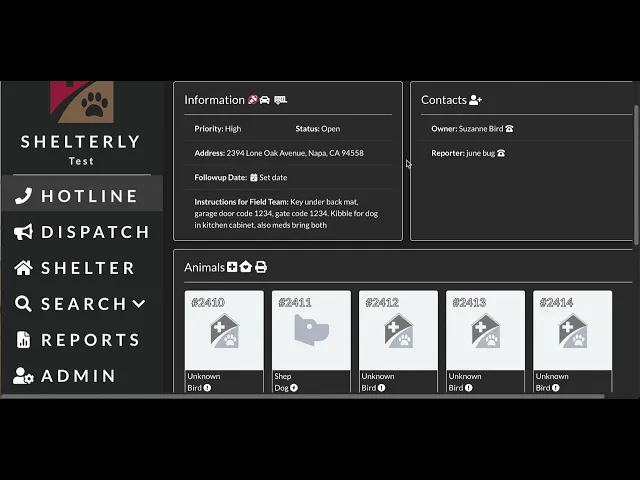
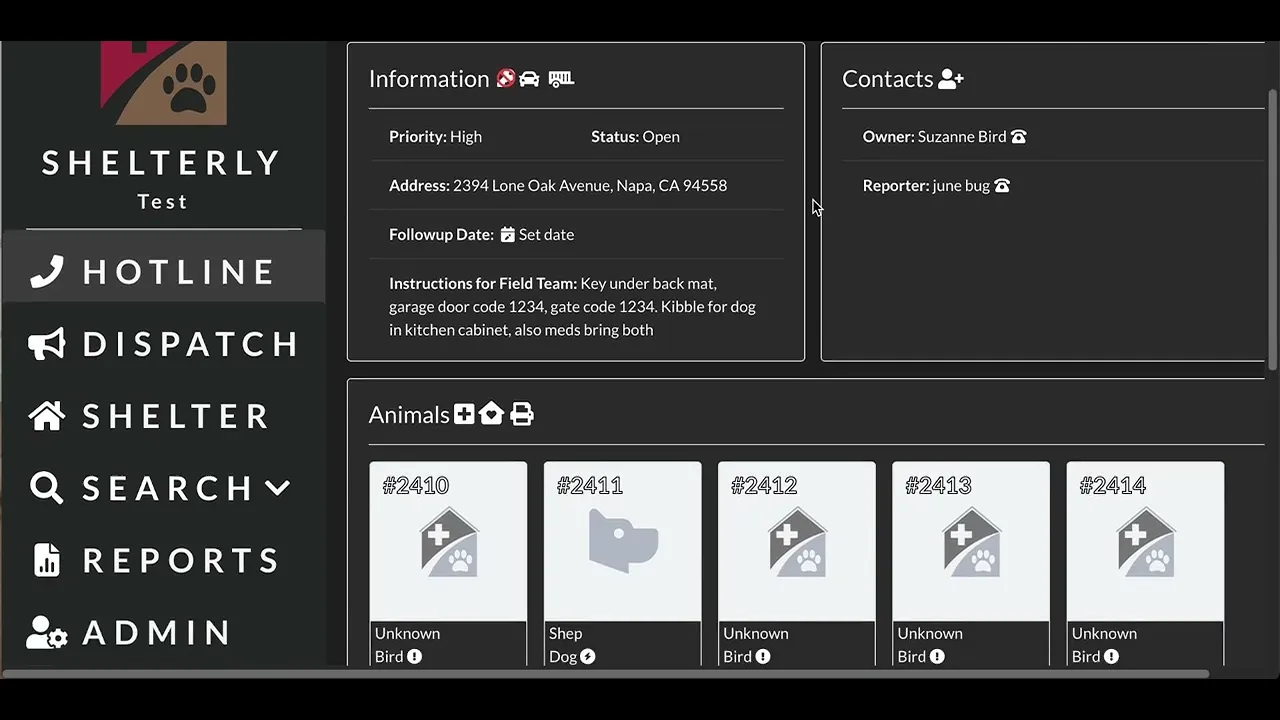
for shelter and place animals it helps us create the schedule we usually V visit our shelter and place animals every other day so knowing when they're last visited can give us an idea of when to start the the care schedule for them so we have the two contacts the caller and the owner the six hens the one dog and this is the final page is the address the same as owner the you know we we got the owner lives at 2394 we want to confirm that's where the animals are that's where our team should go
if not we can put in a different address for where we are responding to in ficart we don't currently change priority unless we're talking about an injured animal um an injured animal would go to highest but at this time that kind of triaging decision we leave to the command center not the hotline operator instructions for field teams very important for um where are the animals where are the keys what is the code is there a gate the really essential information they need to know about accessing the property so ker back Matt so these four questions
are pretty important although for forc entry permission not so important for Napa cart we don't do forc entry whether or not we have permission you can ignore it or you can click it it should not make a difference key at staging if the owner didn't have a key conveniently under the back M or we able to drop off a key at staging which is usually at Horseman's we would click that there so that the team ASR team knows to pick that up on their way out accessible means can a Prius make it up their driveway
how rugged is access to to to this property turn around means can a truck with a trailer turn around if we're sending out a team to evacuate a couple horses and they might swing by to also pick up this dog is that team going to be able to access this property safely so we've created this service request it's very important you know double check everything's correct you can still go back and and re-edit it at this time and you've created the this um service request number 2245 also known as the r number request for Animal
Service number um you write that that number down on the hotline log next to you the piece of paper um at this time and we also our procedure is to um the hotline operator will be in a WhatsApp group with the command center and they'll text this service request number over the message it over the the WhatsApp group um with some indication of urgency if there's an injury um this might this text might see say you know 2245 six H shelter in place one dog Evac the command center will also get notifications through shelter Le
but we just want a little bit of redundancy in our Communications so nobody slips through the cracks and that is it for creating a service request in shelter Le later on we can go in and add photographs add more notes flush this information out but for getting the most key information to command as quickly as they as we can so that ASR can get the information they need to roll that's the basic gist of it before we leave this page I want to point out download service request data as gojon the hotline operator won't use
this the only person who really uses this is the Sopo Tech in the command center they'll download this file and then use it to populate their Sopo map that they're working from so it's a good button to knowwhere to find if you have have aspirations to be as sartopo Tech in the command center okay so now we're going to talk about the dispatch module and the role of the shelter Le Tech who's the person in the command center who primarily uses the dispatch module the Shel Tech's R is pretty detailed there's a lot of little
steps involved so you're going to definitely want to be using the Shel Tech checklist both to study the role in advance and to perform the role in the command center this is going to be a little bit of a quick gloss over this what the shelter Tech does with um a demonstration of what we do in shelter Le of dis of um batching the service requests creating the dispatch assignment and then resolving the dispatch assignment when the ASR team has returned broadly speaking speaking there's four um sections areas for the shelter Le Tex role the
first is just readying um the outside of an incident you create the incident in shelter Le we won't go over that today because the technique for doing that is changing with the update next month we create and maintain the command center WhatsApp group we sit next to um the Sopo tech make sure that your workstations are you know convenient to each other so you can work closely together and when the new service request arrives it's a shelter Tech role to make sure that the S is seen it make sure that there's a print copy available
for um command people in the command center um you might be emailing it to people um who are maybe with C who might not be in shelter Le but need access to the to the the service request the second part of the role is deploying this is using shelter Le to batch the service requests assign them to as ASR team members download that um dispatch assignment print it out and hand it physically to the ASR team or email that PDF to the comm's team if they're going to be re radioing it to a team that's
in the field the third part of the role is debrief when the ASR team returns you get the verbal rundown of how things went where the animals are now if they were able to be found and then you would up dat within shelter Le with that information and then the last part of the shelter text role is backing up and monitoring we all know that power and the internet and shelter Le itself might not be stable during an instant Technologies can be unreliable under that that kind of stress so we're making sure throughout your your
shift in the command center to be backing up the um the the animals the owners the service requests and the dispatch assignments and we'll use the search function to do that and I'll demonstrate that in a moment and then if handing off to another shelter Le tech make sure that they know about any open service requests any active dispatch assignments all right we're back in shelter Le now in the dispatch module but as one of your first steps as a shelter Tech when a new uh service request comes in you're going to pull up the
service request itself if you've been given just the server request number you can search for it this is the one we just created 2245 um you're going to be downloading that printing it to make sure that the paper copy available in the command center you might be emailing it to somebody else involved who needs that information um and then you are going to make sure that you know the Sopo Tech and the Ops lead the instant command the people in the room who need to know about it have that information and they will after Consulting
it come and sit I stand behind you or sit in the chair next to you and look over your shoulder at the map in shelter Le to decide how to handle that that service request when you go to the dispatch module this home screen reflects open dispatch assignments in our test module there's one team out for this horse um it's good to familiarize yourself with what the icons stand for you know red with a exclamation point just means reported um with a little lightning rod reported evacuation requested with a little house reported sheltered and place
requested um yellow it's been visited it's being sheltered and placed in place unable to locate is the little question mark and Brown X I think is closed uh so you will be going to deploy teams and give it a minute again to load and It Centers roughly where you are you'll notice as you zoom in on the open service Quest here what's on that little map screen is going to be what's on the list down below so the more you zoom in the more manage what you're looking at gets um by coincidence we've got 2245
at the top right now sometimes if I you know am having trouble locating a service request I'll just use my browser search function and find it in the list so we have selected this 2245 service request we just had previously created and we're the instant Commander the Ops lead are going to be looking over your shoulder and trying to decide who what's a manageable dispatch assignment to create what's the right team to match to that dispatch assignment in this case it's they're going to be checking on the six Birds but evacuating the one dog the
one evacu one dog is the priority at this time the Llama over here also needs an evacuation or has been requested an evacuation I think we're going to batch those two together which we have now done merely by clicking on them um you scroll down that llit appears there as well and then we're going to assign team members where this is team two and the people who are telling you you know what assignments they want are saying it's going to be Michelle and Jen our team too to take care of these two service requests it
doesn't need an ACO and we're going to hit deploy this has created the dispatch assignment summary with the information the team will need for these animals you are going to print dispatch assignment um in this scenario if this team if Jen and Michelle are still at command you're printing this dispatch assignment um the Sopo Tech is also going to provide a printed out map to join the printed dispatch assignment and you're going to staple them together um the current policy is also to highlight some of the key information and then hand it to Michelle and
Jen if they are already in the field you're going to be downloading the dispatch assignment which you do also by hitting the print dispatch assignment uh logo that will help you download it and then you can email that PDF to the comm's team the radio person will um communicate that new dispatch assignment to a team that's already in the field then while the at ASR team is out doing that job you're going to be doing the backing up the U monitoring the board processing the new uh service requests that are coming in but we're going
to do a little time Skip and now the um the team is back and we're going to resolve this dispatch assignment if you're working on another screen and they come back and you need to find it you can search open dispatch assignments we only have two it's pretty easy to distinguish them this is the one that we had just created so we are back at that dispatch assignment screen so Michelle Jen were you able to complete this dispatch assignment if they're un unable to complete it you know they couldn't get there by the road something
interfered and that just weren't able to get to this property at all you would hit unable to complete and then um that's point you would hit save it takes a little bit of study a little bit confusing this difference between save and close and um just just save save and close means every service request in this dispatch assignment has been addressed well whereas save means we're not done here and that every um service request being able to be addressed includes um unable to locate like that is that is a a save and close situation but
unable to complete would be as just a save situation in this case they're able to confirm that the birds are um oops so they able to evacuate Shep the dog they brought him to test while we're doing practices we always work with the test version of the animal shelter and um we're not going to select a room at this time if they have given you what room they ended up in you can update that there otherwise the um Shel intake technician at their shelter can update that themselves um but they were able to confirm that
the six birds exist they're there they're now officially sheltered in place they they've graduated from reported to sheltered in place so we're going to update them as well and confirm the date that this was completed and we always schedule we schedule um shelter and place fds it's usually on every other day um so we'll go ahead and schedule that for 2 days from now on the 21st it's important to do that because it will automatically pop up on the map again on the 21st visit notes yeah provided food and water for hens more in garage
evacuated chip to that second sentence was not necessary but what the heck um they didn't do forced entry they did contact Suzanne bird they contacted her today at 9: um for the Llama they were able also to evacuate the Llama to test where do you take llamas let's say it's a For Youth and uh somebody who's more familiar with that can correct me no followup needed for an evacuation um so in this case all the open service requests in the dispatch assignment were able to be addressed um so we are going to save and close
this dispatch assignment and That is the role of the shelter Le Tech there's um lots of different possible scenarios definitely need to um spend some time pondering the difference between save and save and close because that is a little bit of a tricky distinction but I'd like to move right on to doing the download backups we use the search field for that so okay we've gone to the search field and selected animals this has pulled up all 358 animals currently in the system to back this up we would hit print all which will take a
minute or two um but we'll generate a PDF of all of those animals um and you would download that to your device and then you do the same thing with owners and in this case you opponent do want for both for owners and then the second one for reporters and then for service requests you want to save all open when possible and then at the end of the shift you can do a more complete backup of all the assigned all the closed all the canceled but you during the shift you want to prioritize keeping updates
of all open service requests so this is currently a search for all open service requests at this time there's 95 I'll go ahead and get it to generate the PDF hopefully it'll be a little bit quicker than the all of the animals currently we just have the shelter Le Tech save all of these to your device um which you do want to make sure you have plenty of space on your device if you're going to be creating all these backups the your shift we're working on a plan to have maybe ex external storage you can
plug into that you can leave at the command center so You' hit okay I've got all of the open service requests downloaded at this time and then oh I should have demonstrated uh downloading all of the open dispatch assignments because that is a quick one as we are now down to just the one so yes um that is the role of the shelter Le Tech managing the um batching of the open service requests preparing the dispatch assignments for the ASR team getting the report from the ASR team on the return turn and resolving the dispatch
assignment and then um backing up backing up backing up and monitoring to make sure that all of our records agree and next we'll look at the shelter module okay I've clicked on the shelter module and we're going to be practic practicing for a while in a different role that of the intake technician the shelter Le user at the shelter our first stop is going to be test Napa County Animal Shelter because we're going to go check on Shep the dog that we brought in during the last section Shep is going to be a roomless animal
at this time because he's been assigned to the shelter but hasn't yet been assigned a specific location he's going to be on the far right of the sliders where we keep the new guys and we can just click and drag him shef we put him in room six that's down here yay Shep well done but there's going to be more maintenance for Shep to be done so I'm going to pull up his file I'll do it using his number in the animal search function you could also search for him by owner name if you hover
over here it'll pull up the owner name but we'll search 2411 hey sheep so as I spoke about during the hotline portion um you know hotline's going to be trying to be thorough and calm and reassuring but also not try to get every bit of detailed information that we might want to get eventually in the interest of time but now that Shep is at the animal shelter we probably want to fill out his uh file a little bit more thoroughly so shef um we either using information we've observed or we want to contact his owner
and get more information or just double check the information we have is correct huh he's an Irish Wolfhound big gold gray guy he's male he's senior he's fixed he's aggressive no ACO required all of this we have found to be true for him um now the hotline operator didn't get the name of the meds but you have the bottle you might add the medical information the the medication information right there um we might now have him scanned and have the microchip number to add to his file we might not want now we even want to
put in a couple of pictures that either we take or that his owner has sent to us to make sure that we are identifying the correct dude and then we can save we also might want to improve uh the anim the owner uh file for Suzanne B bird Shep's person that's one that we were pretty quick and Breeze through in part because things like email address and driver's license information was going to take a couple extra minutes we didn't want to spare during the hotline portion but now that would be good information to get driver's
license is one of the tools we use to make sure we're releasing the the an to the correct person so if you've got Suzanne on the phone and she has a minute to spend the time with you you can get the driver's license information you can get her email you can improve this file um it will require you to enter a change reason if you're going to save changes here just to you know keep track of what the changes have been so I'm going to say that's why we changed that owner information so that we
have some record of why things are happening within shelter Le um there's another way thing that you want might want to be interacting with in contact in in owner information which is the contact log this is the um note that we added during the um the the district dispatch assignment resolution at the command center but now we might have contacted her again today yeah if there's something that she wants want us to make sure that he has or concerns that she has they might be added into the owner contact note we'll be saving that and
that will become part of her file the times we've interacted with her what she has to say the key things that we've told her okay so I think Shep is pretty well squared oh no there's one more thing I wanted to point out about sheep uh let's see if we can go directly to his file there um like I we did earlier we put him in room six if we decide that we want to move him this is going to be the um the screen that we do it from the animal information rather than the
shelter information update information here he's in room six of the test animal shelter we might decide actually his neighbor is kind of stressing him out kennel 7 looks like it'll be a quieter spot for him removing him to dog kennel 7 and update it there and hit save so that is Shep for now I'm going to go down to test Napa Valley Horsemen's Association to go through a little bit of the intake procedure at the shelter it's a very similar role to the hotline operator or this very similar um page that you'll be working from
again you'll want to decide you know is this animal coming as a walk-in from the owner Walkin from non-owner which might be a good Samaritan or a neighbor or a first responder intake from dispatch assignment this is with the ASR team is arriving with an animal you might you know intake there there's a certain amount of overlap where you can intake at the shelter or we can assign at U from the dispatch assignment back at the command center um but both methods will work going to say again it's a non-owner it's going to be a
similar page like I said to the hotline operator module you can add the reporter information and then um fill it in create a file for that new animal so let's see I'll do a quick Walkin see Barney rubel make so we use the existing owner field bar Barney Rebel art exists in our file Barney's evacuated with us before you double check Barney is this still your best phone member to reach you the the correct address please give us information about your animal say it's a donkey skip the added information at this time and just save
and finish we now have this unknown donkey at test naap Horseman's Association um and he's going to be currently another roomless animal and again he's going to be on the far right of our slider unknown donkey he's actually who knew he's friends with bubble the horse we're going to add him to that room there he's all set and then again you can go back and you know pull up his file and add more detailed information give him a name and start recording his care information there um again I have admin privileges so there's going to
be some features you see on my screen that update shelter is not going to be a button that everybody has on their screen but the shelter technician will likely or the the intake technician will likely have permissions to do some editing um because we they will necessarily want to to do some um management you know this is not actually the layout at Horsemen there's going to be more than three rows there's going to be more than four two or zero rooms per row so to do some architectural rearranging you can add a building and you
can add rooms within that build building say pen [Music] one this is not necessarily going to be the layout that is this is certainly not going to be the layout that is used by the intake technician at nap valy Horsemen's but it is an example of how it might be done so go back and test na Horseman's Association we've added another row with two two rooms we can start just uh assigning some animals to their own pens get them out of that roomless situation and get this shelter organized so let's see we've gone over intake
for shelter like I said very similar to the hotline interface if you're familiar with one you're going to be familiar with the other andake from dispatch assignments going to be let's see I kind of gave Lisa another animal okay so that all right this dispatch assignment has a cat and two horses they're reported so during the shelter Tech component I went through you know resolving A dispatch assignment and in that case the the shelter Le Tech would be moving these animals from reported to sheltered it is also possible to be doing it through through this
module at the shelter itself and it won't Sheltering an animal here it won't resolve the dispatch assignment it shouldn't mess up the um the steps for the Shel shelter technician if the animal's already been officially sheltered in shelter Le but it also isn't necessary to do at this stage if if the animal has already been dropped off and the shelter technician the intake technician at the shelter hasn't you know except redefined the animal status within shelter Le before Asar gets back to the command center and updates with the shelter Le Tech that is also very
fine so in this case we're not taking the we're not changing the information for this cat because we're not taking the cat at this shelter we're taking in these two horses we're going to put them a sheltered test Horsemen's Association they're in the same pen we're saving right okay so we've gone over intake we've gone over assigning to Rooms oh print Animal Care schedule is going to be an important step for um let's see for the intake technician I'm going to go back to Shep for this pull up his Animal Care schedule so this button
up here is print Animal Care schedule I'm going to select it and we can see what that Animal Care schedule looks like so this would be something that you could print and attach to the pen of the specific animal and it will give you the owner's name some basic information and it has ways for you to mark it with a pen visibly and you can see like if we' printed this out before we' got back in and updated by the um about the species and and stressed by noise it would be less complete now it's
more complete and there's spaces for the carers at the shelter to be filling this this care schedule out on a daily basis and um reuniting animal is you know my favorite button at the end of the instant or when the owner is in a position to collect their animal safely you can hit reunite animal and Suzanne bird can have her Shep again Tada thank you for going through shelter Le with me a couple things that I would like to stress again as we close we can practice in shelter Le we should practice in shelter Le
um knowing how to log in knowing what your login credentials are having some familiarity with the way it's laid out will help you enormously during an incident and help you reduce stress in anticipation of an incident and I mean I think all Shel users should be logging in you know monthly doing a little bit of practice on a regular basis and and I've found with my own practice that um saving myself that a minute or two Gap like shelter is wonderfully intuitive it's really well-designed most people if you haven't spent any time with it you
can come to it and figure it out we found that during the Maui incident um when shelter Le was was was used and people were able to take to it very quickly but if you are you know using Shel and somebody asks you how do you find the contact log it is so much nicer to I've spent some time with shelter Le and know like oh I click on suzan bird there's a contact log we can edit it this way rather than like oh I know that is something you can do let me think on
it for a minute and poke around so practice on your own time come to Tech workshop and practice with others bring us your questions your concerns and um thank you for being part of Napa cart and thank you for studying shelter Le with me