did you know that most of the time spent by data scientists goes into wrangling data more specifically in feature engineering which is transforming raw data into high quality input signals for ml models but this process is often inefficient and brittle well i'm priyanka and in this video we will identify the key challenges with feature engineering how vertex feature store helps solve them and see a quick demo now what are the key challenges with ml features the first is that they are hard to share and reuse across your different steps of the ml workflow and across
projects which results in duplicate efforts second is that it is hard to serve in production reliably with lower latency and the third is that there is an inadvertent skew in feature values between training and serving usually which causes your model quality to degrade over time that is exactly where vertex feature store comes in it's a fully managed and unified solution to share discover and serve machine learning features at scale across different teams within your organization and it also helps reduce the time to build and deploy your aiml applications by making it easy to manage and
organize your ml features in one place it makes the features reusable easy to serve and avoids skew now let's see how to set it up in the console in vertex ai we see the feature tab to get started let's click on this documentation and explore using feature store section now the first thing you need is a feature store at the time of this recording feature store is in preview so just know that depending on when you're watching this there might be more options and updates that you would see you cannot create a feature store in
the console so let's use this sample notebook to learn how to create it using the sdk this sample uses a movie recommendations data set and the task is to train a model to predict if a user is going to watch a movie and serve this model online we will learn to import our features into feature store serve online prediction requests using the imported features and then access imported features in offline jobs such as training jobs to set up we installed some additional packages set up our project and authenticate our google cloud account step one is
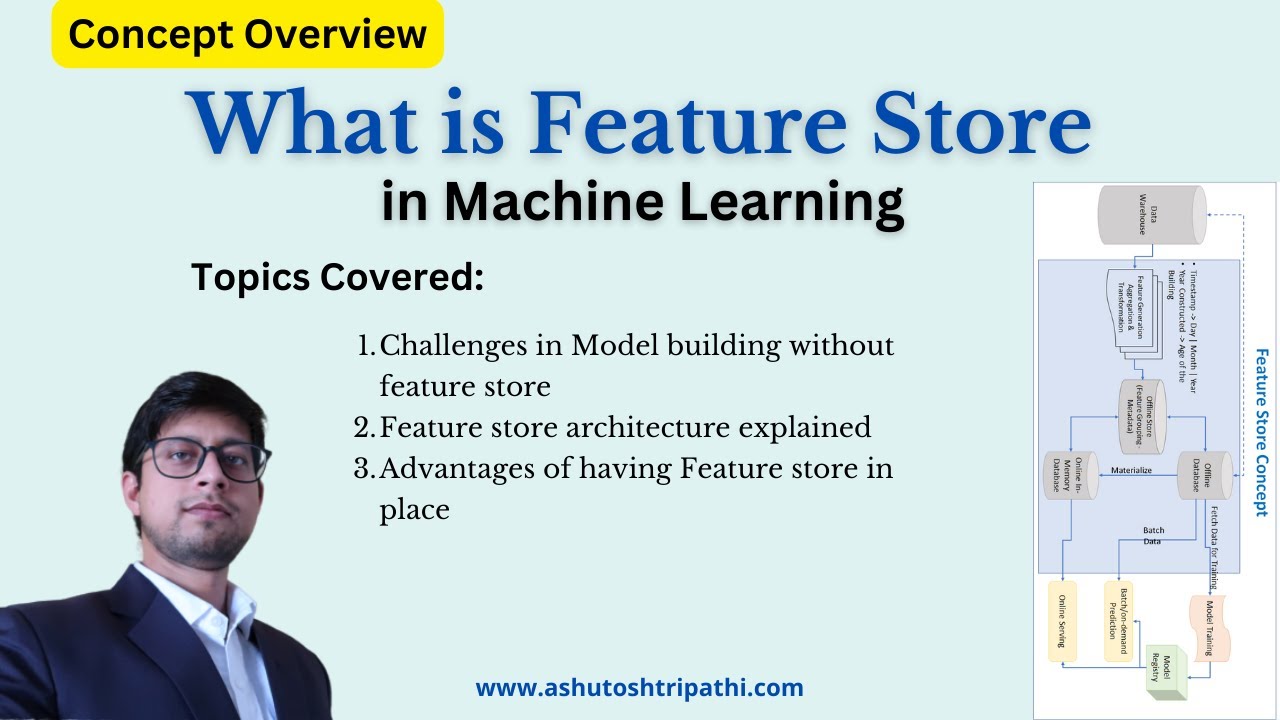
to create data set for output we are creating bigquery data set to host the output data input the name of the data set and the table we want to store the output later then we are defining constants and feature store related imports here's how the vertex feature store actually works it organizes the data with the three hierarchical concepts feature store which is the place to store your features entity type under feature store describes an object to be modeled real or virtual and feature itself under entity type describes an attribute of that entity type now in
our movies prediction example we will create a feature store called movie prediction this store has two entity types users and movies the user's entity type has age gender and like genre features the movie to entity type has the genre and average rating features the first thing we do is to create the feature store the method to create a feature store returns a long-running operation that starts an asynchronous job this may take about three minutes or so and once the feature store is created we can see it in the console and we can create our entities
in this store i'm creating two entities here user and movies we can also create features within these entities here i've created age gender and light genres under user and title genres and average rating under our movies if we want we can search through and filter on these features now we need to import feature values before we can use them for online offline serving let's head back into our notebook to see how to import features in bulk using the python sdk we defined the data source the bigquery table or cloud storage bucket and the destination feature
store entity and the features to be imported you do this for both users and the movies entity now for a latency sensitive service such as online model prediction we would need to serve our feature values online for example for a movie service we might want to quickly show movies that the current user would most likely watch by using online predictions you can read one entity per request or even read multiple entities per request now if you need feature values for high throughput typically for training a model or batch prediction then serving feature values in batch
is a better idea than serving online consider this example if the task is to prepare a training data set to train a model which predicts if a given user will watch a given movie then to achieve this we need two sets of inputs features that we have already imported and labels which is the ground tooth data recorded that user x has watched movie y it also includes the time stamp which indicates when the ground truth was actually observed as labels and feature values are collected over time those feature values change the feature store can perform
a point in time lookup so that you can fetch the feature values at a particular time it's literally the data version of going back to a previous version of your source code in github imagine freezing the state of the feature values at two different time stamps and that was a quick summary of vertex feature store just know that at the time of this recording the feature store is in preview so chances are there are more options and features available when you're watching this video to explore more up-to-date information check out the documentation that i've linked
below any questions let me know in the comments or on twitter at pee vergaria







![[English] Machine Learning infrastructure using Feature Store and Vertex AI - Merpay Tech Fest 2022](https://img.youtube.com/vi/2o7I7KKokZA/maxresdefault.jpg)