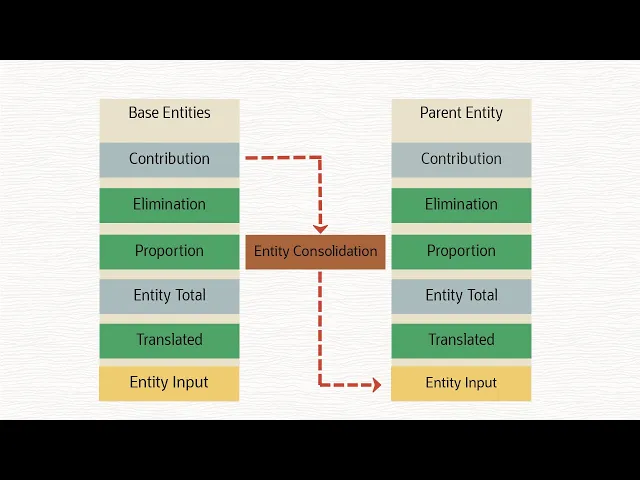
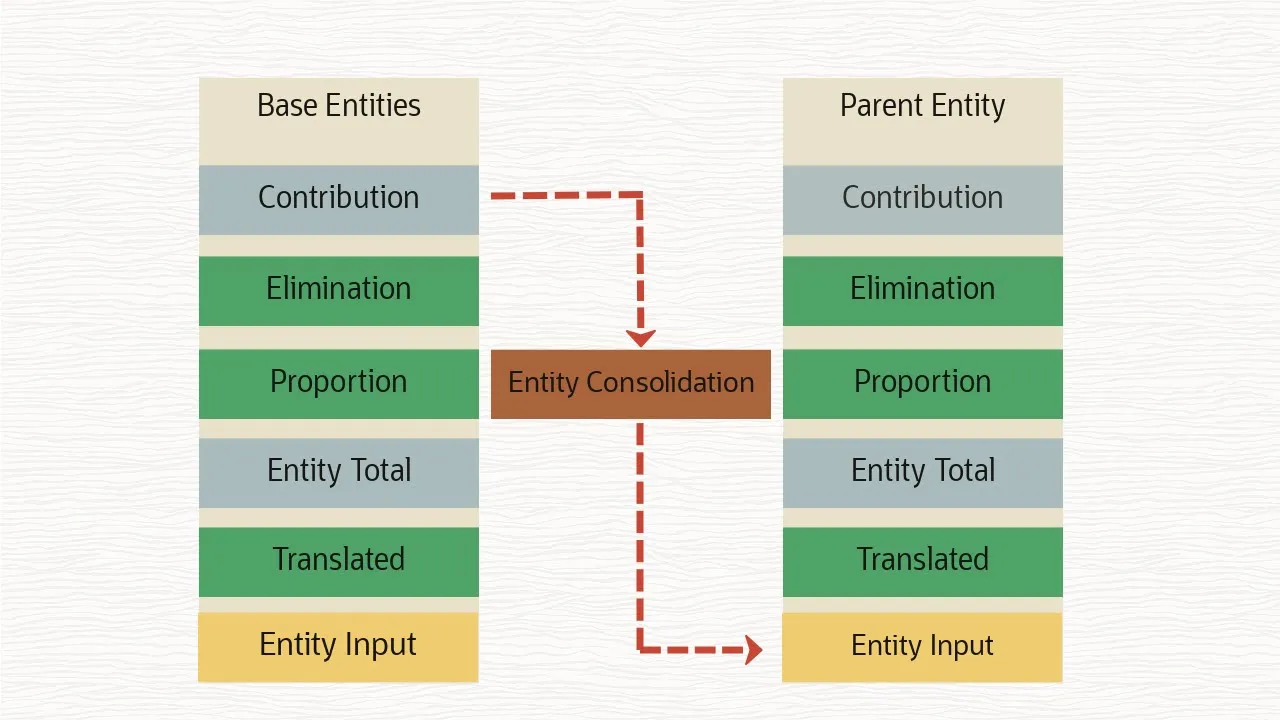
Consolidation is the process of gathering data from descendant entities and aggregating the data to parent entities for reporting purposes. To facilitate the consolidation process, Financial Consolidation and Close includes a Consolidation dimension. The Consolidation dimension includes the following members: Entity Consolidation is where data resides for consolidated entities and is only available for a parent entity.
Entity Input is where data is entered directly to an entity. Entity Total is the aggregation of Entity Input and Entity Consolidation. Proportion is the proportionalized data for an entity, reflecting the application of a consolidation percentage to the source data.
Elimination is where intercompany eliminations are calculated. Contribution is the consolidated result of a single entity for a specific parent entity. The consolidation process starts with data being entered at the entity input level of the consolidation dimension in base level entities.
Data is then translated for base level entities from their entity currency to the parent currency. Data at Entity Total in the parent currency is proportionalized, intercompany eliminations are calculated, and Contribution is the consolidated result of a single entity for a specific parent entity, including the aggregation of proportion and elimination data. The sum of the children’s contribution becomes the Entity Consolidation for the parent and then the process is repeated for each level of the entity hierarchy.
You can run a consolidation from Business Rules. Select your POV and launch. You can also run the consolidation rule from any form that has the rule added to it.
When you select a base entity to consolidate, the system performs the calculation for the entity only. It does not consolidate to its parent entity. When you consolidate a parent entity, all descendants of the parent are also consolidated.
You can also run consolidation from the predefined Data Status form, which contains entities in the rows, and periods in the columns. Select Action, Business Rules, and then Consolidate. Select your POV and click Launch.
The calculation statuses for data are OK, Impacted, No Data, and System Changed. If the status is Impacted, data has changed since last generated, which requires a reconsolidation to change its status to OK. In this example, we ran a consolidation for North America for February, so all subsequent periods are impacted.
If you reconsolidate for a period within a year, April in this example, the system will consolidate the impacted data for all periods up through the period you have selected. If you have an entity that has a status of System Changed, it will only consolidate the period you selected, and not any previous periods in the year. When you run a consolidation for the last period of a year, it automatically impacts the first period of the next year.
When you consolidate data, you can monitor the status of the task from the Jobs console. You can use the Force Consolidate option to force consolidation to run on selected cells. For example, if the consolidation process did not properly complete due to an external factor, you can use the Force Consolidate option, which consolidates all entities with data.
To learn more, visit docs. oracle. com.