So uh I hope u in the first class right you might have uh uh you you got the understanding what the this boot camp all about what kind of a topics we are going to cover uh during this boot camp right it would be uh more than three months boot camp right so let me take you through my profile and then we'll start our first class. All right. So uh like myself Deepak and uh I do have around uh more than 14 years experience in IT industry and uh currently I'm working with one of the
organization like uh in in 14 years uh I think I have worked with uh five to six organizations right and some of local to India and uh multiple companies like they are multinational companies Right. So I have wide variety of experience working in IT starting from uh you know like a net developer. Uh developer basically develop an applications or website for example uh let's say any e-commerce website maybe right. So you are accessing you are going there you are uh browsing the products you are putting the order you are placing the order right. So that
is like somebody has developed right and uh That is basically an user interface the one that you are able to uh use on your mobile or laptop right that's a user interface and um and there is a back end basically you know the codings and then database right so those are the full life cycle like there are a lot of things are there when you talk about any application development so I started with application development as a net developer and then I move to business intelligence right so when we talk about business intelligence meaning you
have lot of data and you are doing some transformation right and then you are generating insights out of it for example let's say uh you are working for a sales company uh the product sales company their their business is around the world right uh they are selling lot of products so um maybe a monthly or weekly or let's say a quarterly they wanted to know how their product sales are going on in which country they which product is uh getting sold more which is less all those metrics information that they wanted to get right so
they have all the data everyday customer is placing order right so on top of the data they are going to do some transformations they will uh create the reports so that your leadership team can look into it how the sales going on across the uh country right so that's the BI BI like business intelligence you're trying to uh generate insights Out of the data right so that's a BI so from net developer I move to a business intelligence where I was working as a data analyst or data engineering right and from last five to six
year I'm working as a you know the cloud cloud uh data solution architect or maybe you can say consultant right and um you know like cloud is nothing but somebody is sharing or they are sharing their storage networking security uh compute over the internet that's the cloud right I mean uh let's say you are working on any software on your computer so you need compute storage networking security and everything Right? So that is something somebody is sharing or selling those required compute, storage, networking, security over the internet that's a cloud. And today there are many
organization they they sell those kind of resources. Amazon, a sorry AWS, that's Amazon, right? Azure, that's a Microsoft, right? GCP. So there are many companies they are basically selling storage, networking and uh you know the computing uh security everything over the internet. So you don't need to manage all those things at your computer. You are just going to pay for what you're going to use that's the cloud right. So on the cloud I do have almost 10 years of experience working on cloud and specifically the cloud services provided by Microsoft which is Azure right so
this is overall a kind of a experience that I have uh right and I worked on multiple you know like services multiple technologies but they are all mostly falls under Microsoft stack Okay. So let's get started with what we are going to cover during the boot camp. Okay. So the first service that we are going to discuss which would be SQL server right and uh SQL server itself will take more than a month to to cover all the capabilities all the you know the topics understandings uh will will have homework as well in between right.
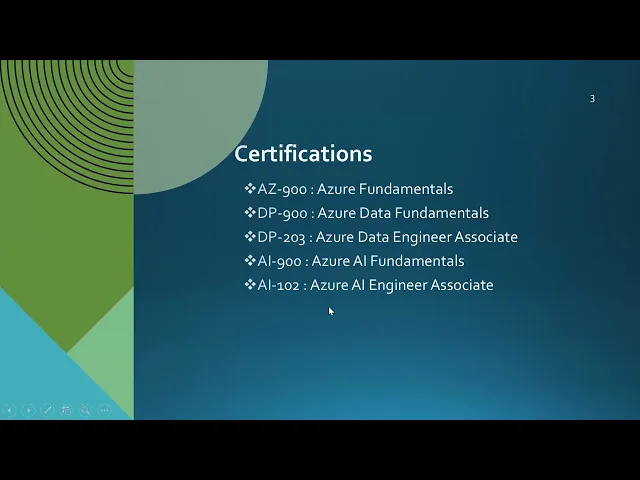
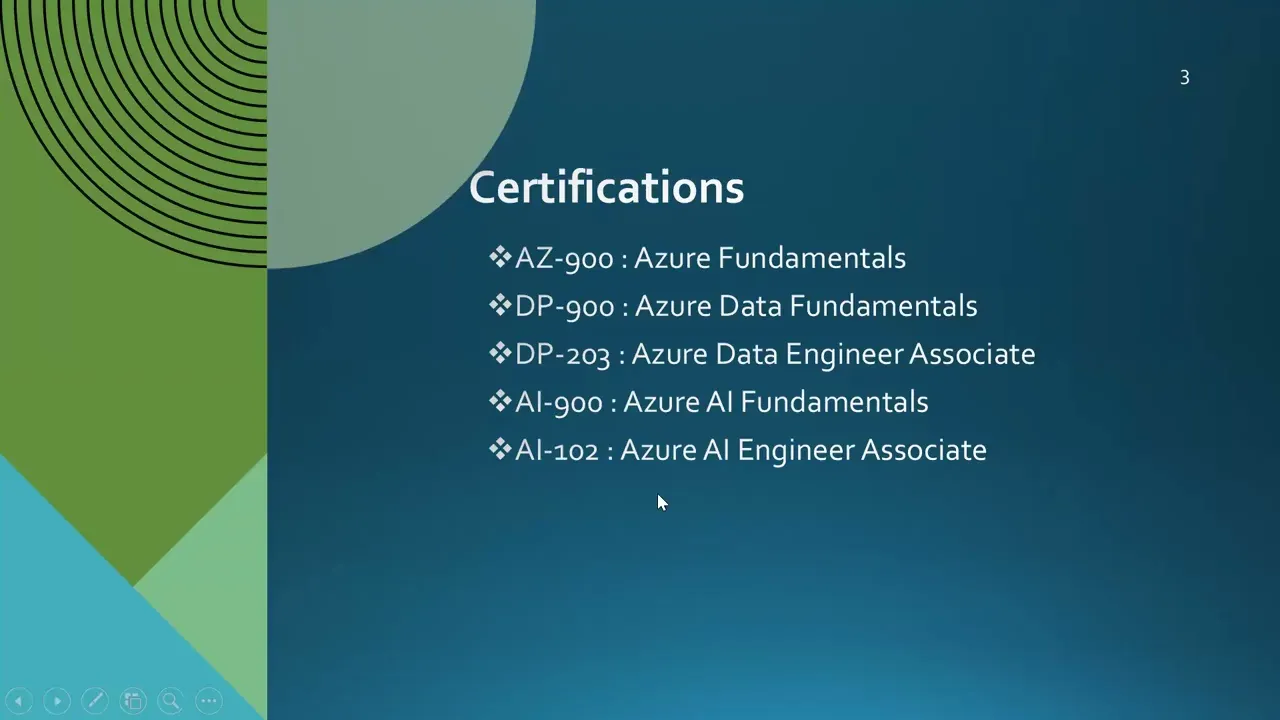
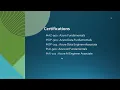
So a and couple of more thing I wanted to tell you about these are the certifications that I have completed so far. So these are all cloud uh certifications. Uh you know the certifications will help you to uh to to understand the concepts and also they add more value to your profile right when you go for any interview. Uh by the way like whenever you are doing any certification right you are reading you are learning and you are going at attempting some exam right so by that way you'll have good understanding on the uh services
for which you are going for certifications so if you see these certifications like uh a900 this is Nothing but a basic the fundamental of Azure that's a provided by Microsoft the cloud's computing services right DP900 is specifically when you move towards data side because Azure the the Microsoft cloud computing platform that we call Azure right Azure provide uh more than 200 services so this is not only for data engineers there are many services for data engineers there are many services for data scientist there are many services for application development team there are many services for
security uh there are many services for compliance right so overall Microsoft provide a lot of services for different different role and designations right but what we are going to cover during this boot camp it's all about data analyst or data engineers right so these certifications also you can plan not now but you can have a look whenever you get some time so a 900 is overall Microsoft Azure right then you go for DP900 this specifically the moment you are starting towards data. So let's say out of 200 services maybe 10 to 15 services are mainly
for data engineers. So that's where DP900 will start with data related services and DB203 it is going to get you more deeper into it. Then you know today what we are talking uh we are talking about AI as well artificial intelligence AI is an AI most of you might be using chat GPT for different Use cases maybe you are drafting an email you are sending some messages to somebody right maybe you are preparing your resume you are looking for some information so you might be using uh chat GPT one or another way right so AI
is really important uh today So with AI because today based on my experience whatever discussions are happening right uh it includes AI geni right so we have to be aware with geni capability so for that I have completed AI 900 it's again basic or fundamental for AI capabilities and AI 102 is little advanced so basically you know how you need to look for your career you need to look for the services the certification that is oriented around data and AI right so that is how you can plan so why I'm talking about all this uh
certification because this is uh this is really helpful basically when you prepare it right you will learn a lot of things so this is something also you can prepare later point of time but if you started you have any questions you can directly reach out to me you can ping me we can have onetoone call as well if required or if you have any general question around the classes, we have a uh telegram channel. You can reach out to us. Uh one of you may be able to uh answer your questions or I'll be looking
into it and I'll help you to understand. Okay. So the first service that we'll talk about which is a SQL server uh for this boot camp, right? So yeah, I I'll just you guys post your question in the chat window. I'll take a pause after a few minutes and then we'll discuss that's not a problem. So you know how we are going to get started or we are going to uh get started with SQL server. SQL Server is a Microsoft product you know and uh it's a database where you can store your data right for
example let me give you an example like why we need database because uh I know uh most of you are very new maybe you are coming from different background you don't know about the databases and all right uh few of you might be aware right so let's get in understanding like what is database. So database basically you are going to store your data but why we need data from where you will get the data what kind of a data that you are going to store right so very very simple example I'm going to give you
so this is the first service that we are going to talk which is a SQL database okay so for example let's say you have a website which is I'll just uh give let's say e-commerce websites are very Common these day right everybody uh going there browsing the you know like um products and placing the order so I'm just putting e-commerce website here it is like here let's say um you are the user here and then you are basically coming to this websites uh and you are logging with your credentials Right? Because each website you have
to you know like um uh put your login details, user ID and password to login on the websites. This is e-commerce website that is something you're going to uh you know like um browse the products you are going to put into your bucket and you are going to do the payment and then it will get delivered right. So this is UI what we call UI which is you know user interface UI which is user interface that is accessible to the end user end user do not need to worry about how the requests are getting handled
where the data is going from where I can see the products right they don't need to worry about it they will just go and login on the e-commerce website and they're going to browse the product they're going to basically you know like um place the order. So this is e-commerce website. Now what happens? Basically there's a back end and that's what we call you know like a database. So this is Database and you know today we do have many databases like we are going to discuss about SQL DB uh but we have Oracle DB, MySQL,
MongoDB, Postgress SQL, Cosmos DB right there are many different databases that we have today and there are different use cases where we are going to use those databases. SQL server is very very mature and old product from Microsoft because I'm in the industry from last 14 years, right? I'm using SQL server from last 14 years and you know like um SQL server is one of the database which is being used for multiple applications. So think about this is one of the application e-commerce website that you are accessing right we are coming to the point why
we need database then we'll go deeper into it right so for example let's say you are selling 20 products it could be related to electronics it could be clothes it could be furnitureures right so you are selling 20 products. So you know these 20 product whenever somebody visiting uh e-commerce website you know like this Should they should basically able to see these 20 products right they should be able to browse it. So whenever you are logging here you should be able to browse these products right maybe out of these products you are placing uh order
for let's say laptop or maybe mobile or some clothes right so these products should be visible for the users but where where from where this product will come so basically what we're doing we are storing the product information in database and when we talk about specific to SQL DB we are having multip Multiple tables to store the data. Multiple tables. Maybe here you are storing let's say list of products. In this table you are storing list of customers. Here you are storing uh let's say customer order details. Right? Here you are storing some other information.
So this is specific to e-commerce website. If you talk about any uh college management ERP where we have students, employee, fee management, hostel management uh right so teachers right so basically you are will have different different tables to store that information. So think about these information about the 20 products we are storing into product table. This is for example product table right? So table is nothing but where you'll have rows and columns. We'll go deeper into it. Okay. So this is table. These are all rows, right? The horizontal one. This is rows. And you will
have the column. Column means like uh let's say your your product ID uh product name, product category, product subcategory, product color, product price, unit price. So all those information you will be able to save in the tables and that information basically coming from the table to the website and you are able to see those products and let's say out of those products you finalized okay I wanted to purchase this mobile phone right so what you'll do you'll place an order and then that order information will go to another table for example this table this is
let's say order table right like this was the user. Uh this is the product. This was the total price. Uh maybe this was the delivery locations address where the product needs to be delivered. This was the total amount for that product. So all those information we are storing into database. So database is a place where you'll have different tables and you are going to store your information all the data. It could be related to product. It could be related to customer. It could be related to order. It could be related to anything. So let's say
you are developing this application. Then you need a database to store all the information. And what developer do in between basically they are going to use uh some programming languages for example.net, Java, Python to write the code. Let's say you are placing an order. So there there should be somebody who will handle This request. So there is a code running and then it is interacting with the database and storing the data or browsing the data into your website. So this is the database here sitting where you are storing all your data. So as part of
the databases we do have different databases. What we are going to discuss we are going to talk about SQL database. Okay. So I hope you got an idea but now I'll take a pause uh I'll see your questions as well but uh if you wanted to speak you have any questions any any suggestions anything that you wanted to discuss today's is our first class right so uh we can talk about anything that you you might have in your mind any question any thought before we go for the question the chat window. Uh, anyone have any
questions? I have a I have a question. Um, can you hear me? Please go ahead. Yeah. Yeah. Yeah. Yes. So, um, for some reason I'm I'm new to the Windows. I'm used to the Mac. I'm installing the, uh, MS I mean SSMS22. Is that the correct version? because I'm having troubles with it and if we are not going to today so then then it's not a question. Okay. So yeah I mean uh SQL server uh management studio 2022 is uh is a new one. You can install the older one also. That's not a problem. you
know this SS SMS which we're talking guys SQL server management studio that's a just a client tool just a client tool meaning this is your database but to access this database you need somebody and that is what SS SMS so you can go for the older version or you can go for the 2022 that's not a problem was this is what yeah so basically when we work with SQL server and all this technology ology on uh you know Mac it's a really difficult uh that is the reason I think you you opted for window and
you'll get habituated that's not a problem because we are starting from fresh so uh like once you have installed SQL server and uh SS SMS then we can uh uh do that but any version of SS SMS is fine. Are we going to use it today or if we are not going to use it, I can take care of it later. Hello. Sorry, I think that you are muted. Yeah. Yeah. Yeah. Go ahead, please. Thank you. I have a question. Mhm. Go ahead. So when people are building these UIs on the back end, do people
build something for uh to able to collect these database or to collect these datas from like the website? Let's say you build a website, The backend team, they build something specific. So you're able to pull data. Yeah. So basically we are storing the data in databases. So to pull the data from database on the UI side where user is going to access we have a code running in between. So it could be net or python or java. So this code is intermediator where it is going to handle the user request. Uh it could be connection
to the database. But this code will handle the interaction between your uh the website and user uh user uh interface and the database. So here we have all the logics and how it got it. So they're actually and how the data here sorry I was saying like how we are getting the data here maybe you are working with your internal team some other people okay give me the list of product that we are going to sell. So those things we have to enter manually and once it is entered and let's say customer is coming first
customer they they will do the sign up that information automatically will go to the customer table and the customer is going to place an order that information automatically will go into the order table. So that will happen automatically. Got to understand. So they specifically build something. It's not not it's not just like basic logs of uh whatever they built and the logs get translated into data. Yeah. So it's a it's a full application development cycle. Uh we do Have lot of you know like uh process here to complete full uh application development. Got it. This
was just to just for us to understand the database. We as a data engineer do not do this kind of a development. We have application development team. Uh they work on uh development of the applications. Thank you sir. Okay. Uh you're welcome. Thanks for asking the question. Anyone else have any question that you wanted to discuss before we move to you know the question in the chat window? Just a very quick one. I was going to ask the same question that the distribution system part and you already said that we're not going to work on
this. I mean we we're not responsible on this. I just wanted to get my head on head around it fully like uh we don't work anything intermediary between data center like database and UI is that right? Uh yeah. So basically uh for you know like uh data engineers we don't work on the application development. Our work will start from here from database. Once you got the data you will move to some other system. You will do the transformation. You will create the reporting to analyze how the sales are going on. So once data is captured
on the database our job start from here. We are not developing any user interface, any code uh to develop the application. But to play around the data, we need to understand uh some coding language. For example, Python or SQL server because SQL server is a database. But to play around the data, you need to know the TSQL. So this is something like we we definitely do but not as a data engineer, application developer do all these things. We are going to manage the database and from the data which we captured here we are going to
take it forward to do analysis on top of it. How the sales happening uh the monthly quarterly yearly where the sales is low where the sales is more all those analysis data transformation we do as a data engineers. So you don't need to worry about this part development of website because uh this is for a different role. And we we're not going to cover these things like how to develop a website but yeah definitely we're going to cover on database and then how we can take it further for generating the insights from here. Hope I
answered your question. Yeah go ahead please if you have any question. No no more questions. So we're not dealing with the distribution or any part of application development all all sorts playing data. Thank you. You you're welcome. So there are a couple of press in the chat window. Let me take you through that. So the certification do you offer any support like mock exam questions or guidance you know like whatever certification that I had done or maybe if you're targeting to any other certifications right I'll definitely help with the help you with the you know
the uh the related documentations the the path which you should follow uh during preparation you have any questions we can discuss onetoone right because the topic that we are going to cover during the boot camp they are part of the certification but not whole certification you have to put additional effort to uh clear the exam right so if you are putting additional effort and you need some guidance definitely you you can reach out to me and I'll be happy to assist you uh so when when when can we start looking into certification not now okay
not now because uh most of you are very very new on uh data services. So let's uh build some understanding uh and then you can start looking for certifications the homework right so every week on Friday you're going to get the homework at least for the SQL server classes uh so SQL server will be there for let's say uh you know like uh 25 to 30 classes will be on uh SQL server so like let's say in a week we'll have four classes, Right? So once we completed those four classes for that week, uh by
end of the week, you are going to get the homework for the topics we covered during that week and you will have one week uh 10 days to submit the homework. We'll share the link where you can basically submit your homework. During the homework you have any questions uh please reach out to me or you just ping your question in the like u you know the telegram channel discussion channel for any discussion use that channel okay so you can bring your questions we'll be able to help you so maybe this Friday you'll get very small
set of homework but from next week you will be getting the homework for all the classes that we are covering during that week like all the topics all the concept concepts we are going to uh cover during the uh week. Yeah. So after completing our courses we'll be able to uh go for one of the certification. Yeah. You should go. I would suggest you should go but you know like u go from basic one like a900 which is as your certifications fundamental whatever services we are going to cover that's a part of that certification but
not whole certification because in certifications you go uh and learn most of the things theoretically as well right so I will provide the path I'll provide the uh there is a like a good set of recordings available which which will help you to clear the exam uh which will help you to understand other concepts right so definitely I'll be There for helping you for certification if you're planning will we cover window function definitely we'll cover it and one more thing guys I wanted to tell you so whatever uh services like like whatever concepts we are
going to cover in the next week I'll be sharing the list of topics in advance. For example, this is our first week, right? So from next week onward, for example, on uh maybe Saturday or Sunday, I will share what topic we are going to cover in the next week coming classes, right? So that's how maybe you wanted to prepare something, you can just prepare uh before the class, right? And one more request that I wanted to make whatever uh uh like uh coding whatever query that we are writing or whatever concept we are understanding during
the class please focus on that don't write anything because at the end of the class what I'm going to share with you whole code and whole like you will have the recording so you can go and refer it later but during the class focus on the kind of a code that I'm going to write and also focus on what kind of a question you might have. So whatever question that you have you go and put your question in the chat window or maybe we'll take some break to discuss about your questions but uh because based
on my experience people start writing the code parallel to me so that time maybe you will miss something Right so I would suggest not to write the code during like during the class uh you just understand what we what's going on and maybe on top of it you might have some questions so you can ask the questions Okay. So, there is a question. Can I ask a rookie question? What it means? Uh, please can you can you ask a question, please? Yeah. I already asked it. I raised my Thank you. I didn't know I could.
All right. Yeah. So, there will not be any exam, you know, there would be homework for for you guys. Okay. Mhm. All right. So anyone have any question be before we move forward? I do have a question. Yeah, go ahead please. Uh are we going to code today or is it all questions and explanation? Uh we'll we'll be having very less code today because we are just starting. Okay. and uh you know like uh we are going to do practically most of the time. So this is something we need to understand. Maybe for a few
folks it might be uh a simple thing but for few Folks who is from different background or new right that's uh important to understand but coding wise we will not be do much coding today. Thank you. Appreciate that. You're welcome. Now let me tell you the SQL server in detail. So SQL server is you know used to store your data. Simple store, organize and manage your data. So and this is from Microsoft and it's a relational database. This is important to understand you know it's a relational database. relational database, right? Relational meaning. This is a
product table, right? For example, this is your order table. For example, so there would be a connection between product and order table. A relation like most of the tables are related. So that is what we are calling relational database. For example, this is product and let's say product has information about laptop and you ordered laptop. Laptop information the amount and everything will go into order table but order table also will have the product ID. Okay. So we'll see that. So this is relational database meaning the tables will have the relation right. So what overall on
high level What you're doing you are storing organizing and managing your data in SQL DB and that's a relational database right let's see the kind of uh how we are going to start okay so before okay so uh let's get started on SQL server and then we'll we'll discuss about the Azure topics that we'll cover maybe after a few days once we'll have good understanding on SQL server. All right. So introduction to SQL server we understood this is relational database management system right that is going to store organize and manage your data right uh SQL
server installation that you already have done I hope you have done it if you're facing you are facing any challenge you ping me or there is a team uh you just ping uh your questions and then you'll get the assistance for related to SQL server installations and when we talk about you know SS SMS. So this is a client tool guys. This is not the database. This is just a tool which will help you to connect your database. Right? You might be having some database on the cloud. Cloud meaning you know Microsoft Azure, AWS or
GCP. You can use SMS to connect it. So meaning it is not mandatory that SQL server should be installed on your computer to connect from SS SMS. It's just a tool. It's just a interface to work with your SQL server database. It's a client tool. Okay. Uh so we'll take again a break after 15 20 minutes and then we'll see if you have any questions. So SQL server meanwhile you can Yeah. Yeah. Go ahead please. Hi my name is Shanaz. Uh can you repeat that one more time? Yeah. Yeah. I I'll repeat it. I'll repeat
it. No worries. So uh like you guys can still post your question in the chat window. See so SQL Server Management Studio is a client tool. Let me open that so that you will get better understanding. So I do have on my computer. So actually I'm using two screen. Uh let me open the SMS. SQL Server Management Studio is a client tool. It's not a database. It's a helpful to connect your database so that you can play around it. Right? So, it is opening for me. So, the moment you opens SMS there are a couple
of details you have to provide. Okay, I'll close this. Okay, I'll let you close this. This window you'll get. Let me close this. In the back end you'll have this back window. This is the SS SMS. Right now we'll take you through couple of options today in SS SMS because there are many thing you can do in SS SMS. So this is SS SMS SQL Server Management Studio. It will help you to connect your database to work with it. What you will Do with the database? You will play around the data, right? You will insert
the data. You will delete the data. You will update the information. Right? So those kind of information that you are going to do like activity you are going to do. But how you'll do that you're going to do using SS SMS. So SS SMS is a client tool like a like a just a tool to connect your you know database. You might have lot of video on your computer but you need a tool. You need a software to play it. Right? So that is what it is. So any song that you can play using that
particular tool here any SQL DB you can connect with your SS SMS. It's just a tool. Now how you will connect to your database that you installed here? You might have installed right? So you need to go to object explorer. Click on object explorer. If it is not coming for you go to view and click on object explorer. It will come automatically here. And then you go to connect. Click on connect. And then you go to database engine. We are working with the database engine. Right? These are there are other options. Analysis services, sitting res
services, reporting services, Azure storage, Azure resis. These are all we will understand. But the primarily how we are starting. We're starting for SQL server. And how we'll connect it. This is client tool. You just click on database engine. This window will come right for the first time you got the same window. You can close it and go to connect or click on database engine. This is the same connection. Now what you need? You might be connecting to different server right because maybe you're connecting to cloud one or maybe somebody else has given access to you
on their database but you wanted to work from your computer. So this is the client tool. So you have to provide the server name for you. How to get the server name? You click on the uh drop-down go to browse for more and click on database engine. So whatever server that you have installed you should be able to see this right and connect it click on one of it and then it requires like a a windows authentication basically when during the installation of SQL server you might have seen that options you wanted to go with
window or you wanted to go with SQL server authentications try to use SQL server authentication most of the time. Okay, for now for next 1 and a half month you can continue with Windows authentication as well but try to configure SQL ser authentication. If you are facing any challenge uh you can ping me. So let's go with the SQL ser authentication. Other options are for connecting the database which is Deployed on Azure that's a cloud computing service provided by Microsoft. So we'll go for SQL. Now this guy is going to ask you the credentials right.
So user ID and password. I have already saved it. Remember the password. And you simply go ahead and connect it. Once you connect it, you should be able to see the databases. Right? So for you at the beginning you will not have this DB. Okay. Let me drop it so that you can get a feel. And this is very very fresh new server where we do not have any DB. I'll delete everything. So you'll see this is how your database looks like when you are connecting to it. Right? This is how it looks like. Now
you have system database and you have user databases. System databases meaning these are all the by default databases are available. We'll talk about each of these database but these are system database. By default uh this DB will be available for you. Right? And the database that we are going to create that we call user database. Right? So you got an idea. This is SS SMS. We are connecting to a server which we which we are calling laptop ACK 02s JT. This is my computer name. Okay. So this is the server. This is the server name.
This is the authentication method. And this is the user ID. And this is the password. and we clicked on connect and we are able to connect it. Once you connect it, you'll see the list of system databases but user databases that we are going to create it's not there. Right? So uh you might have seen how to get the sample database on your computer here. Right? So adventure works. So let me take you through that quickly and then we'll take a pause to see if any questions you know like um Microsoft people has uploaded some
sample database so I'll show you adventure works databases you can see that so can you see that so these are the different you know databases people has uploaded for us to work adventure works OLTP and do not get Confused with OLTP right we'll talk about it we'll talk about it in detail but for now I'll tell you this database is OLTP database why OLTP mailing online transactional processing so this This e-commerce website there are many users are coming here maybe 10 15 20 100 right so they are placing some orders so lot of transactions happening
basically and that is going to get inserted into this DB so this DB on this DB a lot of transaction happening every day update insert delete right select so if lot of transaction ction happening that table we call transactional database the database we call transaction lot of transactions happening so this is nothing but OLTP okay online transaction processing a database where lot of transaction happening every day that's a OLTP so they are small inside right so if you see here this is OLTP they're small in size and there is a data warehouse maybe we have
data for last 5 years 10 years OLTP basically we do not hold data Historical data longtime data we move that data into data warehouse that is the reason data warehouse has lot of data historical data and there is a lightweight basically couple of tables they have basically put it here and then you can use it. So you see that bak filebak is nothing but a file of a backup file of the database. We'll see that how to create this file and how to use this file. Let's see that. Okay. So think about I'll just minimize
it this also. So think about you do have SS SMS but we do not have any user database and you wanted to store one of the database here to play around with and Microsoft has uploaded multiple databases for you to play around right so let's go and download one which one you guys wanted to download because you might have done Okay. So, let me go for one of it. Okay. So, I'll go for let's say a data warehouse. Click. So, these are 2025 guys. So, you know my SQL server. How to know what is the
version of your SQL server? You go and click on new query window. Go and click on new query window and run select add the rate add the rate version right this is the command we'll learn a lot of command okay so you don't need to worry about it this command this is coming as a pink right it's a inbuilt function within SQL server Right. So we are going to see the version of SQL server that I'm using because you could have 17 19 2022. Let me run this. I have older one basically 2019. You can
see that Microsoft SQL Server 2019 and that's a developer editions. This is the server I'm running. So meaning now here you are going to you have to get the the that same version right same version or the older version it's a backward compatible actually so if you are using SQL server 2019 you can restore these backup not this one 2022 2025 because forward compatibility is not there backward compatibility is there so your SQL service 2019 19 then you have to either in uh like uh restore this or the older versions. Okay. So let me go
ahead and click on this adventure works DW209.b. I'll click it will get downloaded here. You can see that it is taking some time because this is warehouse and it will take some time. Okay. So let me download and restore and then talk about the questions. Okay, it is it got downloaded guys. So if I'll go to my download folder. Let me see what's there actually. So I got it. So if you see that in download this is the one I got right ad just now in India basically it's a the third fave right so uh
you can see that adventure works TWW209 so this is what what we'll do what we'll do we'll copy this file okay we'll go to our uh you know computer I'll go to C drive I'll go to users I'll delete the previous backups. Okay. And uh continue. And then I'll put it the new one. The one that we got downloaded today. Adventure Works DW209.bK. New file. This is the backup file, Right? I'll tell you what is backup file. I mean it's let's say uh you have data for last one year. data contains product customer informations uh
customer order information right so you will take a backup why backup are required because maybe your system got crashed your system due to XY Z reason your system got crashed so you will lose that data right so that is the reason we take the backup and how to take the backup how to use the backup we'll understand but for Now there is somebody who has already uploaded the backup for us. So let's use that. So this is the backup and I have placed on users folder. Let me copy the path and we'll go back to
our SQL server management studio. Right click on the database. Now we are going to restore. This process we call restore. Okay. So right click on the database. go to restore database. Click on restore database and then you go to you know browse from your device because the backup that you downloaded right it's there on your computer. So you are going to browse that location where that backup is available on your device. Click on these three dots add this. Now you have to put your path here. So my Database within the users right so I'm putting
the path say enter now you see that adventure works 20 DW209 and I'll say okay and then you say okay and then you say okay now so it is database adventure works DW209 restored successfully and you say okay you can see that adventure works we got it here We got this TV. This is just now we got it. Okay, I'll take a pause now. If you have any questions so far and then if you have any question you can speak and then after that I'll go for the question. They are in the chat window. I
got a question. How do you log in? Uh on what? Uh login on what? So like whenever you get the first window out when there's the server name and you have to log in put the username. Okay, let me close this now. Uh I'm I have closed SMS now gone. I'll go to search because I had installed you know SS SMS. So I will look for SSMS Or you search for SQL server management studio. Click on it from beginning guys from beginning because this is something we are going to do in every class. So we
have to understand right. So it is opening guys. My computer is little slow. See it we got this window. Now you are getting this window to provide which server you wanted to connect. So you will see this server. If you're not able to see go to you know this drop-down browse for me go to database engines and you will see the SQL server that you might have installed. If you are not able to see meaning you have not installed SQL server. Okay. Yeah, but I don't have the drop down that you have like go back
one. Uhhuh. Okay. Like I don't have that drop down different version 2025. And that's not a problem. If you have let's say different version the process will be same. Any version that you have you will get this window. You will browse your you know the server name that you have installed with and then say okay server name we got it now Windows authentication. Okay. So any questions so far? I mean yeah but you use the drop down. I don't understand what server name I'm supposed to pick cuz I have my laptop name. That's all I
have. I have to type it in. So this is Excuse me. May I say something? I I just inst installed this uh just today and the server name uh when he opens this um server name I have only two drop down so the laptop name and browse so which is his last option in this in this list I have only two it's okay to have only two yeah it's it's okay it's okay to have because why I can see multiple because I have connected multiple server in the past so you don't need to worry about
it you have you Max max max maximum you might have two one is your laptop name and the last one is the browse for more these are all I get that I sent a screenshot in the chat I don't have browse for more I don't have it I don't have anything okay okay all right uh quickly let me does that make sense yeah yeah yeah so let me quickly see that uh let me see that then I'll go for the next question is okay. So, may I know where you saved that? That is screenshot in
the chat. Can you see it's it's the one with the red box sent 8:20 p.m. Okay. Okay. Okay. All right. Not a problem. I'll I'll just uh let me have a look on it. Okay. I posted my connection windows. So you might need to do the same. I have 2025 version but the server name just print local host. Yeah, local host will work. Local host will also work. So um I I I think uh uh this is instruction or this is the one you're facing some challenge. Somebody say this is yours. No, I'm the one
above there. Okay. So, it's the same example, same version. Yeah. Can you follow? See, there is one more thing that I would show you guys. You go to options, guys. If you're nothing is working, right? Go to options and go to connections. You put your uh database name here. I mean, you you don't have any database. I know. So, go to login. Same details information. Sometimes we have to put this uh you know database this is not for you confused only here uh additional only login. So like uh sometimes you you need to write local
host here local host right. So try with this and browse from. So browse is also not coming for you. No not for me. Okay. Okay. Okay. you what you do you send me personally in my you know like um telegram channel right uh Deepak you just send me the screenshot there I'll see that okay so you guys might face some challenges initially because this is first time for us right so most of the time you're going to see your laptop name or you put local host and the browse for more it should be there actually.
So then you go and select one of it because I have installed two. You click on it and then you go for SQL authentication. For now you can go with Windows authentication as well. Windows meaning the logged in user on this Windows. This is uh you know like my laptop/ Angel uh this is my wife name. So uh you know like this is the logged in user. So with this user it is going to connect or you during the installation you might have given user ID and password use that. So for now anything is fine
anything is fine either this either this anything's fine but make sure you are able to connect it. So when when I I click on connect by providing the server name and user ID and password then I can see the databases and other folders we'll discuss. Okay. So this was the connection related question. Anything else that you guys might have? Okay. So let me take you through the question posted in the chat window quickly. Okay. All right. So difference with authentication you know like uh SQL authentication where you have to provide user ID and password. So
when we are going to work with cloud right. So there we need that kind of authentication but for now window authentication also will work. Okay we cannot connect. Now there could be multiple people might be facing some challenges in terms of connectivity. Okay. So that's that happens for the first time when we are working with SMS or SQL server. Uh no need to worry you ping me I'll reply back. I think we might need to explain it based on how we see it. Yeah, last one. This is fine. I cannot log. Okay. So, you know
when you are looking at the uh this one, right? I mean, I think you already shared it. So, here what you do, you try to use Windows authentication. Then if you're not able to uh recolct what was the server name and the password that you might have set up during the installation then go for the windows authentication. If none of them is working then might be you are putting the wrong server name right. So that is how you you do that and also how you are going to get the server name I'll tell you one
more thing. So click on you know I mean how to get the laptop name I wanted to tell You. So go to you know uh this PC right click on this go to properties and then you are going to see your your computer name. So that could be the one that you can use or you can use local host and that should be where it went that information. Right click properties. It is going somewhere in another screen. Yeah, this is where it is. I'll show you you know like uh this is the server database my
my device name. So this is the device name I'm using uh as a server name there in SS SMS right this is the one. So try the connectivity with different ways and if still you are facing challenge you ping me. It could be server name incorrect. It could be user ID and password incorrect. You try with Windows right then you you do that. Now there is a question I have my SQL server running in Visual Studio Code. Okay. And I'm using Mac OS. My question is it going to do very diff different between what you
will be teaching about SQL and Windows? No, it won't be that much different. Okay. So you know this SS SMS is a client tool. So similarly we have one more client tool we call Visual Studio right. So that is also you can use. Okay. So that would be little different in terms of look and feel but the work that we are going to do here most of the work we can do there as well but I would suggest to have SMS because that is what we are going to use and then you know it is
very mature it has a lot of things to do that I'll show you guys but if you you do not have SMS installed you can use visual studio uh not visual studio we call it data studio Okay. So here, so should we download the 2025 or the 2019 pro professor? So this is basically you know it is up to you. You can download 2025, you can do 2020 uh 2019, right? That is fine. That's not a problem for us. We're not going to compare what is new into 2025 or what is there in 2020 2019
right so anything is fine but you know if you are on SQL 2025 then any database you can restore if you are on 2029 sorry 2019 then you would be able to restore this one and the backward compatibility. So you can go with the 2025 or 2019. Anyone is fine. Yeah. For Mac it will be a little uh different. All right. So the team who has uh helped you to install the SQL server I think they have some work around to have SQL server installed on Mac book right. So please reach out to that team.
If you're facing challenge, you let me know. I'll help you to reach out to the team. They help you. They will help you to install SQL server on your Mac system as well. There is a question UI on VS code uh extension is different. Should I get a PC or can continue with Mac? See getting PC is a basically new investment, right? So uh Mac people I'll suggest you guys to uh reach out to the respective team who do the info setup for SQL server or SMS and then get it sorted. Okay. Yeah, it's a
it's a best way to go uh I mean for window but uh you know like we have to purchase this new system. Uh all right. So the team is uh having u alternate solutions to have SQL server on MacBook. So I'll suggest to reach out to them. I might need to do the same. Yeah, local host window. Yeah, this is fine. This one you guys try because we have local host window authentication do not need any user ID and password, right? And also use trust server certificate that will uh be uh useful. Okay. Is it
possible on MacBook? Where do we ping? Here. Yeah. So, for me, you know, uh you ping me on the telegram. Okay. So, I'm part of your uh discussion channel or uh our main channel, right? Uh you can see uh me as a debug and then you can ping me trust ser. Yeah. Yeah. Yeah. That is fine. That is fine. Our objective is to connect with the SQL server database. trust. Yeah. Yeah. So when you do not need any user ID and password even when you are going with the window authentication. Yeah. Go ahead please. How
did you open that window? Uh that part of window where you entered uh select version. Yeah. So that is something we are going to do in every class. So now let's say we got here. Now we wanted to know uh uh because most of time we know uh what is the version that I'm using but here on my computer it's been long time I'm using SQL 2019. So I wanted to check what is the version of SQL server or any query that we are writing in SS SMS. This is SMS right? any query that you
are writing uh right so yeah so for setup uh that is fine u I mean you guys might be facing some challenges for one or two it will be you know like for within one or two classes it will be uh finished I think uh you guys will be able to set up either uh Applying multiple different options or reach out to the respective team they will help you to set up that's not a problem so Now uh ins SMS whatever work that you are going to do most of the time you need to write
a query that we call TSQL transact structured query language we'll go in deeper into it and we'll do it for next 30 classes you know so to work with any database you have to go to new query so there is a new query can you see that so you Either you click ontrln you can see the shortcut on mouse over just click on it and then it will open a window it will open a query window right and then you write a query so that writing the query and all we'll go deeper into it for
now you just think about I wanted to know what is the version of SQL server I'm using right so select add the rate add the version right and then run it simple and you'll get this. So now uh once we got the DB restored here right once we got the DB restored here uh let me let me just talk about for next 10 minutes and then we'll see if you have any questions. So uh this is DB that we installed and for most of the DB You will see these are the folders we'll go one
by one right so now there is a tables that's where our first focus would be tables okay can you see the tables I told you for product there would be different table I told you there for order there would be different table fact internet sales right don't go with the name of the table fact or dimension that is something we will discuss in detail okay you just look on the table folders right you have tables folder now okay so so far what we understood what is database why we need it and how to restore a
database that somebody has given a backup file how to connect with MS with your database. How to get a query window? This is we call query window to run the query. Now this is the database we restored guys and these are the tables we got by default. I mean somebody has already done something and it they have just given a backup to you and you restored and you you're ready to explore right now. Can you see the table? There are many tables actually. But you wanted to see what's there in the table, Right? What is
there in the table? So what you'll do? You are going to run select star from you know this table dbo. Dim product for example. If you run it now, what we're trying to do, we're trying to, you know, explore the data that we got in the adventure box. You run it, you will see this error. This is very important, guys. I mean, because I hope most of you have that backup restored here. most of you because that's the communication I can say in in telegram channel. So now um I'll just run this and you are
getting just look at the error you'll get the error here invalid object name that's a DB or dim product meaning there is no table there is no object here whatever we are talking we are talking about objects table is an object in SQL server okay so why this is error because it is saying this table does not exist Next. So if you see on top there are many system databases right this is something we'll discuss in detail tomorrow but you have to change the DB because your table is available within adventure works but you are
running into master DB here. This is the Context. This is the master DB that you selected. So you have to change the DB in which you are looking for the table. Click on that. Now you run this and you should be able to see the data within product table. Can you see that how the table looks like? And I told you that's a row. This is horizontal one is rows and vertical is columns. So we have product key, product alternate key, English product description, Spanish product name, u French and then you see that uh recorder
point a lot of information you can see here. So this is rows and the vertical one is columns. And this is how we are storing data in the table. Right? And one more thing I'll compli backup to you and you restored. But how you can take a backup of the database? This is the database you are running. You want to take a backup. Right click on it. Go to task, go to backup and um you know Uh I'll uh add a path where you wanted to basically generate that backup. you'll go and you'll see the
I I'll go for the users only that folder users within the users I'm going to give a name to it let's say uh maybe a b c any name you can give dot bak this is the file name this is the location then I'll say okay I'll say okay and I'll set the path and I'll say okay So you know so this is saying the media loaded back is formatted to support this but two media families are expected according to backup device. Okay this is fine. So I'll just remove this and I'll go with this
one and you should be able to uh restore it and let me show you that location. Okay and then I'll stop for today. You can see that abc.bk. Now you can go ahead and restore like this. So you can take a backup, you can restore it. Okay. So that is how they have taken the backup and they have uploaded on the website and you can download and you can uh install on your like restore in your computer and you can explore how it looks like the way we are able to query the data from this
particular database. Okay. So I'll take the pause for today and then we'll see if you have any questions uh before we wind up for today guys. Uh yes I had a question about the capitalization of letters. Uh does it mean something or it is okay to write capitals or lower case select prompt? Yeah, this is this is a very very good question because you know like in it's a language specific let's say in Python wherever we have to put let's say I'm writing select for example if s should be capital then it should be capital
in python so python is case sensitive language but in SQL server it's not the case sensitive language you can put like select star f capital promp anything you can do that soql server uh basically is not a case sensitive language so here it doesn't matter but you know the kind of a standard keyword that we usually use that is inbuilt inbuilt one right we usually use into capital letter to looks better but there is no meaning of it no impact if you are putting small or capital or mix of it that that is not going
to create any problem because this is not a case- sensitive language. Okay. So I need to download that adventure DB and then try Yeah. Yeah. Please download and try this. That's not a problem because we just started today. Okay. Yeah. Okay. I think you have question please go ahead. Yeah quick one so the best practice is going with the uppercase I mean in the industry or doesn't matter. Yeah so whatever inbuilt that is coming let's say in blue color right uh go with the capital letters and that will basically looks better as compared to uh
normal one but it's not mandatory. Got it. Thank you. Yeah. Uh I wish some info I downloaded back file how to install and open in SQL server. That's not a problem guys. you know like you can have a quick uh look on the recording and uh you go ahead and uh like quickly because you know right click on this DB go to restore database and browse your locations where you have downloaded your file backup file this is my backup file in the users folder right and click on this say okay and this say okay and
then you say okay It should be uh restored here. Once you restored, go to this DB, click on the new query and you should be able to run this. So try and go with the recording. You should be able to do that. Uh we will discuss we'll discuss. Yeah, go ahead please. Um Pin, you have handdressed? Yes, really quick. So I got the tables pulled up. I don't have the same file as you. The dem product I don't have a DVO in front of my files. This is tables, right? These are the table looks like.
Yeah, I have the same thing. I just don't have DBO. I don't have the DBO. That is fine. That is fine. We'll talk about what they are basically. So if you run without it, still they it is going to work. Okay. So that is what is DBO and all that is something we'll discuss in detail. For now I think it's our first class right so going in depth it might create some confusion. Okay. So uh yeah Rafi uh you go please with your questions. You know how to make it lower case or upper case. Select
this text. Okay. And control shift U upper case. Can you hear me? Yeah. Yeah. Yeah. Go please. Yeah. Okay. Uh very quickly some question about um you know I tried to Copy what uh did you do before and uh I make a I made a request about select version and I u have a message about uh about this I have a Microsoft 10 pro and now information it means uh everything is Okay, it work uh the system uh works correct. Uh Microsoft SQL Server Microsoft uh SQL Server 2025 and etc. No, this is fine. That
is fine. Not a problem. That's fine. Okay. But uh after that I uh tried to copy uh another points uh about to find some table dbo and it doesn't work. Okay. Okay. Not a problem. I don't know. Uh yeah I I I got message with uh errors something. Uh yeah yeah. Have you have you installed this uh like restored this database? Yes. You mean adventure? Adventure works. Yes, I have adventure works 2025. Okay. And then make sure your database is like this. You selected adventure works. Then you run a adventure. Yeah. Here also you have
to I I did I did maybe it's not it's not the time to No problem. Try again and then let me know. You ping me the screenshot. I'll be happy to help you because initially classes you guys may get some challenges. Uh but it's not a challenge basically. We will get habituated to it. Okay. Uh I I will write in the telegram chat. Okay. Yeah. So one Yeah. One more question. Somebody asked like here like how to make it upper and lower. Let's say this is the text you wanted to make it lower. Control shift
L. You wanted to make it upper control shift U. So that is how you can do that. Select the text use this shortcuts. Okay. All right. So I think we are on top of time. So if you have any questions, please uh share your question the discussion channel. uh and don't hesitate to uh share your question because everybody's new right so any question if you have in your mind any challenge you're facing uh please share in the discussion channel you can reach out to me as well that's not a problem so all right anyone have
any question for today I hope you got an idea about little bit on SQL server but no worries we are going uh we are going uh deeper into it so you'll get better understanding ing in upcoming classes. I have a question if you don't mind. Yeah, go ahead please. Uh in the meantime, should we work on anything else? Maybe doing some research or No, for now looking into something. Uh for now, nothing. You need to make sure you are able to connect with SQL server. That's all. Perfect. Thank you very much. I have both of
them uh downloaded here. Thank you everyone for your time. Uh see you tomorrow. Thank you everyone. Thank you. Thank you. Thank you. Bye. Bye everyone. Bye. Thank you. Bye. Thank you. Bye.