hello welcome to prum Technologies I am wenet this is part 62 of SQL Server video series in this video we'll discuss about what to choose for performance subqueries are joints let's flip to SQL Server management Studio I have two tables here TBL products and TBL product sales tables in TBL products table I've CAU around 400,000 and TBL product sales table I've CAU 600,000 records I have inserted this huge amounts of data into these tables using automated SQL scripts we have discussed about how to do that in the previous session of this video series if you
haven't watched that I would strongly encourage you to do so before continuing with this session now according to msdn in most cases there's usually no performance difference between queries that uses subqueries and equivalent queries that are formed using joins let's understand this with an example let's flip to SQL Server management studio now let's say we want to write a query which lists the list of all products that we have sold at least once let's say I wanton ID name and description so how do we write that query so look at this select ID name description
from TBL products table where ID in select product ID from TBL product sales table so if the ID is present in TBL product sales table then we know for sure we have sold that product in which case we are retrieving ID name and description okay now if you look at this this query is formed using a subquery okay now let's go ahead and execute this query and see how long is that going to take so I'm executing now look at this the query is executing still it's already 3 seconds 4 5 it should take around
9 seconds I have oh it's actually taking around 7 Seconds look at this how many rows we have we have around 30 6,199 rows in how much time it took around 7 Seconds okay so 7 seconds and we have 36 ,1 199 rows okay now let's see how to form the same query but using joints no I want the same result but I want to do that using joints so if you look at this here we are selecting the product ID name and description from tbll products table by joining with TBL product sales table uh
on the common column what is the common column ID in TBL products and product ID in product sales table and we are using distinct here because you know for every match we get a row from the left table so but we don't want duplicates so we are using the distinct keyword there so let me go ahead and run this look at actually let me stop this we want to clear the query cache otherwise this query cache is going to impact the numbers that we get okay so let me drop this query cache okay so what
is this query cache you know when we execute a query a query execution plan will be generated we don't want that plan to be reused you know just to make sure that our our performance testing numbers are right so I'm cleaning the query cache and the execution plan cache here okay so once we have done that now let's go ahead and run this query and see how long this will actually take to run so it's executing now it's already 2 seconds still executing 4 seconds let's see how long is this going to take so this
has also taken around 7 seconds and look at that the same number of rows 300 6,199 rows and that's what we have got using the first query so here whether you use subquery or whether you using a join it is not really making a difference okay but in some cases again this is present on msdn in some cases where existence must be checked a joint produces better performance otherwise the nested query must be processed for each result of the outer query in such cases a join approach would actually yield better results let's understand this with
an example look at this here now let's say I want to retrieve all the products which we have not sold at least once okay how do we write that using a subquery look at this we are we are doing that using a subquery here select ID name description from TBL products where not exist remember the exist function this exis function will actually return true or false okay when will it return true if there is you know if this query returns at least one row then it's going to return true otherwise this exist function is going
to return false and look at the subquery here select star from TBL product sales table where product ID is equal to TBL products. ID now if you look at this query it is a correlated subquery and we have discussed about correlated subqueries in the previous sessions of this video series if you haven't watched that I would strongly encourage you to do so okay now look at this this query will now have to be executed for every row that is retrieved by the outer query so in these cases look at this according to msdn in some
cases where existence must be checked so here we are checking for the Existence using exist keyword and now you know here the nested query must be processed for each results of the outer query in this case a join approach would yield better results let's see if that's the case so here since the inner query that's our subquery has to be executed for every row that is produced by the outer query you know a join would actually produce better results that's what msdn says but let's see what actually happens when we execute this query let's see
how long it's going to take before that let's clean the query cache and execution plan cache and let's go ahead and execute this query now so let's see how many seconds is this going to take so it's running now 1 second 2 seconds 3 seconds 4 seconds seconds so it has taken the subquery has taken around 4 seconds look at this we have got 93,173 81 records okay so that's what are the number of rows retrieved now we have an equivalent query but formed using joints so we have we are retrieving ID name description from
TBL products we are doing a left join with TBL product sales table on the common column which is ID in TBL products and product ID in TBL product sales table and look at this we are saying where TBL product sales. product ID is null okay now we have discussed about joints and intelligent joints again in this video series if you don't know how to do that please uh watch those videos before proceeding with this video so this left join with this check where TBL products sales or product IDs now this is going to return all
the nonmatching rows from the left table in this case from TBL product table so we are going to get a list of products that we have not sold at least once so let me go ahead and execute this query see how many seconds is this going to take so it took 1 second 2 seconds look at this it actually took 2 seconds now okay so the join here actually produced within 2 seconds and how and and look at this it took around 93,000 it retrieved around 93,00 one rows now I'm not sure if we have
deleted the cash let's go ahead and delete the cash and run that quy again because I don't think I have done that okay let me try this now and now let's execute this okay look at this now it's taking 2 seconds 3 seconds okay so this the the join has actually executed in 3 seconds and it has given me the same number of rows 938 81 record okay now let me again clear the cache let's execute the query once again that uses subquery and see what's going to happen Okay so 1 2 3 and look
at this this time it has actually retrieved those um records in 3 seconds itself though it's a subquery okay actually you know I have tested this several times but you know though here we you know this query is actually checking for existence and this query is executed every time uh for the outer query it actually produce the same amount of time on my machine look at that 3 seconds 9381 records and even the query that users joins is producing the same result now but what does msdn say according to msdn in some cases where existence
must be checked a joint produces better performance otherwise the nested query must be processed for each result of the outer query in such case a join approach would yield better results but our test proved that both of the queries are producing the same result and they are taking the same amount amount of time okay that is because in general you know if you look at this if you ask some if somebody asks you in an interview uh which is better for performance joints or subqueries in general it's actually joints joints are much faster than subqueries
but in reality it all depends on the execution plan that is generated by SQL Server it does not matter how we have returned the query did we use subqueries or did we use uh joins to write that query it doesn't really matter because SQL Server will always transfer that query based on an execution plan if it is smart enough and if if the SQL Server generates the same plan for both the queries then we are going to get the same result and that's what is exactly happening here now though I might have written this query
using a subquery you know SQL server has actually transformed it you know to to you know produce an execution plan you know which is same as that of you know the query that uses joints that's why I'm I'm getting the same result look at this let me run this once again uh we get the same result so I'm going to clear the cache but if it doesn't produce the same result then definitely in that case a join will be much better than a subquery in general that's the common notion you know joints work uh much
faster than subqueries look at this the subquery retrieved the same number of rows 9381 in 3 seconds and look at the join but before that make sure we delete the cache okay and let's run this this is the query using joints look at that 1 2 and 3 seconds okay same number of rows so in this case you know the SQL Server is actually generating the same plan for both the queries that's why we're getting the same result okay now instead of going by Theory okay somebody says joins are much better than subqueries uh instead
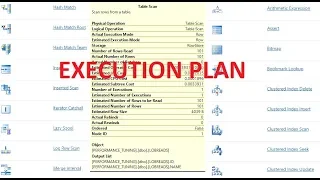
of Simply going by that theory in fact we should actually be testing queries for performance and then tuning them as needed okay so I would say rather than going by this Theory uh you know that joints are much better than subqueries turn on client statistics and execution plan to see the performance of each option for ourselves and then let's make a decision so how do we turn on you know the client statistics and execution plan it's very easy to do in SQL Server management studio all you have to do is look at this button this
is called you know when you click on this button it's going to include the client statistics and there's another button here include actual execution plan when I click that button I'm going to get the actual execution plan as well so now if I execute this query for example the query that's making use of subquery I get the result and then I should also get the execution plan and client statistics okay now how to read these client statistics and execution plans and then make a decision we'll talk about this in a later video session okay on
this slide you can find resources for asp.net C and SQL survey interview questions that's it for today thank you for listening have a great day