beyond trust privileged remote access lets you control monitor and manage privileged users access to critical systems as part of our privileged access management platform privileged remote access enables secure remote access for internal administrators and third-party vendors for internal administrators it gives a more secure way to access systems while improving productivity at the same time it also lets you bring contractors and third-party vendors into your organization's safely without the need for VPN and traditional all-or-nothing remote access tools finally it enables centralized control over remote access sessions and complete visibility into session activity through screen recordings and
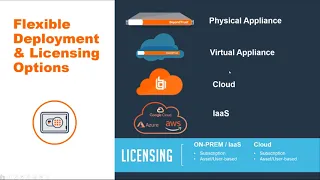
session forensics privileged remote access is an appliance based solution that can be deployed in several different formats we do offer a physical rack mountable appliance more commonly though our our virtual and cloud deployments customers can deploy our virtual appliance using VMware Microsoft hyper-v and Azure or Amazon AWS in addition we offer a SAS version of the appliance through the be on trust cloud this enables subscription based pricing and let's beyond trust maintain the infrastructure feature set and security capabilities are available to your organization no matter which deployment method you choose now let's take a look
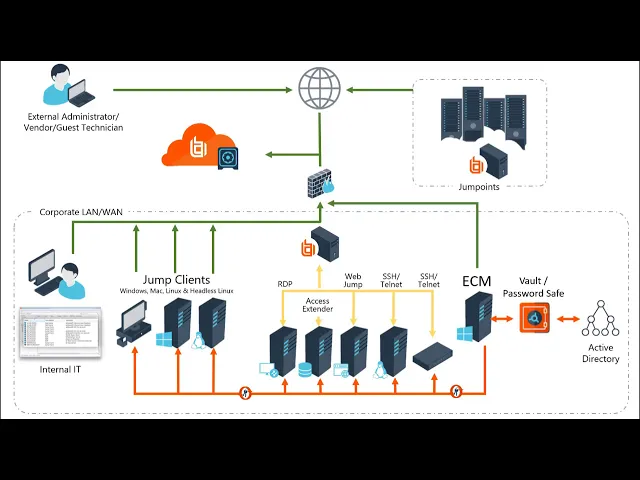
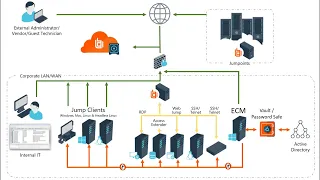
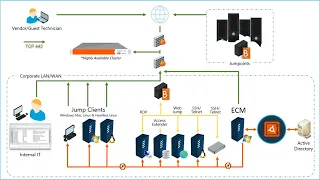
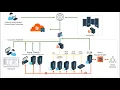
at how privileged remote access works to begin IT administrators vendors or guest technicians log in to the product as indicated by the green arrows all traffic is 4:43 outbound to the appliance there's a reason for this firewalls are designed to block incoming traffic that's why traditional remote access tools like RDP V&C and dameWare required firewall configuration changes in order to work over the Internet but with beyond trust both the privileged users and the endpoints connect to the appliance through outbound connections so no port forwarding or firewall changes are necessary when a privileged user logs into
the product you can have them authenticate using a local count and are built-in TOTP for two-factor authentication alternatively you can also utilize various combinations of Active Directory LDAP sam'l or radius connections once logged in the user will inherit group policy which is also managed within the appliance this lets you ensure that a user only has access to the endpoints you want them to access with the features you want them to use with beyond trust junk technology users have a variety of ways to access endpoints one common method of remote access is the use of jump
clients a jump client is an agent you deploy to the application layer of an endpoint it runs as a service and works on Windows Mac Linux and headless Linux operating systems jump clients are especially effective when the network is unknown jump clients send an outbound heartbeat ping to the appliance about every 10 seconds checking both for software updates and connection requests if a privileged user initiates a connection request that opens up a TLS encrypted session between the jump client and the appliance then the user who's interacting with the system is never connecting directly to the
endpoint itself instead every interaction is happening on the appliance in addition to this agent based approach privileged remote access includes an agentless methodology using a jump point a jump point acts as a conduit for remote access to systems on a known network with this method a single node is used to access multiple systems on the network eliminating the need to pre install software on every computer you may need to access like the jump client the jump point sends an outbound heartbeat paying to the appliance waiting to be contacted to make an outbound call to the
appropriate system as the yellow arrows here indicate the jump point can utilize protocols like RDP protocol tunnels web jumps SSH and telnet or VNC once the jump point has made the outbound connection to the system it then delivers that session securely back to the appliance over the TLS encrypted can action as with the jump client method of connecting jump points also allow the privileged user to interact with each system on the appliance so even though administrators may be connecting using a legacy protocol they're never actually connecting directly to the endpoints themselves with this method of
connecting each session can be fully audited and screen recorded and these logs and recordings are stored on the appliance in a tamper-proof manner finally privileged remote access eliminates the need for privileged users to remember or share credentials for the systems they need to access passwords can be stored in the on appliance vault or you can integrate privileged remote access with beyond trust password safe or another password management solution this password component enables our credential injection capabilities instead of requiring privileged users to know usernames and passwords for each endpoint we can store those credentials securely and
then using API functionality we can retrieve those credentials and inject them directly into a session this means you don't need to expose credentials giving you more control and flexibility around those accounts now let's jump into the product itself in order to access endpoints technicians can download or open an access console from the login area I'm currently logged in to the desktop version of the access console the X s console can run on Windows Mac and Linux and we have mobile access consoles for iOS or Android devices in addition we have a web console that runs
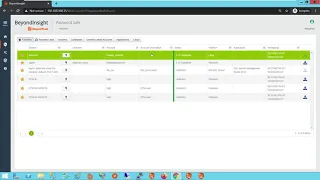
within a browser the web console works without the need to install a new application and other than some light administrative functions it lets users perform almost everything they can do in the FAQ client when a user logs into privileged remote access they'll see a list of the endpoints your group policy allows them to access you can filter in points by groups or you can select my jump groups to see the complete list and you can view properties of a jump shortcut to see more about the end point this one for example is a linux server
which i'm able to access through a jump point on a remote network using SSH or shell jump administrators can modify most of these properties with this endpoint for example I can select which jump point I want to use I can also apply a session or jump policy to this endpoint session policies let you customize the security permissions within a session to fit specific scenarios and jump policies are used to control when certain jump items can be accessed by implementing schedules weather notifications are sent when a jump item is accessed or weather approval or a ticketing
system ID is required before jump item can be accessed in this case I want to make sure the end user gets permission before accessing the endpoint so I'll select the sis ops approvals policy this is going to send an email to someone in my data center asking them to approve my access so not only can you centrally manage users access to systems you can use workflows and policies to further refine that access now when I end-user double clicks on that jump item they're presented with an authorization request window here I can see who the approver
is and other information about the policy I'm also prompted to provide some justification for accessing the system as well as the date and time period I'll need to have access to it this can be helpful if you have administrators working on systems over a weekend for example I'll see a pending status as I wait for someone to approve my access request once it's approved I'll get an on-screen notification and possibly an email notification and I'll see my status change this time when I double-click the endpoint I'm not prompted to provide justification but I am alerted
that someone will be notified about this session this endpoint requires credentials to be entered before I can access it because we're either using the built-in vault capability or we've integrated with an external password safe I'm able to access the Linux server with these credentials even though I don't know what they are so I click OK and privileged remote access pulls those credentials from our password management system and enters them in on the remote system allowing me to log on this is beyond tres credential injection capability once connected I noticed that my approver left me a
message for him to contact if I have any questions so loud that and launched into my SSH session to this Linux server now I'm connected to the endpoint through a jump point proxy I can work on it just as I would through a traditional putty session but with beyond trust everything I do can be recorded audited and monitored in real time I can also connect to systems using jump clients so in this example I'll select one of our Windows servers once connected I'm dropped at the login screen again I don't know the credentials to log
in but with credential injection that doesn't matter here I'm able to see the list of credentials that are currently available to me on this machine I only need to click the credential I want to use to log into the system in addition to remote control and screen sharing I have additional functionality on this system on the file transfer tab I'm able to browse the remote and local file system and transfer files back and forth I also have a command shell emulator that lets me interact directly with the command shell without having to open it up
in the screen sharing GUI I can view a system information without using the GUI too this lets me access device manager process information and the ability to interact with processes I can also see an event viewer a programs list and currently running services I even have a registry access tab that gives me access to the registry editor without needing to open it in the GUI access to all of these tabs is controlled granularly through policies so if you don't want a vendor or a sysadmin to have access to a particular tab that can be controlled
through the group policy or through the jump client policy I can have multi sessions running at once and easily toggle back and forth between tabs or I can go back home and launch additional connections for my next session I need to access an internal website this particular dashboard does not require a login but you can use credential injection with Web jump if needed - this is a be on trust real-time dashboard and as you can see there is no one logged in at the moment so there's not much activity I'm not able to modify the
URL but I can follow hyperlinks within the page or move back and forward or refresh is necessary web jump can be especially helpful for securing access to web-based administrative interfaces like your administrative console of AWS for example just like with other session types everything I do in this session is being fully recorded and audited you can also use privileged remote access to enable collaboration often organizations need to bring in a number of experts or even vendors or partners to resolve an issue instead of launching a screen sharing session through some type of meeting tool you
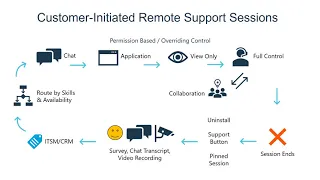
can actually invite the user in through privileged remote access to illustrate this let's say I'm logged into this jump client and decide I needed some additional help from a vendor or a third party if I have permission to do so I can invite an external user along with the invitation I can specify the level of access they should have and provide some context for them this will generate a URL that I can share with that third party technician when they open that URL in the browser they're taken directly to the appliance here they can choose
to join through the web access console or they can download the full access console I'm going to use the web access console and join the session as that invited user the invited user will see a welcome notification and once they click OK they're interacting with the same technician who invited them just by way of demonstration here in the foreground we have our invited vendor and in the background is original technician as the invited user begins troubleshooting you can see that everything is happening in real time in both windows as long as the original session is
open the invited user can work on the system or the original user can manually remove them before ending the session once they've been removed their access is permanently disabled they cannot get back into the system unless we generate another invitation we've mentioned that all sessions can be recorded and audited so let's take a look at what those reports look like we access all the reporting through the appliance interface as with other privileges in the product reporting is also a group policy membership item so if you don't want someone to have access to reporting that's not
a problem you can also delegate reporting permissions so if you have a particular vendor who needs to see reports from sessions on boxes they have access to you you can let them see those reports without giving them access to everything else there are three main reports available session reports summary reports and session forensics with session forensics you can actually search for file names or events that appear in the session log but we're going to run a simple session report once I do that I can see reports for the sessions that have been done on this
appliance we can click details to see the complete session log we also have a link to view the video recording of the session these recordings are compressed so they have a pretty small footprint in terms of storage especially if you want to retain the data for longer periods of time as you've seen privileged remote access lets you manage access to critical systems without hindering the productivity of your users it integrates seamlessly with password management leverages security investments you've already made and works across hybrid environments users can even access systems from mobile devices or through a
browser and every session is logged and recorded enabling you to satisfy compliance requirements