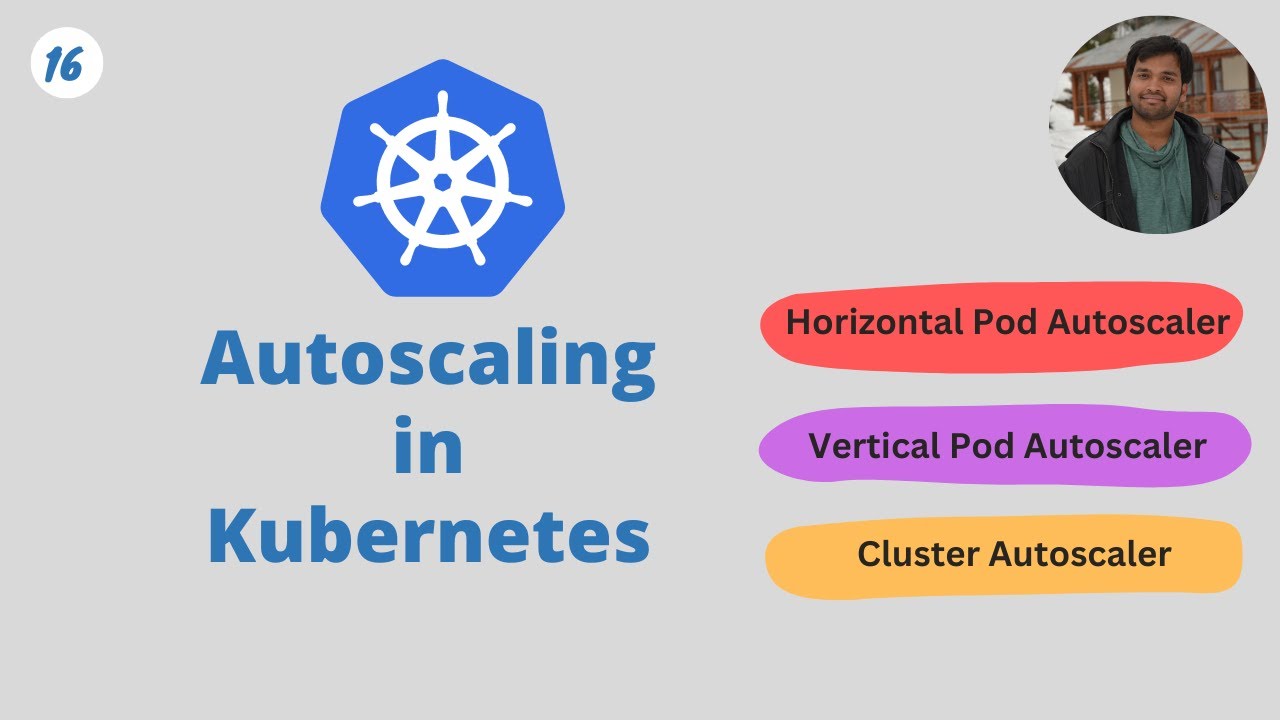
hello everyone welcome back to my channel my name is p and this is video number 17 in the series CK 2024 and in this video we'll be looking into Auto scaling uh we'll be looking into HPA vpa and so on we'll be looking into overall concept of Auto scaling so although this topic is not important from exam perspective from cka exam perspective but if you are someone who is a beginner to kubernetes or who learning kubernetes and want to do the Deep dive into it this is really important and I wouldn't suggest to miss this
topic so that is why I have included that in the series even though it's not part of CK but it is you know a good to have a must have uh topics to understand so uh comments Target for this video will be 150 comments and like Target for this video will be 250 likes I'm sure you can do that in next 24 hours U so without any further Ado let's start with the video okay so let's begin with understanding what actually scaling is forget about Auto scaling for now forget about HP VP for now but
let's just start with what actually scaling is so scaling is changing your servers or your workload to meet the Demand right and it can be done manually or or by automatically so if you remember when we've discussed deployments because we have looked into deployment in detail so with deployment you know it comes with replicas so that identical copies of a single pod can run in the same deployment to serve the customer right so it is to be done to scale the workload right so that's one of the example of scaling or when we are deploying
our workload in multiple notes this is one example of scaling so we are actually increasing our resources based on the demand by the customer and because with the deployment with the multiple nodes it was done all manually right we specify how many replicas do we need or we specify like if we need to scale it beyond that so we update the deployment or replica set to a desired number of replica so it was all done manually till here and if we see uh like if you are running your workload on a production system or let's
say even something you you won't be able to monitor it 24x7 and you won't be able to do it manually like consider an application with thousands of nodes you know thousands of PODS how would you do it manually there is it it's almost impossible to do that manually and it's not efficient it's not recommendable so there was a need of Autos scaling something that could do that automatically based on the demand based on the increased workload or based on the utilization of resources on the server so that's when the Autos scaling concept came in so
let's see what are different types and what exactly are these so let's say you have a node uh the first one you have a node with one pod running which requires one CPU and one memory at the time and uh there is a constant load let's say this is a database uh you know or even uh public facing application doesn't matter so let's say there is some load getting generated on this application and uh let me add the user over here as well we have multiple users accessing this application doesn't matter how they are accessing
it it just like they are accessing this application that's important for now okay so users are accessing this application and let's say user load increases instead of one user now we have two user three user and it keeps on increasing so application would fail at at some time it will reach to bot neck at some time it will you know stop responding to the user or there'll be a lot of latency in responding to the request in that case we use a concept called horizontal pod Auto scaling I will explain it to you what exactly
it is so what it will do this horizontal P order scaling this will add identical Parts in the deployment automatically based on the load on the server and this load can be you know um increased CPU or increased memory let's say we set the target as Whenever there is a load of at least 60% of the average CPU utilization add one pod and it keeps on doing that and let's say it if it there are more users to the application so it will add more replicas of that part and it will all be done automatically
so over here in this process we are actually horizontally adding the pods and it is done automatically so that is why it's called horizontal pod autoscaling so first the flow is horizontal and then we are doing it automatically so horizontal pod autoscaling right it's the self explanatory term but this is what I mean by that now let's say we have another node or another cluster and a separate project uh okay and a separate workload running so again over here as well we have uh some users accessing this application okay and application load load is getting
increases but this application can afford some downtime or it can afford some restarts or some slowness it's not Mission critical or it's not something which expect a lot of customer uh you know it don't work on seasonal PR cars and so so there are different use cases right so in that case what we can do is we can use a process called vertical autoscaling I'll explain it to you as well instead of horizontal P Auto scaling they can use vertical p scaling so in that what will happen is instead of this one pod I mean
the the Pod that is serving it has one CPU and one memory we can automatically resize this to a bigger pod and now we resize the requirement the resource requirement instead of one CPU let's say we go with 10 CPUs and 10 GB of memory so now even if and it all happens when there is an increased workload so increased uh user traffic and and so on right so now this pod will be replaced by a bigger pod it will require a restart so that's what I said like it will happen only when your application
can afford some downtime so it is stateless in nature and it can afford some downtime there is no Mission critical workload running that cannot afford to go with the restart and so on right so this is what I mean by vertical P Auto scaling now this is in terms of kubernetes but if we look at the concept of horizontal autoscaling and vertical autoscaling it stays the same right in horizontal autoscaling let's say instead of these pods we have virtual machines so if we take an example of a cloud let's say AWS in that we have
an autoc scaling group in autoscaling group we specify how many ec2 instances do we need let's say it starts with one and then we set the number of replicas or desired number to three and it will add more replicas when the CPU load increases on the server so that's example of horizontal autoscaling in vertical autoscaling instead of pod again we have an ec2 server and we replace it with the bigger machine whenever there is an increased CP utilization or memory utilization and it'll be all done automatically so so this is the concept of horizontal Al
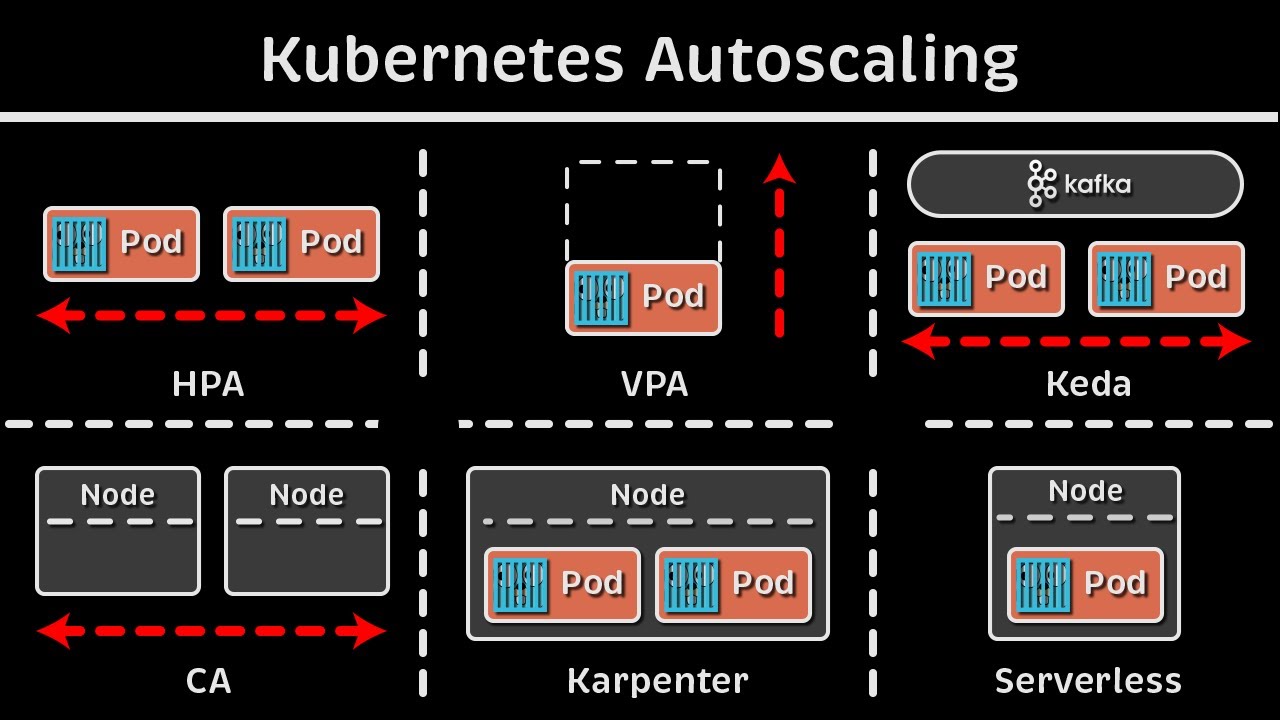
Auto scaling and vertical Auto scaling and when we have a look at that in terms of kubernetes we actually have few more Concepts so let me explain it to you over here we'll be doing the demo of one of these which is HPA but we'll be you know having an overall understanding of all the autoscaling features so let's start with the scaling type so we have as discussed we have two major scaling types one is horizontal another one is vertical horizontal Autos scaling also known as scale out or scale in that means we are scaling
out or we are scaling in when there is a increased load on the server we actually add more replicas and when there is the decreased load on the server we actually decrease the replicas to save the cost and to make sure we are using the optimum resources in vertical autoscaling however we actually resize our machines or we actually resize our applications to Meet The increased load and whenever the demand is decreased we actually scale it down so there is this difference between scale out scale in or scale up and scale down so it can be
sometimes confusing but if you associate it with horizontal and vertical it will be easy to remember then in both of these in horizontal autoscaling and vertical Auto scaling we do it on two different aspects right one is on the workload it would be either on workload or it would be on infra such as nodes workload such as ports infra such as nodes and the same for vertical autoscaling as well let's take few example of each one of those let's say we are using horizontal autoscaling on workloads so the example that we saw um we have
an application running it has multiple Parts Whenever there is an increase Demand on the server whenever CPU utilization goes to let's say 60% it will add more ports to the deployment right so that is your first part and it is done by a process called HPA horizontal p autoscaler and this comes of within like it is built-in kubernetes but it only takes Matrix from The Matrix server so if you remember previous video we installed a new OD or a new deployment called Matrix server and it is responsible for exposing those CPU memory and all other
metrics to HPA right but this h HPA it comes within kubernetes and instead of workloads or instead of ports let's say we have to add more notes to the server mod more notes to the infrastructure Whenever there is an increased demand so that is managed by a process called cluster autoscaler and if we go to Vertical autoscaling uh same thing if we have to do vertically autoscaler pods or or workload so we have to resize it with the bigger pods for that we use a process called VP or vertical p autoscaler and if we have
to let's say add more node pools to the server to the cluster we can do that with node autoprovisioning so these features most of them are not available like only HPA is available Within kubernetes by default but rest like vpa it's a separate project on GitHub you have to separately install it and set it up cluster Auto scaler not Auto provisioning this mostly comes with the cloud provider so if you use a manage cloud service such as a AKs eks or gke then it comes with that you cannot really add more nodes to your uh
local infrastructure setup to your local installation like we are using kind cluster or if you are using mini Cube or anything else so yeah it comes with a cloud providers manage service offering so this is the overall uh difference between horizontal and vertical Auto scaling and there are some other Auto scaling such as event based Auto scaling because these horizontal and vertical these Works based on the metrix you know your CPU your memory your disc and so on but there could be some cases where we have to like in a production system we actually have
to autoscale our system autoscaler infrastructure and our workloads based on certain events let's say let's say there is an event whenever uh you know you are getting a lot of 500 to error on one of the servers or a lot of requests are getting rejected with a particular error code so scale that node or add more nodes add more parts and so on so this event based autoscaling can be done by a third party tool which is again um a cncf project it's called kaada and there'll be many more projects as well but you can
use any of those this Scara is one of the most popular tools that we use these days and then we have crown or schedule based Auto scaling as well and so on so out of all these on only HPA comes uh within kubernetes installation rest either you have to set it up manually uh from the binary or it comes with a manage Cloud offering such as AWS gcp or Azure so this is the overall concept of scaling now we'll be doing a load test for the HPA and I will show you how HPA actually works
behind the scene okay so as I was recording this video I realized that CK exam uh lab version has been updated to 1.30 so I have upgraded my environment to 130 so if you do cctl get nodes uh now I'm using the latest version 1.30 as of uh June today is yeah 3rd June so this is what I'm using make sure you also upgrade your version kubernetes version to 130 uh we have already discussed the installation steps in detail in one of those videos you can refer that and maybe install a new version it won't
really U make much of a difference when it comes to you know doing all the practice handson and everything but it will be uh good to have the same version as it will be there in the exam and it is one of the latest table version so it's good to use that now um to test HPA first we need is the metrix server so if you remember we have installed Matrix server as part of I guess yeah in the previous video itself so we can use the same yaml and install it and and it will
be because we need metrix server to expose the metrix to HPA and HPA will get all the values of CPU and memory utilization from there and it will take some actions based on that so yeah it is one of the prerequisites I already have it running because I did not deleted it last time so let's see get pods hyphen n Cube system okay uh here it is metric server it is running so we are good with that prerequisite now now let's uh create a deployment and a service on which we'll be doing the auto scaling
so I already have a yaml created in day 17 folder okay so all the resources it will be there in the GitHub repository don't worry about it so it has two objects one is deployment one is service okay till now we have not covered how we can use multiple objects in one single EML so we can do that with these three dash which separates two different objects right so for example uh here is our deployment and here it ends and when the next object starts like let's say this is a service so we add one
line in between with three hyphens and that's it that's how it knows that okay so the first object has been completed over here from here it will be the second object and you can have as many as uh resources created within one single EML so uh in this EML let's say we have a deployment deployment name is PHP Apache and it's using an HPA example from the official K repository right this is uh one of the public repositories and it has HP example as the image now we'll be exposing this on container Port 80 and
we have specified request and limits we have already seen that in previous video so we are specifying that it should acquire 200 M of CPU so m is like 200 m is similar to to2 of 1 CPU right and this is05 of 1 CPU so M is for Millie so it will have .5 CPU and as the limit and2 CPU as the request and then we'll be creating a service which exposes this on Port 80 right and based on this selector and this is the label that we have in the deployment okay we have discussed
this in uh in depth already so I'm not going to spend much time on that so now that we have our deployment ready we can just apply this deploy do EML and it will create a deployment and a service so let's see okay so it has one part because this deployment does not have replicas specified that's why by default it will create one replica of it okay so we have one part running and there would be a service running if we do get service so PHP Apache there is one service running on PO D and
it's been exposed now now the next is we have to create the um HP object so you can use the imperative command and you can use the declarative command so I will show you uh how we can do that so you use the command Cube CTL Auto scale and deployment deployment is what we need to autoscale then the name of the deployment PHP p and then we specify CPU percentage CPU perc equal to 50 so this is the average CPU utilization that it looks for for a given period of time let's say because the way
it works is HP keeps on monitoring your workload after every 15 seconds is the by default period but you can configure it in controller manager but for now just understand that it will after a few seconds it will keep on monitoring your workload for the CPU utilization so whenever for a brief period of time let's say for 10 15 seconds it will find that your average CP utilization is going Beyond 50% then it will add more replicas to it and we can specify mean and max number of replicas so mean is one right so that
that's mean when the node goes below 50% then it will decrease the load it will delete the additional replicas and it can go to minimum of one replica which is the one that we have used as default okay so we specify hyphy Min equal to 1 and hyphen hyen Max equal to let's say 10 okay so we have okay it says already exist so let me delete the already one delete PA and the name was PHP Apache okay let me create this again now okay it says HPA autoscaled the deployment so if we do get
HPA okay now it is showing me just drag it over here now it is showing CP utilization as unknown because it takes few seconds to you know get the CP utilization 50 is the max that we set as the target so as soon as it reaches to 50 add more replicas main pod is One Max p is 10 so if we run the command again now it shows C utilization is 1% and 50 is the target for Autos scaling right now we have to actually simulate the load on this particular application right so we have
to get put some request on that so that it will increase the CPU utilization so for that what we can do is we can actually try generating the load and we can do that okay so the document that I was following was over here see so uh this was HPA okay horizontal part [Music] scaling and if you go down I guess this one walkth through example okay so this is the command that we can use to increase the load on This Server yeah I've just made a copy of it so that I can I don't
forget to paste that locally so we can do that on a separate window so that we don't have to stop the application and it will be running in the background so I have opened a separate terminal window and this is the command that I'm going to use Cube CTL run hyphen it load generator is a separate application that we are running as a container and is based on the busy box image we are actually doing while sleep1 so after every millisecond it will try to uh you know get the request from this page right so
it is just sending some random requests to a page a wet request to a page it will be just printing that right so it will increase some load on the server after a few seconds so let's run that okay and it it is just printing the response so I'm getting the response back as okay so it is keep on printing that after every 1 millisecond so after a while if we check our application and if we do get HP again we will see the load getting increased so you have to wait for some time and
and instead of you know running the command you can actually add Hy hyphen watch so that it will only be changed when once there is a change in the result so now that we have seen the target is 1 60% so this is the time it should add more parts so let's see get pods okay it had added five more parts and this is still coming up and if we do get HPA watch so CP utilization now to 37% and it added four replicas already few of them were still coming up so that's why it's
not part of it now it has five replicas and it will keep on adding it as per the requirement right so if we do Cube C get pods and if we want to check 1 2 3 4 five right so there are actually five pods running at the moment and if we see the get HPA the CPU utilization is 117% which is more than 50% and five or seven replicas at the moment right now it is showing 47% but it will not be for a longer time so that it will be captured as part of
the HP action so that's why it is not scaling it down so let's see it is still seven replicas so now what we can do is yeah we have uh seen the how HPA works and with the help of an example we did the load testing so now let's contrl C let's interrupt this so that it will stop this container okay it has stopped the container it has uh stopped generating the load now and let's go back and if we do get parts it will not be downsized uh instantly it will take some time but
if see Key C HPA so uh CP utilization is now going down to 50% and it will go down in some time so it will take around a few minutes for this to go down to you know 0 or 1% and then these replicas will also go down to a minimum of one pod which is what we have specified yeah so this was the example from HPA and as I've mentioned Auto scaling is not part of cka so if you are just preparing for CK don't worry about it but it is important to understand this
concept HPA vpa autoscaling in General Auto scaling in kubernetes and so on so yeah I hope this video was helpful you would have understand everything about autoscaling and uh I will see you tomorrow with the next video or as long as uh the targets of comments and likes gets completed within the next 24hour you will see the next video in the next video we'll be looking into props liveliness and Readiness props and uh yeah uh that's that's all about it if you like the video gives it a thumbs up and share it with your friends
family and colleagues subscribe the channel if you are new here okay thank you so much and uh have a good day happy learning and I will see you soon






![Kubernetes Crash Course for Absolute Beginners [NEW]](https://img.youtube.com/vi/s_o8dwzRlu4/maxresdefault.jpg)