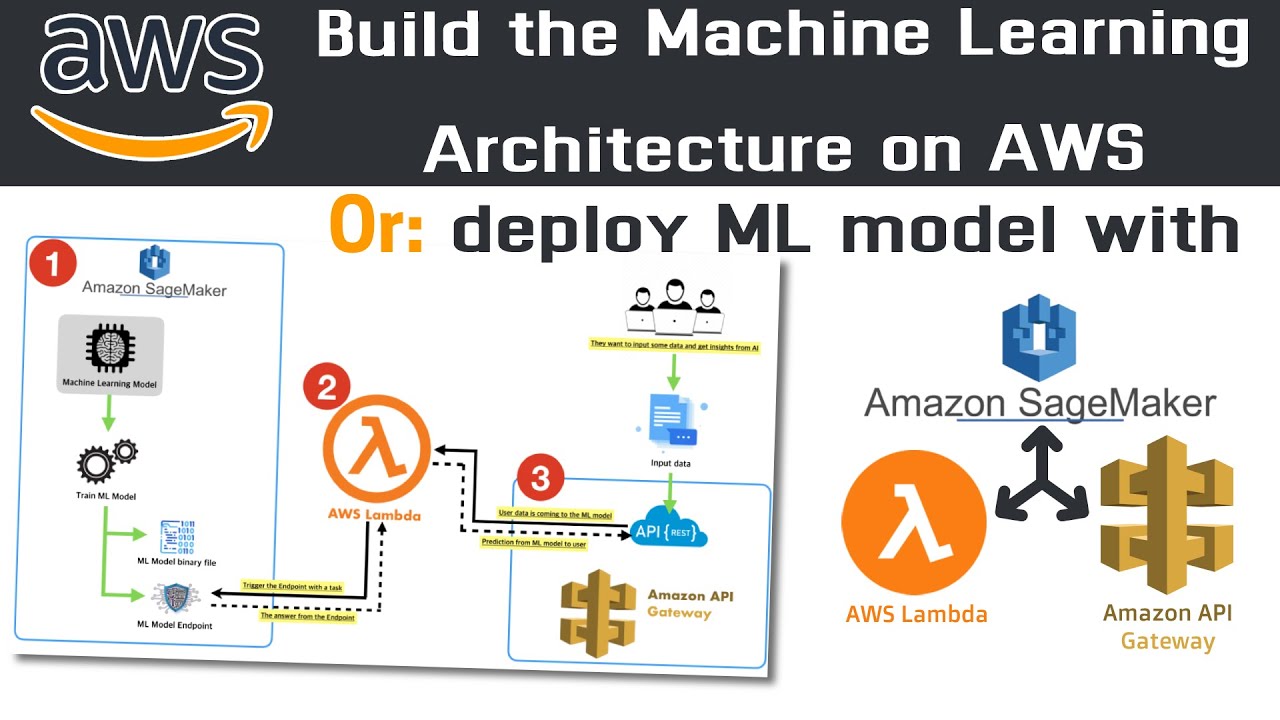
hello all my name is krishna and welcome to my youtube channel so guys we are into the sixth tutorial of amazon sagemaker and right now what we'll do is that if you remember in our previous video we had trained the model we had trained the complete model using xgboost with the help of amazon sagemaker now in this video we'll try to deploy this machine learning model you know and i will try to see what all parameters are actually required for deploying the machine learning model again just one line of code is actually required apart from
that i'll also be telling you from past two to three days i'm actually running this aws amazon uh various web services like sage maker like amazon sagemaker what was the total overall charge that has been charged to me in my credit card that also i'm going to show you and how you can also try to find out how you can actually see the billing amount and all and make sure guys if the bill usually comes high probably you're doing something wrong okay if you're following all my steps then it should not be a problem now
uh to deploy the machine learning model once my machine learning model is created right so you will be able to see over here if i just go and reload this particular page in my s3 right so this is my s3 you can see sorry this is not my s3 this is my sagemaker let me just go through my s3 so in my s3 here if i go to my bank application if i go and see my uh just let me reload this page and let me see whether the model file has been created or not
so you will be able to see that inside my xgboost as built-in i'll go inside my output folder you'll be able to see that my model has been created and every time when i train a new model a new file will get created inside this output folder because remember this file and path that is getting created it is based on timestamps so every time whenever you create or whether you train new machine learning algorithms your new model will get created and will be saved in the s3 bucket that is very very much important to uh
learn right so because of this model versioning becomes very very easy because every time whenever a new data set comes you train it and then you create a new model based on your timestamp and that is the most important thing so every time you'll be seeing that new new timestamp models will get created as more number of times you actually train right now this is one of the thing we have verified this you can see that uh i have my model present inside this in the form of zip file like star dot z z files
right now in my next step i'm going to deploy this machine learning model again to deploy i'm going to use the same object which we did the fit with right and then we will try to deploy it we'll just write dot deploy function and here you will be requiring two important parameters one is the initial instance count you can give any number of instances uh instances basically helps you to uh have parallel instances so that they you know multi-parallel processing can happen you can get the response very very much quickly and this instances will also
be given with some instance type and this is the instance type that we select again this x large is basically selected so that the response time is very very less it is a powerful system but remember just don't keep it stagnant for much time after you run this probably after you run this try to delete all the things i'll try to show you in my next video as soon as you deploy as soon as you verify your model how you should close this whole notebook instance how you should delete it uh everything will be shown
so that much charges will not happen so let me just execute this and now the deployment will actually start again this is some warnings because probably um it will be renamed to image underscore uri instead of this parameter image there is some parameter in image inside this deploy function so instead of that it will become image underscore uri now guys this will probably take some time so what i have taught is that i i really want to show you that from past three to four days i've been exploring sagemaker i'm running this particular account i
just want to show you how much charge it has basically happened so in order to know the charge what you do is that just go and click on services right over here on the top you'll be able to see this billing so once you open the billing guys you'll be able to see that uh in the august month you know basically in this month because i've just started four days back exploring this the cost was just 0.04 and where do you see the cost is basically in the sage maker and the other services probably right
so these two things you can see uh okay tax is there apart from that only sage maker cost is going on probably because of the reason that i have actually used some instance type but again just imagine guys for three to four uh you know from past three to four days i've trained i've fitted this kind of models many number of times and the charge that was just put up is somewhere on point zero four dollars okay so make sure that if you are always checking this this is a very small amount guys i think
you can afford that if you have a credit card but just imagine if you are getting some higher dollar like 10 20 and think that you have done something wrong so make sure be cautious and actually continuously try to see the billing page also and how much cost is basically getting incurred because this will just be a very very small amount that will get added okay so uh you can see the top three services by usage this much time this much things all this information is given over here easily so this will probably take some
time till then we can actually wait um and as soon as the train deployment gets over we'll try to see this and in my next video after the deployment is done how do we do the prediction that is what we are going to discuss about it okay so i hope you like this particular video uh i'll see you in the next video with respect to to see the prediction data how the prediction data is doing we'll also try to create a confusion matrix and see so i hope i'll see you all in the next video
guys thank you one and all uh please do subscribe the channel and uh don't forget to like the video if you like this thank you bye bye