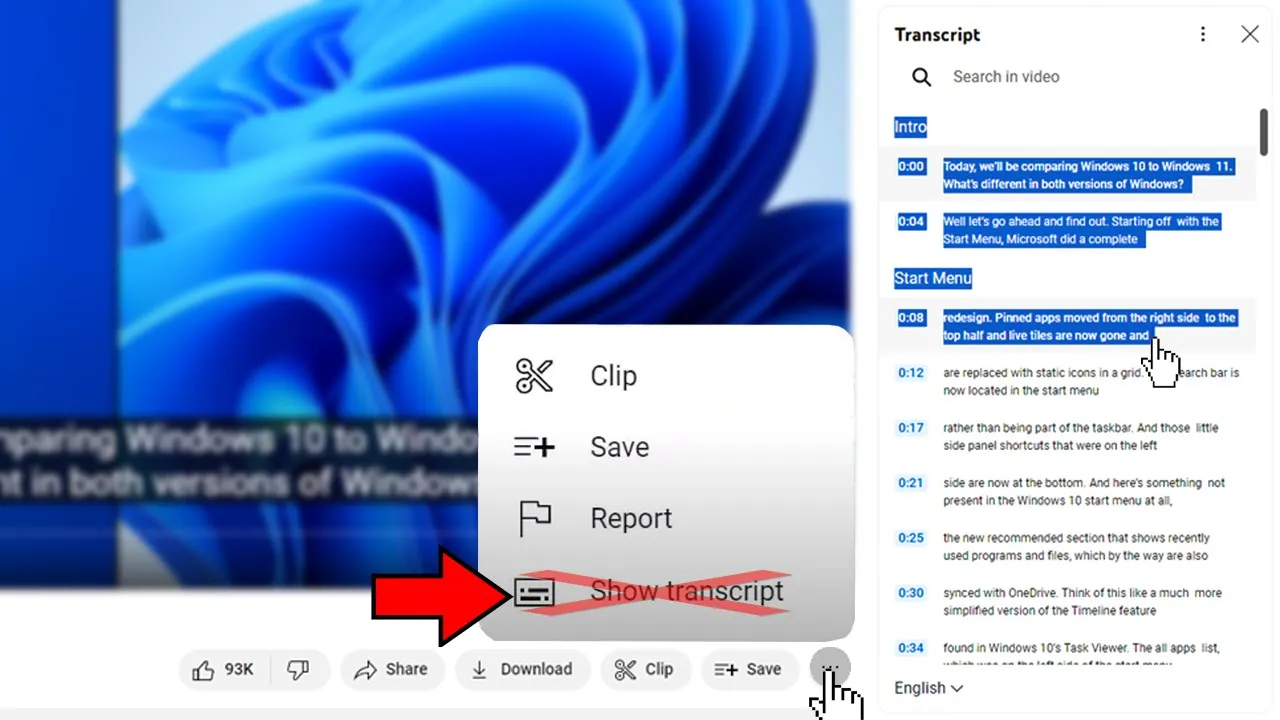
Would you like to get transcription for any Youtube video? Which shows at right side of the video. So stay in this video that I will show you.
And if you like this type of content, subscribe the channel! Give me your support :) If you like this video and if this video helps you out someway, leave a like! Then go!
I will show how to do that! Here in the Youtube, so I will go to my channel to show how to do. I will take this video here in order to show you how to do.
Here in my video, and you can click here to enable the subtitles. Previusly you clicked here in 3 dots and there showed "Show transcript". So appeared in the right the transcript to you to take that, but Youtube removed it.
Removed this option and put right above in the description, the description is shortened just click in 'MORE'. Here it is, transcript, 'Show transcript'. Click here.
Already appears here in the right, wonderful. Showing here in the right you have this 'Search' in 'Search' you can insert any word you want to search which is in the subtitle any time for example 'microphone' All times which showed microphone, it already detachs for you where it will show. Look the timestamp here.
Showed once in 4:45, clicking in 4:45 it already go there. Go exactly in the moment where shows microphone. I want to copy all the text without the timestamp, and how to do to remove the timestamps.
Just click in three dots. Toggle timestamps Ready. Ready already removed all timestamps.
So now, you just select with cursor all and click on right button, copy. For example, here is Word. Just put into Word and CTRL+V.
Ready, all the text is here. Everything right for you. Amazing, isn't it?
Well, it was the video. If this video helped you out someway or if you liked the video, leave your like. If you like content of PC, videomaker, youtuber's tips and ramdon reviews of cool things, subscribe the channel.
Give me your support :) Thank you so much for watching, a huge hug, until the next video, thanks, bye!


![Como copiar legenda /transcrição de vídeos para [Canal Dark] no Youtube com o celular](https://img.youtube.com/vi/h3ErGqaw9ps/maxresdefault.jpg)
![Como transcrever vídeo em texto usando ChatGPT [ EM 3 MINUTOS! ]](https://img.youtube.com/vi/Z8EjMXiJydw/maxresdefault.jpg)