in this video I'm going to show to you how you can use video.ai for all your content repurposing needs within five minutes to get started with video.ai what you need to do is upload a file right you can use a YouTube link if you have one or you can choose to drag and drop a file from your computer the moment you click and put in a link or upload your file and hit continue you'll be asked to set your preferences for this video do you want Square videos out of this do you want portrait shots
out of it or do you want landscape chapters out of it depending on which platform you want to post these on for the sake of our example we are going to select portrait and square for these platforms in The Next Step what you've got to do is Select templates for your videos templates are essentially pre-built looks for videos that you want to post on Tick Tock Instagram YouTube whatever the case may be in this case what you need to do is Select at least three templates of each type so that we are able to give
you a variety of Clips as we keep going forward you hit on continue and now you need to do the same exact thing for square videos as well so I'm going to select three types of templates for square videos as well here I can add my Instagram and Linkedin accounts and Tick Tock account so that I am able to personalize your videos as you keep moving forward and you're done your video upload is complete this can take some time depending on the length of your video you can save your preferences for future videos and now
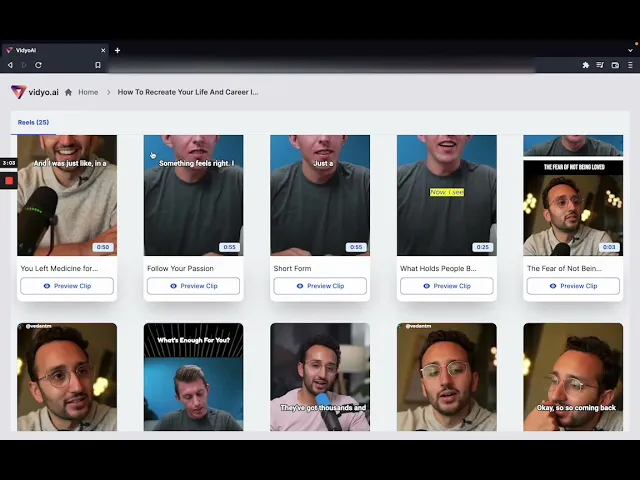
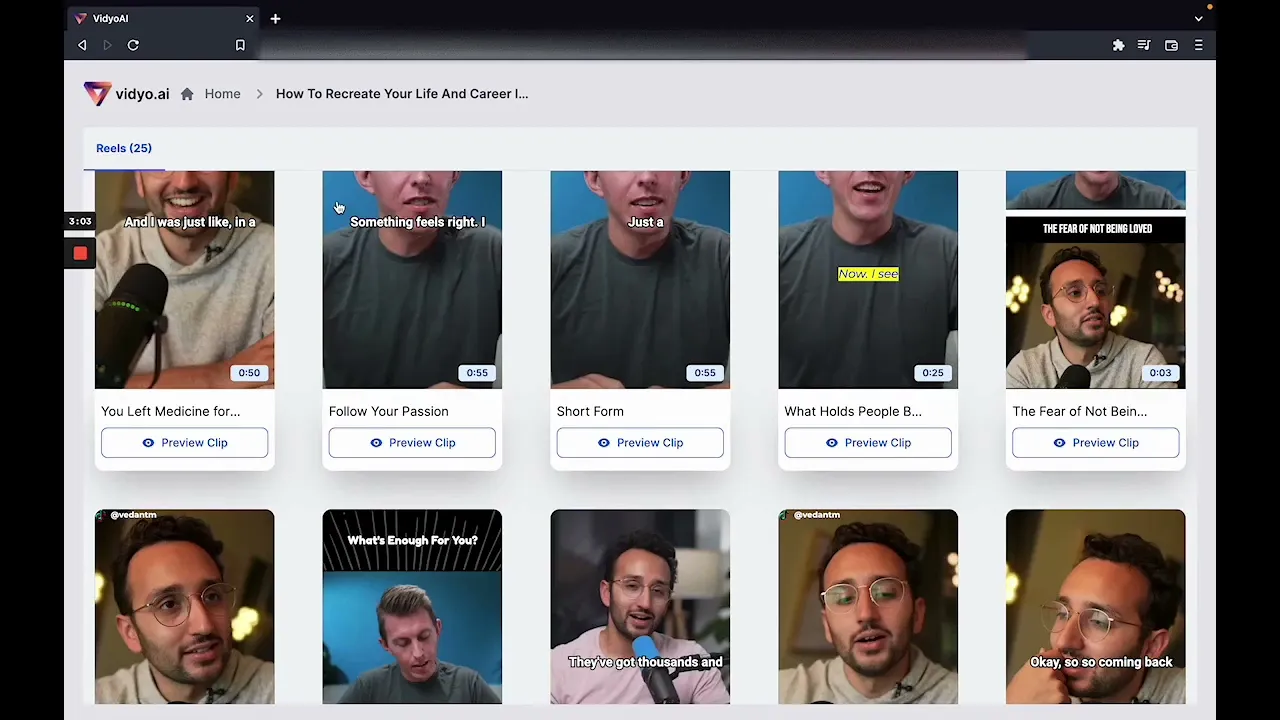
you can head on to your dashboard as you can see this video is already getting uploaded we are going to go through the next steps on another set of videos let's say we uploaded this video as you can see what's happened in this video is that from one hour long conversation the AI was able to detect over 25 reels that can now be shared on Tick Tock or on Instagram or on YouTube depending on what you prefer let's just take a look at one of these reels if I want to check out one of these
reels I can hit click on one of these wheels and it gives me a title for the reel it also gives me a transcript what this reel actually has now I can choose to watch this video or I can choose to let's say change templates and try and see if this video looks better with other templates if I want to completely change the look and feel of this video or any other video that has been detected for me I can also go click on this button that says make changes on editor this will open up
a brand new editor that will allow you to change every aspect of this video that has been generated if you want to choose more templates you can do that if you want to select a custom template you can do that editing subtitles is also possible over here and written the style of the subtitles is also possible over here as you can see I can change the size I can also change how the subtitles look the color of the subtitles in the alignment of the subtitles as well I can also add effects as you can see
over here four effects are included in video.ai as of now if you want to download the SRT of these subtitles that can also be done now let's talk about elements let's say for example you want to add a progress bar to your video you can choose to add a progress bar that goes as the video goes along if you want to add social callouts like you can see Tick Tock over here you can do that as well should you choose to add an outro for your video you can also add and adjust the length of
this outro using this outro section if you want to add your logo or a custom image you can do that from here as well text can also be added using this section over here let's say I want to add the title of the video I'm going to select this section title of my video I'm going to adjust it basis my preferences and now I can change the look and feel of this text using Styles as well some videos require you to put a different background that is something that you can do from this section as
well the moment I hit on download video now this video as it is will be downloaded in in preference that I set note that Pro is only note that 1080p is only a pro feature and that comes with a paid plan you can now access your downloads from this section over here I have downloaded a lot of videos so you can see all of these videos lining up over here my templates is a section that allows you to access your custom templates which is again a pro feature not a feature that's accessible to everyone thanks
a lot for watching