i was a terrible student at school but i was efficient so efficient in fact that i actually never ended up reading any of my assigned readings i remember in my final year of high school i got assigned the book emma by jane austen now due to my sheer laziness i never actually got past the fourth page english just really wasn't for me so what i ended up doing is falling back on my good old friend cliff notes i read a summary of the entire book and then ended up making my own summary from that now
this whole process would have been a hell of a lot easier if i had the model we're going to be describing and taking a look at in this video so that brings us to the model in this video we're going to be taking a look at the pegasus model for abstractive summarization now you're probably thinking nick what the hell is abstractive summarization well abstractive summarization aims to do exactly that it aims to take a body of text and summarize it into a shorter version in this particular case when we are talking about abstractive summarization it's
actually generating new sentences so it's not just looking at a body of text and extracting the most important one like extractive summarization does it's actually looking at the body of text and trying to generate an abstract summary of that so it's actually generating a new sentence now the model that we're going to be taking a look at is the pegasus model trained by a team which was supported by the data science institute imperial college in london as well as google now there's a whole bunch of use cases for abstractive summarization summarizing emma is probably one
of them but there are a whole heap of others say you wanted to read a bunch of newspapers faster you could do that in fact the pegasus model has actually been trained on a whole bunch of articles from cnn as well as bbc you could also summarize reddit post or reddit threads in this case pegasus has actually been trained on that as well in fact one of my favorite use cases is the ability to use the pegasus model to summarize scientific journals again something which has been done using the pubmed article now the pegasus model
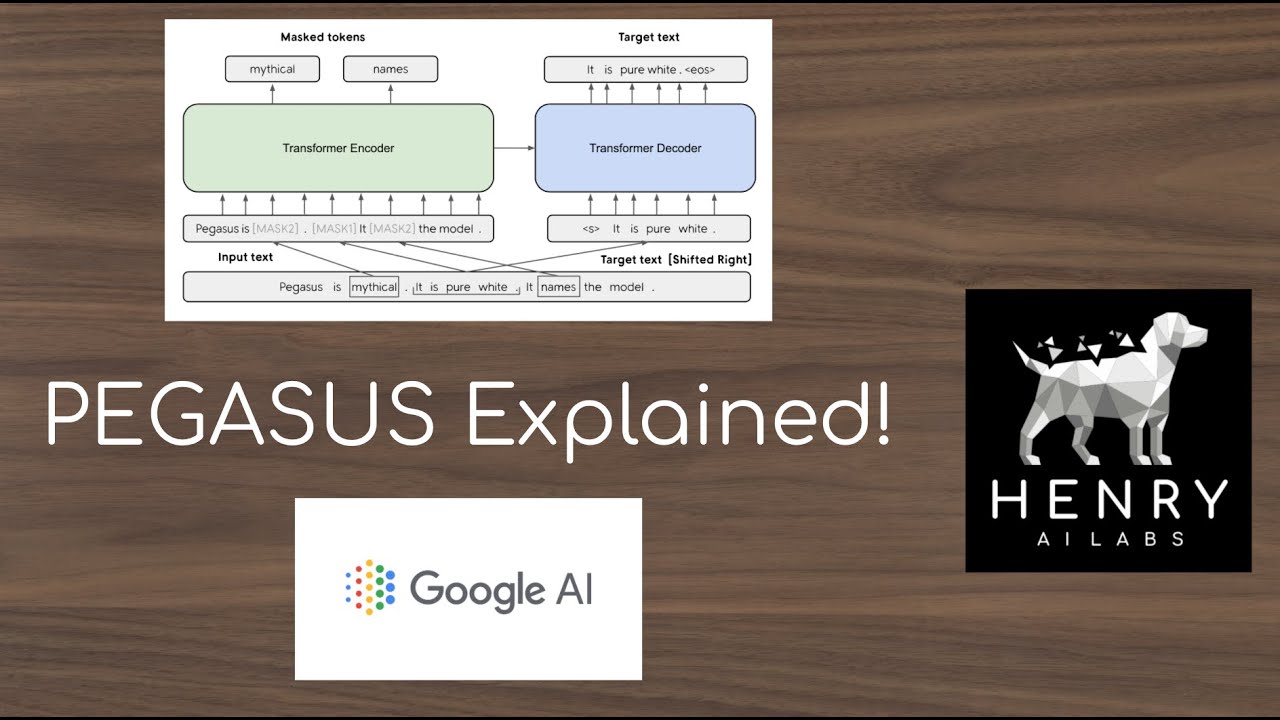
is described in a paper called pegasus retraining with extracted gap sentences for abstractive summarization it is built using a transformer encoder decoder architecture with the encoder outputting mask tokens and the decoder generating gap sentences the second bit in this particular case is the bid that we're interested in however the research team output the mass tokens so that they would still be able to evaluate the model against a range of standard nlp benchmarks this model differs from traditional gsg models in that it was pre-trained on existing gap sentences from the body of text the researchers extracted
specific sentences from the corpus and used those as the pre-training objective this was done in the aim of producing more robust generated summaries now in this video we're going to do a little bit of a crash course on pegasus let's take a deeper look as to what we'll be going through so in this video we're first i'm going to start out by installing the dependencies to be able to use the pegasus model and we're specifically going to be doing that through a library called hugging face transformers then what we're going to do is we're going
to import and configure the model so this will basically download the model and get it ready so we can actually perform some attractive summarization and then on step 3 we're gonna do exactly that so we'll take a bunch of different types of text and we'll actually pass it through to our pegasus model and see how it actually goes about performing some attractive summarization now in terms of how this works first up what we'll do is we'll install pi torch and transformers so pytorch is going to be the underlying deep learning model that ours the pegasus
model then we're going to download the google pegasus exam model so this is actually been trained on a whole bunch of bbc articles so we'll be able to leverage that but i'll show you where to access the other models as well if you want to do that and then what we're going to do is wrap it up and pass through a body of text and have it summarized so we'll actually grab some wikipedia articles pass it through to our pegasus model and you'll say generate a shortened summarized version of that and it will be an
abstract summary so it's not just a sentence which is existing within that existing body of text ready to do it let's get to it alrighty guys so in order to go on ahead and use pegasus there's going to be three things that we need to go on ahead and do so first up what we're going to do is install our dependencies and these are namely going to be pi torch and hugging face transformers then what we're going to do is we're going to import and load those models and then what we're going to do is
perform that abstractive summarization so i think this is so powerful right so say for example you wanted to go and summarize a block of text and maybe pass it through to a newsletter this would definitely be the pipeline that you want to take a look at okay so let's go ahead and first up install our dependencies now the first dependency that we're going to need is pytorch so in order to grab pytorch what you can do is navigate to pytorch.org and then all you need to do is go and hit install and you'll be able
to install it so if we scroll on down the build that we're going to choose is the long term stable one and then we're going to choose our operating system so let me zoom in on this so you can see it a little bit better so we've got our version that we want or what build we want what os we're using in this case we're using windows we're going to install it using pip and we're going to be installing it for python and in this case i've got cuda 11 on my machine if you don't
have a cuda implementation or if you're not running on a gpu perfectly fine you can still go on ahead and do this just choose the cpu version if you're running on a or keep scrolling on there if you're running on collab then i believe it's going to be cuda 11 as well so let's go ahead and copy this and to install it all we need to do is type in exclamation mark and then paste that in and i'm just going to get rid of the pip 3 or just the 3 from pip 3 and if
we go ahead and run this this is going to go on ahead and install our pi torch implementation so that ran pretty quick because i already had it installed you can see that first up what you need to do is install pi torch so let's add a little comment there in the store pie torch and then the next thing that we need to do is go on ahead and install hugging face transformers so in order to do that we just need to type in pip install transformers and hit shift enter and again i've got that
pre-installed so it went pretty quick but all you need to do if you're installing it for the first time let's add a comment install transformers all you need to do is type in exclamation mark pip install transformers now you're probably thinking nick why do i need transformers it's like aren't we using pegasus well the implementation of pegasus that we're going to be using is through hugging face so hugging face is an awesome natural language processing company that gives out a whole bunch of open source natural language processing models that you can go on ahead and
use and it just so happens that the google pegasus models are available on there so you can see that we've got pegasus exam pegasus large pegasus cnn daily mail so these each of these different models are models that are trained on different data sets so you can actually see that there's a whole bunch of different ones that we're able to use we're going to use the exam model because that's the most popular and that's the one that i found pretty good results on so if we actually step into this what you can actually do is
see a whole bunch of information about the model a whole bunch of documentation about how it was built but again i'll link to the formal paper inside of the description below so you can see that as well cool so we are going to be using this model now let's go on ahead and do that so we have now completed step zero what we now need to do is go on ahead and import and load our model let's give ourselves a little bit of extra room so i'm just going to add some additional cells and what
we're going to do now is import and load the model so we're going to first up import some dependencies and then bring it in so let's go ahead and import our dependencies first up okay so those are our main dependencies now imported so i've gone and written one line of code there so this is importing dependencies from transformers so let's take a look at what we wrote there so i wrote from transformers import pegasus for conditional generation and each one of those has a capital right so it's in camelcase comma pegasus tokenizer so we've actually
imported two new classes we've imported this one which is pegasus for conditional generation and the tokenizer as well so what we've actually gone and brought in is two separate things the tokenizer is going to allow us to convert our sentences into a set of tokens so think of this as a set of number representations for our sentences so rather than passing through the word um i don't know iphone it's going to assign a unique identifier for that specific word which allows us to pass it to our deep learning model so this is the process of
tokenization then what we also have brought in is this pegasus for conditional generation class this is actually what's going to allow us to use the model so this is going to be the holder of our specific deep learning model so when we go and instantiate them we're going to instantiate our tokenizer and we're going to set up our model as well so what we're going ahead and do is exactly that now so let's create our tokenizer and our model so we're going to create our tokenizer so that is our tokenizer now imported so what we've
gone and written there is tokenizer equals pegasus tokenizer so this class from up here and then we've gone and used the from pre-trained method to load up an existing model so this is going to be what allows us to leverage the pegasus excel model so in this case this is the exact model that we're going and using so google forward slash pegasus exum now because i've gone and used this model before it sort of skipped through the downloading because it's already pre-downloaded when you do this for the first time it's actually going to go on
ahead and download the model i think it's around about two ish gigabytes so just be mindful that you've got enough disk space to hold that as well if you wanted to go and use different pegasus models you could as well all you need to do is pass through the name so you can see that this one here is called pegasus forward slash large if you wanted to load this model all you need to do is replace that in here and replace it in the same place when we instantiate our model you'll see that in a
sec um so again you can use a whole bunch of different models if you wanted to let's create our model now so create our model actually load models probably a better description for what we're doing so we're loading a tokenizer and we're loading our model so let's load our model now cool so that is our model now loaded so what i've got and written there is model equals pegasus for conditional texture of pegasus for conditional generation which is this over here and then again we've gone and used the from pre-trained method so similar to what
we used over here to go up and load an existing model in this case because i already had it pre-downloaded it's already downloaded so it didn't need to go and download it again so it's loaded pretty fast and then i'm going to pass through the model that i want to use so in this case we're using the google forward slash pegasus dash excel model so again exactly the same as what we've gone and passed you to our tokenizer so all up to import and load our models we've gone and written three different lines of code
so first up we've imported our dependencies from transformers we've then gone and loaded up our tokenizer and then last but not least we've gone and loaded up our model now what we can actually go on ahead and do is actually perform some abstractive summarization so let's go ahead and do this now first up what we need to do is grab some text that we want to summarize so we're going to create a new variable called text and we're going to create three sets of quotes so we can just include it over multiple lines i think
if we go and grab python from wikipedia this is a great example so if we go to the python wikipedia page and let's say we copy this block of text what we can go ahead and do is paste it in there and try it out so that's our text that we're going to try to summarize now again you could throw in whatever you wanted in here so if you wanted to throw in i don't know like a abstract from a research paper you could do that as well in fact we'll probably try that out in
this case what we've gone and done is we've just gone and grabbed some text from wikipedia and we'll try to create a summarized version of that let's get rid of that so let's go on ahead and first up what we're going to do is convert this to tokens so remember we said that we loaded in our tokenizer up here what we first need to do is convert this text into its token representation so this is exactly what we're going to do now so create tokens and remember our tokens are a number representation let me bring
this up a little higher so we can see it number representation of our text so let's go ahead and do it okay so those are our tokens now generated so if we go and take a look at our tokens you can see that we've got a whole bunch of different tokens down there now let me explain what it is that we've got there or what we've actually gotten done so what i've gone and written is tokens equals tokenizer and this is using our tokenizer that we created up here and then to that we're passing through
our body of text which is what we had over here so you can see that that is our first positional argument there and then we're going to pass through a number of keyword parameters so specifically we've specified that we want truncation and this basically means that it's going to shorten our text to make sure that it's of an appropriate length to be able to pass it through to our model because there are limits as to how much you can pass through to the model then we're going and specifying that we want our padding to be
as long as possible so it was set padding equal to longest and then we've gone and specified that we want to return pie torch tenses to return underscore tenses and we've set that to pt for pi torch so all up it's this one line here to create these tokens and then you can actually see the token representation of our body of text so basically what we're saying is that all of this here is represented as these numbers to be able to pass it through to our pegasus model pretty cool right so let's take a look
at that line again i've written tokens equals tokenizer pass through our text as our positional argument specified truncation includes true specified padding equals longest and specified return tenses as pi torch which gives us these tokens over here now what we need to do now is actually go and try to summarize this so let's go ahead and do that okay so that looks like it's gone and successfully generated a summary so what i've written is summary equals model dot generate and then what we're doing is we're unpacking all the stuff that we've got inside of token
so specified uh asterisk asterisk token so if we go and pass that through so asterix asterix tokens this might throw an error so what we're effectively doing is we're unpacking all of the stuff that we've got in here so this is just a simpler way of passing through the input ids as well as the attention mask so when we go and create these tokens we're actually getting two things back so we're getting all of these input ids which are our actual tokens and then we're getting this other thing called an attention mask which basically specifies
where our specific attention is going to be directed when we're going and generating this text but for now just focus on these input ids and know that all you need to do is unpack those tokens and pass it to our model and that will generate our summary so let's actually take a look at that full line there so i've written summary equals model dot generate and then we're going in unpacking this dictionary of tokens hopefully we take a look at the type of our token so type should be a dictionary uh well it looks like
so it's a specific class but you can actually see that this looks like a dictionary it's wrapped in our squiggly brackets so by using our double asterisk we're able to unpack that and pass it to this model.generate function so full line is summary equals model dot generate asterix asterix and then tokens so it's unpacking that then the result that we're getting so if i type in summary is a number of tensors back so this is effectively returning a separate set of tensors so remember we passed through some tensors as our input what we're going to
get back is our output tensors now this is actually the result or our summary so if we actually go and decode this we can actually see what our summary looks like so if we go and write so this is a summary in tensors or actually in tokens right now right now that doesn't really represent very much to us because it's just a bunch of numbers so what we can actually do is perform a decoding step to go and convert this back to words now we can use our tokenizer to do that so let's actually go
and do it so tokenizer decode and then if we pass through our summary and we're going to extract so you can see that this is wrapped inside of two sets of square brackets so we've got a square bracket there there and we've got a second set of square brackets so it's actually nested now what we need to do is just grab the first instance of our result and this is going to give us our summary back so that's pretty cool right so this is decoding our summary so decode summary so let's just quickly take a
look at the line that we wrote there so i've written tokenizer dot decode and then what we're doing is we're grabbing this summary and effectively just grabbing the first value from that so we're passing through this list rather than the nested list because remember this is nested you can see that it's got two sets of square brackets there so we need to grab the first result which is accessed by passing through zero or indexing zero and then you've actually got the summary there so this is pretty cool right so we've gotta pass through this big
block of text over here so python is interpreted at a height like basically what we've gone and copied from wikipedia and what we're getting out of that is python is a programming language developed by guido van rossum how sick is that so it's actually going and summarizing this big block of text now if you actually like this is the test that i always go and do to see how accurate this is actually or how valid these results actually are if i go and copy this text can we actually go and find this within the existing
body you can see that it doesn't actually exist so if i go and try to search through that we don't actually have this sentence inside of this wikipedia page this is what abstractive summarization is all about it is going and generating a new set of tokens or a new set of token sequences to be able to generate that summary so it's completely generating a summary out of this big block of text that we're passing so it's not just extracting one important sentence it's going and generating those new sentences which is so so cool so let's
actually take a look at what we passed through so we passed through python is an interpreted high level general purpose programming language its design philosophy and for sizes code readable oh my god okay so you can clearly see that with my short attention span having something like this is super useful so by passing through this big block of text we're now generating this summary down here so python is a programming language developed by guido van rossum let's try some other stuff so um what's another good example uh let's type in machine learning it's getting super
meta as per usual so if we copy this and paste it in so we're going to replace this text so again this sort of shows you how you can update the pipeline so if you wanted to go and i don't know scrape a website and bring it in all you need to do is replace what's inside of this text variable and the pipeline will still work so if i go and pass this through which is just the machine learning bits that we went and copied from wikipedia into this text variable here and if we go
and run through the pipeline again this is going to create our new tokens so let's remove the type function there so those are our new tokens if we go and generate our summary there is our new sentence so it's gone and written so machine learning is the study of computer algorithms that can improve automatically through experience and by the use of data is that in there looks like it's just gone and grabbed that first sentence so machine learning is a study of computer algorithms that can improve automatically through experience and by the use of data
okay so not all that abstractive in that particular case let's go and try uh another but again it's still gone and summarize it right like that is probably a really good summary of what machine learning really is all about uh let's go and grab a news article so i don't know tesla robot this is uh obviously making the rounds at the moment let's grab this one so this is all about the tesla robot or the tesla bot that tesla's just gone and announced or the optimus robot so if we go and copy this paste it
in again i haven't gone and written or read any of this so it'd be interesting to see what it generates and let's go through our pipeline again so that's created our tokens that's generating our summary and then it's going to go on ahead and decode it how cool is that so tesla has announced plans to build a humanoid robot is it in this okay let's this is again the test let's actually see if this sentence is within this article it isn't see how cool is that that is abstractive summarization right so this is a pretty
good summary of exactly what that article is about so it's tesla is has announced plans to build a humanoid robot so again if we go and try to search for this i just want to make sure i'm not not pulling pulling the covers over you you can see i've actually got that search query over there so i've got this search over here and we're searching through the web page it is not finding this right just make sure that we can see some stuff so again the search is working so tesla has enough how cool is
that so that is your abstractive summarization in a nutshell what happens if we tried to summarize use pegasus to go and try to summarize the pegasus paper let's go and find it so pegasus machine learning paper so it should be through aar xiv right let's copy this but we can open up the pdf as well as soon as that downloads we'll be able to go and try to summarize this is getting super meta right almost like inception up in here so we're using pegasus to summarize the pegasus paper you saw it here first wow my
internet is slow all righty come on there we go all right so what we're going to do is copy the abstract and see what happens let's copy all of this paste it in so again we're going to replace what's inside of our text and try doing that so this is basically the abstract that we got from our pegasus paper and we're throwing it inside of our text variable so if we go and run this now so let's see what it's going to say so pre-training nlp models will self-supervise objectives on large text corpora has shown
great success when fine-tuned on downstream nlp tasks including text summarization i don't know if that is the best summary of what the pegasus model is all about and that looks like it might have actually just gone and taken a sentence let's have a look so again it's still gone and generated a new sentence or an abstract summary uh let's try this with self-supervised objectives free training transformers still gone and generated a new sentence it's almost like it summarized or paraphrased this first sentence here which you can see there so recent work pre-training transformers will self-supervise
objectives on large text corporate showing great success when fine-tuned pretty close now keep in mind that we're not using the model that's been fine-tuned on the pubmed model so this might actually perform better if we actually use that model but you can see that it is actively going and performing abstractive summarization which is absolutely super cool and we've done it in just a couple lines of code as well now as per usual this code is going to be available by github below so let's quickly summarize and then wrap it up so remember we've gone through
three key steps so we first up went and installed our dependencies we then went and imported and loaded our model we then went and performed abstractive summarization and remember there's three key steps so we first create our tokens we then use our model to generate our new tokens or our summary and then we can decode the tokens that we get back to be able to see our actual summary so on that note that about wraps it up thanks so much for tuning in guys hopefully you enjoyed this video if you did be sure to give
it a big thumbs up hit subscribe and tick that bell thanks again for tuning in peace