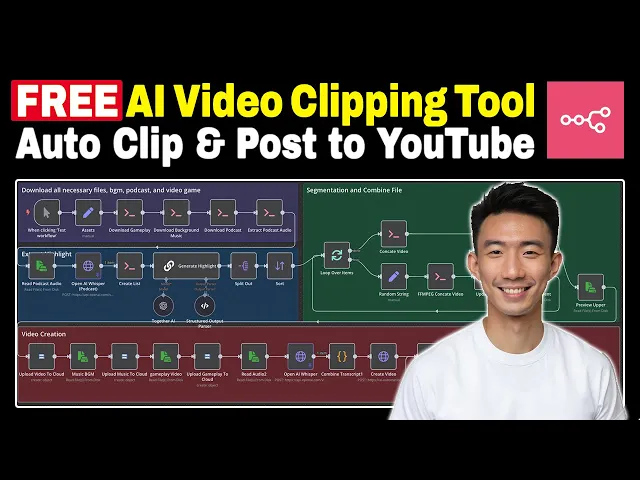
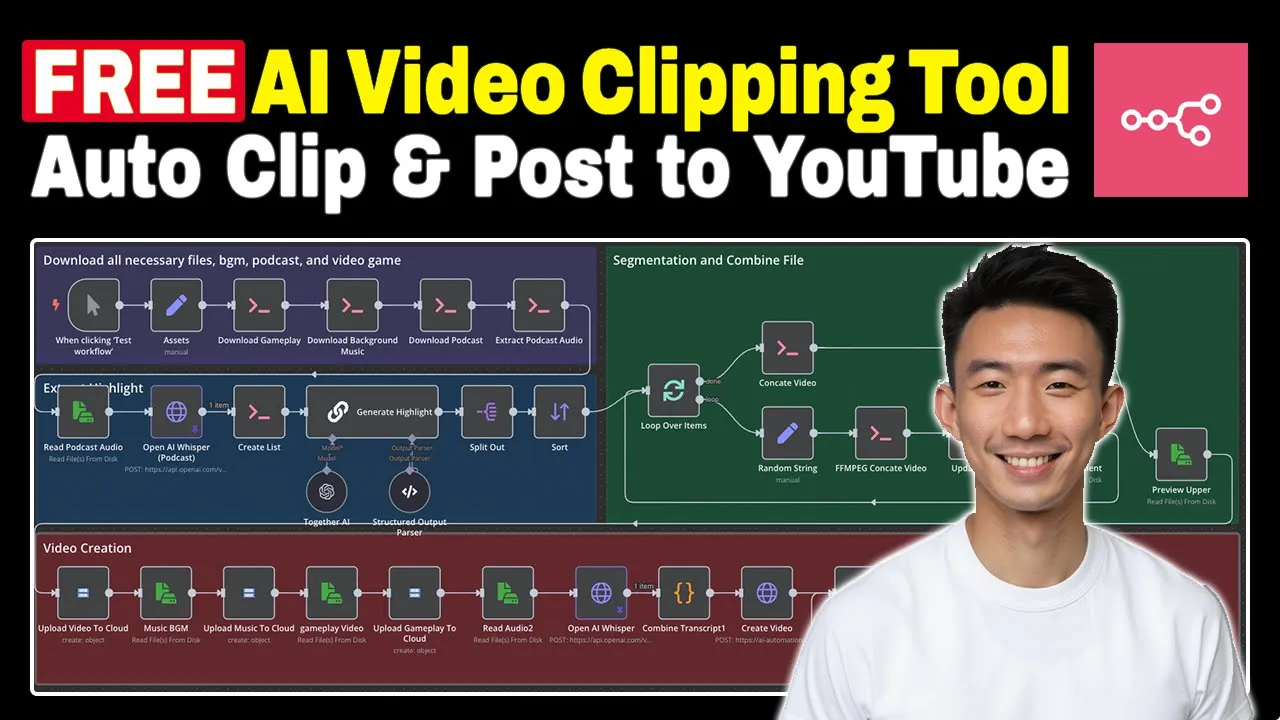
hi everyone this is Andy welcome back to the channel after watching this video you will know how to build your own Auto video clipping with AI agents let's take a look at the result first I have this sense that there are very powerful secret societies operating today and we don't really know or understand them and the conspiracy theories in spirit might have something to them but are actually factually not correct well you get like influential people Med so if you like this result remember to like the video and save this workflow tutorial so that you
can always come back and rewatch it anytime you want all right let's take a look at another live demo now this is the podcast video and this is the no copyright gameplay video this is the background music that we can use for free no copyright free as well and this is for the Google Sheets we have the title caption URL post it at what time status we'll store everything here after we have done the auto clipping all right and then let's run through our n workow first and at the end of this video I will
share with you where you can get the template great let's take a look at our Google sheet here we can see the title caption and video URL let's take a look at the video try to be useful um you do things that are useful to your fellow human beings to the world it's very hard to be useful I think that's great that's the result of our live demo all right for our next step is to auto upload to our YouTube channel here so you can see this is our U workflow for uploading the YouTube channel
we can try to run it now okay let's take a look at our Google cheat first the status is posted and let's go to our YouTube channel and try to refresh it great is uploaded and let's take a look at this try to be useful um you do things that are useful to your fellow human being great so this is our live demo for this Auto clipping workflow and we'll teach you how we can do that on your Local Host so let's dive in all right first of all for this video Auto clipping tool we
are going to build it on your local nxn so we need to have the docker desktop for your Mac or for your PC you can search from Google and then download Docker desktop and then we will give you this Docker file in our community I'll share with you where you can get this at the end of this video or you can just make your own file here just copy and paste this okay because we need to is install the library of FFM so that's why we need to run this okay so there are two scenarios
the first one you starting from scratch the second one you have already installed your local NN so let's go through the first one first first of all we go to terminal we search for terminal and then you can run this to script okay so this one it means the local Port so where we will find it you'll find it in the image and then Python and also the container and then you can run both when you want to when you want to run the N workflow or start building your local um Auto clipping tool for
the second scenario it means that you have already installed NN from dockerhub by searching for NN and install this one and then you need to get the container ID first so where to find a container ID so this one is the one that you installed by searching from dock hop so you can copy this ID and paste it here and then copy the whole one and then go to terminal and execute so that's how you can install your uh container and also the images on Tucker so you can start building on your local machine for
the n for this Auto clipping too all right let's get started for the first note we will have the edit field note and then we rename it as SS because we're going to get the links of the three YouTube the gameplay one music and also the podcast how we are going to get the link is going to the URL and get the latest uh get the ending part of the URL and then we can just copy and paste and paste it to here okay and then we will have another note this is a note specialized
for Local Host so where we can get it we can search for execute command execute command all right and then we we name it as download gamep play because uh we this is the gameplay video we are going to download so so for YT it means YouTube we use this um model uh to download the gameplay video and this is mp4 file and we are going to download the background music and we are using the audio format of MP3 okay and for podcasts again we use the MP4 okay and we are going to extract to
podcast fe uh audio and we need to use hi y um because it's for always overwrite it's very important okay and we're going to extract the highlights for this note is another new note all right it's very important note we are going to uh end and then we can search for prefume uh this one read or writes files from disk okay and then we can rename it as read podcast audio and we can take a look at this um like try to learn a little bit about okay great and then another note this is XP
request note we name it as open AI whisper it's very important okay we can scroll down and can see the uh form data time stamp form data model wper one which choose and the response format verbos Chas and it's very important and and B file file data this why we need to always have the data the read podcast audio the note the read um the note um before this open the eye whisper okay as on the right hand side you can see is these are the words starting seconds anding seconds okay all right we are
going to to use the execute command uh to have this note to create the list this list is for uh the segmentations for the video combinations is for combining the videos at the end okay and then we have another note this is for generating the highlights of video so the the problem we use here is to analyze the analyze the provided transcript array and then um the total duration of all highlights uh and then priori action with high informational value emotional impact or keyis it basically tell the AI what to extract what to highlight and
then we can scroll down we can give some examples and rules for example like merch adjacent or sequential entries if they form a coherent highlight all right let scroll down we can see the message this chat message again we need to Jason stringify everything uh is for getting the words an index starting time starting second basically or ending seconds okay on the right hand side you can see the transcript basically start index end index the transcript Etc all right and we have the structured output pars here uh this is the Json example okay and we
Ed to together the AI we use dips here all right dips 33 and we have the split out note here to split out the transcript with the starting index and end index and we have the sort note okay as this first simple one just ascending order using the start index and this is the most important part the segmentation and the file combination we are going to combine everything together in this workflow first of all we have the loop over items here and we will set another edit fils note this is we name it uh we
rename it into random string as you can see this is the U URL this is the random string basically that we are going to use it for later stage okay we use FFM pack to concate the video okay we can see hav SS means the starting second this is starting second hi t means the duration okay okay you can see this expression just copy and paste okay then we are going to update a list this is the list that we created before the list.txt okay and then we use this R files from dis and then
we can take a look at this there are five items here we can take a look at that try to be useful um you do things that are useful to your fellow great this is another mp4 file so there you can see there are five segments over there okay then we are going to The Loop and then we concate video here we use FFM okay um this is a list txt that we created before all right and then we set random string the string is for um uploading to the Google Cloud later yeah okay and
then we going to to extract the audo this one is the execute command note and we use FFM pack um it's for uh extracting the audio from the upper uh MP4 upper upper one means the podcast video okay uh this is audio MP3 and we preview the upper one here we can take a look at this try to be useful um you do things that are useful to your fellow human beings the world all right right so we have the upper part ready okay we are going to upload video to Cloud we use Google cloud
storage and we created a bucket name as anding end clip and this is the object name upper because uh we have upper part and lower part lower part is the gameplay upper part is the podcast one and we're going to have the music BM we extract it from the disk from the local and upload music to the cloud okay and then read um the gameplay for you this is Minecraft one all right upload to the cloud game and then we read the audio try to be useful um from the podcast you do things that are
useful to your fellow human beings to the world it's very great and we have the open AI note here is for whisper and here we are going to do what we're going to do is uh to the transcription uh on the right hand side you can see the U word starting time ending second Etc combine all the transcript using this uh code note uh for example with we have three words for each line we have the starting time ending time yeah you can fine tune the length here we just put three here okay and then
we have another HTTP request note we rename it as create video and this is the API we use any not code again you need to use it as a query or query or we can go to any not code and then you can go to documentation and search for clip video generation this is the um gener U clip video generation API documentation and you can go to API and this is API key you can copy and paste okay and then we can take a look at the Json here we have the background URL clip URL
gameplay URL transcript remember to Jason stringify everything and we need to add uh first uh for the URL okay all right we need to add a wait note uh for 10 seconds check the video progress again this is the um using the API all right have if note if the status equals to done then we proceed to next if not if keep waiting and getting the Fe progress and now at the FI note we rename it to set final video URL so this is the final video URL here we will get the generate the title
and transcript for the prompt we use analyze the following video transcript and generate a compelling you to shorts title under 60 characters attention grappling use emojis and captions and this is the example output like title caption Jason right structured output paer this is the output structure the Jon example and finally we are going to update the sheets again connect with your Google sheet account it's very easy we map each column manually this is the title caption Fe URL all right so that's it for the video generation part all right after we create the YouTube video
we are going to upload it automatically to our YouTube channel first of all we have the schedule trigger here all right uh we can schedule it for example one day between Trigger you can set up um the time interval that you want and we will have the Google sheet note here again connect with your Google account connect with your Google sheet document so this is our Google sheet we have the title caption video URL posted at what time status as the first row the column name all right so we get the status here first and
have the limit note uh maximum one item and for the YouTube link um for Local Host we need to use HTTP request for the YouTube um workflow we have this HTTP request node and then we rename it as the create YouTube link we use this URL as the Google API all right and then we are going to use pred Define credential type YouTube O off to API connect with your YouTube account all right using Fields below content type application SL Json X upload content type video webm raw Jason let's take a look at this snad
title description default language you choose English all right uh private status public you can choose whatever you want for example private license YouTube edible true ET just copy and paste this after we create the uh YouTube link we're going to download YouTube again another HTTP request note you can take a look at this this is the URL okay let's take a look at this try to be useful um you do things okay then we are going to upload the video put method the this is the URL all right let's SC down and binary file data
which means this one all right on the right hand side this is a snipet ID ech the kind here then we are going to update the Google Sheets again connect with your Google Sheets again account and map each column manually uh column to match on row number row number title caption video URL post it at what time uh status great so that's it for the upload YouTube part basically this is the whole workflow for creating this um Auto clipping video automation Tool uh you can build this on your Local Host to save the cost and
also you can upload to Youtube automatically if you want to get this template feel free to join our any not code Community we provide all all other different templates as well more than 15 with that and we keep adding more and more every single week and more importantly we are going to provide Tech Support to all of you if you have any questions when setting up your own en workflow we provid uh technical support in our community and hope to see you there