Devlin: Hello my friends, I think it's safe to say at this point that artificial intelligence is here to stay. So, over the past couple of years we've seen these big organizations dump a ton of money and resources into AI and we've seen these models and tools get a lot better. We're also seeing AI pop up on more and more instructional design job listings.
So while right now it might still be a nice to have, it seems like that's quickly turning into a need to have. So, if you are looking for professional development, or you want to upskill in the instructional design space, Artificial Intelligence is probably one of the best places you can be looking. So that's why I'm recording this video.
I want this to serve as hopefully a long term foundational introduction. We're going to cover some of the key terms and concepts, some of the use cases, and of course, some of the tools along with examples of what these tools are capable of as of when I'm recording this video. So yeah, stay tuned.
This is going to be a good one. Feel free to bookmark it and come back to this and we'll have a lot more AI videos coming in the weeks and months to come. So make sure you watch this one first.
Alright,, so while I don't have a AI degree, or a machine learning Background, or anything like that, I have gotten a lot of experience with AI, this past couple of years. I use AI almost everyday myself. I try to use the new tools when they come out, I've talked to a lot of instructional designers who are using these tools regularly, and I've surveyed a bunch of hiring mangers who are using AI on their teams, So, I've gotten a good idea of how AI is being used right now, I see where we're headed in the future, and I'm excited to create some content to help you all out with this.
So, let's dive in here. So in this intro video, we're going to cover the key terms, the use cases, the popular tools, along with some brief, overviews or demos of them. We're going to dive into some of my AI skill building recommendations.
I'll share some prompting tips and I'm, I think I've thrown some, bonus stuff in here as well. So. Let's start with the terms, nice and easy.
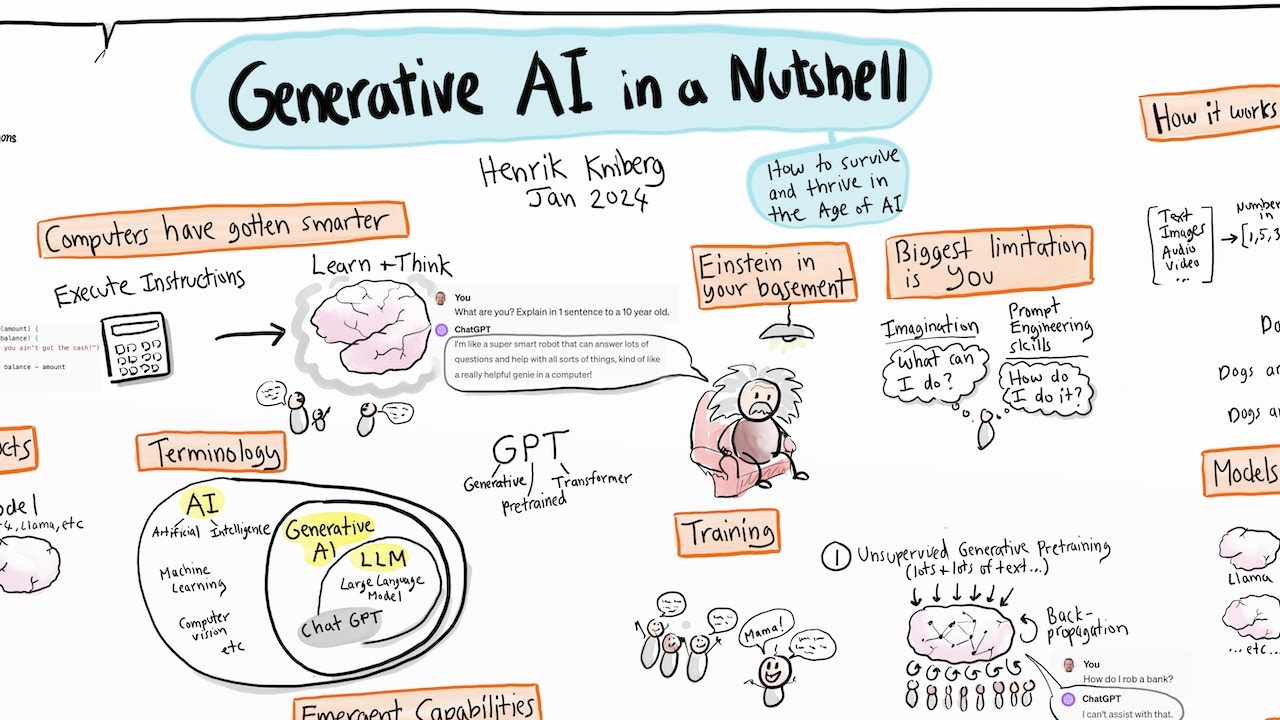
So, Artificial Intelligence refers to systems that perform tasks that typically require human intelligence. So, it's not human, it's artificial, right? We probably all, can deduce that one.
Generative AI, however, refers to AI that's used to generate new content based on patterns it recognizes from its training. So if we, for example, show you 10 photo, or if we show the machine 10 or in most cases, like tens of thousands or hundreds of thousands of photos of a cat, it can kind of recognize the patterns that make this thing that we're calling a cat, a cat. And then what makes it generative is it can then generate a new cat based on all of those patterns that it learned from its training data.
So Generative AI is a little bit more specific because AI is used for all sorts of different tasks like classifying things and labeling things, but unless it's generating something new based on those patterns it's learned It's not Generative AI. And then Large Language Models. So this is most people's introduction to AI like using ChatGPT for example.
LLMs can understand and generate text because they were trained on like terabytes of text data. So yeah, if you see LLM You can generally think of like a text based generative AI, platform. Cause that's what most of us are interacting with LLMs.
So that's the general hierarchy. Again, it's a little more, we can get a little bit more in the weeds, but I don't think we need to here. So yeah, those are some of the main key terms you should know.
I wanted to include this slide here because I know some of y'all might be extra nerdy and you want to know how this stuff works. So. Large language models are trained on huge amounts of text to understand language patterns.
So, terabytes of text, like millions of pages worth of text. Then that text is broken down into tiny pieces called tokens. So generally, a token is about three quarters of a word.
And then they use a system called transformers to predict the next piece in a sentence. So when they're trying to actually generate that next thing, they're saying, Based on all of this text, terabytes of training data we have and all these patterns that we learned while looking at that data what's the most likely next token in this sequence? So you might have heard some people refer to LLMs as glorified autocorrect And that's why there can be limitations like hallucinations and things like that where the LLM say things that aren't necessarily true or where the LLM say things that might be you know directly quoted from a popular news site because it didn't it's not random enough.
It's kind of just based on these patterns and, in some cases, citing things a bit more closely than it should be Thereby causing people who are using the LLMs to think. Oh, hey, I can use this is this I own this copyright, but then they actually can run into issues. So there are definitely some limitations I'll probably be discussing throughout this video But generally, yeah, this technology saves a ton of time and, is really helpful for instructional designers.
So, a couple more really basic terms. I just want to clarify the difference between models and tools. So, models are the underlying AI engines, essentially, that can perform the AI tasks.
And then tools are built on top of these models to make them more user friendly and task specific. So you might find a handful of different, AI video generation tools, but they all might be built on the same underlying model. So just something to keep in mind, that differentiation there.
Each new tool isn't necessarily bringing a whole new AI model to the scene. Some of them are, yeah, some of those models are open source, and then people are using them to build their own tools. Another example is with that AI haunted house project that we did a couple of months ago that I might reference throughout this video.
It's where we integrated OpenAI's LLM, so like ChatGPT, we used that same underlying model that powers ChatGPT for example, and we brought that into an eLearning course that we were building with Storyline. So we can use the model to then create a new tool. And a lot of these other popular AI tools, are built off of, OpenAI's models.
So, if this is going over your head right now, no worries. I know some of you might be brand new beginners, and that's okay because we're gonna dive into some of these AI tools. Alright, so let's dive into the fun stuff.
So let's look at some AI tools. So of course, first and foremost, we have the large language models. So Chat GPT, Claude, Gemini, these are a few of the most popular ones.
We can do a little demos of them. So here's an example from my Chat GPT chat, where I kind of kicked things off and I was like, what should I cover in this video I'm going to be recording? Right?
Like I kind of use it as supplemental research sometimes. So you can see it gives me a whole list. I didn't exactly follow it to a T.
Well, yeah, it was interesting seeing how AI's outline compared to the outline I had already had. And then if we go all the way down to the bottom, I realized as I was just talking to y'all about the limitations, I was like, I didn't include a slide for the AI limitations. But I can just ask AI, you know, what about the limitations?
So here we see here You can slow down bias and outputs. This is a big one that we didn't talk about before. But yeah, AI might be biased like white able-bodied American men.
So when you want visuals with people of different races or from different backgrounds, it might be harder to generate them. And of course that can be a lot more insidious as well as you can imagine. So I know there are a lot of teams working against this, but it's going to be tough because it's trained on human created data.
Which again is the next one. So, all these models depend on the quality of the inputs. So, yeah.
these companies are standing apart by having better trained, standing out by having better trained models. But if I try to train my own model, it would probably be pretty horrible. So it takes a lot of time and resources to train a new model from scratch.
Yeah. The general AI might not be an expert in our specific domain. So that's why it needs a bit of extra prompting and fine tuning to make it better at instructional design, for example.
Ethical concerns, yeah, data privacy, like some of these models have been trained on a lot of copyrighted works. And now it can be used to generate new work that is allegedly copyright owned by you. So, we're gonna have to wait and see what kind of case law comes out around this.
Yeah, it doesn't seem to be slowing down the corporate sector, but, definitely something to keep in mind. So yeah, so thank you ChatGPT, this is an LLM who, showed us some of these, limitations. The other one is just, yeah, the hallucination, right?
Like it could have told me this, and this could all be false and these couldn't be limitations, but you're gonna have to use your judgment, maybe do some additional research to, verify the stuff that you're receiving from AI. So it's usefulness is limited in that way, generally speaking, Here's an example from a chat I had with Claude when I was building this AI haunted house. So this is a different URL and again, if you haven't used these you can go and create an account in two minutes like try them like you start using these.
But here's Claude. So notice I'd say what kind of task I'm trying to complete and I explain what I'm doing as with as much description as felt appropriate here, and then it just gives me the code. So this was one that was kind of code intensive, and then the LLM just says, Here you go, right?
here's some code to handle what it is that you're trying to accomplish. And then I had a much longer chat from there to, yeah, get it closer and closer aligned with what I want, but yeah, check out this, AI Haunted House Video. If you want to see more how we did this, so It's a little bit of the different ways you can use LLMs.
You've probably been using them by this point, if you're watching this video, but then there are also the image generators. So MidJourney is one of them. Here's their site.
You have to get on to Discord so you can generate, yeah, just text to image, right? Nice and simple. You've probably heard of this tool before.
I've found that it's a much better user interface using FreePik. So FreePik, if you don't know, that was always like the go to, tool for Go to resource for a lot of this like really cute and professional looking vector graphics that we use for eLearning projects for years now. But yeah, they've added this AI suite that's actually quite impressive.
So these are some photos of me, but they're not really me. So FreePik has this feature where you can like upload images of yourself and then generate new AI images accordingly. So you can tell stuff is a little funky if you look too closely.
And now you can even generate video. So I uploaded a photo of myself It kind of generated this whole description. And then I added , the man takes a small bite out of an apple then tosses the apple out of frame.
Now it's not perfect and it is very creepy hahaha. Strange way to eat an apple. Let's look at this one.
Yum! So yeah, the AI video, not exactly there yet. I am very intrigued by this one right here.
Veo 2 by Google. So it's a wait list right now, but from the people who have used it, they've said it's better than anything they've seen. And yeah, common trend if you've been following along with the AI stuff, it's moving very quickly.
I'll show you one more. This was an apple I tried to generate. with Runway, which is another tool.
Even weirder, even stranger, I thought it might be better, but I'm pulling other apples out of nowhere. They're flying around, so it needs some work, right? But, yeah, AI can generate video.
OpenAI's Sora is another really popular one that just released recently. but yeah, I've heard Veo 2 kind of blows the AI video competition out of the water. So make sure you get on that waitlist if this is something you think will be useful for you.
When it comes to sound effects and voice, you can use a tool called Eleven Labs, which again, quite popular at this point. Articulate also has, these voices built into their AI assistant and we demo that in our most recent live event where we, essentially showed how to use AI with Storyline. So check that out.
Okay, Suno. Oh, this one is really cool. So Kath Ellis showed me this not too long ago and showed me some custom songs that she made.
Maybe send DM if you know her and tell her to create a deep dive video on it because it's so cool, but yeah, you type what you want your song to be about. You can pick from a wide range of different, genres, and Check some of this out. It's generated by AI.
Here are the, lyrics over here. So I'll let you, play around with this on your own time, Suno. com, but you can use this for your eLearning experiences.
I think Kat Ellis made a version of this for her like learning community, that was super impressive. Like a theme song. So the sky's the limit with how you want to use your creativity with the music.
And then Notebook LM. You may have heard of this one too. This one, huge game changer.
what I love so much about this one is, if you have a big document, so this happens a lot in instructional design, I feel like it's here's this huge PDF. We need to turn this into an eLearning module. Well, Notebook LM lets you upload one PDF, 20 PDFs, whatever it is, and then you can ask it questions and it will cite your PDFs to give you answers.
So it's kind of like training up your own subject matter expert that you can ask questions to on demand. And, yeah, you'd say, okay, well, you could do the same thing with ChatGPT. You could give it your files and ask it questions.
I feel like it, when you do it with other tools, it hallucinates quite a bit, and you can't really depend on the responses that you're getting. But with NotebookLM, it shows you it will cite, like, all of the claims that it makes, it will cite where it is in the original PDFs. You can click on its citation and see where that is in your source material.
So that's a huge game changer for me. There's also like some, you can like create, generate a podcast based on your documents if you want to learn that way. I haven't really spent too much time on that.
but yeah, so here's how we've been using it. So, If you follow along with the channel, you might know we're going through this process of becoming like a licensed career school in the state of Oregon. And they have a 200 something page PDF with all of their, requirements for, or all the statutes, all the laws around becoming a career school.
So I can ask it a question here. This is like the chat area in the middle. I can say, what are the curriculum requirements?
And so then it will give me this big response. But if I'm like, that seems like it might not be true. Or, Oh, let me see if that's.
If that's right, I can click on the citation and it will highlight it over here in the source material so I can compare it accordingly. And, so, you know, your learning plans shall include. So, really helpful tool, really helpful for, instructional design tasks that are really heavy on source material.
So, if you haven't heard of or used Notebook LM, it's free, so fast to get started, and definitely a huge time changer. Here are a couple more tools. I don't use these ones so much, but if your writing needs some help, you know, very common ID tasks, you can use Grammarly or Jasper AI.
Those are both pretty popular ones. And then if you've been seeing these AI generated avatars, I've covered them in some of my previous AI videos. I've used Synthesia before to make like an AI version of myself, but now I've been seeing more about this one called HeyGen, and Kimberly Goh, posted a video showing off one of these HeyGen avatars, and I was quite impressed, I was like, these have come a long way since I played around with them a year or so ago.
So check those out if you want to have the AI talking head, avatar that looks exactly like a human. Okay, so that, we covered the tools there. I will say, there are so many tools.
The best, the way that I kind of stay on top of them is I've trained my algorithms over the years. So I search for AI content sometimes. I, Yeah, I would suggest you do the same.
if you're on social media, you know, Instagram, TikTok, whatever, do a couple of searches about, AI tools or same thing on YouTube, top AI tools today, whatever it is. and yeah, then when these new announcements come up and stuff, generally they will pop up on your feeds because the algorithm knows you're interested in AI. So you're already doing a good job by watching this video.
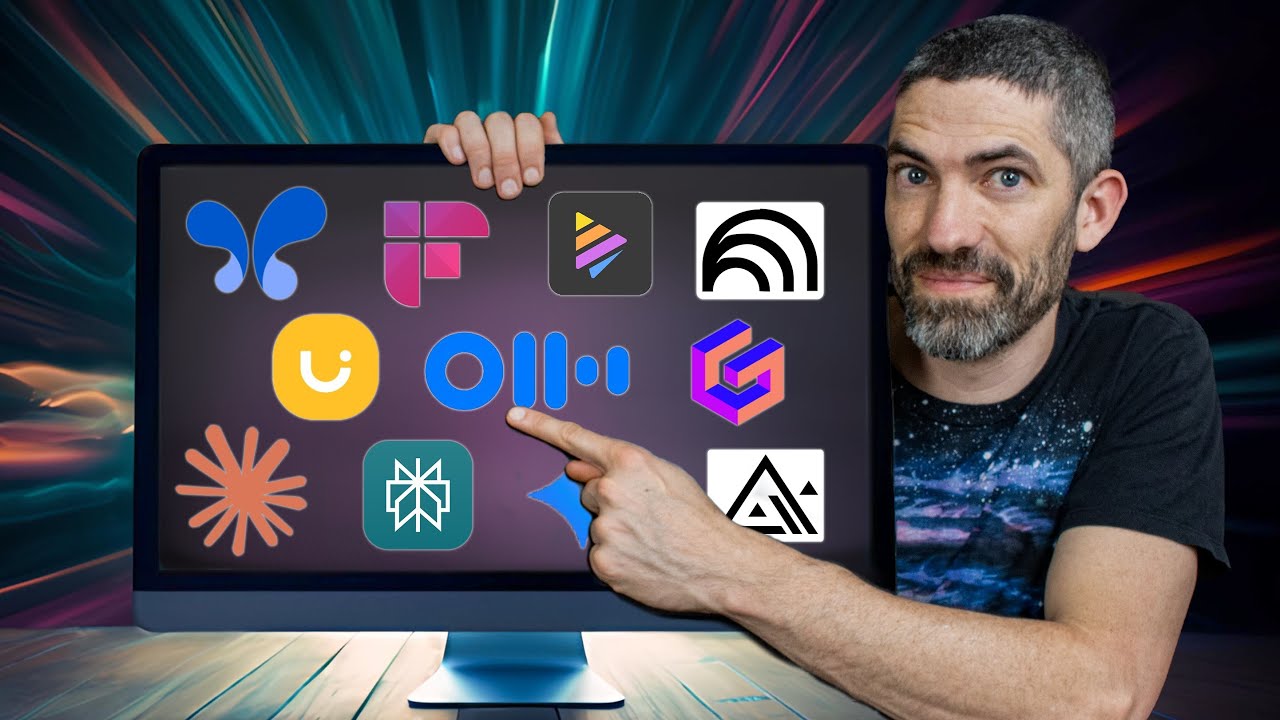
So that's how I'm staying on top of these things and seeing what breaks through the noise. but right now I'd say this is a pretty solid running of the, AI tools IDs are using I'm sure you're using some other ones that I might not have mentioned, so drop a comment and let us know. Alright, use cases.
So, generally speaking, these are the different ways I think about how we can use AI as instructional designers. So we can use AI to guide our design process. So for brainstorming ideas, kind of like I showed you how I was using ChatGPT to do some brainstorming for my video.
And it can also generate outlines, course content, practice activities, etc. So you can even have it generate stuff for you as long as you're editing it and reviewing it before bringing it live to your audience. But, it's a nice little design assistant.
And then if taking things a step further, you can generate assets for use in development. So that's where we get into the AI images and AI video and AI sound effects. And it saves instructional designers so much time because previously you'd have to contract out, you know, you might have to set up a video shoot.
You might have to contract out your, voiceover narration, and it's a multi week turnaround time. Just all of these different assets that normally you'd have to coordinate with humans for, and it would take quite a bit of time, these tools are getting better and better at generating them in a matter of seconds or minutes. So, really changing the game a bit with that.
And then, the third tier of this, I view as creating AI powered learning experiences. So this is stuff like the AI haunted house, these role playing exercises where maybe I, you know, you have , the learner role playing, as the salesperson or the customer support agent or whatever they'd have to be doing on the job, but you can let them role play with an AI who's going to be a lot more sophisticated than if you had to like program it manually. And, but it's also a much safer space for these, learners to make mistakes because you'd rather them mess up with the AI customer than with the real customer.
So, that's the best use case I've seen so far for the AI integrated learning experiences, but we're, yeah, we're doing a big focus on this stuff, like in the bootcamp and our workshops and we're seeing people create, we're seeing people come up with some more creative ideas. So maybe a video will have to come within the next month or two about some of these impressive AI projects that people are working on these days. Alright, so beyond that, AI is really good for personalizing learning experiences based on learner data.
So this can be referred to as adaptive learning and it pairs really well with xAPI. So if you're not sure what xAPI is, that's okay. I need to include this because it's really powerful.
So yeah, there's this thing called xAPI that's been pretty popular, somewhat popular for the nerdier developers, I'd say. And it lets you track really specific data about how people are interacting with the learning experience and then performing on the job. So you can get this really rich, learning and performance data.
Now, in 2025 and beyond, when we can give AI all of that data and let it make decisions about how to best help that person learn and perform better on the job, it, that's where you get into some really, innovative use cases for AI and you're using it to really supercharge people's performance. So, not sure how many organizations are there yet, but so much potential there because yeah, that's where you can imagine having your, AI assistant who has all the data about what you're learning and what you're doing on the job. And it can, feed you customized coaching, customized support, to help you achieve your goal.
So. Definitely some stuff to look into further if you're interested in that route. And then you can use AI to just improve your process and help you work faster overall.
So it can analyze data, it can write survey questions, it can draft emails to subject matter experts or team members. It can help you conduct research, you know, the brainstorming I mentioned earlier. So, just all these general ways that you could you can use AI as an assistant.
And we're gonna get into AI agents a little bit later where AI can actually take actions on your behalf, but next up let's talk about some of these AI skills to build because yeah, it's nice to be watching videos like this and keep yourself up to date about what's happening, but if you really want to take advantage of some of these opportunities, you're gonna need to build those skills and then show off those skills to your team or whoever it is that might need some help with AI. So the first one you've probably heard of it before people refer to it as prompt engineering but you're essentially writing good prompts to get the AI to give you the output that you want it's easier said than done. I'll share a few prompting tips with you after this slide or a little later.
but yeah, the next skill I'd say is selecting and recommending appropriate AI tools. So, this would be a good, if you're interested in that skill, go back to that slide I shared. Use every single tool on that list to generate something and see how it goes, see how good it is.
See how well it aligns with your expectations because we're going to need people who know what tools are out there and who can set realistic expectations about what we can get from those tools. And again, this is what's constantly changing. So this is what I would suggest training your algorithm for if you want to help stay up to date on these things.
But, yeah, we need to know what AI can help us with for it to actually help us out with that. And our team might need you to help fill in those gaps or put them on to the right tools as well. Okay, writing or modifying code.
So, this one might sound intimidating, but at the same time, it's not. So JavaScript is really good for integrating AI into these learning experiences and these web based projects. And then Python is really useful for customizing the models or building, building out AI automations, essentially.
So, yeah, sounds intimidating, but with AI being so good at writing, and, working with code, you really don't need to be an expert yourself. we had one of these people in the bootcamp, they're not even an instructional designer yet. They're still working on getting into the field, and, they took one of their like practice projects so far by adding all these like in depth AI integrations that are like reviewing long form open text responses using all this custom JavaScript and everything just from they said they watched this AI haunted house video like five times over and used AI to, to help support them, but they're doing this stuff.
They're doing this stuff that 99. 9 percent of instructional designers would have an almost impossible time with, if left to their own devices. But with AI, we can have people who are brand new to the field doing this, not with ease, but doing it confidently, and competently, and it has, you know, a working end result.
So, really impressive seeing what people are doing with AI these days. Alright, so another skill, I'd say this is one of the most important ones, is communicating around AI. So knowing these terms, being able to talk confidently about AI, in your interview, to show off your AI skills on your portfolio so that you can signal, yeah, I'm keeping up with this stuff.
And then just talking to team members, educating some team members who might not know as much as you do about AI. Yeah, the communication around it and being able to put it in simpler terms and show off these use cases to people who might be newer, all of that is going to be really valuable, I'd say, as well. Yeah, and even educating, stakeholders, or, you know, higher up stakeholders, or managers, or supervisors, and helping get buy in from business partners around AI.
That is all going to be very, valuable and helpful as well. If you're the, one who's the expert. All right.
So then automating tasks and processes. So this is kind of like a new tier altogether, and we're going to get into that when we get into the AI agents, but you can actually have AI just completely take some tasks off your plate. That's something I want to be exploring more, this year and beyond.
And then finally fine tuning AI models. So these last two are a little bit more advanced. I can do videos on them at some point if you'd like let me know in the comments if you're at that point, but yeah, fine tuning AI models.
I've always been interested in this. It's you're essentially getting the generic model that open AI trained, for example, and open AI is the company behind chat GPT, some of these image, you know, Dali 3, Sora. So they're, you know, one of the biggest names in AI right now, if you're new to them.
But you can essentially take the models that they've created and then you can feed it like a thousands more examples of how you want it to respond in your specific niche or use case or industry and then and then when you try to use it going forward it will respond in a much more tailored way. So it's basically a way to get a really specific AI model without having to train it completely from scratch. And that's what fine tuning is.
Okay, so prompting tips. So, I'm not going to get super in depth here, I have some other videos where we dive deeper into prompting tips, but I think these tips will carry you 90 percent of the way. So, whenever you're using a new tool or a new model, Google prompting tips.
There are probably going to be people who share what works for them. often times the company that created the model or the tool will share their own tips for how you should prompt it. So, each thing will be a little bit different.
So, yeah, make it easy on yourself. You know, just Google the prompting tips for that specific tool. And then, use AI to help you create the prompt.
So, that's something that we've been using on our team that's been working really well. So, we'll say, hey, we need a prompt. We need a prompt that we can use to give to this specific AI model that will result in this kind of output.
You know, can you help us get started or what questions do you have for us before you can generate that and generally the AI will create quite an impressive one I will say generally less is more. This one can be debated, but in one of my previous videos from probably like a year or a year and a half ago, I was like talking about all this detail we need to add. And, as these models have gotten better, you need, to give them less and less.
So they're better and better at understanding the context and realizing what it is that you're looking for. So you might not need to say as much like you are an instructional designer who specializes in X, Y, and Z. If there's enough detail in your prompt, it can probably tell what domain expertise you're trying to get it to tap into.
And then, if you, one of the most effective ways you can get it closer, the output closer to what you're looking for is by using examples. So you might see these terms thrown around, zero shot, one shot, and few shot prompting. It's really simple.
It's, you know, zero shot prompting is just a prompt with no examples. One shot, you include one example, and few shot, you include, you know, two to four examples. So, yeah, that's one of the most effective ways, I would say, if you're like, Oh, this output isn't where I want it to be.
just give some examples in that initial prompt. It's way cheaper and simpler than fine tuning, but also way more effective at getting what you're going for than zero shot prompting. Okay, AI agents, I debated including this one in here, but I'm personally interested in them, and if some of you may be a bit more, advanced, so I want to give you a rabbit hole you could potentially go down.
But AI agents can take actions and perform tasks on your behalf, right? So most of what we're looking at and using so far, we're using AI tools. We're in there doing stuff in the tool as a human.
Now AI agents, you can, give them the ability to take actions based on the knowledge and stuff that they have of your company or your customers or your students. So here are just some really brief examples. You can create agents that can respond to potential customers with questions about your offer, to grade student assignments and answer their questions so that they don't get stuck.
You can have An agent kind of communicating with your SME and putting stuff on your calendar as needed. So these are just some examples. I haven't dove too deep into this.
I've been watching a lot of videos on how to do it and I have a pretty good idea of some of the early use cases I want to try it with. Yeah, we're developing some stuff that isn't live yet. So stay tuned.
I will definitely make some more videos about this, especially if you all are interested in it. Yeah, because automation, I mean, that's great, but it's tough getting to a point where it's is this good enough for me to actually be, hands off? And that's something we're going to be exploring and putting safeguards in place for and all of that good stuff.
But if you want to look at some tools that people are using for this, you can look at AutoGen, Zapier, Zapier is, more of a, yeah, it just makes it easier to get your data from one tool to another. But yeah. Because tools or companies like OpenAI let you use their models now, Zapier or, you know, you can just pull in that, the OpenAI GPT models and just use them to, you know, generate text or to analyze something.
And then you can pull that data into an email tool or something like that. So again, I can do, deeper dives into any of this stuff and I plan to for some of this stuff. But let me know what's most interesting to y'all in the comments and where exactly you're at in this AI journey.
I do have a request for you or a suggestion, if you are interested in the AI stuff show this off on your portfolio, right? create at least one portfolio piece that shows that you are using AI and open to AI so these are the three tiers, again, the AI show how AI is guiding your process, so show how you're using AI to brainstorm and, potentially storyboard, and you can talk about all of that in your process write up. you can generate AI assets, so, the visual assets, the voices, show off that you can do that effectively.
And then if you want to go really hard and, challenge yourself technically a little bit, you can show off how you can use, you can integrate AI into your eLearning projects, for example, to, give students feedback or guide them through the experience. Or, or, yeah, create a role playing activity. So I'll probably be talking more about this because that's a really big push I'm doing in the bootcamp right now.
Like let's create some AI projects. I think this is going to really help us stand out and people are working on some cool stuff in there. And then some homework, use more AI tools.
So if you haven't used them at all, you know, get started, open up chat, GPT, see what this is all about. I know the biggest resistance is thinking, yeah, you know, I have enough stuff in my plate. This is just going to take more time than it saves me.
And maybe for 60 percent of the things you try that will be the case, maybe even 80%. But for those things you do for those tools, you do find that can save you a big chunk of time. It's going to pay off like 50 times over.
So you gotta, maybe make, it part of your routine to try these different tools, and use them where you can. And then watch more AI content. This has been the thing that's helping me stay up to date with all of this.
The most, , you know, if I'm curious about some AI stuff, just YouTubing it or Googling it or looking it up on TikTok. and then now when these new developments do come, I'm kind of getting it from all angles and I'm, instantly, the wheels are turning. I'm like, how can we be applying this to instructional design?
So that's been really helpful. And then my final request. Please subscribe!
There is a lot more AI content coming, and, you know, I look at the numbers and stuff like that, so if I see that a bunch of y'all are subscribing on this video, I know that the AI is, the AI content is what you all want to see. So, thanks for making it to the end, I appreciate you all, and I will see you in the next video.