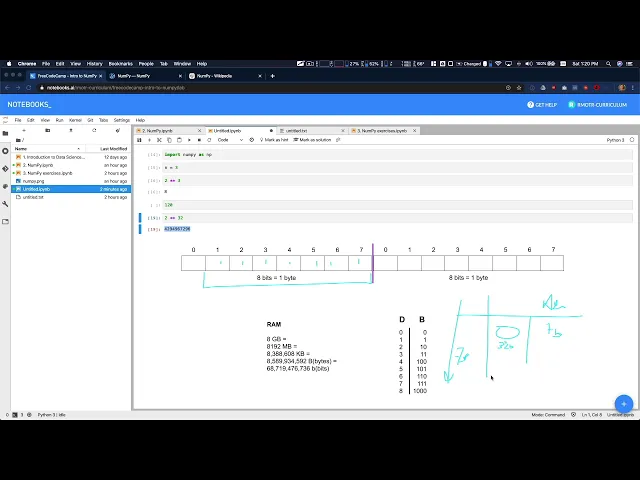
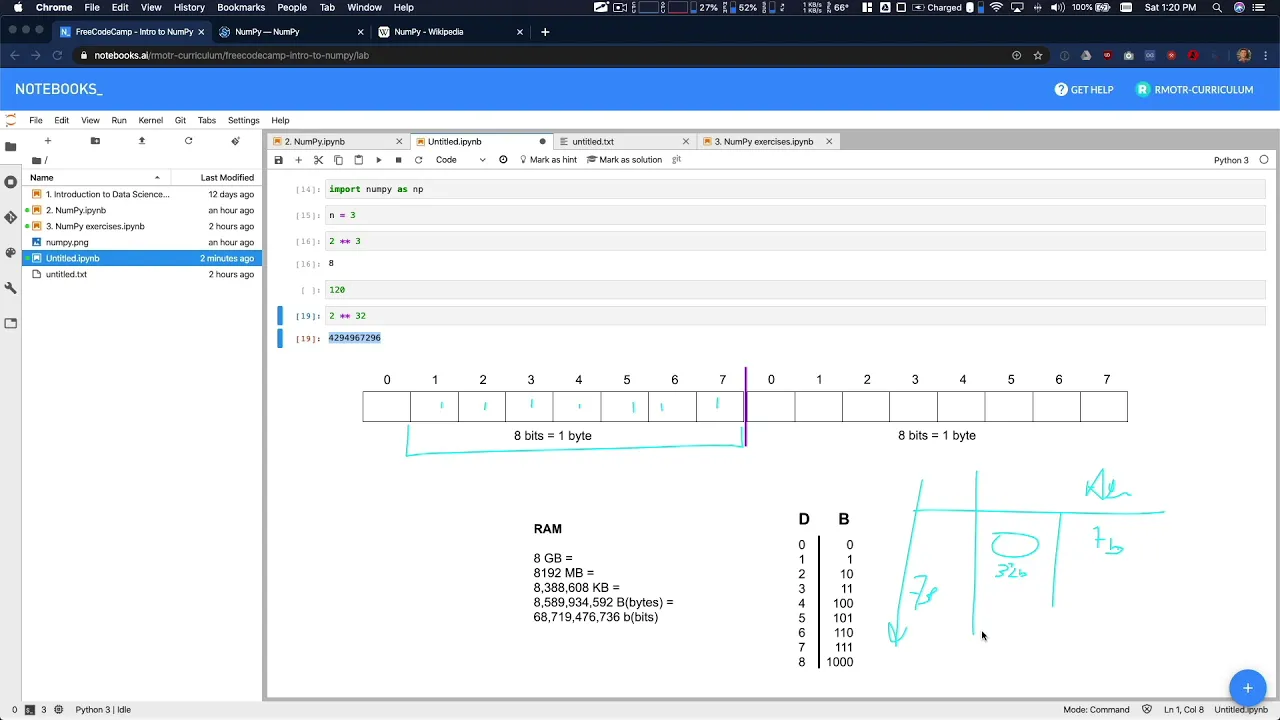
So now, moving forward, we're going to delete this whole thing. Moving forward. Why is this important?
When you're working with your data, when you're doing your data analysis, you know, what, what data you're what type of data you're working with. They're all numbers. But numbers only usually have a connotation behind.
Right? So let's say that you have here, it's a table of people, and you have the total net worth of the person. And also you have the age of the person.
The age is a value that will range between what zero, right? Just born to, I don't know, 120, we can say, I don't know, what's the maximum age registered right now, the oldest human being but zero to 120, it seems, seems reasonable. In your other column net worth for this person, the range is, it's completely difference.
We can go from something like $0 up to, I don't know $60 billion. I think Mark Zuckerberg or Jeff phases are one of those. So we go from zero to 60 billions in this case, if there are dollars, what happened if this is a highly devaluated currency?
Would we have to go to trillions, right? So these two, even though they're just plain numbers, and we can say they're integers. Even though these are pulling numbers, they have an integers, they have a different connotation, and they will need different requirements in terms of storage size, right?
So if we say that nh goes from zero to 120, we don't need so many. So many bits to store it in memory, right? We can do the math, actually, how many bits Do we need in order to store 120 100?
And what do we say? 120. Right?
Well, if you do the math, you will see that two to the power two to the power of seven is 128. So if you have, if you have seven bits here, seven bits, you're going to store from zero, up to 1111111, which is actually 127. Okay, these number, all ones, seven ones in binary is equals to 127.
in decimal, in total, we can store 128 numbers 00, Mater's, up to 127. So that means that for our column right to column, age, here, age, we only we can use, the size of the memory we need to use is going to be seven bits per user, or costumer or person, whatever. What about these number right here, if we have to go up to a couple billions?
Well, in that case, the numbers a little bit more complicated, we're going to need for example, we can say 64, or 30, to 32, it's actually 64, probably, but with 32 bits, right, you can store up to from zero up to these volume. So again, I don't know about the currency we're using or anything so we can assume. But here we need 32.
Bit in order to store that. And now you can do the math how many how much memory space you need, in order to process this data? How many records Do you have, if you have only 1000 records?
That's not significant. You can use whatever, you can use 64 bits here to store the age, and you're not going to have a problem. But what happens if you have more what happens?
What happens if you have the entire population of the earth, you have 7 billion records here 7 billion records, then every bit that you're saving in these columns is going to be important, because it's going to take a ton of data and of course, you have a ton more columns, right? What happens if you are processing trillions of records from financial transactions, right, you want to be very, you want to be very efficient and optimize every single bit you can and that means again, selecting the correct number of of a bit Per the columns you're currently processing. So, so far, so good again, when there's 10, that the the number in decimal we need to store has a correspondence with emits, right?
eight bits is one byte. And the more we can optimize that the last memory we're going to use for our obligations. Where does NumPy come in place?
Why are we talking about data in these NumPy lessons? Well, they're right. The idea is that NumPy is a library that will lead you has a very advanced numeric processing, in order to let you select the number of bits you want to take for an integer.
Even more, let's say you for forget about NumPy, you want to process this thing with pure Python? So you do x equals five, for example, working with Python, you create a number we're storing age is a five, how many bytes? How many bits?
Do you think the simple variable takes in memory? How many? Well, in reality, even though we think it should be around, what, three, three bits, eight, let's say back to the simple too simplistic.
In reality, for Python, this is going to take around 20 bytes. Okay, so we are wasting a ton of memory in order to store this number. And why is that?
Well, because Python is a high level, object oriented programming language. The reasoning behind it is that Python is simple to write, write simple to also read and, and, and code on top of it. But again, in order to create that simplicity, in its drop all the numbers in objects, which have all these attributes, that if you know, advanced Python, you're going to recognize that are not necessary.
So these is taking a ton of memory. And a regular, very simple number in Python ends up consuming 100 times more memory than what it should be consumed. This one NumPy comes in place in NumPy, you can create numbers that are for example, you can control the size, in terms of bits, you can say I want to create a number that has only eight bits.
And that's it, that you're going to create a one byte integer, and you're very precise, and how much memory it takes, you can create a number that it's actually need a little bit more space, we're going to do NP int, and we can hear use a talkie, you're gonna get auto completion 6016 bit, or eight or 32, or 64, right. So we can actually be a lot more precise in the number of bits that we need. And this is extremely important for, again, our high level processing.
On top of that NumPy is our array processing library. And NumPy is 99%, about processing a race constantly processing erase the data structures, we have in Python, the built in data structures we have in Python, for example, the list dictionary, they are not optimized for high level computing. So if you have a list of numbers in Python, let's say you have, I don't know, l equals 3224.
Right, you have three numbers in your list. In Python there, it's not guaranteed that the least they'll the list is going to contain all the numbers, three to four in contiguous positions is gonna, it might put them in separate positions in memory. On top of that, you can rely on advanced CPU directives and instructions for processing matrix matrices, sorry, because Python, again is wrapping these things in objects.
So there is no access to these high performance, low level instructions with NumPy that changes because when you create an array NumPy, you say, I want to create an array of three numbers, and they are all into eight, then imposition forget about this is not these are not bytes I am, I'm using these drawing as a general representation of memory. So in that case, in NumPy, when you create these three element, int, eight array, it's going to create those three elements in contiguous positions in memory, three to four, and they are only going to take that amount of memory that we said they were going to take On top of that, we can rely on a bunch of very efficient low level instructions from your CPU for matrix matrix calculation, this is something that it's a little bit more advanced. And it's something has exploded in the past 10 years CPUs with more with richer instruction sets, and the same thing for GPUs, you might have heard, especially with machine learning and all that we need, we need fast array processing.
When we are storing features and weights and all that's a topic for four different tutorial. But again, the idea is we need right a ton of weak sorry, we can use all these important and very efficient, low level directives from our CPU, which makes our computations a lot faster. So again, as a recap, you don't need to know all these to work with NumPy.
But that's the first thing. Second, you don't need to get extremely, extremely conscious about all the numbers you use. At the beginning, you're just going to use NumPy as it is, and you're going to use just the default types that it takes in 38 answer in 32, in 64, that's fine.
But then, with when you get into bottlenecks, when you're working with with larger amount of with more amount of data, then you might need to get into the details of the size of the integers that you're using. And this all applies to float. So I'm just using integers because it's simpler, but is all applies to floats.
So again, NumPy The main advantage is that it it has built in very fast and raised kit tag, take advantage of CPU instructions for matrices and arrays and all that. And it also has a very efficient representations of numbers, right that are not the regular objects of Python. Again, recap, you don't need a list.
If you want to get into more details, I recommend you to get a little bit more understanding about binary arithmetic, and how numbers are and computer architecture, how numbers are stored in memory, etc. Especially for floats and all that's a completely different representation.