file new project and i'm going to go again to digital i'm going to go to flex again i'm going to put in my project layout name because you can't change the name afterwards with a flex layout you can have as many layouts as you want but you can't change the names afterwards so i'm going to change that the grid is going to be fine the maximum width that's the width of an hdtv that's a good max to have the other options are fine okay it's going to create that and we'll see it's going to come
up with the template browser from the last time but i don't want that this time i want to have the flex page flex layout blocks and i want to have the flex object browser always have the object browser on when you're using flex now it is possible to create containers really from scratch like that uh or indeed to just take any object and uh right click or control click create flex and you'll see that it's now made a box inside a container in flex everything must be in a container otherwise flex doesn't know what to
do with it it will behave strangely when it appears in the html website but actually in most cases it's better to use these blocks now these are not templates in the same way they are literally just blocks of code which cork is pre-populated for you in a way to make it easy to use so let's drag that across and this doesn't have any graphics or anything in there what it's got is it has the root container you get a little breadcrumb over here and then it's got the container the row and column let's look at
that for a second on the object processor root container container row column you'll see that all of these are part of the root container if they're not part of that root container it will start to go wrong when it's in use the hierarchy is always container row column and things are in the column they can also be directly in the container but you can't have a row in a column or a container in a row containers can contain other containers um now that might be a bit confusing so let's start doing some things to it
we're going to skip sections for a moment because this has already got these sections in there in fact if i was building really from scratch then i would put sections in right now but i'm not going to do that yet instead what i'm going to do is go to basic and i'm going to put some text in there now this is where my title is going to go this has no padding or anything if we go to flex we'll see here where the padding goes uh that there's nothing there now i can increase that to
maybe 15 which would be quite a good number but uh rather than having to do that let's just delete that for a second uh cork's already prepared one with text padded so i'm going to put that in there now um i'm going to put more text in there and i'm also going to put a picture in there i'd always say to people sketch out a thumbnail sketch on paper before you start working on your website because otherwise it will get hopelessly lost now i actually previously tried this website on an intel mac running mojave right
now i'm running an m1 max mac on monterey but i just wanted to make sure it works on both so i've already tried this out now before i go any further i want to go back to my root container because as well as containing other things containers can also have pictures so file uh import and i've just prepared some graphics here space background this is a for a book called the winds of space it's a science fiction uh novel and so obviously space is going to be the right thing if i go to picture box
you'll see all of your regular picture things but if i go to container then you'll see background fill and i can do this in various ways phil's gonna be fine for me but if i put enable parallax effect on then the stars will stay where they are while i scroll that can be a great effect for many things in the end i'll probably turn it off for this one but we'll see it in a minute you can't do that if you set the background in the export so last week we noticed by the export that
we could set uh the background but you won't see it on the page and if my text is white it will be very unhelpful and also you can't put the parallax effect on now let's put my title in there and that's my headline now as you can see this is currently black uh so let's go to window and because all of our text is going to be white or the white it'll make no sense so we're going to do go to stylesheet and we're going to just make that text white and i don't want helvetica
it's not really very science fictiony i'm going to go with a variable font which i've pre-prepared called amp still var and here it is so and again we want to make that bigger now i'm going to expand this and you'll see that it will actually change the box size to suit so probably that's a little bit too much now again um uh we've got our amstel bar there so i maybe want to make that 18 points i think because of the way websites respond to things so again i've got a little bit of text here
this is my teaser text for the website and that goes in there let's make that just a little bit bigger here we go okay and now i want a picture and i'm going to put this space shuttle in while the nifty one now this is a png file and a png file unlike a jpeg can have transparency which as we're going to see in a moment when i turn off the white background is going to work very well with that space background now i i probably don't really want to occupy as much of my pressure
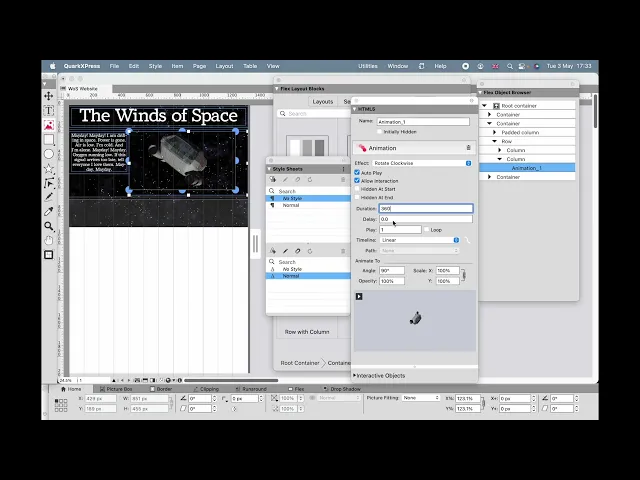
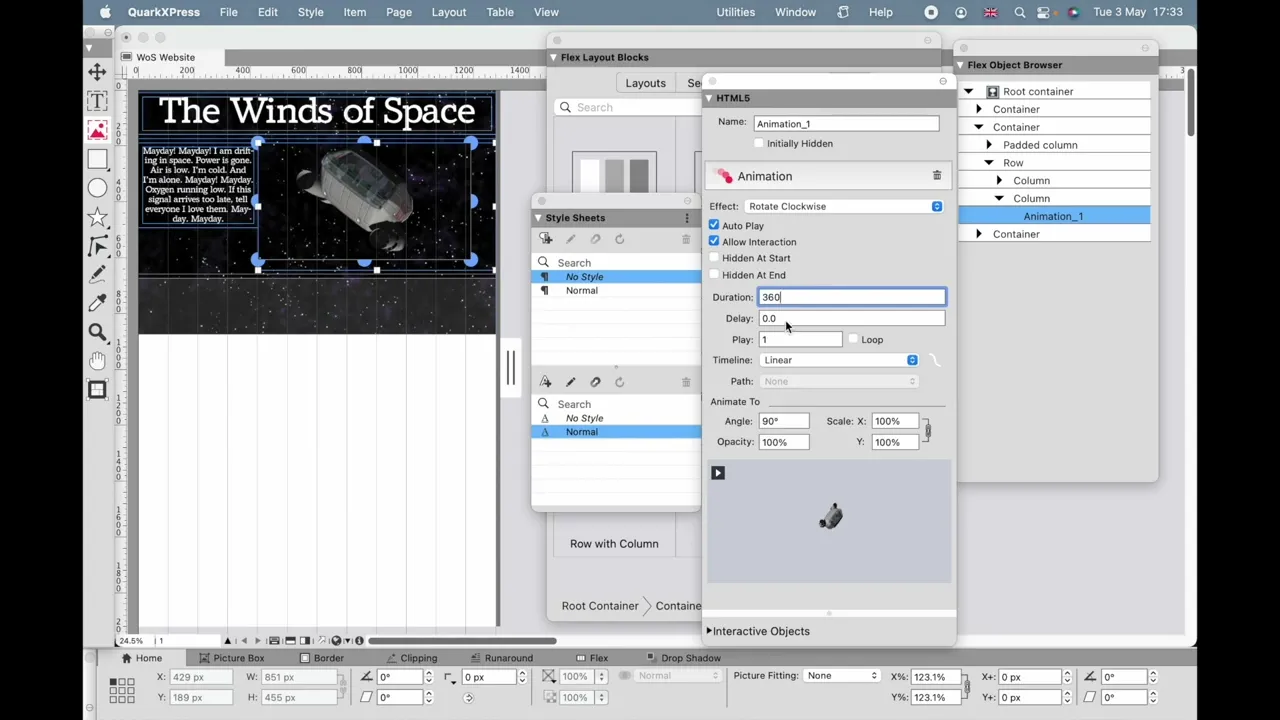
screen space with it like that so i'm going to just didn't want to do that um uh i'm going to just take away that rotation there i'm going to just reduce that again i'll reduce the text size a little bit to suit with that um so what i want to do next well um i'm actually going to before we go any further just put a bit of animation on there so window html5 uh and i'm going to animate this space shuttle uh science fiction shuttle not a real one um i'll double click together on the
picture itself i'm going to do animation and i'm going to say we're going to rotate it clockwise for a duration of 360 seconds we're going to loop it and we're going to do that as 360 degree rotation so it's going to go right the way around for this text here i'm going to do again animation and i'm going to fade in 30 seconds direction but i'm also going to just roll that angle a little bit as it moves out and scale it down to zero and you'll see that happening when we get there but we'll
come back to that in a minute now again before i go any further i want to set consider control um click or right click on a pc i'm going to do the export options and this sets the alt text the the tag which is required in html5 for it to be compliant so it's important to do that now let's come back down to uh our sections and i want a section which has got three columns because when you minimize the size of the screen uh then the columnar blocks will stack up in threes which is
what i kind of want and again i'm getting back to basic here we could use some of these more fancy components in fact we will here we can updo three threes uh and i'm just going to put some people's heads in those again uh you'd want to do the alt tags for those we'll just do one of those in a minute i'm not going to do all of these as it'll be far too tedious but these are just some of the characters in the story and we actually would have nine of them uh because apparently
stories sell better if there were more characters you wouldn't believe it uh so again we're going to do uh control click or right click and we're going to go to um actually we're going to actually be come back to here control click export options uh and this is the name of the principal character now he's got a funny swedish letter there that should be okay but again you want to check that with websites assume that stuff doesn't work unless you check that it does so check this actually working for your particular application because it may
very very well may not now last week somebody asked is it possible to do slide shows well let's let's do one so um i'm gonna put again a picture in there uh where's my picture here it is no padding or anything uh and i'm going to just go back to the html5 and i'm going to put my slideshow in now where am i getting them from and slides from picture files uh so i've already got these ready and off it goes so again i want to make background none otherwise it makes no sense i can
just click through those and see how they appear so clearly i'm going to want that a little bit bigger to fill the screen nicely a bit of a spaceship there make that a little bit bigger as well um a bit of a space explosion but you don't want to show everything you have to leave something with the imagination and a smaller explosion but i'm going to do that like that so they follow in that way um and uh we can uh do this various things for this i'm gonna have fade rather than slides they just
can fade in uh i'll allow interaction i could turn that off and also allow full screen so what have we got here um we could do much much more but let's have a look at it right now because i think you're beginning to get the sense of a bespoke website rather than something which looks like it's been built with tables now um okay my my text we can see here is my my text is gonna fade in and then go white and then fade out again as it disappears and that's that's to do with just
the way i've i've set this up uh you'll again see that as i reduce the size of it those faces will stack up in groups of three and eventually it'll break it down but that's quite a nice effect and then again you see my slideshow here it's just rolling away and it's going to go back to that galactic map in a second because it's not the real galaxy it's a science fiction galaxy uh and then we're gonna go on to that spaceship which is doing what spaceships do there it is uh in all its glory
and again if i if i reduce the size of that now uh you'll see it's got its own star background and this parallax effect which i talked about it means the stars stay where they were as i change it now actually it doesn't really look quite as good as i thought it might so i'm going to just go back to the quark file and we'll just go back to the root container and we will very simply turn off the parallax effect we will preview again you will find that you're doing a lot of previewing when
you're constructing a website because uh everything on a website which doesn't hasn't been checked to work you can assume doesn't work uh so now the the stars don't move uh which is a little bit better uh but the that out of control spaceship just rotating round just seems a bit more realistic and if you can't read the text uh it says mayday mayday i'm drifting in space power is gone air is low i'm cold and i'm alone may day mayday oxygen running out if this signal arrives too late tell everyone i love them mayday mayday
and again we just want to check on that and we'll set it to loop so it just keeps coming back like a voice from the void we can keep on adding more sections onto the bottom of this page as many sections as you want with all kinds of other things planets whatever and that page will just scroll down and down and down but when you come to view it it will only ever have as much page as you as you've specified so uh it won't go off the bottom into other things and show that you
haven't finished it so again that that text is coming up there it fades in it fades out again uh it's a teaser if you want to give good information then don't do effect one thing i would say is that making it work is really important websites are about information this one's a bit fussier and fancier because of the subject matter but if there's a choice between doing an animation or not doing it your tendency will be let's do it but in most cases the website will be better as flat text people generally do not have
time for your animation i'm just going to do one more refinement which i'm just going to fade in that uh that title just to refine it a little bit further then we're going to stop so again preview and there it goes and then this other text just starts fading in uh it's hard to read maybe i'm drifting in space and you see that that ships out of control there um and already these are changing a lot of things going on there for most websites i wouldn't want to be that fussy but uh hopefully that gives
you some pictures of what you can do now just to refresh us everything must be in at least in the root container it will be in containers if you use these then you can clearly make them work easily but if you're going to create stuff from scratch and you convert that into flex uh it will not be in the right container to begin with but if you just cut that and go back to our root container here you can paste that in it will appear in the right place doing what it's doing and there we
have it