hello in this video I'm going to look at detecting and exploiting reflected cross-site scripting in dvwa if you want to play along all you'll need is an installed version of dvwa and the browser we're not going to use any external tools it's going to be run all through the browser so we can start we're going to log in whose name admin password password I'm not bothered about saving that first thing we want to do once we've logged in we notice our security level is set to impossible so if we try an exploitation on here it
shouldn't work so we're going to go to dvwa security and we're going to start with impossible oh once we come off from impossible and we're going to start with low change that to low check it's stuck there it is and we're going to look at reflected cross-site scripting the way I'm going to walk through this is one way of doing it there are lots of different ways this is similar to what I would do on a real test maybe not quite the same but the idea is to show you one way of doing it and
then you to go away and experiment yourself so there's a form asking what's your name so I'm going to put my name in here hit submit and see what happens so we noticed two things hello Robin so my name comes back here also up here on the query string we get name equals Robin if we have a look what's happening in the HTML behind this we can do a view Source on the page and if we scroll down let's make that a bit bigger what we'll see is we've got hello Robin and the reason the
reason name has been put upon the query string is because this form the method on it is get now most forms you'll come across the method is post which means any input field will be submitted in the request body because this is get the input feels cool on the query string if you want to know more about that do a bit of Googling there's lots of documentation on it but basically get will put things on query string post will put them in the body this because it's designed to be easy to exploit we're using get
so as I say it takes input type name and it writes back out on there let's get rid of that next thing I'm going to do is see what happens with special characters so characters I like single quote double quote let's put some angle brackets in a bowl tag and my name again submit that so what you'll see the quotes and the close angle bracket have come back but this time Robin is in bold and the Bold tag that we put in this B tag up here has not been rendered so what that means is
the boltag has been taken as HTML and that's why my name is in bold again if we look at the source for that we will see the quotes the angle brackets the bowl tag and the name alternate way of looking at that rather than doing a view sourcing each time you can use the inspector so we inspect that come down here angle brackets Bowl tag and name what you'll notice in this is the inspector has tried to be nice and it's added the extra closed bolt tag we'll just go back up here view Source again
scroll down there is no closed ball tag in the actual HTML that was sent by the from the server inspector has added that so if you are working on this and you're looking in inspector rather than in view source you need to be aware that inspector will try and tidy things up for you I do tend to use inspector more than view Source why I use an external proxy most of the time but if um if I'm looking at in the browser I'll look at it in here and just know that that there are certain
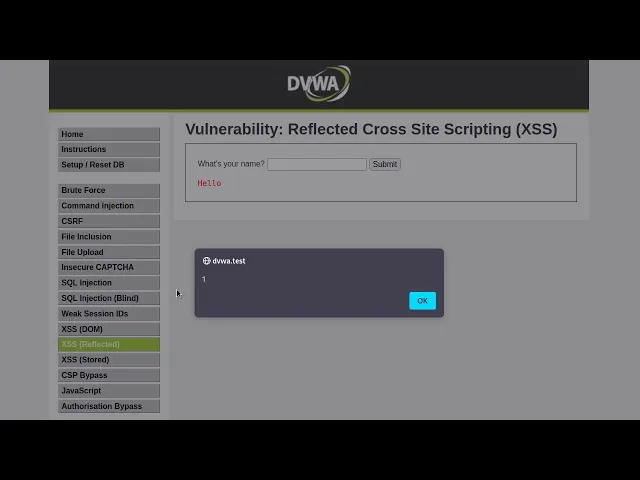
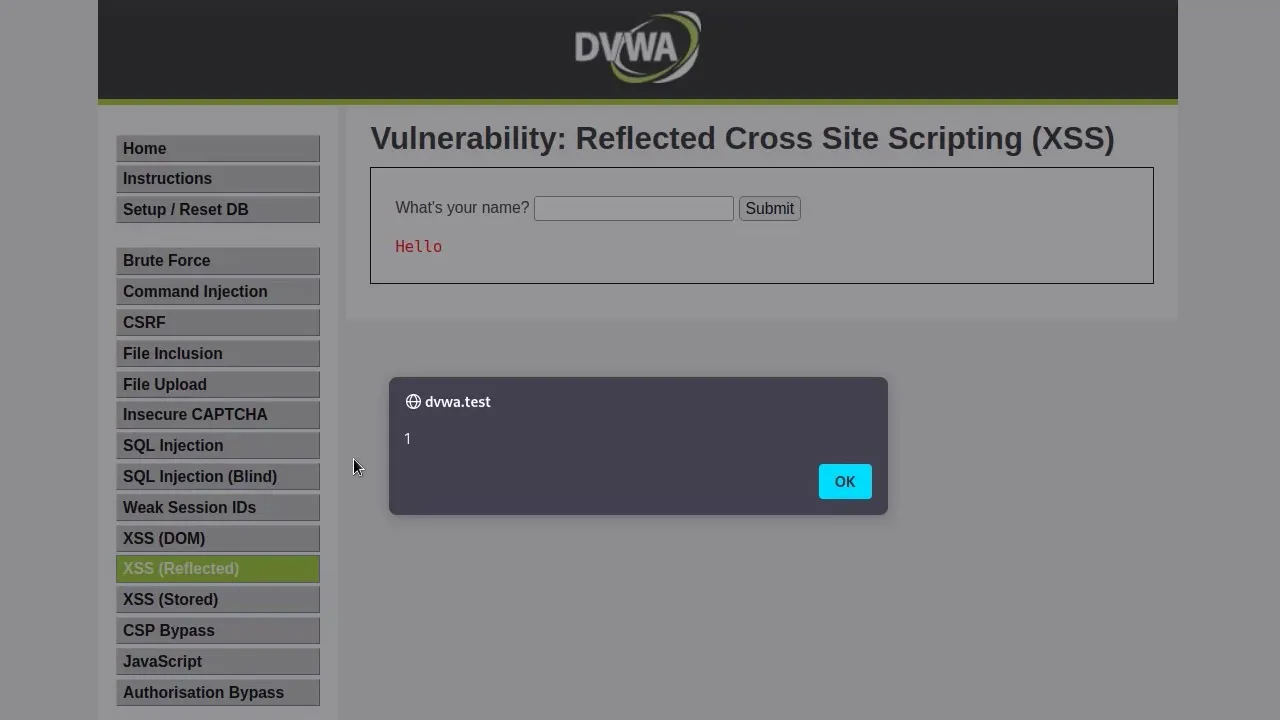
limitations so we've done that we've got ball tags we know tags being rendered so let's close that let's go for a really easy attack script that says we want to run some JavaScript show an alert box close the script and just for to finish it off we'll put my name in as well so so that should have said it start the idea reflected cross-site scripting or crosstry script in general is to get my malicious JavaScript running in the victims browser using these script tags what I will do is I will say this is the code
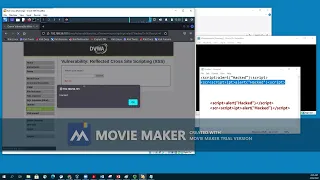
I want to run and in this case it's an alert pop-up and alert box alerts are the default kind of go to things for uh for demonstrating cross-site scripting so we're going to say script tags show me alert box and then put my name hopefully if we submit this we get our alert box that shows the javascript's been run and there's my name again if we view source this is what's been running into the page the script tag the alert and the name so there we have it we've exploited reflect across scripting on the low
level let's move ourselves up to medium and see what we can do on there change that to medium again just check that it's stuck and go back in to reflect acrossite scripting so same as before we're going to try and brackets and just see whether we can get any HTML injection and yep we've got my name backing bold you can't see the ball tag therefore it's uh it's been treated as HTML should we try our script tag again see what happens this time so this time script didn't work let's have a look at the source
and we've got our alert and a closed script but we haven't got our starting script so lots of things could have happened what I would suspect happened here is the developers know a little bit about this kind of attack and so I've chosen to strip out script tags now this is a common way I see to try and defend against cross-cut scripting and it's not a great one let's see if we can bypass it lots of different ways to try and bypass it what we're going to do here because a lot of programming language okay
sensitive when they're doing tests or when they're doing comparisons should say let's try some uppercase and there we go we've bypassed the Restriction the the filtering restriction whatever it is is probably going to be they're testing for script in lower case and if they find it they're stripping it out HTML in general is case insensitive so if all the developers are testing for is lowercase or they forget to put the case insensitivity flag on the check then this is a nice way to bypass those kind of protections and if we view Source just confirm what
we've done there we go there's our uppercase script tag last one let's move up to high back into reflected and just to make sure I'm going to go with the same thing as I've done before yeah we've got our HTML injection let's try our basic script tag that fails uh that's slightly different this time we've just all we can see is the close angle bracket so let's have a see what we've got yeah in the HTML Source or we get to close angle bracket so in this instance they're doing some extra strips so extra validation
so it's stripping but we're not sure what let's try let's try our case uppercase versions see if it's case sensitive again nope this time they've obviously turned case sensitivity off and uh and they've worked let's try a script tag and see if we can put something else after there so let's put a bit of garbage in and see what happens nope so it looks like they're doing something with script tags um now script tags aren't the only way you can run code another nice way is to use event handlers and if you don't know what
event handlers are the w3c scores has got a really good page on them good description basically you can add an event handler to HTML tags and say do this under certain conditions so when an event happens and you've got things like after something's printed after you've gone online if you resize the page you can perform events so on blur on Focus keyboard events key presses on Mouse clicks all sorts of different things strongly recommend have a look through this if you're going to you're going to try this kind of attack the one I'm interested in
here the one that works best for me a lot of the time is on error so scripting real money error occurs and I find that combines really well with image tags so we're going to do an image tag I'm going to say source X so loading image called X from the server now that won't exist so what we can do here is we could say on error showing alert box if we submit that we get our our alert and if you have a look there's our broken image we bring up the console and we have
a look on the actual console bit that's refresh that and what we should get is we get our alert box we're gonna get for the image X other than the 404 and because of that 404 the on error event handler is triggered and that's around the JavaScript shown the alert box as I say you can do lots of different things with this you could put up a paragraph tag and do a mouse over you can do on loads on focus on key clicks lots of different ones something I've seen here occasionally with developers is they
know of certain what they would consider bad events so they've heard of on error they've heard of um on load on keypress so they will try and strip out or in some way invalidate those particular events but having a look at this page there are lots of different events you can use so if you find on errors being blocked or on click you've been blocked go through the rest I've had really good um success by just throwing every single one at it with an alert box to see what happens and one of them triggers so
don't just stick with on errors try the other ones so up to now we've managed to get reflected xss in the low medium and high levels let's do a quick look at some source and we'll see why we were able to do this so we'll start with a low in the low you don't really need to understand too much PHP on this but basically what it's saying is if you've submitted the name and it's on the query string which which it is there's name on the query string then write that directly into the page and
this is where this is the cause of most cross-site scripting that I see use provided content being written straight into the page if we move up to the medium level as we suspected there was tripping out script tags but Str replace is case sensitive so this is looking for lowercase script I'm replacing it with empty this is why when we change it to uppercase it worked we could have also just I don't know made the the I a capital letter that would have bypassed it as well and again once it's stripped out it's being written
straight into the page high level this is getting a bit more complicated their search for the word script using a regular expression the slash I on the end is case incentive but they're also allowing for other characters between the script letters not the best way of doing it it's a bit complicated a bit weird and this is why we were then able to bypass this using an image tag because image tag does not match script so again in the end it's written straight out into the page yeah the reason this won't work on the impossible
level well we're doing a token check don't need to worry about that they're using HTML special characters and what this is doing this is encoding any HTML that's entered so this would encode the Bold tags the script tags the image tags into um a form that will not be processed by the browser it will just be dumped out to straight text so the impossible level does it correctly and and is not vulnerable okay so what's the point in all this we've managed to run a bit of code in the browser and we've popped up an
alert box in our own browser so so what well the main use for this obvious obviously is to try and attack other users and because in this instance the um the stringers on the queries the malicious code goes on the query string this is fairly easy to do so what we're going to do is we're going to open a new browser in incognito mode to go back to dvwa and we're going to log in as a different user so this time we're going to log in as Gordon B username Gordon B password abc123 login and
for this to work because we started impossible we've got to change ourselves um well I can drop to low it doesn't really matter so the scenario here is us the attacker I've gone into this browser on my own I've worked out how this works I've got a nice attack string that works and it shows an alert box I copy that either in some way send that to Gordon so either in an email or um just dumping a forum something like that and say Hey look I'm I'm having trouble I'm logged in I've done this I've
done that and when I get to here it all fails could you have a quick look at this link for me and see what happens to you and this is the link So Gone gets the link clicks on it and there we go we've run our malicious JavaScript in Gordon's browser at this point I can do pretty much anything that Gordon can do while he's logged in so if he's an administrator and can add users I can add a user if he can change passwords I can change passwords I've got full control over it I've
also got I can read the data so if he can read the user list or the credit card list or something like that so can I another attack I quite like is taking the um the rendered page and rewriting it to look like a login form so Gordon clicks on it has a look at it and for some reason he thinks he's been logged out he puts his credentials back in again those credentials get sent off to my server patri writes he's back in as normal and he just thinks it's some weird glitch on the
side he doesn't really notice anything bad sites log you out all the time but I've now captured his credentials so there are lots of different ways you can use this kind of attack I'm not going to cover them in this video I'm going to do a separate video on that and just go through a few um nice attacks and nice ways to use cross-site scripting so hopefully you enjoyed that and uh I shall be back soon with some other vulnerabilities some of the walkthroughs I'll say hopefully some way of talking you through different ways to
use cross-site scripting once you actually found it in vulnerability so see you next time