It is super exciting to see so many people starting to use Notebook LM. Today, I want to share with you 10 use cases for Notebook LM that I don't hear anybody talking about. This can be useful in your job if you're juggling a lot of different projects or trying to keep up in a complex industry, but it can also be really useful in your personal life—for your health, for your hobbies, and even for making big life decisions.
Notebook LM can be super useful, but the tool is so versatile that it's not exactly obvious how to use it. I'm going to kick the video off with a rapid-fire overview of Notebook LM, including this killer new feature that everybody's talking about. Then, I'm going to dive into the 10 use cases, and finally, at the end of the video, I'm going to zoom out and show you the big picture of how I have Notebook LM plugged into all sorts of other tools and resources.
So, if you just go to notebooklm. google, you'll see this page. You need to have a Google account or a Gmail of some kind, and it's in beta, so you may need to tweak a few little settings on your admin side.
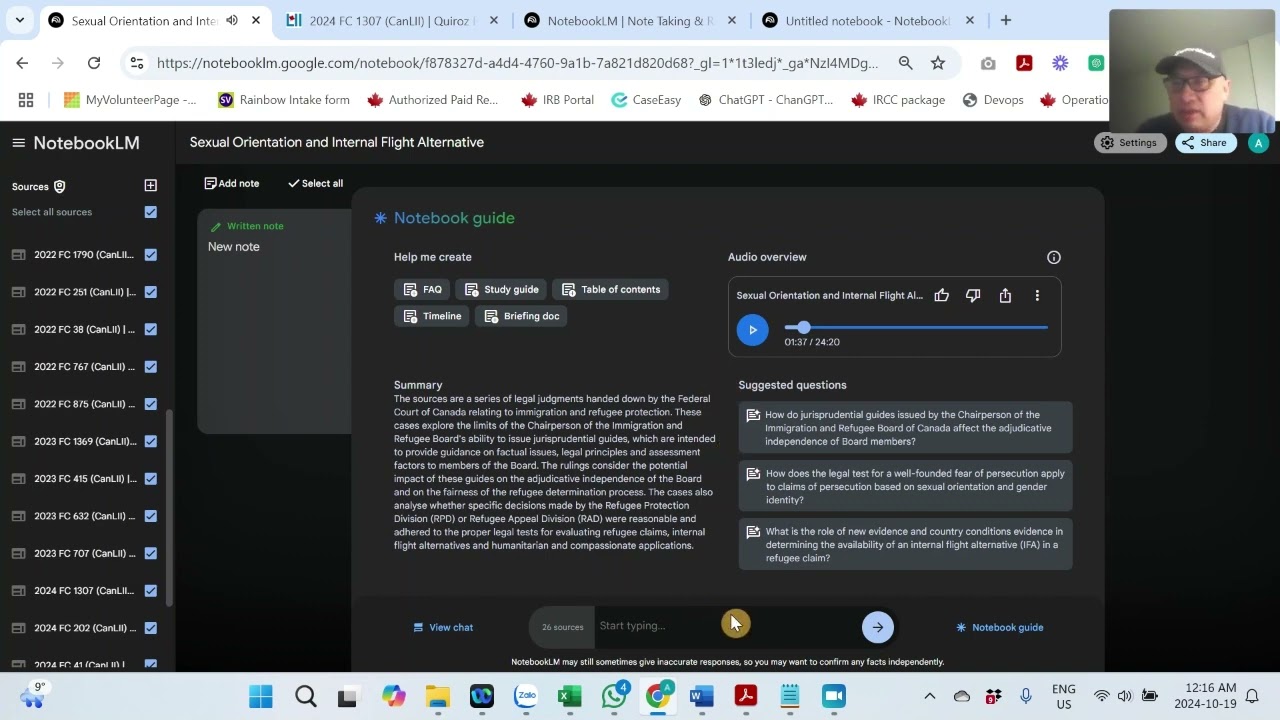
But once you're here, you can log in and try out Notebook LM. Once you click "New Notebook," you'll be met with this: this is an empty notebook. All of your sources are going to appear on the right-hand side; you can load these up in many different ways, and all of your notes will appear on this side.
Down at the bottom is how you control and chat with your different materials, and this notebook guide comes in super handy, as we'll see in a second. So, the first case I want to share with you is how to use Notebook LM to keep up with niche information. Most of us are in these complex industries, and there's a lot of news coming out.
Here’s what I do on a weekly basis: I have a virtual assistant who's really my right-hand person. Each week, I have her transcribing various YouTube channels that I want to keep up with—way more than I would be able to keep up with just by watching these videos. So, I have her transcribing these videos using Descript, and I'll show you that in a second here.
Then, she loads in those transcriptions right in here. By copying and pasting text in each week, I open this up, and I have this week's AI news—AI on YouTube ending September 20th. From there, once those are all loaded in, I've instructed her to create this briefing document.
So, this notebook guide is a really cool button; it's kind of hidden down there. When you click on that, there are all these different things that you can do with that source material, and the newest and most exciting piece of this is this audio overview. These are these deep-dive podcasts that are created from all of your materials.
If you haven't heard this, it is just stunning—next-level AI for so many different reasons. Let me show you this: "Wow, you've sent over a ton of really interesting stuff about AI. It seems like you've been doing some serious digging into this.
" "Yeah, it's definitely been on my mind lately. " "So, ready to do a deep dive into all of this and see what we can uncover together? " "Absolutely, let's do it!
" Perfect. So, that is the killer new feature that everybody's talking about: the ability to create that podcast where you have a male and a female voice going back and forth, all created with AI, discussing the materials that you've uploaded. I'm going to come back to this use case later on because I think there's a lot we can unpack here.
But I want to zoom out and see what's going on in general in tech and business. That brings me to our next use case. The second use case is using Notebook LM to keep up with general knowledge.
I have my same virtual assistant; she logs into my Wall Street Journal and New York Times and pulls all of the different tech and business articles into this Notebook LM, doing the same exact thing. So, each week, I am able to look at an overview of everything that has happened and also just listen to these beautiful podcasts as I'm taking a walk, giving me a summary of everything that I was interested in that week. But that is not all; there is a ton that we can do with this.
For every client that I work with, I have a specific notebook just for that client. Every time I speak with that client, I log my transcripts right in here, pulling these directly from Zoom. You can set Zoom up to automatically record every time you fire it up and then automatically transcribe what's going on, which is really awesome because it labels who is speaking.
This is very helpful for the AI to understand what's going on because I don't always want to know what I'm saying on these calls; I want to focus on what the clients are saying. So, anytime I have a call coming up with that client, I can just say, "Hey, what did we discuss last time? What were the action items?
" etc. This gets me right back up to speed with where I need to be with that client. You can also prompt it to see, "Hey, how is this relationship unfolding?
What is the client continuously asking about that I haven't been able to fulfill on? " You can learn a ton from these notebooks. Moving on.
To use case number four for any project that I'm working on, I like to fire up a notebook. In this particular case, I was working on a custom GPT that creates business plans, so I've loaded in a ton of different books all related to creating business plans and started working with this large language model to help me build that custom GPT specifically for these business plans. Moving on to use case number five, anytime I have a recurring internal meeting, I grab all of those transcripts from Zoom, the same way I do for my client meetings.
If you have a meeting with your leadership or if you have a meeting with your department, you want to keep those loaded in there. You can share this internally, so as you're documenting these group calls, you may want to share those with that group so that they can access this information and keep up to speed that way. And now for one of my absolute favorite use cases: use case number six is using this for market and competitive research.
I created a whole video just on this, but I think this is one of the number one use cases for Notebook LM. Loading up all sorts of information about your competitors, loading up information about your audience, and about your customers. I'm going to link to a video that I created all about that, which really helped me uncover some pretty amazing marketing strategies.
So market research is a biggie for Notebook LM. So those are all different use cases you can think about in your professional life, but there's still a lot more we can do with this tool in your personal life. For health and fitness, I have a notebook loaded up with my two all-time favorite books.
You can put full books in here as your resources; it can handle up to 50 full-length books—50 very large books. One thing I didn't mention is that you can actually point this if you want to do a chat just with one particular book or one particular source; you can control that right here by checking and unchecking these boxes. So if I just wanted to know what Terry Wahls was saying in "The Wahls Protocol" about some diet things, I can just have that box checked or vice versa.
Now, for decision-making, this is a huge use case for Notebook LM. I've loaded this up with a ton of different books that I use for decision-making that I refer to, from "Blue Ocean Strategy" to "Crossing the Chasm" to "Good to Great"—all of these amazing business books. I have loaded in 14 of these books, and this has been a very helpful resource for me as I'm trying to make decisions, as I'm working through different projects, and so forth.
Now on to use case number nine: notebooks for your hobbies. So anything that you're really interested in, I have one that is full here with all sorts of great literature. I can just ask it questions about poems; it has all of Shakespeare in here.
I've also got a notebook for creative writing and for different hiking outdoor ideas and outdoor activities. I live in Maine, so I've loaded one notebook up, all filled with different travel books for Maine, so when my family's coming to town, I can just chat with that and come up with cool new ideas that I would never have been able to find just in those books alone. One final use case before I zoom out and give you some big-picture resources to think about is getting back to this killer feature: this killer podcast creator here with these deep dives that I showed you earlier in the video.
So these are not only a great example of these large language models producing audio, but I think what nobody's talking about here is how well they're presenting this information. They take this information, which sometimes can be very dry, and create a very, very cool narrative around it. So even if you're not going to use that podcast itself, you can think about listening to it as ways to present specific information because it has a lot of story built into the way that those podcasts are created.
Now getting into some final tips and tricks for these use cases: you can download these podcasts that it creates; you can load those right into Descript and then begin editing it just the way you would edit a Word document. So if there are some things that weren't quite right in there, you can fix that up; you can add a little intro. Another couple of resources you might be interested in for converting your Kindle books into PDFs are known as Calibre and eBook-Ocean.
PDF is a place you can go to find a bunch of different PDFs of different documents and hard-to-find books that you can load into your Notebook LM knowledge bases. All right, I hope you got a ton out of this video. I have a cheat sheet version of this video that goes through everything I've covered and a ton more.
I went to town on this cheat sheet; there are over a hundred different use cases and ideas for Notebook LM. You can find a link to that in the description—that's for my Patreon subscribers. So if you want to grab that and support this channel, that's the best way to do that.
Otherwise, please subscribe to Blazing Zebra. I've got a ton of fun stuff coming your way. Drp me a note in the comments: what can I help with?
What did you struggle with? What are you using Notebook LM for? I'd love to learn from you, and I will see you on the next video.




![Google Notebook LM Tutorial - [Become A Power User in 15 min]](https://img.youtube.com/vi/UG0DP6nVnrc/maxresdefault.jpg)