Hey y'all, data guy here and today I am continuing kind of my intro series on very this different Apache products to talk about Apache Knifi. Um, and the reason why I want to talk about it is it's now been actually, you know, integrated into Snowflake and a lot of people are using it within the context of Snowflake for data pipelines because that's kind of what Snowflake has decided on as their native data pipelining tool. Um, so I'm going to talk to you about Patroni just as a product standalone from Snowflake.
Maybe if you guys like this, I'll have more of a Snowflake video uh centric video down the line. But today, I really just want to talk about what is Apache Knifi, how it works, and how you can get started using it, and also some of the most common use cases Apache Knifi is really well suited for. So, that's what we're going to explore in this video today.
If you like these videos, please like, subscribe. Helps me out a ton. Uh but without further ado, let's get into it.
So Apache Knifi just as this dictionary definition is a data pipelining tool, right? It's an open- source data integration platform that is designed to automate the flow of data between systems. And you can see that in this example, you know, where some raw multim modal data is received, then it's saved either as a video and then has some extracted semantic meaning gleaned from it.
Um and then another parallel track it's actually being chunked, vectorized and the embeddings are being stored. Um and the way Apache Knifi works is on a flow-based programming paradigm where data processing is conceptualized as a network of blackbox processes like these that exchange data across predefined connections. Um so unlike you know something like airflow where you would see you know the exact logic of each of these operations each of these kind of you know data you know data processing boxes is completely independent and is designed to operate as its own kind of blackbox system.
So it's almost more like an assembly line where each station performs a specific task on the data as it moves through the system. And in knifi data moves through the systems as packets and they actually have a term for them which is called flow files where each flow file which will contain the actual data payload as well as the metadata attributes that describe the data its source its processing history and any other contextual information that might be needed alongside of it. Um, and where traditional ETL tools will, you know, typically require a good amount of coding, Knifi is really centered around this kind of drag and drop interface where you visually connect processors to create data pipelines.
So, it makes those kind of more complex data integration workflows accessible to business users who might not really have an understanding of code. And then finally, Knifi is driven by event- driven processing. So, when data arrives, it's processed rather than on a fixed schedule, which has a number of benefits.
uh and enables real-time data processing and immediate responses to changing conditions. Um and you don't have to worry about, you know, missing a schedule. You're going to process that data whenever it arrives, regardless of a schedule.
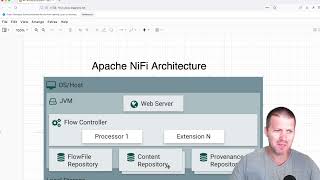
So, now I've talked about, you know, generally what Apache Knifi does. I want to talk a little bit about its architecture because that's key to understanding any software. Um and with Apache Knifi, you have a few different components.
Number one, you have the web server, which is, you know, what's hosting your Knifi user interface and the REST API for interacting programmatically with Apache Knifi and also is where you're going to be designing your user flows and monitoring any system performance. Then underlying the or you know linked to that web server is the flow controller and the flow controller is the brain of Knifi that manages the execution of processors, maintains the cues and ensures data flows according to the design you've laid out and will handle scheduling resource allocation and flow orchestration. So one-stop shop for all the scheduling components.
Then you will have processing execution um which is you know indicated here by this extension N right where each processor is going to run in its own thread pool. So each flow controller will have multiple pro processors right um where that will allow parallel processing and optimal resource utilization. So you can think of these as the different lanes on your highway that going to be processing your data and processors can be figured to either run continuously or on schedules.
And then you also have linked to this flow controller the content repository. So this is the actual data content of flow files on disk with configurable retention policies and compression options. And then you have the flow file repository which maintains metadata around flow files and their current state in the system which ensures they're durable and also provides any recover recovery capabilities in case of you need to revert to a previous flow file.
And then finally you have the providence repository which is going to record the detailed history of every action taken on every piece of data. So this is really your source for any kind of audit logs where you want to track the flow of data from its source to its destination. So now I want to talk about one of the biggest features of Apache Knifi and one that's actually kind of blocked by my head right now.
um which is its ability to track data provenence which is really kind of data lineage right and so what you're seeing here is you know basically the process that's happening under the hood during a data flow where every time a flow file is created modified or routed to an external system knifi is going to record this event with timestamps but also the actual processor information attribute changes that occurred right so it went from you know plain text to compressed telling you exactly what changes occurred to the underlying data So you have a complete genealogy of your data that enables you know compliance because you have all the regulatory information for data governance and you know traceability of your data built into the platform. You have debugging built in because you can trace the issues back to the root cause see hey step back in the pipeline and see what uh changes were you know basically building on each other and where your pipeline actually broke and started producing bad data. Um, it also lets you replay and reprocess data from any point in the pipeline because you can just repeat these already structured and and tracked uh operations and it also is really great for data analytics and understanding the actual data processing patterns and bottlenecks within your Apache Knifi system by looking at the underlying data and how that processing is performing.
So now I've talked a lot about how Apache Knifi works and its benefits. I want to talk about what those benefits align with in terms of what use cases are best suited to Apache III. And the first and probably the most classic one is enterprise date integration.
Especially if you're a big organization that's used to guey based tools, it's a really natural choice to use Knifi to gradually migrate data from legacy systems into modern platforms. So, you know, extracting data from mainframe databases and streaming it to cloud data links while still maintaining business continuity. Um it also really excels at API integration.
Um you know connecting many disparate systems through REST APIs, handling authentication, rate limiting, error handling and data transformation through different API schemas and also database synchronization. You know, all that tracking information it makes around data changes makes it really good at keeping multiple databases in sync by capturing change data and then propagating those updates across many different systems while maintaining data consistency and handling those kind of conflicts that might rise up automatically. Another common place you'll see Knifi used is for real-time great data streaming workflows.
you know, especially if you have something like IoT data processing where you need to collect sensor data from thousands of devices, you know, filter out noise, aggregate readings, route alerts. Knifi can handle the volume and variety of IoT data streams while also providing built-in back pressure management for those data streams. Um, it's also really good at, you know, kind of log processing.
So constantly ingesting any log files generated from multiple different servers, parsing different log formats, extracting meaningful metrics, and then routing events to different downstream monitoring and analytic systems as well as event stream processing where you're processing high volume event streams from applications. You know, user interactions or business processes. Let's say you want to do something like fraud detection where you're constantly analyzing every transaction that comes in.
Knifi can be a good system for that. Um, and also enables real-time analytics and immediate response critical events because it's doing that real-time processing inhouse. Um, and typically, you know, you're going to be bringing that, you know, using it to move data from, you know, on-prem the cloud or between different cloud providers or just doing kind of general data ingestion into your whatever your backend database is.
Um, it also has compliance and data governance built in. Um, so you know, you're able to do things like data masking and encryption. So, it's really good for sensitive workloads.
There's that audit trail creation I talked about earlier. So any really highly regulated workflows potentially a good choice. Um and also any workflows where you need high degrees of data quality assurance.
You know it has built-in capabilities for implementing validation rules, data profiling, quality checks as data flows through the system which can help for quarantine quarantining bad data and then also setting up alerting operators on that too. So now how do you get started using Apache Knifi? Um and it's actually really easy.
So knifi has a docker image hosted online for it. So actually if you just want to run a simple uh docker you know installation of knifi. So if you have docker up and running you can just run this command docker run name knifi apache/nifi latest.
It'll pull the latest uh knifi image and then run it on your local machine. And I actually the reason why it's failing there is I've already created one. Um so you can see here that if I open this up it is my Apache Knifi uh latest running on my local machine.
And then what I can do if I want to actually go and access it, just need to open up a browser window. Um, and then go navigate to localhost uh Apache Knifi 8443. Um, so going to here and so here you can see if I if you go to https.
nifi or sorry localhost8443i uh you'll be presented with this login page. Um, and then what we'll need to do to actually get the uh generated credentials is go back into the terminal and run this GRE command. So, get me the generated username and password.
Um, so, and then we can copy these over into our Knifi environment and we will have a local version of Knifi ready to experiment with. So here, just grab the username, grab the password, and don't worry, you literally won't be able to log in someone like this from with those credentials. Um, and boom.
Now we have our Knifi environment on our local machine ready to be used and start designing our own flows. So that's where I'm going to cut this video off. If you like this video, if you want me to go further and actually start showing you how to design from some flows, let me know.
Have it make follow-up videos on this topic. But I hope you enjoyed this video. I hope you have a great rest of your day.
Data guy out.