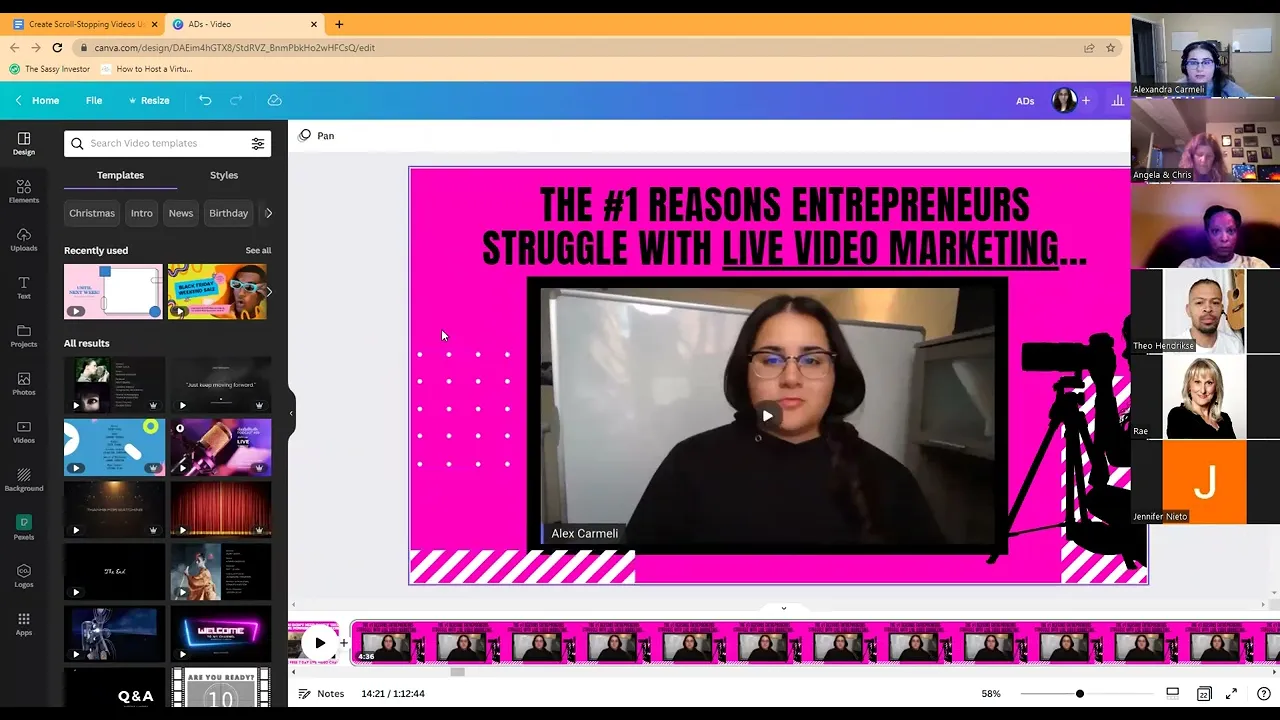
all right so welcome to the final training of 2022. it's been an incredibly fast year and I'm excited to be here with all of you whether you're here live or you're watching the replay um I'm excited to have you here I see we have Ray here from Phoenix Angela from Washington uh Jennifer Mia awesome Theo amazing Okay cool so today is all about creating scroll stopping videos using graphic uh overlays or backgrounds and if you don't know what that is essentially it's things like this right so this video obviously I uploaded but you can see
the background uh here I'm gonna go through a bunch of examples with all of you but this is another example of a background and I know they look maybe it looks fancy but it's like one of the simplest things you can do and I want to give you guys exactly how you can go about doing this how you can create these really quick backgrounds and before we get into that my first question for all of you is have you done this before you can just put a yes or a no in the chat I'm gonna
go into a little bit like why this matters what we're thinking about when we're doing this we're gonna go through some examples we're gonna go through like where specifically I like to use these and I have used these we're going to talk about what to include and then we're gonna actually design one of these guys together as an example so let's talk first about like why this actually is important why this matters so um first things first we've got the five second rule when we're thinking about video content and that means that like you want
to put yourself in your audience's shoes like they're scrolling social media and you've got maybe five seconds to grab their attention right and so there's three things with video content that people notice before they listen to a single word right so number one it's the title right are you hitting on their pain points are you um you know are you showcasing something that they actually care about right in a compelling way that's the first thing the second thing they can see like what the heck's going on in your video so what I mean by that
is like what's happening in the frame so like what are you doing what what does the background look like what is actually on the screen what's going on there and then lastly they can see usually the comments likes social proof so those three things together are what people notice before they even listen to a word and these three things are kind of what goes into scrolling uh helping stop the scroll so people tune in and listen to your video we know why the title is important if you haven't given people a reason to stop right
they're not going to spend their precious time listening into that video what's going on in the video um this one isn't like this one's I think is less important than the title but we can actually you're going to see today we can make better use of our backgrounds in our videos and we can use them in strategic ways but people pay attention to what's going on in the video so it helps to have something you know that's attention getting and then you know obviously we know why comments like social proof are important on there wouldn't
boost the video but also when people see people other people liking and commenting they're like oh this must be good content it must be interesting they're curious to see what's going on in the comment section things like that so let me know you can just give me a guess if this is making sense so far why something like this is important and we're gonna go through first like a little bit on like where we use them and things to include right so let's go through where I use them first and then we'll go through kind
of examples of these so the first place I love to use these kind of Graphics is on sales pages so if you have a membership or a course or a product you're selling and you have some sort of explainer video or testimonial videos on there this is such an awesome way to like uh you know draw people's attention and also like make the sales Page look a little bit better and a little bit uh more inviting as well I'm going to show you some examples in a bit um I also like to use it with
just like organic video content so like I'll like in my Facebook group specifically I like to use it on my business page um those are some great places Instagram um you know content that basically you're posting uh on the regular and then it's especially especially good for paid content so if you are someone who is running ads or is or has run ads before like you know how expensive paid advertising is and how difficult it is to grab people's attention especially if you're running to cold audiences and so this is another way to make sure
that your videos are standing out and so that you're not you know wasting that ad spend so let's take a look at some of these examples so I'm going to go through oops let me move this guy a few of these I have a lot of these guys so let's start with uh let's start with some of the paid ads that I've done so these are it's not showing the actual video oh here we go okay so this is an ad that I ran um for I think it was for my live video challenge but
this was the background um it's basically like some important things we want to highlight is like we've got this attention grabbing title are you one of these four entrepreneurs struggling with live video I've got this little live this video was just uploaded into canva and I'm dragging it onto the page and then I've got a background right and so for me like I'm not a super like pink person like I'm not like that really but like it's the colors you want to have big bright colors that are grabbing people's attention uh through this so it
doesn't have to be pink but remember like you don't want this to be like subtle and boring and like too corporate like you want this really to kind of stand out so this is one example let me scroll through here's another example that a lot of you have probably seen maybe you saw the ad the live video challenge ad where I'm like dancing in my kitchen uh this is that ad this is where I literally created this whole ad in here uh where I've got um all I put on here was the video I've got
these little flashing Diamonds the headline and then I've got this like half white half pink background right so let me know as you're looking at these like if there's specific things that are standing out so these were two examples of like like ways you could use this with like videos and paid advertising so that's one example um let me show you sales Pages let me show you a recent sales page one uh there's one specifically that I want to show you okay so this was one that I did you can see it running here this
is one that I did for the six figure challenge intensive that I ran a couple months back and this was the video that went at the top of the sales page where I talked about exactly what's inside the six figure challenge intensive so this is like if again if you're selling a course or a membership or a coaching program and you're talking about the program this is an easy way for you to be like hey join this thing here's the video about it you've got some color on it and then I've got this little click
button showing them you know press the video to to watch so that's one example of like how you can use it on a sales page let me show you another one here's another recent one that I did um I did I re-ran the three days for three dollars video content planning workshop and so you can see what I really like about this one is the actual background like the theme of it is it looks like like a record like we've got the record um it sort of looks like a camera I don't know at least
to me it like looks a little bit like a camera um we've got like the video player stuff here at the bottom and then the actual video um and so biggest thing again we've got the the title three days for three dollars video content planning workshop just the video background and then this little element that is basically just adding a little bit grabbing attention and you want them to be like relevant to you know whoever your audience is okay so let me know if this is making sense so far let me know if you have
questions on any of this um I'm gonna show you I'll show a few more examples if it's helpful but the biggest thing is when we're thinking about building these we want to make sure we have the attention grabbing header or footer right so that is this guy here so this is like the sales page so I'm just being really like Direct on like here's exactly what here's exactly what you're getting um but here's a better example of like an attention grabbing headline the number one reason entrepreneurs struggle with live video marketing dot dot dot and
then I've got the video underneath with the little camera person right so that's the first thing attention grabbing header or footer that's focused on your audience's pain points the second thing is we want to have you know pick a background that stands out so you can see like you're not going to miss this pink background like this is obnoxious you're scrolling by like this is going to grab your attention in some way right so we want to make sure that we have something that's grabbing their attention and then the extra elements so when I say
extra elements I'm talking about like things like this or like these guys here that are just making it look a little bit more creative and again we want it to be like relevant to your audience okay cool so that's what this looks like um so I gave pretty much examples of everything again what it looks like on sales Pages video content paid ads things like that but I want to walk you through what goes into uh designing one of these also we're gonna go through that so does someone have a video title that they want
to just like do they want to do I can make one up if you want but I figure if someone has one we can just do it right now like in the chat like do an example one let me see if anyone I have one yeah let's do it Mia uh it's a testimonial and it's a client actually sharing her and I just I just did it like yesterday it's a client sharing her testimonial after her reflexology services so what was the What's the title of the video it's I haven't titled it I haven't I
just did the video yesterday and actually I was gonna do it today um what's the transformation uh relief of sciatic pain okay cool so what kind of let's build this together what kind of what color like stands out like what color you're thinking here thinking uh fuchsia it's a bright it's not pink but cannabisia color is that like purple I mean we can use purple okay fuchsia is kind of in between pink and purple okay maybe we use something like maybe something like this is that cool with you man okay okay we can always change
the colors but we'll just go through the process right right um all right so what I like to do is I pick the background again we'll clean this up we're just gonna like rough and dirty it at first and then what I like to do is go into elements and I like to have like a backdrop for the title so I'll go into lines and shapes in canva and then I'll click this square shape and uh Mia where do you want to have the this go do you want to have the title be at the
top or the bottom sorry I was muted at the top okay so what I'll do is we can do it like this guy here where we could just have it fully across the top we could pull it down and have it this way why don't we just have it Go fully across the top for this and we want to just pick the other color so we could have this be a black a white we could do a different shade of purple what are you thinking Mia yeah probably a different shade of purple a darker okay
let's see um yeah I'm definitely not a designer let's just stick with this for now okay um okay this is what I mean I'm not a designer I probably should have prefaced this with like even if you're a terrible designer you can still make this work so like I designed all of these I just play around with the colors so if there's designers watching this I'm sorry if I'm butchering this for you but either way it'll come together um Okay so we've got the two colors um can you guys see the canvas screens I see
Theo saying okay everyone's fine okay yes yeah I'm not sure all right after that we want to get the title so let's just pick any heading we'll put it up here and uh you said how do you want to use the person's name or you're just saying how a client foreign what's the transformation again she get relief from a sciatic pain uh okay sciatica pain okay and do you want to do like we could do sciatica pain to transfer the after or it could be three ways you know it could be X number of ways
that my client relieved her sciatica painter something like that like what what do you want the actual title to kind of look like because I I want I'm gonna actually drop her video where she's actually sharing her own testimonial yeah that's what I'm that's that's my thought right so I'm asking so the whole idea is like we want to highlight the transformation like we don't want to just be like here's a testimonial we want to say all right here's what you as the audience member are gonna get if you listen in so I like raise
I I see in the comments sciatica suffering to Sweet relief I think that's a really good title like you could do uh you could do something like that okay let's just try it for the sake of this but does that make sense to me like what we want to be focusing on with these headers right does it make sense to you right like the worst stuff I see from people is when in their content they just write quiet testimonial and they put it at the top of their stuff and then they just put the testimony
over the video right so like instead no no I wanted to say so they'll know exactly what it is it's sciatic pain relief yeah so let's get a sick of this let's go suffering we can use what she said static suffering to Sweet relief Ray coming in hot with the suggestions okay all right cool so now we've got that right so now we're like focusing on a front and center these pain points we want to make sure it fits nicely and again we want to have this like we can bold it we can pick like
a better font it's not really a great one I kind of like this one just for the sake of it we can always make it better but now we've got sciatica suffering to Sweet relief and then let's just use a a what am I saying let's use a filler video for now so if you guys were actually creating these you would just upload here um but since we don't have an actual video we're going to go into the video section and we'll just choose something like this and then we can resize it we can put
it here and this is where you have the opportunity to add some elements to it so we could go into elements here on the side and what elements should we choose should we put like relief or we could put I don't know does anyone have ideas on uh elements sciatica suffering to Sweet relief um what what kind of elements do you like do you think would resonate with you yeah well I I like the way you had like the camera or the like it was being recorded like she's speaking I don't know okay you could
definitely do something like that the reason I had that like that was because like my audience is like they're looking to learn about video so like you don't want to put you would want to put elements that are going to like attract attention based off of the topic so maybe what if we put like back pain or something like that like what if we saw it could be like you could use one of these graphics I don't know what hits home with you here but [Music] uh yeah yeah that's the one I was looking at
and then maybe like on the other side we could do like I don't know we'll just pick this we'll pick this one we could pick better ones but you guys get the point like we're going from Pain we'll get you right yeah and like we could even have down here knock it over my microphone something like this like we could do something like this we could resize it a bit so it's a little messy but like and we could Finagle a little more but now do you see like kind of like what we've got what
we've gotten to right yeah or we could have it move down and have the arrow go like over to if this why is it not letting me put it something like that or here's a better one ah maybe it's like something like that so again you have to play with it a little bit to make sure like the images fit and like the stuff fits Maybe here's a better one we could flip it and we can make it like bigger here I kind of like this one so again we'd have to like make it fit
better but again look how quickly like we ended up putting something like that together just using some of these like simple ideas yeah what do you guys think was this helpful to see the process yes um I see Jennifer saying would you post this in Facebook or just websites you got to like figure out what your intent is before you create this like if your intent is to create this for a sales page then like you would go in with the intent of like setting this up for a sales page if your intent is for
this to be a post on social media then like you would want to pick a canva template that reflects where you're gonna post so like this is like a template I would use for Facebook but if I was gonna post this to Instagram this is not the sizing that I would use for Instagram um I see Ray saying could we create the frame to add to our live in stream yard absolutely but this is not how you would do that so if you wanted to add to stream yard um that is basically that's a little
bit different so you'd have to get the right sizing for stream yard but what you would want to do here is usually for like the stream yard overlays um you can't put a I think you actually can put a background similar to this but uh it's usually like you're uploading it to stream yard like like you don't have control over like the positioning the same way so usually for stream yard like for things like that this is what I like to do I'll show you my stream yard here okay and I'll show you how you
could create this so when we're talking about overlays in stream yard if you go into branding like I've got these overlays uploaded so things like this do you see how I now have live video marketing Hangout or this guy here at the top right so I can do things like that you can like I said in this setting you can change like you can put a background here like you could use canva to like upload a background of some sort you would just want to make sure like the sizing matches which is why I like
to just do overlays like this I think they're more effective so you would literally just pull up a blank page like this and let's say you wanted to do like you were live you could just type in Live you could drop this guy you could size it so this one's at the bottom here and then I don't know maybe you wanted to put the name of your business right so you could go into elements we could add this guy here let's put this guy maybe at the top and maybe we're like my my business name
here and then all you would do is download this share download you're going to want to make sure you download it as a PNG make sure you download with a transparent background here and then you would go into stream yard and upload it and it would show up like that cool so let me know if that helps Ray I see Jennifer is interested so yeah that's another really great way to kind of add stuff to your videos too in stream art if you wanted to as well I like using overlays best in stream yard cool
awesome do we want to do one more example does someone else have a another video title they want to use so that we can we can Workshop one more and you could just throw it out too if you haven't Jennifer do you want to use the recent title you came up with I see you're saying ebook and Mia saying when you download is it a video yes that's a really really good question so yeah if we were going to ah if we were going to download this guy here you would be because remember we're uploading
this video putting it onto this page and then we're downloading this entire thing so like if you're uploading a five ten minute video into this it does take a little while to download it okay Jennifer can you want to come off mute do you want to remind me of what which title you want to use so the series I just did was how to get your anxiety under control without hiding under a rock okay so maybe this is this is a good one so when we have a long title so she's got how to get
your anxiety under control without hiding under a rock so she already has that title there so the the background is where we can just pick a few things to kind of stand out so it could be something like we could do like highlight just um it could be like if you were uh if you're an empath Quick Quit hiding out today or something like that or let's we'll play with the language but we want to just pick a few things we don't want to have it the point is we don't want to have it be
redundant or we say one thing in the video title that's written and then in the background we say the exact same thing right we want the background to add something new or creative to what's already there so I don't know Jennifer do you want to come off mute and like help me through this or sure well actually I just finished that video series so would it be helpful because I was gonna try and promote my ebook on Christmas like this is my Christmas present to you oh cool yeah what do you think of that yeah
let's do a Christmas one okay that sounds fun okay so what's the ebook called um well originally it was just self-care for impasse and then I was doing something with the word burnout and I I can't think of it right now that you're gonna ask me okay no worries so let's do like if it's a Christmas gift let's do maybe we do like Christmassy colors uh-huh so maybe we do like Reds and greens something like that and then in your text maybe there's like Christmas texts I don't know uh okay let's just do regular for
now uh my gifts how much is the ebook usually worth I don't know this first time I've done one so I was just gonna give it away for free this was just like my gift to you but what would you charge for it yeah I I have no clue it's like 20 it's like 30 pages it's not super long okay well I was gonna say you could just say my gift to you or it could be my free gift to you ah and then it could be like usually X amounts okay or it could be
you could say let's say it was a it was 27 you could be like 27 and then do the strike through got it okay the metal it's not showing up now effects yeah where's the strike through I don't see it but either way we can figure out where that strikethrough is so uh my free gift to you we can make this bigger maybe we do this in like a white or something so it stands out a little bit more and then we'll use let's say we'll use a uh temporary video here like that and then
maybe like around it we do yes yeah little things like that this is a really good one to use I actually really like this idea maybe we've got these guys but you actually posted on the day of Christmas or would you recommend posting it before Christmas oh it's up to you okay you could do it before like I mean just think about like when people are online like that's why I've never tried to sell anything or promote anything before so I was just thinking like I don't know people are online on Christmas yeah before or
I don't know yeah you could probably do it before like yeah okay so my free gift to you and the only thing else that I would probably include is like the actual photo of your ebook okay so like Let's Pretend one of these is your ebook I don't know if you have like a picture of it or like a screenshot but maybe you do that like the actual ebook and like a pile of gifts or something like that okay and the video would be me just explaining it that this is what I'm offering to them
yep okay and if I wanted to post this in Facebook I have to save it as an mp4 and then post it in the group yes you would yeah you would put the video on here download it say like yeah download it as an mp4 okay and then you'd and then you would post it to Facebook that way okay yep this is a really this is a cute one actually I like this one okay awesome see I'm just saying great Christmas gift or New Start posting between two holidays yeah awesome cool um any other questions
on this that you guys want answered um otherwise I hope I'll I'll hang out a sec I hope that this was helpful and I just want to give y'all like one tip of some of this stuff too is like we want to make sure we're testing different types of creative right and so like if people aren't stopping the scroll like if people are not watching your videos we always want to look at two things first number one we want to look at the video title number two we look at like the creative kind of piece
to things this is especially for like paid paid traffic for videos we look at the title and then we look at the like creative of it and we make sure that like people it's like standing out enough because again like people are just scrolling scrolling scrolling like we want to make sure the colors are grabbing attention the titles are like actually something that people care about so if one type of creative like just isn't doing the job like if people just aren't like really stopping play with other types and so you can see I'll scroll
here like some of these that I showed you have like a bunch of different creatives like are you struggling with one of these four live videos this is one creative I did for that topic but then I showed you uh that other one earlier here we go here's the other one are you one of these four entrepreneurs struggling with my video so it's the same topic it's the same video I'm just using different creatives to like show it off and seeing like what is actually hitting home with my audience uh the best uh here's another
example when I do the number one reasons entrepreneurs struggle with live video marketing here's one version the pink with the girls shooting in the background and then here's another version oops this is not it uh over here the number one reason entrepreneurs are struggling with live video right and so I've got you know this video here join the seven day this one did worse than the other one I showed you this the pink one this obnoxious pink one did better than the blue one right so it's just and it's just like a matter of like
testing it and playing around with it so if the first one it doesn't hit home automatically like don't be discouraged and you got to see this whole process as like continuous testing so I see Angel saying is this how you would post on Pinterest also uh yeah I'm not sure it should be the same I mean like if you're posting videos like you can on uh you just want to make sure you have the like formatting correctly so for example if I go to my home right I could go into create design Pinterest video you
probably use the either Pinterest video ad video pin whichever ones you're trying to use and then you would do the same process just on this square right so we'd go through the same process of again if we wanted to do that same uh let's say it was my free gift to you one that we did you do the same here you'd set up the heading at the top you know you'd have the video be here you just be conscious that you have less space so this is what I mean by like you gotta understand what
the intent is for whatever you're trying to post like if you're trying to use this for a sales page the sizing is going to be different versus a Facebook ad versus an Instagram post versus something for Pinterest so just be aware of like don't just go and create these without having that intent be really clear okay cool so I hope this was helpful like this is something you can pull out of your back pocket this isn't something you have to do all the time like sometimes like if you do too many of these like your
business kind of just ends up looking like I don't know it's like too much it's like too spammy and like not authentic enough whereas like sometimes videos of like you literally just looking like a regular normal person or more attention getting than you know the overly designed overly fluffed up one so have a balance kind of between those things that you're doing awesome cool well let me know if you guys have any other questions I hope this was helpful and like I said this is the last call of 2022 which is crazy um we have
some really great stuff planned for next year I hope you're excited about that I'll be asking for your input on topics that you like want to learn more about and uh it should be a great year together I'm excited for it so if you have any questions let me know but otherwise it was good to see you all and I'm looking forward to a great year in uh 2023 and I'll see you see y'all soon I hope you have a great uh holiday season thanks so much Alex take care bye bye everyone