hi welcome to our first video after the remote instruction startup for UCF alright so what we're going to talk about tonight is string manipulation in R this is a critical component of text analytics so what we're going through remember that we're gonna take some politician tweets and we're gonna analyze them I feel like this is a good place to start when it comes to learning text analytics now I do this all the time specifically string manipulation this is a critical part of my job because the same data will be recorded in this in different manners
by different people people use abbreviations people skip words some people spell it out and I need to be able to put them in a common format also I need to reduce text for things like visualizations to shorter formats so that things will fit nicely onto the page so this is an important skill set for anyone working in analytics now I'm going to be doing everything in our sass has excellent string manipulation features but unfortunately sass does not support the text analytics that we're gonna be doing it a little bit SAS Enterprise miner does but that
stuff really in forex miner just does everything for you so there's not really a whole lot teach so I'm just going to be digging into our everything from this evening you can pretty much do in SAS but I feel like our support a what will are definitely supports a wider range of things to do so basically string manipulation is the process of changing character strings into different formats so let's think about that let's think about different ways you can put down my name you could have Erin Smith you know first name first last name last
and then we can have Smith Aaron last name first first name last and then a Smith that's how my dry cleaner puts it all these are referring to the same person but they're in different formats and if I want match up different data sources that have my name in different formats I need to do string manipulation to be able to match things up so now another thing to think about let's think about the words jump in all caps jumping jumped jumper well these are all really are just you know relating to the same word jump
so if I was doing text analytics and I see all these different words coming up I would want to convert them all to the word jump otherwise we're going to have some problems with sparse words all right so here is kind of like a kind of a guide of how to go through and do pre-processing for text analytics so my my opinion is that you should really start out by removing URLs that are in there remove your contractions remove your special characters remove punctuation x' numbers redundant unnecessary whitespace remove some remove symbols such as dollar
signs convert everything to lowercase so it's uniform throughout remove stop words stop words are words that are not informative such as the word and replace abbreviations now stem words that's where you reduce the words to a common format and complete words are where you convert the stems to an easier to interpret word and then we remove informative frequent words remove sparks words and then we convert to another format now something to think about when you do this is that every analytics project is gonna have a a a different like optimal order for what to do
and you need to look at what you have to work with look at your documents and choose what works best if you see a whole bunch of like numbers throughout and those numbers are not going to be useful for what you're doing you want to remove numbers early on one thing that I frequently do is I'll remove stop words first and then I'll remove software's later after I do some pre-processing to get things into common formats again and that will speed up my processing a good rule of thumb is if it removes more words as
we also call those tokens it removes more of them then it's probably the one you want to do first because that will help speed up your processing time and you will get different results depending on the order in which you perform these tasks so you have to really think about why you choose the order you choose all right so not tonight what I really want to do is I want to just talk about tools to use while doing text analytics for string manipulation in particular and I'm just going to show you here are the tools
in our tool belt I'm not going to show you how to use them that will be in the next video here what I want to do with these PowerPoint slides I want set up so that as you're working through a project you'll hey what's the function that does this thing that I need to do you can go and you can look that up all right so the the format strings really is important because different for different functions in our interact with different formats better or worse or not all than others and the most common ones
are vectors - field frames and core pipe so the and each function package has a perform at to work with and base are its vectors and DEF frames and stringer is the same as base are and the TM package has these things they call corpus and it really prefers to work with those and what you have to do when you decide on how to manipulate your strings you need to look up the format of the func like you find the function you want you make sure they will work on the format that you have you
may need an additional function to help you and then you execute it and you always have to consider the format that you have stored in and the actually that you want to perform if you want to use a non-corporate function on a corpus you're going to need the TM map function from the team package my opinion is that the stringer functions are better than the base our counterparts now something about that is I learned the base are ones first and I've never kind of got away from that I guess I'm old and I I'm kind
of set in my ways but there's a lot of good reasons the one that jumps my mind first and foremost is that the base our functions handle in a missing values as the letters in a which is a huge pain in the neck but the stringer functions do not alright so now let's take a look at like the the meat and potatoes functions for string manipulation all right there is a whole bunch here and we're going to go through so here this column is for like the base our functions and over here are for the
stringer functions that do the corresponding things so here if I have paste 0 or paste or stringer see these concatenate strings so paste 0 does not by default have any space between the concatenation pasted puts a space between the items being connected concatenated and something to realize is that when I talk about the base our functions frequently they convert na to the string in a which is kind of bad it is bad now number of characters in string length counts the number of characters in a string one thing that's nice about the stringer package is
that if you pass factors to it they'll just accept them as character strings and it'll roll with it the base our functions will not so you if you want use base are you have to make a conversion first using the as dot characters function now substrings here we extract the sub strings by the position so we have to say where we want to start and we want to stop when we use these functions so if I want the the second and third letters from a string I have to put two and three inside the function
now here the gr FL this is a logical give lotta logical get the detect whether a substring appears in a string yes or no true/false here is it's called string detect now string subset what does it a string detect and then returns a string that you're looking for string extract pulls out the matching patterns from a string and string count counts the number of times a pattern appears in the string so one thing I've noticed in the in the politician tweets dollar signs appear a lot so something that might be interesting is to look at
how how many times through dollar signs appear in the different politician tweets now we can also split strings this is one I do frequently at work so what we do we come up with we identify a character string that is like delimiting different asked different parts of a string and then we struck we strip it out and we separate them out and our the string split function gives you a list and the format can can be a pain to work with but it's consistent and it's good to work with now sub and string replace replaces
the first occurrence of string pattern G sub okay G sub and string replace all replaces all occurrence of a pattern I use these a lot now string view and string view all helps you it will launch an HTML file showing you specific aspects of string that you are looking for and they'll be highlighted very useful when you're trying to figure out what you should and should not do now converting to uppercase if you've been working with data for a while you'll notice that a lot of places will put all caps in their column headers just
to make things uniform and consistent I think that's visually ugly but you know you can do it to lower converts everything all the letters to lowercase when we're doing like cinema analysis when we're doing a bag of words you know and we're doing other types of analysis we usually want to have everything in lowercase or lowercase this is the more common one to be done we want everything in the same format because the system if it's if I've got like an upper all uppercase all lowercase and first letter is up for everything else that's lower
then R will think that these are different character strings and putting them all in lowercase or uppercase if you really want to it makes things more uniform makes things work out better now we can also convert our strings to proper title cases I like to do this for the for my column headers I like to have it in title case and we can convert strings to sentence capitalisation which is nice and then there's format C for formatting numbers this is good for standardizing numbers and different formats like if I've got commas in there and some
of them but I don't want those commas in there right lines is good for praying text and charter translate specific characters to another character I haven't used this one very much [Music] another package that you can use is the string I package they're kind of a strong following on the internet over this one it works pretty good I first haven't found it to be advantageous over stringer all right now let's get into some more we in some weeds of this so what some of the things that we're going to want to do is what I'm
going through I want remove punctuation almost always for the type of analysis I'm doing we might want to remove numbers and now we want to remove redundant whitespace so if I have let's say that for some reason somebody put three spaces between two words well I only need one in there the strip white fate whitespace function will reduce like three spaces down to one and also get rid of leading and trailing white spaces so this way it'll my it'll be a little bit easier to read my strengths will be shorter in length and it will
things will process faster the queued app package has a root lot really neat you know functionality to it now I had issues with Java with this in Oregon we talked about this issue in class before so this may or may not work on your machine but the bracket X function will remove text contained within brackets we can replace numbers with their word equivalence we can replace abbreviations this one's really nice we can replace contractions when I like a lot we can replace symbols with their equivalent so we could replace dollar signs with the word dollar
and it has a utility you know cute app regular expressions as a whole like suite of functions for removing special types of substrings so we can remove URLs we can remove twitter urls there's a whole bunch of these there are a whole bunch of special remove substring functions in the cute app regular expressions a package i really suggest that you check it out now ours gonna have different formats for the data to be stored in and and so if I want to take a vector sort if I want to take some strings are stored as
a vector and then want to convert it to a corpora then I want to use the vector source function if I have a data frame source I want convert that to a cor per core purpose then I want to use a data frame source function and the corpus function is very similar to bacterial source or so I take back your source and I put it into B corpus and now NLP has some other features for us to be able to dig in to do to extract features from documents when I'm around like metadata we're really
not going to use it in this class stop words stop words are words that are not informative for our analysis now something I want to point out it informative for our analysis so the the default examples are work such as for and nor but or yet so these words are grammatically important these tell us what the words are doing in the sentence but if I see these if I was to see these words you know just kind of displayed out and I wouldn't know what was going on now if I saw let's say doc river
water boats I have an idea that like all those words together tell me something about what's going on in the document those are informative words for what's going on now it depends in our situation so let's say I am going through and I'm and I'm doing text analytics on pediatric medical journals well in that situation pediatric child children are not going to be informed of words because they're going to appear everywhere throughout those documents but if I was analyzing a bunch of cardiac medical journals and I see pediatric child children then I know that those
are special topics within carry-all so the so in the situation of pediatric journals I would want to remove the word pediatric throughout because that doesn't really tell me what's going on for the context of what I'm doing so the the TM package has a function called stop words that returns a vector of words that are generally not informative in English so there's two major options to go through either smart or English if you use the English one there's 174 common words or there are soft words the smart one has 571 the cube gap dictionaries package
also has some good stop words so the top 25 words top 100 words and the top 200 words these are the most what the dictionary says are the most 25 most common words in the English language most common top most common 100 words and most common 200 words and so these are you know they're so frequent that they're not useful for our analysis and what we want to do at we use these dictionaries and the TM remove words function to remove these words from our text documents removing stop words will greatly improve the speed of
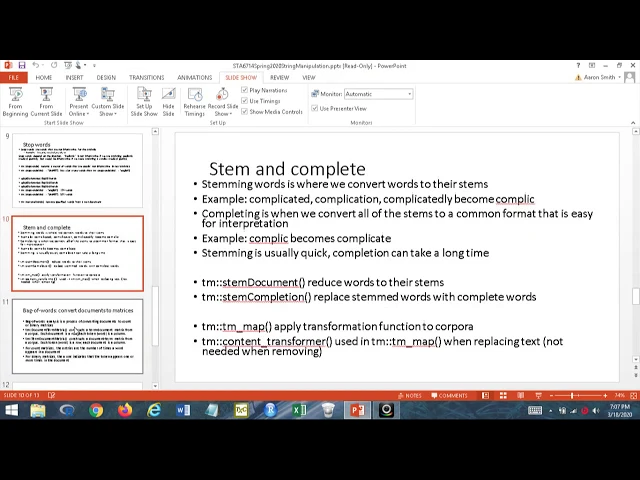
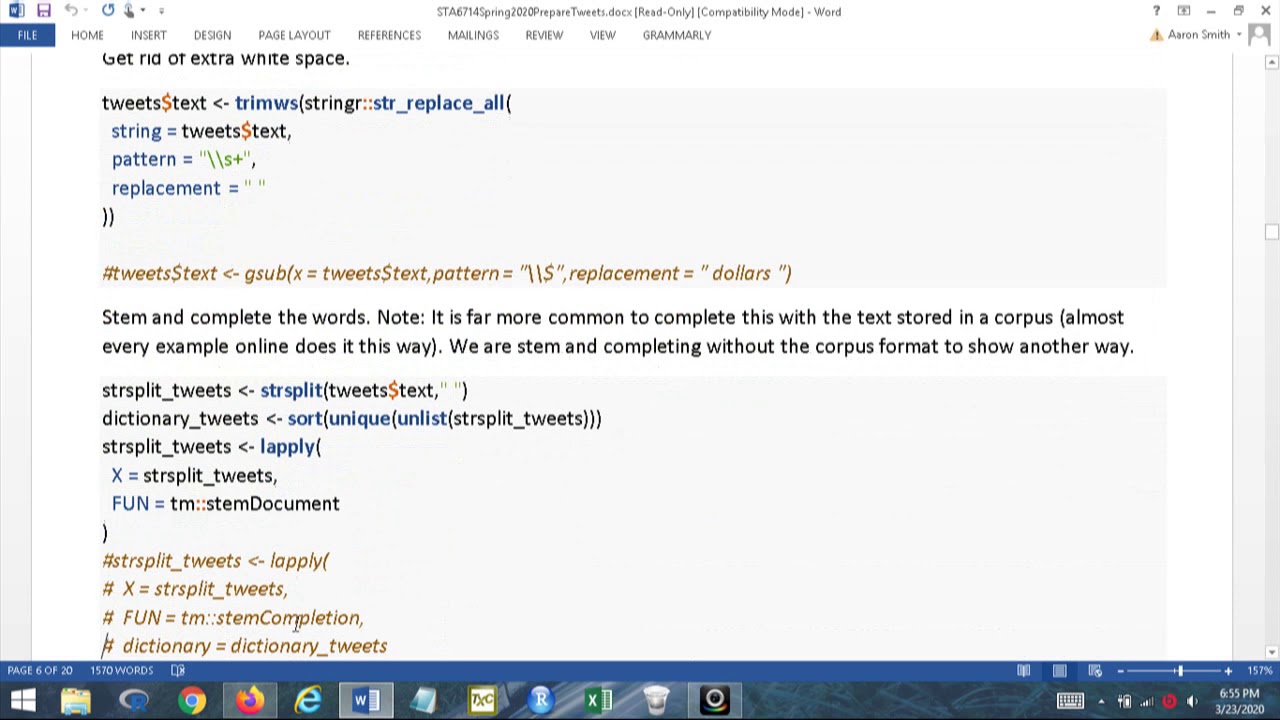
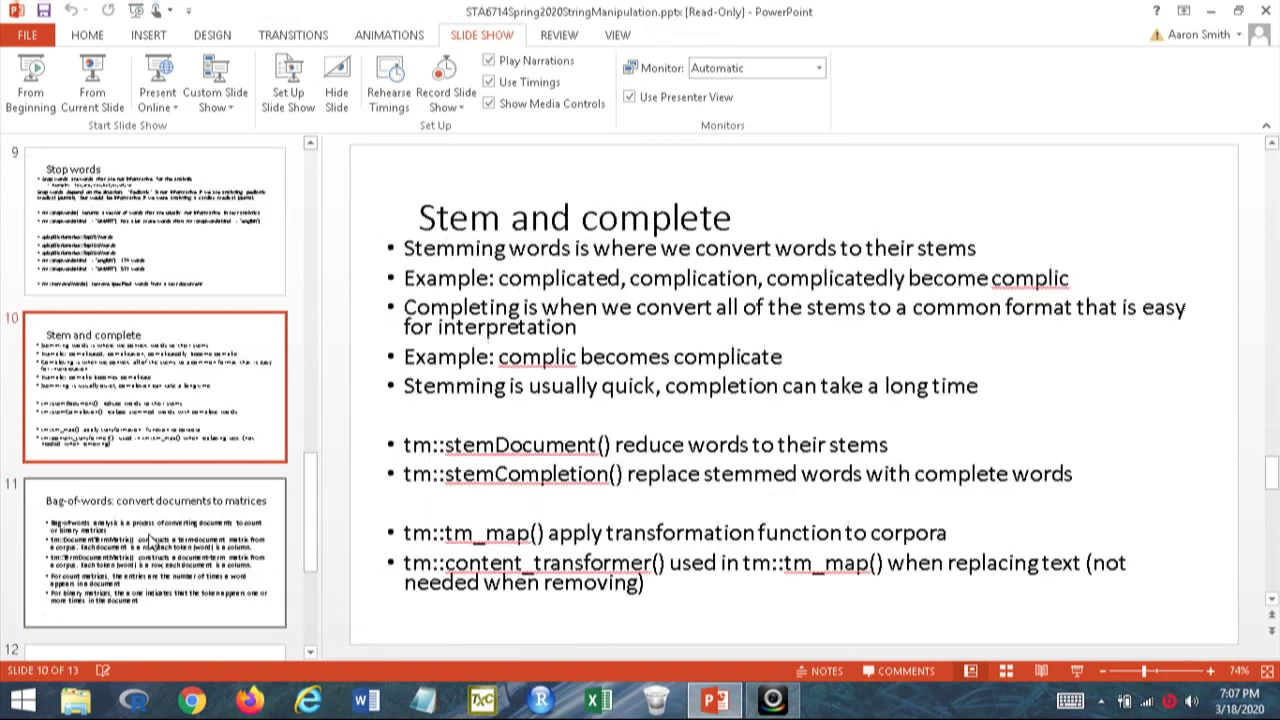
our analysis and it will improve the output also so you definitely want to remove stop words stem and complete stemming words is where we convert words to their common stem all right so let's say that we're interested and we see the words complicated complication and complicatedly well these all have a common stem of complexion all right now if I get what we're gonna do we're gonna convert all these to their common stem of complex because these are all referring to the same thing of like being complicated well after I do that if I read complex
I don't know what conflict means that's not you know in my normal vernacular alright so what we're going to do we're going to complete the stems into a common format so what we're going to do we're going to convert words the word click to complicate to all of these words these three when I'm done will be converted to complicate first I stem them to a shorter common version and then I complete them to a common version stemming is usually pretty quick complete but the completion can take a long time I honestly recommend if you don't
have to show anyone your output just not going to doing the completion phase of your analysis it just takes you long it's not really it's not that helpful if we're going to be doing things like backwards what you could do is go through like run your analysis without completion and see what is important what the important words are then go back and complete only the important words and rerun your analysis that way I think that's a better way to go because you you can you can waste a lot of time trying to complete your your
stemmed words alright so stem document is the function to reduce your works of stem it's an a-t-m package and stem completion completes them and you have to tell stem completion what how you want to identify which one goeth either you can go with the most frequent terms in your collection of documents or you know the first or you can go with the last or you could go random it's up to you move the most common ones probably the best one to use in most situations but that will also take the longest to complete like we
said earlier the TM map function is how we apply a function to a corpora and we use the content transformer also for that purpose bag-of-words so the idea of bag-of-words is that I'm going to convert my documents into a matrix what I'm gonna do I'm gonna each document is gonna have a row or column and then each token or that's word is gonna have a column or a row so and we're going to and the entries will indicate either the presence of a word or the number of times the word appears all right so now
why do we want to do this well if I want to be doing you know statistics of all good machine learning I have to somehow some ways some shapes in form convert what I have into numbers and this is the benchmark way of converting documents and tokens words into numbers right so we neither have a document term matrix if I have a document term matrix then documents refer to or corresponding rows words correspond to columns if I have term documents matrix then each term corresponds to a row each document corresponds to a column most of
the time we're going to be using document term matrix there's a few functions that want term document but once you have one they're quick to switch back and forth between the two formats so for count matrices the entries are the number of times a word appears in a document and that might be 0 for binary matrices a1 indicates that the word appears one or more times in the document 0 indicates that the word does not appear in the document now something something to keep in mind is that since these are count matrices these are non-negative
matrices and we're probably going to have a lot of zeros if I'm doing you know if I have a large number of documents I'm analyzing I'm probably gonna have a lot of zeros on there they're gonna be sparse matrices all right so when I have a sparse matrix so if I have some words that only appear let's say and like 1 percent of my documents those really aren't helpful you know think about it as you know when we talked about convergence in our stat theory class if I don't have enough observations I can't have convergence
on my example means and stuff like that well if I have I'm in that type of situation with a word where it doesn't appear frequently enough to be useful then I really shouldn't include it then in that case I really want to get rid of it this is JIT this is basically extension of variable selection so what we want to do we want to use the remove sparse terms function from the TN package and get rid of things and now how sparse is too sparse that's up to you you might choose point 9 you might
choose point nine five point nine nine it's up to you you'll have to just kind of make a judgment call if you the destructor you get the fewer columns you'll have to work with that might be good that might be bad you have to make a decision on your own now after we get through and we've built our our text our document term matrix and everything is looking good and we're feeling good we want to take a look at what's going on and we so we're going to want to do some visualizations so work clouds
are by far the most well known text analytics visualization out there they are they're readily accepted by audiences people feel like these are very very informative I feel like they're not as informative as you yeah as people like perceive them but they're really good they're a good place to start you can look at the work cloud and know what the overall topic of the of a of a document is so something that is something I know teachers have done is that they've taken like famous speeches and they've given their students just the work clouds of
speeches and they've asked the students to tell them all right what's going on in the speech what's the topic of the speech for the analysis and the students have been were very successful at that you know a lot of Martin Luther King's speeches were presented by this particular teacher this way and it was a good way for her to start this part of the semester commonality cloud is like usually what you want to do here this is when you have two documents that you want to compare or maybe you have like two different authors and
you want you know you want compare and contrast how they are similar pyramid plots are good for comparing contrasting two different authors or two different documents and the word the cute app or associates function creates a graph showing which terms are associated to each other you really need to only work with a few words or a few documents if you want to use this it gets just to be overwhelming really quickly all right so that's all I've got for us next time we'll start looking at some more aspects of string manipulation we'll get into specific
regular expressions to help us speed up what we're doing to grab on to stuff and make it smoother and easier for us and then after that we'll start actually doing examples and getting to the meeting potatoes well thank you so much and take care