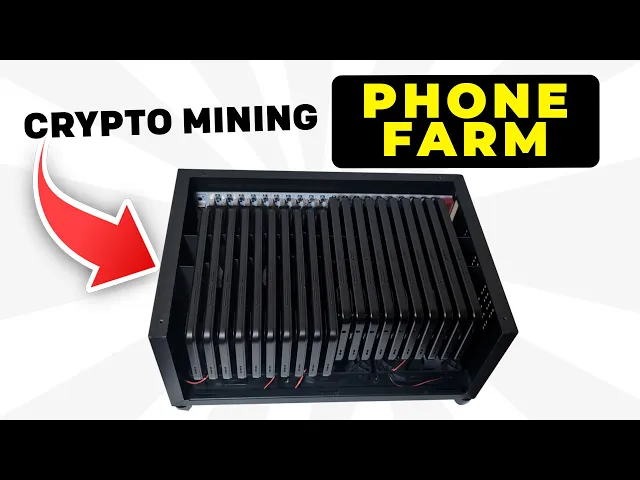
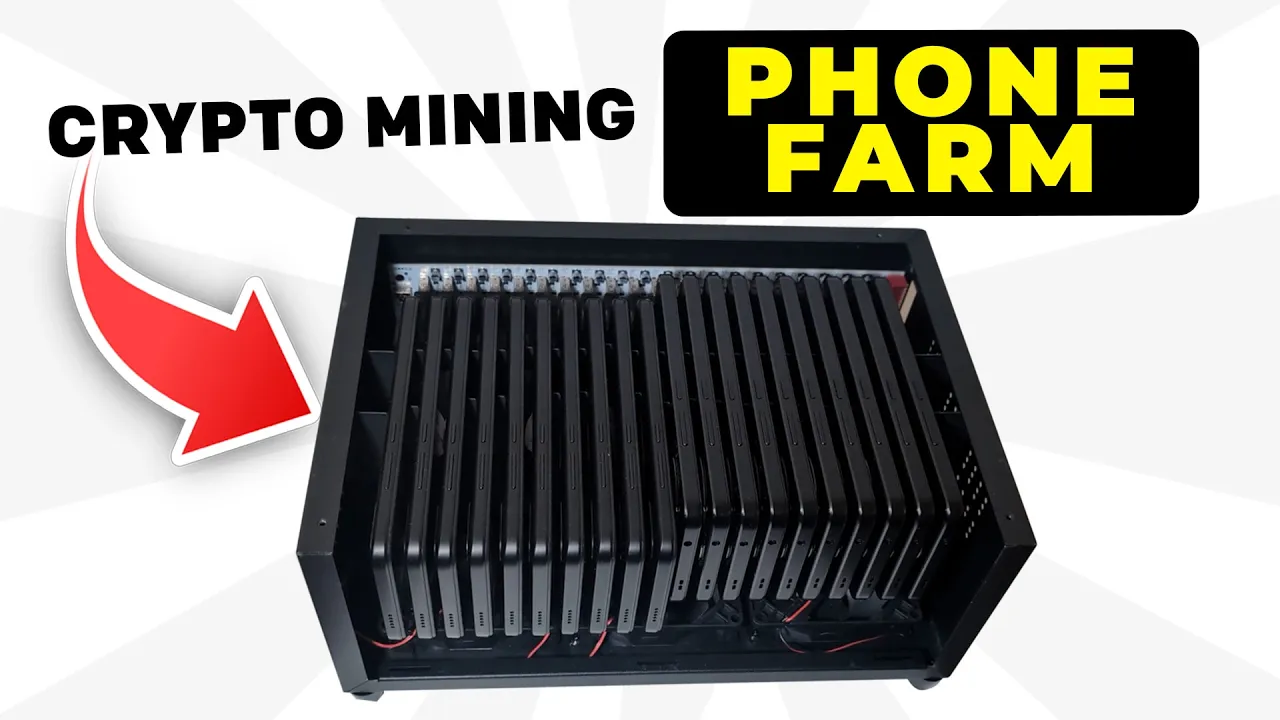
one year ago I built my crypto mining phone farm and now I've just boosted the setup it's a free project to start and it's earning me thousands of tokens a month you can run this on Android or iPhone and the token is listing in April of this year and unlike other phone mining projects there's no overheating no need to be plugged in 24/7 and no heavy electricity costs and I can monitor them anytime from my phone and make sure you stay till the end of the video as I'll showare are my earnings so far my
new researched phones for 2025 and my top tips for maximizing your earnings and you don't want to miss that because it's a year of my mistakes that I'm going to share with you I'll also announce the winner of my phone giveaway competition from the last video and I'll announce an even bigger one in this video in this video I'll go over what Acuras is and what it's trying to achieve I'll go through the rewards and how they work for this project I'll show you step by step how you can get set up with Acuras today
including in the airdrop program I'll then show you how I built and upgraded my existing phone farm and then finally I'll go through my earnings so far I'll explain my setup and the tips to maximize your earnings and make the most out of this setup I'll have all the links in the description right let's jump straight into this video right let's jump into the Acuras website so we can learn more about this project what it's trying to achieve and why I decided to build build a phone farm for it so Acuras is trying to build
a decentralized cloud compute Network now cloud computing is something which is huge but centralized companies are controlling most of the market in fact over 65% of the market is owned by Amazon Azure and Google cloud and these companies don't have your best interest at heart they can control your data and monitor what you are doing because of the centralized nature in which those are and that's a major problem for me and you and acurus is trying to combat that by deploying this network on mobile phones and you can either provide your mobile compute and earn
rewards or you can actually deploy centralized compute at the moment using the Acuras Network and they've even got a tutorial on their website on how to set up an llm using Acuras that's for AI purposes now you might want to ask the question why are they focusing on mobile phones well there's a bunch of reasons why they want to do that one of the first reasons is that security is already built into the hardware of modern-day smartphones so for example iPhone is one of the most secure devices that you can purchase today probably more than
your own PC and that's because it has so much of your personal data on it so you can leverage that hardware for your own gain the second reason mobile phones make sense is that modern day high-end phones have got built in CPU GPU security and also TPU the tensor processing unit is actually a chip that allows you to run AI on these small devices so if you could get thousands of those devices together well you you've got a mini AI Cloud compute system and that's one of the other benefits that they can get from using
mobile phones and the other thing is the sheer size of the market compared to 13 million new servers sold annually there's over 1.4 billion phones that are sold all around the world and there's a problem today of fake gpus and computers and because mobile phones can be verified by their design that's their original equipment manufacturer number it means it's more safe and reliable for companies and one of the biggest reasons actually is that it's over 100 times cheaper than purchasing something like a Dell server which would cost you around $3,000 but if you upcycle a
phone a secondhand one you could probably get it between $30 to $40 which means that those phones are not going to end up in the landfill and it's better for the environment and the project is super successful they've got over 35,000 devices that have been on boarded now this has gone up a lot since my last video so congrats if you got in from that video and they've had over 7 and 1 half th000 compute deployments that have been executed on chain these are deployments that companies have deployed onto Acuras and they're well on their
way on their road map they launched their Cloud Rebellion they launched their iPhone processor and mainnet is expected in quarter 1 of 2025 in fact that's expected to be token generation in April of this year so that's a brief overview of the acurus project if you want to learn more about this project I did an in-depth video in my last video and you can watch that here in the top right hand corner or you can watch it in the description so so we move on to the next question how do the rewards work for the
Acuras project well because we are in beta at the moment users are going to earn cacu tokens and once we move to mainnet then that's going to be the ACU token we don't have an exact answer of how the cacu tokens will convert to the ACU tokens we'll get that information a little bit closer to token generation and there are two ways in which you can onboard your devices with Acuras one of them is Acuras core this means that your phone is a dedicated device you can't run anything else on there and that's only available
for Android and the second option is through the acurus light mobile app and this is available for both Android and iOS and this will require you to download an app that runs in the background on your phone the added benefit of the acurus light is that you can run other apps on that phone if you wanted to utilize multi Mining and I actually did a video on the top four passive crypto mining apps if that's something you're interested you could check that out and the rewards for this project come in three different ways the first
one is that each device regardless of whether it's an acurus light or acurus core will receive 250 cacu tokens per device per month and there's no limit to the number of devices per IP address and the second way that you can earn cacu tokens is if your compute power is used by developers now remember they're more likely to use your device if it's a dedicated device cuz they don't want an unreliable device through acurus light and that's why I've opted for for a dedicated phone cuz I want to get these extra cacu tokens and the
third way that you can earn rewards in this project is by earning missed tokens and you get those by joining the cloud Rebellion this is acura's incentivized beta test net you can register for free start completing tasks and when you onboard devices through that you'll get additional missed tokens there is a conversion to the ACU token but we don't know what that is yet of course I'll update you once we get more information so that's the rewards with this project in a nutshell okay so if you want to get started today even if you don't
have your phone yet let me talk you through a step by step on how you can get set up with acur step one is going to be to join the cloud Rebellion this is going to allow you to get the missed tokens that I spoke about earlier it's free to join and you need a referral code this is mine on the screen I'll have a link in the description simply click join the cloud rebellion and choose one of the wallets metamask is probably easier for most of you to choose now once you're into the cloud
Rebellion homepage you can actually start taking part in the quests and start earning missed tokens but the second thing that you're going to want to do is ensure that you have an Acuras compatible mobile phone now I've got a list of all of the compatible mobile phones here but it's quite detailed for you to go through and if you don't have the time to go through each one later on in the video I break down my setup and I'm also going to share with you the best phones for you based on where you live so
make sure you stick around for that part because I found the cheapest devices and additional items you can purchase to have your phone F set up now whether you're using one of your existing pH phones or you're going to purchase a new or used one step two is going to be to onboard that processor so in the cloud Rebellion you're going to click on onboard processor here that's going to take you to this page and then I'm going to direct you to go to the console now regardless of whether you've got an acurus light or
a acurus core go through this step it will make sense because it's going to allow you to earn those missed tokens you can use the same wallet that you used to sign into the cloud Rebellion to get onto the acurus console and it'll look something like this you'll have your balance here which I'm going to blare at the moment make sure you do stay tuned because I'm going to share my rewards later on in the video so now you're into here we're going to go into step three which is to fund your account click on
fund account and it's going to go to this page here it should have your wallet displayed simply click I'm not a robot and get tokens that's going to give you some tokens as gas fees to onboard your devices once you've got your gas fees the third thing you want to do is simply click on add new device now once you do that it's going to sign a transaction and it's going to bring up a QR code so once you've got to this step here you can now decide whether you have an accurus core a dedicated
phone or you want to use an accurus light if you have an acurus core make sure that your phone is factory reset or if it's brand new turn it on and from the homepage simply tap the home screen about 10 or 15 times once you do that you'll get a camera which is going to look for a QR code use the QR code to scan this code on the screen once you carry out that process after a few minutes you should have your phone attested and running as an accurus core dedicated phone and the process
for accurus live is exactly the same once you get to this QR code simply download the app once you get to the app this should be what you see on your screen right now make sure you click connect to console if you don't do that you'll earn your tokens but you won't get the Mist rewards once you click connect to console you simply need to scan the QR code that's the one that you have on screen and then it's going to show you to set up a work profile now a work profile is a separate
profile inside your mobile phone which will mean that it's secure from all of your other items but will run in the background meaning you can run other apps on that phone if you want to after you've completed that you should see your acurus active on your console and earning those rewards and most importantly you'll get the additional missed rewards and it's simple as that you're onboarded onto the acurus network I just want to pause the video here if you're taking value from my video so far I'd super appreciate it if you could like the video
and also subscribe to the channel it will allow me to put more projects in front of you and if you love communicating with this type of community then why not join my Discord it's in the description below and you can chat to fellow people not on this project but on all the other projects that I've covered so far right let's get back into this video okay so let's build my phone Farm together first of all I'll show you what my old phone Farm looked like this is the setup that I had in my last video
as you can see I've got my 10 phones it's a little bit bulky with the wire sticking out but it did well for me at the time but I've outgrown it now because I've added another 10 phones to my setup and now to help me with that I've purchased this which is a cell hasher phone holder make sure you do stay towards the end of the video because I'm going to go through this in detail where you can purchase it and I'll also talk about all the other additional items that I purchased to make my
setup possible now the awesome thing about this is it comes with a power cable built in air fans to cool your devices and it's got a grate in the middle that can hold up to 20 mobile phones super slim together it comes with these attachments but I'm not going to use these right now this is if you wanted to remove your battery and hardwire your phone to the main frame this is more useful for phone mining projects like Acuras and others but I don't need it for what I have obviously it comes with a USBC
to USB adapters now 10 of my phones are USBC and 10 of my phones are micro USB but later on in the video I do break down additional adapters that you can purchase pretty cheap to make that setup possible all I had to do was plug in the USBC line it up with the USB portion on this device and I was able to set up my device you can watch me setting it up here there is a bit of a gap between the devices and the fan at the bottom runs super cool but as I'll
show you a little bit later on you don't need to have this switched on 24/7 which is going to save the batteries in your device so I do recommend you stay for my tips and tricks section to maximize your earnings and Safeguard your phones right time for the overdue acures phone giveaway I know it's been 8 months I do apologize all you had to do was follow a few steps and you'll be in for that giveaway now don't be upset if you couldn't get involved or you didn't win because I'm going to do another giveaway
right after this and it's going to be even bigger and better but let's jump into that giveaway let's see who our first winner is congratulations to in the ram music in the ram music you're the winner of the first acurus compatible mobile phone all you have to do is contact the email on the screen and then prove to me that this is your YouTube channel I'll show you how you can do that and I'll send you a accurate compatible mobile phone or if you're in a country that doesn't allow me to do that I'll send
you the funds so that you can purchase one yourself let's do another draw for another lucky winner right and the second winner is Kiger Adventures once again contact the email on screen and I'll get in touch with you for your acurus compatible mobile phone so well done right so congratulations to those who won let me announce another giveaway which is going to be bigger and better than the last one now to take part in this giveaway all you have to do is number one like the video number two subscribe to the channel number three join
the acurus Rebellion using my invite code and number four leave a comment in the description that wasn't generated by AI but is a crazy reason as to why you want to win this giveaway I'll announce the winner in my next Acuras video and I'll have a bunch of prizes for those of you who take part I'll be giving away a free sell hasher to one lucky person who takes part in the giveaway I'll be giving away one Acuras compatible mobile our phone and I'll also be giving away a bunch of Acuras merch that not many
people have got their hands on at the moment so it's going to cost you nothing just to take part in that giveaway okay so I've teased you long enough let me talk about my earnings so far my expectations for the future and then I'll also talk to you my tips and tricks on how I think you can maximize your earnings and protect your mobile phones so so far I've earned 17,5 ATC ACU tokens I've only added my additional 10 mobile phones in the last few days so this is mainly from from 10 mobile phones which
have been online since I made my video last year which is around April I'm hoping this is going to convert well into the ACU token once we hit mainnet and now that I've got my 20 devices I'll be updating you on how my rewards do as we go forward especially if I start getting projects deployed onto those devices so let me talk to you about the acurus compatible mobile phones now if you're getting an Android it's got to be Android 12 or higher and if it's an iPhone make sure that it's an iPhone 6s or
or higher you can buy iPhone 6 s's for quite cheap on eBay depending on where you live if you want to buy a brand new dedicated mobile phone then the way that I would recommend you do that is go to Google shopping and type in cheap Android 12 phone in the US I found this to be the cheapest which is $43 it's a Android 13 smartphone with a pretty decent spec for what you want or you can buy this one for $55 which is again an Android 12 unlocked mobile phone and in the UK and
some other European countries trees the xiaomi red 3 proved to be the cheapest it was actually $50 at the time of my purchase currently sitting at around $59 and the price might fluctuate for that device and with regards to the phone holder the 10 mobile holder was this one that I purchased the reason I bought it is because it had a builtin fan and it was power plugged in but if you want to buy the 20 phone holder this is the one that I purchased it's called the cell hasher classic and you can purchase it
for around $150 I'll have a discount code in the description if you want to get that device and it'll have a bit of a discount on that as well now my device only came with a USB to USBC it didn't have the micro USB attachment that you can see here but I was able to purchase a couple of these from Amazon so if you got a micro USB you can purchase this item here now the other thing that I want to mention is that you don't need your devices plugged on and charging 24 hours a
day it could damage the battery and cause some battery expansion what I realize is that they can actually run for around 2 weeks without being charged so if you can go to Amazon and purchase a cheap smart plug and then program it to turn on once every 2 weeks and that will allow you to charge your phone every 2 weeks keep them fully charged but it means that they're not constantly plugged in 24 hours a day and another way that you can Safeguard your setup is by going into the acurus console and clicking on activities
this is going to launch the telegram monitoring bot which allows you to remotely see your devices if they're online and if there's any problems with your devices so if I run a status check here you can see that I've got 19 processors that are fine and one of them has has got a warning so I'm going to check into that to make sure what the problem is with it and the last bit of advice that I'll give you which is going to maximize your phone's life if the screen is on it will hugely deplete the
battery and every time you turn on the power or turn off the power the screens will automatically turn on so just make sure that if you turn off the electricity simply press the standby button on each of your devices turning off the screen that will increase your battery life by at least a week and a half so if you make use of these tips and tricks I'm sure that you can maximize the lifespan of your mobile phones therefore maximizing your earnings right that's it from this video I hope you took a ton of value from
my acurus foam farm setup let me know your thoughts if you're going to be getting involved yourself uh and if you like these types of videos why not check this one out here and if you want to stay updated on future projects like this you can join my free subscriber newsletter I'll have that in the description all right that's it from me I'll catch you in the next video